
EMR vs EHR comes down to scope. The Office of the National Coordinator for Health IT describes an EMR as a digital chart for one practice and an EHR as a record built to share information beyond it. Neither is a billing system. Billing depends on what your documentation, charge capture and claim tools do.
Vendors, staff and even government pages use the two terms loosely, so the confusion is fair. This guide gives the official definitions first, says where the line has blurred, and then answers the question practice managers actually have: does it matter for getting paid? Short version: the label matters less than whether your notes, charges and claims connect cleanly.
Key takeaways
- ONC describes an EMR as a digital chart for one practice and an EHR as built to share information with other organizations, including labs and specialists.
- Many products are sold under either name, so check what a product does and whether it is certified, not what it is called.
- Neither an EMR nor an EHR is a billing system by definition. Claims, payment posting and follow-up usually need billing or practice management tools.
- Complete documentation is the link between the record and the claim, so it is the part of the EMR/EHR choice that most affects billing.
- Check certification, data export and the billing connection before you buy or switch.
What is the difference between an EMR and an EHR?
An EMR is a practice’s own electronic chart. An EHR is a record designed to travel with the patient across organizations. That is the distinction ONC drew in its HealthIT.gov explainer, first posted in 2011 and still published on the site.
ONC describes an EMR as a digital version of the paper chart that holds a patient’s medical and treatment history in one practice. A practice can use it to track data over time, find patients who are due for screenings and monitor care quality. The same post says EMR information does not travel easily outside that practice. An EHR does what an EMR does and adds secure sharing with other organizations, such as laboratories and specialists. ONC also says EHRs are meant to be used by everyone involved in a patient’s care, including the patient.
| Question | EMR | EHR |
|---|---|---|
| Whose record is it? | One practice’s chart | The patient’s record, built to reach beyond the practice that created it |
| Main design goal | Documentation, diagnosis and treatment inside the practice | The total health of the patient, across care settings |
| Sharing with labs and specialists | Does not travel easily outside the practice | Built to share information with them securely |
| Who uses it | Clinicians and staff in that practice | Everyone involved in care, including the patient |
| Where billing fits | Not defined by the term | ONC lists insurance and billing information as a typical EHR element |
Source: ONC/HealthIT.gov, ‘EMR vs EHR – What is the Difference?’ (first posted 2011) and ‘What Are Electronic Health Records (EHRs)?’ (updated December 10, 2025).
The last row needs a caution. HealthIT.gov lists “insurance and billing information” among the typical elements of an EHR, next to demographics, history, progress notes and test results. That means the record can hold the data a biller needs. It does not mean the record software submits, tracks or follows up claims.
Do the labels still matter today?
Less than they used to, and the label on the box does not settle what a product can do. Many products are sold as an “EMR” and exchange data with outside systems. Others are sold as an “EHR” and are used inside a single practice. We use both terms in our own writing, as in our EHR and EMR abbreviation guide.
Three things say more about a product than its name.
- Certification. The ONC Health IT Certification Program is voluntary. ONC does not test products itself. It authorizes labs and certification bodies to do that, and certified products are listed on the Certified Health IT Product List. ONC also notes that CMS Promoting Interoperability programs require the use of certified health IT. Whether that applies to you depends on the programs you take part in.
- Information sharing rules. The 21st Century Cures Act (2016) made electronic health information sharing the default expectation. ONC says it is prohibited for health care providers, developers of certified health IT and health information exchanges to engage in a practice likely to interfere with access, exchange or use of that information unless an exception applies. The exceptions are in 45 CFR Part 171. HHS has also issued a final rule on disincentives for providers that the HHS Office of Inspector General finds to have committed information blocking. These rules attach to who you are and what you use, not to whether the product calls itself an EMR or an EHR.
- What you can export and connect. A record you cannot get data out of will hurt you in a switch, an audit or a billing hand-off, whatever it is called.
Most practices now use some form of electronic record. In the 2024 National Electronic Health Record Survey, run by the National Center for Health Statistics, 95% of office-based physicians reported any EHR and 91% reported a certified EHR. Solo physicians were the lowest at 86.1% for any EHR and 79.9% for a certified one, per the ASTP/ONC data brief published in June 2026.
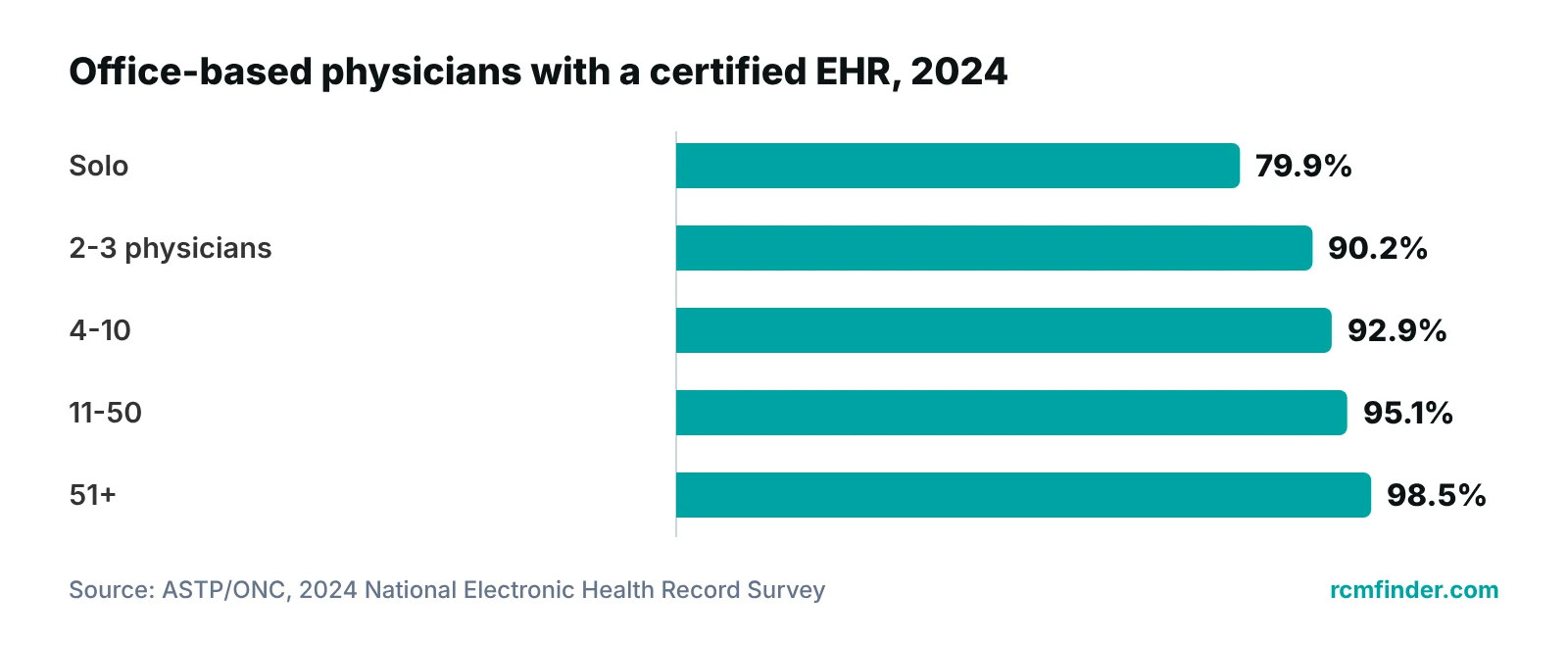
One detail in that data brief matters for this post. The survey defines “any EHR” as any non-billing electronic system used to document patient care. In other words, the national adoption figures count the clinical record and leave billing systems out. The two are treated as different tools, and your practice may want to do the same.
Does EMR vs EHR matter for billing?
Not directly. The term does not decide whether your claims go out clean or your payments are posted. What the record does decide is whether the clinical story behind each charge is complete, and that is where billing starts.
HealthIT.gov lists several provider benefits of EHRs, including reduced administrative burden, more organized and accurate patient information, and better coordination among care teams. The page does not list billing or coding as a benefit, so we would not promise one. The honest version is narrower: a record that captures the visit completely gives the biller something reliable to work from.
Here is how that plays out in a billing office. This is our working view from billing and data-clean-up work, not a statistic.
- Documentation drives coding. If the note is missing a diagnosis detail, a time, a laterality or a procedure description, the coder has to query the provider or code conservatively. Either way the claim is slower or smaller.
- Charges have to leave the visit. A visit that is documented but never turned into a charge is revenue that never reaches a claim. How charges move from the record to billing is covered in our guide to charge entry.
- Demographics and insurance data start in the record or the front desk. An error there tends to travel with the patient into every claim. See how EHR functions affect the revenue cycle for the functions worth checking.
- Specialty needs differ. A pain or cardiology practice needs different note templates and charge logic than a primary care office. Browse the specialties we support to see how billing patterns differ by specialty.
Plain reading for a practice manager
Picture a provider who sees a full day of patients and documents every one. The notes are complete, but the charges are entered by hand later and some are missed. The record did its job. The gap is between the record and the claim. That gap is why this question belongs in a billing conversation, not only an IT one.
Where billing actually happens: record, practice management system, revenue cycle
Billing work usually lives in a separate layer from the clinical record. The record holds what happened. A billing or practice management layer turns it into claims and tracks them until they are paid.
| Tool or team | Main job | Billing role | Not its job |
|---|---|---|---|
| EMR or EHR | Hold the clinical record | Source of documentation, diagnoses and procedures; may hold insurance data | Following a claim through payment on its own |
| Practice management system | Run the business side of the practice | Charges, claims, status tracking, payment posting, reporting (features vary by product) | Documenting care |
| Clearinghouse | Pass claims between practice and payers | Format checks and transmission | Deciding what to bill |
| Revenue cycle management | Manage the whole path from visit to payment | Coding support, claim follow-up, denials, A/R | Replacing clinical judgment |
RCM Finder’s working description of typical roles; product features vary. ONC lists insurance and billing information as a typical EHR element (HealthIT.gov, updated December 10, 2025).
To be plain about our own product: RCM Finder’s portal is a practice management system that tracks claims by stage with an owner for each claim. It is a practice management system, not an EHR. It does not hold clinical notes and it does not replace your EMR or EHR. It sits beside the record and covers the claim side: specialty-aware billing logic, data-completeness checks before a claim is submitted, underpayment flags against expected amounts, workflow rules, role-based permissions, an audit log, client portals and reporting dashboards. Appointment scheduling in it is early access only.
Our billing team also works inside the EHR you already have, for example PrognoCIS, eClinicalWorks or athenahealth, so a practice does not have to change its clinical system to get billing help. We do not claim any partnership with those vendors. For the connection between the two sides, read our guide to EHR and RCM integration.
See where your visits and claims disconnect
Our free practice audit looks at how charges and claims move from your record to payment, and shows which gaps to fix first. Pricing for any service is quoted after the audit.
If you want the end-to-end view of what happens after the chart is signed, see revenue cycle management and our medical billing services.
What to check when you choose or switch a system
Check four things before the name: certification, sharing and export, the billing connection, and the contract. A product called an EHR can fail any of them, and so can one called an EMR.
| Area | Ask | Why it matters |
|---|---|---|
| Certification | Is the product on the Certified Health IT Product List, and for which edition and criteria? | ONC runs the certification program, and CMS Promoting Interoperability programs require certified health IT. Check which programs apply to you. |
| Sharing and export | Can we export our full records, and how do you exchange data with labs and other organizations? | Information blocking rules cover providers and developers of certified health IT, and a switch is much harder without usable data. |
| Billing connection | How do charges, diagnoses and insurance data reach our billing or practice management system? | The record is not a billing system, so the hand-off has to be designed. |
| Patient access | How do patients see their records? | ONC says EHRs are meant to be used by the patients as well as clinicians. |
| Contract and cost | What is free, what is capped, and what happens to our data if we leave? | See our guide to free EMR software and its risks. |
Source: ONC/HealthIT.gov certification program overview (2024; page last updated October 27, 2025); information blocking and EMR vs EHR pages.
Last, ask who else will touch patient data. Any vendor that does should be able to explain its access controls and audit trail in plain terms, whatever its product is called.
Our recommendations
- Ask for the function, not the label. When you talk to a vendor, ask what the product exchanges, with whom and in what format. Do not accept “EHR” or “EMR” as an answer.
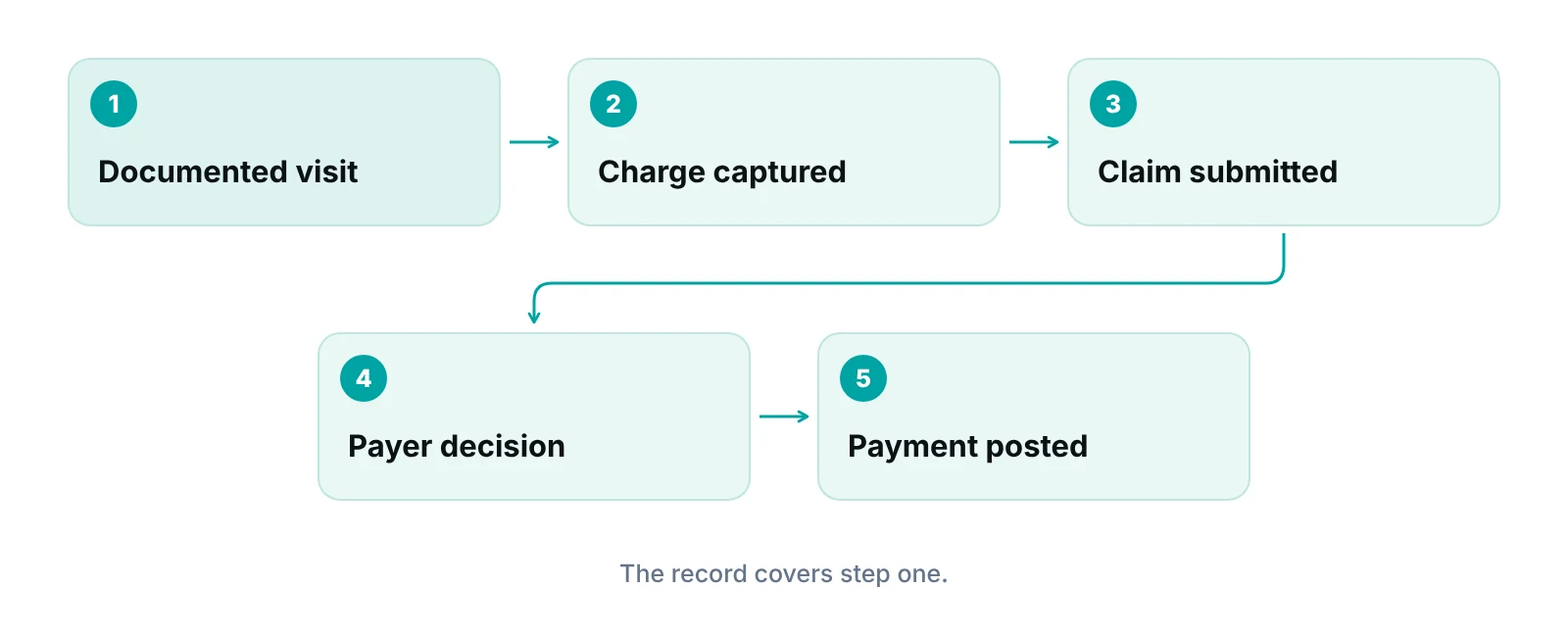
- Trace one visit from note to payment. Pick a recent visit and follow it through the note, the charge, the claim and the payment. The point where it stalls is your real problem, and it is rarely the record type.
- Fix documentation gaps at the source. If the same missing detail keeps causing coding queries, change the note template. That is cheaper than fixing it at the claim.
- Keep billing tools separate in your head. Decide what the clinical record must do and what the billing layer must do. Judge each on its own job.
- Test a data export before you commit. Ask for a sample export of your own records. If it is hard to get, assume a switch later will be harder.
- Check certification against your programs. Look up the product on the Certified Health IT Product List and confirm it fits the quality programs you participate in.
Track each claim by stage, with an owner, beside your EHR.
RCM Finder's practice management system tracks claims by stage and can flag incomplete claim data before submission. It is a claim-centred practice management system, not an EHR, and it works alongside the record your practice already uses.
See how the RCM Finder portal works · Create a portal account
Disclosure: RCM Finder builds and sells this portal. It is a practice management system, not an EHR.
Bottom line
The EMR vs EHR difference is real in ONC’s definitions but small in daily practice, and it does not decide your billing results. What does is whether the chart is complete, charges leave the visit and claims are tracked to payment. If you want help finding where that chain breaks in your practice, our medical billing services team works inside your existing EHR, and you can see where it leaks with the free practice audit or the revenue calculator.
Frequently asked questions
What is the main difference between EMR and EHR?
ONC describes an EMR as a digital version of a practice’s paper chart, used in that one practice. It describes an EHR as built to look at the total health of the patient and to share information securely with other organizations, such as labs and specialists. Today many products carry either name, so check what the product does.
Are EMR and EHR the same thing?
Not in ONC’s definitions, but vendors and staff often use them as if they were. The practical answer is to ask what a product can exchange, with whom, and whether it is certified, because that decides how it behaves.
Is an EHR a billing system?
No. HealthIT.gov lists insurance and billing information as something an EHR typically contains, so the record can hold billing data. Submitting claims, tracking them and posting payments is usually handled by billing or practice management software, or by a billing team. Some products bundle both, so ask which functions are included.
Does EHR vs EMR affect claim denials?
Indirectly. The label does not cause denials. Missing or inconsistent documentation, wrong demographic or insurance data and charges that never get entered do. Look at how complete the note is and how data reaches the claim before blaming the record type.
Is an EMR or EHR better for a small practice?
The better question is which product fits your visits, your billing path and your budget. A small practice usually needs a certified product that exports data, supports its specialty’s templates and connects to billing. Our free EMR article covers the risks of free options.
Is the RCM Finder portal an EHR?
No. It is a practice management system focused on claims. It tracks claims by stage, checks claim data before submission and flags possible underpayments. It does not store clinical notes, and our team works inside your existing EHR instead of replacing it.
Get your free practice audit
Tell us about your practice. We will contact you using the details you give.
- A review of your recent claims, denials and A/R aging
- Where your front desk and prior authorizations slow payment
- A prioritized fix list you keep, whether or not you hire us
Pricing is quoted after the audit, based on your volume and the services you choose. Prefer to talk? Call +1 (302) 556-2288.
Sources
- EMR vs EHR – What is the Difference? — ONC/HealthIT.gov (2011 (page modified 2026))
- What Are Electronic Health Records (EHRs)? — ONC/HealthIT.gov (2025)
- Benefits of EHRs — ONC/HealthIT.gov (2025)
- ONC Health IT Certification Program Overview (2024) — ASTP/ONC (HealthIT.gov) (2024)
- Information Blocking — ASTP/ONC (HealthIT.gov) (2026)
- Office-based Physician Electronic Health Record Adoption, 2008-2024 — ASTP/ONC (HealthIT.gov) (2026)
Disclaimer: This article is general educational information for medical practice owners and managers. It is not legal, compliance, coding or billing advice, and it does not recommend any EMR or EHR product. Certification, program and payer requirements vary and change. Confirm requirements with qualified advisers and each vendor's contract before acting.