
Clearinghouse rejection codes are messages on a 999 or 277CA report saying a claim failed format or data checks before the payer judged it. A rejected claim is not denied and produces no remittance. Read the category and status code, fix the source data, then resubmit before the filing limit.
A rejection means the claim never reached adjudication. Nobody has decided to pay or not pay it. That is good news, because the error is usually a data problem you can fix. It is also a risk, because a rejected claim earns nothing and the filing clock keeps running. This guide shows where rejections appear, how to read the codes, which ones show up most, and when it makes sense to change your process. For the post-adjudication version of this problem, see our guide to the CO-16 denial code.
Key takeaways
- A rejection is a pre-adjudication stop. A denial comes later, on the 835 remittance.
- Read two things on a 277CA: the claim status category code and the claim status code.
- Fix the source record, not just the claim, or the same rejection returns.
- Rejected claims do not stop the filing clock. Medicare gives one year from the date of service.
- Check payer rules before resubmitting: some want a new original claim, not a corrected one.
What are clearinghouse rejection codes?
Clearinghouse rejection codes tell you a claim failed an automated check and was sent back to you. The check can be by the clearinghouse, the payer or both. Stedi’s documentation puts it plainly: a rejected claim has correctable errors and never reached adjudication, so it produces no electronic remittance (Stedi).
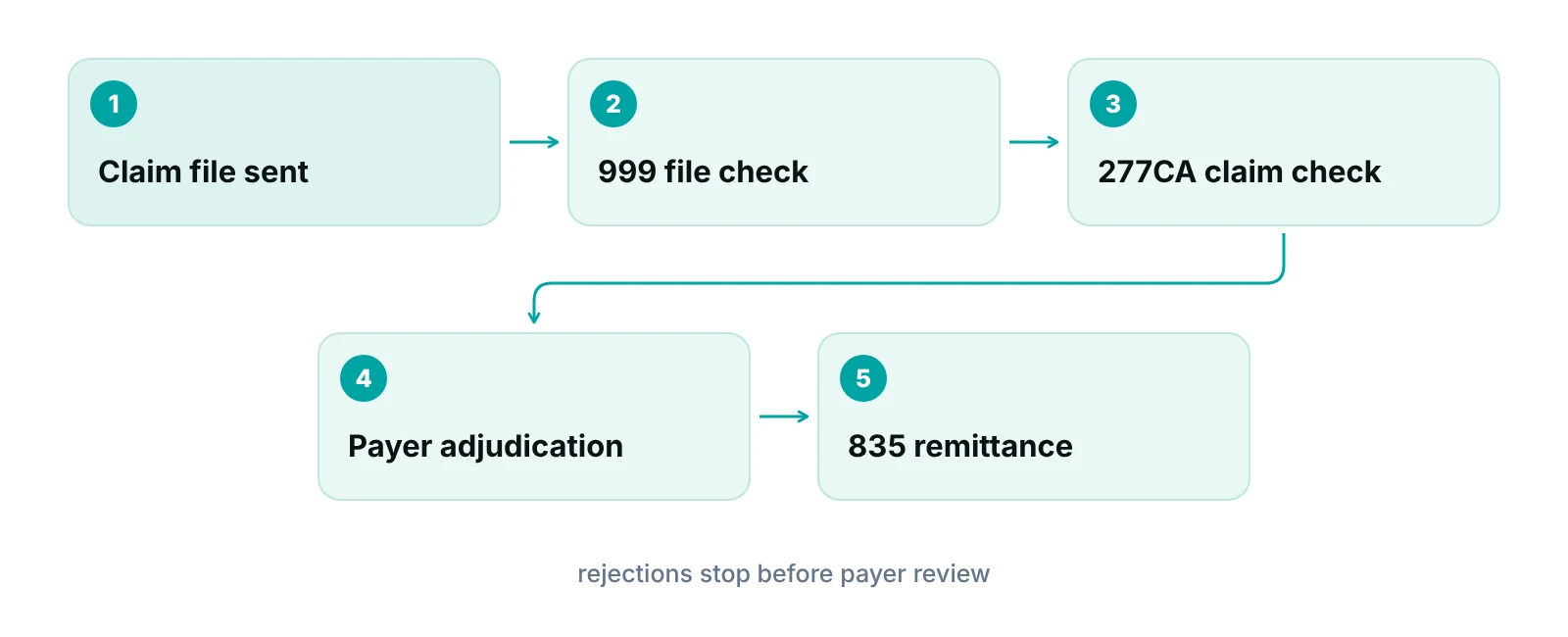
The difference from a denial matters for your workflow. A denial happens after the payer reviews the claim, and it appears on the 835 remittance advice. A rejection appears earlier, on an acknowledgment report. Different report, different fix path, different deadline pressure.
Our clearinghouse guide covers what the clearinghouse does. This post covers what it sends back when something is wrong.
Where do rejections show up: 999, 277CA or 835?
Rejections show up on the 999 and the 277CA, never on the 835. Plan on checking both reports, because a file-level problem and a claim-level problem look different and have different owners.
| Report | What it tells you | If it shows a problem |
|---|---|---|
| 999 implementation acknowledgment | Whether the claim file as a whole could be read. It reports on syntax and implementation-guide errors, not on business rules. | Fix the file or setup issue (often an EHR or clearinghouse configuration problem) and resend the file. |
| 277CA claim acknowledgment | Claim-by-claim result before adjudication: accepted or rejected, with codes saying why. | Correct the claim data named in the codes, then resubmit. |
| 835 remittance advice (ERA) | Payment, adjustment and denial detail after adjudication. | A denial. Follow the appeal or correction path, not the rejection path. |
| No 835 and no 277CA on file | Nothing confirms the payer received the claim. | Check the clearinghouse and payer portal before resending, to avoid duplicates. |
Source: AHCCCS acknowledgments guide, OneHealthPort claim acknowledgment guide, Stedi documentation. Retrieved October 2026.
Two details trip up billing teams. First, a claim rejected for X12 syntax or format errors may appear only on the 999 and not on the 277CA (OneHealthPort). Second, some payers send one 277CA confirming receipt and another giving the accept or reject result (Stedi). Ask each payer or clearinghouse which reports you will receive, and whether the 277CA is switched on for your account.
How do you read a 277CA rejection code?
A 277CA status is built from two codes in the STC segment: a claim status category code (CSCC) and a claim status code (CSC). The category gives the general result. The status code gives the specific reason (CGS Medicare 277CA guide).
| Category and status | Plain-language meaning | What you do |
|---|---|---|
| A1 with 19 | The entity acknowledges receipt of the claim but has not brought it into its system for adjudication. | Wait for the next report. This is a receipt, not an approval. |
| A2 with 20 | Accepted for processing. | Watch for the 835. No rejection fix needed. |
| A7 with 164 | Rejected for invalid information in the subscriber’s contract or member number. | Check the member ID against the insurance card and eligibility response, correct it, resubmit. |
| A7 with 500 | Rejected for invalid information in a postal or zip code. | Correct the zip on the subscriber or service location record, resubmit. |
Source: OneHealthPort claim acknowledgment guide (A1/19, A2/20); CGS Medicare 277CA EDI Edit User Guide (A7/164, A7/500). Payers may use other combinations.
X12’s own guidance says the claim and service data categories A3, A6, A7 and A8 are rejections, and that the 277CA has no code for “accepted with warnings” (X12). So if you see an A7, treat the claim as unpaid until it is corrected and accepted.
Use the payer's lookup, not a guess
The 277CA uses many status codes, and wording differs by payer. CGS publishes a 277CA edit lookup tool for its Medicare claims. Other payers publish companion guides. Keep a list of the lookup for each of your top payers next to your rejection log.
What are the most common clearinghouse rejection messages?
Many rejections trace to data-entry and setup errors in a short list of fields. The table below groups the messages billing teams see most often by the field to check. Exact wording and code numbers vary by clearinghouse and payer, so match the table to your own reports.
| Message (as commonly worded) | What to check | Usual owner |
|---|---|---|
| Billing provider name, NPI or tax ID missing or invalid | NPI and tax ID on the claim against what the payer has on file for that practice. | Billing and enrollment |
| Rendering provider identifier missing or invalid | The rendering provider’s NPI. Old legacy provider numbers cannot stand in for it. | Billing and enrollment |
| Subscriber or member ID invalid | The ID on the card and in the eligibility response, including prefixes and suffixes. | Front desk |
| Address, city or postal code missing or invalid | City, state and full zip against the patient or facility record. | Front desk |
| Diagnosis code invalid or missing | Whether the code is complete to the character length the code set requires, and not truncated. | Coding and billing |
| Procedure code, modifier, place of service or date invalid | Payer-specific rules for the code and modifier, the place of service code and the service dates. | Coding and billing |
| Claim frequency code invalid | Whether a replacement or void code was used without the original payer claim number. | Billing |
| Payer ID invalid, or duplicate claim | The payer ID for that plan, and the 277CA and 835 history before resending anything. | Billing |
Source: CMS NPI Overview (legacy identifiers); CDC/NCHS ICD-10-CM Official Guidelines FY 2027 (code length); VA Community Care claims corrections page (frequency codes). Message wording varies by clearinghouse and payer.
Provider identifiers
Rendering and billing provider rejections turn on the National Provider Identifier. CMS says the NPI replaces legacy provider identifiers in HIPAA standard transactions, and that legacy numbers may not be used after May 23, 2007 for providers who have NPIs (CMS NPI overview). If a template or old setting still points to a legacy number, correct it at the source.
Diagnosis codes
The ICD-10-CM guidelines for fiscal year 2027 (October 1, 2026 through September 30, 2027) say codes have 3, 4, 5, 6 or 7 characters and must be reported at the highest number of characters available (CDC/NCHS). A code cut short of its required length is a common reason a diagnosis fails. Your coders should see the full code in the claim, not a category.
Frequency codes and duplicates
Replacement (7) and void (8) frequency codes are for claims the payer already processed. The VA Community Care page states this directly: do not submit a corrected claim if the original was rejected or denied, and a 7 or 8 needs the original claim ID or the claim is rejected (VA Community Care). That is one payer’s rule. Many payers want a rejected claim fixed and sent as a new original, but confirm in the payer’s guide. Before you resend anything, look for the earlier claim on the 277CA and 835, so you do not create a duplicate.
How do you fix and resubmit a rejected claim?
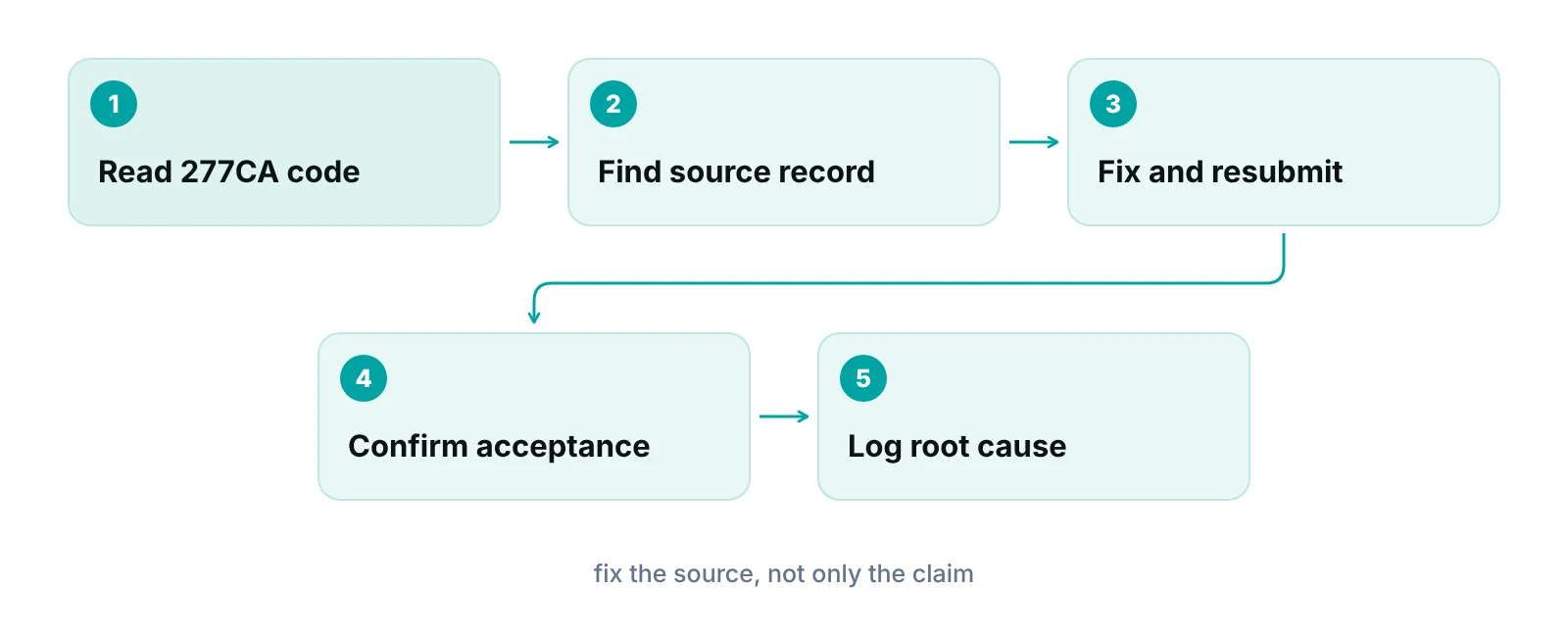
Correct the source record first, then resubmit the claim. If you only edit the claim, the next claim for that patient or provider will fail the same way.
- Pull the rejection report for the claim and note the category code, status code and any entity or field it names.
- Look up the code in the clearinghouse’s or payer’s list. Do not rely on a generic description.
- Find the field in your practice management system or EHR and the record behind it (patient, insurance, provider or payer setup).
- Correct the record, then rebuild or edit the claim from it.
- Resubmit as the payer instructs, checking whether it should go as a new original claim or with a corrected-claim code.
- Confirm the next 277CA shows acceptance, and log the cause.
Do not appeal a rejection. Claims returned as unprocessable are not appealable, and First Coast tells providers that an appeal only delays payment and can return a letter asking for a new claim (First Coast Service Options). For denials, the path is different. See our post on CO-16 denials for one example.
Do rejected claims affect the timely filing deadline?
Yes. A rejection does not pause or extend the filing limit. Medicare gives providers one year from the date of service, and rejected or unprocessable claims must be corrected and resubmitted within that year (Noridian Medicare). A claim denied for timely filing carries no appeal rights.
Commercial and Medicaid limits differ by payer and state. Check each payer’s contract. The practical risk is quiet: a rejection nobody reads in the first week becomes a filing problem months later.
Watch for claims with no response at all
If a claim was sent and neither a 277CA nor an 835 comes back, do not assume it is in process. Ask the clearinghouse for the claim’s status. A missing acknowledgment is how claims age out unnoticed.
Fix in-house, tighten the front end or outsource?
Which route fits depends on how many rejections you see and where they start. If rejections come from a handful of fields, process changes are enough. If they come from many causes and nobody owns the queue, you need dedicated hands.
- Work the queue in-house when rejections are occasional, one person owns the report each day and your payers publish clear code lists.
- Tighten the front end when the same fields keep failing: member IDs, addresses, provider identifiers. Verify coverage at scheduling and check data before submission. Our claim scrubbing guide covers pre-submission edits.
- Hand it off when rejections sit unread, staff turnover keeps breaking the routine, or you cannot tell rejections from denials in your reports. A billing partner can take the daily queue. Our medical billing services include claim submission and rejection follow-up, and we work inside your existing EHR (for example PrognoCIS, eClinicalWorks or athenahealth).
Rejection patterns can also vary with the kind of services you bill. See our specialty billing pages for how we handle billing by specialty.
Not sure where your rejections start?
Our free practice audit looks at your rejection and denial reports and shows which fields and payers cause the most rework. Pricing is quoted after the audit.
“Most rejection queues I see are not hard problems. They are unowned problems. Name one person to read the report every morning and half the work is done.”
— Awais Afzal, Healthcare Operations & Data Analyst
What should you track about rejections?
Track the reason code, the payer, the field and the date found, not just a count. A count tells you there is a problem. The reason tells you where to fix it.
- Rejections by status code and by payer, reviewed weekly.
- Days from claim creation to first accepted 277CA.
- Rejections that repeat after a fix, which signal a source record that was never corrected.
- Claims with no acknowledgment after the payer’s usual response window.
Pair this with your ERA and 835 review so you see rejections and denials side by side. To see what rework costs your practice, try our revenue calculator. For a specific rejection type, see our post on entity code rejections.
Our recommendations
- Name one owner for the rejection report. We recommend one person reads the 999 and 277CA reports every business day. Rejections that wait become filing problems.
- Keep a payer code lookup. We recommend saving each top payer’s 277CA code list or edit tool next to your log. Generic descriptions lead to wrong fixes.
- Fix the source record. We recommend correcting the patient, insurance or provider record first, then the claim. This keeps the same rejection from returning on the next visit.
- Confirm each payer's resubmission rule. We recommend writing down, per payer, whether a rejected claim goes as a new original or with a corrected-claim code. Do not assume.
- Check before you resend. We recommend looking at the 277CA and 835 history before resending any claim, to avoid duplicates.
- Review causes monthly. We recommend a short monthly review of rejection reasons by payer, and one training or setup change per cause.
Many rejections trace back to incomplete claim data.
The portal checks claims for completeness before submission, so missing items can be caught before the clearinghouse sees the claim.
See how the RCM Finder portal works · Create a portal account
Disclosure: RCM Finder builds and sells this portal. It is a practice management system, not an EHR.
Bottom line
A clearinghouse rejection is a data problem found early, and that is the cheapest time to fix it. Read the 999 and 277CA daily, correct the source record, resubmit as the payer instructs and track the cause. If rejections and denials are piling up faster than your team can work them, our denial management services can help you sort them, and you can talk to our team first. We would start with a free practice audit.
Frequently asked questions
What is the difference between a rejection and a denial?
A rejection happens before adjudication. The claim failed a format or data check and the payer never reviewed it, so there is no remittance. A denial happens after review and appears on the 835. Rejections are corrected and resubmitted. Denials usually follow an appeal or correction process.
Where do I find clearinghouse rejection codes?
They appear on the clearinghouse’s rejection report and on the 277CA claim acknowledgment. File-level problems appear on the 999. Each code has a category and a status code. Your clearinghouse and payer publish lists explaining them, so look the code up there rather than guessing.
Should I appeal a rejected claim?
No. A rejected claim was not adjudicated, so there is nothing to appeal. Medicare contractors such as First Coast say unprocessable claims are not appealable and that an appeal only delays payment. Correct the error and resubmit the claim instead.
Do I send a corrected claim or a new claim after a rejection?
It depends on the payer. Replacement and void frequency codes are for claims that were already processed. The VA Community Care page says not to send a corrected claim when the original was rejected. Many payers expect a fresh original, but check each payer’s guide.
How long do I have to resubmit a rejected claim?
Rejection does not stop the filing clock. Medicare allows one year from the date of service, and rejected claims must be fixed and resubmitted within that year. Commercial and Medicaid limits vary by payer, so check each contract and work rejections quickly.
Why was my claim rejected when the data looks right?
The data may be right in one system and wrong in another. Common causes are a payer ID or member ID that differs from the card, a provider number not matching the payer’s enrollment record, or a code truncated on its way to the clearinghouse. Compare the claim file itself, not only the screen.
Get your free practice audit
Tell us about your practice. We will contact you using the details you give.
- A review of your recent claims, denials and A/R aging
- Where your front desk and prior authorizations slow payment
- A prioritized fix list you keep, whether or not you hire us
Pricing is quoted after the audit, based on your volume and the services you choose. Prefer to talk? Call +1 (302) 556-2288.
Sources
- 277CA EDI Edit User Guide — CGS Medicare (2025)
- 277CA Edit Tool — CGS Medicare (2025)
- RFI 2203: 277CA non-rejecting issues — X12 (2022)
- Acknowledgments and ERAs overview — Stedi (2025)
- Claim Acknowledgment best practice recommendation — OneHealthPort (2025)
- Transaction Acknowledgements — AHCCCS (2011)
- Claims corrections and voids — U.S. Department of Veterans Affairs (2025)
- What you should do with claims returned as unprocessable — First Coast Service Options (2025)
- Claim submission timeliness — Noridian Medicare JF Part B (2025)
- NPI Overview — CMS (2007)
- ICD-10-CM Official Guidelines for Coding and Reporting FY 2027 — CDC / NCHS (2026)
Disclaimer: This post is general educational information about revenue cycle operations. It is not legal, coding, billing-compliance or financial advice. Code definitions, payer rules, filing limits and resubmission requirements vary by payer and clearinghouse and change over time. Confirm requirements with the payer, your clearinghouse and qualified advisors before acting.