
Free EMR software can work for a very small practice, but it is rarely free to run. You still need a signed Business Associate Agreement, a security risk analysis, a way to bill and a way to get your data out. Check those four things before patient records go in.
“Free” describes the price on the sign-up page. It says nothing about who signs the HIPAA paperwork, what happens when you outgrow the free tier or whether claims can leave the system. Those answers decide what the software really costs.
This guide covers what free EMR software usually means, the real advantages, the catches, the HIPAA rules that apply and the questions to ask first. We have not ranked products: your specialty, volume and billing setup matter more than a list.
Key takeaways
- “Free” can mean a capped cloud plan, open-source software you host yourself or a sponsored product. Each costs you differently.
- A vendor that stores your patients’ data is a business associate under HIPAA, and HHS says using one without a BAA breaks the HIPAA Rules.
- A “HIPAA-compliant” claim on a sales page is not a Business Associate Agreement. Ask for the BAA before any patient data goes in.
- If you take part in MIPS, check the product is on the Certified Health IT Product List.
- Price year two, test a full data export and confirm how claims leave the system before you commit.
What does free EMR software actually mean?
It means the vendor does not charge a license or subscription fee for at least part of the product. That is all. The product may be a capped cloud plan, open-source software you host yourself, or a sponsored product, and each carries different costs. Find out which one you are being offered.
Buyers use “EMR” and “EHR” loosely, and so do we here. If the distinction matters for your decision, our guide to EMR vs EHR differences explains it.
| Kind | What is usually free | What you may still carry | Ask the vendor |
|---|---|---|---|
| Free tier of a cloud EMR | The monthly subscription, up to a cap on providers, patients, encounters or features | A paid upgrade once you pass the cap; billing or telehealth may sit behind a paid plan | Which features and limits apply, and what the paid plan costs |
| Open-source EMR you host yourself | The software license | Servers, security updates, backups and IT time; support is often community forums | Who hosts it, who patches it and who signs the BAA |
| Open-source EMR hosted by a third party | The software license | A hosting fee, and a BAA with the host | Is hosting included, and will the host sign a BAA |
| Sponsored or advertising-supported product | The subscription | Someone else is paying for the product, so ask who and what they receive | How the vendor earns money and what sponsors can influence |
Source: HIPAA Journal (2025, updated 2026); Medesk blog (2026). Both discuss free EMRs in general terms; the second vendor sells its own EMR.
What are the real advantages of free EMR software?
The main advantage is cash. No license fee helps a solo practice, a start-up clinic or a practice moving off paper that has little software budget. A free tier can also let you test your workflows before you commit to a contract.
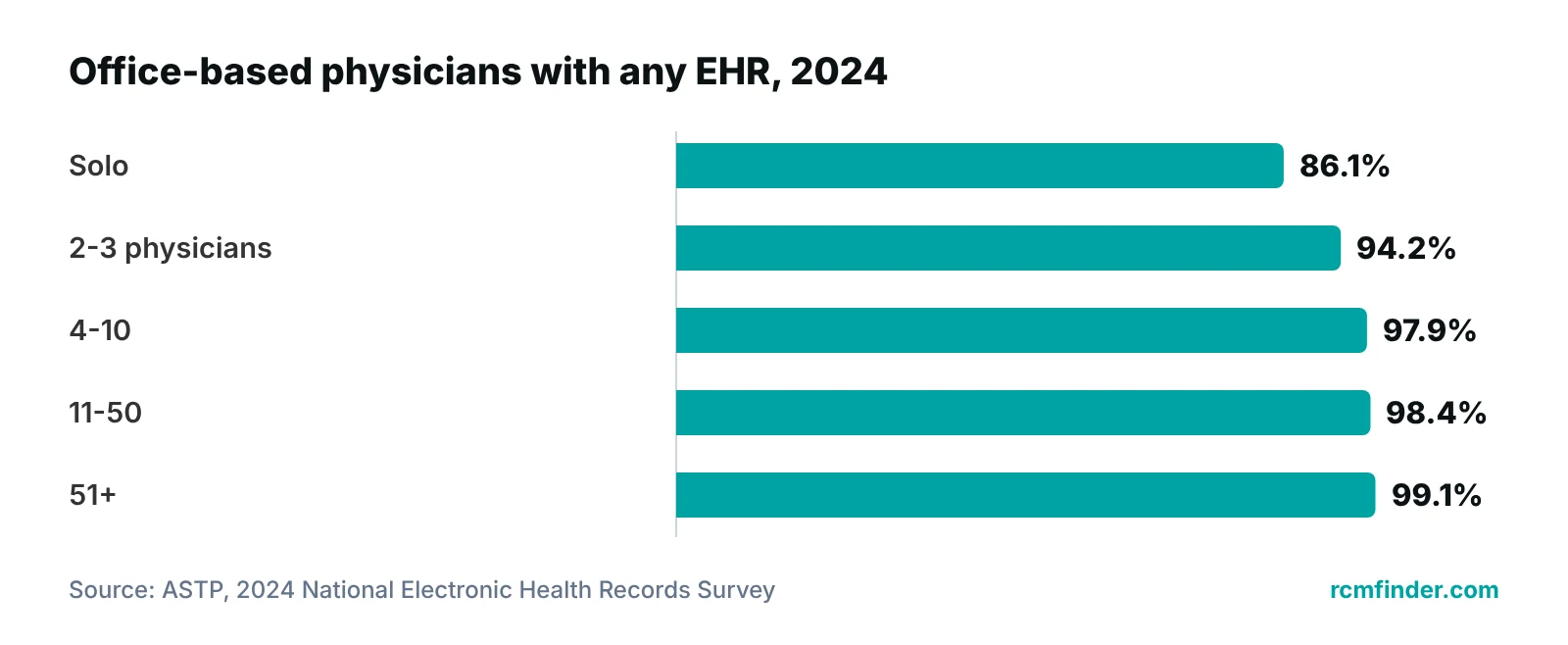
You are probably not choosing between an EMR and paper. In the 2024 National Electronic Health Records Survey, reported by ASTP in June 2026, 95% of office-based physicians had an EHR and 91% had a certified one. Solo practices had the lowest adoption, at 86.1% for any EHR. The real question is how much it costs to start free and how hard it is to move later.
- Lower upfront spend. You avoid a license or subscription fee while volume is low.
- A low-risk trial. You can map your visit types before signing a paid contract.
- A fit for light use. A one-provider practice with simple needs may never reach a cap.
What are the catches with free EMR software?
Limits, support, billing and exit. The HIPAA Journal’s small-practice EMR guide describes free EMRs as “only free up to a point”, with usage limits, limited features and little live support, and says the total cost can end up above a low-cost paid product.
Limits and support
Free plans often cap something: providers, patients, encounters or features. When you pass the cap you pay, often on the vendor’s timetable.
The product can change
The same guide describes providers who had to buy a paid plan when a free service was cancelled, with too little time to migrate. A product you do not pay for gives you less leverage when its terms change.
Billing is often an afterthought
Medesk, which sells its own EMR, says in its guide that free tiers often exclude billing and telehealth, and that open-source builds may have limited billing. Check each product yourself. Without charge capture, a clearinghouse connection and electronic remittance posting, staff re-key data, and re-keyed data produces denials. Our EHR and revenue cycle integration guide shows where the handoffs break.
Who is paying for it?
If you do not pay, someone else does, and you should know who. In January 2020 the Department of Justice announced a $145 million resolution with an EHR vendor that took sponsorship payments from drug companies. The department said sponsors helped design clinical decision support alerts in the software, and that the alerts did not always reflect accepted medical standards. One case does not describe every free product, but it is a reason to ask.
Is free EMR software HIPAA compliant?
Not by default. HIPAA applies to your practice, and software is only one part of compliance. A vendor that stores your patients’ electronic data is a business associate, and you need a signed Business Associate Agreement (BAA) before you use it.
HHS’s cloud computing guidance says a cloud provider that maintains electronic protected health information for a covered entity is a business associate, and that a covered entity using one without a BAA “is in violation of the HIPAA Rules.” The guidance adds that this holds even if the provider stores only encrypted data and has no key. HHS’s business associate page describes the BAA as the written assurance a covered entity must have before disclosing protected health information.
A badge is not a BAA
A “HIPAA-compliant” label on a sign-up page tells you nothing about your contract. Ask for the Business Associate Agreement, read it, and keep a signed copy before any patient data goes in. If the vendor refers you to its terms of service instead, treat that as a no.
The BAA is one of several duties. The Security Rule’s administrative safeguards at 45 CFR 164.308 require an “accurate and thorough assessment” of risks to electronic patient data, and procedures to create and maintain “retrievable exact copies” of it. Our HIPAA compliance checklist for medical practices covers the wider list.
The stakes are real. IBM’s 2025 Cost of a Data Breach report, as reported by TechTarget, put the average healthcare breach at $7.42 million and said healthcare took 279 days to identify and contain one. Those are industry averages, not a forecast for a small practice, but a risk analysis is not optional paperwork.
Does free EMR software need to be certified?
Only if you take part in a federal program that requires it. If you report to MIPS, the Promoting Interoperability category requires certified EHR technology (CEHRT), so check that the product is certified before you rely on it.
CMS’s 2025 Promoting Interoperability fact sheet says that to score above zero, a clinician must use CEHRT and provide the EHR’s CMS identification code from the Certified Health IT Product List (CHPL). It also requires data for at least 180 continuous days, a Security Risk Analysis attestation and a SAFER Guide self-assessment. Those are 2025 rules, so confirm the current-year requirements. ONC’s certification program overview says the program is voluntary, that ONC authorizes other bodies to certify products, and that the CHPL is updated at least weekly.
| Topic | What the source says | What it means for free EMR software | Source |
|---|---|---|---|
| Business associate | A cloud provider that maintains ePHI for a covered entity is a business associate, even if it holds only encrypted data | Vendor must sign a BAA before you use it | HHS |
| Using a vendor without a BAA | A covered entity doing so “is in violation of the HIPAA Rules” | No BAA, no patient data | HHS |
| Risk analysis | Entities must conduct an accurate and thorough assessment of risks to ePHI | Do your own; the vendor’s brochure does not replace it | eCFR, 45 CFR 164.308 |
| Backups | Entities must keep procedures to create and maintain retrievable exact copies of ePHI | Ask what is backed up, how often and how you restore it | eCFR, 45 CFR 164.308 |
| Certified technology for MIPS | Scoring above 0 in Promoting Interoperability (2025) requires CEHRT and its CMS ID from the CHPL | Check CHPL listing before you rely on a product for MIPS | CMS, QPP |
| Information blocking | Certified health IT developers are barred from information blocking, with defined exceptions | Ask how certified products let you get your data out | ONC |
Source: HHS (cloud computing guidance); eCFR (45 CFR 164.308); CMS QPP (2025); ONC (2024).
How does a free EMR affect billing and revenue?
The EMR is where charges, diagnoses and demographics start. Gaps there show up later as rejected claims and slow payment.
That makes the billing path the first thing to test. Ask how a charge becomes a claim, which clearinghouse receives it and how remittances come back. Our guide to EHR functions and the revenue cycle lists the functions that feed billing. Specialty matters too: a visit type, template or code set that works in one specialty may not suit another, so test your own visit types. See the specialties we support.
RCM Finder is not an EHR vendor and we do not claim to be. Our team works inside the EHR you already use (for example PrognoCIS, eClinicalWorks or athenahealth) on billing, denials and A/R. Our practice management system is a separate portal for the business side: it tracks claims by stage, checks claim data for completeness before submission and flags possible underpayments. Appointment scheduling in it is in early access only. If you are weighing separate tools, our practice management software guide compares the options.
See how your setup affects claims
Our free practice audit looks at your claim flow and denial reasons and shows which steps to fix first. Pricing for any service is quoted after the audit.
What should you ask before choosing free EMR software?
Ask about the BAA, the business model, the caps, the data exit and the billing path, in that order. The table turns each into a question with a red flag to listen for.
| Question | Why it matters | Red flag |
|---|---|---|
| Will you sign a Business Associate Agreement before we enter patient data? | HHS says a covered entity using such a vendor without a BAA breaks the HIPAA Rules | No, or a pointer to the terms of service |
| How do you make money? | Someone pays for the product; sponsors may shape what you see | A vague answer, or sponsored content inside the chart |
| What happens when we pass your cap? | Free tiers often have limits | No written price for the next plan |
| Can we export all our data, in what format and at what cost? | You may need to leave one day | Exports only as PDFs, or an exit fee |
| Is the product on the CHPL, and for which criteria? | MIPS Promoting Interoperability requires CEHRT | Cannot give a CHPL listing or CMS ID |
| How do charges become claims? | Billing is often missing from free tiers | Manual re-keying into another tool |
| What support do we get, and when? | Free plans often have limited live support | Forum-only help for a clinical system |
When does free EMR software fit, and when does it not?
It fits a small, simple practice that has done the checks above. It does not fit a practice that needs billing, reporting and growth room from day one.
Free EMR software may fit if
- You are a solo or very small practice with simple visit types and low volume.
- The vendor signs a BAA and you have completed your own risk analysis.
- You have tested a full data export and priced the next plan.
- You have a clear plan for billing outside the free tier.
It may not fit if
- You need e-prescribing, billing and reporting in one system from the start.
- You report to MIPS and the product is not on the CHPL.
- You cannot get a BAA or a usable data export in writing.
- No one on staff can own hosting, backups and security.
To see what your current claim numbers look like before you decide, try the revenue calculator.
Compare tools for the business side
Our practice management system tracks claims by stage, checks claim data before submission and flags possible underpayments. Appointment scheduling in it is in early access only.
Our recommendations
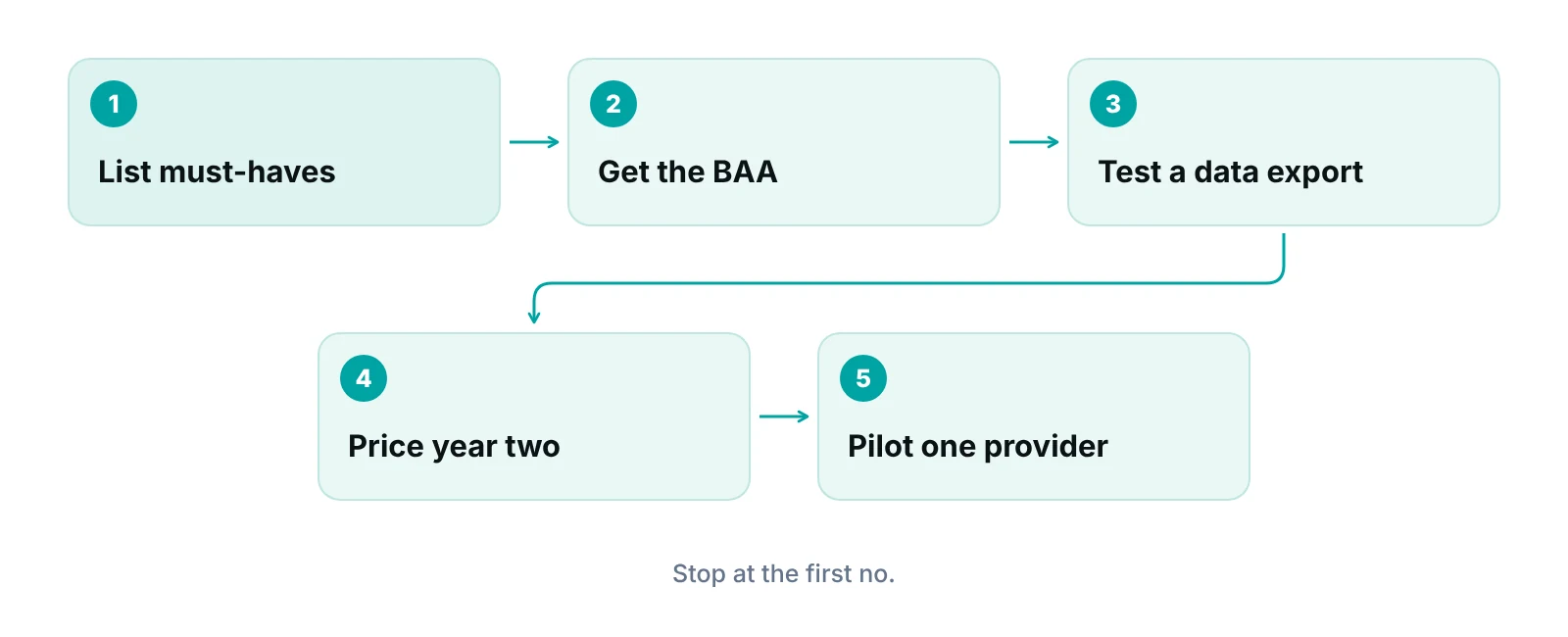
- Write down your must-haves before you look at price. List your visit types, e-prescribing, billing and reporting needs first. A free product that misses two of them costs more than a paid one that fits.
- Ask for the Business Associate Agreement first. If the vendor will not sign one, or points you to its terms of service, the conversation is over. Read the agreement itself, not the sales page.
- Price year two, not year one. Ask what happens when you pass a provider, patient or feature cap, and get the paid-plan terms in writing.
- Test a full data export in the trial. Export a sample chart set and a month of charges on day one. If you cannot get your data out in a usable form, you are renting, not owning.
- Run your security risk analysis before go-live. Write down where patient data lives, who can reach it and how it is backed up. The Security Rule requires the analysis, and a new system changes your answers.
- Decide who owns the handoff to billing. Name the person who checks charges, diagnoses and demographics before they reach a claim.
Bottom line
Free EMR software is a fair starting point only if you check four things first: a signed BAA, a completed risk analysis, a billing path and a tested data export. If you want a second pair of eyes on how your current setup affects claims, our medical billing services team works inside your existing EHR, and you can contact us to book the free practice audit.
Frequently asked questions
Is there really a free EMR?
Some products have no license or subscription fee, either as a capped cloud plan or as open-source software. Free to buy is not free to run. Hosting, security, support, add-on features and the time to set it up and train staff still cost money, and a free tier can end or change. Read the terms and the paid-plan limits before you commit.
Is free EMR software HIPAA compliant?
Not automatically. HIPAA applies to your practice, not to a product. A vendor that stores your patients’ data is a business associate, and HHS says you need a signed Business Associate Agreement before using it. You also need your own risk analysis, access controls and backups. Treat a “HIPAA-compliant” label as a claim to verify, not as proof.
Do free EMRs include billing?
Often not fully. One vendor guide says free tiers frequently leave out billing and telehealth, and open-source builds may have limited billing. Check for charge capture, a clearinghouse connection and electronic remittance posting. If billing is missing, you will re-key data or add a second system, which brings its own cost and error risk.
Can I switch from a free EMR to a paid one later?
Yes, but plan the exit before you start. Ask which data you can export, in what format and at what cost, and test it during the trial. Moving charts, demographics and open balances is the hard part. A product that only exports PDFs makes switching slow and expensive.
Is an open-source EMR a good option for a small practice?
It can be, if you have the IT help. The license is free, but you still need hosting, patching, backups and support, and a hosting provider that handles patient data must sign a BAA. Open code is not the same as reviewed code. Many small practices find a hosted service easier to run safely.
Does RCM Finder offer an EHR?
No. RCM Finder is not an EHR vendor. Our team works inside the EHR you already use, for example PrognoCIS, eClinicalWorks or athenahealth, on billing, denials and A/R follow-up. Our practice management system tracks claims by stage; its appointment scheduling is in early access. We do not replace your EHR.
Get your free practice audit
Tell us about your practice. We will contact you using the details you give.
- A review of your recent claims, denials and A/R aging
- Where your front desk and prior authorizations slow payment
- A prioritized fix list you keep, whether or not you hire us
Pricing is quoted after the audit, based on your volume and the services you choose. Prefer to talk? Call +1 (302) 556-2288.
Sources
- Guidance on HIPAA & Cloud Computing — HHS Office for Civil Rights
- Business Associates — HHS
- 45 CFR 164.308 Administrative safeguards — eCFR
- Office-based Physician Electronic Health Record Adoption, 2008-2024 — ASTP/ONC (HealthIT.gov) (2026)
- 2025 MIPS Promoting Interoperability: Actions to Limit or Restrict CEHRT Attestation Fact Sheet — CMS Quality Payment Program (2025)
- ONC Health IT Certification Program Overview (2024) — ASTP/ONC (HealthIT.gov) (2024)
- Electronic Health Records Vendor to Pay $145 Million to Resolve Criminal and Civil Investigations — U.S. Department of Justice (2020)
- Healthcare remains costliest industry for breaches at $7.42M — TechTarget Health Tech Security (reporting IBM's 2025 Cost of a Data Breach report) (2025)
- How Much Does an EMR Cost for a Small Practice? — The HIPAA Journal (2025)
- Free EMR for small practices — Medesk blog (vendor) (2026)
Disclaimer: This article is general educational information for medical practice owners and managers. It is not legal, compliance, coding or billing advice, and it does not recommend any EMR product. HIPAA duties, payer rules and program requirements vary and change. Confirm requirements with qualified advisers and each vendor's contract before acting.