
An EHR for urgent care billing should capture the visit, support correct coding, check claims before they leave and send them electronically. It cannot guarantee payment. Registration accuracy, coding review and denial follow-up still decide how quickly you are paid.
If your urgent care center already has an EHR, it can be hard to tell whether the system or the process around it is the reason claims come back. Walk-in volume and many payers make the cause hard to see.
This guide follows a claim from check-in to remittance, shows where an EHR helps and where people still own the work, and lists what to test before you switch systems or add support. It replaces an earlier version of this post.
Key takeaways
- An EHR supports the claim path; it does not replace registration checks, coding review or denial follow-up.
- Confirm place of service, E/M level rules, filing limits and the October 1, 2026 ICD-10-CM update are set correctly for each payer.
- An EHR can offer security features, but HIPAA compliance remains your organization’s responsibility.
- Track denial rate, days in A/R, point-of-service collections and cost to collect with the same definitions each month.
What should an EHR do for urgent care billing?
It should carry one visit from check-in to a paid claim without anyone retyping the data. That means capturing registration and coverage, documenting the visit in a form that supports the codes, running checks before a claim leaves, sending it in the standard electronic format and showing the payer’s answer when it comes back.
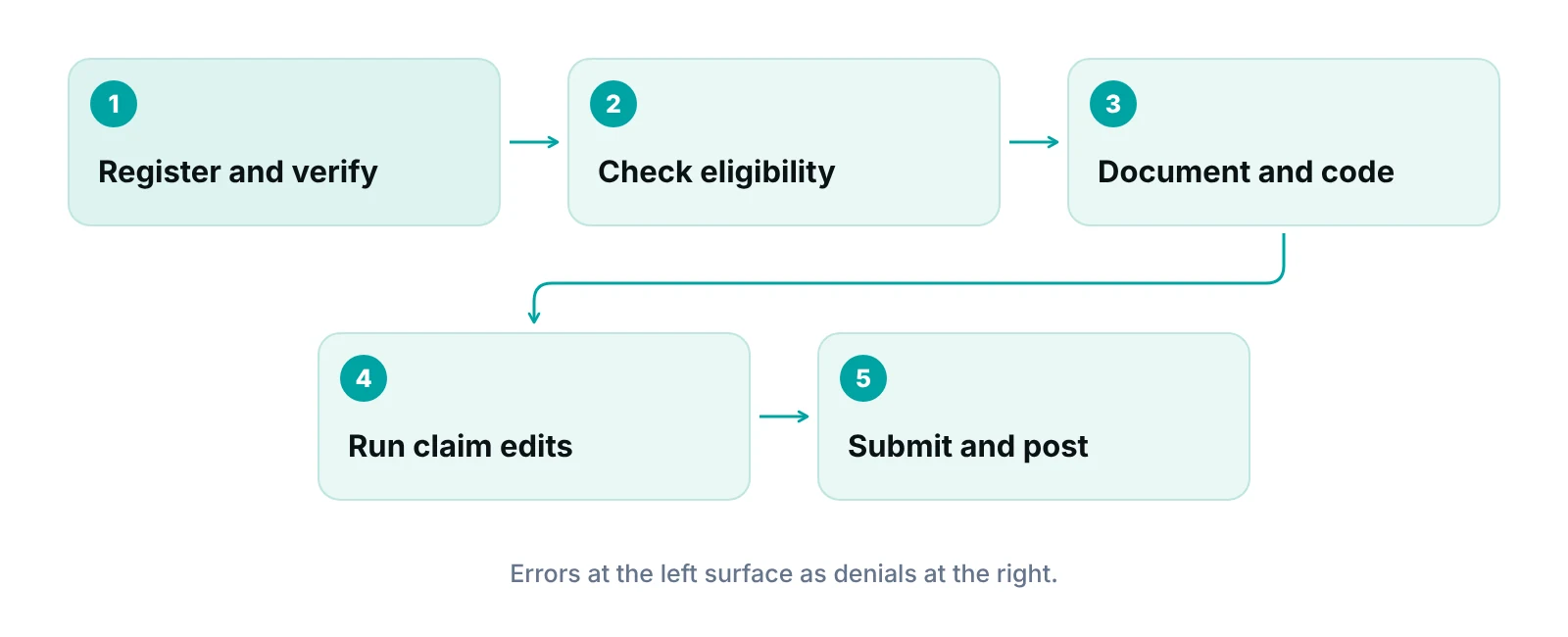
The EHR is the system of record for the visit. It is one part of the billing chain, not all of it. Staff still decide what to bill, check what the system flags and work what comes back unpaid. The diagram shows the five steps where the EHR does most of its billing work.
Urgent care raises the stakes on each step. The Urgent Care Association’s 2023 industry white paper counted 14,382 centers as of July 2023 and almost 206 million non-emergent cases in 2022. Walk-in care means little time per patient at the desk, many different payers and, as the Journal of Urgent Care Medicine notes, many patients who visit only once.
If you want the broader picture first, our guides on EHR functions and their effect on the revenue cycle and the difference between an EMR and an EHR cover the basics. This post stays on urgent care claims.
Where does an EHR help, and where do people still own the work?
An EHR helps most where the work is repetitive and rule-based: required fields, code lookup, claim formatting and routing. It helps least where judgment is needed: reading an insurance card, choosing the right level of service and deciding why a payer denied a claim. The table separates the two.
| Step | What the EHR should do | What your team still owns |
|---|---|---|
| Registration | Capture demographics, subscriber, payer and card images; flag missing fields before check-in is complete | Matching the person at the desk to the subscriber; asking about other coverage |
| Eligibility | Send a standard electronic eligibility inquiry and show the response in the chart | Reading the response; handling plans that return nothing; the self-pay conversation |
| Documentation and charges | Offer templates that prompt for what the level of service needs; capture charges from orders and procedures | Complete provider notes; a coder or trained biller checking levels and procedures |
| Diagnosis and procedure codes | Keep current code sets, search and basic validity edits | Choosing the right specificity from the note; learning each update |
| Claim edits | Check for missing data and payer-specific rules before submission | Maintaining the rules; fixing flagged claims the same day |
| Submission and remittance | Send professional claims electronically and receive electronic remittance advice | Reconciling payments to deposits; spotting underpayments |
| Denials | Show denial reasons and route them to a work queue | Appeals, payer follow-up and fixing the cause at the source |
Source: RCM Finder summary of standard billing workflow; electronic transaction types per CMS, HIPAA Adopted Standards and Operating Rules (page updated March 2026).
Notice that none of the right-hand cells can be switched on by software. That is why two urgent care centers on the same EHR can have very different denial rates. Our guide to common urgent care billing mistakes lists the errors we see most often at those hand-off points.
Which rules should your urgent care billing setup reflect?
Your EHR has to match the rules your claims are judged by: place of service, evaluation and management (E/M) level selection, diagnosis code updates, filing limits and standard electronic transactions. Some are national rules. Others are set by each payer contract, so check both.
| Area | What the source says | What to check in your EHR |
|---|---|---|
| Place of service | The CMS place of service code set lists POS 20 as Urgent Care Facility, separate from POS 11 (Office) | Which POS each location reports, and whether each payer contract expects the same one |
| Office E/M levels | Since January 1, 2021, office and outpatient visit levels (99202–99205 and 99211–99215) can be chosen by medical decision making or total time on the date of the encounter | Whether templates support both methods and whether providers and coders apply the same one |
| Medicare filing limit | A Medicare claim must be filed no later than one calendar year after the date of service, with limited exceptions (42 CFR 424.44) | Alerts for claims nearing the limit; other payers set their own limits |
| Diagnosis codes | The FY 2027 ICD-10-CM update takes effect October 1, 2026 (CMS Transmittal 13813, July 8, 2026) | That the new code set is loaded and that saved favorites and charge templates still map to valid codes |
| Electronic transactions | HIPAA adopts ASC X12 version 5010 for professional claims (837), eligibility (270/271), claim status (276/277) and remittance (835) | Which of these your EHR or clearinghouse actually supports and has turned on |
| Per-visit (global) rates | Since 2019 more centers have been paid a fixed amount per visit regardless of complexity (UCA, 2023). HCPCS S9083 is a private-payer code for this | Whether the EHR can price a visit by contract rather than by level |
| After-hours codes | Medicare and some other payers bundle CPT 99050 and 99051 into other same-day services; UnitedHealthcare began paying 99051 in 2018 under conditions (AAFP, 2018) | Payer by payer, whether after-hours codes are paid, and whether your charge master adds them by default |
Sources: CMS (POS code set; Transmittal 13813, 2026; HIPAA adopted standards, 2026); eCFR 42 CFR 424.44; Noridian Medicare E/M page; Urgent Care Association (2023); AAFP FPM (2018); Find-A-Code (S9083).
Two of these deserve a closer look because they change often or vary by payer.
E/M level and modifiers
CMS guidance says modifier 25 is appended to an E/M service to show it was significant and separately identifiable when it is billed the same day as another service such as drug administration. Many urgent care visits include a procedure or injection, so ask each payer how it applies the modifier. Your EHR should prompt for it but cannot decide it. Our guide to modifier 25 and modifier 59 explains how the two differ.
Claim timing
Medicare’s one-year limit is a ceiling, not a target: a claim that needs rework needs time to be corrected and resubmitted. Other payers set their own limits. Our guide to medical billing time limits explains how to find the limit for each payer, and the EHR’s aging report is where you watch for it.
What makes urgent care billing different from a regular office?
Walk-in care changes where errors start. In its April 2025 article, the Journal of Urgent Care Medicine, written by an urgent care software vendor’s client success manager, lists the causes that recur in urgent care. We are citing it for the list of causes, not for any statistic, because it gives none.
- Transient patients. Many patients visit once, so a registration error or missing document is hard to fix after they leave.
- Front desk turnover. Frequent staff changes lead to uneven training and repeated registration and verification errors.
- Insurance variety. Many plans, out-of-network visits and coordination of benefits make eligibility harder to read.
- Coding and documentation gaps. Diagnoses that do not match procedures, or levels billed without support in the note.
- Silos. Providers, front desk and billing may not share the same information, such as a secondary plan.
An EHR can reduce some of this: required fields, card capture, shared notes and templates. It cannot fix turnover or teach a new hire to read an eligibility response. That is a training and process job. If you want a team to look at it with you, see our urgent care billing and revenue cycle support.
“An EHR records the visit. Someone still has to make sure the visit becomes a clean claim.”
— Awais Afzal, Healthcare Operations & Data Analyst
What does a manual eligibility check cost?
The CAQH Index measures it. In the 2024 CAQH Index (calendar year 2023 data), medical providers spent $8.57 in labor per manual eligibility and benefit verification and $2.00 per electronic one. System costs are excluded, and the figures cover all medical providers, not urgent care alone. At walk-in volume, the gap adds up, and electronic checks give the front desk an answer before the patient is roomed. See our guides on patient insurance verification and claim scrubbing for the steps around that check.
Does an EHR make my urgent care HIPAA compliant or billing-ready?
No. An EHR can provide features that help you meet the HIPAA Security Rule, but your organization remains responsible for compliance. Nor does certification tell you how well the system bills.
The HHS technical safeguards paper (CMS HIPAA Security Series, revised 2007) describes five standards: access control, audit controls, integrity, person or entity authentication and transmission security. It also states that the rule does not require specific technology solutions, so each organization decides what is reasonable and appropriate for itself. A vendor saying its EHR is “HIPAA compliant” is describing features. Ask to see them: role-based access, an audit log you can read and encrypted connections.
The ONC Health IT Certification Program is described as voluntary and certifies health IT against standards for functionality, security and interoperability. The page does not say that certification covers billing or claims, so test billing separately in a demo with your own payers and visit types. For the current security rulemaking status, see our HIPAA Security Rule guide.
EHR, practice management system or billing service: which gap do you have?
Pick by the gap you can name. If notes and charges are the problem, you need better EHR templates and coding review. If scheduling, claims routing and reports sit in separate tools, you need a practice management layer. If claims are clean but unpaid claims pile up, you need follow-up capacity.
- Documentation and charge gaps: start with EHR templates, coder review and provider feedback.
- Disconnected workflow: look at a practice management system that tracks each claim by stage and reports on it.
- Rework and unpaid claims: consider medical billing services or denial management support that work inside your EHR.
- Vendor choice: our EHR and RCM integration guide explains how the pieces connect.
Our team works inside your existing EHR (for example PrognoCIS, eClinicalWorks or athenahealth), so changing billing support does not mean changing the chart. We do not claim an official partnership with any EHR vendor.
See where your claims slow down
Our free practice audit reviews your claim workflow and denial reasons and shows which fix to make first. Pricing for any service is quoted after the audit.
Which numbers should you pull from your EHR reports?
Four. Each answers a different question about whether the EHR setup is working. The Healthcare Financial Management Association (HFMA) defines them in its MAP Keys so you can measure them the same way every month. The 2023 edition gives definitions, not target values, so set your own baseline first.
| Metric (MAP Key) | What it measures | Why it matters for urgent care |
|---|---|---|
| Remittance Denial Rate (AR-5) | Share of remitted claims carrying an actionable denial; counts initial and appeal denials, excludes patient-responsibility denials | Shows whether registration, coding and edit rules are catching problems before submission |
| Net Days in A/R (FM-1) | Net A/R divided by average daily net patient service revenue, using the latest three months | Shows how quickly visits turn into cash across all payers |
| Point-of-Service Cash Collection (PA-7) | Self-pay cash collected at or before service (or within seven days of discharge for a current encounter) | Shows whether self-pay amounts such as copays are collected at or before the visit |
| Cost to Collect (FM-6) | Total revenue cycle cost divided by patient service cash collected in the month | Shows whether added tools and staff are paying for themselves |
Source: HFMA, MAP Keys 2023 Edition (definitions summarized; HFMA states no target values in this document).
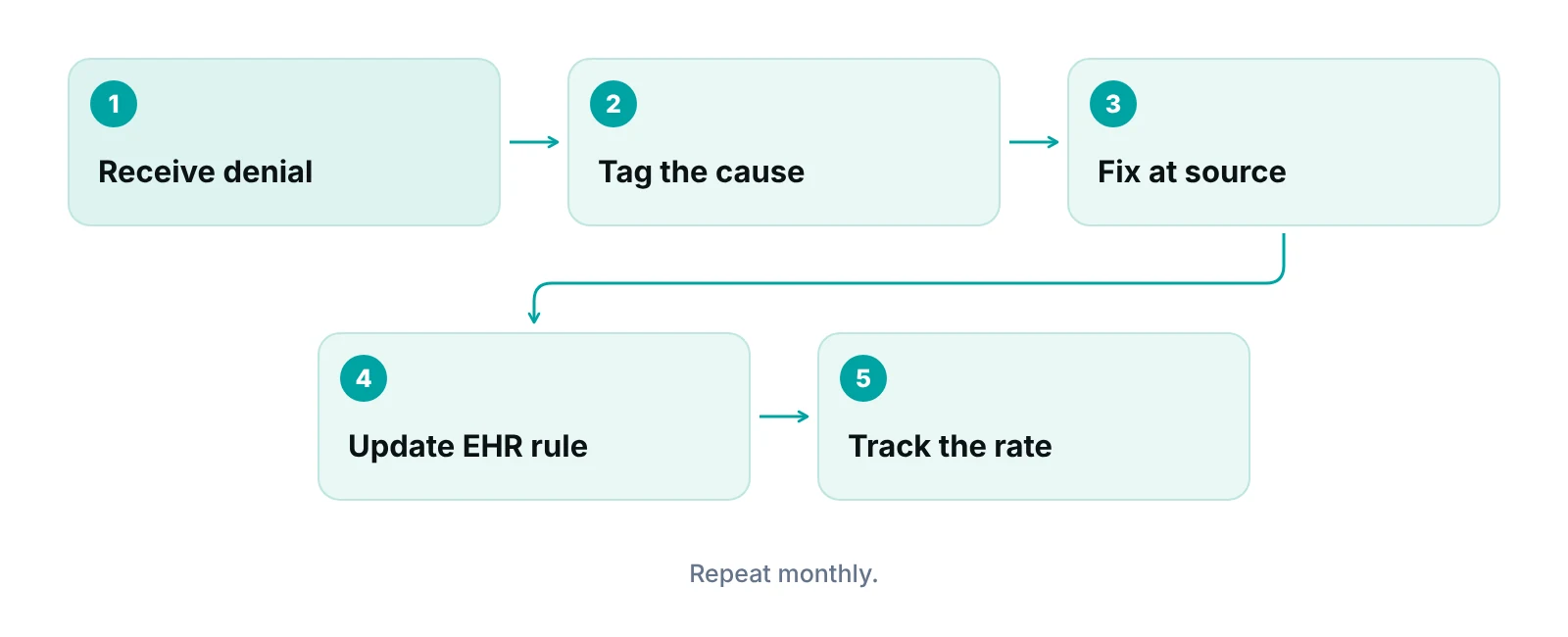
Pull these by payer and by location where your reports allow it. If you do not have a denial feedback loop yet, build one before buying anything new. The diagram shows the loop. For definitions of other measures, see our revenue cycle KPI guide.
To see what unpaid claims may be costing your center, try our revenue calculator.
Our recommendations
- Name your biggest gap before you shop. We start by sorting a month of denials into front-end, coding and follow-up causes. The biggest group tells you whether you need training, templates or capacity.
- Test billing in the demo with your own cases. Bring five real visits, including a procedure with a visit and a self-pay patient, and a payer that uses a per-visit rate. Watch what the system does at each step, not what the brochure says.
- Make eligibility electronic and visible. Run the check before the patient is roomed and show the result in the chart, so the desk acts on it, not just stores it.
- Review levels and modifiers on a sample. Have a coder check a sample of visit levels and procedure claims each month. The EHR can prompt, but only a person can confirm the note supports the code.
- Confirm the October 1 code update landed. Check that the FY 2027 ICD-10-CM set is loaded and that your saved diagnosis favorites still map to valid codes.
- Put a BAA and access rules in writing. Before any vendor touches patient data, get a Business Associate Agreement and confirm role-based access and an audit log you can read.
Bottom line
An EHR gets the visit right; people get the claim paid. Judge any system on how it handles registration, eligibility, coding checks and denial queues for your payers, then pair it with the process and staff to use it. If claims are slipping through, our medical billing services and urgent care support work inside the EHR you already have, and a free practice audit shows where to start.
Frequently asked questions
Can an EHR handle urgent care billing by itself?
Some EHRs include billing modules, and many connect to a practice management system or clearinghouse. Either way, software only automates steps. Someone still checks eligibility results, reviews codes and modifiers, and works denials. Decide who owns each step before you decide what to buy.
What is the difference between an EHR and a practice management system for billing?
The EHR holds the clinical record and the documentation that supports codes. A practice management system usually handles scheduling, claims tracking, payment posting and reports. Some products combine both. Ask any vendor which functions are in the product you are buying and which come from a partner.
Will a new EHR reduce my denials?
It can help if it catches missing data, prompts for documentation and flags claim errors before submission. It will not help if the errors start at the front desk or in coding judgment. Measure your denial rate and its causes before and after, so you know what changed.
Which place of service do urgent care centers use?
The CMS code set lists POS 20 for urgent care facilities and POS 11 for offices. Which one you report depends on your location and what each payer contract says. Confirm with your payers, then make sure the EHR is set the same way for each location.
How long do we have to submit a claim?
Medicare’s limit is one calendar year after the date of service, with limited exceptions. Commercial and Medicaid plans set their own limits. Record each payer’s limit in your billing setup and watch aging reports, so claims are not lost to the clock.
Does a certified EHR mean HIPAA compliance?
No. ONC certification covers standards for functionality, security and interoperability, but your organization stays responsible for compliance under the HIPAA Security Rule. Use the EHR’s access controls and audit logs, sign a Business Associate Agreement with the vendor, and keep your own policies and training current.
Get your free practice audit
Tell us about your practice. We will contact you using the details you give.
- A review of your recent claims, denials and A/R aging
- Where your front desk and prior authorizations slow payment
- A prioritized fix list you keep, whether or not you hire us
Pricing is quoted after the audit, based on your volume and the services you choose. Prefer to talk? Call +1 (302) 556-2288.
Sources
- 2023 Urgent Care Industry White Paper — Urgent Care Association (2023)
- Place of Service Code Set — CMS (2026)
- 42 CFR 424.44 Time limits for filing claims — eCFR / CMS (2026)
- Evaluation and Management: payment for office and outpatient visits — Noridian Medicare (JE Part B) (2021)
- Transmittal 13813, FY 2027 Annual Update to the Medicare Code Editor and ICD-10 code sets — CMS (2026)
- HIPAA Adopted Standards and Operating Rules — CMS (2026)
- 2024 CAQH Index — CAQH (2024)
- Effective Strategies to Minimize Claim Denials in Urgent Care — Journal of Urgent Care Medicine (2025)
- HIPAA Security Series 4: Security Standards: Technical Safeguards — HHS / CMS (2007)
- About the ONC Health IT Certification Program — ONC / HealthIT.gov (2026)
- 2023 Edition MAP Keys — HFMA (2023)
- Payment for Office or Other Outpatient E/M Visits (Codes 99201-99215) — CMS (via HHS guidance) (2005)
- UnitedHealthcare to pay for 99051 — AAFP Family Practice Management (2018)
- HCPCS S9083 Global fee urgent care centers — Find-A-Code (2026)
Disclaimer: This article is general educational information for medical practice owners and managers. It is not legal, compliance, coding or billing advice. Payer rules, filing limits and contract terms vary by payer, plan and state and change often. Confirm requirements with each payer and qualified advisers before acting.