

The medical billing process turns a patient visit into payment in eleven steps: verify coverage, document and code the care, enter charges, scrub and submit the claim, post the payer's payment, work denials, and follow up on balances. Errors usually start early and show up late.
If claims keep coming back, the cause is rarely the last step. This guide walks through the full workflow, shows where errors usually enter, and ends with fixes you can apply to your own practice. It is written for practice owners and managers, and it replaces an older version of this article that relied on unsourced statistics.
Key takeaways
- The billing process has eleven steps, and most denials trace back to the first seven.
- Verify coverage before the visit, not at check-in.
- Medicare fee-for-service claims must be filed within one calendar year of the date of service.
- A denial log by reason and step of origin shows which fix matters most.
- Outsourcing is a choice about management time and skill, not a cure by itself.
What is the medical billing process, step by step?
The medical billing process is the chain of tasks that turns a patient visit into payment: verify coverage, document and code the care, send a claim, post what the payer pays, and follow up on whatever is short or denied. Most practices run the same eleven steps, whether the work is done in-house, by a billing company, or both.
Each step hands work to the next one. A wrong policy number at the front desk becomes a rejected claim two weeks later. That is why improving billing rarely means fixing one thing at the end. It means finding the step where errors enter. For the wider picture of how billing fits into the whole cycle, see our healthcare revenue cycle management guide.
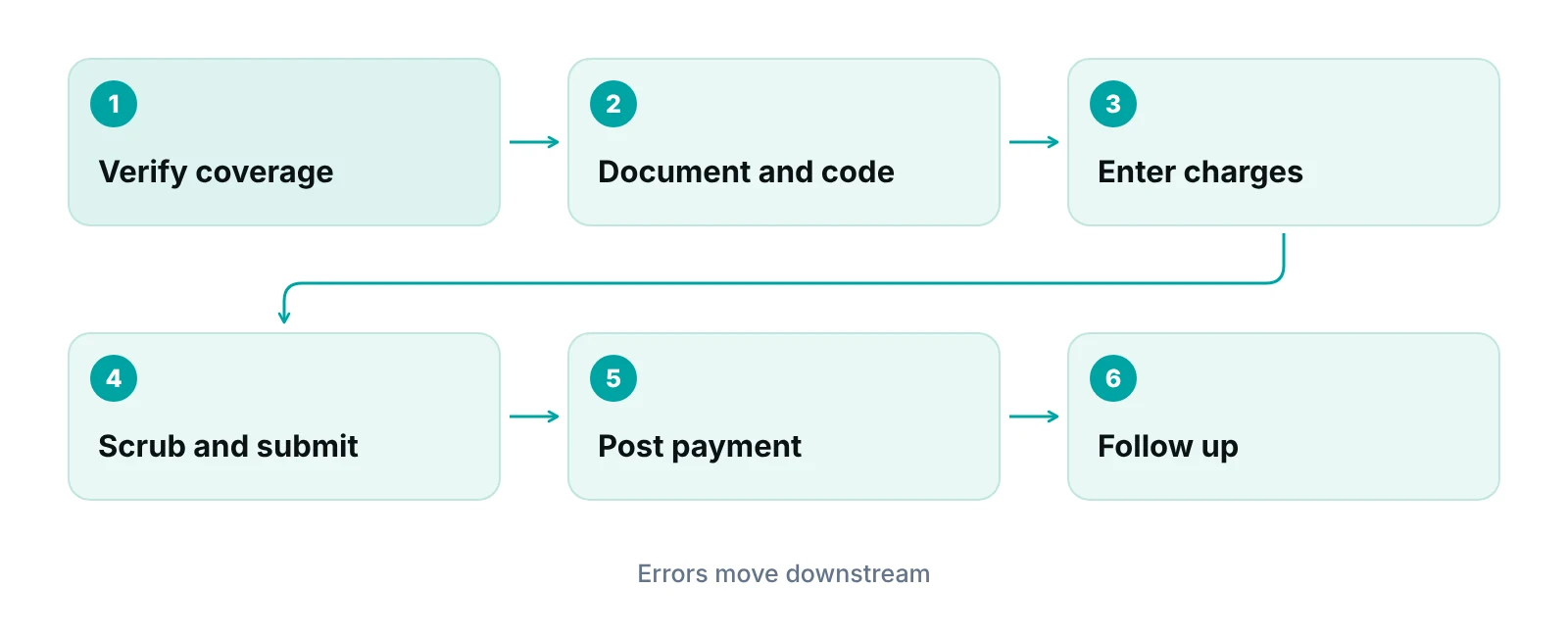
| Step | What happens | Usual owner | Common failure |
|---|---|---|---|
| 1. Schedule and pre-register | Collect demographics and insurance details before the visit | Front desk | Missing or misspelled subscriber data |
| 2. Verify coverage | Confirm active coverage, plan type and patient responsibility | Front desk or billing | Coverage changed since the last visit |
| 3. Check in and collect | Photo ID, card copy, copay at the visit | Front desk | Copay not collected or recorded |
| 4. Document the visit | Clinician records the service in the chart | Clinician | Note does not support the service billed |
| 5. Code the visit | Assign CPT/HCPCS and ICD-10-CM codes and modifiers | Coder or biller | Wrong code, missing modifier, vague diagnosis |
| 6. Enter charges | Post codes, units and fees to the patient account | Biller | Missed charge or wrong units |
| 7. Scrub and submit | Check the claim for errors, then send it electronically | Biller or clearinghouse | Rejection for format or missing field |
| 8. Payer adjudication | Payer accepts, pays, denies or pends the claim | Payer | Edits, medical necessity, prior authorization |
| 9. Post payments | Match the remittance to the claim and book adjustments | Biller | Payment posted to the wrong claim |
| 10. Work denials and appeals | Correct and resubmit, or appeal | Biller | Deadlines missed, no denial log |
| 11. Bill the patient and follow up | Send statements, work unpaid claims and A/R | Biller | Aging claims nobody owns |
Source: RCM Finder summary of the standard claim workflow. Owners vary by practice size and staffing.
Steps 1 to 3: what must be right before the visit ends
Front-end work decides how many claims go out clean. Registration data and coverage checks are the cheapest place to prevent a denial, because correcting them later means resubmitting a claim and waiting again.
At scheduling, capture the patient’s full legal name, date of birth, address, and the exact subscriber and plan details from the insurance card. Confirm that coverage is active for the date of service and note whether a referral or prior authorization is needed. Our guide to patient insurance verification walks through what to check and when, and the front desk’s effect on the revenue cycle explains why this role matters so much.
Collect the copay or known patient balance at check-in. Collecting after the visit is harder and costs more staff time. Payer rules vary, so always check the contract or the patient’s plan documents for what applies.
Steps 4 to 7: documentation, coding, charges and the claim
The claim is only as strong as the note behind it. Coders assign codes from what the clinician documented, so a vague note leads to a vague or down-coded claim, and payers can deny what the record does not support.
Coding uses CPT or HCPCS codes for what was done and ICD-10-CM codes for why. Modifiers add detail where needed. Use the current CPT and ICD-10-CM code sets and your payers’ policies as the final word. Once the codes are set, charge entry posts the service, units and fee to the patient’s account. Small mistakes here, such as wrong units, flow straight onto the claim.
Before submission, a claim scrub checks the claim against payer rules and basic completeness. Our guides on claim scrubbing and clean claims cover typical checks. Professional claims go electronically in the HIPAA standard format. Federal rules at 45 CFR 162.1102 name the ASC X12N 837 version 5010 transaction as the standard for health care claims, with separate implementation guides for dental, professional and institutional claims (eCFR). Practices that still key the paper CMS-1500 form should understand its fields even if a system now fills them.
Fix errors where they start
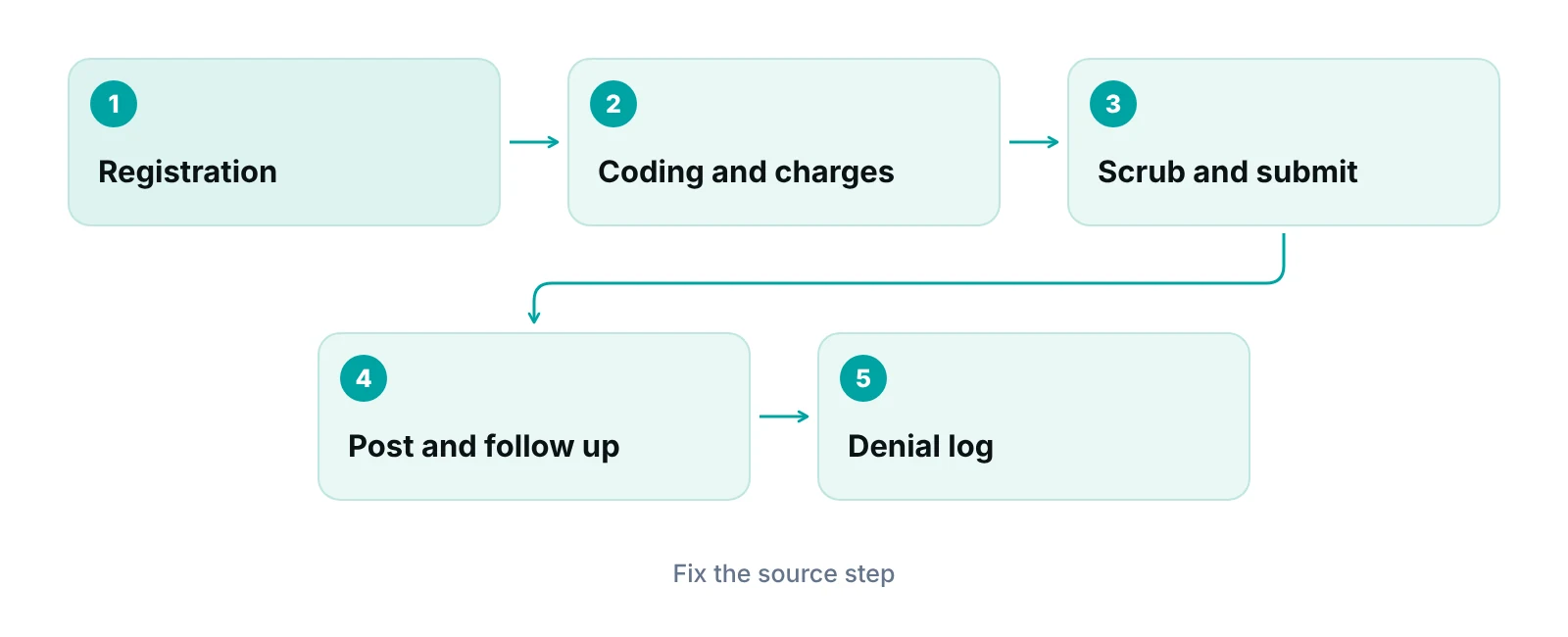
A rejection usually points back to an earlier step. Log the reason each time a claim is rejected or denied, then fix the source: registration, documentation, coding or charge entry. Correcting only the claim leaves the cause in place.
“A billing team that fixes claims one at a time will keep fixing the same claims. A team that fixes the step that caused the error stops seeing them.”
Steps 8 to 11: payment, denials and follow-up
After submission the payer decides whether to pay, deny or pend the claim, and the remittance explains the decision. Posting that remittance accurately is what lets you see what is still owed.
Electronic remittance advice follows the ASC X12 835 version 5010 format for Medicare. CMS requires the 835 format for electronic remittances, and the paper version is called the Standard Paper Remittance (CMS Medicare Claims Processing Manual, Chapter 22). Whatever the format, payment posting should record the allowed amount, the adjustments and the patient’s share, so that nothing is written off by habit.
Denied claims need a fast, owned process: read the reason, correct what is fixable, and resubmit or appeal before the deadline. See medical billing denial management for how to categorize and work them. Unpaid claims and patient balances then move into follow-up, covered in accounts receivable in medical billing.
| Deadline | Rule | Practical note |
|---|---|---|
| Filing a claim | Claims for services on or after January 1, 2010 must be filed no later than the end of the period ending one calendar year after the date of service | Limited exceptions exist, for example errors by a contractor |
| Asking for a first-level appeal | A redetermination request is due within 120 days of receiving the initial determination; receipt is presumed five days after the notice date | The contractor generally has 60 days to decide |
Source: eCFR, 42 CFR 424.44 (current); CMS, First Level of Appeal: Redetermination by a Medicare Contractor (current). These describe Medicare fee-for-service only.
Commercial payers and Medicaid set their own filing and appeal windows, and they differ by contract and state. Our state guide to medical billing time limits is a starting point, but check each payer’s manual.
How to improve the medical billing process: five practical fixes
Improvement comes from finding the step where errors enter and fixing it, not from adding more rework at the end. These five changes address the most common weak points.
1. Fix registration and coverage checks first
Verify coverage before the visit and re-verify on a schedule for repeat patients. Compare the card to the record at every visit. This is the cheapest denial to prevent.
2. Automate repeatable checks, not decisions
Software is good at catching missing fields, mismatched data and claims that sit too long. A practice management system that tracks claims by stage gives each claim an owner and a status. Judgment calls, such as coding disputes and appeals, still need trained staff.
3. Track denials by reason, not just by amount
A denial log with the reason, payer, step of origin and owner shows which fix will matter most. Review it on a regular schedule, monthly for many practices.
4. Train staff on the payers you actually bill
Payer policies change. Short, regular training on current policies for your top payers prevents repeat errors. Keep a written rules sheet per payer.
5. Measure the whole cycle
Pick a few measures and review them together: days in A/R, denial rate, first-pass acceptance and net collection. Our guide to revenue cycle KPIs explains each. For ways to remove waste from each step, read lean healthcare revenue cycle management.
In-house, outsourced or hybrid: which model fits?
The right model depends on volume, staff skill, and how much management time you can spare. None is best for everyone. Many practices start in-house and add outside help for the hardest work, such as denials or A/R.
| Model | Strengths | Watch-outs | Often suits |
|---|---|---|---|
| In-house team | Close to the clinic; quick answers to coding questions | Coverage gaps during absences; training and software costs | Practices with steady volume and an experienced lead |
| Outsourced billing | Dedicated billing staff and tools; no hiring | Needs clear reporting and a signed Business Associate Agreement | Practices that want to free up management time |
| Hybrid | Keeps front desk in-house, outsources denials or A/R | Needs clear handoffs between teams | Growing practices with one weak step |
Source: RCM Finder comparison. A practice’s staffing, payer mix and contracts will change the trade-offs.
If you outsource, ask any vendor to sign a Business Associate Agreement before it touches patient data, to report on its work regularly, and to explain how it handles denials. Practices weighing a partner can review our medical billing services. The scope of each specialty differs, so also see how billing varies across the specialties we support.
Where to start this week
Pull the last 30 days of rejected and denied claims and sort them by the step that caused them. In most practices a handful of causes account for most of the rework. Fix those first, then rerun the sort a month later.
A free practice audit looks at your claim flow and shows where errors enter. If you want a rough sense of what unpaid claims cost you, the revenue calculator is a quick place to begin.
See where your billing process leaks
Get a free practice audit of your claim flow, from registration to follow-up. No obligation.
Our recommendations
- Start with the denial log. We recommend logging every rejection and denial with its reason and step of origin. Without that record, fixes are guesses.
- Verify coverage before every visit. We recommend checking active coverage ahead of the appointment, not at check-in, so problems can be fixed while the patient is still reachable.
- Give every claim an owner. Each claim in progress should have one named person responsible and a status. Unowned claims age.
- Put payer deadlines on a calendar. Track filing and appeal windows for each payer, not only Medicare. Missed deadlines usually cannot be recovered.
- Review the cycle monthly. We recommend a short monthly review of days in A/R, denial rate and first-pass acceptance, with one action item per meeting.
- Document handoffs. Write down who does what at each step, including coverage during absences.
Track every claim by stage with a named owner.
RCM Finder's practice management portal shows each claim's stage and owner, runs data-completeness checks before submission, and flags payments that fall short of the expected amount.
See how the RCM Finder portal works · Create a portal account
Disclosure: RCM Finder builds and sells this portal. It is a practice management system, not an EHR.
Bottom line
A reliable medical billing process comes from fixing the step where errors begin, not from chasing denials at the end. Start with registration and coverage checks, keep a denial log, and review a few measures each month. If denials are your weakest step, our denial management services are one place to look, and the revenue cycle management guide shows how every step connects.
Frequently asked questions
What is the medical billing process?
It is the series of steps that turns a patient visit into payment. A practice verifies insurance, documents and codes the visit, enters charges, submits a claim, posts the payer’s payment, works any denials, and bills the patient for their share. Most practices follow the same core steps, with differences in who does each one.
How long do I have to file a medical claim?
It depends on the payer. For Medicare fee-for-service, a claim for services on or after January 1, 2010 must be filed within one calendar year after the date of service, with limited exceptions (42 CFR 424.44). Commercial payers and Medicaid set their own limits by contract and state, so check each payer’s manual.
What is the difference between a rejected and a denied claim?
A rejected claim fails basic format or data checks and is usually fixed and resent without an appeal. A denied claim was processed and refused payment, and may need correction, resubmission or a formal appeal. Tracking the two separately points to different fixes in your process.
How can I reduce claim denials?
Start where errors enter: accurate registration, coverage checks before the visit, notes that support the service, and correct coding. Then scrub claims before submission and log each denial by reason. Fixing the cause of repeat denials works better than reworking each claim.
Should a small practice outsource its billing?
It depends on volume, staff skill and management time. Some small practices keep the front desk in-house and outsource denials or A/R. If you outsource, require a signed Business Associate Agreement, regular reporting and clear handoffs.
How often should I review the billing process?
Review key measures monthly, such as days in A/R and denial rate, and do a fuller process review at least once a year or when payers, staff or software change. A quarterly review of payer policy changes is also reasonable.
Get your free practice audit
Tell us about your practice. We will contact you using the details you give.
- A review of your recent claims, denials and A/R aging
- Where your front desk and prior authorizations slow payment
- A prioritized fix list you keep, whether or not you hire us
Pricing is quoted after the audit, based on your volume and the services you choose. Prefer to talk? Call +1 (302) 556-2288.
Sources
- 42 CFR 424.44 Time limits for filing claims — eCFR (U.S. Government) (current)
- First Level of Appeal: Redetermination by a Medicare Contractor — CMS (current)
- 45 CFR 162.1102 Standards for health care claims — eCFR (U.S. Government) (current)
- Medicare Claims Processing Manual, Chapter 22 – Remittance Advice — CMS (via HHS) (current)
Disclaimer: This article is educational and is not legal, coding, compliance or financial advice. Payer rules vary by contract, plan and state, and they change. Check current payer manuals and the current CPT code set before you act.
