
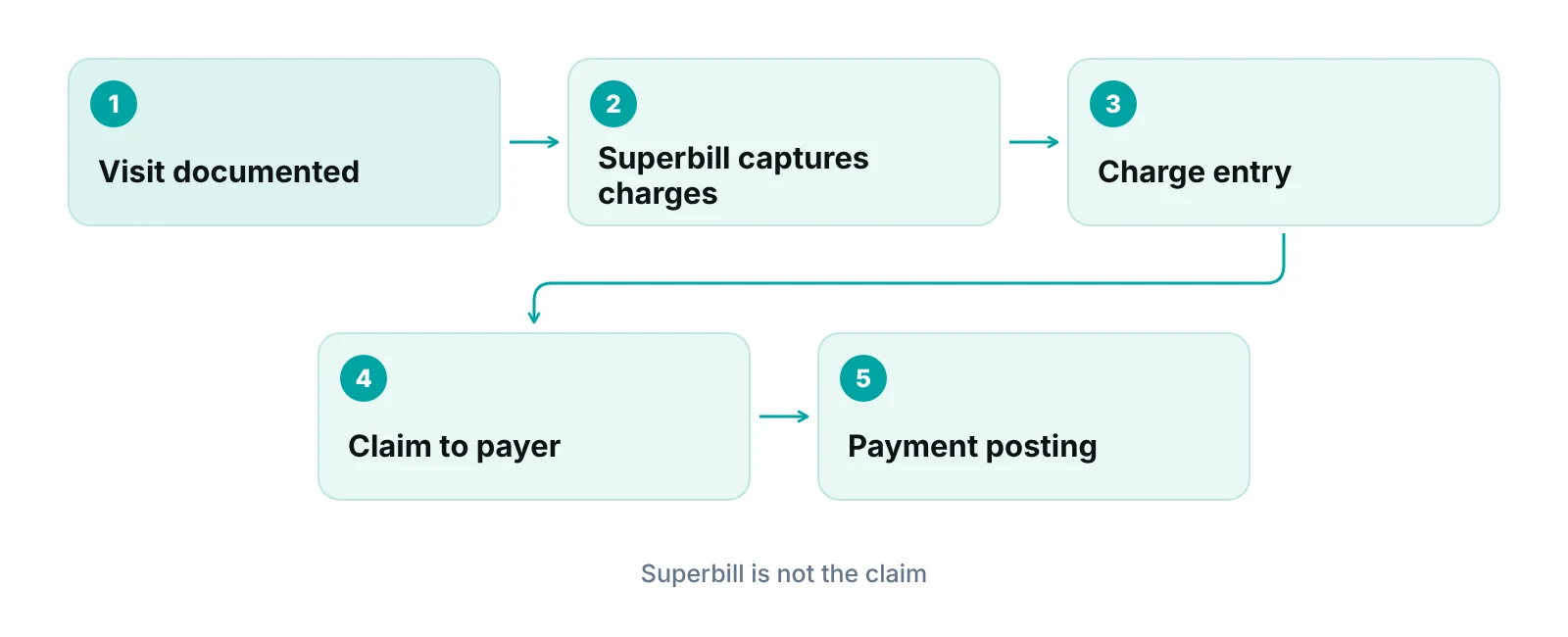
A superbill is an itemized record of a patient visit that lists the services provided, their procedure and diagnosis codes, and the charges. Practices use it to capture charges for billing and, for out-of-network patients, to give the patient a document they can send to their own plan. It is not the claim itself.
People use the word superbill for three different things. It can be an internal charge-capture form, a printed encounter sheet, or the itemized bill a patient submits to their own insurer. This post keeps those uses apart, because most confusion starts when they are mixed up.
We cover the superbill itself. What happens to a charge after it is captured is covered in our posts on charge entry in medical billing and charge posting, so we link to them instead of repeating that work. Payer rules differ, and everything here is described as of October 2026.
Key takeaways
- A superbill is a record of services and charges for one visit. It is not a claim.
- No single layout is required, so what you include depends on who will read it.
- A payer-ready itemized bill shows who, when, what, why, how much and who provided it.
- For out-of-network patients, the superbill is the patient’s document; the plan decides what to reimburse.
- Read your payers’ own instructions before you design the form.
What is a superbill?
A superbill is a document that lists what was done at a visit and what it costs. It usually holds the patient and provider details, the date of service, the procedure codes, the diagnosis codes and the fee for each line. Think of it as the bridge between the visit and the bill.
The word covers three practical uses. Knowing which one you mean makes everything else easier.
- Charge capture. The clinician or coder marks what was performed, and billing staff turn it into charges. In many practices the EHR now does this without a paper sheet.
- Patient reimbursement. The practice gives the patient an itemized bill with codes, which the patient sends to their own plan. This is the most common use for out-of-network visits.
- Claim input. Billers read the superbill when they build the claim for the payer. The claim is a separate document.
A superbill is not the clinical note and does not replace it. The note is the record of care. The superbill summarizes the billable parts, so the two should agree. If the codes on the superbill do not match what the note supports, you have a compliance problem and a likely denial, not a paperwork problem.
What should a superbill contain?
At minimum, a superbill should answer six questions: who was seen, who provided the care, when, what was done, why, and what it cost. No single layout is required for a superbill. What it needs depends on who will read it, so the most reliable guide is the payers that will receive it.
Two payer documents show what a payer-ready itemized bill looks like. Blue Cross and Blue Shield of Vermont asks members to send an itemized receipt on the provider’s letterhead. HealthPartners accepts an itemized bill, provider statement or receipt. Table 1 combines the elements both lists have in common with the fields a biller needs to build a claim.
| Field | Why it is there | Where a payer asks for it |
|---|---|---|
| Patient name and date of birth | Identifies the person seen. Add member ID if you have it. | Both payers ask for the patient or member name; HealthPartners also asks for member ID. |
| Provider name, address and phone | Shows who delivered the service and where to reach them. | HealthPartners lists provider name, address and phone. |
| Provider NPI and tax ID | Identifies the provider and the billing entity. | Blue Cross and Blue Shield of Vermont lists NPI and tax ID; HealthPartners lists tax ID. |
| Date of each service | Each line needs its own date. | Both payers. |
| Place of service | Tells the payer where care was delivered, such as office or telehealth. | HealthPartners lists place of service. |
| Procedure code (CPT or HCPCS) and a short description | Says exactly what was done. | Both payers ask for procedure or CPT codes; Blue Cross and Blue Shield of Vermont names CPT and HCPCS. |
| Modifiers, when they apply | Changes how a service is read by the payer. | Not listed by either payer; the 1500 claim form has room for them. |
| Diagnosis code (ICD-10) | Gives the reason for the service. | Both payers ask for diagnosis codes; Blue Cross and Blue Shield of Vermont names ICD-10. |
| Charge for each line and the total | Shows what was billed. | Both payers. |
Source: Blue Cross and Blue Shield of Vermont member claim form submission checklist; HealthPartners claim submission page; both accessed October 2026.
Codes, place of service and modifiers
Procedure and diagnosis codes are the lines that cause the most trouble. Use the code set that applies to the date of service, and keep the diagnosis linked to the service it supports. The claim form itself shows why this matters: the NUCC 1500 instruction manual provides for a CPT or HCPCS code with up to four modifiers on each service line, and a place of service code. Our guide to CPT codes in medical billing explains the code sets in more detail.
For place of service, CMS publishes the code set that professional claims use. Examples: code 11 is office, code 02 is telehealth when the patient is not at home, and code 10 is telehealth when the patient is at home. If your practice sees patients by video, make sure the superbill can show which one applies.
Do not copy a template without checking it
A free template is a layout, not a compliance review. Have your biller check the fields against the instructions your top payers publish, and have a coder confirm that the code choices on any pre-printed list are current.
A simple layout your staff can use
- Header: practice name, address, phone, tax ID, billing NPI.
- Patient block: name, date of birth, member ID if on file.
- Visit block: date of service, rendering provider and NPI, place of service.
- Service lines: description, procedure code, modifiers, diagnosis pointer, charge.
- Footer: total charges, any amount paid at the visit, and a line for the provider’s signature if your payers or your own policy ask for one.
What is the difference between a superbill and a claim?
A superbill is a record of the visit in whatever format the practice chooses. A claim is a standardized request for payment that the practice sends to the payer, on the 1500 paper form or as an 837P electronic transaction. The superbill feeds the claim. It does not replace it.
The claim form has a published instruction manual. The NUCC lists version 13.0 (July 2025) of its 1500 Claim Form Reference Instruction Manual, which exists to standardize how the form is completed. The NUCC also notes that payers may issue their own instructions for some items, so the manual is a guide and the payer’s rules come first (NUCC FAQ). Superbills have no equivalent. Each practice or software vendor designs its own.
| Point | Superbill | Claim (1500 form or 837P) |
|---|---|---|
| What it is | An itemized record of one visit, in the practice’s own layout. | A standardized request for payment. |
| Who normally receives it | Billing staff, or the patient for out-of-network reimbursement. | The payer, from the practice. |
| Who sends it to the payer | The patient, when it is used for reimbursement. | The practice or its billing company. |
| Format | No single required layout. | The 1500 form has a published NUCC instruction manual; the NUCC also publishes a crosswalk between the form and the 837P. |
| What it contains | The visit, the codes and the charges. | The same information, plus the claim-specific fields the form requires. |
| What comes next | Charge entry and claim creation. | Adjudication and payment posting. |
Source: NUCC 1500 Claim Form Reference Instruction Manual page and NUCC FAQ (accessed October 2026); superbill column is RCM Finder’s description.
Many guides say to “submit the superbill to insurance”, which mixes the two up. In-network, you submit a claim. A superbill is mainly for the patient to submit when the practice is out of network. For the form itself, see our CMS-1500 claim form guide. For what happens to the charge after you capture it, read our posts on charge entry and charge posting.
Our team supports the billing side of that handoff through medical billing services that turn captured charges into claims, but the principle holds with any process: the superbill should hold what the biller needs so nobody has to chase the clinician afterward.
How does a superbill work for out-of-network patients?
When a practice is out of network for a patient’s plan, the practice often does not bill that plan. Instead it gives the patient an itemized bill, and the patient sends it to their plan with the plan’s own member claim form. Whether the plan reimburses anything, and how much, depends on that patient’s out-of-network benefits.
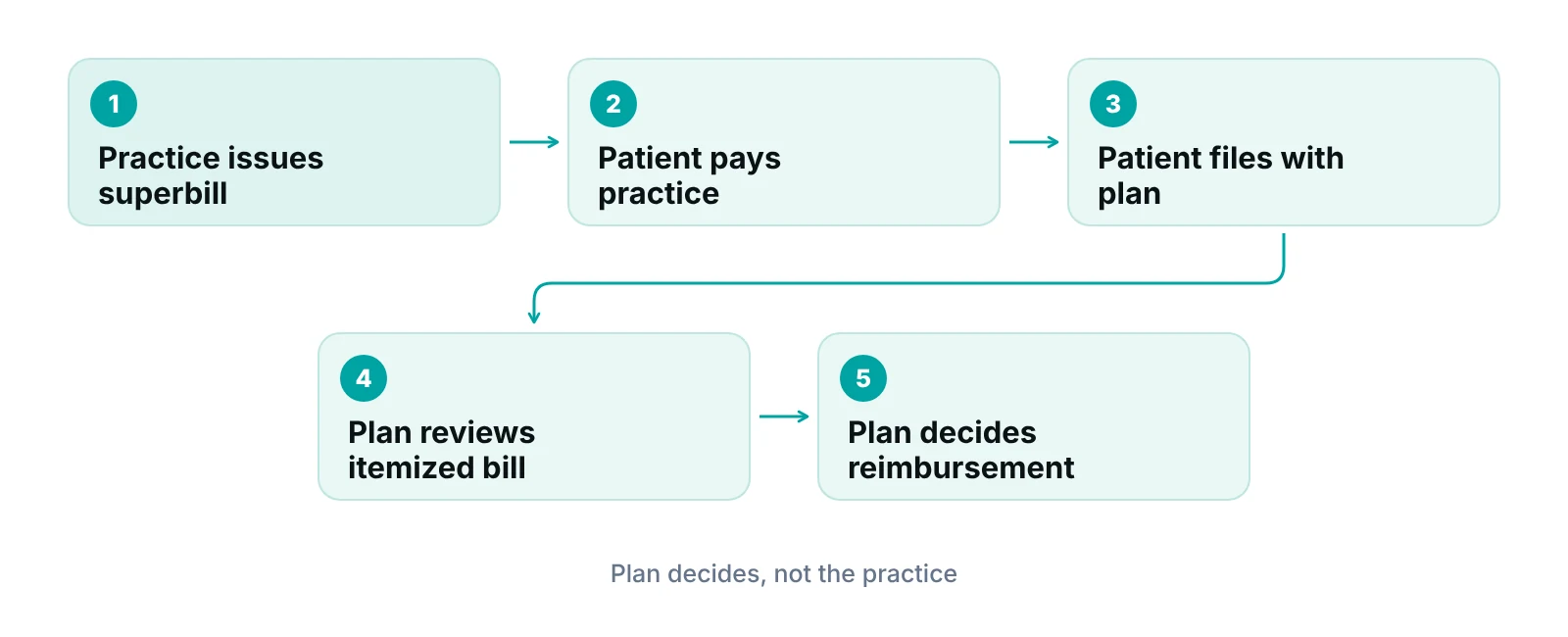
Payers set their own submission rules, so read them. The Blue Cross and Blue Shield of Vermont checklist asks for an itemized receipt on letterhead and separately asks whether the member completed a member claim form. HealthPartners sets timing rules as well: bills should be submitted within 90 days of when services were first received, and a bill received more than 15 months after the date of service can be denied. Those are one payer’s rules, not a standard. They show why the practice should tell the patient to check the deadline.
| Element | Blue Cross and Blue Shield of Vermont | HealthPartners |
|---|---|---|
| Patient or member name | Listed | Listed, with member ID |
| Date of each service | Listed | Listed |
| Service description with CPT or HCPCS code | Listed | Procedure or CPT code listed for medical claims |
| Diagnosis with ICD-10 code | Listed | Diagnosis code listed for medical claims |
| Charge for each service | Listed | Amount billed listed |
| Provider NPI | Listed | Not listed on the page |
| Provider tax ID | Listed | Listed |
| Provider address and phone | Not listed in the receipt list | Listed |
| Place of service | Not listed in the receipt list | Listed |
| Provider letterhead | Required | Not stated |
Source: Blue Cross and Blue Shield of Vermont member claim form submission checklist; HealthPartners claim submission page; both accessed October 2026. Other payers will differ.
What the practice should do for these patients
- Create the superbill from the finalized visit, not from memory, so the codes match the note.
- Include every element in Table 3, so the same document works for most payers.
- Tell the patient plainly that the plan decides reimbursement and that you cannot promise an amount. Do not quote one.
- Suggest the patient ask their plan about out-of-network benefits, filing deadlines and whether a member claim form is needed.
- Keep a copy and note in the patient record when and to whom you gave it.
Network status affects far more than the superbill. Our posts on out-of-network claims and in-network versus out-of-network care explain the practice-side choices.
Where do superbills go wrong, and how do you prevent it?
Most superbill problems are data problems: a missing field, a code that does not match the note, or a form that nobody updated. Each one either delays the claim or sends it back. The checks below are the ones we would build into any workflow.
- Missing fields. Required items left blank, such as a diagnosis, a modifier or the rendering provider. A short checklist at the point of capture catches these.
- Codes that do not match the note. The coder should be able to point to the documentation behind every line. If they cannot, fix the note or the code before billing.
- Out-of-date pick lists. Pre-printed code lists age quickly. Assign someone to review them against current code sets and your payers’ policies at least once a year.
- Wrong place of service. This is easy to miss on telehealth visits, where office and home locations use different codes.
- Patient details that do not match the insurance card. Check the name, date of birth and member ID before the patient leaves.
- Unclear ownership. When nobody owns the superbill, it ends up in a stack. Name one person who checks that each completed superbill reached billing.
These checks overlap with claim scrubbing. Our guide to clean claims covers what a claim should pass before it leaves the practice.
If your team tracks this by hand, a practice management system that tracks claims by stage can show where a charge or claim is stuck and who owns it. Our portal runs data-completeness checks before a claim is submitted, and specialty-aware billing logic is applied per claim. It is not an EHR. Fields can vary by specialty, so see our specialty billing pages for how we approach each one.
See where your charges slip through
The free practice audit looks at how charges move from the visit to the claim and flags where information goes missing. If you want a rough sense of the cost of missed charges first, try the <a href="https://rcmfinder.com/revenue-calculator/">revenue calculator</a>.
Our recommendations
- Decide what the superbill is for. We would write down which of the three uses each form serves, charge capture, patient reimbursement or both. A form built for one use rarely works well for the others.
- Start from your payers' instructions. Pull the itemized-bill or member-claim instructions from your five largest payers and merge the fields into one template. Update it when a payer changes its rules.
- Make the superbill match the note. Have the clinician finalize the note before the superbill is released. If you cannot point to documentation for a line, do not bill that line.
- Give out-of-network patients a complete document. We would include every element in Table 3 on the first try, and tell the patient to ask their plan about deadlines. A complete document saves a second visit to your front desk.
- Name one owner and review quarterly. One person should own the template, the pick lists and the handoff to billing. A short quarterly review catches outdated codes.
See where a charge or claim is stuck, and who owns it.
Our portal tracks claims by stage with an assigned owner and runs data-completeness checks before submission, so missing fields show up before the payer sees them. It does not create superbills or replace your EHR.
See how the RCM Finder portal works · Create a portal account
Disclosure: RCM Finder builds and sells this portal. It is a practice management system, not an EHR.
Bottom line
A superbill is the practice’s itemized record of a visit. It feeds the claim, and for out-of-network patients it is the document they send to their own plan. Keep it complete, make it match the note, and read your payers’ instructions before you finalize the layout. If you want help getting from captured charge to paid claim, see our medical billing services, or talk to our team about your current process.
Frequently asked questions
What is a superbill?
A superbill is an itemized record of a patient visit. It lists the services provided, procedure and diagnosis codes, and charges. Practices use it to capture charges for billing, and patients use it to ask their own plan for out-of-network reimbursement. It is not a claim and it does not replace the clinical note.
What information must a superbill include?
No single layout is required, but a payer-ready version shows the patient, provider, date of service, place of service, procedure codes, diagnosis codes and charges, plus the provider’s NPI and tax ID. Payers differ on details, so check each payer’s instructions. Table 1 and Table 3 above show two payers’ lists.
Is a superbill the same as a claim?
No. A claim is a standardized request for payment sent to the payer on the 1500 form or as an 837P transaction. A superbill is a practice-designed record that supports charge entry or gives a patient an itemized bill. In-network, the practice submits the claim, not the superbill.
Can a patient get reimbursed with a superbill?
Sometimes. It depends on the patient’s plan and out-of-network benefits. The plan decides whether to reimburse and how much, and may require its own claim form and a filing deadline. A practice should not promise a result. Tell the patient to ask the plan first.
Does a superbill have to be signed?
We could not find a general rule that requires it. Some payers or practice policies may ask for a provider signature, so check the payer’s form instructions. The 1500 claim form has a provider signature field, but that applies to the claim, not to a superbill.
Who creates the superbill?
Usually the clinician or coder selects the services and codes, and front-desk or billing staff complete the rest. Many EHRs generate one from the visit. Whoever creates it, a coder or biller should check that the codes match the documentation.
Get your free practice audit
Tell us about your practice. We will contact you using the details you give.
- A review of your recent claims, denials and A/R aging
- Where your front desk and prior authorizations slow payment
- A prioritized fix list you keep, whether or not you hire us
Pricing is quoted after the audit, based on your volume and the services you choose. Prefer to talk? Call +1 (302) 556-2288.
Sources
- 1500 Claim Form Reference Instruction Manual (2020 edition v8) — NUCC (2020)
- 1500 Claim Form Reference Instruction Manual page — NUCC (2025 (accessed Oct 2026))
- 1500 Claim Form frequently asked questions — NUCC (2026 (accessed))
- Member claim form submission checklist — Blue Cross and Blue Shield of Vermont (2026 (accessed))
- Submit a claim (member reimbursement documentation) — HealthPartners (2026 (accessed))
- Place of Service Code Set — CMS (2024)
Disclaimer: This article is general educational information for medical practice operations. It is not legal, coding or compliance advice. Rules are described as of October 2026, and payer requirements and contracts vary. Check current requirements with your payers and, where needed, your attorney or certified coder.
