
Medical billing software for billing companies should let one team work claims for many practices while keeping each client separate. Look for a portal per client, access limited to assigned clients, an audit log, a claim pipeline with an owner per stage, pre-submission checks, underpayment flags, client dashboards, a BAA chain and clean X12 837/835 exchange.
A clinic buying software asks whether it fits its front desk. A billing company asks a harder question: can one team run claims for many practices without mixing up patients, access or results? This checklist is for that buyer.
If you are a practice deciding whether to outsource, start with our guides to third-party medical billing and choosing a medical billing and coding company. Below: ten capabilities to test in a demo, the HIPAA rules behind them, the Security Rule proposal’s status and the EDI standards involved.
Key takeaways
- Separation first: a portal per client, and each biller sees only assigned clients.
- You need a BAA with every client and every subcontractor that handles PHI.
- The 2025 HIPAA Security Rule update is still proposed; final action is projected for July 2027.
- HIPAA names X12 837 for claims and 835 for remittance; three CAQH CORE rule sets are federally mandated.
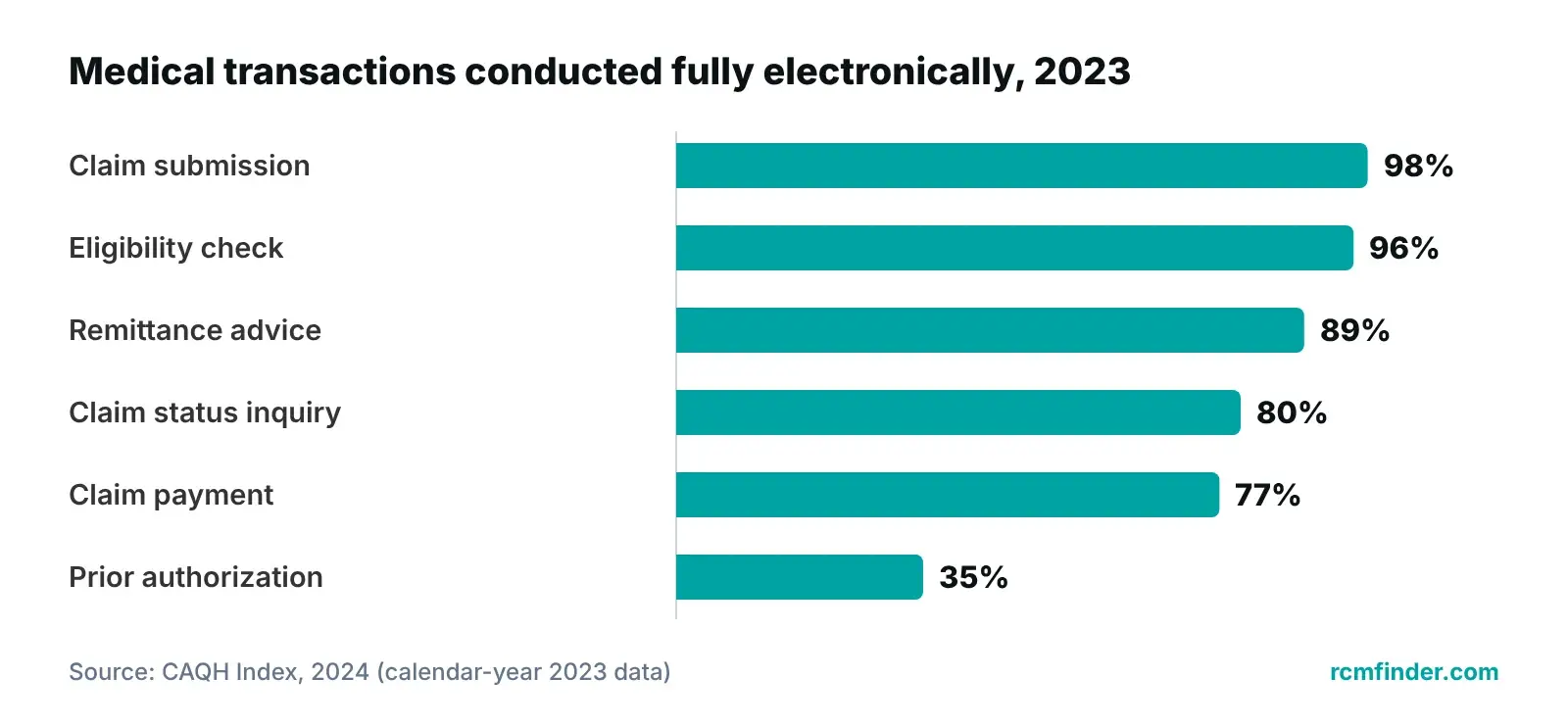
- 2024 CAQH Index (2023 data): 98% of medical claims went fully electronic; claim status inquiries, 80%.
What should medical billing software for billing companies do?
It should let one billing team work claims for many practices while keeping each practice’s data, users and reports apart. A clinic needs software for its own schedule and claims. A billing company also needs a wall between clients, a record of who touched what, and a way to show each client its own numbers.
That is the difference from practice management software for a single clinic, built around one practice’s schedule and staff. See also practice management software features that affect RCM and what a practice management system does.
Three questions that separate it from clinic software
- Can a biller assigned to two practices see only those two?
- Can you show a client who opened or changed its claim, and when?
- Does each client get its own dashboard, from the data your team works?
“If your platform cannot show a client who touched their claim and when, you are asking for trust on faith. We would rather show the log.”
— Awais Afzal, Healthcare Operations & Data Analyst
The multi-practice checklist: 10 capabilities to test in a demo
Test ten capabilities in three groups: client separation (1 to 3), claim workflow (4 to 7), and money and reporting (8 to 10). Ask the vendor to show each one live with sample practices, not on a slide.
| Capability | Why a billing company needs it | Ask the vendor to show | Red flag |
|---|---|---|---|
| 1. Separate client portals | Clients must never see each other’s data | Two sample practices, each logged in as itself | Filters instead of real separation |
| 2. Access limited to assigned clients | Minimum necessary, across many clients | A biller assigned to two practices opening a third | Every user sees every client |
| 3. Audit log | Answers ‘who touched this claim, and when?’ | Filter by client, user and date; export | Vendor-only log, or no export |
| 4. Claim pipeline with an owner per stage | Work does not stall between billers | Each claim’s stage and next-step owner | Status only in free-text notes |
| 5. Data-completeness checks | Each rejection costs a resubmission | A claim with a missing field stopped before sending | Errors first seen on clearinghouse reports |
| 6. Automation rules | Same claim, same handling, any biller | A rule that flags, holds, advances or assigns | Only vendor engineers can change rules |
| 7. Each practice’s time zone | Due dates match the client’s clock | Two clients in different time zones | Everything in the vendor’s time zone |
| 8. Underpayment detection | Short payments hide in normal-looking ERAs | An ERA line compared with the expected amount | Nowhere to load contracted rates |
| 9. Client-facing dashboards | Clients see results without emailed reports | A client login showing only its own claims and aging | Dashboards from a separate spreadsheet |
| 10. Data export at exit | PHI returned or destroyed at contract end, if feasible | A full export for one client, with claim history | Partial export, or by ticket only |
Evaluation guide from common multi-client billing operations; regulatory references are in the HIPAA section below.
Separation is more than good manners. HHS guidance on the minimum necessary standard asks covered entities to define which workforce members need which categories of patient information, and when. Roles control what a user can do; client assignments control whose data they see. You need both. For pre-submission edits, see our claim scrubbing guide.
Run the demo with your own scenario
Ask the vendor to log in as a biller assigned to two of three sample practices, try to open a claim in the third, then show the audit log entry for the attempt.
Want a second look at one client's claims?
Our free practice audit reviews a sample of one practice's claims, denials and A/R aging and shows which stage costs the most.
Get a Free Practice AuditWhat does HIPAA require of a billing company? A BAA with every client and subcontractor
A billing company that handles patient data for a practice is that practice’s business associate, so it needs a Business Associate Agreement (BAA) with every client. It also needs a BAA with every subcontractor that creates, receives, maintains or transmits that data for it.
HHS lists billing, claims processing and practice management among business associate functions. Under 45 CFR 160.103, a subcontractor that handles PHI for a business associate is itself a business associate, and HHS says you must have a BAA with it before disclosing PHI. Your client does not sign with your subcontractor; 45 CFR 164.502(e) puts that duty on you.
Terms flow down. Under 45 CFR 164.504(e), the agreement must require safeguards, reporting of improper disclosures and breaches, the same restrictions for subcontractors, and return or destruction of PHI at termination where feasible. 45 CFR 164.410 requires breach notice to the client without unreasonable delay, and no later than 60 calendar days after discovery.
Map the chain before data moves
- Each client practice: one signed BAA per client.
- Software and hosting vendors that store or process PHI for you.
- Outside coders or staffing firms that are not your own workforce.
- Every other vendor in the claim’s path, including your clearinghouse: confirm which agreement covers it.
Business associates must comply with the Security Rule directly. 45 CFR 164.312 requires unique user identification and sets standards for audit controls, authentication and transmission security; 45 CFR 164.308 requires a risk analysis and regular review of audit logs and access reports.
| Rule (current eCFR) | What it requires | What to look for in the software |
|---|---|---|
| 45 CFR 164.502(e), 164.504(e) | Written BAA with each client and subcontractor; same restrictions flow down | Access granted only after the BAA is on file |
| 45 CFR 164.504(e)(2)(ii)(J) | Return or destroy PHI at contract end, if feasible | Full export per client; documented deletion |
| 45 CFR 164.410 | Breach notice to the covered entity no later than 60 calendar days after discovery | Logs showing which client’s records a user accessed |
| 45 CFR 164.312(a)(2)(i) | Unique user identification (required) | One account per person; no shared logins |
| 45 CFR 164.312(b), 164.308(a)(1)(ii)(D) | Audit controls; regular activity review (required) | Searchable, exportable audit log |
| 45 CFR 164.308(a)(4); minimum necessary | Grant, review and change access (addressable); limit PHI to what is needed | Access by role and assigned client, removed promptly |
| 45 CFR 164.312(e)(1) | Transmission security | Encrypted connections for portal and file transfers |
Sources: eCFR, 45 CFR Parts 160 and 164 (up to date as of October 2026); HHS OCR business associate and minimum necessary guidance. ‘Required’ and ‘addressable’ are the regulation’s own labels.
Business associates are directly liable
HHS lists ten provisions business associates answer for directly. Three bear on software choices: complying with the Security Rule, signing BAAs with subcontractors, and limiting PHI to the minimum necessary.
Our own setup: role-based access, audit logging, encrypted (HTTPS) connections, and we put a Business Associate Agreement in place before accessing patient data. For the practice side, share our HIPAA compliance checklist for medical practices with clients.
Is the proposed 2025 HIPAA Security Rule update in effect?
No. As of October 2026 it is still a proposed rule. HHS published it in the Federal Register on January 6, 2025, comments closed on March 7, 2025, and the 2026 Unified Agenda lists it as a long-term action with final action projected for July 2027.
The Federal Register notice drew 4,747 comments, and the Unified Agenda entry (RIN 0945-AA22) shows no final rule yet. HHS’s fact sheet says the current Security Rule stays in effect meanwhile. As proposed, a final rule would take effect 60 days after publication, with compliance due 180 days after that.
Proposals that would affect billing companies most
- Business associates would verify at least every 12 months that required technical safeguards are in place, with a written expert analysis and certification.
- Business associates would notify covered entities within 24 hours of activating a contingency plan.
- Certain regulated entities would be told within 24 hours when a workforce member’s access changes or ends.
- Multi-factor authentication and encryption of ePHI at rest and in transit, with limited exceptions.
- An asset inventory, a compliance audit and penetration test at least every 12 months, and vulnerability scans at least every six months.
- No more ‘required’ versus ‘addressable’ distinction.
Plan for it, but do not cite it as law
A multi-client billing platform should already support MFA, encryption and fast access removal. But anyone calling the proposal a current requirement is ahead of the rulemaking.
The EDI side: X12 837 and 835, clearinghouses and CAQH CORE rules
HIPAA names the X12 standards your software must produce and read: the 837 for professional claims and the 835 for remittance advice. CAQH CORE operating rules add business rules on top, and three sets of them are federally mandated: eligibility and benefits, claim status, and payment and remittance.
Under 45 CFR 162.1102, the professional claim standard is X12 837 version 005010X222; under 45 CFR 162.1602, remittance advice is X12 835 version 005010X221. The section’s newest paragraphs phase in a newer retail pharmacy standard from August 2027; the professional standard stays the same. 45 CFR 162.920 incorporates the CAQH CORE operating rules by reference, including uniform use of claim adjustment and remark codes on the 835.
For Medicare, CMS describes the Administrative Simplification Compliance Act requirement to send claims electronically as a condition for payment, and notes that EDI may take place with the help of a clearinghouse or billing service.
| Transaction | Standard | Rules that apply | What the software should do per client |
|---|---|---|---|
| Professional claim | X12 837 (005010X222) | 45 CFR 162.1102 | Check completeness; send with the right client’s provider details |
| Remittance advice (ERA) | X12 835 (005010X221) | 45 CFR 162.1602; CORE 350 and 360 (uniform CARC/RARC use) | Match lines to claims and expected amounts |
| Eligibility and benefits | X12 270/271 | CAQH CORE eligibility rules (45 CFR 162.920, 162.1203) | Record who checked, when, and the response |
| Claim status | X12 276/277 | CAQH CORE claim status rule 250 (45 CFR 162.920, 162.1403) | Update the claim’s stage and its owner |
| EFT and ERA enrollment | Enrollment data; CCD+/835 reassociation | CORE 380, 382 and 370 (45 CFR 162.1603) | Track enrollment per client and payer |
Sources: eCFR, 45 CFR 162.1102, 162.1602 and 162.920 (up to date as of October 2026); CAQH CORE operating rules page (2026).
Claims are nearly all electronic; follow-up is not. In the 2024 CAQH Index (calendar-year 2023 data, from health plan-reported volumes), 98% of medical claim submissions used the HIPAA standard, but only 80% of claim status inquiries and 35% of prior authorizations did. CAQH put the time savings opportunity at 18 minutes per claim status inquiry for medical providers. Check how the software records status checks done by portal or phone.
Are you also a clearinghouse?
The health care clearinghouse definition in 45 CFR 160.103 names ‘a billing service’ that converts nonstandard data into standard transactions, or the reverse. If you reformat client data into X12 files, ask counsel whether that role applies.
For background, see our guides to clearinghouses in medical claims management, EDI in medical billing and electronic remittance advice.
How RCM Finder's portal handles multi-practice billing today
Our practice management portal covers the multi-practice basics today, listed below. Appointment scheduling is in early access; credentialing and in-portal real-time eligibility verification are coming next.
Live today
- Client portal for practices and for billing companies serving several practices, with reporting dashboards.
- Role-based staff permissions and an audit log.
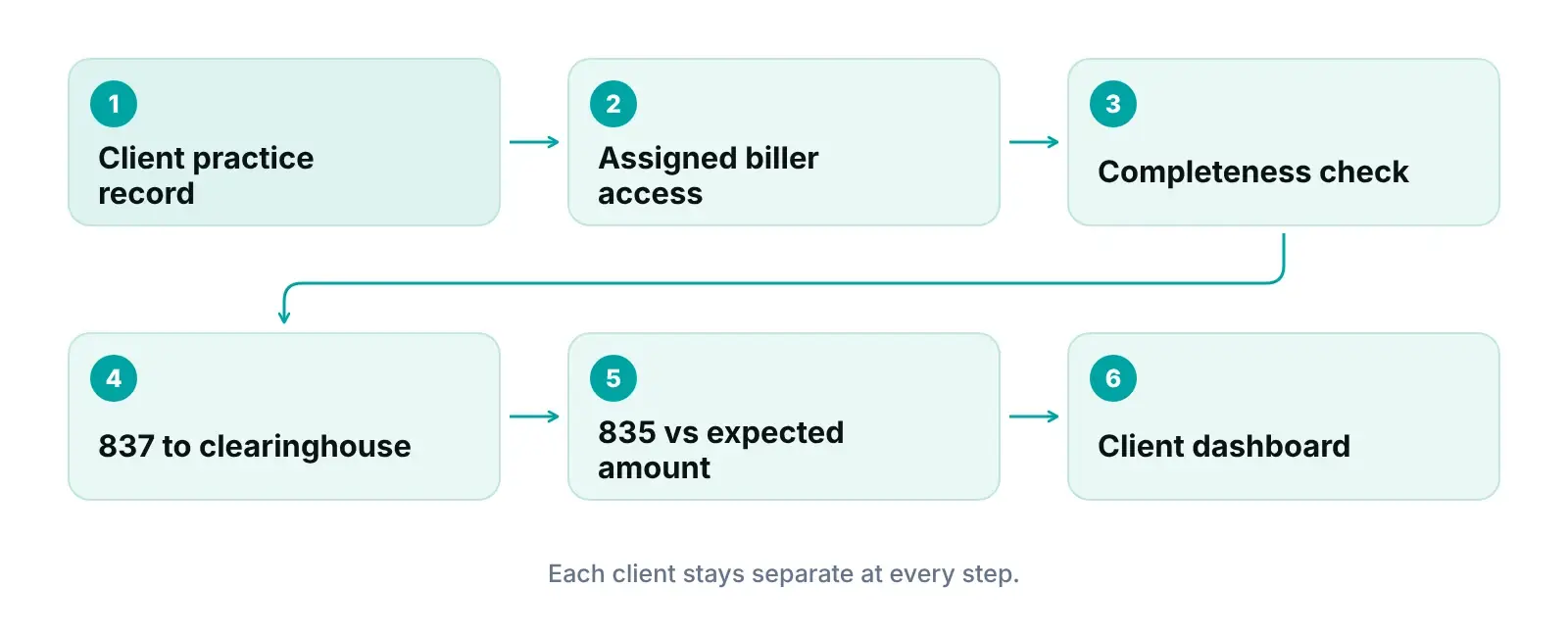
- Claim pipeline by stage, with data-completeness checks before submission.
- Specialty-aware billing logic: 35 specialties grouped into shared billing-pattern archetypes, applied per claim.
- Underpayment detection against expected amounts.
- Automation rules: flag for review, advance or hold a stage, assign an owner.
- Each practice’s time zone governs every staff member, onshore or offshore.
Our founder, Awais Afzal, is the portal’s product owner and lead developer. We build our billing pipeline around how claims actually move through a practice: registration, charge entry, submission, payment and follow-up. Practices that would rather outsource the work itself can use our revenue cycle management service.
Early access and coming next
Appointment scheduling with a calendar and day view is in early access, and billing companies can join the list now. A credentialing module and automated real-time eligibility verification inside the portal are coming next. None of the three is live today; we do not quote release dates.
Join early access for portal scheduling
See the multi-practice portal, test it against this checklist, and join the early-access list for appointment scheduling.
Join Early AccessOur recommendations
- Write down your client and access map first. Before any demo, we list every client, every user and which clients each user serves. That map becomes the test script.
- Test separation; do not take it on trust. Have the vendor log in as a biller assigned to two practices, try to open a third practice’s claim, and show the audit log entry.
- Get the BAA chain on paper before data moves. We keep a signed BAA with every client and subcontractor on file before anyone gets access. Missing subcontractor BAAs are a direct liability for business associates.
- Load contracted rates for each client. Underpayment detection needs an expected amount. Load each client’s fee schedules during onboarding, or short payments will look like normal ones.
- Run every client on its own clock. Set each client’s time zone in the software and keep each payer’s filing and appeal limits next to the work queue, so due dates mean the same to every biller.
- Prepare for the Security Rule proposal without overstating it. MFA, encryption, an asset inventory and prompt access removal make sense now. We call them proposed until HHS publishes a final rule.
Bottom line
The right medical billing software for a billing company keeps every client separate, shows who did what, and gives every claim a stage and an owner. Pair it with a BAA chain on paper and clean X12 837 and 835 exchange. See how our practice management system for billing companies meets this checklist and join early access for scheduling, or start with a free practice audit.
Frequently asked questions
What is the difference between medical billing software and practice management software?
Practice management software usually runs one clinic’s scheduling, registration and billing for its own patients. Medical billing software for billing companies is built around claims across many practices: separate client views, access by assigned client, audit logs, claim pipelines and client reporting. Some products do both. Our practice management software guide covers the single-clinic side.
Does a medical billing company need a BAA with every client practice?
Yes, if it creates, receives, maintains or transmits patient data for that practice. HHS lists billing and claims processing as business associate functions, and each covered entity must document its business associate’s assurances in a written agreement. Keep every client’s BAA on file and match each user’s access to the clients they actually serve.
Do our offshore team or software vendor need a BAA too?
If they handle PHI for you and are not part of your own workforce, yes. HIPAA treats a subcontractor that creates, receives, maintains or transmits PHI for a business associate as a business associate itself, and HHS says you must sign a BAA with it before sharing PHI. Your client practice does not need to sign with your subcontractor directly.
Is the 2025 HIPAA Security Rule update in effect?
No. As of October 2026 it is a proposed rule, published in the Federal Register on January 6, 2025. The 2026 Unified Agenda lists it as a long-term action with final action projected for July 2027. The current Security Rule still applies, including unique user IDs, audit controls and risk analysis. Check the Federal Register before relying on any date.
Does a billing company need its own clearinghouse connection?
It depends on your setup. Claims can go through a clearinghouse account you hold or one a client already uses, and CMS notes that EDI with Medicare may take place through a clearinghouse or billing service. Either way, your software must send X12 837 claims and read X12 835 remittances for each client, and match each ERA to the right practice.
Does RCM Finder's portal include scheduling and eligibility checks?
Not as live features yet. Appointment scheduling with a calendar and day view is in early access, and you can join the list from our practice management system page. A credentialing module and automated real-time eligibility verification inside the portal are coming next. Today the portal covers claim tracking, completeness checks, underpayment detection, automation rules, permissions, an audit log and client dashboards.
Get your free practice audit
Tell us about your practice. A member of our operations team replies within one business day.
- A review of your recent claims, denials and A/R aging
- Where your front desk and prior authorizations slow payment
- A prioritized fix list you keep, whether or not you hire us
Pricing is quoted after the audit, based on your volume and the services you choose. Prefer to talk? Call +1 (302) 556-2288.
Sources
- Business Associates — HHS Office for Civil Rights (2026)
- Direct Liability of Business Associates (fact sheet) — HHS Office for Civil Rights (2019 (reviewed 2021))
- Minimum Necessary Requirement — HHS Office for Civil Rights (2003 (content last reviewed 2013))
- 45 CFR 160.103 — Definitions — eCFR (National Archives) (2026)
- 45 CFR 164.502 — Uses and disclosures of PHI: general rules — eCFR (National Archives) (2026)
- 45 CFR 164.504 — Uses and disclosures: organizational requirements — eCFR (National Archives) (2026)
- 45 CFR 164.410 — Notification by a business associate — eCFR (National Archives) (2026)
- 45 CFR 164.308 — Administrative safeguards — eCFR (National Archives) (2026)
- 45 CFR 164.312 — Technical safeguards — eCFR (National Archives) (2026)
- HIPAA Security Rule To Strengthen the Cybersecurity of Electronic Protected Health Information (proposed rule) — Federal Register (HHS OCR) (2025)
- HIPAA Security Rule Notice of Proposed Rulemaking fact sheet — HHS Office for Civil Rights (2024)
- Unified Agenda: HIPAA Security Rule To Strengthen the Cybersecurity of ePHI (RIN 0945-AA22) — OMB OIRA, reginfo.gov (2026)
- 45 CFR 162.1102 — Standards for health care claims or equivalent encounter information — eCFR (National Archives) (2026)
- 45 CFR 162.1602 — Standards for health care payment and remittance advice — eCFR (National Archives) (2026)
- 45 CFR 162.920 — Availability of implementation specifications and operating rules — eCFR (National Archives) (2026)
- Operating Rules | CAQH CORE — CAQH CORE (DataSpring) (2026)
- 2024 CAQH Index: From Transactions to Trust — CAQH (2024)
- Electronic Billing & EDI Transactions — CMS (2024)
Disclaimer: This article is general educational information for medical billing companies and practice managers. It is not legal, HIPAA-compliance, coding or billing advice. Your obligations depend on your contracts and your role, payer and clearinghouse rules vary, and the proposed HIPAA Security Rule update may change before it is finalized. Confirm requirements with qualified counsel before acting.