

Claim scrubbing in medical billing is a rule-based check that flags missing data, invalid codes and conflicting code pairs before a payer decides on the claim. Your software, a billing team, the clearinghouse and the payer can each run checks. A scrubber catches fixable errors, not missing documentation or inactive coverage.
Many practices say they “scrub” claims without being sure what that covers. Sometimes it means a few required-field checks in their software. Sometimes it means a full edit library run by a billing company. This guide separates the layers, ties each check to a published rule and shows what scrubbing cannot do. If you want the bigger picture first, start with our clean claims guide.
Key takeaways
- Scrubbing is a set of rules, not one thing. Ask what is checked, not whether you scrub.
- Four parties can check a claim: your software or team, the clearinghouse, the payer front end and payer adjudication.
- Completeness, code-pair (NCCI) and units (MUE) checks come from published CMS rules; payer rules vary.
- A scrubber cannot judge documentation, coverage or whether a modifier is clinically right.
- Fix flags at the source record, then re-run the check.
What is claim scrubbing in medical billing?
Claim scrubbing is an automated rules check run on a claim before it is judged for payment. The rules look for missing data, invalid or conflicting codes and payer-specific problems, then flag each hit for a person to fix. It is not a law or a CMS program. It is an industry term for a set of edits, so two scrubbers can check quite different things.
It also helps to be clear about where scrubbing sits. It happens after charges are entered and before the payer decides anything. The rest of the path, from the clearinghouse to the remittance, is covered in our clean claims guide and our clean claim submission process post. This post stays on the scrubbing step itself.
Who runs a claim scrubber?
More than one party can run checks on the same claim, and each one runs different rules. Your own billing or practice management software, a billing team, your clearinghouse and the payer can all apply edits. The first two happen before submission and are under your control. The last two happen after you send the claim.
A clearinghouse is a separate role from a scrubber. Stedi’s documentation describes a clearinghouse that validates a claim against industry standards and payer rules and then returns a 277CA saying whether it accepted or rejected the claim (Stedi). The payer then sends its own acknowledgments and can reject the claim again. Our clearinghouse guide explains that role in full.
| Layer | Who runs it | When | What you get if it fails |
|---|---|---|---|
| Your software or billing team | Your practice, your billing company or a tool they use | Before the claim leaves your system | A flag in your own work queue. Nothing has been sent yet. |
| Clearinghouse edits | The clearinghouse you submit through | On receipt of the claim file | A rejection on a 277CA. The claim has not reached adjudication. |
| Payer front-end edits | The payer or its contractor | Before the claim enters adjudication | A rejection on a 277CA. No payment decision and no remittance. |
| Payer adjudication edits | The payer, including coding edits such as NCCI | While the claim is being decided | A denial or a reduced line on the 835 remittance advice. |
Source: Stedi, Acknowledgments and ERAs overview (2025); CMS, Medicare NCCI Policy Manual introduction (2024). The first row is a general description of a typical setup, not a regulatory category.
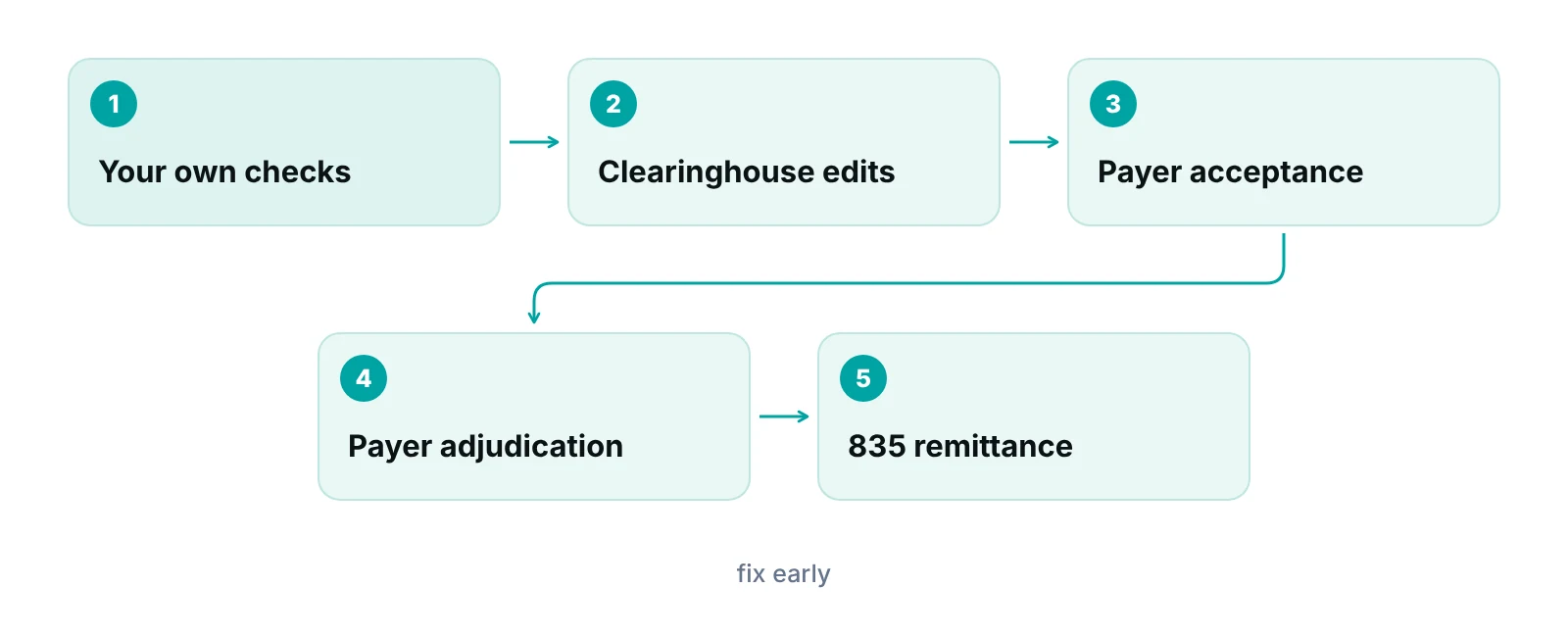
A clean result at one layer says nothing about the next. A claim can pass your own checks and the clearinghouse and still be denied at adjudication for a coding conflict. The earlier you run the edits that matter, the cheaper the fix.
What does a claim scrubber check?
A scrubber checks three families of rules: whether the data is complete, whether the codes are valid and allowed together, and whether the claim meets a payer’s own requirements. The first two can be tied to published rules. The third depends on each payer’s contract, so no list can cover it for you.
| Check | Example | Where the rule comes from |
|---|---|---|
| Required fields present | Patient name, insurance ID, provider NPIs, units on each service line | Medicare Claims Processing Manual, Chapter 26 (CMS-1500) |
| Place of service valid and consistent | A missing or invalid place of service code, or one that does not fit the service, comes back unprocessable | Medicare Claims Processing Manual, Chapter 26 |
| Diagnosis code set and pointers | The right ICD indicator, one diagnosis letter pointed to per service line, no mixing of code sets | Medicare Claims Processing Manual, Chapter 26 |
| Unlisted procedure code explained | An unlisted or NOC code needs a narrative or an attachment | Medicare Claims Processing Manual, Chapter 26 |
| Code pairs that cannot be billed together | A Column Two code paid with a Column One code on the same date, without an allowed modifier | CMS NCCI procedure-to-procedure edits |
| Units above a limit | More units of one code than the maximum for one patient, one provider and one date of service | CMS Medically Unlikely Edits |
| Payer-specific rules | Prior authorization on file, coverage policy, modifier rules | Each payer’s contract and policies; varies |
Source: CMS, Medicare Claims Processing Manual Chapter 26; CMS, Medicare NCCI Policy Manual introduction (2024); CMS, Medicare NCCI Medically Unlikely Edits page. Chapter 26 describes the Medicare version of the CMS-1500; commercial payers may differ.
Completeness and format checks
These are the simplest checks and catch the most avoidable errors. The Medicare Claims Processing Manual, Chapter 26 says a claim with incomplete or invalid information may be returned to the submitter as unprocessable. It lists, for example, that a date span needs a valid end date, that an unlisted procedure code without a narrative or attachment is returned as unprocessable, and that a missing or invalid place of service is returned using CARC 16 and RARC M77.
The same chapter sets the diagnosis rules a scrubber enforces. A claim holds up to 12 diagnoses in priority order. Each service line points to one diagnosis letter. ICD-9-CM and ICD-10-CM codes cannot appear on the same claim. Our medical claim forms guide walks through the form fields these checks read.
Coding edits: NCCI procedure-to-procedure pairs
NCCI procedure-to-procedure (PTP) edits are pairs of codes that should not be reported together. CMS says each pair has a Column One and a Column Two code. If both are reported for the same patient on the same date, Column One can be paid and Column Two is denied unless a clinically appropriate modifier is reported (CMS NCCI Policy Manual). Each pair carries a modifier indicator. Per CMS’s MLN guide to using the Medicare NCCI, 0 means no modifier allows the pair, 1 means an NCCI-associated modifier is allowed when appropriate, and 9 means there is no active edit.
This is where a scrubber earns its keep, and also where it can mislead. A tool can tell you that a pair needs a modifier. It cannot tell you whether the modifier is clinically right. CMS advises using modifiers only when the clinical circumstances justify them, not to get past an edit, and keeping support in the medical record. See our post on modifier 25 versus modifier 59 for how that plays out. Procedural specialties feel this most, for example the injection-heavy work covered on our pain management billing page.
Medically unlikely edits
A medically unlikely edit (MUE) is the maximum units of service of one code that CMS expects on most correctly reported claims, for one patient, one provider and one date of service (CMS). CMS publishes most MUE values and keeps some confidential. It updates the published files quarterly, so a scrubber running last year’s tables will miss changes.
Payer-specific rules
NCCI is a CMS program, and CMS notes that other payers may apply NCCI edits voluntarily without CMS controlling how (CMS). Beyond that, commercial and Medicaid rules differ by payer and by plan. If your scrubber says it checks payer rules, ask which payers, which rules and how often the list is updated.
What can scrubbing not catch?
A scrubber cannot fix problems that sit outside the claim file. It reads the data you give it. It cannot tell that the visit note does not support the level billed, that the patient’s coverage ended, or that an authorization was never obtained, unless that information is also in the data it checks.
- Documentation gaps. A claim can be perfectly formatted and still unsupported by the record.
- Coverage and eligibility. Whether coverage is active on the date of service is an eligibility question. See our insurance verification guide.
- Clinical judgment on modifiers. The tool flags the pair. A coder decides whether the modifier is supported.
- Payer behavior it does not know about. A payer changes a rule, and the scrubber keeps passing claims until someone updates it.
Scrubbing also changes which kind of failure you see. Errors it catches never reach the payer. Errors it misses show up as rejections or denials. A rejection and a denial are different events. A rejected claim fails validation before adjudication, so it is never decided and produces no remittance, while a denial happens during adjudication and appears on the 835 (Stedi). Our guide to clearinghouse rejection codes covers how to read the first. The CO-16 denial code guide covers one common version of the second.
Rejections do not stop the filing clock
For Medicare Part B, the limit is one year from the date of service, and rejected or unprocessable claims do not count as filed in time (Noridian Medicare). Claims returned as unprocessable are not appealable, so appealing only delays the fix (First Coast Service Options). A scrubber that catches the error before submission removes that risk. Commercial limits differ, so check each contract.
How should a team work scrubber flags?
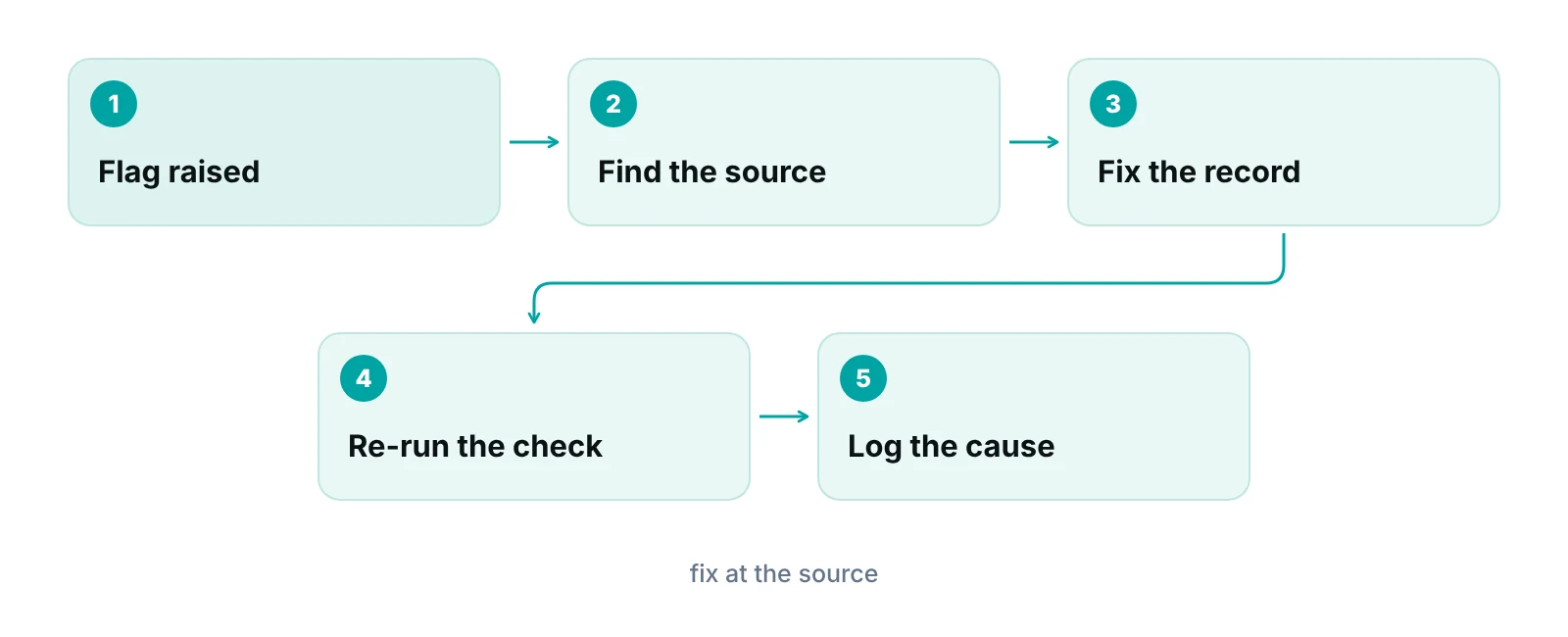
Treat every flag as a question, fix the source of the error, then re-run the check. Editing only the claim leaves the same bad data in the patient or provider record, and the next claim fails the same way.
- Sort flags by severity. Many tools separate errors that must be fixed from warnings to review. Confirm how yours labels them, and who may override a warning.
- Find the source. Is the problem in the registration record, the charge, the code or the payer setup?
- Fix it at the source. Correct the record first, then the claim.
- Re-run the check. Confirm the flag clears rather than moves to a different field.
- Log the cause. Note the payer, the rule and the field so patterns show up.
“A scrubber is a smoke alarm. It tells you something is wrong. It does not put out the fire, and an alarm nobody answers is just noise.”
— Awais Afzal, Healthcare Operations & Data Analyst
When a claim does come back, the payer’s own message is the reference. Medicare contractors publish lookup tools for their rejection codes. For example, the CGS 277CA guide gives a rejection for an invalid ZIP code and another for an invalid member number as examples, and tells the provider to adjust the claim file and resubmit. Keep a lookup like that for each major payer next to your flag log.
In-house, built-in or outsourced: which fits?
The right setup depends on who owns the work today and how many flags reach the payer. If your claims go out clean and flags are few, a good checklist and built-in rules may be enough. If rejections and denials keep returning from many causes and nobody owns the queue, you probably need dedicated hands.
| Approach | Strength | Watch out for | Fits when |
|---|---|---|---|
| Manual checklist | No tool needed; staff learn the rules | Slow; misses NCCI and MUE pairs; depends on memory | Very low claim volume and a stable payer mix |
| Rules built into your software | Runs on every claim; flags appear in your queue | Rule list may be thin or out of date; ask who maintains it | Your software already includes edit libraries and someone owns them |
| Clearinghouse edits | Catches format and payer-acceptance errors | Acts after you submit, so a flag becomes a rejection report to work | You already submit through one and read its reports daily |
| Billing company with scrubbing | Specialists apply and update edits for you | You need to see which rules ran and what they found | In-house time is short or rejection and denial work is piling up |
Our medical billing services include claim scrubbing, and our team works inside your existing EHR (for example PrognoCIS, eClinicalWorks or athenahealth). If you would rather keep the work in-house, RCM Finder also builds a practice management system that tracks claims by stage, with an owner on each claim. It runs data-completeness checks before submission, so missing required data is caught before the claim goes out. It is a claim-centred system, not an EHR, and not a clearinghouse. It does not replace code-pair or payer-rule edits.
See where your claims fail checks today
Our free practice audit looks at your rejection and denial reports and shows which fields, codes and payers cause the most rework. Pricing, if you want help, is quoted after the audit.
What should you track about scrubber results?
Track the rule that fired, the payer, the field and who fixed it, not just a count of flags.
- Flags by rule, so you can see whether the cause is data entry, coding or payer setup.
- Claims that passed your checks and were still rejected or denied, which shows a gap in your rules.
- Date of the last edit-table update, especially for NCCI and MUE files that CMS changes quarterly.
Pair this with your denial work. Our denial management guide covers what to do after adjudication. To see what rework costs your practice, try our revenue calculator.
Our recommendations
- Know which layer catches what. We recommend writing down, for each of your top payers, which checks run in your software, which at the clearinghouse and which only at the payer. Gaps show up quickly.
- Ask for the rule list. We recommend asking any scrubber vendor or billing partner which edit sets they run, how often they update them and who maintains the payer rules.
- Keep NCCI and MUE tables current. CMS updates both quarterly. We recommend confirming that your tool loads each new release on schedule.
- Do not add a modifier to clear a flag. We recommend that a coder confirm the clinical support before any modifier is added. A cleared flag with no support is a denial and audit risk later.
- Fix the record, not just the claim. We recommend correcting registration, insurance and provider data at the source so the same flag does not return on the next visit.
- Name one owner. We recommend one person owns the flag queue and the rejection report each business day. Flags that wait become filing-limit problems.
Catch incomplete claim data before submission.
RCM Finder's practice management system tracks claims by stage with an assigned owner and runs data-completeness checks before submission, so missing required data is caught before the claim goes out. It is a claim-centred system, not an EHR or a clearinghouse, and it does not replace code-pair or payer-rule edits.
See how the RCM Finder portal works · Create a portal account
Disclosure: RCM Finder builds and sells this portal. It is a practice management system, not an EHR.
Bottom line
Claim scrubbing finds fixable errors before a payer sees them, and it does that best when you know who runs which check and what each one covers. Use your own checks for completeness, keep code-pair and unit edits current, and read every rejection report. If flags and denials are piling up faster than your team can work them, our denial management services and medical billing services can help, and you can start with a free practice audit.
Frequently asked questions
What is claim scrubbing in medical billing?
Claim scrubbing is an automated check that looks for errors in a claim before the payer decides on it. It flags missing data, invalid codes, conflicting code pairs and payer-specific problems so staff can fix them first. It is an industry term for a set of edits, not a regulated process.
Is a claim scrubber the same as a clearinghouse?
No. A clearinghouse transmits claims and applies its own edits, and it returns acknowledgments such as the 277CA. A scrubber is a set of checks that can run in your software, at a clearinghouse or at a billing company. Some clearinghouses include scrubbing. Ask what is included.
Does claim scrubbing prevent denials?
It prevents the denials that come from errors a rule can detect, such as missing data or a code pair that needs a modifier. It cannot fix thin documentation, inactive coverage or a missing authorization. Treat it as one control among several, not a guarantee.
What are NCCI and MUE edits?
NCCI procedure-to-procedure edits are code pairs that should not be billed together on the same date unless an allowed modifier applies. A medically unlikely edit is a cap on units of one code per patient, provider and date. CMS updates both quarterly, and some payers apply them voluntarily.
What is the difference between a rejected claim and a denied claim?
A rejected claim fails validation before adjudication, so the payer never decides on it and no remittance is issued. A denied claim was adjudicated and appears on the 835 with reason codes. Rejections are corrected and resubmitted. Denials may be appealed, depending on the reason.
How often should scrubber rules be updated?
Whenever a source changes. CMS updates the published NCCI and MUE files quarterly, and payers change their own rules on their own schedules. Ask your vendor or billing partner how often rules are refreshed, and who confirms the update ran.
Get your free practice audit
Tell us about your practice. We will contact you using the details you give.
- A review of your recent claims, denials and A/R aging
- Where your front desk and prior authorizations slow payment
- A prioritized fix list you keep, whether or not you hire us
Pricing is quoted after the audit, based on your volume and the services you choose. Prefer to talk? Call +1 (302) 556-2288.
Sources
- Medicare NCCI Policy Manual, Introduction — CMS (2024)
- How to Use the Medicare NCCI (MLN901346) — CMS (2025)
- Medicare NCCI Medically Unlikely Edits — CMS (2025)
- Medicare Claims Processing Manual, Chapter 26: Completing and Processing Form CMS-1500 — CMS (2025)
- Acknowledgments and ERAs overview — Stedi (2025)
- Claim submission timeliness — Noridian Medicare JF Part B (2025)
- Claims returned as unprocessable — First Coast Service Options (2025)
- 277CA EDI Edit User Guide — CGS Medicare (2025)
Disclaimer: This post is general educational information about revenue cycle operations. It is not legal, coding, billing-compliance or financial advice. Edit rules, code tables, payer policies and filing limits vary by payer and change over time. Confirm requirements with the payer, your clearinghouse and qualified advisors before acting.
