
One portal for claims, billing rules, staff access and reporting, for practices and billing companies, with a team that works inside your existing EHR.
By Awais Afzal | Healthcare Operations & Data Analyst
Published October 12, 2026 · Last reviewed October 12, 2026 · Next review April 12, 2027
Quick answer
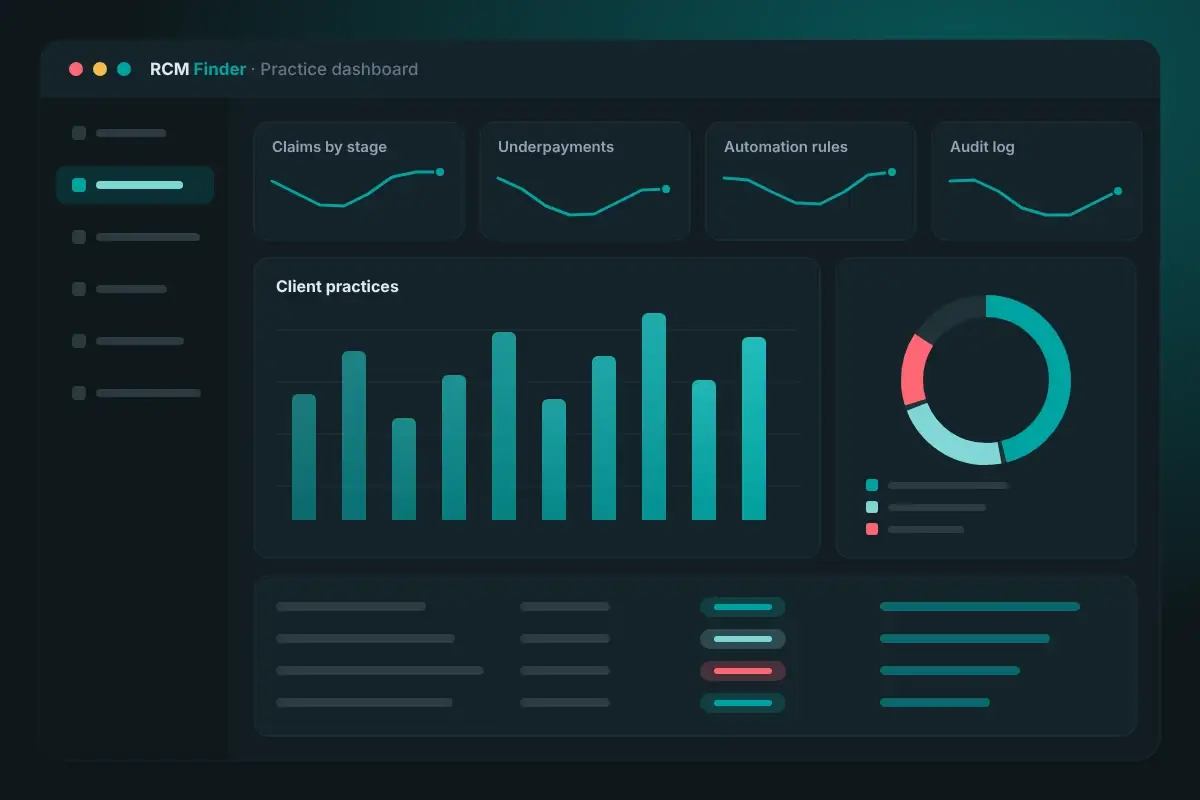
The RCM Finder portal is a practice management system for medical practices and billing companies, built around the claim. Today it tracks claims by stage, applies specialty-aware billing logic, checks data before submission, flags underpayments, runs automation rules and controls access with roles and an audit log. Scheduling is in early access.
Because the claim is where money, staff work and compliance meet. A practice management system (PMS) built around the claim shows what is waiting, what is on hold, what was paid short and who owns the next step, in one place. Most billing trouble comes from claims that sit between two people, two spreadsheets or two systems.
The RCM Finder portal is that one portal. It runs the business side of the practice: claim stages, billing rules, staff access and reporting. It is not an EHR, and it does not replace yours. An EHR holds the clinical record; HealthIT.gov describes it as a digital version of a patient's paper chart. Our team works inside your existing EHR (for example PrognoCIS, eClinicalWorks or athenahealth), and the portal tracks the billing work alongside it.
Much of that business work runs on HIPAA standard transactions. CMS names eight, including eligibility, claim status, claims and encounter information, referrals and authorizations, and payment and remittance advice. A PMS is where a practice keeps track of them.
Want the scheduling calendar first?
Join early access for appointment scheduling with a calendar and day view. We start with a free practice audit so the setup reflects how your front desk and billing work today.
The portal groups 35 specialties into shared billing-pattern archetypes and applies that logic per claim, not per practice. Two claims from the same practice can need different rules, and the portal treats them that way.
Many systems set one rule list for the whole practice. That works until a group adds a second specialty or a billing company takes on a new client. A per-claim approach means the rules follow the service billed, so a multi-specialty group or a billing company with clients in different specialties is not forced into one template.
We build our billing pipeline around how claims actually move through a practice: registration, charge entry, submission, payment and follow-up.
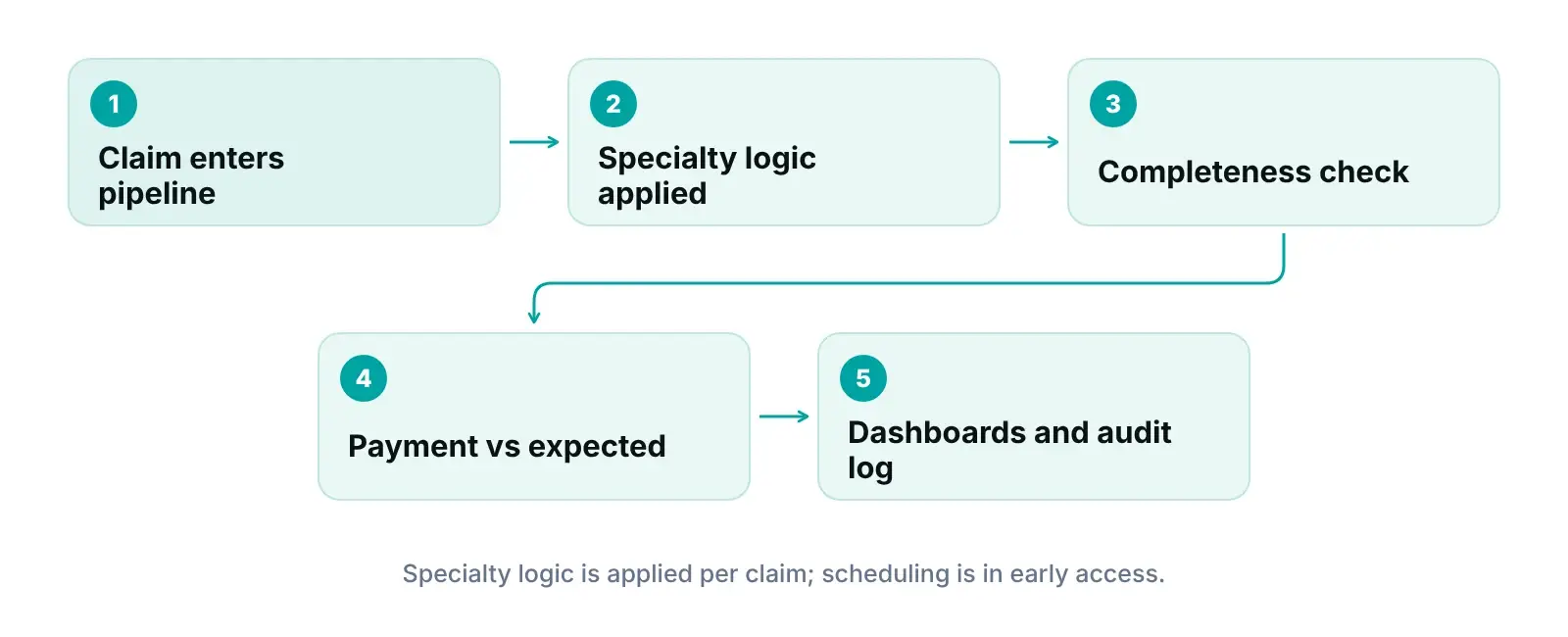
It checks claim data before submission, compares each payment with the expected amount after, and runs workflow rules in between. Each one targets a point where revenue normally slips.
A claim missing required data is a claim that will likely come back. The portal flags incomplete claims before they go out, so staff can fix them while the visit is fresh. Our claim scrubbing guide explains the edits most practices need.
Payers can pay less than the expected amount without saying so. The portal compares each payment with the expected amount, so a short payment is flagged instead of posted and forgotten. Share your fee schedules, and they become the baseline.
Rules flag a claim for review, advance or hold a stage, or assign an owner. They copy your process, so we write the process down first. The result is the same decision every time, whoever is working the queue.
Together these feed the reporting dashboards in the portal. For deeper analysis, we also build dashboards in our own practice management system for medical practices. The portal supports the billing work; it does not promise a result, and we do not publish client outcome numbers.
Each person gets a personal login and a role, the audit log records portal activity, and the practice's own time zone governs every staff member. These three controls matter most when staff are remote or when one billing company serves many clients.
HHS's minimum necessary guidance asks covered entities to identify which workforce members or classes need which patient information and under what conditions. Role-based permissions are how software puts that policy into practice: a biller sees what billing needs, a manager sees more, and nobody sees everything by default.
Under 45 CFR 164.312, access control requires a unique user identification and an emergency access procedure, while automatic logoff and encryption are addressable. The same section requires audit controls. Addressable does not mean optional: 45 CFR 164.306(d) requires you to assess each addressable item and either implement it or document why not. The portal uses role-based access, audit logging and encrypted HTTPS connections, and we put a Business Associate Agreement in place before accessing patient data.
HHS proposed changes to the Security Rule on December 27, 2024, including mandatory encryption and multi-factor authentication. HHS's fact sheet states that the current Security Rule remains in effect during that rulemaking, so check its status before you plan around it.
The practice's own time zone governs every staff member, onshore or offshore. Staff work to your clock, so a morning review means your morning.
Both. Practices use it to see their billing work, and the team doing it, in one place. Medical billing companies use it as a medical billing portal for several client practices, with staff permissions, an audit log and automation rules. The table shows what each audience gets from the same features.
| Need | If you are a practice | If you are a billing company |
|---|---|---|
| See where claims stand | Every claim by stage, with an owner, without calling the biller | Each client practice's claims by stage |
| Handle different specialties | Rules follow the service billed, claim by claim | Clients in different specialties handled per claim |
| Catch problems early | Incomplete claims flagged before submission | The same checks across every client |
| Find short payments | Payments compared with expected amounts | Short payments flagged for each client |
| Control who sees what | Each staff member sees what the role needs | Staff roles plus a record of activity when a client asks who did what |
| Share results | Your own claims and KPIs in one place | A client portal for each practice you serve |
| Keep staff on one clock | Your practice's time zone, every shift | Each client's time zone governs that client's work |
Features as listed by RCM Finder's product team, October 2026. Confirm your exact setup during the free audit.
Searching for practice management software? Our guide covers the category and the features that matter for RCM. This page covers one product: what ours does today.
Claim tracking, billing logic, checks, rules, permissions, audit log, client portals and dashboards are live today. Appointment scheduling with a calendar and day view is in early access. A provider credentialing module and automated real-time eligibility verification inside the portal are coming next. We give no release dates.
| Feature | Status | What it means for you |
|---|---|---|
| Claim pipeline by stage, with data-completeness checks before submission | Live today | See where every claim stands; incomplete claims are flagged before they go out |
| Specialty-aware billing logic (35 specialties, applied per claim) | Live today | Rules match the service billed, not just the practice |
| Underpayment detection against expected amounts | Live today | Short payments are flagged, not written off |
| Workflow automation rules (flag, hold or advance a stage, assign an owner) | Live today | The same decision every time |
| Role-based permissions and audit log | Live today | Each person sees what their role needs; activity is recorded |
| Client portals and reporting dashboards | Live today | Practices see their own claims and KPIs; billing companies get a portal per practice |
| Appointment scheduling with calendar and day view | Early access | Join early access to try it before general release |
| Provider credentialing module; automated real-time eligibility verification | Coming next | Not live; today our team runs eligibility checks |
Status as of October 2026, per RCM Finder's product team. Early-access and coming-next items have no committed release dates.
The goal is that the front desk books and views the day in the same system where claims are tracked, so the visit and the claim start from one record. Early-access members try it before general release. Until then, scheduling stays in your EHR, and our virtual medical assistants book and confirm visits there on your clock.
Credentialing delays hold up claims for new providers, and eligibility gaps cause avoidable denials. Both modules are on the roadmap and neither is live. Today our virtual medical assistants run eligibility checks for you. For what good looks like in the meantime, read our guides to automating insurance eligibility verification and insurance credentialing for group practices.
It starts with a free practice audit and a Business Associate Agreement. Then we map your claim stages, set roles and rules, and review results with you.
We review a sample of your claims, denials and A/R aging, plus how your front desk and billing hand work to each other. You get a plain list of where claims stall. Pricing is quoted after the audit.
We put a Business Associate Agreement in place before accessing patient data. Then each staff member gets a personal login and a role that matches the job.
We set up your claim stages, match your services to the right specialty billing pattern and agree how expected payment amounts are set for underpayment checks.
Together we decide which claims get flagged for review, which stages hold or advance and who owns each queue.
Your staff and ours work from the same pipeline. Each week we review dashboards and underpayments with you, check the audit log and adjust rules as payers change.
Size the revenue your workflow leaves behind
Put your monthly claim volume and collections into our revenue calculator for a starting number to bring to the audit.
The portal's job is the same in every specialty, but the claims it handles are not. Procedure-based specialties need authorization and modifier discipline; visit-based specialties need clean eligibility and documentation. Per-claim logic lets one portal serve both.
| Specialty group | What differs in the claim | Why per-claim logic matters |
|---|---|---|
| Pain management and neurology | Procedures, units and modifiers; authorization before repeat treatment | Procedure and visit claims from one practice need different checks |
| Cardiology | Professional, technical or global billing depends on who owns the equipment and who reads | The same test can be billed differently by site |
| Orthopedics and general surgery | Surgical cases with global periods, assistants and facility claims | Follow-up visits need different handling from the surgery |
| Radiology and pathology | Professional and technical components; ordering-provider details | Missing order data is caught before submission |
| Behavioral health | Session type and length; authorization and visit limits | Series of visits tracked against authorization |
| Dermatology and ophthalmology | Medical vs cosmetic or routine services | Coverage logic follows the service, not the practice |
| Family practice and internal medicine | High visit volume; preventive and chronic-care visits | Many small claims need consistent rules and owners |
Operational patterns by specialty, not statistics. Payer rules vary by plan; confirm each against the payer's own policy.
Each name links to that specialty's page, with codes, payer rules and sources. For all 35 specialties, see our specialty hub.
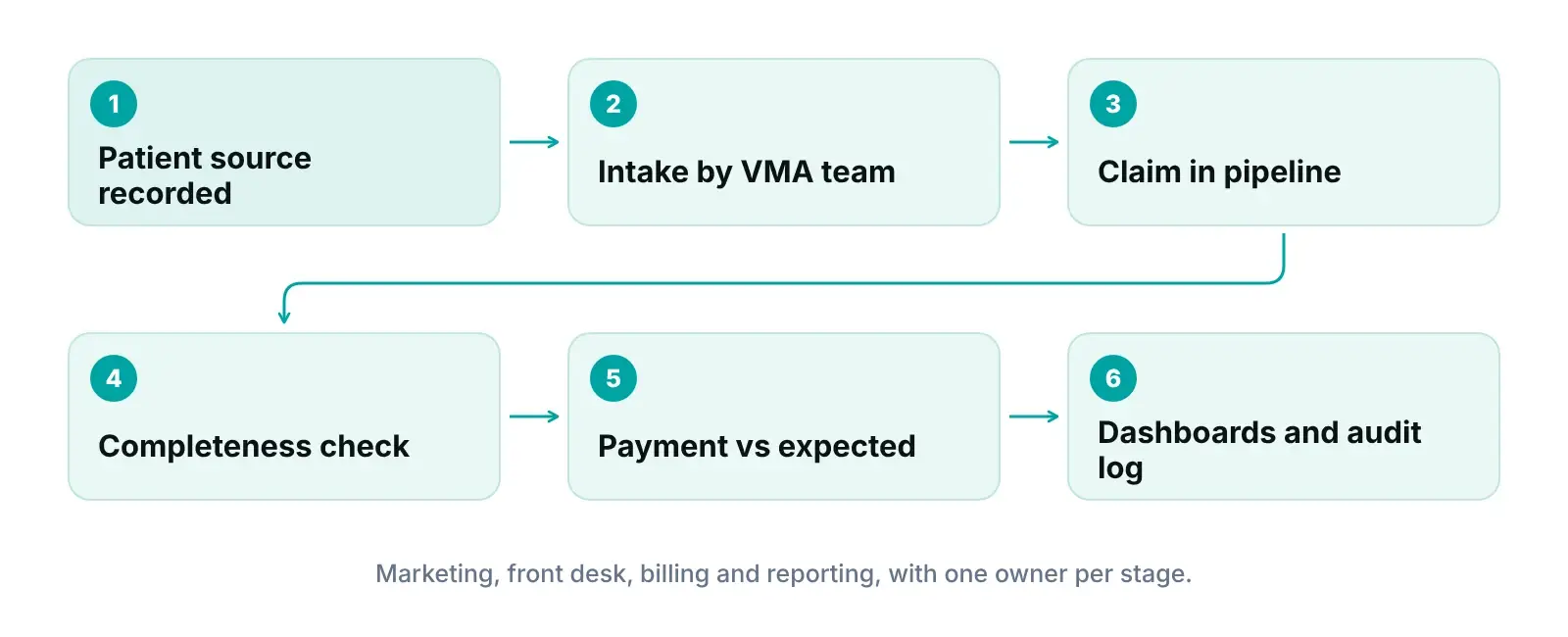
The portal is where our four services meet. Marketing brings the patient, virtual medical assistants prepare the visit, the RCM team works the claim, and the portal keeps claim history and reporting in one place.
Local SEO, Google Ads and reputation work bring new patients. Our intake team records how each patient found you.
Our assistants handle scheduling, eligibility checks, prior authorizations and intake inside your EHR.
Billing, coding support, claim scrubbing, denial management and A/R follow-up, in the same pipeline you see.
The portal holds the claim pipeline, permissions, audit log and dashboards, for one practice or many.
Ask for a Business Associate Agreement, a clear answer on who can see patient data, and a demo of what is live. HHS lists billing and practice management among the functions a business associate performs, and a covered entity may share patient data with one only under a written agreement.
Our answer to the first and last: yes, and no. We put a Business Associate Agreement in place before accessing patient data, and our team works inside your existing EHR. For a wider checklist, see our HIPAA compliance checklist for medical practices.
Questions about fit, data access or early access?
Talk to our team. If you need a feature that is not live yet, we will say so and explain what our staff can do in the meantime.
We would rather tell you now than after you sign. Here is where we fit and where we do not.
A good fit if you are
Probably not a fit if you are
What we would do first if we were running your practice's revenue cycle tomorrow.
Shared logins break the audit trail and the HIPAA requirement for unique user identification. We set up each staff member, onshore or offshore, with a login and role on day one.
Automation rules copy your process, good or bad. We write down each stage, its owner and its exit condition first, then add rules that flag, hold or advance claims.
Underpayments rarely announce themselves. We review flagged short payments weekly and group them by payer, so one contract problem gets fixed once.
Most teams open the audit log only after something goes wrong. We suggest a monthly look at unusual access and changes to who can see what.
Limit each biller to the client practices and functions their job needs. It protects clients and makes the audit log easier to read.
Early access is for practices that want to try scheduling before general release. If your front desk can spare time to give feedback, say so when you join.
A practice management system is the software that runs the business side of a practice: claim status, payments, staff tasks, access and reporting. An EHR holds the clinical record, and an RCM service is the team that does the billing work. RCM Finder's portal is a practice management system with billing built in, and it does not replace your EHR.
Not yet. Appointment scheduling with a calendar and day view is in early access, so it is not live for daily use. You can join early access from this page. Until then, our virtual medical assistants schedule, confirm and prepare visits inside the EHR you already use, on your practice's time zone.
Yes. The portal includes a client portal for billing companies that serve several practices, plus role-based staff permissions, an audit log and workflow automation rules. Each practice's claims are tracked by stage, checked for missing data before submission and compared with expected payments. We confirm your exact setup during the free audit.
No. Our team works inside your existing EHR, for example PrognoCIS, eClinicalWorks or athenahealth, while the portal tracks the billing work alongside it. We do not claim an official partnership with any EHR vendor. During the free audit we walk through how work moves between your EHR, our team and the portal.
HIPAA compliance is an ongoing program, not a badge, and HHS does not endorse or recognize private certifications of Security Rule compliance. What we can state: we put a Business Associate Agreement in place before accessing patient data, and the portal uses role-based access, audit logging and encrypted HTTPS connections. Your practice still needs its own risk analysis and policies.
Pricing is quoted after a free practice audit, because cost depends on your claim volume, the services you need and how many practices you manage. We do not publish fixed prices. The audit also shows where your claims stall today, so you can judge the value before you commit to anything.
Guides from our operations team on topics covered on this page.
Tell us about your practice. A member of our operations team replies within one business day.
Pricing is quoted after the audit, based on your volume and the services you choose. Prefer to talk? Call +1 (302) 556-2288.
Tell us about your practice
About the author: Awais Afzal
Healthcare Operations & Data Analyst, RCM Finder
Awais has spent more than 16 years in healthcare digital marketing and clinical operations management. He builds data-driven revenue cycle blueprints for high-ticket medical practices and leads product development of the RCM Finder portal. More about our team.
How we write: every figure, code and rule on this page was checked against the primary source listed below and independently fact-checked before publishing. We re-review this page every six months. Last reviewed October 12, 2026; next review April 12, 2027.
We use cookies to understand how our site is used and to measure our advertising. You can accept or reject non-essential cookies. See our Privacy Policy.