
Automating insurance eligibility verification means sending each patient's coverage check to the payer electronically, using the standard 270 request and 271 response, instead of calling or browsing a portal. CAQH's 2024 Index puts a manual check at about $8.57 of provider labor and an electronic check at about $2.00.
This guide is for practice owners and managers who already know why coverage must be confirmed before a visit and now want to know how the automated version works, what it changes and where it still needs people. If you need the basics first, start with the full patient insurance verification guide. Everything below is about the automation decision: the standards behind it, what the published cost data says, how to handle exceptions, and how to roll it out in stages.
Key takeaways
- Automated checks use the HIPAA-adopted 270/271 transaction; manual checks are phone, fax, mail or email.
- CAQH’s 2024 Index (2023 data) reports provider labor of about $8.57 per manual check versus about $2.00 per fully electronic check.
- Automation answers the routine checks. Exceptions (no response, mismatched names, secondary coverage) still need a trained person and a written queue.
- Measure your own volume and denial reasons before you buy anything; published averages are not your savings.
What automated eligibility verification actually does
Automated eligibility verification replaces a person’s phone call or portal search with a machine-readable request to the payer. Your software, clearinghouse or practice management system sends a 270 eligibility inquiry and receives a 271 response. Under 45 CFR 162.1202, the adopted standard for dental, professional and institutional eligibility transactions is ASC X12N 005010X279, the 270/271 pair.
The response tells staff whether the plan shows the patient as covered on the date of service and returns benefit information the plan chooses to send. A staff member (or a rule) then compares that response with what the schedule and the insurance card say. Automation moves the lookup. It does not move the responsibility for acting on a mismatch.
Think of a Monday morning at a three-provider practice. Forty patients are booked for Wednesday. In a manual workflow, one front-desk employee opens payer portals and phones the plans that have no portal. In an automated workflow, the 270 requests go out as the appointments are made or the night before, and the employee only opens the cases that came back inactive, empty or inconsistent.
Three ways to run the same check
CAQH defines these modes in its 2024 Index. Fully manual means end-to-end human interaction by telephone, mail, fax or email. Partially electronic means a web portal or interactive voice response system. Fully electronic means a HIPAA-mandated standard transaction, which for eligibility is the 270/271. Most practices today sit in the middle, logging into one portal per payer.
What the published data says about cost and time
The most useful public benchmark is the CAQH Index. Its 2024 edition reports calendar-year 2023 labor cost per eligibility and benefit transaction, split by who does the work and how.
| Method | Provider cost | Plan cost | Industry cost |
|---|---|---|---|
| Fully manual | $8.57 | $4.38 | $12.95 |
| Partially electronic (portal / IVR) | $4.46 | $0.04 | $4.50 |
| Fully electronic (270/271) | $2.00 | $0.04 | $2.04 |
Source: CAQH, 2024 CAQH Index (2023 data), medical eligibility and benefit verification.
The same report estimates that switching a medical provider’s check from manual to electronic saves about 12 minutes of staff time per transaction. It also puts the medical industry’s remaining savings opportunity from fully electronic transactions at $11.7 billion for 2023, the largest of any medical transaction it measures. On the plan side, 96 percent of medical eligibility transactions reported by health plans were fully electronic in the 2024 Index, so payers are largely ready to receive your requests.
These are averages, not your savings
CAQH measures labor cost per transaction across the industry. It does not measure your denial rate, your payer mix or what you pay your staff. The old version of this post quoted a denial share and a dollar loss per month without a source. We removed both. Use the formula in the savings section to work out your own number.
“Size this from your own check volume and your own denial reasons, not from any vendor's headline percentage, including ours.”
How an automated check works, step by step
An automated check follows the same six moments every time, and the quality of the result depends mostly on the first one: clean demographic data. The diagram shows the usual flow; your clearinghouse or EHR may combine steps.
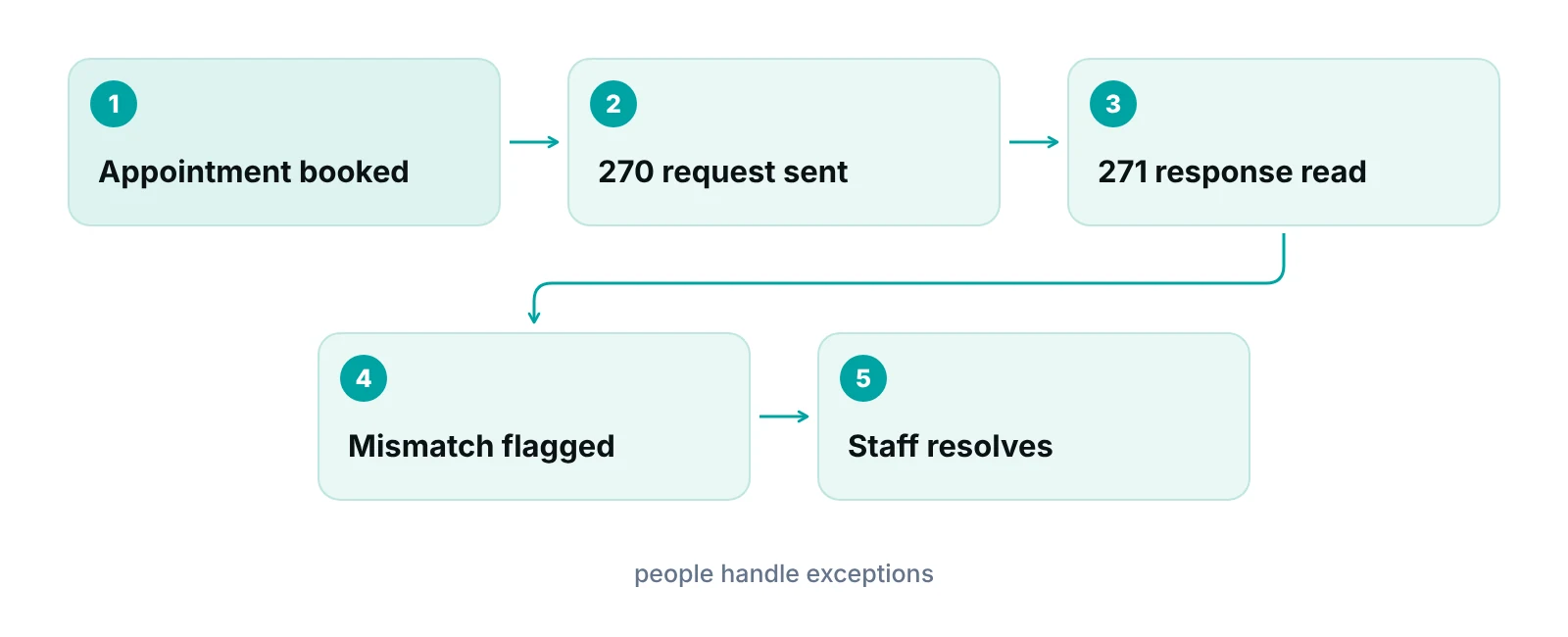
- Capture. Name, date of birth, member ID and payer are entered or scanned from the card. A typo here produces a failed check, not a wrong one.
- Request. The system builds a 270 and sends it through a clearinghouse or direct connection.
- Response. The payer returns a 271, or an error that says why it could not match the patient.
- Interpret. Rules compare the response with the schedule: active on the date of service, expected plan type, other coverage shown.
- Flag. Anything inactive, unmatched or inconsistent goes to a work queue with an owner.
- Record. The result and the time are saved on the visit so billing can see what was known at scheduling.
For Medicare, the CMS HIPAA Eligibility Transaction System (HETS) takes real-time 270 requests and returns 271 responses. Per the CMS HETS page, it does not accept batch transactions, and a submitter must develop or acquire a tool to build the requests and read the replies. Commercial plans and Medicaid programs set their own connection rules, so ask each payer or your clearinghouse what they support.
One caution on timing. A check is a snapshot. Coverage can change between the day you check and the day of service, which is why many practices run a second check close to the visit. That second pass is also a good moment to re-read the benefit information, because it is the part patients ask about at the desk. five best practices for eligibility and benefits verification covers the manual habits that still apply.
The rules behind the 270/271: what is required and what is not
Federal rules fix the format and the response time of the transaction, not what your practice must automate. HIPAA’s transaction standards bind health plans to accept the standard transaction, and the adopted CAQH CORE operating rules add speed and content requirements.
| Item | What the rule or page says | Why it matters to a practice |
|---|---|---|
| Transaction standard | ASC X12N 005010X279 (270/271) for dental, professional and institutional eligibility (45 CFR 162.1202) | Your clearinghouse and EHR should speak this format; ask which version they use |
| Real-time response time | CORE 156 sets a response of 20 seconds or less, met when 90 percent of responses arrive in that time each calendar month (CAQH CORE 156 rule) | A single slow reply is not automatically a violation; a pattern is worth raising with the payer |
| Adopted operating rules | 45 CFR 162.1203 adopts CAQH CORE eligibility rules covering connectivity, data content, response time and AAA error code reporting | Error codes should tell you why a check failed, which drives your exception queue |
| Medicare real-time access | HETS accepts real-time 270 requests only; no batch (CMS HETS page) | A nightly batch for Medicare patients is not available through HETS |
| Retail pharmacy | Uses NCPDP standards instead of X12 (45 CFR 162.1202) | Pharmacy benefit checks are a separate workflow from medical eligibility |
Sources: eCFR 45 CFR 162.1202 and 162.1203; CAQH CORE 156 rule; CMS HETS page (all retrieved October 2026).
None of this is a mandate to automate. It means that if you do, the format, the connection and the response time are standardised, so the work is mostly integration and process, not invention. Rules and payer companion guides change, so check the current text before you sign with a vendor. This is educational and not legal or compliance advice.
Where automation breaks, and what to do about it
The routine cases go quickly; the failures are where revenue leaks. A written exception process is what separates a useful rollout from one that quietly stops being checked.
| What comes back | Likely cause | Practical response |
|---|---|---|
| No match / AAA error | Name spelling, date of birth, ID format or wrong payer | Re-check the card, correct the registration data, resend; call the plan if it fails twice |
| Inactive on date of service | Lapsed coverage, new plan, or wrong member | Contact the patient before the visit; ask for current card and any other coverage |
| Active but unexpected plan type | Plan change, Medicare Advantage vs traditional Medicare, a carve-out | Update the payer on the visit and rerun; confirm who is primary |
| Other coverage shown | Coordination of benefits | Confirm primary and secondary order with the patient and payer before billing |
| Timeout or no reply | Payer system or connectivity | Queue for a retry and a portal check; log the attempt |
Our operational guidance, not a regulatory list. Payer behavior varies; confirm in each payer’s companion guide.
Specialties with extra benefit questions need more than an active-or-inactive answer. Therapy and counseling visits, for example, often depend on benefit details that vary by plan, so behavioral and mental health billing teams typically add a benefits review step on top of the automated check. Our post on behavioral health eligibility verification walks through that.
People are the other pitfall. Automation changes the front-desk job from lookup to review, and that needs training and clear ownership. If a flag has no owner, it becomes background noise. how front-desk work affects the revenue cycle, and eligibility is one of the earliest places that shows up.
How to estimate your own savings before you buy
Your savings are your monthly check volume multiplied by the labor difference between your current method and the new one, plus whatever denials you avoid. Only the first part can be estimated from public data.
- Count eligibility checks per month, including repeat checks on the same patient.
- Time a sample of ten manual checks with a stopwatch, by payer.
- Multiply that time by the loaded hourly cost of the person doing them.
- Subtract the time you expect to spend on exceptions after automation.
- Add the vendor or clearinghouse fees quoted in writing.
As an illustration only, using CAQH’s national averages: 1,000 checks a month at $8.57 manually versus $2.00 electronically is a $6.57 difference per check, or $6,570 in provider labor cost a month before exceptions and fees. That is arithmetic on industry averages, not a forecast for any practice.
For the denial side, pull your last quarter’s denials and tag each by reason. Only the ones caused by registration or coverage problems belong in the eligibility column. Our denial management guide explains how to categorise them, and the revenue calculator gives a broader view of where revenue may be leaking.
A staged rollout that does not disrupt the front desk
Start with one payer and one location, and expand only after the exception queue is working. A pilot costs a few weeks and tells you more than any demo.
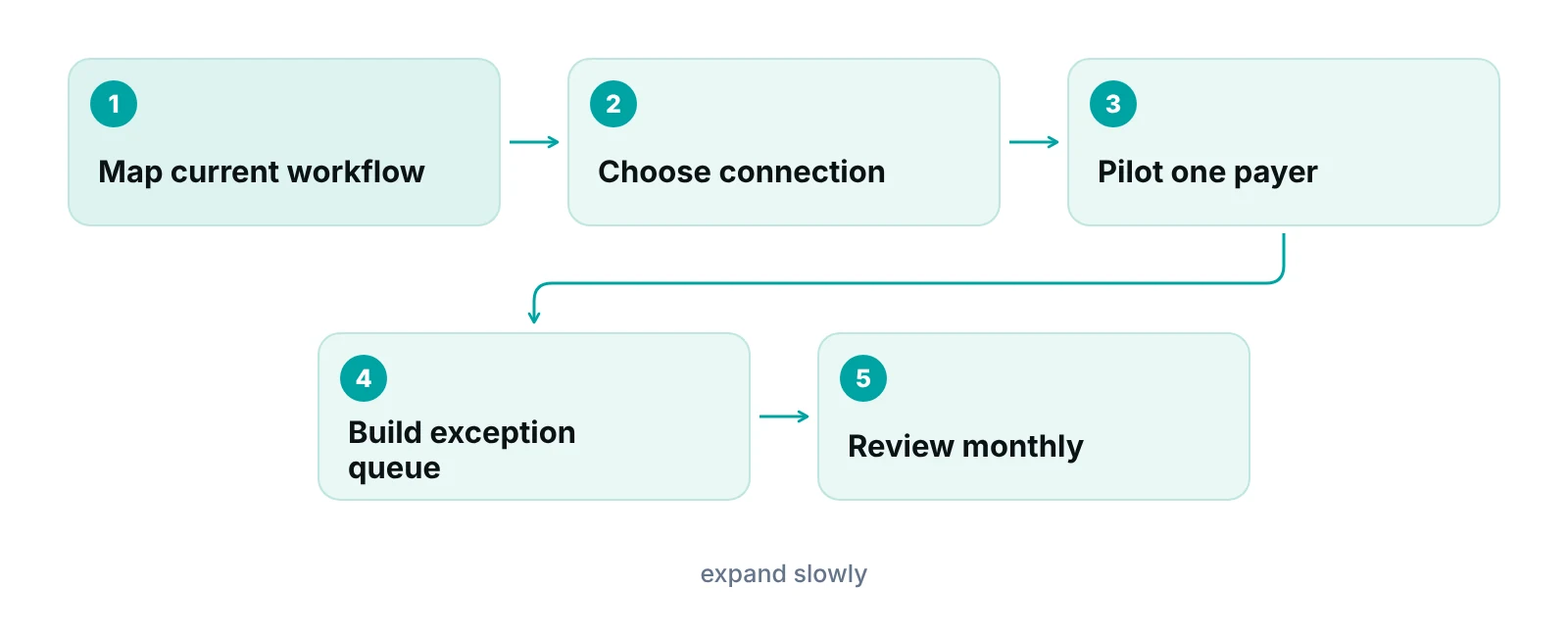
- Map the workflow. Who checks, when, in what system, for which payers?
- Choose the connection. Ask your EHR vendor and clearinghouse which payers they check in real time and which still need a portal.
- Pilot one payer. Run automated and manual in parallel for a few weeks and compare.
- Write the exception rules. Use the table above. Name an owner for each queue.
- Review monthly. Track failed checks, eligibility-related denials and re-registration rate.
Want a second pair of eyes on your eligibility workflow?
Our free practice audit looks at how coverage is checked today and where claims are being held up.
Where software ends and people begin
Software gives you the response; a trained person decides what to do with it. RCM Finder’s team works with the EHR you already use and can take on eligibility checks and the follow-up on exceptions as part of virtual medical assistants who run eligibility checks. We do not claim an official partnership with any EHR vendor.
Our own software portal does not run eligibility checks today. What it does cover is the stage after: tracking each claim by stage with an owner, and flagging claims with missing data before they are submitted. If you want that visibility, see a practice management system that tracks claims by stage. Eligibility problems that surface later show up as denials, and our denial management services and medical billing services teams work those once they are on a claim; the aim of better clean claims is to catch them earlier.
Our recommendations
- Count before you compare. Get a month of check volume by payer. Without it every vendor quote is a guess.
- Time your own manual checks. Ten stopwatch samples beat any national average for your decision.
- Pilot one payer first. Run both methods side by side. Expand when the exception queue is quiet.
- Name an owner for every flag. A flag without a person attached is not a control.
- Recheck close to the visit. Coverage changes. A second check shortly before the date of service catches most of it, and gives you current benefit details to share at the desk.
- Ask for payer coverage in writing. Ask any vendor which payers return real-time responses, which need batch or portal, and what happens when a payer does not respond.
Our portal tracks the claim after eligibility is checked.
It tracks claims by stage with an owner and runs data-completeness checks before submission. It does not perform eligibility checks today.
See how the RCM Finder portal works · Create a portal account
Disclosure: RCM Finder builds and sells this portal. It is a practice management system, not an EHR.
Bottom line
Automation is worth it when your check volume is high enough that the labor difference matters and when you have someone to own the exceptions. If you want help sizing it, our virtual medical assistants who run eligibility checks can take the routine checks and exceptions off the front desk, and our denial management services team works the denials that still get through.
Frequently asked questions
What does automating insurance eligibility verification mean?
It means checking coverage through an electronic 270 request and 271 response, usually via a clearinghouse or your EHR, instead of phoning the payer or searching a portal. The system flags results that need attention. Staff still handle failures, secondary coverage and any benefit question the response does not answer.
How much does a manual eligibility check cost compared with an electronic one?
The CAQH 2024 Index, using 2023 data, reports provider labor of about $8.57 for a fully manual medical check, $4.46 for a portal or phone-menu check and $2.00 for a fully electronic one. These are industry averages for labor only. Your cost depends on your staff pay, volume and fees.
Is real-time eligibility verification required by law?
No. HIPAA adopts a standard format for the 270/271 transaction and CAQH CORE operating rules for response time, which apply to health plans and covered transactions. Federal rules do not require a practice to automate its own checks, though many choose to for cost and speed.
Can I check Medicare eligibility in bulk each night?
Not through the CMS HETS system. CMS states that HETS supports real-time transactions only and does not accept batch 270 requests. Some clearinghouses offer scheduled runs that send many real-time requests in sequence, so ask your vendor how they handle Medicare.
Does a positive eligibility response guarantee the claim will be paid?
No. An eligibility response tells you what the plan shows at that moment. A claim can still be denied for other reasons such as authorization, coding, medical necessity or timely filing. Keep eligibility checks as one control among several.
What should I ask a vendor before I automate eligibility checks?
Ask which payers return real-time responses, what the failure rate looks like in your payer mix, how errors are reported, how data is secured, and whether they will sign a Business Associate Agreement. Ask for a pilot on one payer, and for fees in writing.
Get your free practice audit
Tell us about your practice. We will contact you using the details you give.
- A review of your recent claims, denials and A/R aging
- Where your front desk and prior authorizations slow payment
- A prioritized fix list you keep, whether or not you hire us
Pricing is quoted after the audit, based on your volume and the services you choose. Prefer to talk? Call +1 (302) 556-2288.
Sources
- 2024 CAQH Index — CAQH (2024)
- 45 CFR 162.1202 Eligibility for a health plan — eCFR / HHS (2026)
- 45 CFR 162.1203 Operating rules for eligibility — eCFR / HHS (2026)
- Phase I CORE 156 Eligibility and Benefits Real Time Response Time Rule v1.1.0 — CAQH CORE (2011)
- HIPAA Eligibility Transaction System (HETS) — CMS (2026)
Disclaimer: This article is for education only. It is not legal, coding, billing or compliance advice. Payer rules, federal regulations and benchmark data change; verify current requirements with the payer, your clearinghouse and qualified counsel before acting.