
EDI in medical billing is the exchange of billing data between a practice and a health plan in a fixed electronic format. Each business task has its own transaction: the 837 sends the claim, the 835 returns the payment detail, the 270/271 checks eligibility, and the 276/277 asks for claim status.
Most practices use EDI every day without seeing it. A biller clicks submit, a clearinghouse reformats the file, a payer answers, and a remittance lands in the posting queue. Problems start when nobody on the team knows which step failed. This guide names each transaction, shows the federal rules behind them, and explains where a practice can lose time. It sits alongside our guides to how clearinghouses manage claims and how electronic remittance advice works, so those topics stay short here.
Key takeaways
- EDI means standard-format electronic transactions; each task (claim, payment, eligibility, status) has its own transaction.
- The federal standards for these transactions are ASC X12N version 5010, in force since January 1, 2012.
- A covered entity that sends a transaction electronically must use the adopted standard (45 CFR 162.923).
- A rejected file never reached adjudication; a denied claim did. Fix them in different places.
- Know who owns each step (practice, clearinghouse, billing company) before something breaks.
What does EDI mean in medical billing?
EDI stands for electronic data interchange. In billing, it means a practice and a health plan trade information as structured files instead of paper, phone calls or portal screens. Both sides follow the same layout, so a computer can read the data without a person retyping it.
The layout is not a vendor choice. Under HIPAA, HHS adopted ASC X12N standards for the main provider-to-plan transactions, and CMS lists the 837, 270/271, 276/277, 278 and 835 versions in use today. All of them are version 5010, with a standard date of January 1, 2012. A rule in the HIPAA regulations, 45 CFR 162.923, says that when a covered entity conducts a transaction electronically and a standard exists, it must conduct it as a standard transaction (eCFR).
Older guides sometimes say claims travel in “ANSI X12 or HL7.” For the claim and remittance transactions listed by CMS, the adopted standard is X12N. HL7 is a different family of healthcare messaging standards and is not what your claim file uses.
Three words worth separating
EDI is the method. A clearinghouse is a company that moves and checks EDI files between you and many payers. A practice management system or billing software is where your team creates the claim. One practice often uses all three.
Which EDI transactions does a practice actually use?
Most front-desk and billing work touches five transactions, plus two that belong to employers and plans. The table groups them by the question each one answers for the practice.
| Transaction | Standard (X12N 5010) | What it does for the practice | Who usually triggers it |
|---|---|---|---|
| Health care claim | 837 | Sends the professional claim to the plan. Also used for coordination of benefits. | Billing team or billing software |
| Electronic remittance advice | 835 | Returns payment and adjustment detail by claim, with the trace number that ties it to the payment. | Payer, after adjudication |
| Eligibility and benefit inquiry and response | 270/271 | Asks the plan about a patient’s coverage before the visit and returns the answer. | Front desk or verification staff |
| Claim status inquiry and response | 276/277 | Asks where a submitted claim stands. | A/R follow-up staff |
| Referral certification and authorization | 278 | Requests and answers referral or prior authorization decisions. | Authorization staff |
| Enrollment (834) and premium payment (820) | 834 / 820 | Move member and premium data. These serve plans and employers, not provider claims. | Plan sponsors, not practices |
Source: CMS, Adopted Standards and Operating Rules (accessed October 2026).
The last row clears up a common mix-up. The 834 and 820 appear in many “EDI in healthcare” lists, but a physician practice does not send them to get paid. If your vendor quotes you for them, ask why.
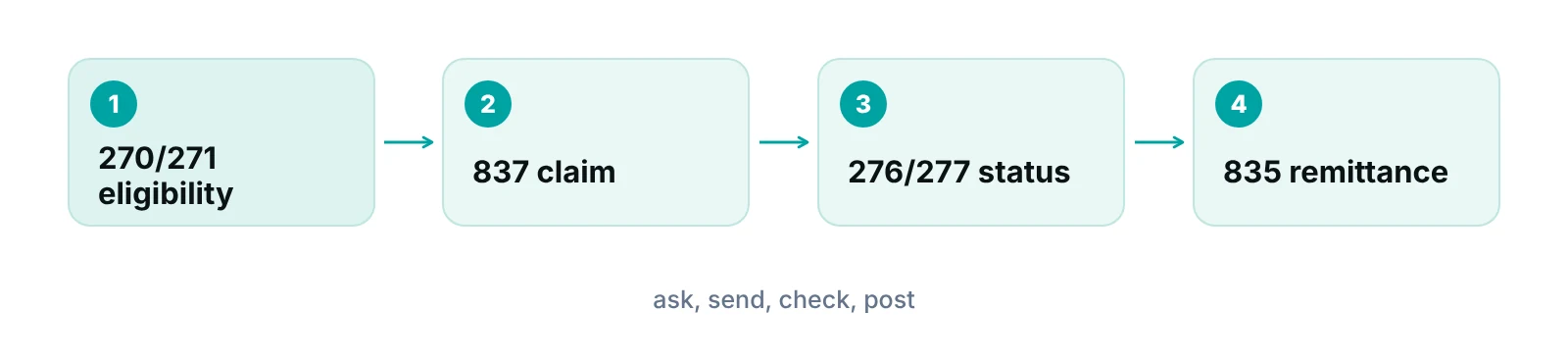
837: the claim
The 837 is the file most people mean by “electronic claim.” It carries the patient, provider, diagnosis, procedure, charge and payer data your software collected. If any required piece is missing or malformed, the file can fail before a human at the plan ever sees it. That is why clean claim practices and a pre-submission check matter more than speed.
835: the answer
The 835 is the payer’s reply on payment. It lists what was paid, adjusted or denied, line by line. CMS notes that the 835 is paired with a trace number so the remittance can be matched to the payment itself (CMS). Posting this file automatically is the biggest labor saver in the whole cycle, and it is covered in depth in our ERA guide.
270/271 and 276/277: the two questions
The 270/271 pair asks whether coverage is active and what the plan will cover. The 276/277 pair asks about a claim already sent. Both are “ask and answer” exchanges, so their value depends on timing: eligibility before the visit, status when a claim ages past your follow-up window. For the eligibility side, see our insurance verification guide.
How does a claim travel through EDI?
A claim passes through five handoffs, and each one has its own failure mode. Knowing the order tells you whom to call when a claim goes missing.
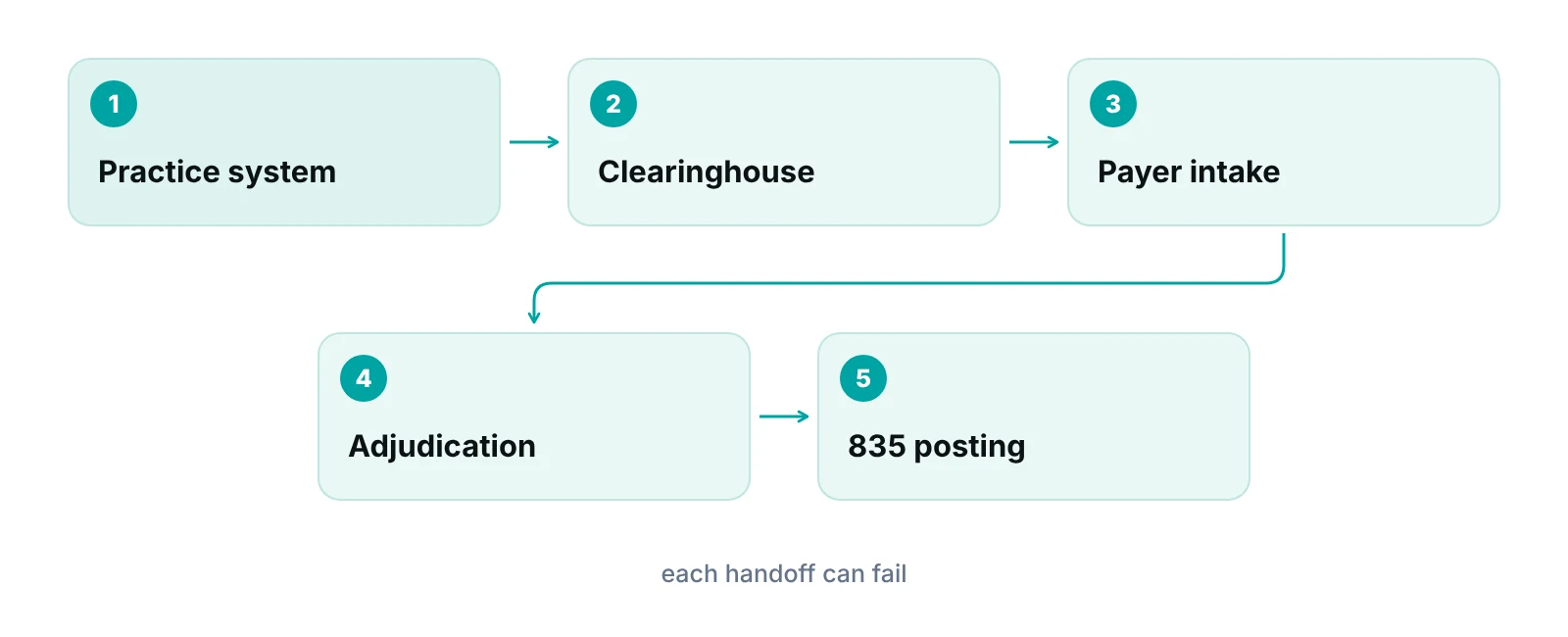
- Build the claim. Staff or software assemble the encounter, charges and coverage into a claim in your billing system.
- Convert and send. The system, or a clearinghouse acting for you, puts the data into the 837 layout and transmits it.
- Intake checks. The clearinghouse and the payer both run format and edit checks. Files that fail are returned as rejections, with a reason, before any coverage decision.
- Adjudication. The plan applies coverage, pricing and medical policy and decides to pay, adjust or deny.
- Remittance and posting. The plan sends the 835 and the payment. Your team posts it, appeals denials and bills the patient balance.
Note that step 3 and step 4 are different events. Our guide to clearinghouse rejection codes covers the intake side in detail. A denial, handled in denial management, comes later and needs an appeal or correction instead of a resubmission.
“Track rejections and denials separately. A rejection is a data problem you can usually fix in a day; a denial is a payer decision that needs a reason code and a response.”
What do the federal rules require?
Two rules shape most practices’ EDI choices: the HIPAA transaction standards and the Medicare electronic-claim requirement. Neither says which vendor you must use.
| Transaction | Standard (version 5010) | Operating rules |
|---|---|---|
| Claims (837) | January 1, 2012 | None listed |
| Eligibility (270/271) | January 1, 2012 | January 1, 2013 |
| Claim status (276/277) | January 1, 2012 | January 1, 2013 |
| Remittance advice (835 with TRN) | January 1, 2012 (835); January 1, 2014 (TRN) | January 1, 2014 |
| Referral certification and authorization (278) | January 1, 2012 | None listed |
Source: CMS, Adopted Standards and Operating Rules (accessed October 2026). Operating rules add business-level requirements for the transactions where CMS lists them.
The standard-transaction rule
Under 45 CFR 162.923, a covered entity that conducts a transaction electronically with another covered entity must use the standard where one is adopted. The same section allows a covered entity to use a business associate, including a clearinghouse, and requires that associate to meet the rules that apply (eCFR). In practice, hiring a clearinghouse does not move the responsibility away from you. Ask any vendor to sign a business associate agreement before it handles patient data.
Medicare and electronic claims
Section 3 of the Administrative Simplification Compliance Act, with 42 CFR 424.32, requires initial Medicare claims to be submitted electronically, subject to limited exceptions. One exception is for providers with fewer than 10 full-time equivalent employees who bill Medicare Part B (Noridian Medicare). Even where paper is allowed, it slows payment in practice, so most small offices still file electronically. Check your Medicare Administrative Contractor’s page for current detail.
Where does EDI break down in a real practice?
EDI rarely fails because the standard is wrong. It fails at the edges where people and systems meet.
- Bad inputs. A misspelled subscriber name, a wrong member ID or a missing billing NPI travels perfectly through EDI and fails at intake. A check for missing or inconsistent fields before submission catches most of it.
- Unwatched rejections. Rejection reports often go to a shared inbox or a clearinghouse dashboard. If no one owns the daily review, claims sit and the timely filing clock keeps running.
- Unposted remittances. If the 835 is not matched to the payment, the account looks open when it is paid, and real denials hide in the noise.
- Missed eligibility. If the 270/271 check is skipped or run too early, the first sign of inactive coverage is a denial weeks later.
- Unclear ownership. When a practice, a billing company and a clearinghouse each assume another is watching, nobody is.
A claim-centred tool helps here because it shows each claim’s stage and owner. A practice management system such as the claim-tracking portal from RCM Finder tracks claims by stage with a named owner and runs data-completeness checks before submission, so the questions above have a place to be answered.
A one-minute test
Pick any claim sent 30 days ago. Can you say who sent it, whether the payer accepted it, whether the 835 arrived and whether it was posted? If any answer takes more than a minute, the process has a gap.
Should you send claims directly, through a clearinghouse, or through a billing partner?
Most practices send through a clearinghouse or a billing partner, because one connection reaches many payers. The right choice depends on payer mix, staff time and how much visibility you need. No option removes your responsibility for accurate claims.
| Option | How it works | Where it fits | Watch for |
|---|---|---|---|
| Direct payer connections | The practice or its software connects to each payer’s EDI gateway. | A small number of high-volume payers and in-house IT support. | Separate enrollment, testing and upkeep for every payer. |
| Clearinghouse | One connection; the clearinghouse formats, checks and routes files, and returns reports. | Practices with mixed payers that bill in-house. | Who reads the rejection reports, and per-transaction fees to confirm in writing. |
| Billing partner | An outside team runs claim creation, submission, posting and follow-up. | Practices that want to move work off the front office. | Ask for payer-level reporting and a signed business associate agreement. |
If you outsource, look for the same basics in any partner: a business associate agreement, role-based access, an audit trail and regular reporting on rejections, denials and open claims. Our medical billing services are built around those basics, and the specialty pages show how billing patterns differ by field, since claim edits and common rejections vary with the specialty.
Not sure where your claims are stuck?
A free practice audit reviews your claim flow from submission to posting and shows where rejections, unposted remittances and follow-up gaps sit.
Our recommendations
- Name an owner for every handoff. Write down who sends the claim, who reads the rejection report, who posts the 835 and who works the denial. Shared responsibility usually means no responsibility.
- Review rejections every business day. A rejection is cheap to fix and expensive to ignore. A daily review also protects the timely filing deadline for each payer.
- Verify eligibility before the visit. Run the 270/271 check close to the appointment date, then again if the visit moves. Do not rely on a card shown at check-in.
- Automate remittance posting where you can. Auto-posting the 835 frees staff to work denials. Review the exceptions the software cannot match.
- Ask each vendor three questions. Which transactions do you support, who sees the rejection reports, and will you sign a business associate agreement? Get the answers in writing.
Claim stages and owners in one place.
The RCM Finder portal tracks each claim by stage with an owner and checks data completeness before submission, so rejections and unposted remittances are easier to spot.
See how the RCM Finder portal works · Create a portal account
Disclosure: RCM Finder builds and sells this portal. It is a practice management system, not an EHR.
Bottom line
EDI in medical billing is not one technology. It is a set of standard transactions that carry your claims, payments, eligibility checks and status requests. The practices that run it well know who owns each step and read the rejections daily. If you want help finding the weak handoffs, see our revenue cycle management services and denial management services, or start with a free practice audit.
Frequently asked questions
What is EDI in medical billing in simple terms?
It is the exchange of billing data between a practice and a health plan in a standard electronic format. Instead of mailing a paper claim, your software sends a structured file and the plan sends structured replies. Each task, such as a claim or a payment, has its own transaction with its own number.
What is the difference between an 837 and an 835?
The 837 is the claim your practice sends to the plan. The 835 is the plan’s reply about payment: what it paid, adjusted or denied on each claim. One goes out, one comes back. Your posting process depends on the 835 matching the payment you receive.
What do 270/271 and 276/277 mean?
The 270 asks a plan about a patient’s coverage and the 271 is the answer. The 276 asks about the status of a claim you already sent and the 277 is the answer. Both are ask-and-answer pairs. They are not used to submit claims or receive payment.
Do I need a clearinghouse to use EDI?
No rule requires one. You can connect directly to a payer, but each payer has its own enrollment and testing. Most practices use a clearinghouse for one connection to many payers. If you do, treat it as a business associate and confirm that it will sign a business associate agreement.
Is EDI the same as electronic claims?
Electronic claims are one EDI use. EDI also covers eligibility, claim status, authorizations and remittance advice. A practice can submit electronic claims and still handle status and eligibility by phone, which is common and slow.
Does Medicare require electronic claims?
Generally yes. Federal rules require initial Medicare claims to be filed electronically, with limited exceptions. One exception covers providers with fewer than 10 full-time equivalent employees billing Part B. Check your Medicare Administrative Contractor for details that apply to you.
Get your free practice audit
Tell us about your practice. We will contact you using the details you give.
- A review of your recent claims, denials and A/R aging
- Where your front desk and prior authorizations slow payment
- A prioritized fix list you keep, whether or not you hire us
Pricing is quoted after the audit, based on your volume and the services you choose. Prefer to talk? Call +1 (302) 556-2288.
Sources
- Adopted Standards and Operating Rules — Centers for Medicare & Medicaid Services (2026)
- 45 CFR 162.923 Requirements for covered entities — eCFR (HHS) (2026)
- Mandatory Claim Submission, JF Part B — Noridian Healthcare Solutions (Medicare Administrative Contractor) (2026)
- 2021 CAQH Index Webinar Slides — CAQH (2022)
Disclaimer: This article is educational. It is not legal, coding or compliance advice. Payer rules, clearinghouse terms and Medicare contractor guidance vary, so confirm details with your payers and advisors.