
Insurance credentialing for group practices means enrolling the group and each clinician with every payer, then linking the clinicians to the group's contract. Set up your entity, tax ID, NPIs and CAQH profile first, then file separate Medicare, Medicaid and commercial applications. Effective dates decide when you can bill, so get each one in writing.
If you are leaving a group to open your own practice, or adding a clinician to a group you already run, you face the same problem: the payer has to verify the person, and also has to know which group gets paid. This guide shows the order of work for both, using primary sources from CMS, the IRS and CAQH. For the basics of what credentialing is, see our complete credentialing guide. This is general information, not legal or compliance advice.
Key takeaways
- Group credentialing has two layers: verifying each clinician and enrolling the group under its tax ID, then linking them.
- Set up entity, EIN, NPIs and CAQH first, and make every name and number match exactly.
- Medicare uses CMS-855B for the group and CMS-855R to connect each clinician; plan on no back-billing.
- Commercial and Medicaid plans set their own cutoffs and effective dates, so get yours in writing.
- CAQH needs re-attestation every 120 days, and Medicare revalidation is generally every 5 years.
How is credentialing different for a group practice?
Two things happen at once. The payer verifies each clinician (license, history, liability coverage), and it also enrolls the group, whose tax ID and organization NPI receive payment. A clinician is useful to the group only when both are linked. That link is what slows many new groups down.
The NPI system reflects the split. According to CMS’s NPI fact sheet, a Type 1 NPI is for individuals such as physicians and nurse practitioners, and a Type 2 NPI is for organizations such as physician groups. A provider who is incorporated can hold both. Our NPI Type 1 vs Type 2 guide covers which one goes on which claim.
| Item | Clinician level | Group level | Why it matters |
|---|---|---|---|
| Identifiers | State license and individual (Type 1) NPI | Legal entity, EIN and organization (Type 2) NPI | Payers match these records against each other. |
| Verification | License, work history, liability coverage, CAQH profile | Practice locations, ownership and contact details | Each side can be rejected separately. |
| Medicare | Individual enrollment and reassignment of benefits | Group enrollment on Form CMS-855B | Payment goes to the group only after both are on file. |
| Commercial and Medicaid | Credentialing application or CAQH authorization | Contract under the group’s tax ID | Many plans only add a clinician to a group that already has a contract. |
| Upkeep | Re-attest CAQH; renew license | Keep entity and location data current | Stale data can stop payment for the whole group. |
Source: CMS NPI Fact Sheet (2024); CMS Form CMS-855B; Sunshine Health practitioner enrollment page. Plan rules vary.
What should the group set up before any payer application?
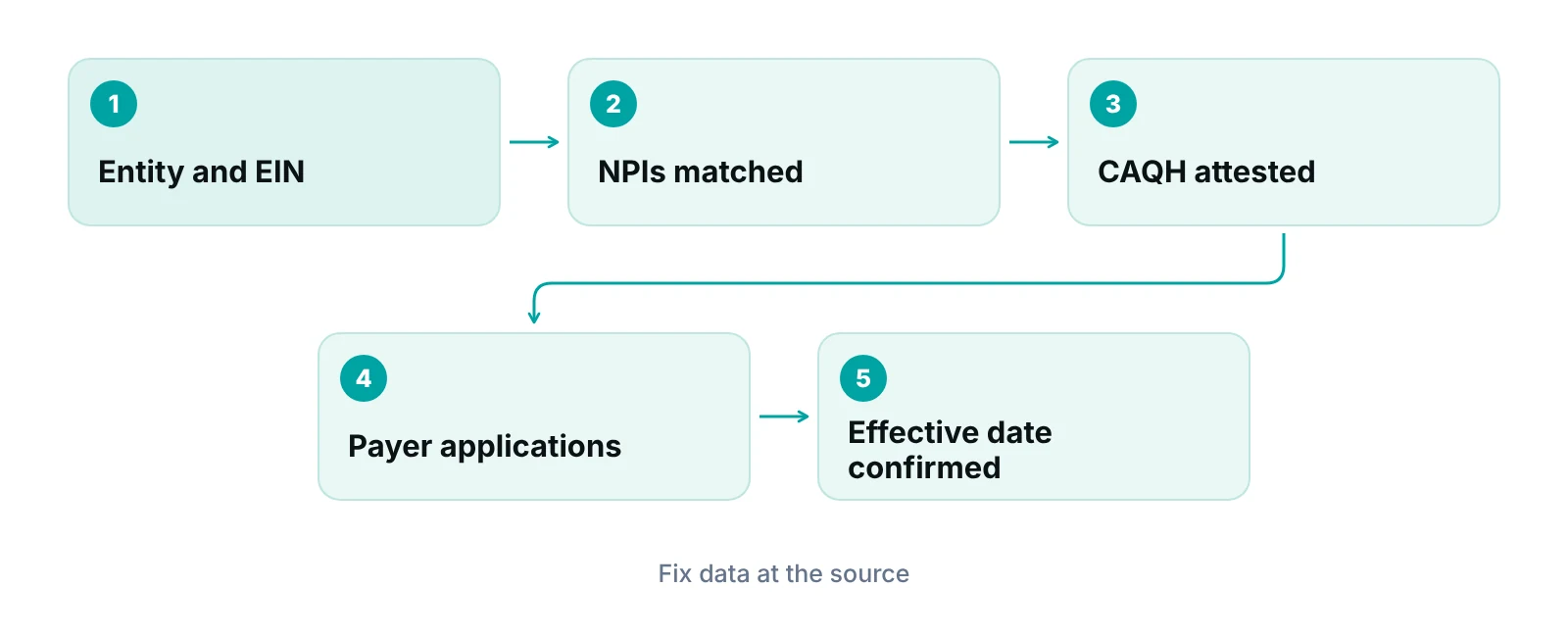
Build the foundation in this order: legal entity, tax ID, NPIs, then CAQH. Doing it out of order is the most common reason the same data has to be corrected in three places later.
Entity and tax ID. If you form an LLC or corporation, the IRS says to form it with your state first, or the application may be delayed. Per the IRS, an EIN is free, you apply online in one session, and an approved application is issued immediately. Print the confirmation for your files.
NPIs. Covered health care providers must obtain an NPI, use it on standard transactions and report changes to the NPI system within 30 days, under 45 CFR 162.410. CMS adds that updating your NPPES record does not update your Medicare enrollment, so a changed address needs to be fixed in both.
Matching. The CMS-855B form notes that the legal business name, TIN and NPI must match exactly in PECOS and NPPES. Treat that as a rule for every payer. One entity name written two ways is enough to stall an application.
Make one source-of-truth sheet
Before applying anywhere, write down your legal name, tax ID, both NPIs, each location address and phone, and the authorized official. Copy from that sheet every time instead of retyping.
Why does every clinician need a current CAQH profile?
Most commercial and many Medicaid plans pull clinician data from CAQH ProView instead of asking for paper. A stale profile can block the whole application, even when everything else is correct.
CAQH’s own guidance says providers re-attest every 120 days, control which organizations can see their profile, and must keep expired documents replaced, liability insurance attached and no unexplained gaps in the last five years of work history (see CAQH’s ProView guide). A plan can only view the data once the provider has re-attested and authorized it.
Groups feel this most. One clinician with an expired attestation holds up that person’s start date, and the group cannot bill that person’s visits under the contract in the meantime. Put each clinician’s attestation date on a shared calendar.
How does Medicare enrollment work for a group?
Medicare enrolls the group and each clinician separately, then connects them through reassignment. Each step is filed through PECOS or on paper, and each can be returned for errors.
The CMS-855B is the enrollment application for clinics, group practices and similar suppliers, and it defines reassignment as a practitioner’s authorization for an organization to submit claims. CMS’s Program Integrity Manual transmittal says an individual who reassigns benefits uses the CMS-855R, signed by both the individual and the group’s authorized official, and that all members of a group practice must be entered into PECOS.
| Form or system | Who files it | What it does | Watch for |
|---|---|---|---|
| CMS-855B | The group (authorized official) | Enrolls the group practice or clinic | Name, TIN and NPI must match PECOS and NPPES. |
| CMS-855I | Each clinician | Individual clinician enrollment | Confirm the current form on CMS’s site before filing. |
| CMS-855R | Clinician and group together | Adds a reassignment so the group is paid; also ends one | Both sign to add; either party can sign to end. |
| PECOS | Group and clinicians | CMS’s online enrollment system | Every group member must be entered. |
Source: CMS Form CMS-855B; CMS Program Integrity Manual transmittal R490PI. The 855I row reflects general CMS usage and is flagged for confirmation.
Effective dates and back-billing
Under 42 CFR 424.520(d), the billing date for physicians, non-physician practitioners and their organizations is the later of two dates: the filing date of an application that is later approved, or the date services began at a new practice location. Section 424.521 allows retrospective billing of up to 30 days only when circumstances prevented enrolling in advance and every program requirement, including licensure, was met. Plan on no back-billing.
Revalidation
Under 42 CFR 424.515, most providers must resubmit and recertify enrollment information every 5 years, within 60 days of CMS’s notice. CMS’s revalidation FAQs say a late revalidation leads to deactivation, which interrupts billing and requires a new application. Give your enrollment contact a mailbox that is actually watched.
What changes with commercial plans and Medicaid?
Each plan sets its own forms, cutoffs and effective-date rules, so there is no single timeline. The safest approach is to read the plan’s own provider page and ask for the effective date in writing.
Two published examples show the range. A Florida plan’s practitioner enrollment page limits its add-a-practitioner form to groups that already hold an executed agreement, asks for CAQH access to be granted and attested within the last 120 days, and says the process can take up to 60 days with effective dates not backdated. An Indiana Medicaid plan’s effective date policy ties the effective date to the date it receives a complete participation request, not to when credentialing finishes.
| Plan example | What starts the clock | What the page says about timing | What to ask your own payer |
|---|---|---|---|
| Sunshine Health (Florida) | A complete request received by the monthly cutoff | Requests received by the 14th are effective the 1st of the next month; after the 15th, the 15th of the next month; up to 60 days; not backdated | Cutoff dates and what counts as a clean request |
| MDwise (Indiana Medicaid) | Receipt of a complete participation request | Effective date is the first of the month after receipt, regardless of credentialing completion; provisional status if no decision in 15 days | Whether you are out of network while provisional |
Source: Sunshine Health practitioner enrollment requests page; MDwise effective date policy. Examples only; verify on each plan’s current page.
State Medicaid enrollment adds its own forms, screening and revalidation. We keep that detail in our Medicaid credentialing guide so this page does not repeat it. Our guide to getting paneled helps you choose which plans to apply to first.
Payer mix also differs by specialty. A pain management group and a pediatric group will rarely prioritize the same plans, so see our specialties overview for how we think about billing patterns by field before you build your target list.
How long does it take, and what do you do while waiting?
No source we found gives one official turnaround for commercial plans, so the old ‘6 to 24 weeks’ figure is gone. Plan for months, ask each plan for its current processing time, and treat your effective date, not the approval email, as the date that matters.
Do not bill as in-network before the effective date
Approval and effective date can differ. Do not schedule insured patients as in-network until the plan confirms the date in writing, and do not assume back-billing will be allowed. Decide in advance how you will handle visits during the gap, and have a lawyer or your compliance advisor review that policy.
The gap is a cash-flow problem as much as a paperwork one. Estimate how many weeks of visits you will see before you are loaded, and model it with our revenue calculator. Keep a simple tracker with one row per payer and clinician:
- Payer and plan type, application type and the date you submitted it.
- Clinician, CAQH attestation date and authorization status.
- Last follow-up date, who you spoke to and what they said.
- Effective date, confirmed in writing, and the date the roster was loaded.
- Next action and owner.
How do you add or remove a clinician later?
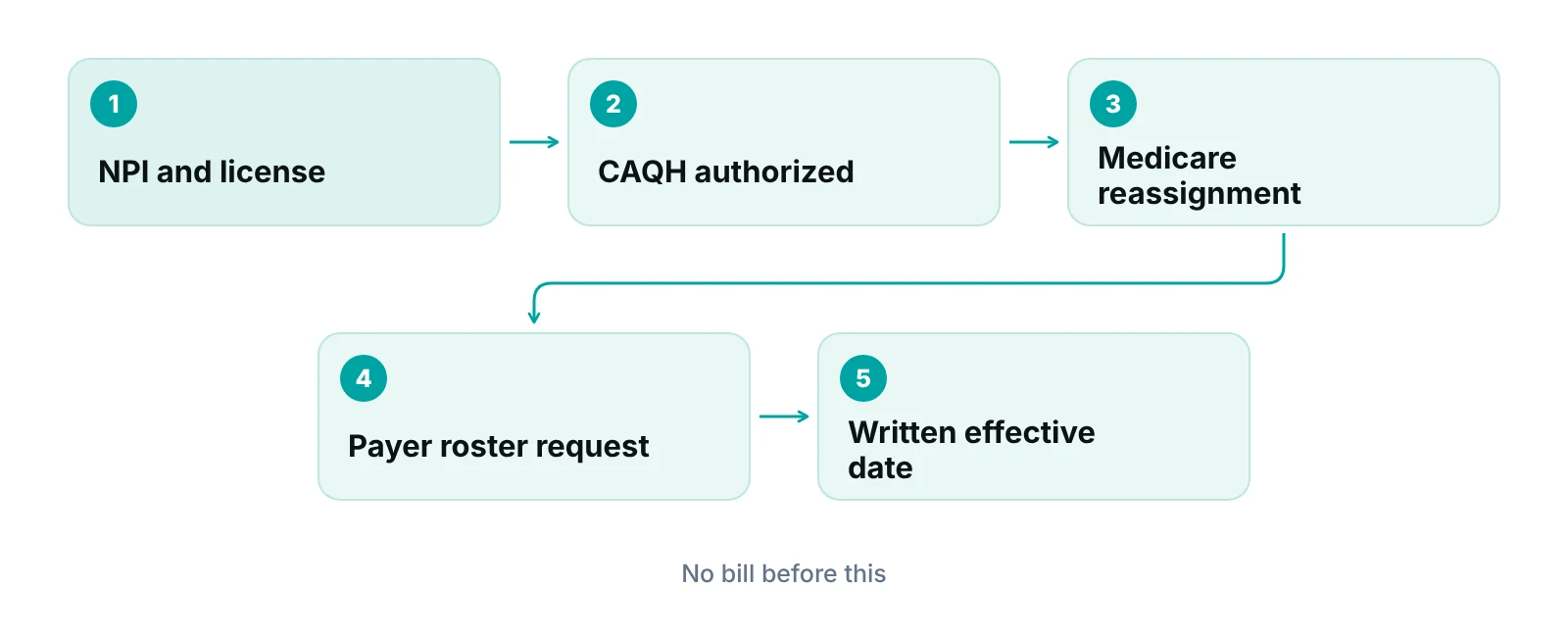
Adding a clinician repeats the clinician-level steps and then updates the group-level records. Removing one means ending the links you created. Both are routine, and both are often forgotten.
- Confirm the license and Type 1 NPI, and make sure the NPPES record shows your practice address.
- Complete and attest the CAQH profile, then authorize each plan you bill.
- File the Medicare reassignment (CMS-855R) and confirm the clinician is entered in PECOS.
- For each plan, submit its add-a-practitioner request or roster form, and wait for written confirmation before billing.
- When a clinician leaves, end the Medicare reassignment, report NPI changes within 30 days and update each plan’s roster.
Large groups sometimes ask whether a plan can delegate credentialing to them. That is a separate arrangement, covered in our delegated vs non-delegated credentialing guide.
“In our experience the avoidable delays are rarely the payer's. They are a mismatched name, a stale attestation or a roster request nobody followed up.”
— Awais Afzal, Healthcare Operations & Data Analyst
Should you handle credentialing in house or hand it off?
Do it in house if you add one or two clinicians a year and someone owns the tracker. Consider help when you are opening a new group, onboarding several clinicians together or already losing visits to enrollment delays.
Our credentialing services cover application preparation and enrollment follow-up, and we work from your records so the data you give each payer stays consistent. Once claims start, the work shifts to billing. That is where payer enrollment and payor enrollment strategy meet your day-to-day claims.
Opening or growing a group and not sure where enrollment stands?
Share your payers, clinicians and start dates. We will review where applications are likely to stall before you schedule insured patients.
Our recommendations
- Set up the entity and tax ID first. Everything else matches against them. Form the entity, get the EIN, then apply for the organization NPI so the names are identical everywhere.
- Keep one source-of-truth sheet. Copy legal name, TIN, NPIs, locations and officials from one sheet into every application. It removes the most common mismatch errors.
- Calendar every attestation. Set a reminder before each clinician’s 120-day CAQH date, not on it. A lapse can freeze that clinician’s applications.
- Get effective dates in writing. Approval is not the date that matters. Ask each payer for the confirmed effective date and keep the email.
- Stagger payers, not clinicians. Submit all clinicians to your highest-volume payer first, so the group starts billing sooner.
- Review the tracker weekly. Follow up on any application with no activity. Silent files are where weeks disappear.
Bottom line
Group credentialing is mostly about order and matching: get your entity, NPIs and CAQH records aligned, file Medicare and plan applications in the right sequence, and never bill in-network before the confirmed effective date. If you would rather hand off the paperwork and follow-up, our credentialing services can take it on, and our medical billing services pick up once claims begin. You can also contact our team with questions about your situation.
Frequently asked questions
Do I credential each doctor or just the group?
Both. Each clinician is verified with their own license, NPI and CAQH profile, and the group is enrolled under its tax ID and organization NPI. The payer then links the clinician to the group. Medicare formalizes the link through a reassignment form signed by the clinician and the group’s authorized official.
Can a new clinician bill under the group's contract right away?
Not until the payer confirms it. One published plan page says effective dates are not backdated and tells practitioners not to see members until they receive written confirmation. Medicare’s billing date is generally the later of the filing date or the date services began at a new location.
How long does group credentialing take?
There is no single official figure. Timing depends on the payer, how complete your CAQH profile is and whether you meet monthly cutoffs. One plan’s page says up to 60 days. Ask each payer for its current processing time and plan for months.
What is the difference between credentialing and contracting?
Credentialing verifies the clinician’s background. Contracting sets the rates and terms under which the group is paid. You can be credentialed and still not be loaded for payment, so confirm both the contract and the effective date before billing.
What happens when a clinician leaves the group?
End the Medicare reassignment on a CMS-855R, report NPI changes within 30 days, and tell each plan to update its roster. Also update your own CAQH and tracker so claims do not go out under the departed clinician.
Can we outsource group credentialing?
Yes. Many groups hand over application prep and follow-up while keeping the decisions on payers and contracts. Make sure whoever helps works from your own records and that you keep copies of every confirmation. Our credentialing team can review where you stand.
Get your free practice audit
Tell us about your practice. We will contact you using the details you give.
- A review of your recent claims, denials and A/R aging
- Where your front desk and prior authorizations slow payment
- A prioritized fix list you keep, whether or not you hire us
Pricing is quoted after the audit, based on your volume and the services you choose. Prefer to talk? Call +1 (302) 556-2288.
Sources
- 42 CFR 424.520 — Cornell LII (eCFR text) (2026)
- 42 CFR 424.521 — eCFR (2026)
- 42 CFR 424.515 — eCFR (2026)
- Revalidation Cycle 2 FAQs — CMS
- Program Integrity Manual transmittal R490PI — CMS
- Form CMS-855B — CMS
- NPI Fact Sheet — CMS (2024)
- 45 CFR 162.410 — eCFR (2026)
- Get an employer identification number — IRS (2026)
- CAQH ProView guide — CAQH
- Practitioner enrollment requests — Sunshine Health
- Effective Date Policy — MDwise
Disclaimer: This page is general educational information for practice owners and managers. It is not legal, coding, billing-compliance or financial advice. Payer rules, timelines and state requirements vary and change; confirm current requirements with each payer, your state Medicaid agency, your Medicare contractor and a qualified advisor before acting.