
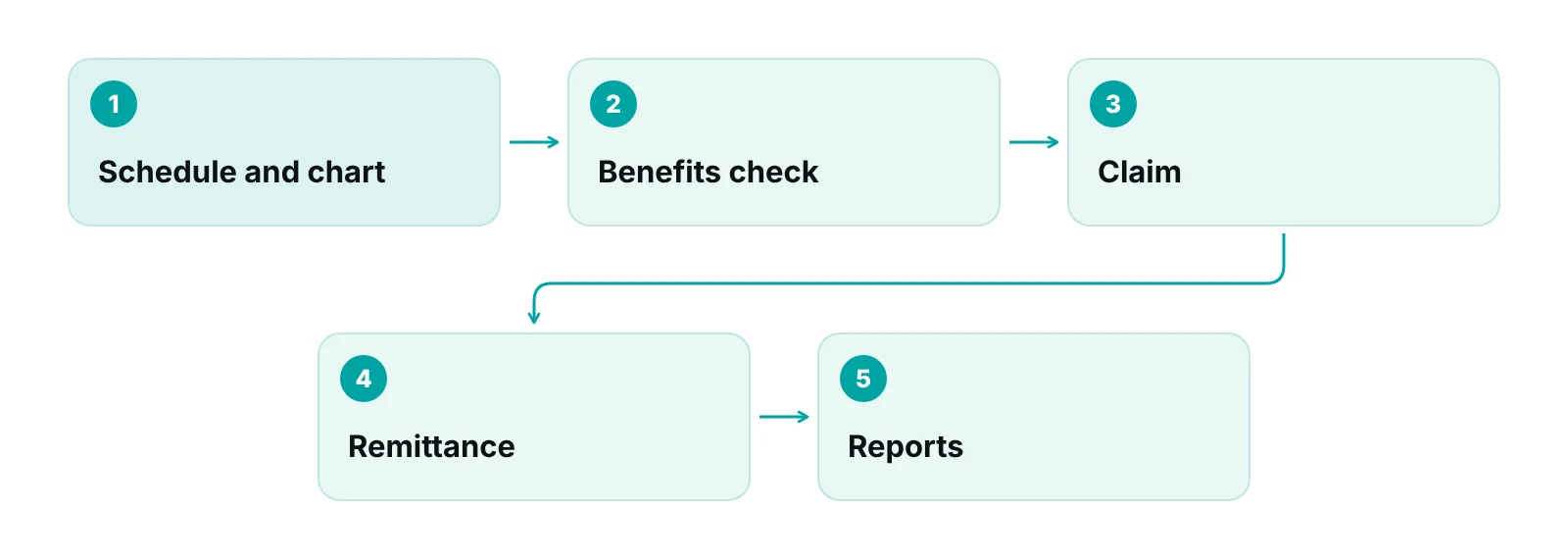
Dental practice management software runs the scheduling, charting, imaging links, insurance and billing work of a dental office. Compare it on five things: how well it handles insurance transactions, how it protects patient data, how easily the practice can export its own data, what it reports, and how it fits with clinical tools and billing support.
A demo shows features. It rarely shows what happens when a plan pays a claim in two parts, when a staff member leaves, or when the practice wants its data back. This guide is for owners and office managers who are shortlisting systems and want a way to compare them that does not depend on a vendor’s feature list.
It names no products. The general category is covered in the practice management software guide and the difference between records and practice systems in the EMR vs EHR guide. This guide stays on dental: insurance transactions, the ADA claim form, plan data and security.
Key takeaways
- Judge the system on three jobs (clinical record, schedule and front desk, money) and test each in a demo.
- Ask which HIPAA standard transactions run natively: eligibility (270/271), claims (837), claim status (276/277) and remittance (835).
- Dental claims need plan data: remaining maximum, frequency history, plan funding and secondary plans.
- A cloud vendor holding patient data is a business associate; the BAA should cover access, backup and return or destruction at termination.
- Test data export before signing, and decide who owns denials and A/R after go-live.
What does dental practice management software do?
Dental practice management software handles the business side of a dental office: the schedule, patient records and charting, insurance and claims, ledgers and reports. Many systems also link to imaging and patient communication tools. A practice may buy one system for everything or combine tools.
It helps to separate three jobs when comparing: the clinical record (charting, imaging, notes), the schedule and front desk, and the money side (estimates, claims, posting, A/R). Systems differ in which job they emphasize, so the demo should test each. Billing support is a fourth item, because software holds the data but a person or team still works the denials; the dental billing services guide explains that split.
The choice between one system and several tools changes the questions. A single system keeps the schedule, chart and ledger in one place, but the practice depends on one vendor for every job. Combining tools lets the practice pick the strongest piece for each job, but each connection is a place where data is mapped and can break, and each vendor that creates, receives, maintains or transmits patient information needs its own business associate agreement (HHS). Write down every tool that will touch patient data before comparing prices.
| Area | What to ask | Basis |
|---|---|---|
| Insurance transactions | Which of eligibility, claims, claim status, remittance and EFT run electronically, and which go through a clearinghouse | CMS adopted standards |
| Plan data and estimates | Where remaining maximum, frequency history, deductible, plan funding and secondary plan are stored, and whether they feed estimates | ADA benefits primer; ADA COB guidance |
| Claim form support | Whether the 2024 ADA form fields for other coverage, attachments and remarks are supported | ADA claim form instructions |
| Attachments | How radiographs and narratives are attached electronically | CMS claims attachments rule |
| Security and access | Unique logins, role-based permissions, two-factor authentication, session time-outs, audit trail | HHS Security Rule remote-use guidance |
| Hosting, backup and exit | BAA, data location, backup and recovery, return or destruction of data at termination | HHS cloud computing guidance |
| Patient-facing features | Online forms, scheduling and messaging: do they use tracking tools, and does the vendor sign a BAA | HHS online tracking guidance |
| Reporting | A/R by age and payer, claims by stage, unpaid items by owner, production and collections | RCM Finder framework |
Source: CMS; HHS Office for Civil Rights; ADA; RCM Finder framework.
Which insurance transactions should dental software support?
Dental software should support the HIPAA standard transactions for eligibility, claims, claim status and remittance, either directly or through a clearinghouse, and should say which. CMS says covered providers must use the adopted standards when they conduct these transactions electronically (CMS, health care transactions basics).
| Transaction | Adopted standard | What it does for a dental office |
|---|---|---|
| Eligibility and benefits inquiry | X12 270/271, version 5010; federally mandated operating rules since January 1, 2013 | Returns coverage and benefit information before treatment |
| Claims (dental included) | X12 837, version 5010 | Sends the claim to the plan |
| Claim status | X12 276/277, version 5010; operating rules since January 1, 2013 | Checks a claim without a phone call |
| Payment and remittance | X12 835 for remittance and ACH CCD+ for EFT, version 5010; operating rules since January 1, 2014 | Posts the payment; the trace number links EFT and remittance |
| Claims attachments | X12 275 and 277; rule effective May 26, 2026, compliance May 26, 2028 | Sends supporting documents electronically; dental applicability to be confirmed |
| Prior authorization and referrals | X12 278, version 5010 | Service review requests such as preauthorization |
Source: CMS, Adopted Standards and Operating Rules; CMS payment and remittance page; CMS claims attachments fact sheet.
The CMS page lists the X12 837 standard for institutional, professional and dental claims, and the HIPAA code-set rule names the ADA’s Code on Dental Procedures and Nomenclature for dental services (CMS; 45 CFR 162.1002). On payments, CMS says the EFT should carry the same trace number as its remittance advice so the two can be matched (CMS).
Ask the vendor three questions for each transaction. Does it run natively or through a clearinghouse? Who pays for the clearinghouse? What happens when a plan rejects a transaction? The clearinghouse guide explains the role. HHS treats a clearinghouse that converts claims as a business associate (HHS).
The stakes are visible in the CAQH Index. Dental eligibility and benefit verification spending rose 15% to $2.1 billion in 2023, and moving to automated electronic checks could save the industry $580 million, up 7% (ADA News on the 2024 CAQH Index).
What plan and claim data should the system hold?
The system should hold the plan terms that decide payment, not just the member ID. A claim can be coded correctly and still pay little when the maximum is used, a frequency limit applies or a second plan is missing.
The ADA’s benefits primer lists the terms: annual maximums, deductibles, frequency limits, pre-existing exclusions, alternate-benefit clauses and plan funding type, and it notes that offices often cannot tell whether a plan is fully insured or self-funded (ADA, Introduction to Dental Benefits). A proposed ADA standard for dental coordination-of-benefits data, in public review in October 2025, lists elements such as remaining annual maximums, frequency limits and exclusions, whether the plan uses carve-out or nonduplication, plan type, adjustment reasons and patient payment fields. It does not prescribe technology and is not yet final (ANSI/ADA proposed Standard 1120-2). It still works as a checklist of fields to look for.
- Remaining maximum and deductible status, with the date they were checked.
- Frequency history by service, including services paid by a prior dentist.
- Plan funding type and the method for secondary payments.
- A second and third plan, with order of benefits, in line with the ADA’s COB guidance (ADA).
- Estimate records that state the plan share, patient share and that neither is a guarantee (ADA).
- The CDT edition in force on each date of service, with full descriptors; the ADA warns that some software truncates descriptors (ADA).
The 2024 ADA claim form carries fields for other coverage, an attachment flag, a remarks field, a treating-dentist taxonomy code and a place of treatment code (ADA claim form instructions). Ask the vendor to show a completed secondary claim, not a screenshot of the form.
How should security and hosting be compared?
Compare who holds the data, who can see it and how it is protected, and put the answers in the BAA. HIPAA does not certify software, so a label is not evidence.
HHS says a cloud service provider that creates, receives, maintains or transmits electronic patient information is a business associate and must sign a BAA, that encryption alone does not satisfy the Security Rule even when the provider cannot view the data, and that a service agreement must be consistent with the BAA and must not block the practice’s access to its data (HHS cloud computing guidance). The same page notes that HIPAA does not require a provider to supply security documentation or allow customer audits, so a practice that wants them must ask for them in the contract.
Access controls matter as much as hosting. HHS Security Rule guidance on remote use recommends unique user names, role-based authorization, two-factor authentication for remote access, session time-outs on inactive devices, encryption of devices and backups, and training (HHS). It is a 2006 document, so treat it as a baseline checklist.
Patient-facing features add a separate risk. HHS says tracking tools on pages that collect health information, such as appointment scheduling, can involve PHI, and a vendor that receives PHI needs a BAA (HHS). Google says Google Analytics has no BAA and should not receive data that may be PHI (Google Analytics Help). Ask whether online forms and booking pages load third-party trackers. The HIPAA compliance checklist for medical practices covers the wider safeguards.
What should a practice ask about getting its data out?
Ask for a sample export before signing, and put the exit terms in the contract. The time to find out how hard it is to leave is not the year a practice wants to leave.
HHS says a BAA must require the cloud provider to return or destroy patient information at termination where feasible, and that after secure return or destruction the provider is no longer a business associate (HHS). That sets a legal floor, not a practical format. Practical questions include the file formats offered for the ledger, charts, images and insurance data, how long the export takes, whether it carries a fee and whether images keep their original quality. The answers should be in writing.
- Ask for a sample export of a test patient: ledger, notes, images and insurance data.
- Ask which formats are standard and which are vendor-specific.
- Ask for the return and destruction terms in the BAA.
- Keep a recent encrypted backup under the practice’s control; the HHS remote-use guidance calls for backups and for encrypting backup media.
A practice whose current system works and exports cleanly may be better served by fixing the claim workflow than by migrating. A move is easier to justify when reporting, access control or insurance transactions fall short of the checklist above.
How do you test a dental system in a demo?
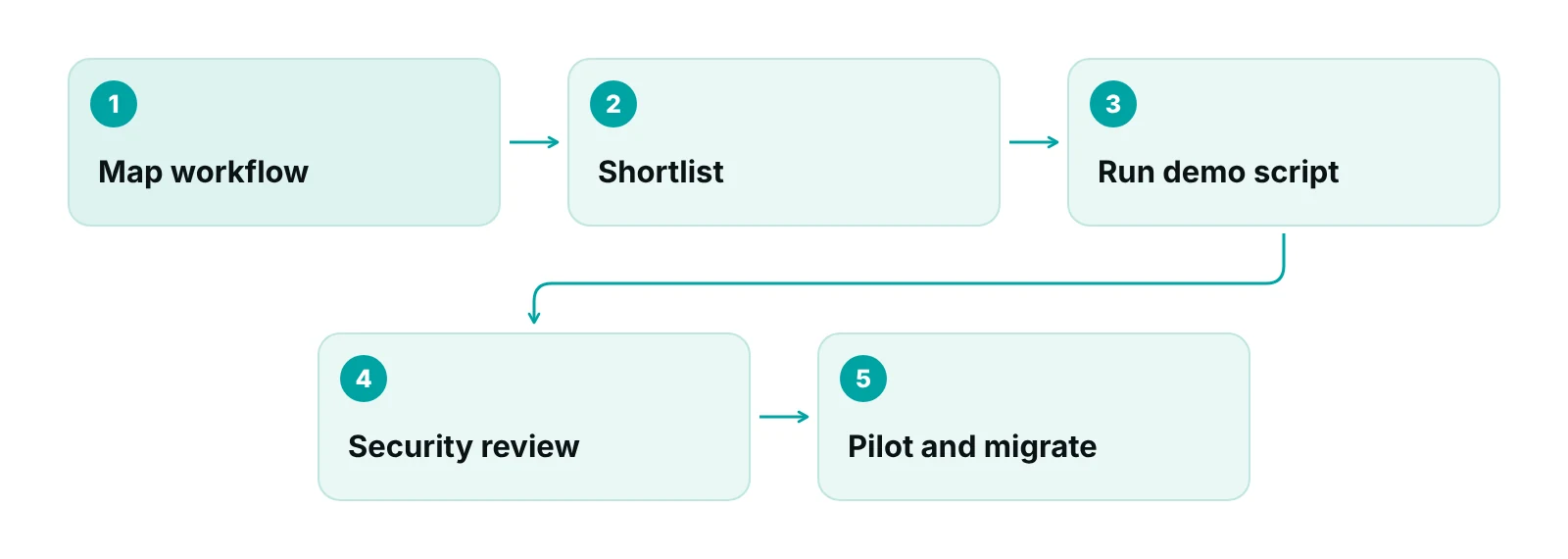
Run tasks from the practice’s own week instead of watching a feature tour. Six tasks cover most of the risk.
| Task | What a pass looks like | Why it matters |
|---|---|---|
| Post a primary payment and bill the secondary plan | Secondary claim carries the full fee and the primary payment; no early write-off appears in the ledger | ADA COB guidance |
| Run a predetermination and an estimate | Estimate shows plan and patient shares with a not-a-guarantee note | ADA pre-authorization guidance |
| Build a claim with a radiograph and a narrative | Attachment flag set; remarks present; claim accepted | ADA claim form instructions |
| Pull A/R by age and payer, and unpaid claims by stage | Report in minutes, with drill-down to the claim | Reporting |
| Remove a user and show the audit trail | Access ends at once; the log shows who opened which record | HHS Security Rule remote-use guidance |
| Export a test ledger and chart | Sample file delivered in a documented format | HHS cloud computing guidance |
Source: ADA; HHS; RCM Finder framework.
Where do billing support and a claims portal fit alongside dental software?
A claims portal complements dental software; it does not replace chairside charting or imaging. The practice still needs a clinical and scheduling system for the daily work in the operatory and at the front desk.
The RCM Finder practice management system sits on the claims side. It tracks every claim by stage, checks claim data before submission, flags underpayments against expected amounts, runs workflow rules that hold or advance a claim, and controls staff access with roles and an audit log. Billing companies serving several offices get a client portal for each practice. Appointment booking inside the portal is in early access, and in-portal eligibility checks are coming next, so neither should be counted on today.
RCM Finder’s team works inside the practice’s existing software, and its virtual medical assistants can run eligibility checks and intake in the practice’s own time zone. The dental revenue cycle management guide shows where each stage sits, and the dental marketing plan and dental digital marketing guide cover the patient-acquisition side that the schedule must absorb. The EHR and RCM integration guide covers connecting records and billing data.
See where claims stall today
A free practice audit reviews claims, EOBs and denials and shows which problems software would fix and which need a process change.
Our recommendations
- Write the practice's workflow before watching a demo. List how a patient moves from first call to final payment so each feature can be judged against a real task.
- Ask which transactions run natively and which need a clearinghouse. Check eligibility, claims, claim status, remittance and EFT, and ask who pays for each connection.
- Check for plan fields, not just member ID. Look for remaining maximum, frequency history, plan funding, secondary plan and estimate records.
- Put hosting, access and exit terms in the BAA. Cover data location, access roles, incident reporting and return or destruction of data at termination.
- Run the six-task demo script. Insist on real tasks, including a secondary claim, an audit trail and a data export.
- Keep billing follow-up on a named owner. Software holds the data, but a person must work the denials and A/R; decide who before go-live.
Bottom line
The right dental practice management software is the one that passes the practice’s own tasks: insurance transactions that run, plan data that is stored, access that is controlled and data that can leave. Compare systems with the table and demo script above, then decide who works the claims. The dental billing services guide covers that split, and RCM Finder’s practice management system page lists what its claims portal does today and what is still early access.
Frequently asked questions
What is dental practice management software?
It is the software that runs the business side of a dental office: scheduling, patient records and charting, insurance and claims, ledgers and reports. Many systems also link to imaging and patient communication tools. Some practices use one system for everything, while others combine separate tools.
How is practice management software different from clinical charting?
Charting records the clinical story: exams, notes and images. Practice management covers the schedule, front desk, insurance, claims and money. Many dental systems bundle both, but the two jobs differ, so test each in a demo. A claims portal handles only the money side.
Is cloud-based dental software allowed under HIPAA?
HIPAA does not certify software. HHS says a cloud provider holding patient information is a business associate and must sign a BAA. Encryption alone does not meet the Security Rule. Ask for the BAA, the data location, access controls and the exit terms in writing.
What insurance features should dental software have?
At minimum, support for eligibility checks, dental claims, claim status and remittance, with or without a clearinghouse, plus fields for remaining maximum, frequency history, plan funding and secondary plans. It should also support the 2024 ADA claim form fields and attachments.
How can a practice get its data out when switching?
Ask for a sample export before signing and put return and destruction terms in the BAA. HHS says the agreement must require return or destruction of patient information at termination where feasible. Ask which formats cover the ledger, charts, images and insurance data.
Does a practice still need billing support if it has good software?
Often yes. Software stores the data and generates claims, but a person has to work denials, chase A/R and handle appeals. Some practices do that in-house, others add a billing team or a claims portal. Decide who owns the work before go-live.
Get your free practice audit
Tell us about your practice. We will contact you using the details you give.
- A review of your recent claims, denials and A/R aging
- Where your front desk and prior authorizations slow payment
- A prioritized fix list you keep, whether or not you hire us
Pricing is quoted after the audit, based on your volume and the services you choose. Prefer to talk? Call +1 (302) 556-2288.
Sources
- Adopted Standards and Operating Rules — Centers for Medicare & Medicaid Services (2026)
- Health Care Payment and Remittance Advice and Electronic Funds Transfer — Centers for Medicare & Medicaid Services (2026)
- Health Care Claims Attachments final rule fact sheet — Centers for Medicare & Medicaid Services (2026)
- Health Care Transactions Basics — Centers for Medicare & Medicaid Services (undated, read 2026)
- 45 CFR 162.1002, Medical data code sets — eCFR (current)
- Guidance on HIPAA & Cloud Computing — HHS Office for Civil Rights (2026)
- Business Associates — HHS Office for Civil Rights (2026)
- HIPAA Security Guidance: Remote Use of and Access to Electronic Protected Health Information — HHS (CMS), Security Rule guidance (2006)
- Use of Online Tracking Technologies by HIPAA Covered Entities and Business Associates — HHS Office for Civil Rights (2024 (reviewed June 26, 2024))
- HIPAA and Google Analytics — Google Analytics Help (2026)
- 2024 ADA Dental Claim Form Completion Instructions — American Dental Association (2024)
- ADA Dental Claim Form — American Dental Association (2024)
- Proposed ANSI/ADA Standard No. 1120-2, Dental Coordination of Benefits data content — American Dental Association (AIP review October 2025)
- Introduction to Dental Benefits — American Dental Association (undated, read 2026)
- ADA Guidance on Coordination of Benefits — American Dental Association (undated, read 2026)
- Pre-Authorizations — American Dental Association (undated, read 2026)
- Responding to Claim Rejections — American Dental Association (undated, read 2026)
- Benefit verification drives increased administrative spending in dental offices — ADA News (2025)
Disclaimer: This article is educational and is not legal, coding, tax or compliance advice. Advertising, privacy and payer rules differ by state and by plan and change over time, so confirm current requirements with your state dental board, your attorney and each payer before acting. CDT is a registered trademark of the American Dental Association and CPT is a registered trademark of the American Medical Association; official code descriptors are not reproduced here.
