
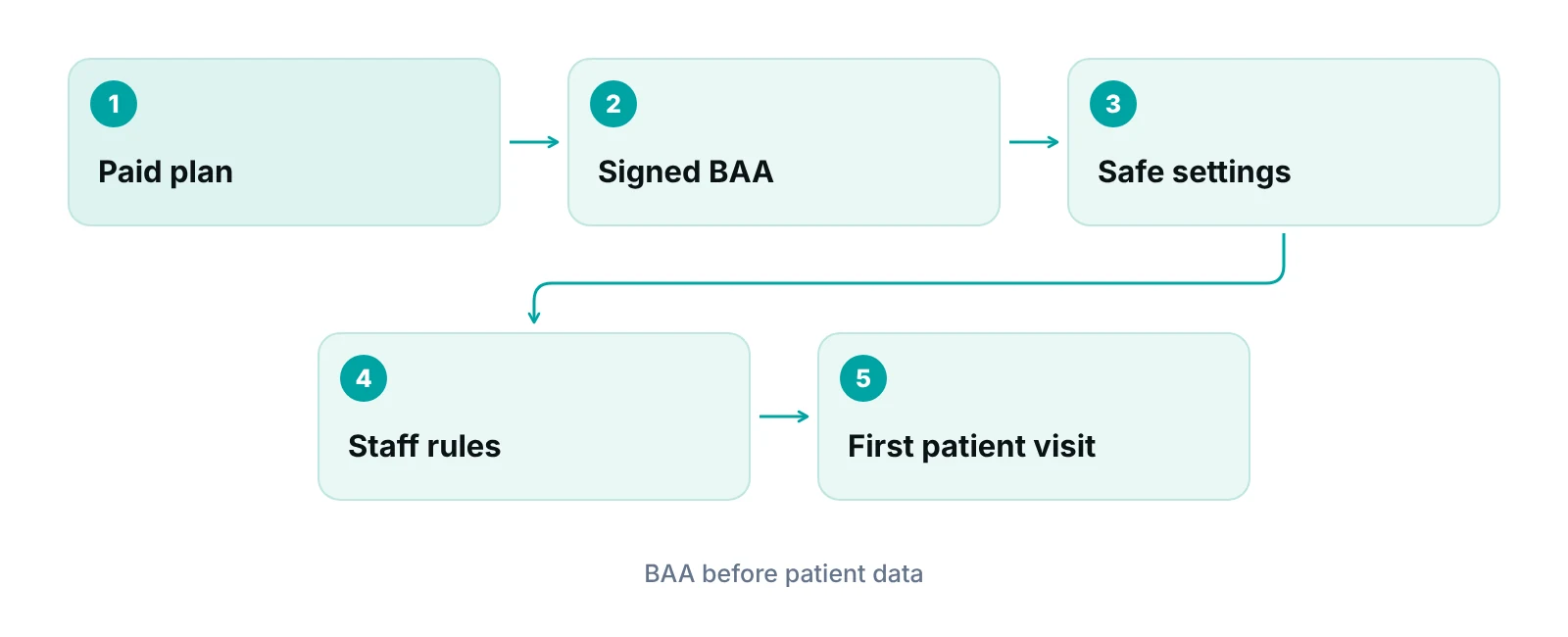
Is Zoom HIPAA compliant? Zoom can be part of a HIPAA-compliant telehealth workflow, but no product is HIPAA certified. Your practice needs a paid plan, a signed Business Associate Agreement (BAA) with Zoom, safe meeting settings and written staff rules. Using it for patient information without that BAA risks a HIPAA violation.
Practice managers usually ask this question at the worst moment: a provider wants to start video visits on Monday and someone has to say yes or no. This guide gives you the decision, the paperwork to collect, and a short setup list. It is written for practice owners and managers, not as legal advice. Our guide to HIPAA-compliant video conferencing compares platforms in general. This post stays on Zoom and the questions your practice should settle before the first patient joins a call.
Key takeaways
- No product is HIPAA certified; HHS and Zoom both say so.
- A signed BAA is required before patient information goes through Zoom.
- Use a paid plan and ask Zoom in writing which features the BAA covers.
- The COVID-19 telehealth flexibility ended on August 9, 2023.
- Settings and staff habits are the practice’s job, not Zoom’s.
Is Zoom HIPAA compliant, and who decides?
HIPAA applies to covered entities and business associates, not to software. Zoom says so itself: its security and compliance FAQ states that there is “no regulatory-backed certification available for HIPAA compliance.” HHS takes the same position for all technology: HHS guidance on cloud computing says OCR does not endorse, certify or recommend specific technology or products. So when a vendor page says “HIPAA compliant,” read it as “this vendor will sign a BAA and offers controls you can use.”
Zoom’s own HIPAA page says it helps customers enable HIPAA-compliant programs by executing a BAA. That is the vendor’s half. Your half is deciding who may use the tool, what they may discuss on it, and how you record those decisions. If the practice skips its half, a signed BAA does not protect it.
Plain-words version
Think of Zoom like a locked room you rent for patient conversations. The landlord (Zoom) signs a promise to protect what is said inside. You still decide who gets a key, who is invited in, and whether anyone leaves the door open.
Why do you need a BAA with Zoom?
A BAA is required because a video platform that carries patient information for your practice is a business associate. HHS says a cloud service provider that creates, receives, maintains or transmits electronic protected health information for a covered entity is a business associate, and that the two parties must enter into a HIPAA-compliant BAA. HHS wrote that guidance for cloud storage, but the same reasoning applies to a video vendor that holds your recordings, chat or visit data.
The rule itself is in the Security Rule. Under 45 CFR 164.308(b), a covered entity may let a business associate handle ePHI only if it obtains satisfactory assurances, documented in a written contract or other arrangement. HHS adds that using a cloud service to maintain ePHI without a BAA puts the covered entity in violation, and OCR has settled a case involving ePHI of more than 3,000 people stored on a cloud server without one (see the HHS FAQ on cloud providers without a BAA).
Encryption does not replace the BAA
HHS states that a cloud provider holding only encrypted data, without the key, is still a business associate. It also says encryption alone does not meet every Security Rule requirement, because it does not address integrity, availability or administrative and physical safeguards. A feature list that says “encrypted” does not close the gap.
Which Zoom plan do you need?
You need a paid plan, not the free one. Zoom’s healthcare pricing page says, “To enable HIPAA compliance, select a paid plan and establish a BAA agreement,” and lists Pro and Business-tier plans there. Zoom’s FAQ says it has a standard BAA “that can be entered into when required by our customers.” Neither page lists which exact plans qualify for the BAA.
Because eligibility can change, ask Zoom in writing which of your plan, add-ons and features the BAA covers before you rely on it. Keep the answer with the signed BAA. Do not assume that a feature you add later, such as cloud recording or a phone add-on, falls under the same agreement. We cannot confirm that from public pages, so we treat it as a question for your account representative.
What the practice owns versus what Zoom owns
| Task | Zoom (vendor) | Your practice |
|---|---|---|
| Sign a BAA | Offers a standard BAA when customers require one | Requests it, reads it, signs it and files it |
| Platform security controls | Aligns controls to HITRUST CSF and provides a SOC 2 + HITRUST report to healthcare customers | Reviews the report during vendor due diligence and records the decision |
| Meeting settings | Provides the settings | Chooses and enforces them for every provider and staff member |
| Who joins and what is shared | Not in Zoom’s control | Verifies patient identity, limits attendees, trains staff |
| Risk analysis | Not in Zoom’s control | Includes video tools in the practice’s own risk analysis |
| Recordings and notes | Stores them if you turn recording on | Decides whether to record at all and where files are kept |
Source: Zoom Security and Compliance FAQ and HIPAA page (2026); HHS Guidance on HIPAA and Cloud Computing (HHS, 2026). Last column is RCM Finder’s practical reading of the practice’s duties.
What changed after the COVID-19 telehealth flexibility ended?
During the pandemic, OCR said it would not penalize good-faith telehealth over “non-public facing remote communication technologies.” That flexibility is over. Any practice still operating as if a casual video app is acceptable needs to stop and fix it. Older articles, including earlier versions of this one, did not mention that change.
| Date | What happened |
|---|---|
| April 12, 2023 | OCR announced the COVID-19 public health emergency notifications of enforcement discretion would expire |
| May 11, 2023, 11:59 p.m. | The notifications expired |
| May 12, 2023 | A 90-calendar-day transition period began for providers to come into compliance for telehealth |
| August 9, 2023, 11:59 p.m. | The transition period ended; normal HIPAA Rules apply to telehealth |
Source: HHS Office for Civil Rights, HIPAA and Telehealth (page last reviewed October 18, 2023).
Since then, the question is not whether a consumer video tool was tolerated in 2020. It is whether your current tool has a BAA, controlled access and a documented risk analysis. If you also bill for these visits, the coding side matters too: see our telehealth billing guide for modifiers and place-of-service basics.
How do you set up Zoom for patient visits?
Set up Zoom in five steps: choose the plan, sign the BAA, lock down the settings, write the staff rules, and test with an internal call. The settings below are our practical recommendations, not an HHS list. HHS does not publish a Zoom configuration standard, so confirm each setting name in your own admin console.
- Buy a paid plan and request the BAA first. Keep the signed copy, the date and the plan name together.
- Use unique, per-visit meeting links. Avoid reusing a personal meeting room for patients.
- Admit people one at a time. Use a waiting room and a passcode so the provider controls who enters.
- Decide on recording. The safest default is no recording. If a visit must be recorded, define where the file goes, who can open it and when it is deleted.
- Limit screen sharing and chat. Provider-only screen sharing prevents a patient from seeing another person’s chart by mistake.
- Test internally. Run a mock visit with a staff member joining from a second device to check the experience a patient will see.
Where practices actually slip
The common failures are rarely about Zoom. They are a provider using a personal account, a front-desk team texting the meeting link along with clinical details, or a recording saved to a personal laptop. Our guides on HIPAA rules for the front desk and the HIPAA compliance checklist for medical practices cover those habits.
What should you ask any video vendor, not only Zoom?
Ask the same short list of questions of every vendor that touches patient information. Zoom is one vendor among several: your EHR, your answering service, your billing partner and any outsourced staff may also create, receive or transmit patient data, and each needs its own written assurance.
| Question | What a good answer looks like | Evidence to keep |
|---|---|---|
| Will you sign a BAA for the plan and features we will use? | Yes, in writing, naming the plan or service | Signed BAA and plan details |
| Which features are outside the BAA? | A clear list, or confirmation that there are none | Written reply from the vendor |
| What assurance reports do you provide? | A current third-party report available under agreement | Report and your review notes |
| Where are recordings and chat stored, and for how long? | Defined location, retention and deletion options | Settings screenshot, retention policy |
| What happens if you have a security incident? | Notice terms are written into the BAA | Incident terms in the contract |
Source: RCM Finder checklist, drawing on 45 CFR 164.308(b) and HHS Guidance on HIPAA and Cloud Computing (HHS, 2026).
The same logic applies when you bring in outside staff or a billing partner. Remote staff need access limits and a BAA before they see a patient record. For how we handle that on our side, see our virtual medical assistant service for medical practices. Any outside team with access to patient data should sign a Business Associate Agreement first.
“The BAA is the start of vendor compliance, not the end. The practice still has to run its own risk analysis and train its own people.”
Does the answer change for behavioral health or other telehealth-heavy specialties?
The rules do not change by specialty, but the exposure does. Practices that run many video sessions, such as therapy and psychiatry-adjacent programs, see more of the risks above: more recordings requested, more sessions from patients’ homes, more notes shared during calls. If that is your practice, review the operations picture on our behavioral and mental health RCM operations page. There, telehealth volume, documentation and billing all have to line up.
Where compliance meets revenue, mistakes are expensive in a different way. A visit that cannot be documented properly may not be billable, and a privacy incident may force you to pause a service line. Our medical billing services work from the documentation your team produces, which is another reason to settle the Zoom workflow before volume grows.
Want a second pair of eyes on your telehealth workflow?
We review how visits are scheduled, documented and billed, and flag where the process leaves gaps. Pricing is quoted after the audit.
What should you watch for in 2026?
Watch the HIPAA Security Rule. Our summary of the HIPAA Security Rule proposal and its effect on revenue cycle teams explains how a proposed update could affect vendors and billing teams. Until a final rule changes it, the existing requirements, including the business associate arrangements in 45 CFR 164.308(b), are what apply.
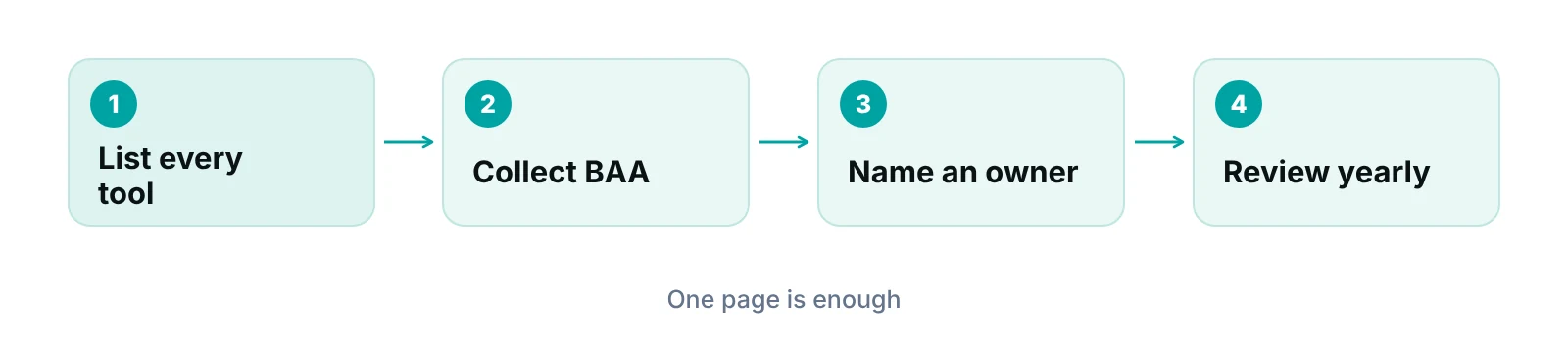
A practical step now: add a one-page vendor list to your compliance binder. Include each tool that touches patient information, the date its BAA was signed, who owns the relationship and when you last reviewed it. If you also want to see what telehealth volume is worth to your practice, our revenue calculator gives a rough starting point.
Our recommendations
- Get the BAA before the first visit. We would not let a provider run a single patient visit on a new video tool until the signed BAA is on file. A short delay is cheaper than a violation.
- Ask Zoom, in writing, what the BAA covers. Public pages do not list which plans and features qualify. Ask your account representative and keep the reply with the contract.
- Write a one-page telehealth rule sheet. Cover identity checks, who may attend, recording rules and what never goes in chat. Give it to every provider and front-desk team member and re-sign it each year.
- Ban personal accounts for patient visits. Every provider should use a practice-controlled account so you can enforce settings and remove access when someone leaves.
- Include video tools in your risk analysis. The Security Rule requires an accurate and thorough risk assessment. Add the video platform, where recordings go and who can reach them.
- Review vendors once a year. Check that each BAA is current, the plan has not changed and the owner is still in the role.
Bottom line
Zoom can support compliant telehealth when the practice does its part: a paid plan, a signed BAA, controlled settings and written staff rules. No product is certified, so keep your paperwork current. If video visits are growing and you want the billing side to keep pace, our medical billing services and a short conversation with our team are the next step.
Frequently asked questions
Is Zoom HIPAA compliant out of the box?
No. HIPAA compliance depends on how a covered entity uses a tool, not on the tool alone. Zoom says no regulatory-backed HIPAA certification exists and that it helps customers by signing a BAA. Your practice still has to choose a suitable plan, apply safe settings, train staff and document its risk analysis.
Can I use the free version of Zoom with patients?
We would not. Zoom’s healthcare pricing page says to enable HIPAA compliance you should select a paid plan and establish a BAA. Without a signed BAA, sending patient information through a vendor that handles it is a violation of the HIPAA Rules, according to HHS. Confirm your exact plan with Zoom before use.
What is a BAA, and who has to sign it?
A Business Associate Agreement is a written contract in which a vendor promises to safeguard patient information it handles for you. Under 45 CFR 164.308(b), the covered entity obtains these assurances in writing. Both the practice and the vendor sign, and the practice should keep the signed copy on file.
Does end-to-end encryption make Zoom HIPAA compliant?
No. HHS says encryption alone does not meet all Security Rule requirements, because it does not cover integrity, availability, or administrative and physical safeguards. A provider without the decryption key can still be a business associate. Encryption is one control, and it sits alongside the BAA, access limits and training.
Were consumer video apps ever allowed for telehealth?
Yes, temporarily. During the COVID-19 public health emergency, OCR said it would not penalize good-faith telehealth using non-public facing remote communication technologies. That notification expired on May 11, 2023, and a 90-day transition ended on August 9, 2023. Normal HIPAA Rules now apply.
Should we record telehealth visits on Zoom?
Only if there is a clear clinical or operational reason. Recordings are additional patient information that you have to store, secure and eventually delete. If you record, decide who can open the files, where they live and how long you keep them, and tell the patient. Check state consent rules with your counsel.
Get your free practice audit
Tell us about your practice. We will contact you using the details you give.
- A review of your recent claims, denials and A/R aging
- Where your front desk and prior authorizations slow payment
- A prioritized fix list you keep, whether or not you hire us
Pricing is quoted after the audit, based on your volume and the services you choose. Prefer to talk? Call +1 (302) 556-2288.
Sources
- HIPAA and Telehealth — HHS Office for Civil Rights (2023)
- Guidance on HIPAA & Cloud Computing — HHS (2026)
- What if a HIPAA covered entity (or business associate) uses a CSP to maintain ePHI without first executing a business associate agreement? — HHS (2026)
- 45 CFR 164.308 Administrative safeguards — eCFR (2026)
- Zoom Security and Compliance FAQ — Zoom (2026)
- Health Data & HIPAA-Compliance — Zoom (2026)
- Zoom Healthcare Pricing — Zoom (2026)
Disclaimer: This article is educational information for practice managers. It is not legal, compliance or coding advice. HIPAA requirements, vendor terms and state rules vary and change, so confirm your situation with qualified counsel and the vendor before relying on it.
