
HIPAA front desk rules come down to three habits: say and show only what the task needs, confirm who you are dealing with, and keep screens and papers out of public view. HHS accepts that a busy counter will produce some incidental disclosures, but only when reasonable safeguards are in place.
The front desk handles more patient information, in more public ways, than any other role in the practice. Names are spoken aloud, insurance cards change hands, phones ring while someone stands at the window. The rules are less strict than many offices fear, and less loose than some assume.
This guide stays at the counter. For the practice-wide program (risk analysis, vendor agreements, breach clocks) see our HIPAA compliance checklist for medical practices. For what to say when you leave a message, see our HIPAA-compliant voicemail guide. Here we cover sign-in sheets, name calls, check-in, ID, minimum necessary and incidental disclosures.
Key takeaways
- HHS says offices may use sign-in sheets and call patient names, if the information shown is limited.
- Incidental disclosures are allowed when reasonable safeguards and minimum necessary are in place; HIPAA does not demand zero risk.
- Minimum necessary is a rule about roles and routine tasks: write down what the desk needs and stop there.
- Before sharing with someone you do not know, verify identity and authority; with family, follow the patient’s wishes and your professional judgment.
- Train every new front-desk hire, keep the training records, and treat the desk’s habits as written policy.
What does HIPAA require at the front desk?
It requires reasonable safeguards, not a silent office. The Privacy Rule makes a practice keep “appropriate administrative, technical, and physical safeguards” for patient information (45 CFR 164.530(c)(1)). In plain terms: a policy, a trained person and a physical setup that make casual exposure unlikely.
HHS adds the part that calms most front-desk fears. An incidental disclosure is a secondary disclosure that “cannot reasonably be prevented, is limited in nature” and happens as a result of an otherwise permitted disclosure. The Rule “does not require that all risk of incidental use or disclosure be eliminated,” according to HHS Office for Civil Rights (OCR). HHS also says it does not expect safeguards to guarantee privacy.
So the test at the desk is not “could anyone possibly overhear this?” It is “did we take sensible steps, and did we say or show only what the task needed?” Those two ideas, reasonable safeguards and minimum necessary, run through every section below.
Can you still use sign-in sheets and call patient names?
Yes. HHS answers this exact question: physician offices may use sign-in sheets and call out patient names in waiting rooms, provided the information disclosed is appropriately limited. The disclosures this can cause are incidental, and the Privacy Rule permits them when the office has reasonable safeguards and applies minimum necessary where appropriate (HHS FAQ on sign-in sheets and calling names, citing 45 CFR 164.502(a)(1)(iii)). HHS last reviewed that page in December 2022.
The limit is what the sheet shows. HHS gives the example that a sign-in sheet should not display medical information that is not needed for signing in, such as the medical problem being treated. A name and a time is enough. If you add “reason for visit” or “insurance” columns, you have gone past what HHS describes.
| Moment at the desk | What HHS or the rule says | Habit we recommend |
|---|---|---|
| Sign-in sheet | Allowed if it shows only limited information; no medical problem or other detail not needed to sign in | Name and arrival time only. Use a sheet where earlier lines are covered, or a tablet that does not show other patients |
| Calling a name in the waiting room | Allowed; incidental disclosure is permitted with reasonable safeguards | First name or first name and last initial; never the reason for the visit |
| Talking at the counter | HHS lists speaking quietly in waiting rooms and public areas as a reasonable safeguard | Lower your voice, lean in, and move sensitive questions to a private spot or a form |
| Names in hallways and elevators | HHS lists avoiding patient names in public hallways and elevators | Keep staff conversations about patients out of shared spaces |
| Computer at the desk | HHS gives passwords on computers as an example of added security | Lock on walk-away, and angle or shield the screen from the waiting room (our practice, not an HHS rule) |
| Whiteboards and printed schedules | HHS notes people may glimpse information on a sign-in sheet or whiteboard | Keep full schedules out of view; show initials or room numbers only |
Source: HHS Office for Civil Rights, Incidental Uses and Disclosures and FAQ on sign-in sheets (guidance last reviewed 2022). The third column is our recommendation.
Some settings call for extra care even though the rule is the same. A patient waiting for a therapy or counseling visit may not want to be named at all. If you run a behavioral health practice, read how our behavioral health RCM operations pages treat registration and ask patients how they prefer to be called. Offering a preferred name or a text-when-ready option is a courtesy, not a legal duty we found in the sources we read.
How should check-in and ID checks work?
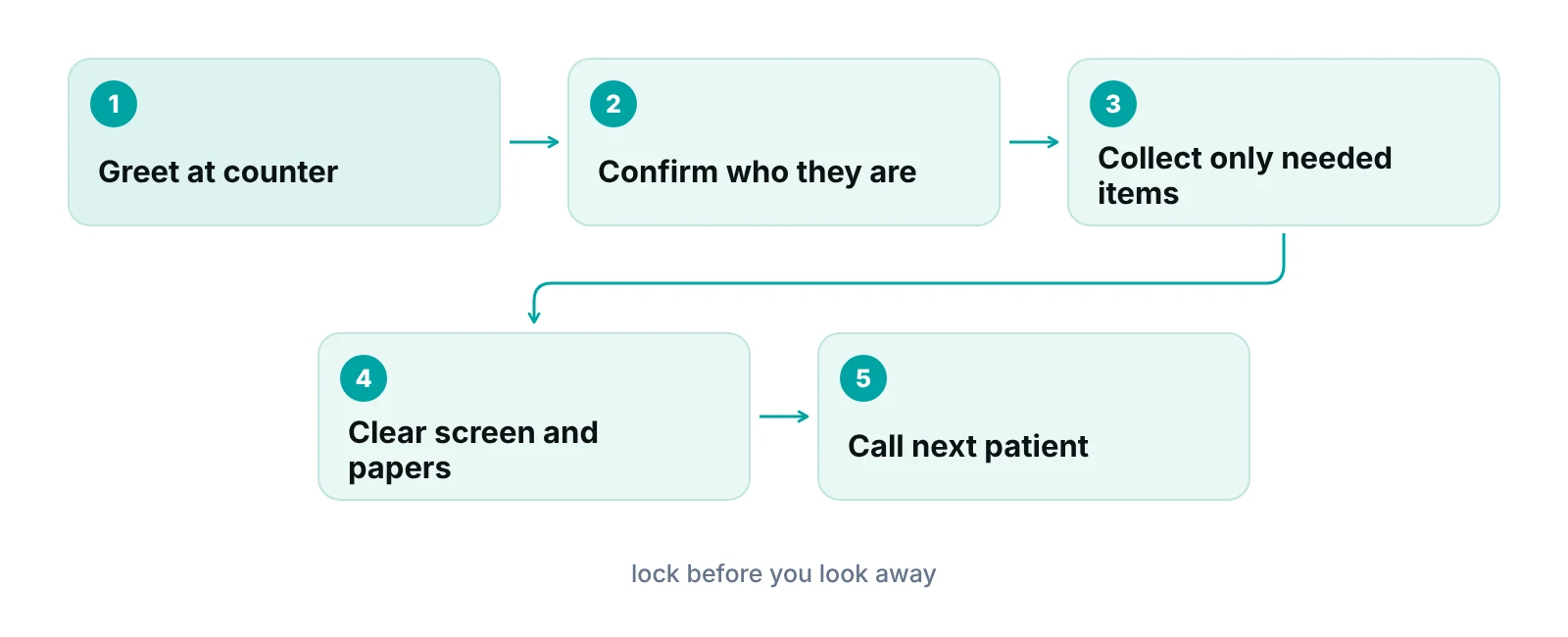
Check-in should collect what the visit and the claim need, confirm the person in front of you matches the appointment, and leave nothing visible when the next patient steps up. The Privacy Rule does not give front desks a script for any of this, so the practice has to write one.
Two parts are worth separating. Collecting information (demographics, insurance card, consent forms) is a normal use of PHI for treatment and payment. Disclosing it, by speaking it aloud or leaving it visible, is where the safeguards apply. A hand-held form, a privacy filter on a tablet or a quiet “please confirm your date of birth” keeps the first from becoming the second. Accurate registration also matters for billing, which is why check-in errors show up later as rejected claims (see our guides to insurance verification and clean claims).
About photo ID: we found no HHS page that tells practices to photocopy ID, or not to. That is a policy choice. If you scan it, treat the scan as part of the patient’s record with the same access limits, and say in your policy who may see it. If you only look at it, say that too, so every shift does the same thing.
When someone you do not know asks for patient information, the rule is explicit. A covered entity must verify the identity and authority of a person requesting protected health information when the entity does not know them (45 CFR 164.514(h)(1)). The section we read sets the duty rather than a method, so your policy should say what staff ask for, such as date of birth plus one more detail for a patient, or a callback to a known number for an outside organization.
What does minimum necessary mean for front-desk staff?
Minimum necessary means PHI “should not be used or disclosed when it is not necessary to satisfy a particular purpose or carry out a function,” in HHS’s words on its minimum necessary page. For the desk, it covers what each person can open as well as what they say aloud.
Practices must identify which people or classes of staff need access to PHI and limit access to that scope (45 CFR 164.514(d)(2)). For routine, repeating requests, standard protocols are enough, and each request does not need individual review. Non-routine requests are reviewed case by case against criteria.
| Desk task | What the desk needs | What it usually does not need |
|---|---|---|
| Sign in and check in | Name, appointment time, insurance card, demographics | Diagnosis, notes, balance history |
| Reminder call or text | Practice name, callback number, appointment time | Reason for visit, test results, treatment |
| Insurance verification | Plan, member ID, subscriber details, service type | Full clinical history |
| Scheduling a referral | Patient identity, referring provider, reason needed to book the right visit | Unrelated records |
| Collecting a copay | Amount due for this visit | Itemized diagnoses |
| Releasing records to another provider for treatment | Follow your release procedure; HHS says minimum necessary does not apply to disclosures to a provider for treatment | Do not use this exception for non-treatment requests |
Source: HHS OCR, Minimum Necessary Requirement; 45 CFR 164.514(d). Task rows are our examples.
HHS lists the exceptions: disclosures to or requests by a health care provider for treatment, disclosures to the individual, uses under a signed authorization and uses required by law, among others. Outside those, the desk limits itself. Software can enforce the habit. If your system supports permissions by role and keeps an audit log, front-desk users can see the schedule and demographics without opening clinical notes or claim payments. Our practice management system that tracks claims by stage uses role-based permissions and an audit log for this purpose; it is a billing and claims tool, not an EHR.
How do you handle phone calls and walk-up requests?
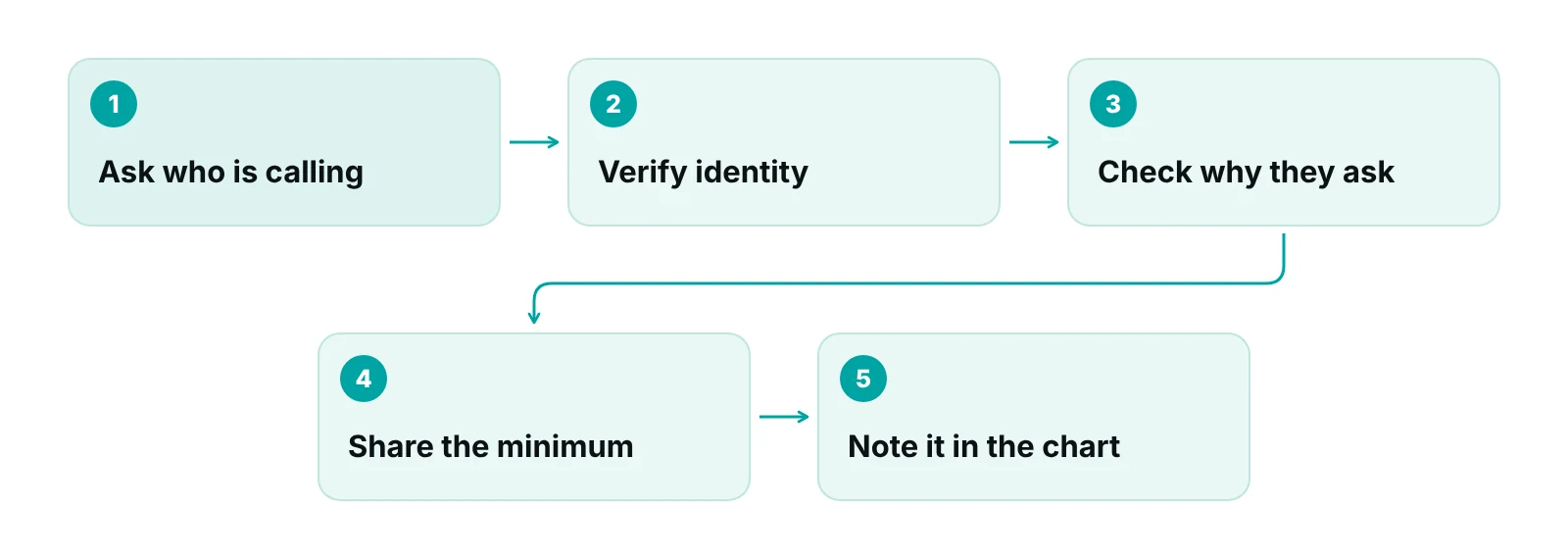
Ask who is calling before you say anything about a patient. Then decide which of three situations you are in: the patient, a family member or friend, or an organization. The rules differ for each.
| Who is asking | What the rules say | Front-desk action |
|---|---|---|
| The patient | Minimum necessary does not apply to disclosures to the individual; identity still has to be verified if unknown (164.514(h)(1)) | Confirm two identifiers before discussing the account |
| Family or friend, patient present and able to decide | Provider may share if the patient agrees, is given a chance to object, or the provider reasonably infers no objection | Ask the patient before speaking; share only what the person needs for their role |
| Family or friend, patient absent or unable to decide | Provider may share if, in professional judgment, it is in the patient’s best interests; limit to what is relevant to the person’s role | Do not decide alone. Hand to the clinician or privacy official |
| Another provider, for treatment | Minimum necessary does not apply to disclosures to a provider for treatment | Follow the release procedure; verify who is asking |
| Someone you do not know claiming authority | Verify identity and authority first (164.514(h)(1)) | Take a callback number and verify before sharing anything |
Source: HHS OCR, FAQ 2087 on family and friends; HHS Minimum Necessary Requirement; 45 CFR 164.514(h)(1).
The family rules are in HHS’s FAQ on communicating with family and friends. In every case disclosures are limited to information directly relevant to that person’s role in the patient’s care or payment. The “reasonable inference” route, such as a friend the patient brought into the exam room, only applies when the patient is present.
HHS also notes on its family and friends page that providers may leave appointment reminder messages at a patient’s home. What a message may contain is covered in our voicemail guide, so we do not repeat it here.
How do you set up the counter, screens and paper?
Arrange the desk so the default is private. HHS names passwords and quiet speech as examples of safeguards; the layout details below are our recommendations, because HHS does not prescribe them.
- Screens: angle monitors away from the waiting area, use a privacy filter, and set short auto-lock times.
- Paper: keep charts, schedules and printed forms face down or in a closed tray. Shred or use a locked bin for scrap that carries names.
- Sign-in: one name per slip, or a tablet that clears after each entry.
- Conversations: a mark on the floor or a sign asking the next patient to wait back gives you room to talk quietly.
- Fax and printer: check the recipient before sending and collect pages immediately.
“A privacy rule that lives in a binder is not followed at the counter. Turn it into five habits the desk can say out loud, then practice them.”
— Awais Afzal, Healthcare Operations & Data Analyst
Walk the waiting room once a quarter as if you were a visitor. What can you read from the chairs? What can you hear? Fix what you find and note the date. That check is our suggestion, not an HHS requirement, but it produces the evidence of safeguards that an investigator would ask about.
What training and records does a front desk need?
Every workforce member must be trained on the practice’s privacy policies as their job requires, and new members must be trained within a reasonable time after joining (45 CFR 164.530(b)). When a material change in policy affects someone’s duties, they are retrained within a reasonable time after it takes effect.
The same section requires appropriate sanctions against workforce members who do not comply, and the sanctions must be documented. Required documentation is kept for six years, counted from the later of the date it was created or last in effect (164.530(e) and (j)(2)).
The rule says “reasonable period” and does not set a number of days or an annual schedule. Pick your own and write it down: for example, before a new hire answers the phone alone, and again whenever you change a form or system.
Want your front-desk workflow reviewed?
Our free practice audit looks at how patient information moves from check-in to claim, so you can see where the desk is collecting or exposing more than it needs.
If the desk is short-staffed, privacy slips first. Our piece on how front-desk staff affect the revenue cycle shows why registration and phone work deserve the same attention as billing, and our patient privacy in revenue cycle management guide covers what happens after the patient leaves the counter.
What should staff do when something goes wrong?
Tell the privacy official the same day. That timing is our recommendation, because the practice cannot start its own analysis until someone reports the problem. Typical desk errors are a wrong-patient handout, a misdirected fax, a name read aloud to the wrong person or an open screen.
The privacy official then decides whether the event needs a formal breach analysis and notification. The breach clocks, the HHS reporting steps and the penalty tiers are in our HIPAA compliance checklist, and the proposed Security Rule changes are in our 2025 HIPAA Security Rule guide. Staff should know one thing: reporting early is the safe choice, and the policy should say staff will not be punished for honest, prompt reports. That second part is also our recommendation.
Our recommendations
- Write the five desk habits on one page. We would write the habits (limited sign-in, quiet voice, verify before sharing, lock the screen, report early) on one laminated page at the desk. A policy that fits on a page gets used.
- Limit the sign-in sheet to name and time. Remove any column that records a reason, insurance or doctor. It is the cheapest fix and it matches what HHS describes.
- Decide your ID and verification rules in writing. Say what staff ask for on the phone and at the counter, whether ID is scanned, and who can authorize an exception. The rule requires verification but leaves the method to you.
- Set permissions by role. Give the desk the schedule and demographics, billing the claim screens, clinicians the chart. If your software has an audit log, review it on a schedule you choose.
- Train at hire and at every process change. Keep the sign-in record. Training dates are the first thing we would pull in a review.
- Walk the waiting room each quarter. Stand where patients sit. Fix what you can read or hear, and log the date.
Role-based permissions and an audit log help a front desk see only what its job needs.
RCM Finder's practice management portal gives each staff role its own permissions and keeps an audit log. It tracks claims by stage and is a billing tool, not an EHR.
See how the RCM Finder portal works · Create a portal account
Disclosure: RCM Finder builds and sells this portal. It is a practice management system, not an EHR.
Bottom line
At the front desk, HIPAA comes down to limited sign-in, a quiet voice, verification before sharing and early reporting. If your front office is stretched thin, our virtual medical assistants for medical practices work inside your existing EHR on your practice’s schedule. You can also talk to us about a free practice audit.
Frequently asked questions
Are patient sign-in sheets a HIPAA violation?
Not by themselves. HHS says physician offices may use sign-in sheets if the information shown is appropriately limited. A name and time is safe; a column for the medical problem is not. Cover earlier entries or use one slip per patient so each person sees only their own line.
Can we call patients by name in the waiting room?
Yes. HHS says offices may call out patient names in waiting rooms, and that incidental overhearing is permitted when you have reasonable safeguards and apply minimum necessary. Use a name only, leave out the reason for the visit, and offer a preferred name for patients who ask.
Do we have to photocopy a patient's ID?
We found no HHS requirement either way. HIPAA does require verifying the identity and authority of someone you do not know before disclosing PHI (45 CFR 164.514(h)(1)), but not how. Choose a method, write it down and apply it the same way at every desk.
Can the front desk talk to a patient's spouse who calls?
Sometimes. If the patient is present and agrees, or does not object, you may share what is relevant to the spouse’s role. If the patient is absent, a clinician uses professional judgment about the patient’s best interests. When unsure, take a message and escalate.
Does minimum necessary apply when we send records to another doctor?
Not for treatment. HHS lists disclosures to or requests by a health care provider for treatment as an exception. It still applies to most other requests, such as payment questions or non-treatment third parties. Verify who is asking either way.
Does HIPAA require training for front-desk staff?
Yes. Under 45 CFR 164.530(b), every workforce member must be trained on the practice’s privacy policies as their job requires, and new hires within a reasonable time. The rule sets no fixed number of days, so set your own and keep the records for six years.
Get your free practice audit
Tell us about your practice. We will contact you using the details you give.
- A review of your recent claims, denials and A/R aging
- Where your front desk and prior authorizations slow payment
- A prioritized fix list you keep, whether or not you hire us
Pricing is quoted after the audit, based on your volume and the services you choose. Prefer to talk? Call +1 (302) 556-2288.
Sources
- Incidental Uses and Disclosures — HHS Office for Civil Rights (n.d.)
- May physician's offices use patient sign-in sheets or call out the names of their patients in their waiting rooms? — HHS Office for Civil Rights (2022)
- Minimum Necessary Requirement — HHS Office for Civil Rights (n.d.)
- 45 CFR 164.514 Other requirements relating to uses and disclosures — eCFR (current)
- 45 CFR 164.530 Administrative requirements — eCFR (current)
- Does HIPAA allow a health care provider to communicate with a patient's family, friends or others involved in care? (FAQ 2087) — HHS Office for Civil Rights (n.d.)
- Disclosures to family and friends — HHS Office for Civil Rights (n.d.)
Disclaimer: This article is general educational information about HIPAA operations for medical practices. It is not legal, compliance or coding advice. Rules, state laws and payer requirements vary and change. Confirm requirements with the HHS Office for Civil Rights, your counsel or a qualified compliance advisor before changing policy.