
The CO-197 denial code means the payer found no precertification, authorization or notification tied to the service. CO shows the provider owes the amount. First check whether approval was never obtained or was simply missing from the claim. Then correct, appeal or request retro review, within the payer's filing limit.
Many practices treat CO-197 as a sign that the front desk forgot a call. Sometimes that is true. Often the authorization exists and its number never reached the claim. The fix is different in each case, so this guide helps you tell them apart. For the process of getting approval in the first place, see our prior authorization guide. For another code that often gets confused with this one, see our CO-24 denial code guide.
Key takeaways
- CARC 197 means precertification, authorization, notification or pre-treatment approval is absent.
- Ask first: was approval never obtained, or was it obtained and left off the claim?
- Read the remark code on the remittance. It can point to an appeal, a mismatch or a bad authorization number.
- Appeal rights, retro authorization and corrected claims all depend on the payer. Check before you choose.
- Track the filing limit on every open CO-197 and fix the intake step that caused it.
What does the CO-197 denial code mean?
CO-197 means the payer found no required precertification, authorization, notification or pre-treatment approval for the service. The standard wording for claim adjustment reason code (CARC) 197 is “Precertification/authorization/notification/pre-treatment absent” (X12). The CO in front is the group code. It marks a contractual obligation, so the provider, not the patient, bears the amount (CMS).
The word to notice is absent. CARC 197 does not say the payer refused the service. It says the approval was not there when the claim was processed. That can mean nobody asked, or it can mean someone asked and the number never made it onto the claim. A Medicare DME contractor lists a missing 14-byte prior authorization unique tracking number as one common cause of reason code 197 (Noridian).
197 is not 198
CARC 198 reads “Precertification/notification/authorization/pre-treatment exceeded” (X12). That points to an approval that exists but does not cover what was billed, such as more visits or units than were authorized. Both codes can show up on the same remittance, so read each line.
CO versus PR on a 197 line
CMS describes CO as the provider’s financial responsibility and PR as patient responsibility (CMS MM5634). If your payer sends CARC 197 with CO, plan on writing it off or fixing it, not billing the patient. If it arrives with PR, read the plan’s provider contract and the patient’s cost-sharing terms before you move the balance. Contracts differ, so do not assume.
Why do CO-197 denials happen?
Most CO-197 denials come from a break in the hand-off between scheduling, authorization and billing. The payer’s system checks for an approval at the time of claim. If the approval, or the number that proves it, is not there, the claim fails. These are the common breaks.
The approval was never requested
- Payer rule not known: the service needs approval under this plan, but nobody checked the plan’s list before the visit.
- Same-day or add-on service: a procedure was added during the visit and no one could request approval in time.
- Plan changed: the patient switched plans, or a new payer became primary, after the original approval.
The approval exists but is not on the claim
- Authorization number missing or mistyped: the number was recorded in a note or on paper and never entered in the claim field.
- Required modifier or tracking number left off: the Medicare DME page above names a missing unique tracking number and a missing bypass modifier as causes (Noridian).
- Approval tied to a different code, date or provider: the claim does not match what was approved. This can also come back as another code, so check both.
Sort every CO-197 into one of two bins
Bin one: no approval exists. Bin two: approval exists, but it is not on the claim or does not match. Bin two is usually a correction. Bin one needs a payer conversation. Counting each bin each month shows you whether your problem is front desk or billing.
Which remark codes appear with CO-197?
Payers can send a remittance advice remark code (RARC) beside CARC 197 to add detail. Read it before you act. Noridian’s DME denial page shows one documented pairing, remark N210, which says “You may appeal this decision” (Noridian). The other codes in the table below are authorization-related definitions from the X12 list. We include them because you may see them on or near a 197 line, not because every payer pairs them.
| Remark code | What it says | What it usually points to |
|---|---|---|
| N210 | You may appeal this decision | Appeal rights exist for this denial; read the appeal steps for your payer |
| N54 | Claim information is inconsistent with pre-certified/authorized services | An approval exists but the code, date, units or provider on the claim differ from it |
| M62 | Missing, incomplete or invalid treatment authorization code | The authorization number is blank, mistyped or in the wrong claim field |
Source: X12 remittance advice remark code list (2025); Noridian Medicare JD DME denial resolution (2025).
Your payer may send none of these, or a different one. Use the payer’s own remark code list, because codes are added, changed and retired over time. If the remittance shows only CO-197 and no explanation, call the payer and ask what authorization they have on file for the member and date of service.
How do you fix a CO-197 denial?
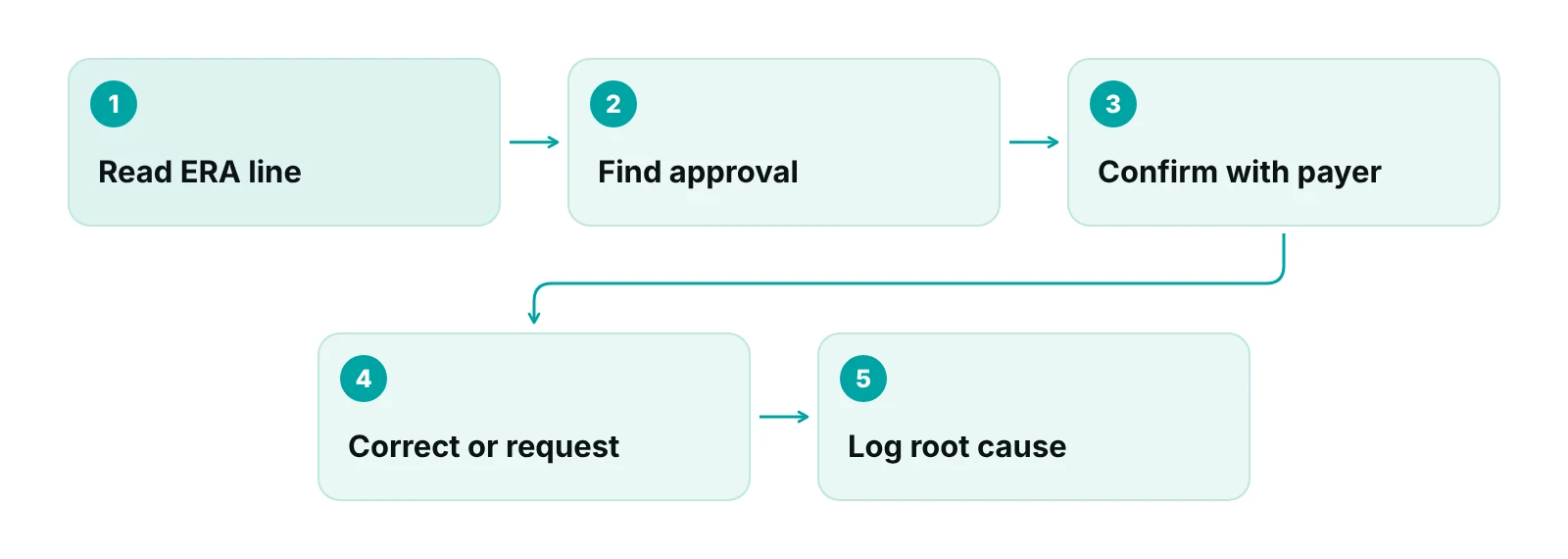
Find out what the payer has on file, then correct the claim or start the right request. Do not resubmit the same claim unchanged, because it will deny again. Work the steps in this order.
- Pull the remittance line. Note the group code, CARC 197 and any remark code. Copy the claim number and date of service.
- Look for the approval in your own records. Check the authorization log, the payer portal and the scheduling notes. Ask: was a request made, and is there a reference number?
- Confirm what the payer has. Use the payer portal or call. Ask for the authorization number, approved codes, dates and units.
- If approval exists: correct the claim so the authorization number and any required modifier match. The Medicare DME example directs the biller to resubmit a corrected claim with the unique tracking number from the affirmative decision (Noridian).
- If no approval exists: ask the payer whether it accepts a retro review for this service, and by when. Many do not, so ask before you invest time. See our retro authorization guide.
- Decide the route and log it. Choose a corrected claim, an appeal or a write-off, set a deadline, and record the root cause so intake can fix it.
Should you resubmit, appeal or request retro authorization?
It depends on whether an approval exists and on what the payer allows. If the approval exists, correct and resubmit. If it does not, the payer decides whether any route is open. Remark N210 tells you an appeal is available (Noridian). Without it, check the payer’s manual before you assume.
| Situation | Usual route | Check first |
|---|---|---|
| Approval exists; number missing or wrong on claim | Corrected claim with the right number | Authorization details match code, date and provider |
| Approval required a modifier or tracking number you left off | Corrected claim with it added | Payer or contractor billing instructions |
| No approval; payer allows retro review | Retro authorization request, then reprocess | The payer’s deadline and the clinical documentation required |
| No approval; payer does not allow retro review | Appeal if rights exist (for example remark N210), otherwise write off | Contract terms and appeal deadline |
| Denial is near the filing limit | Send the corrected claim first | Payer filing limit; do not let an appeal use up the time |
Source: Noridian Medicare JD DME (2025); retro rules and appeal rights vary by payer, so confirm with each payer.
Watch the clock. For Medicare, a claim must be filed within one year of the date of service, and Noridian states that a claim denied for timely filing has no appeal rights (Noridian). Commercial payers set their own limits by contract. Put the deadline on every open CO-197 so a slow appeal does not turn a fixable denial into a permanent one.
Why does missing authorization hurt more than one denied claim?
Authorization work is heavy in most practices, so every miss adds to a full queue. In the AMA’s survey of 1,000 physicians, reported in July 2024, practices completed an average of 43 prior authorizations per physician per week and spent about 12 hours a week on them. 94% of respondents said prior authorization always, often or sometimes delays access to necessary care (AMA).
Those figures describe the burden, not the cost of your denials. We do not put a dollar figure on a CO-197 here, because it depends on your payers, services and volume. Your own data answers it better.
A ten-minute self-check
Export the last 90 days of denials. Filter for CARC 197. Split them into “no approval” and “approval not on claim”. Then sort by payer and by service. The pattern will usually point to one or two intake gaps.
If you want to size what denials cost your practice, try our revenue calculator with your own numbers.
How do you prevent CO-197 denials?
Check authorization requirements before the visit and carry the approval onto the claim. Prevention sits at four points: scheduling, authorization, charge entry and pre-submission. Our insurance verification guide covers the coverage check that feeds the first of these.
| Checkpoint | What to verify | Who owns it |
|---|---|---|
| Scheduling | Plan and service checked against the payer’s authorization list before the appointment is confirmed | Front desk |
| Authorization | Request sent, reference and approval number recorded in one place, with approved codes, dates and units | Authorization coordinator |
| Charge entry | Authorization number and any required modifier entered; codes match what was approved | Biller or coder |
| Pre-submission scrub | Claims for authorization-required services blocked until a number is present | Billing lead |
Rules are changing at some payers. CMS finalized a rule in 2024 that, beginning primarily in 2026, requires certain payers to answer prior authorization requests within 72 hours for expedited cases and seven calendar days for standard ones. It also requires a specific reason when a request is denied (CMS). The covered payers listed are Medicare Advantage organizations, Medicaid and CHIP programs and some others, so it does not reach every plan you bill. Faster answers help only if your staff log them.
Authorization workflows also differ by specialty. If you want to see how one specialty handles this, see our pain management billing page. For a different denial with a different fix, compare it with CO-16.

When should you bring in outside help?
Bring in help when CO-197 keeps returning for the same payers or services, or when nobody owns the authorization step. Signs include approvals tracked on sticky notes, a biller who also schedules, and denials you cannot trace to a cause. Our prior authorization services handle requests and follow-up, working inside your existing EHR (for example PrognoCIS, eClinicalWorks or athenahealth).
Want to know where your authorization denials start?
Our free practice audit reviews your denials by reason code and shows whether the cause is intake, authorization or billing. Pricing is quoted after the audit.
Our recommendations
- Keep one authorization log. We recommend one place that holds the request date, reference number, approval number, approved codes and units, and expiry. If the number lives in three places, it will be missing from one claim.
- Block the claim until the number is present. For services that need approval, set a rule that holds the claim until an authorization number is entered. A held claim is easier to fix than a denied one.
- Split CO-197 into two bins. Record whether approval was never obtained or was not on the claim. The two have different owners and different fixes.
- Keep a payer cheat sheet. For each top payer, note which services need approval, whether retro review exists, the appeal route and the filing limit. Update it when payer bulletins change.
- Put a deadline on every open denial. Each CO-197 should carry a date by which a corrected claim or appeal must reach the payer. Do not leave it to memory.
- Review the denial reasons monthly. Look at CO-197 by payer, service and ordering provider. A repeat pattern is an intake problem you can remove.
Bottom line
A CO-197 denial tells you approval was absent from the claim, and your job is to learn whether it was absent from the process. Fix the claim, fix the hand-off, and track the filing limit. If your team is stuck in rework, our denial management services and prior authorization services can take that queue off your desk. Start with a free practice audit, or talk to us.
Frequently asked questions
What does CO-197 mean on a remittance?
CO-197 means the payer found no precertification, authorization, notification or pre-treatment approval for the service. CO is the group code, so the provider is responsible for the amount. The key word is absent: it may never have been requested, or it may exist but not be on the claim. Check which before you act.
Can you appeal a CO-197 denial?
Sometimes. Appeal rights depend on the payer and on how the denial was issued. A Medicare DME contractor pairs reason code 197 with remark N210, which says you may appeal. Many commercial plans have their own rules. Check the remittance, then the payer’s manual, and keep the appeal deadline in view.
Is there retro authorization for CO-197?
Some payers allow a retro review for certain services and many do not. There is no single rule, and the window can be short. Call the payer, ask whether retro review exists for this service and what documents it wants. Our retro authorization guide explains the process in more detail.
What is the difference between CO-197 and CO-198?
CARC 197 says the precertification, authorization, notification or pre-treatment approval is absent. CARC 198 says it was exceeded, for example more visits or units than approved. 197 is usually a missing approval or number. 198 is an approval that exists but does not cover what was billed. Read each line on the remittance.
How long do I have to correct a CO-197 claim?
Medicare requires claims within one year of the date of service, and a claim denied for timely filing has no appeal rights. Commercial payers set limits by contract, often shorter. Look up each payer’s limit and track it against every open CO-197, so an appeal does not use up the time.
How can we stop CO-197 denials from recurring?
Check each payer’s authorization list before the visit, record the approval number in one log, and enter it on the claim. Hold claims for services that need approval until the number is present. Then review CO-197 denials monthly by payer and service, because repeats point to a step in intake you can fix.
Get your free practice audit
Tell us about your practice. We will contact you using the details you give.
- A review of your recent claims, denials and A/R aging
- Where your front desk and prior authorizations slow payment
- A prioritized fix list you keep, whether or not you hire us
Pricing is quoted after the audit, based on your volume and the services you choose. Prefer to talk? Call +1 (302) 556-2288.
Sources
- Claim Adjustment Reason Codes — X12 (2025)
- Remittance Advice Remark Codes — X12 (2025)
- Reason Code 197 | Remark Code N210 — Noridian Medicare JD DME (2025)
- Denial Code Resolution — Noridian Medicare JD DME (2025)
- MLN Matters MM5634 — CMS (2007)
- Claim Submission Timeliness — Noridian Medicare JF (2025)
- Exhausted by prior auth, many patients abandon care: AMA survey — American Medical Association (2024)
- CMS finalizes rule to expand access to health information and improve the prior authorization process — CMS (2024)
Disclaimer: This post is general educational information about revenue cycle operations. It is not legal, coding, billing-compliance or financial advice. Code definitions, payer rules, authorization requirements, filing limits and appeal rights vary by payer and plan and change over time. Confirm requirements with the payer and qualified advisors before acting.
