
Retro authorization in medical billing means asking a payer to approve a service after it was delivered. No federal rule gives a practice a right to it. Whether it is available depends on the payer, the plan and the reason the approval was missed, so check the payer's policy first and act fast.
Most practices meet this problem the same way: a claim comes back with a missing-authorization denial, and the visit happened weeks ago. The question is whether the approval can still be obtained. This guide separates retro authorization from two look-alikes that cause confusion, emergency care and Medicaid retroactive eligibility, then walks through the request steps, the evidence to send and the fallback when the answer is no. If you are still before the visit, start with our prior authorization guide for providers instead.
Key takeaways
- Retro authorization is a payer’s option, not a right; policies differ by payer and plan.
- Emergency services under many commercial plans need no prior authorization, so retro approval is not the issue there.
- Medicaid retroactive eligibility is about coverage dates, not about approving a service.
- A CO-197 denial is the usual signal; the fix starts with the payer’s own manual, not a template letter.
- Build the front-end check so the request is never needed.
What retro authorization means
Retro authorization, also called retrospective or retroactive authorization, is a request for a payer to approve a service after the patient already received it. It sits at the end of the authorization timeline, not the start.
It is often confused with a denial code. The code a payer uses when no approval is on file is CARC 197, which the X12 code list defines as “Precertification/authorization/notification/pre-treatment absent”. That is the usual trigger for a retro request. Our CO-197 denial code guide covers the code itself.
| Type | When it is requested | What to expect |
|---|---|---|
| Prior (pre-service) authorization | Before the service is delivered | The approval number goes on the claim; this is the normal route. |
| Concurrent authorization | While care is ongoing, such as a continued stay or a course of treatment | The payer approves further units or days in stages. |
| Retro (retrospective) authorization | After the service was delivered | Allowed only if the payer’s policy permits it; often limited to specific reasons and short windows. |
Source: general industry terminology; each payer defines these terms in its own provider manual.
The older version of this article listed benefits such as “enhancing patient trust” and “compliance.” Neither is a reason payers grant retro approval. Retro approval is a decision the payer makes under its own utilization management rules, so plan on it being a recovery tool, not a routine workflow.
Can you still get approval after the visit?
Sometimes, but only if the specific payer allows it. There is no single national window. Some payers set a short deadline after the service, some only accept requests tied to certain situations, and some do not accept them at all. A figure like “30 days” appears in many blog posts, but it is not a rule you can rely on without the payer’s own document.
The place to confirm is the payer’s provider manual or portal, plus your contract. Look for words such as “retrospective review,” “retro-authorization,” “notification after the fact” or “administrative denial.” Write down the answer for each of your top payers so billing staff do not have to look it up again.
| Situation | What the rule says | What to do |
|---|---|---|
| Emergency care at an emergency department, commercial plan covered by the federal rule | Plans must cover emergency services without any prior authorization determination, judged by a prudent layperson standard (45 CFR 149.110). | Do not seek retro approval; follow up on payment. For out-of-network emergency care the plan must pay or send a denial notice within 30 calendar days of the bill and needed information. |
| Patient had no Medicaid coverage on the service date but applied later | Coverage can start up to three months before the application month if the patient would have been eligible (42 CFR 435.915). | Check the state’s eligibility result, then bill under the new coverage dates and follow that plan’s authorization rules. |
| Routine or scheduled service where the front desk missed the authorization | No federal retro right; the payer’s own policy decides. | Look up the payer’s retro policy at once and submit within its window, if one exists. |
| Authorization was requested before the service but was still pending | Payer-specific; a pending request is not an approval. | Ask the payer for the request date and status, and document it. |
Source: 45 CFR 149.110 (eCFR, via Cornell LII); 42 CFR 435.915 (eCFR, via Cornell LII). Payer-specific rows depend on the payer’s own manual.
Two look-alikes: emergencies and Medicaid retroactive eligibility
Emergency care and Medicaid retroactive coverage can look like retro authorization, but the rules are different. Mixing them up is the fastest way to send the wrong request to the wrong place.
Emergency services: authorization is not required
For plans and issuers covered by the federal rule, emergency services must be covered “without the need for any prior authorization determination”, even from an out-of-network provider. The test of what counts as an emergency uses a prudent layperson standard, and plans cannot limit it only by diagnosis code. The rule applies to plan years starting on or after January 1, 2022. It does not cover every payer, so confirm the plan type before relying on it. If an emergency claim was denied for missing authorization, treat it as a payment dispute, not a retro request. Our guide to medical billing for emergency services goes deeper.
Medicaid retroactive eligibility: coverage dates, not approvals
Under 42 CFR 435.915, Medicaid eligibility can be effective up to three months before the month of application if the person received covered services and would have been eligible at the time. That changes who the payer is, not whether a service was authorized. States set additional details in their plans, so the state agency is the source for edge cases. See our Medicare and Medicaid billing tips for the wider picture.
“A missed authorization is a process problem first and a billing problem second: the cheapest fix is always the one made before the visit.”
How to request retro authorization, step by step
Work the request in the same week you find the gap. Because windows are payer-specific and unknown to most front-desk teams, speed protects your options. These steps are general good practice, not a payer guarantee.
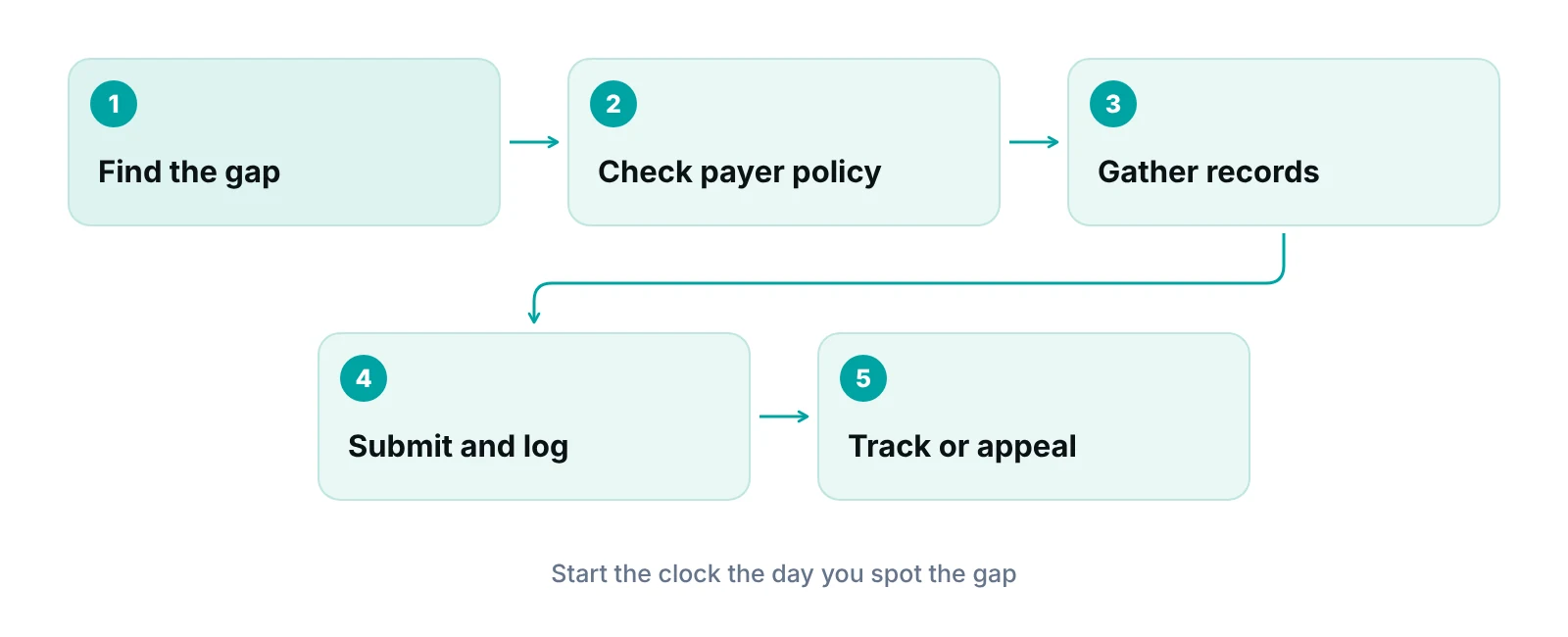
- Find the gap and stop the claim. Hold the claim if it has not been submitted, or note the denial and its date if it has.
- Read the payer’s retro policy. Confirm whether retro requests are accepted, the deadline, the accepted reasons, and the submission channel.
- Document why approval was missed. Write a short, factual reason: urgent clinical need, an outage on the payer side, coverage found after the visit, and similar. Do not alter or backdate any record.
- Assemble clinical evidence. Send the notes, orders, test results and the date of service that show medical necessity.
- Submit through the payer’s channel and keep proof. Record the date, method and any reference number.
- Follow up on a calendar. Note a check date, then escalate to a supervisor or provider representative if the payer is silent.
Not sure where your authorization gaps are?
A free practice audit looks at how authorizations are requested, tracked and tied to claims, and shows where visits slip through.
What to include in the request
A strong request is short, factual and complete. Reviewers decide on medical necessity and policy, so tell them exactly what they need and nothing more. Check the payer’s form first, since many require their own.
- Patient identifiers, plan ID, and the date and place of service.
- Procedure or service codes as billed, and the diagnosis supporting them.
- A one-paragraph explanation of why the authorization was not obtained before the service.
- Clinical notes, orders and results that show medical necessity.
- The provider’s contact details for a peer-to-peer call, if the payer offers one.
- Any earlier request numbers, so the payer can link the history.
Keep a copy of everything sent. If the request is refused, the same package becomes the base of your appeal.
What to do if the request is refused
A refusal is not always the end. Read the stated reason, because it tells you which path remains.
- Policy-based refusal (“retro not accepted”). Ask whether an appeal route exists for provider error. Payers often handle these separately.
- Medical-necessity refusal. Request the clinical criteria used and consider a peer-to-peer review or a formal appeal with added records.
- Approval exists but the number was missing from the claim. This is a claim-data fix: submit a corrected claim with the authorization number.
- Appeal deadlines. Appeal windows are set by the payer and plan, so note them in the denial letter and diary them the day the denial arrives.
Before writing off a balance or billing the patient, review your payer contract. Many contracts limit what a provider can bill a patient when the provider failed to follow authorization rules. Your denial management team or biller should confirm. Our guide to medical billing denial management explains how appeals fit in the broader workflow, and accounts receivable follow-up covers tracking the balance meanwhile.
What federal prior authorization changes mean for retro requests
The CMS Interoperability and Prior Authorization final rule speeds up payer decisions but does not create a right to retro approval. It is worth knowing because it changes how fast you can get an answer before the visit.
In CMS’s fact sheet on CMS-0057-F, impacted payers must send prior authorization decisions within 72 hours for expedited requests and within seven calendar days for standard requests. Beginning in 2026, payers must give a specific reason for any denial. Most operational provisions start generally on January 1, 2026, and the API requirements generally start January 1, 2027.
| Provision | Requirement | Notes |
|---|---|---|
| Expedited request decision | Within 72 hours | Applies to impacted payers; QHP issuers on the federally-facilitated exchanges are excluded from the timeframe. |
| Standard request decision | Within seven calendar days | Same exclusion for QHP issuers on the federally-facilitated exchanges. |
| Reason for denial | A specific reason must be given, starting in 2026 | Applies however the request was sent: portal, fax, email, mail or phone. |
| Who is covered | Medicare Advantage, state Medicaid and CHIP fee-for-service, Medicaid managed care, CHIP managed care and QHP issuers on the federally-facilitated exchanges | Commercial employer plans are not on this list. |
| Excluded | Prior authorization for drugs | The rule’s prior authorization provisions do not apply to drugs. |
Source: CMS, CMS Interoperability and Prior Authorization final rule (CMS-0057-F) fact sheet (2024).
In practice, faster answers should shrink the number of visits that go ahead with the approval still pending. It does not change a payer’s retro policy. Re-check payer manuals each year, as these requirements phase in.
Prevent the request: close the gap at the front end
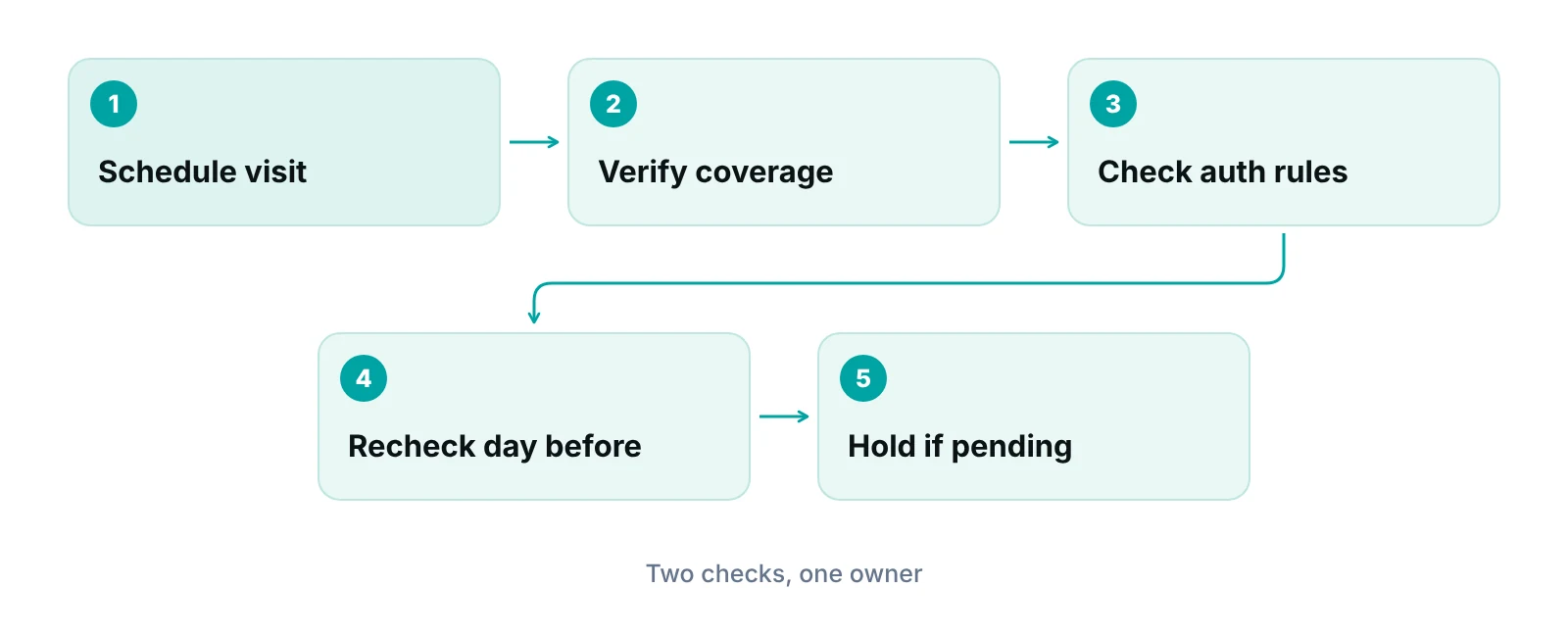
The cheapest retro authorization is the one you never need. Most missed approvals trace back to the same few points: the service was not flagged as needing approval at scheduling, the plan changed, or an approval was pending but nobody checked.
Pair the authorization check with insurance verification, since plan changes are a common cause. See our insurance verification guide. For a specialty that depends heavily on approvals, such as injections or imaging, the pain management billing page shows where authorization rules tend to bite.
A practice management system that tracks claims by stage lets each authorization have an owner and a status, and flags a claim that is about to go out without one. Where the practice lacks capacity, prior authorization services can run the request and follow-up work.
Our recommendations
- Write down each payer's retro policy. Keep a one-page note for your top payers: whether retro is accepted, the deadline, the form and the channel. Review it yearly.
- Act the week you find the gap. Windows are short or unknown. Delay can close options that were open.
- Separate emergencies and Medicaid eligibility from retro requests. Route those cases to payment disputes and eligibility checks, not authorization requests.
- Never alter or backdate records. Describe what happened accurately. Honest documentation is also what makes an appeal stronger.
- Give every authorization an owner and a status. Name one person per request, with a follow-up date. Unowned requests are the ones that expire.
- Check authorization twice before the visit. Once at scheduling and once the day before, with a rule to hold the visit when the status is still pending.
Track each authorization like a claim, with an owner and a status.
The RCM Finder portal tracks claims by stage with an assigned owner and workflow rules that can hold a claim for review, so a visit without a recorded authorization is easier to catch before submission.
See how the RCM Finder portal works · Create a portal account
Disclosure: RCM Finder builds and sells this portal. It is a practice management system, not an EHR.
Bottom line
Retro authorization is a payer option, not an entitlement, so the plan is to confirm the payer’s policy quickly, document the reason honestly and keep an appeal path ready. For the denials that follow, see our denial management services and the CO-197 guide, and use the revenue calculator to size what unworked authorization denials may be costing.
Frequently asked questions
What is retro authorization in medical billing?
It is a request asking a payer to approve a service after it was delivered. Payers accept it only if their policy allows it, often for limited reasons and within a short window. It is also called retrospective or retroactive authorization. Because it is the payer’s option, a practice cannot assume it will be available, which is why front-end checks matter more than recovery.
Is there a standard deadline to request it?
No national deadline applies. Each payer sets its own, if it accepts retro requests at all. Confirm the window in the payer’s provider manual or by contacting the provider representative, and write it down. A useful habit is to log each payer’s answer and the date you confirmed it, since policies are updated.
Do emergency services need retro authorization?
For plans covered by the federal rule at 45 CFR 149.110, emergency services must be covered without any prior authorization determination. A denial for missing authorization on such a claim should be disputed as a payment issue. Not every payer is covered, so confirm the plan type. Urgent but non-emergency visits, such as after-hours clinic care, are not covered by that rule and follow the plan’s own authorization policy.
How is Medicaid retroactive eligibility different?
It changes the date coverage begins. Under 42 CFR 435.915, coverage can start up to three months before the application month if the patient received covered services and would have been eligible. It does not approve a service that needed authorization. The state Medicaid agency is the final source for how it applies the rule to a given patient.
What if the payer refuses the request?
Read the stated reason. Policy refusals may have a provider-error appeal, medical-necessity refusals can go to peer-to-peer review or formal appeal, and a missing number on the claim needs a corrected claim. Check your contract before billing the patient. Keep appeal deadlines on a shared calendar from the day the denial letter arrives.
Does the CMS prior authorization rule give practices retro rights?
No. CMS-0057-F sets faster decision times and requires a specific denial reason for impacted payers, mostly from 2026. It does not require payers to approve services after the fact. Re-check payer manuals as the requirements phase in, since the dates differ by payer type.
Get your free practice audit
Tell us about your practice. We will contact you using the details you give.
- A review of your recent claims, denials and A/R aging
- Where your front desk and prior authorizations slow payment
- A prioritized fix list you keep, whether or not you hire us
Pricing is quoted after the audit, based on your volume and the services you choose. Prefer to talk? Call +1 (302) 556-2288.
Sources
- Claim Adjustment Reason Codes (code 197) — X12 (2018 (last modified))
- 45 CFR 149.110 Preventing surprise medical bills for emergency services — eCFR via Cornell LII (2026)
- 42 CFR 435.915 Effective date — eCFR via Cornell LII (2026)
- CMS Interoperability and Prior Authorization final rule (CMS-0057-F) fact sheet — CMS (2024)
Disclaimer: This article is educational and is not legal, coding or compliance advice. Payer rules differ by plan and change over time; confirm requirements with each payer and your contract.
