
To verify Medicare eligibility, enter the patient's Medicare Beneficiary Identifier (MBI), name and date of birth in your MAC portal or a HETS-connected clearinghouse. Then check for a Medicare Advantage plan or secondary payer, and look up the coverage rules for the service. An eligibility response is not a payment guarantee.
Checking eligibility and checking coverage are two different jobs, and the old advice on this topic often blends them. Eligibility asks whether the person has Medicare on the date of service. Coverage asks whether Medicare pays for this service, for this diagnosis, at this frequency. This guide covers both, in the order a front desk can follow.
It sits alongside our all-payer patient insurance verification guide and is written for practice owners, managers and front-desk leads. Every rule below comes from CMS documents we read in October 2026. Where a rule depends on your Medicare Administrative Contractor (MAC), we say so.
Key takeaways
- Eligibility and coverage are separate checks; passing the first does not prove the second.
- Enter the MBI, last name, first name and date of birth. HETS rejects requests that use the old HICN.
- Your MAC portal, a clearinghouse or a software vendor can return the same HETS data; responses can differ by tool.
- If the patient has a Medicare Advantage plan, send eligibility questions to that plan.
- Use the Medicare Coverage Database for NCD and LCD rules, and decide on an ABN before the service.
What does it mean to verify Medicare eligibility?
Verifying Medicare eligibility means confirming, for a specific date of service, that the patient has active Medicare and seeing what the Medicare record shows about their entitlement and plans. CMS lists people who may be eligible as those age 65 or older, people under 65 with certain disabilities, and people of any age with end-stage renal disease (ESRD), per its November 2025 MLN fact sheet, Checking Medicare Eligibility.
Run the check at scheduling and again before the visit. Coverage can change between booking and arrival, and a dated result protects you if a claim is questioned later.
Three questions, three places to look
- Eligibility: is the patient entitled to Part A or Part B, and is there a Medicare Advantage, Part D or secondary payer on file? Your eligibility response answers this.
- Coverage: does Medicare cover this service for this diagnosis? NCDs and LCDs in the Medicare Coverage Database answer this.
- Patient liability: if you expect a denial as not reasonable and necessary, does the patient need an Advance Beneficiary Notice (ABN) first?
The CMS HETS guide is blunt on the limit: the response should not be interpreted as a guarantee of payment. Treat it as a snapshot of the Medicare record, not a promise on the claim.
What do you need to check Medicare eligibility?
You need the patient’s MBI, last name, first name and date of birth. The MLN fact sheet lists the MBI, first and last name and date of birth (MM/DD/YYYY) as the information needed.
The old post on this page listed a PTAN and TIN as items to gather. Those identify your practice to Medicare and your MAC. They are not fields in the patient match, so we have removed them from the checklist.
| Data element | Rule from CMS | Why it matters |
|---|---|---|
| MBI | 11 characters; the letters S, L, O, I, B and Z are never used; dashes shown on the card are not entered | Enter it without dashes, exactly as issued |
| Last and first name | Both are used in the primary match | Use the name as it appears on the Medicare record |
| Date of birth | MM/DD/YYYY in the fact sheet | Enter it exactly as on the Medicare record |
| Alternate matches | MBI + last name + DOB, or MBI + last name + first name | Useful when one field is uncertain, per the HETS guide |
| Old HICN | HETS rejects requests that use a Health Insurance Claim Number | Do not enter the old number |
| Middle name, gender | Do not send; either can trigger a rejection | Keep the request to the required fields |
| Date range | Up to four years back and up to four months ahead; blank returns current eligibility | Ask about the actual date of service |
Source: CMS, HETS 270/271 Companion Guide v14.0 (2025), Section 7.3-7.4; CMS MLN8816413 (November 2025); CMS, Understanding the MBI.
What if the patient does not have the MBI?
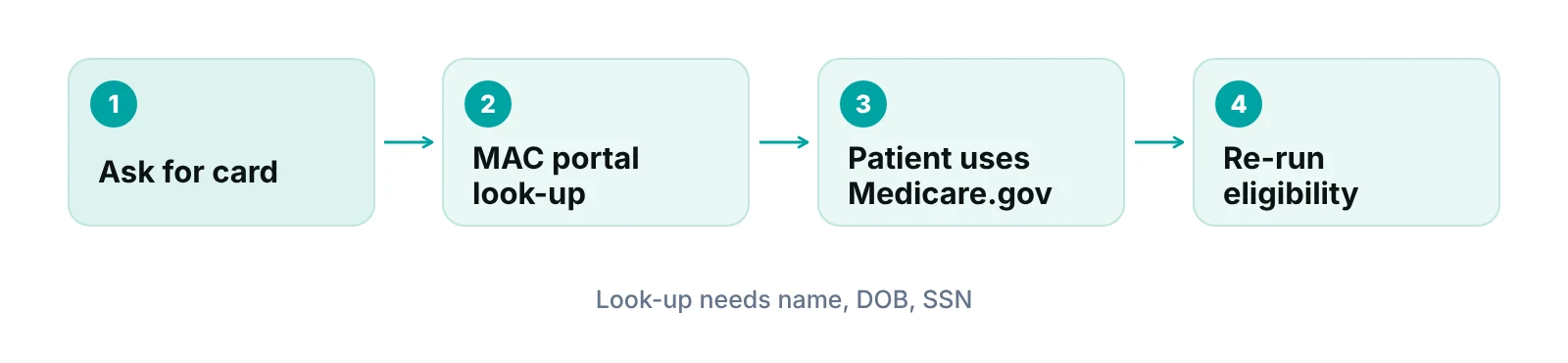
CMS says providers can get an MBI by asking for the Medicare card, using the MBI look-up tool in the MAC’s secure portal, or, for older claims, reading the remittance advice. The portal look-up needs the patient’s first name, last name, date of birth and Social Security number. If the patient will not share the SSN, CMS says to have the patient log in to Medicare.gov to get the MBI.
Check the format before you submit. The CMS MBI guide says the MBI has 11 characters, is randomly generated rather than built from the SSN, and is not case-sensitive. The dashes on the card are display-only and are not entered.
Which method should you use to check Medicare eligibility?
Most practices use one of three routes: the MAC provider portal, a clearinghouse or software vendor, or a direct HETS connection. The CMS fact sheet notes that MAC portals, billing agencies, clearinghouses and software vendors all use HETS data, so the underlying record is the same. The difference is workflow.
| Method | How it works | Best when | Watch for |
|---|---|---|---|
| MAC provider portal | Each MAC runs its own portal, available at any time per CMS | Low volume, a few checks a day | Manual entry; set up and features vary by MAC |
| Clearinghouse or billing software | Sends the 270 request on your behalf and shows the 271 response in your system | You already send claims through that vendor | Confirm that it handles Medicare Advantage and secondary payer fields |
| Direct HETS connection | Practice, clearinghouse or vendor becomes an approved trading partner | Large volume or in-house IT | Trading Partner Agreement, a Submitter ID and annual recertification |
| Phone or IVR with the MAC | Set by each MAC | Fallback for a no-match | Not covered in CMS’s current eligibility fact sheet; check your MAC’s website |
Source: CMS, MLN8816413 Checking Medicare Eligibility (November 2025); CMS, HETS 270/271 Companion Guide v14.0 (2025), Sections 1.2, 2.2, 4.1.1.
The old version of this page listed a Secure Provider Online Tool, IVR phone numbers and hours as if they applied everywhere. Portal names, phone lines and hours are set by each MAC and change over time, so we do not print them. Find your MAC on its own website and keep that page bookmarked.
Different tools can return different answers
CMS warns that you may see different eligibility responses depending on the tool you use. If a result looks wrong, re-run it in a second tool before telling the patient they have no coverage (CMS MLN fact sheet).
How does HETS work, and what does the 271 response show?
HETS is the CMS system that returns Medicare eligibility data in real time using the HIPAA 270 request and 271 response. The HETS 270/271 Companion Guide says it is typically available 24 hours a day, seven days a week, and that approved trading partners include providers, clearinghouses and third-party vendors.
What the response can include
When the information matches a Medicare record, CMS says the response can show:
- Part A and Part B entitlement, with demographics and the entitlement reason
- Deductibles and coinsurance
- A Medicare Advantage (MA) plan, a PACE plan and a Medicare drug plan (Part D)
- Medicare Secondary Payer (MSP) information
- Hospice, home health, ESRD and Qualified Medicare Beneficiary (QMB) status
- Skilled nursing facility benefit days remaining and hospital lifetime reserve days
- Next eligible dates for preventive services and, for some services, whether prior authorization is required
Two limits matter at the front desk. First, the data refreshes once a day, early in the morning Eastern time, so a change made today may not appear until tomorrow. Second, preventive service dates are calculated from Medicare fee-for-service paid claims. A next eligible date in the future means the service cannot be provided yet; a date in the past means the patient is already eligible, per the MLN fact sheet.
HETS is also not a claims or appeals system, and it is for conducting Medicare business only. Questions about Part A and B go to your MAC. Questions about Medicare Advantage, Part D and MSP go to the plans named in the response, and QMB questions go to the state Medicaid system, per the companion guide.
What if the patient has Medicare Advantage or another payer?
If the response shows a Medicare Advantage plan, stop and send the eligibility and benefits question to that plan. CMS says the response shows the MA plan, its enrollment effective and termination dates, and plan contact information, and to “direct your eligibility query to the identified plan” (MLN8816413).
This is the step most older guides skip. A Medicare card alone does not tell you whether the patient is in Original Medicare or a plan. The eligibility response shows the MA plan if there is one.
The same response flags Medicare Secondary Payer information. If another payer is primary, Medicare may be secondary, so record the order of payers at registration. Our guide to the Medicare Part A versus Part B differences explains which benefits sit where.
“The most common mistake we see in Medicare front desks is treating a clean eligibility screen as an approval. It is a starting point for the next three checks.”
— Awais Afzal, Healthcare Operations & Data Analyst
How do you check NCD and LCD coverage for a service?
Search the Medicare Coverage Database (MCD) for the service, using a keyword, CPT, HCPCS or ICD-10-CM code, or a document ID. CMS’s MCD guide says the search covers both national and local coverage documents.
A National Coverage Determination (NCD) is national policy granting, limiting or excluding coverage for a specific item or service. A Local Coverage Determination (LCD) is a decision by a MAC about whether a service is reasonable and necessary, and it applies within that MAC’s jurisdiction. Before an LCD is final, the MAC publishes a proposed version for public comment.
Do not stop at the LCD. MACs also publish billing and coding articles that often hold the coding and documentation guidelines tied to an LCD. Read both before you set the diagnosis and code pairing for a scheduled service.
| Question at the front desk | Where to find the answer | Notes |
|---|---|---|
| Is the patient entitled to Part A or B? | Eligibility response (portal, clearinghouse or HETS) | Dated snapshot, refreshed daily |
| Is there a Medicare Advantage plan? | Eligibility response shows plan and dates | Send questions to that plan |
| Is another payer primary? | MSP information in the response | Record the payer order |
| Does Medicare cover this service? | NCD or LCD in the Medicare Coverage Database | LCDs differ by MAC jurisdiction |
| Is a preventive service due? | Next eligible date in the response; CMS Medicare Preventive Services tool | Based on fee-for-service paid claims |
| Will the patient owe if Medicare denies? | ABN decision before the service | Original Medicare only |
Source: CMS, MLN8816413 (November 2025); CMS, MLN901347 How to Use the Medicare Coverage Database; CMS, ABN Tutorial.
When does the ABN come in?
If your coverage check shows Medicare is likely to deny a service it generally covers as not reasonable and necessary, the patient needs an ABN before the service. CMS says the notice must be given before the service, that it is not used for Medicare Advantage or Part D items and services, and that the patient must choose one of three options. Our ABN guide for providers walks through the form.
What does a reliable Medicare verification workflow look like?
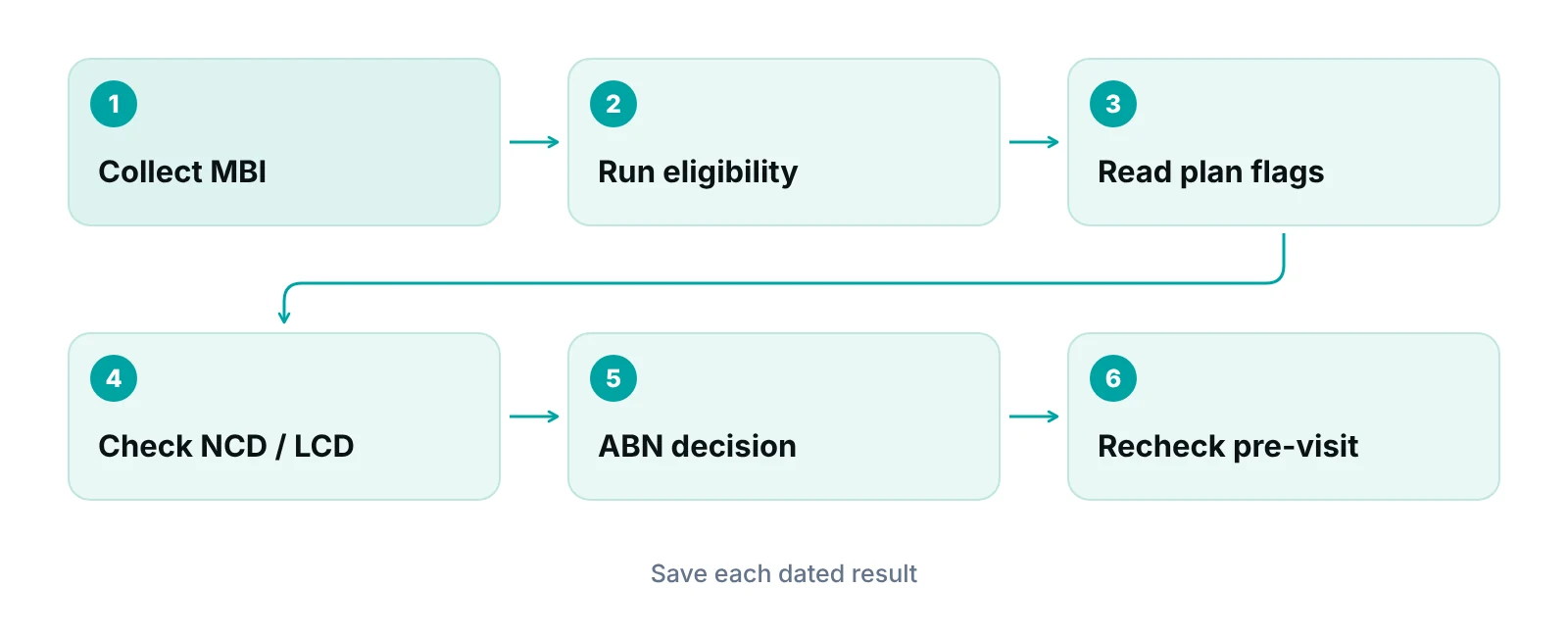
A reliable workflow has one owner, one order of steps and one place to record the result. Here is an order that works for most front desks.
- Collect the MBI, the name as shown on the card, and the date of birth at scheduling.
- Run the eligibility check for the actual date of service and save the dated response to the chart or account.
- Read the response for a Medicare Advantage plan, MSP data, hospice or home health periods, and ESRD status.
- Look up the NCD, LCD and billing article for any service with frequency, diagnosis or site limits.
- Decide on an ABN, and give it before the service, not at checkout.
- Repeat the eligibility check shortly before the visit and flag changes for the biller.
Specialty changes the checks. A practice that serves mostly older adults will meet Medicare Advantage and secondary payer questions often, while a procedure-heavy practice leans harder on LCD diagnosis rules. Our geriatrics billing page shows how those patterns differ in billing.
Should you keep this in-house or hand it off?
Keep it in-house if one trained person can run the six steps above on every Medicare patient. Look at outside help when checks are skipped on busy days, the response is not saved, or denials trace back to eligibility errors. Our guide on front-desk staffing and revenue covers the staffing side.
If you use a vendor, ask the questions CMS itself suggests. The MLN fact sheet notes that HIPAA does not require business associates to protect electronic health information stored or processed outside the U.S., and advises asking whether a third party uses subcontractors, how it protects your data and whether data leaves the U.S. Also ask for a Business Associate Agreement, role-based access and an audit trail.
Eligibility is the front of a chain that ends in the claim. Our medical billing services team works inside your existing EHR (for example PrognoCIS, eClinicalWorks or athenahealth) and puts a Business Associate Agreement in place before accessing patient data. Automated real-time eligibility inside our own portal is early access, not live, so today the check stays a documented workflow step. For tooling options across payers, read our eligibility automation guide. To see what unchecked eligibility could cost your own practice, try the revenue calculator.
Find out where Medicare checks break down in your practice
We review how your front desk verifies eligibility today and show you the gaps, free. Pricing, if you want help, is quoted after the audit.
Our recommendations
- Name one owner for Medicare checks. We recommend one named person per shift, with a backup. Shared ownership is how checks get skipped.
- Save every response with a date. We recommend saving the eligibility response to the account, not just reading it. It is your record if a claim or a patient question comes up later.
- Add a Medicare Advantage stop. We recommend a hard stop in your checklist: if a plan appears, the check moves to that plan before the visit.
- Keep your MAC's page and the MCD bookmarked. We recommend bookmarking your MAC’s provider pages and the Medicare Coverage Database. Portal names, phone lines and LCDs change; your bookmarks should be the source.
- Decide the ABN before the day of service. We recommend reviewing scheduled services against LCD limits a day ahead, so the ABN conversation is not rushed at check-in.
- Audit a sample each month. We recommend pulling a small sample of Medicare accounts each month and checking that the response, plan flags and ABN decision were recorded.
Bottom line
To verify Medicare eligibility, get the MBI right, run the check for the actual date of service, read the plan and secondary payer flags, then confirm coverage in the Medicare Coverage Database. Eligibility alone does not settle payment. If a prior authorization may apply to the service, see our prior authorization services and prior authorization guide. If you want a second set of eyes on the workflow, contact us for a free practice audit.
Frequently asked questions
How do I verify a patient's Medicare eligibility?
Enter the patient’s MBI, last name, first name and date of birth in your MAC provider portal, or have a clearinghouse or software vendor send a HETS request. Read the Part A and B entitlement, any Medicare Advantage plan and Medicare Secondary Payer data, then save the dated response to the patient’s account.
Can I still use the old HICN to check eligibility?
No. The CMS HETS companion guide says HETS rejects requests submitted with a Health Insurance Claim Number. Use the 11-character MBI instead. If the patient does not have it, use the MBI look-up tool in your MAC’s secure portal or ask the patient to log in to Medicare.gov.
Does a positive eligibility response guarantee payment?
No. CMS states that the 271 response should not be interpreted as a guarantee of payment. It confirms what the Medicare record shows on the day of the query. Coverage rules for the service, documentation, medical necessity and the plan type still decide whether a claim is paid.
What if the patient has a Medicare Advantage plan?
The eligibility response shows the MA plan, its enrollment dates and contact information. CMS says to direct your eligibility query to the identified plan. Also note that an ABN is not used for Medicare Advantage items and services, so follow the plan’s own rules on notices and authorization.
Where do I find NCD and LCD rules for a service?
Search the Medicare Coverage Database by keyword, CPT, HCPCS or ICD-10-CM code, or document ID. NCDs are national. LCDs are issued by your MAC and apply within its jurisdiction. Also read the related billing and coding article, which often holds the coding guidance for that LCD.
When do I need an ABN?
Under Original Medicare, give an ABN before the service when you expect Medicare to deny a generally covered service as not reasonable and necessary. CMS says it must be given before the service and the patient must choose one of three options. It is not used for Medicare Advantage or Part D.
Get your free practice audit
Tell us about your practice. We will contact you using the details you give.
- A review of your recent claims, denials and A/R aging
- Where your front desk and prior authorizations slow payment
- A prioritized fix list you keep, whether or not you hire us
Pricing is quoted after the audit, based on your volume and the services you choose. Prefer to talk? Call +1 (302) 556-2288.
Sources
- HETS 270/271 Companion Guide v14.0 — CMS (2025)
- Checking Medicare Eligibility (MLN8816413) — CMS Medicare Learning Network (2025)
- How do health care providers & office managers get patients' MBIs? — CMS (accessed 2026-10-14)
- Understanding the Medicare Beneficiary Identifier (MBI) — CMS (hosted by HHS) (2018)
- MLN901347 How to Use the Medicare Coverage Database, Chapter 2 — CMS Medicare Learning Network (accessed 2026-10-14)
- ABN Tutorial (Form CMS-R-131) — CMS Medicare Learning Network (2015)
Disclaimer: This article is educational and is not legal, coding, billing or compliance advice. Medicare rules, MAC processes and payer policies change and vary by jurisdiction. Confirm current requirements with CMS, your MAC and your own compliance advisor before changing your process.