
EHR and RCM integration means the data your team enters once, such as demographics, coverage, services and diagnoses, reaches billing without retyping. It reduces avoidable errors at the source. It does not guarantee payment: coding review, claim edits and denial follow-up still decide how fast you are paid.
Most practices already own an EHR. The harder question is how the chart connects to billing, and whether that link is the reason claims keep coming back. A weak link shows up as rejected claims, missed charges and staff who copy data between screens.
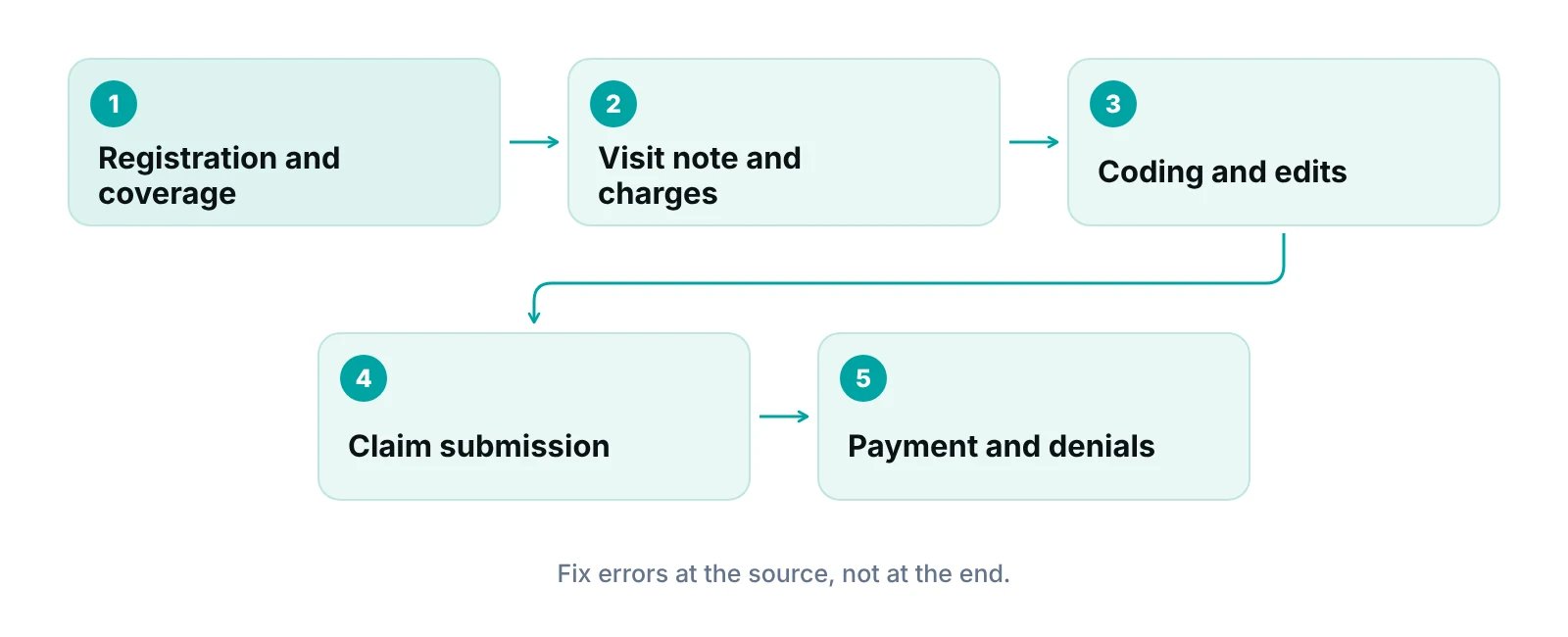
This guide follows one visit from chart to payment, shows what a good connection changes, compares three ways to set it up and lists what to ask before you commit. It replaces an earlier version of this post that relied on figures we could not verify. For definitions, see our explainer on EMR versus EHR.
Key takeaways
- Integration is about data moving once, accurately: registration, coverage, charges, diagnoses and remittances.
- Nearly all office-based physicians use an EHR (95% in 2024), so the question is how it connects to billing, not whether you have one.
- Standard electronic transactions (837, 835, 270/271) are the shared language between your systems and payers.
- A connection speeds data movement. People still review codes, edits and denials.
- Test the connection with a short list of real visits before you sign or switch.
What does EHR and RCM integration actually mean?
It means the EHR and the revenue cycle process share one record of the visit instead of two. Registration, coverage, services performed and diagnoses are entered once, travel to billing automatically, and come back as payment and denial information. The EHR holds the clinical record. Revenue cycle management turns that record into a paid claim.
EHR adoption is no longer the open question. The CDC’s National Center for Health Statistics survey, reported in ONC’s 2008 to 2024 data brief, found that 95% of office-based physicians used an EHR in 2024, and 91% used a certified EHR. If you have an EHR, you have the first half. The second half is how its data reaches billing.
There are three common shapes. The billing module sits inside the EHR. The EHR passes data to a separate billing or practice management system through an interface. Or an outside billing team works directly inside your EHR. Each can work. Each fails in a different place, which is why the setup matters more than the label.
What changes in your billing workflow when the link works?
The biggest change is fewer places where a person retypes data. Each retype is a chance for a typo, a missed charge or a mismatch between the note and the claim. A good connection removes the retyping and makes the remaining checks visible. The table maps each step to the failure it is meant to prevent.
| Handoff | Data that should move | What goes wrong when the link is weak |
|---|---|---|
| Registration | Demographics, subscriber, payer, plan and ID, card images | Name or ID mismatch; claim rejected before the payer reviews it |
| Eligibility | Coverage response, copay, deductible, referral or authorization flags | Visit proceeds on inactive or wrong coverage; denial arrives weeks later |
| Charge capture | Every billable service, units, provider, date, place of service | Service documented in the note but never billed |
| Diagnosis and procedure codes | Codes tied to the note and to the visit | Codes entered twice and mismatched; diagnosis does not support the procedure |
| Claim edits | Missing-field and payer-rule checks before submission | Preventable errors leave the building |
| Remittance | Payment, adjustments and reason codes returned to the account | Posting is manual; short payments and denials are missed |
| Follow-up | Denial reason and claim history linked back to the encounter | Same error repeats because the cause is never traced to the chart |
Our team has seen this pattern first-hand. The billing pipeline behind the RCM Finder portal was built and tested against real claim data from an affiliated multi-provider pain management and neurology practice in Indiana. Missing or inconsistent fields at registration and charge entry were the problems that created the most rework downstream. We do not quote numbers from that work.
For the feature view, see our guide to EHR functions and their effect on the revenue cycle. For the step where services become billed lines, see charge entry in medical billing.
Which standard transactions connect your systems to payers?
Claims, eligibility checks, remittances and claim status all travel in federally adopted electronic formats. CMS lists the ASC X12 version 5010 standards for each transaction on its adopted standards and operating rules page, and says they apply to all HIPAA covered entities. Your EHR or billing system, or the clearinghouse between them, should be speaking these formats.
| Transaction | Adopted standard | What it does in your workflow |
|---|---|---|
| Health care claim | ASC X12N 837, version 5010 | Carries the claim from your system to the payer |
| Eligibility and benefits | ASC X12N 270/271, version 5010 | Asks whether the patient is covered and returns the answer |
| Remittance advice (ERA) | ASC X12N 835, version 5010, with the TRN trace number | Returns payment and adjustment detail for posting |
| Claim status | ASC X12N 276/277, version 5010 | Asks where a claim stands and returns the status |
| Prior authorization and referral | ASC X12N 278, version 5010 | Requests and returns a referral certification or authorization |
Source: CMS, Adopted Standards and Operating Rules (accessed October 2026)
The word “integration” often hides a simpler fact: some of these exchanges happen through a clearinghouse, not directly between the EHR and the payer. Ask which transactions your system sends itself, which go through a clearinghouse, and who monitors the rejections. Our guide to EDI integration steps explains the setup.
Which setup fits your practice: suite, interface or an outside team?
There is no single best setup. The right choice depends on how many systems you run, how much IT help you have and who will own the work after go-live. The table compares the three shapes on the questions that decide it.
| Setup | Where it tends to work | Where it tends to break | Ask before you choose |
|---|---|---|---|
| Billing built into the EHR suite | Smaller practices that want one login and one vendor | Billing features may be thin for your specialty; switching away is harder | Can we export our claim and payment history if we leave? |
| EHR plus a separate billing or practice management system, connected by an interface | Practices that need stronger billing tools than the EHR offers | Interface errors, delayed updates, two places to correct data | Which fields sync, how often, and who is alerted when a sync fails? |
| EHR plus an outside team working inside it | Practices that want expertise without a second system or new hires | Unclear ownership if responsibilities are not written down | Who owns charge review, edits, denials and A/R, and what do we see each week? |
Our own team works inside the EHR a practice already uses, for example PrognoCIS, eClinicalWorks or athenahealth, rather than asking the practice to change systems. That keeps one source of truth for the chart, with billing work done in the same place. If you are weighing a separate platform instead, our practice management system page shows how we approach it, and our guide to practice management software explains what the category covers.
What does integration not fix?
A connection moves data faster. It does not make the data right. If the front desk records the wrong subscriber, or a provider documents a visit in a way that does not support the code, the error simply travels faster. People and process still decide the outcome.
- Coding accuracy: ICD-10-CM codes change every year. CMS lists the FY 2027 update as effective October 1, 2026, for encounters through September 30, 2027. Someone has to confirm your code tables and templates match.
- Timely filing: Medicare generally requires a claim to be filed within 1 calendar year of the date of service under 42 CFR 424.44. Commercial payers set their own limits. A connection does not track the deadline for you unless you build that rule.
- Eligibility judgment: an electronic response can be wrong, incomplete or silent. Staff still read it.
- Denials: a returned remittance has to be worked. Someone must decide whether to correct, resubmit or appeal.
- Patient communication: balances and estimates still need a person who can explain them.
The CMS page for the ICD-10 codes update and the eCFR text of 42 CFR 424.44 are the places to confirm both rules. Our guide to medical billing time limits covers payer and state variation.
How do you know whether your connection is working?
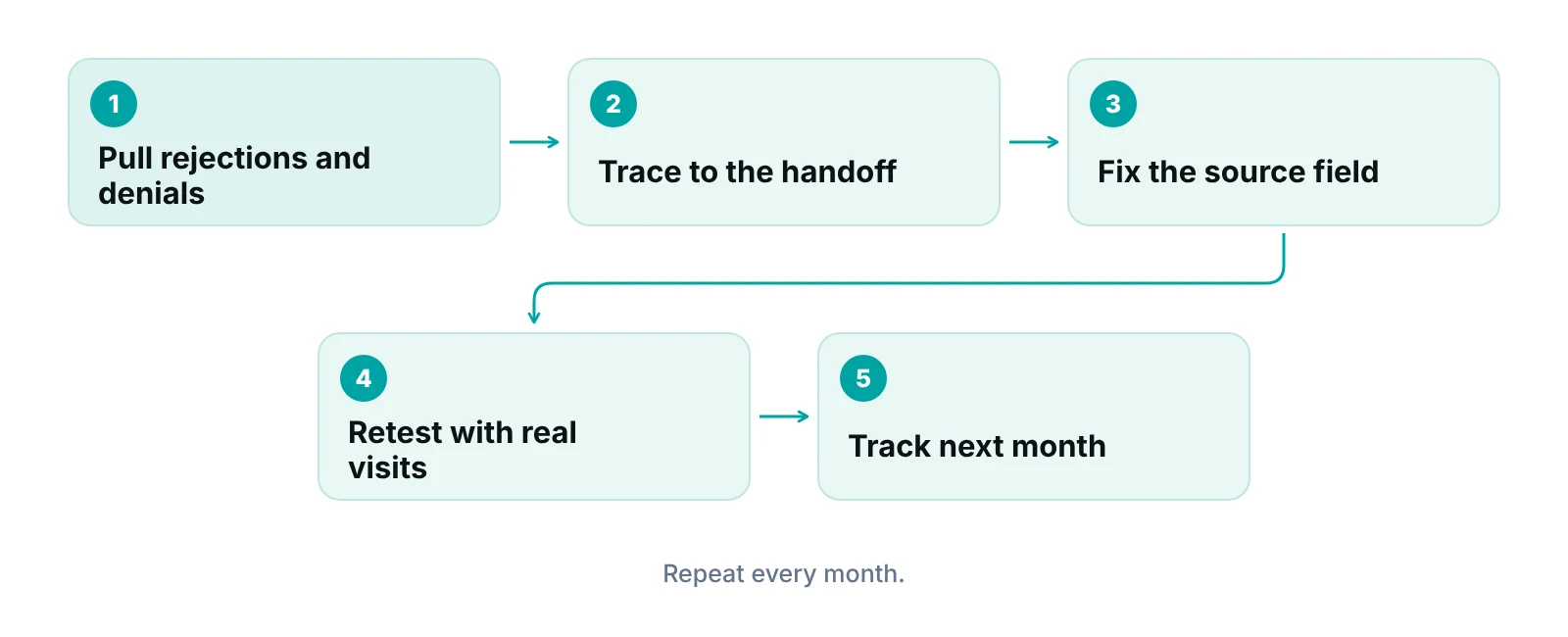
Track a short list of measures every month and trace each miss back to a handoff. A rising rejection or denial rate points at registration, eligibility or coding. A growing gap between visits and claims points at charge capture. A slow rise in unpaid claims points at follow-up. You do not need many metrics. You need the same ones each month.
- Rejections at submission: claims stopped by the clearinghouse or payer front end, grouped by reason.
- Denials by reason: grouped by cause, such as eligibility, authorization, coding or missing information.
- Visits not yet billed: encounters closed in the EHR with no claim, and how long they have waited.
- Days to submit: the gap between visit and claim.
- Payment versus expected: remittances compared with the contracted amount.
Our revenue cycle KPI guide gives definitions for each, and our claim scrubbing guide explains the pre-submission checks that catch many rejections.
See where your chart-to-claim handoffs break
Our free practice audit reviews your claim workflow and denial reasons and shows which fix to make first. Pricing for any service is quoted after the audit.
What should you ask before you connect or switch systems?
Ask for proof on your own data, not a demo script. A vendor or billing partner should be able to show how a test visit moves from registration to a posted payment, and what happens when a step fails. The questions below separate a working connection from a promise.
Questions on data and standards
- Which fields move between systems, in which direction, and how often?
- Which X12 transactions does the system send itself, and which go through a clearinghouse?
- What alert appears when a sync or submission fails, and who sees it?
- Can we export claims, remittances and the audit trail if we leave?
Questions on certification and APIs
ONC says certified EHR technology has been required to offer standardized FHIR-based APIs since January 1, 2023, and that the 21st Century Cures Act bans information blocking, as described in an ONC post on information blocking and APIs. Those APIs are described as patient and population services, so do not assume they give your billing team a charge feed. Ask what the vendor actually provides for billing data and whether it costs extra.
Questions on privacy
HHS says the HIPAA Rules generally require covered entities and business associates to enter into contracts, and defines a business associate as an entity that performs functions on behalf of a covered entity that involve access to protected health information (HHS sample business associate agreement provisions). Any billing partner that sees patient data should put a Business Associate Agreement in place before access. Ask about role-based access and audit logs too.
“The best demo is your own messy Tuesday: ten real visits from check-in to payment, with a person watching every handoff.”
— Awais Afzal, Healthcare Operations & Data Analyst
How does a managed revenue cycle fit with your EHR?
An outside team can handle the revenue cycle inside your EHR so you do not need a second system for the chart. We work this way: the team reviews charges and coding against the note, runs claim edits, tracks claims by stage, posts payments and works denials and unpaid claims, with weekly reporting back to you. Our end-to-end revenue cycle management page describes the scope, and our medical billing services page covers the claim-side work.
The RCM Finder portal adds a claim tracking pipeline by stage, claim data-completeness checks before submission, underpayment detection against expected amounts and an audit log. Practices that serve specialty patients can see how the work differs by field on our specialties hub. If you want to size the gap first, try the revenue calculator.
This is not an official integration or partnership with any EHR vendor. It is a team that works inside the system you already own.
Our recommendations
- Map one visit from chart to payment. Walk a single recent visit through registration, charge, code, claim, remittance and posting. Write down every place someone retypes data. Those are your integration gaps.
- Fix registration first. Most downstream rework begins at the front desk. Check that subscriber, plan, ID and coverage order are captured once and verified against the card.
- Reconcile closed visits against claims weekly. A list of encounters closed in the EHR with no claim catches missed charges early. Run it every week, not at month end.
- Write down who owns each handoff. Name an owner for charge review, edits, denials and A/R. A connection with no owner decays quickly, whether the work is in-house or outsourced.
- Tie every denial back to a source field. Tag each denial with its cause, then change the template, rule or training that created it. This is where a connected system pays off.
- Test before you sign. Ask any vendor or billing partner to run ten of your real visits end to end, and sign a Business Associate Agreement before they touch patient data.
Bottom line
Integration is about moving data once and moving it right. Judge any setup on how it handles registration, charges, claim edits and denial follow-up for your payers, then give each handoff an owner. If you want help, our practice management system and revenue cycle management teams work inside the EHR you already have, and a free practice audit shows where to start.
Frequently asked questions
What is EHR and RCM integration?
It is the connection that carries registration, coverage, charges and diagnoses from the EHR into billing, and returns payments and denials. The goal is to enter data once and avoid retyping. It can be a billing module in the EHR, an interface to a separate system, or an outside team working inside the EHR.
Does integrating my EHR with billing increase revenue?
It can reduce avoidable losses, such as missed charges and preventable rejections, but no source we verified supports a specific revenue figure, and we do not promise one. Results depend on your payers, specialty and how well the team works the claims that come back.
Do I need to replace my EHR to improve billing?
Often no. First find where claims fail: registration, eligibility, coding, edits or follow-up. Many fixes are template, rule or staffing changes. Replace the EHR only if it cannot export data, support your specialty or connect to the tools you need.
What standards do EHRs and billing systems use to exchange claims?
HIPAA covered entities use ASC X12 version 5010 transactions, per CMS: 837 for claims, 835 for remittance, 270/271 for eligibility, 276/277 for claim status and 278 for referrals and authorizations. Some travel through a clearinghouse. Ask your vendor which ones it sends itself.
Can an outside billing company work inside my EHR?
Yes. Many billing teams work inside the practice’s EHR under a Business Associate Agreement and role-based access. Ask for written scope, access levels, an audit trail and weekly reporting. Our team works inside systems such as PrognoCIS, eClinicalWorks and athenahealth, with no official partnership claimed.
How long does it take to see whether the connection works?
You can test it in days with ten real visits traced from check-in to posted payment. Trends in rejections, denials and unbilled visits take a few billing cycles to read, because claims and payments arrive weeks after the visit.
Get your free practice audit
Tell us about your practice. We will contact you using the details you give.
- A review of your recent claims, denials and A/R aging
- Where your front desk and prior authorizations slow payment
- A prioritized fix list you keep, whether or not you hire us
Pricing is quoted after the audit, based on your volume and the services you choose. Prefer to talk? Call +1 (302) 556-2288.
Sources
- Office-based Physician Electronic Health Record Adoption, 2008-2024 — ONC (HealthIT.gov), using NCHS National Electronic Health Record Survey (2026)
- Adopted Standards and Operating Rules — CMS (2026)
- 42 CFR 424.44 Time limits for filing claims — eCFR (2026)
- ICD-10 Codes — CMS (2026)
- Getting Real about Information Blocking and APIs — ONC (HealthIT.gov) (2024)
- Sample Business Associate Agreement Provisions — HHS Office for Civil Rights (2026)
Disclaimer: This article is general educational information for medical practice owners and managers. It is not legal, compliance, coding or billing advice. Payer rules, filing limits and contract terms vary by payer, plan and state and change often. Confirm requirements with each payer and qualified advisers before acting.