
Lab claim documentation means sending supporting medical records, such as the order, results, history and physical, and office notes, with the initial claim for certain pathology and laboratory codes on lists published by Novitas Solutions and First Coast. Without them, the claim rejects and must be resubmitted with the records.
This guide replaces our 2024 news post on the same rule. It keeps what still helps (the four types of record), drops the unsupported statistics and gives you the steps to attach records, plus what CMS says makes an order hold up. It is for lab managers, pathology groups and billers. Rules vary by payer and change over time, so check the current MAC pages before you act. For the wider picture, see our laboratory billing and coding guide.
Key takeaways
- The requirement attaches to specific codes on a MAC list, not to all lab services, and the list is updated.
- Send the order and results, history and physical, progress or office notes and any other record that supports the service.
- FCSO points to its PWK option for sending documentation with an initial claim; fax within seven calendar days or mail within 10.
- CMS says an unsigned requisition alone does not show intent to order.
- A rejection is fixed by resubmitting with records, not by an appeal.
What does the lab claim documentation rule require?
For a defined list of pathology and laboratory codes, Novitas Solutions and First Coast Service Options (FCSO) want the supporting medical record to travel with the initial claim. If it does not, the claim rejects. The practice or lab then has to resubmit it with the records attached. FCSO’s process page for pathology, laboratory and other codes describes exactly that behavior.
The rule was announced in 2024 and the old shorthand for it is “the September 19, 2024 change.” That date is now history. What matters today is that the code lists are living documents. FCSO says they may be updated quarterly and tells billers to check them frequently, and its current page links two code files dated August and September 2026.
Check your own MAC before you build a process
This guide rests on FCSO’s published page, a 2024 summary of the original Novitas notice and CMS’s lab documentation fact sheet. Novitas’s own page could not be opened while this article was written. Before you change a workflow, open the current page for the MAC that pays your claims and confirm the code list, the submission method and the effective dates. The two MACs may not match in every detail.
This guide covers the Medicare contractor rule only. Other payers set their own record requests, so check each payer’s provider manual separately.
Which lab and pathology codes trigger the records requirement?
The trigger is a specific code list that each MAC publishes as a spreadsheet, not a category of service. When the rule began in September 2024, one published copy of the Novitas list held 39 codes, according to health-policy analyst Bruce Quinn. They included 0020M and many proprietary laboratory analyses (PLA) codes ending in the letter U, such as 0421U and 0422U.
That 39-code count is a 2024 snapshot. It is not today’s list. The MAC lists are revised, and new PLA codes are added to the CPT set on a regular schedule, so any article that prints a fixed list will go stale. Build the habit instead of memorizing the codes.
- Download the current code file from your MAC’s page at the start of each quarter and save the date you pulled it.
- Load the list into your billing system as a rule: if a billed code is on the list, hold the claim until the records are attached.
- Review new PLA codes your lab starts offering. A newly released code may land on the list at the next update.
- Pair this with your normal code checks. Our laboratory billing and coding guide and pathology CPT codes guide cover the code families themselves.
Code descriptors belong to the AMA, so we do not reprint them here. Use your licensed CPT book or encoder for the exact wording. For fee-schedule context on pathology, see our summary of the 2025 Medicare Physician Fee Schedule changes for pathology.
What records should you send with the claim?
Send the records that show the test was ordered, why it was needed and what it found. FCSO lists four kinds of documentation, and Novitas’s original notice used the same four, as summarized in 2024.
| Record | What it shows | Practical tip |
|---|---|---|
| Order and test results | The test was ordered and what the test found | Send the signed order or the note that documents the intent to order, plus the final report for the billed test |
| History and physical examination | The clinical picture that led to the test | Pull the note from the date of the order, not a later visit |
| Progress or office notes for the test | Why this test was needed for this patient | Pick the note that names the problem the test addresses |
| Other record documentation | Anything else that supports the need for the service | Add earlier results or a specialist note only when they explain the order |
Source: First Coast Service Options, Process for pathology, laboratory, and other codes (page reviewed October 2026).
Notice what is missing from that list: nothing says to send the entire chart. A short, targeted packet is easier for a reviewer to match to the claim and is less likely to be returned.
The documents usually live in the ordering provider’s chart, not the lab’s system. A reference lab or pathology group often does not hold the history and physical or the office note. That is why this rule is as much about the relationship with the ordering practice as it is about billing. The same point runs through our guide to why clear documentation matters in medical billing.
“A record packet is only as good as the order behind it. If the order is weak, no amount of attached paper repairs the claim.”
How do you attach records to an initial claim?
FCSO points to its Paperwork (PWK) option for sending documentation with an initial claim. PWK is a segment on the electronic 837 claim that tells the MAC supporting documents are coming by fax, mail or electronic submission. FCSO explains the PWK option step by step, and the details below come from that article and its companion on unsolicited PWK segments.
- Flag the claim. Add the PWK segment at claim or line level when you build the 837. Only the first PWK segment is considered. Choose the report type code that matches your document, the transmission method and an attachment control number (ACN) that you assign, such as the patient account number.
- Submit the claim. Send it through your usual clearinghouse or portal. Documentation cannot be sent before the claim is submitted.
- Get the claim control number. Download the 277CA acknowledgment. It carries the internal control number (ICN) for Part B that you need on the coversheet.
- Complete the coversheet. Fill in the MAC’s electronic coversheet before printing. It needs the ACN, the ICN, the beneficiary’s Medicare ID, the billing provider’s name and NPI, and a contact. One coversheet covers one patient and one claim.
- Fax or mail within the window. FCSO allows seven calendar days from claim receipt for fax and 10 calendar days for mail. Late or incomplete documentation is not used, and the claim processes as if nothing arrived.
| Item | What FCSO says | Why it matters to a lab |
|---|---|---|
| Transmission codes | FX for fax, BM for mail, EL or FT for electronic submission through esMD | The code on the claim must match how you actually send the records |
| Fax window | Seven calendar days from claim receipt | Set a same-day task when a flagged claim goes out |
| Mail window | 10 calendar days | Mail is slower, so fax is easier to control |
| Coversheet | One per claim; each covers one patient; incomplete sheets may be rejected | A rejected sheet means the documentation is not used |
| Initial claims only | PWK cannot be used for appeals, adjustments or corrections | A rejected claim needs a different path, covered below |
Source: First Coast Service Options, PWK option allows you to submit documentation with an initial claim, and Submitting unsolicited paperwork (PWK) segments for electronic claims (pages reviewed October 2026).
Novitas runs its own systems, forms and addresses. Do not copy FCSO’s fax lines or mailing addresses into a Novitas workflow. Use the instructions on your own MAC’s website, and ask your clearinghouse whether it supports the PWK segment.
Why do lab records fail even when you send them?
The most common weak point is the order. CMS’s MLN fact sheet on documentation requirements for lab services (May 2026 version) says the treating provider must order diagnostic lab tests, and that medical necessity under 42 CFR 410.32 should be documented in the patient’s record. A signed record is not the same as a record that supports the order.
| What is in the record | Does it support the order? |
|---|---|
| Signed order that lists the specific test | Yes |
| Unsigned order plus an authenticated record showing intent to order | Yes |
| Authenticated record showing intent to order, with no separate order | Yes |
| Unsigned order or requisition by itself | No. It does not show intent |
| Progress note that supports intent but lacks a signature | Can be fixed with an attestation from the ordering physician when responding to a review |
Source: CMS, MLN909221, Complying With Documentation Requirements for Lab Services (May 2026).
An exception worth knowing
CMS notes that signatures are not required on orders for clinical diagnostic tests paid under the clinical laboratory or physician fee schedules, or on physician pathology services. Intent to order must still be documented. Confirm how your billed test is paid before you rely on the exception.
CMS also describes what the billing side should keep: documentation of the order that lets Medicare identify and contact the ordering provider, evidence the order was processed and billed correctly, and the diagnostic information sent to the lab, including the ICD-10-CM code or a narrative description. Orders may arrive as a signed document, a documented phone call or an email.
Diagnosis coding on the requisition matters here too. Our short guide to ICD-10 coding for lab review covers how to read what the order is claiming.
How should a lab or pathology group build a workflow around it?
Treat the rule as a front-end process and not as a rejection to clean up later. A rejected claim for missing records is a preventable cost: it delays payment and adds rework. A short checklist before submission catches most of it. If you are weighing outside help, a billing partner offering medical billing services should be able to describe how it handles code-list rules like this one.
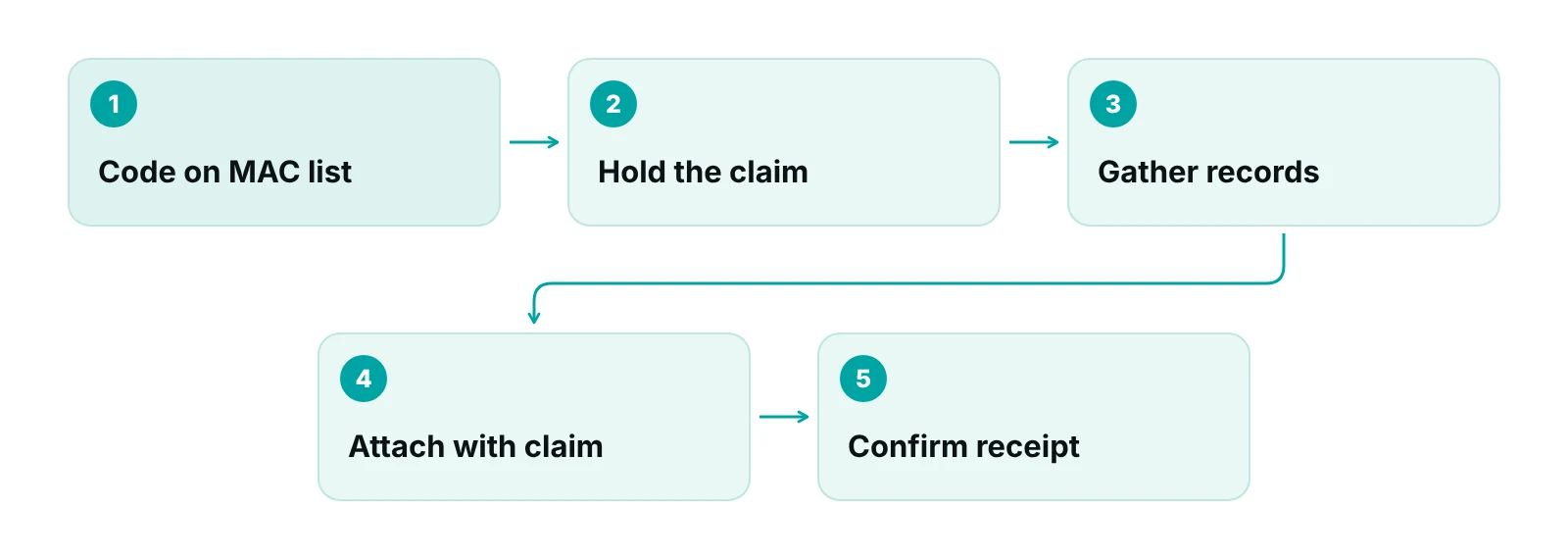
- Intake: when the test arrives, check that the requisition names the test, the ordering provider and a diagnosis.
- Code check: compare each billed code against the current MAC list before the claim leaves.
- Records request: if the code is on the list, request the history and physical and office note from the ordering practice the same day.
- Hold and release: keep the claim on hold until the packet is complete, then submit with the PWK flag.
- Follow-up: check the 277CA and the claim status to confirm the documentation was matched.
A practice management system that tracks claims by stage can help here, because the hold-and-release step is simple to describe but easy to lose in a spreadsheet. Look for a practice management system that tracks claims by stage with an owner on each claim, checks for missing data before submission, and rules that hold a claim for review. Whatever tool you use, the point is that a person is accountable for each held claim.
Pathology groups have their own billing patterns, including technical and professional components and PLA codes. Our pathology billing specialty page outlines how those fit together, and the general laboratory billing guide covers the lab side.
Want a second set of eyes on your lab claim workflow?
A free practice audit looks at how flagged codes move from order to payment and where claims stall.
What should you do when a lab claim rejects for missing records?
Resubmit the claim with the supporting documentation, as the MAC instructs. FCSO says a claim rejected under this rule must be resubmitted with the appropriate documentation. Because PWK is limited to initial claims, do not try to use it as an appeal. Read the rejection message first, because a reject is different from a denial and has a different fix.
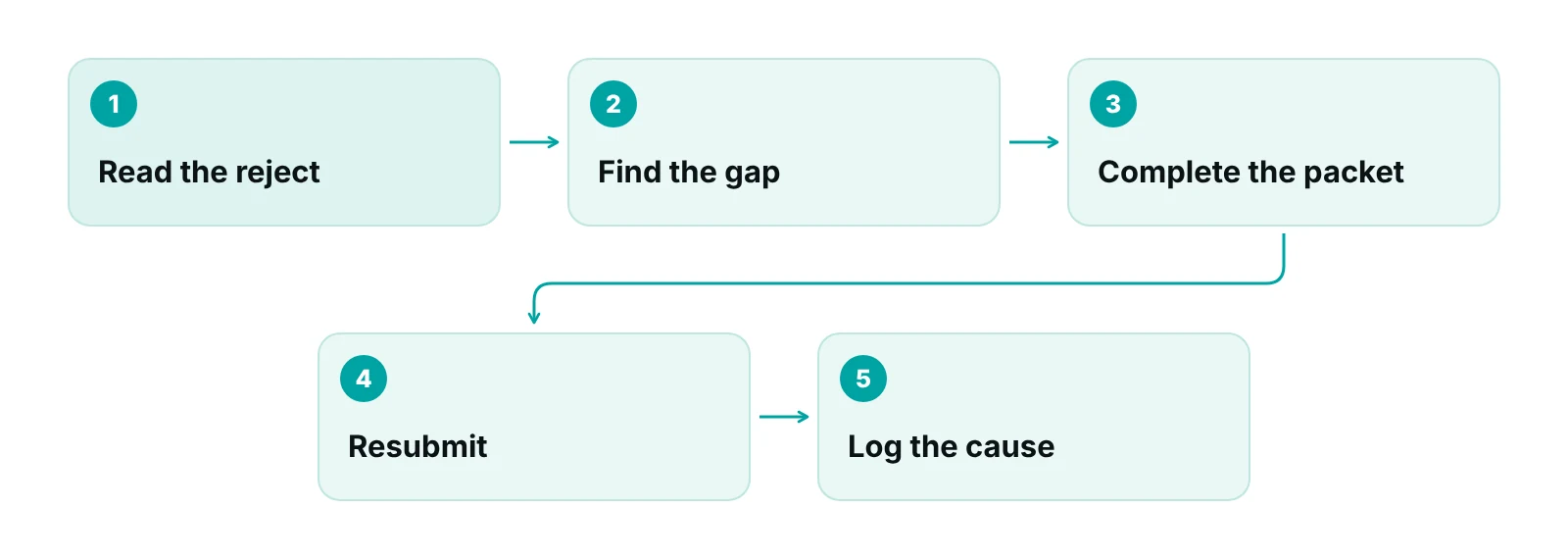
- Read the rejection message and confirm the code is on the current list.
- Find out why the records were missing: was the PWK flag absent, was the fax late, or was the coversheet incomplete?
- Collect a complete packet from the order through the progress note and result.
- Resubmit through the route your MAC specifies, and note the date.
- Log the cause so the same gap does not repeat.
If a claim is accepted and later denied, or a payer asks for records after payment, the work shifts to appeals and audits. See our guides to medical billing denial management and medical billing audits. For the broader habit of sending clean claims the first time, read the clean claims guide.
Our recommendations
- Download the MAC list every quarter. Save the file with the date. Treat it as a rule in your billing system, not a reference document.
- Agree on a records process with ordering practices. Put a named contact and a same-day turnaround in writing, so the lab is not chasing a chart after the claim is ready.
- Fix the order at intake. Check that every requisition names the test, the ordering provider and a diagnosis before the sample is processed.
- Hold flagged claims on purpose. Use a visible hold status and an owner for each held claim, so none sit unnoticed.
- Track rejections by cause. Group them as missing flag, late fax, incomplete coversheet or weak order. The pattern tells you which step to fix.
- Confirm commercial payer rules separately. Do not assume the Medicare process applies to other plans. Check each payer’s manual.
Hold flagged lab claims until the records are attached.
RCM Finder's practice management portal tracks each claim by stage with an owner, checks for missing data before submission and can apply workflow rules that hold a claim for review.
See how the RCM Finder portal works · Create a portal account
Disclosure: RCM Finder builds and sells this portal. It is a practice management system, not an EHR.
Bottom line
Lab claim documentation is a front-end task: know which codes are on your MAC’s list, collect the order, history and office note before the claim leaves, and attach them by the route your MAC specifies. If claims still stall, our denial management services team can review where they stop, and a free practice audit is the place to start.
Frequently asked questions
Does this rule apply to every lab claim?
No. It applies to the codes on the MAC’s published list, not to all pathology and laboratory services. Check each billed code against the current file from your MAC before you submit, and note that the lists can change. A good habit is to send only a targeted packet, not the whole chart.
Is the September 19, 2024 date still the deadline?
No. That was when the rule began, according to a 2024 summary of the Novitas notice. The rule now applies as an ongoing requirement. What changes is the code list, which FCSO says may be updated quarterly.
What happens if I forget the records?
The claim rejects. The MAC’s instructions say to resubmit with the appropriate documentation. A rejection is not a denial, so you correct and resubmit the claim, and you do not file an appeal. Find out why the records were missing so the same gap does not repeat on the next claim.
Does a signed requisition always satisfy the order requirement?
Not always. CMS says an unsigned requisition by itself does not show intent. A signed order that lists the test supports the claim. So does an authenticated record showing intent. Some fee-schedule tests do not need a signature, but intent must still be documented.
How do I know which MAC list applies to me?
Look at which Medicare Administrative Contractor processes your Part B claims, then open that contractor’s page for pathology and laboratory codes. Novitas and First Coast each publish their own page and code file. Do not assume the lists or the submission steps are identical.
Can a billing company handle this for my lab?
Yes, if the company has a defined process for code-list checks, records requests and claim holds. Ask how it gets records from ordering providers, who owns held claims, how it tracks the quarterly code list and how it reports rejections back to you.
Get your free practice audit
Tell us about your practice. We will contact you using the details you give.
- A review of your recent claims, denials and A/R aging
- Where your front desk and prior authorizations slow payment
- A prioritized fix list you keep, whether or not you hire us
Pricing is quoted after the audit, based on your volume and the services you choose. Prefer to talk? Call +1 (302) 556-2288.
Sources
- Process for pathology, laboratory, and other codes — First Coast Service Options (2026)
- PWK option allows you to submit documentation with an initial claim — First Coast Service Options (2026)
- Submitting unsolicited paperwork (PWK) segments for electronic claims — First Coast Service Options (2026)
- Complying With Documentation Requirements for Lab Services (MLN909221) — CMS (2026)
- Novitas: no LCD, but documents required — Discoveries in Health Policy (Bruce Quinn) (2024)
Disclaimer: This article is educational. It is not legal, coding or compliance advice. Medicare contractor and payer rules change and differ by region and plan, so confirm current requirements with your MAC and payers before you act.