
An advance beneficiary notice (ABN) is Form CMS-R-131, a one-page notice an Original Medicare provider gives a patient before a service Medicare is expected to deny as not reasonable and necessary. A valid, signed ABN lets the provider hold the patient liable if Medicare denies. The claim then carries modifier GA. It is not used for Medicare Advantage.
This guide covers the whole ABN workflow for billing teams: what the form is, when CMS says it is required and when it is only optional, how to complete it, which of the four ABN modifiers (GA, GX, GY, GZ) goes on the claim, and how long to keep the record. Every rule below comes from CMS publications, and each link goes to the page we checked.
It replaces two older, overlapping ABN posts on this site. If you want a one-line rule to remember: the ABN is a liability tool, not a payment tool. It does not make Medicare pay. It decides who owes the bill if Medicare says no.
Key takeaways
- The ABN (CMS-R-131) is required for Original Medicare services you expect to be denied as not reasonable and necessary, and optional for never-covered services.
- Do not use it for Medicare Advantage or Part D items and services, and never in an emergency.
- The patient chooses the option. Pre-selecting it invalidates the notice.
- GA, GX, GY and GZ report what happened with the notice on the claim.
- Keep the ABN 5 years from the date care was delivered, unless state law says longer.
What is an advance beneficiary notice (ABN)?
An ABN is Form CMS-R-131, the Advance Beneficiary Notice of Non-coverage. CMS lists it among its fee-for-service notices as the form that shifts financial liability to the patient when Medicare is not likely to cover a specific service (CMS Beneficiary Notices Initiative). It is used by providers, suppliers, laboratories, home health agencies and hospices that bill Original Medicare.
The form gives the patient three things: the item or service, the reason Medicare may not pay, and a good-faith cost estimate. The patient then chooses one of three options and signs. That choice is what protects the provider, and it is also what protects the patient’s right to make an informed decision before the service happens.
What an ABN does not do
- It does not guarantee payment. With Option 1 Medicare still decides the claim.
- It does not apply to Medicare Advantage (Part C) or Part D drug plan items and services. CMS says plainly: do not use an ABN for those (CMS ABN tutorial).
- It is not a blanket form. It must name the specific item or service and a reason that applies to each one listed (CMS ABN form instructions).
The older versions of this page described the ABN as a general warning that “a service might not be reimbursable.” That is too loose. CMS ties the required ABN to a specific situation, covered next.
When is an ABN required, and when is it voluntary?
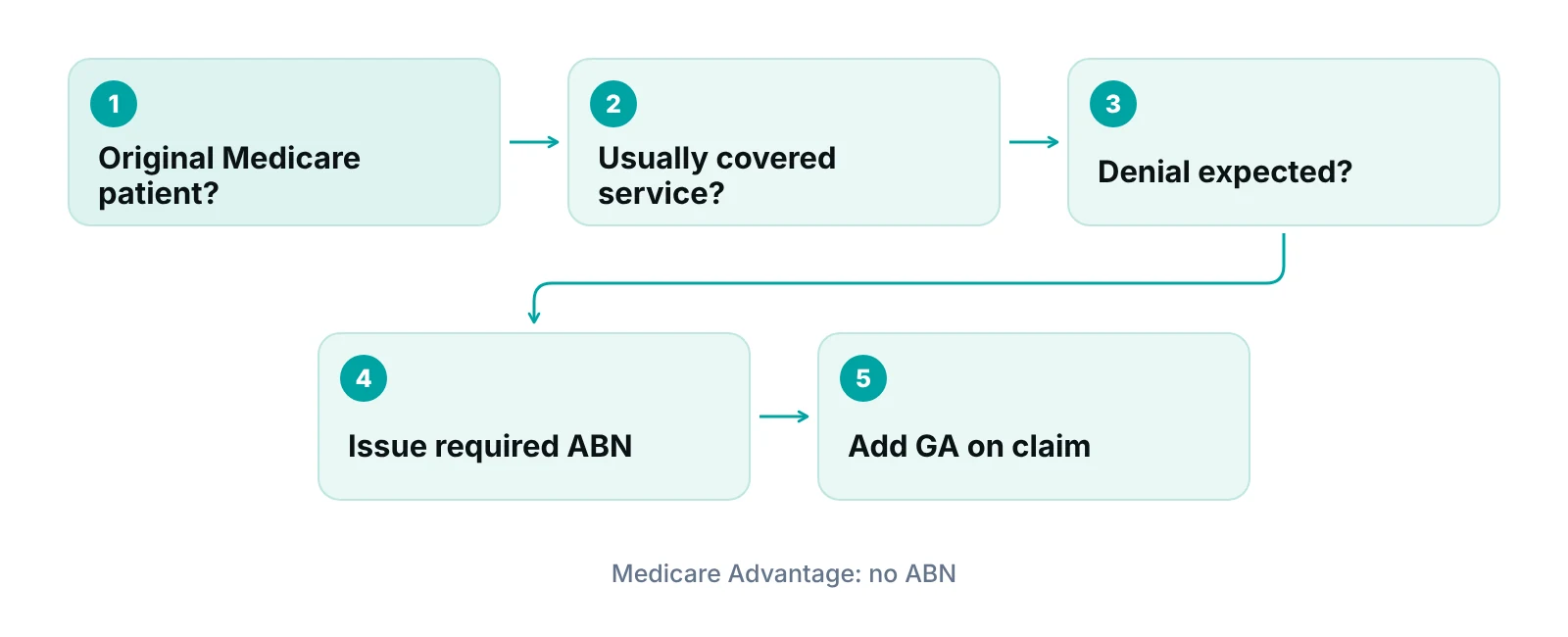
An ABN is required when you expect Medicare to deny an item or service it usually covers, and the denial would move liability to the patient. The typical reason is that the service is not reasonable and necessary for this patient under Medicare rules (Medicare Claims Processing Manual, Chapter 30; CMS MLN booklet). For services Medicare never covers, an ABN is optional.
| Situation | ABN? | Modifier | CMS basis |
|---|---|---|---|
| Usually covered, but you expect a denial as not reasonable and necessary | Required. Patient picks an option and signs. | GA | Chapter 30 section 50; MLN booklet |
| Same situation, but no ABN was issued | Liability generally stays with the provider if you knew or should have known | GZ | Chapter 30 section 50.9; MLN booklet |
| Never covered: statutory exclusion or not a Medicare benefit (for example routine eye care, dental care, personal comfort items) | Optional courtesy notice. No option box or signature needed. | GX and/or GY | Chapter 30 section 50.2.1; MLN booklet |
| Item or service billed to Medicare Advantage (Part C) or a Part D plan | Do not use an ABN | None | MLN booklet; CMS ABN tutorial |
| Medical emergency | Never required; do not obtain during an emergency | None | ABN form instructions; Chapter 30 section 40.3 |
Source: CMS Medicare Claims Processing Manual Ch. 30; CMS MLN006266; CMS ABN form instructions; CMS ABN tutorial.
CMS’s own ABN tutorial lists situations that call for a required ABN. They include care that is not indicated for diagnosis or treatment, experimental or investigational use, services beyond the number allowed for a diagnosis in a set period, custodial care, outpatient therapy that is not medically reasonable and necessary, and preventive services beyond frequency limits (CMS ABN tutorial).
Timing and emergencies
Deliver the ABN before the service, early enough that the patient has time to consider the options (CMS ABN form instructions). The same instructions say ABNs are never required in emergency situations. The Claims Processing Manual adds that written notice should not be obtained during a medical emergency or under great duress, and that in EMTALA cases it should wait until screening and stabilization are complete (Chapter 30).
CMS says delivery should be in person if possible, to a patient able to understand it. Other delivery methods are allowed, but they need a response from the patient to show the notice was received.
ABN vs SNF ABN, HINN and HHCCN: which notice is which?
The ABN (CMS-R-131) is only one of several CMS notices, and they are not interchangeable. The older version of this page listed the home health notice as a type of ABN with form CMS-10280, which is the Home Health Change of Care Notice, a different notice with a different job (CMS HHCCN page).
| Notice | Form | Issued by | What it does |
|---|---|---|---|
| Advance Beneficiary Notice of Non-coverage (ABN) | CMS-R-131 | Providers, suppliers, labs, home health agencies, hospices (fee-for-service) | Shifts liability to the patient when Medicare is not likely to pay |
| Skilled Nursing Facility ABN (SNF ABN) | CMS-10055 | Skilled nursing facilities | Used before a Part A item or service that may be denied as not reasonable and necessary or as custodial |
| Hospital-Issued Notices of Non-coverage (HINN) | Four versions: HINN 1, 10, 11 and 12 | Hospitals | HINN 1: non-covered stay at admission. HINN 10: hospital-requested review of a discharge decision. HINN 11: non-covered services during a covered stay. HINN 12: non-covered continued stay |
| Home Health Change of Care Notice (HHCCN) | CMS-10280 | Home health agencies | Written notice before reducing or ending an item or service in the plan of care |
| Medicare Outpatient Observation Notice (MOON) | CMS-10611 | Hospitals | Tells a patient they are an outpatient receiving observation services, not an inpatient |
Source: CMS Beneficiary Notices Initiative (2026); CMS MLN006266; CMS HHCCN page.
If your practice is an office, clinic or therapy provider billing Part B, the ABN is the notice that matters. Facility-based teams (skilled nursing, hospitals, home health) should use the facility notice that fits the setting and read the CMS instructions for that form.
How to complete Form CMS-R-131 step by step
Use the CMS form as published and fill in every required blank before the patient signs. The form must fit on a single page, and the signature line cannot be completed ahead of the rest of the notice (CMS ABN form instructions). Do not rebuild it in a template of your own.
- Notifier: put your practice name, address and phone number at the top right.
- Patient name: first and last name, plus a middle initial if it appears on the Medicare card. The identification number line is optional, and CMS says Medicare beneficiary identifiers (MBIs) and Social Security numbers should not appear on the notice.
- Item or service: name each specific item or service you expect Medicare not to pay for. For repetitive or continuing care, state the frequency or duration.
- Reason Medicare may not pay: write the reason in plain language. For the ABN to be valid, at least one reason must apply to each item listed.
- Estimated cost: make a good-faith effort to give a reasonable estimate for each item. CMS says an estimate that substantially exceeds the actual cost is generally still acceptable, and Chapter 30 says a difference between estimate and actual cost does not automatically invalidate the ABN.
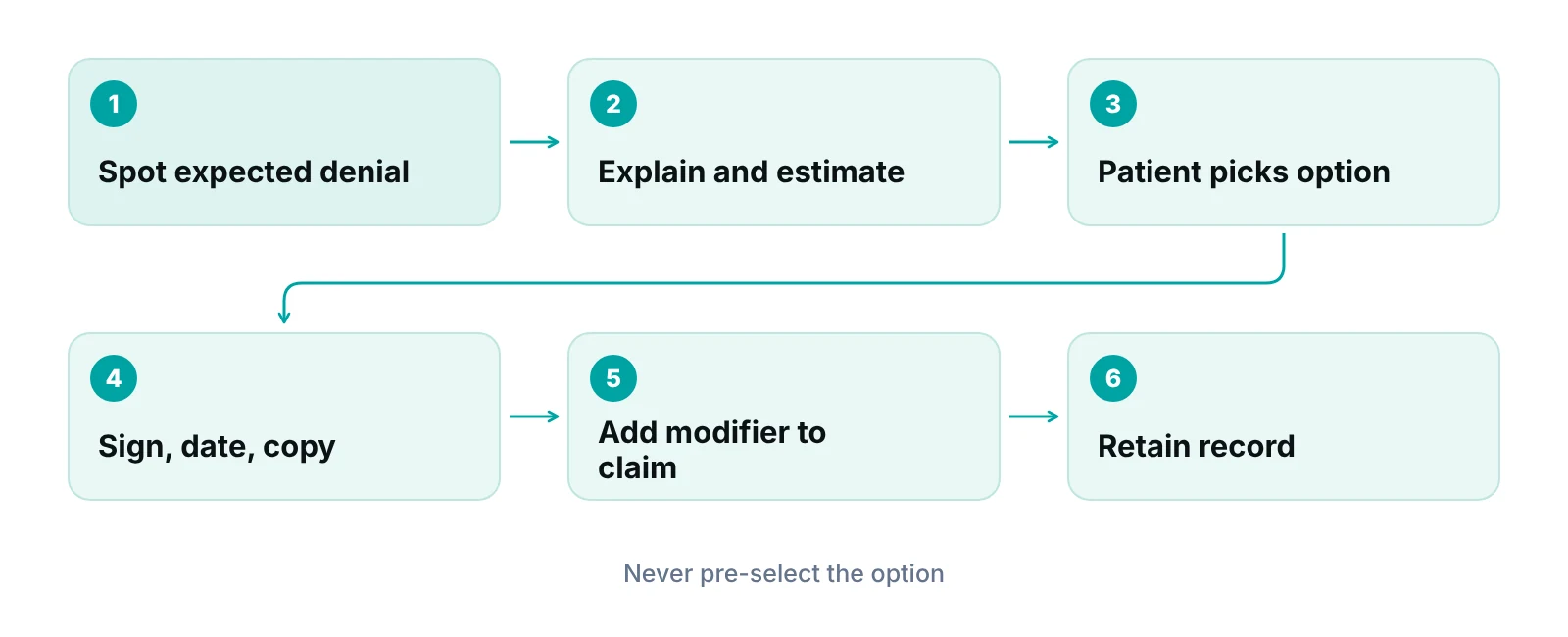
- Options box: the patient or representative checks one option. You must not pre-select it, because pre-selection by the notifier invalidates the notice.
- Additional information: optional, for clarifications such as other insurance.
- Signature and date: the patient or representative signs and dates. A representative writes “representative” in parentheses after the signature.
The three options, in plain words
- Option 1: the patient wants the service and wants Medicare billed. If Medicare denies, the patient is responsible but can appeal. You must submit a claim that produces an appealable decision.
- Option 2: the patient wants the service and does not want Medicare billed. The patient pays out of pocket and has no appeal rights.
- Option 3: the patient does not want the service. The patient is not responsible for payment, and there is no claim and no appeal.
Correcting an old claim about appeals
Earlier versions of this page said patients can always appeal after signing an ABN. That is only true for Option 1, where the claim is billed and the Medicare Summary Notice becomes the appealable decision. Options 2 and 3 carry no appeal rights (CMS ABN tutorial).
Attachments are allowed when several items will not fit on the form, but they must let a reader match each item to its reason and cost estimate (Chapter 30, section 50). One ABN can name several items, so you do not need a separate form per item.
For a patient who wants a service Medicare will not cover, the billing office and the clinical staff should agree on the wording before the visit. That keeps the reason on the form consistent with the medical record and with the claim the medical billing team later submits.
GA, GX, GY and GZ modifiers: which one goes on the claim?
The ABN is paperwork. The modifier is how the claim tells Medicare what happened to that paperwork. CMS’s MLN booklet lists four modifiers: GA, GX, GY and GZ (CMS MLN006266).
| Modifier | CMS meaning | Use it when | Watch for |
|---|---|---|---|
| GA | Waiver of liability statement issued | A required ABN was issued and is on file | If the notice is later found invalid, the contractor overrides GA and holds the provider liable |
| GX | Voluntary notice of liability issued | A service that is never covered and you gave a voluntary notice | Used with GY or on its own; the patient does not have to choose an option or sign |
| GY | Item or service is statutorily excluded or is not a Medicare benefit | You are reporting a never-covered service | Used with GX or on its own |
| GZ | Item or service expected to be denied as not reasonable and necessary | You expected a denial and no ABN was issued | Signals provider liability; it is not a way to avoid the ABN |
Source: CMS MLN006266, Table 2; Medicare Claims Processing Manual Ch. 30 section 30.2.3.
Put plainly: GA says “we gave the required notice,” GX says “we gave a courtesy notice,” GY says “this is excluded or not a benefit,” and GZ says “we expected a denial and had no ABN.” Using GA without a valid signed ABN on file is the mistake to design out of your process, because Chapter 30 says the contractor can override it.
Therapy: GA or KX, not both
For outpatient therapy, CMS’s tutorial says to use GA when an ABN was issued because the therapy is not medically reasonable and necessary, and KX when the therapy is medically necessary and justified in the record. Do not use GA and KX together (CMS ABN tutorial). Therapy teams (see our rehabilitation billing page) should make that choice at charge entry, not after a denial.
For other modifier decisions at the line level, see our explainer on modifiers 25 and 59. Your Medicare Administrative Contractor may publish extra instructions, so check its ABN page before you set claim edits.
How long to keep an ABN, and what to do if the patient refuses
Keep the ABN for 5 years from the date care was delivered, unless state law sets a longer period. CMS’s MLN booklet states five years from the date of care delivery when no other state requirements apply, and Chapter 30 says retention is required in all cases (MLN006266; Chapter 30, section 50).
- Keep the signed original in the patient’s record, and give the patient a copy. For electronic issuance, Chapter 30 says the patient must still be given a paper copy of the signed ABN.
- Keep records of refusals as well: declined care, a refused option or a refused signature.
- Repetitive care: CMS limits a single ABN for a repetitive course of care to one year, and it must list all the items and services you expect Medicare to deny (Chapter 30, section 50.7.1).
If the patient will not sign
If a patient refuses to choose an option or sign a properly delivered ABN, note the refusal on the original. Listing witnesses is optional. CMS says to consider not providing the item or service, unless doing so would create health, safety or civil liability concerns.
Can you collect payment right away?
Chapter 30 says a notifier may bill and collect for non-covered items immediately after an ABN is signed, unless another policy or law prohibits collecting before Medicare makes its determination. If Medicare later finds the provider liable, the money must be refunded. Check your contract terms and state rules before you build collection scripts around this.
What happens if you skip the ABN or fill it out wrong
If a required ABN is missing or invalid, the patient is relieved of liability. A notifier who knew or should have known that Medicare would deny the service, and did not issue a valid ABN, generally cannot collect from the patient (Medicare Claims Processing Manual, Chapter 30, section 50.9). A notifier who can show it did not know and could not reasonably have known may be protected.
That is the real financial exposure. It is not a lawsuit risk or a vague increase in denials, which is how the old version of this page put it. It is a write-off: the service is provided, Medicare denies it, and nobody can be billed.
- Pre-selecting the option box for the patient. CMS says this invalidates the notice.
- Using the ABN for a Medicare Advantage or Part D patient.
- Listing a reason that does not apply, or no reason at all for an item.
- Putting an MBI or Social Security number on the form.
- Signing the line before the rest of the form is complete.
- Adding GA to a claim when the signed ABN is missing from the chart.
- Obtaining the ABN during an emergency or after the service has been given.
“In my view the form itself is rarely the weak point. The weak point is that nobody checks the signed form exists before the claim goes out.”
— Awais Afzal, Healthcare Operations & Data Analyst
If denials tied to Medicare necessity edits are already piling up, read our guides to medical billing denial management and clean claims. For the wider Medicare picture, start with mastering Medicare billing.
Check coverage before you issue an ABN
We advise against handing an ABN to every Medicare patient. Check the coverage rule first. A required ABN is a response to an expected denial, so you need a reason for the expectation, such as a coverage policy, a frequency limit or a documented lack of medical necessity. Where possible, write the policy reference into your internal notes, not onto the patient form.
Our guide to verifying Medicare coverage walks through the lookup steps. Medicare payment reductions such as the 2% cut explained in our sequestration guide are a separate topic.
Where do your ABN and modifier gaps sit?
Our free practice audit reviews a sample of your Medicare claims, denials and A/R to see whether missing notices or wrong modifiers are behind them, and what to fix first.
Our recommendations
- Write an ABN rule by service line. We list the services your practice commonly sees denied as not reasonable and necessary, tie each to the coverage policy behind it, and tell the front desk which ones trigger a required ABN. Everything else gets no ABN.
- Hold the claim until the ABN is on file. No claim with GA leaves the building until a signed, dated ABN is in the chart. A practice management system that tracks claims by stage can assign an owner and flag the claim for review, but the same hold works in a spreadsheet.
- Never pre-fill the options box. Train staff to explain the three options and step back. A pre-selected option invalidates the notice, so the scripting matters more than the software.
- Decide the modifier at charge entry. GA, GX, GY and GZ should be set when the charge is entered, while the ABN is in front of the biller, not when a denial arrives. For therapy, decide between GA and KX at that same point.
- Audit a small sample every quarter. Pull a dozen claims with GA, GX, GY or GZ and check four things: ABN on file, signed and dated, option chosen by the patient, modifier matches the form. Fix the pattern, not the single claim.
- Track ABN-related denials as their own category. Report GZ claims and ABN-related denials separately from other denial reasons so you can see whether the problem sits at the front desk, in charge entry or in the coverage rule itself.
Track each claim by stage with an owner, so a claim with a GA modifier does not move forward until its ABN is confirmed.
RCM Finder's portal tracks claims by stage, assigns an owner and can flag a claim for review through workflow rules. Teams can use that to hold claims that depend on a signed notice. The portal does not issue or store the CMS form for you.
See how the RCM Finder portal works · Create a portal account
Disclosure: RCM Finder builds and sells this portal. It is a practice management system, not an EHR.
Bottom line
The ABN decides who pays when Medicare says no, and the modifier on the claim shows it. Issue it only for Original Medicare services you expect to be denied, let the patient choose the option, keep the record for five years and match GA, GX, GY or GZ to what really happened. If denials from these gaps are already costing you, see our denial management services or start with a free practice audit.
Frequently asked questions
What is an advance beneficiary notice?
An advance beneficiary notice (ABN) is Form CMS-R-131. A provider gives it to an Original Medicare patient before a service that Medicare is expected to deny as not reasonable and necessary. The patient chooses one of three options and signs, which accepts responsibility for payment if Medicare denies the service.
Is an ABN required for services Medicare never covers?
No. For items that are never covered, such as routine eye care or dental care, CMS calls the ABN a voluntary courtesy notice. The patient does not have to choose an option or sign. Required ABNs are for services Medicare usually covers but is expected to deny in this particular case, so the front desk needs a reason for each notice.
Do I use an ABN for Medicare Advantage patients?
No. CMS says not to use an ABN for Medicare Advantage (Part C) or Medicare drug plan (Part D) items and services. The ABN applies to Original Medicare fee-for-service. For a Medicare Advantage patient, follow that plan’s own notice and authorization rules, and confirm the plan type at check-in so the wrong form is never issued.
What do modifiers GA, GX, GY and GZ mean?
GA means a waiver of liability statement was issued, so a required ABN is on file. GX means a voluntary notice was issued. GY means the item is statutorily excluded or not a Medicare benefit. GZ means a denial was expected as not reasonable and necessary and no ABN was issued.
How long should I keep a signed ABN?
CMS says to keep the ABN for 5 years from the date care was delivered, unless state law requires a different period. Retention applies even when the patient declined care or refused to choose an option or sign. Keep the original in the record, give the patient a copy, and store refusal notes with it so the file tells the whole story if Medicare ever asks.
Can a patient appeal after signing an ABN?
It depends on the option. With Option 1, the claim is billed to Medicare and the patient can appeal the Medicare Summary Notice decision. With Option 2, Medicare is not billed and there are no appeal rights. With Option 3, the patient declines the service and owes nothing. Explain this difference before the patient chooses, because the choice cannot be changed by staff afterward.
Get your free practice audit
Tell us about your practice. We will contact you using the details you give.
- A review of your recent claims, denials and A/R aging
- Where your front desk and prior authorizations slow payment
- A prioritized fix list you keep, whether or not you hire us
Pricing is quoted after the audit, based on your volume and the services you choose. Prefer to talk? Call +1 (302) 556-2288.
Sources
- Medicare Advance Written Notices of Non-coverage (MLN006266) — CMS (2026)
- ABN Form Instructions (CMS-R-131) — CMS (2026)
- Medicare Claims Processing Manual, Chapter 30 – Financial Liability Protections — CMS (2026)
- Medicare Claims Processing Manual, Chapter 30, section 50 (ABN) — CMS (2026)
- Beneficiary Notices Initiative (BNI) — CMS (2026)
- FFS HHCCN — CMS (2025)
- Advance Beneficiary Notice of Non-coverage Tutorial (MLN909183) — CMS (2026)
Disclaimer: This article is general educational information about Medicare billing operations. It is not legal, coding, billing-compliance or financial advice. Medicare rules, forms and contractor instructions change, and Medicare Advantage and commercial plans set their own notice rules. Confirm requirements with CMS, your Medicare Administrative Contractor and qualified advisors before acting.