
DME billing modifiers tell the payer how an item was supplied and whether policy rules were met. RR, NU and UE show rental or purchase, KH, KI and KJ mark capped rental months, KX confirms the item's medical policy requirements, and LT, RT, GA, GY and GZ cover side and coverage status.
This guide covers modifiers only. For HCPCS code structure and ICD-10 pairing, read our post on DME coding with HCPCS codes, modifiers and ICD-10. For process and compliance, see DME billing best practices and compliance.
Everything below comes from DME MAC pages, CMS material and federal regulation, checked on 2026-10-14. Where a rule varies by item, we say so. The item’s own policy always has the last word.
Key takeaways
- Pick the status modifier first: RR for rental, NU for new purchase, UE for used purchase.
- KH, KI and KJ mark payment months; capped rental payment under federal rules stops after 13 continuous months.
- KX means the requirements in the item’s medical policy are met. It is not a documentation-on-file stamp.
- GA, GY or GZ must never share a claim line with KX.
- A claim line holds four modifiers; pricing modifiers go first and KX second.
What DME billing modifiers do on a claim line
DME billing modifiers are two-character codes added to a HCPCS code. Per Noridian’s DME modifier page, Medicare modifiers are always two characters, some change pricing and others only inform, and a claim denies as unprocessable when a required modifier is missing.
On a DME line they do three jobs:
- Status: rented or purchased, and which rental month (RR, NU, UE, KH, KI, KJ).
- Policy: the item’s medical policy requirements are met (KX).
- Circumstance: side of the body, replacement, servicing, advance beneficiary notice (ABN) or supply type (LT, RT, RA, RB, MS, GA, GY, GZ, AU, AV, AW).
Order and limits
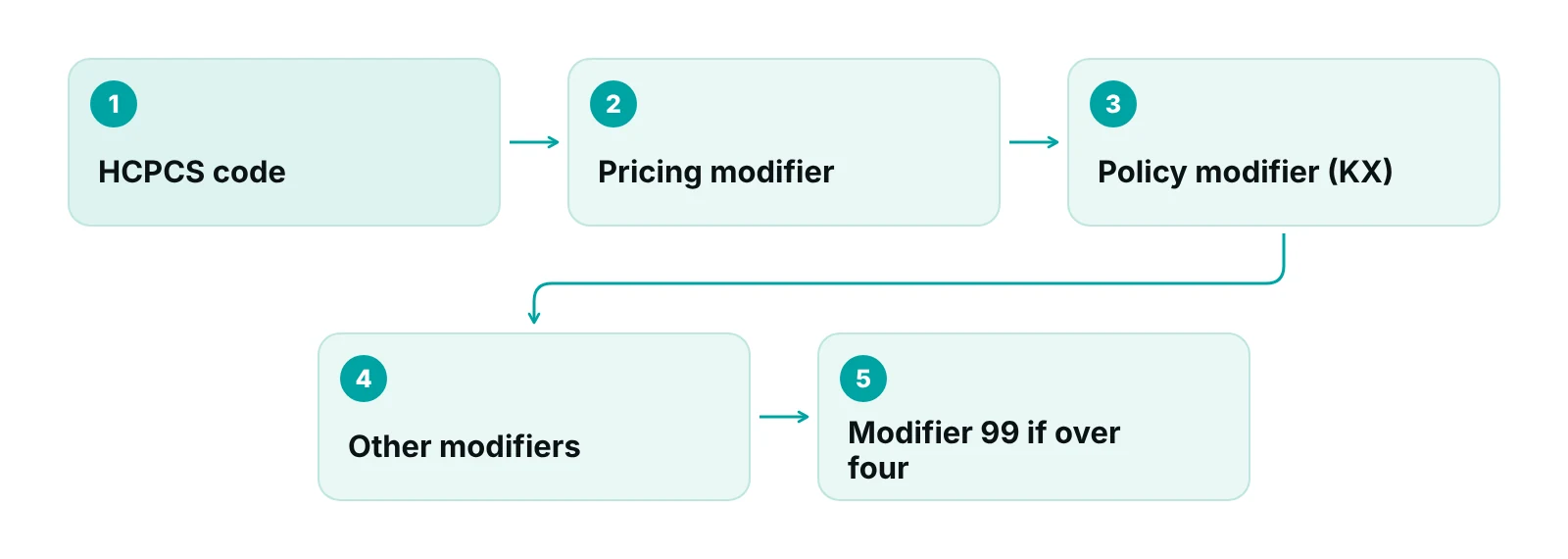
Per the same DME MAC page, pricing modifiers (RR, KH, KI, KJ, NU) go first, a policy modifier such as KX goes second, and informational modifiers follow. The claim form holds four modifiers. If you need more, use modifier 99 as the fourth and describe the rest in the claim narrative.
Medicare rules, then your payer
The sources here are Medicare DME MAC and CMS material. Medicaid plans and commercial payers can require different modifiers or none. Check each payer’s DME policy before you copy a Medicare pattern.
Rental or purchase: RR, NU and UE
Start every line with the status modifier. RR is a rental, NU is a new purchase and UE is a used purchase. These are pricing modifiers, so they sit first on the line.
| Modifier | Meaning | Billing note |
|---|---|---|
| RR | Rental | Use when the item is to be rented. |
| NU | New DME purchase | Purchase of a new item. |
| UE | Used DME purchase | Purchase of a used item. |
| KR | Rental item, partial month | Use when billing a rental for part of a month. |
| BP | Beneficiary elected purchase | Records the beneficiary’s choice. |
| BR | Beneficiary elected rental | Records the beneficiary’s choice. |
| BU | No decision after 30 days | Used when the beneficiary has not chosen rental or purchase. |
Source: Noridian Healthcare Solutions, JD DME Modifiers page (updated April 3, 2026); CMS Transmittal 4052 (2018) for BP, BR and BU.
The old advice to use RR “for capped rental items, such as oxygen equipment” is incomplete. Oxygen has its own payment rules, covered below. For other rented items, RR is the status modifier and the payment-month modifiers in the next section follow it.
Capped rental months: KH, KI and KJ
KH marks the initial claim or first rental month, KI marks months two and three, and KJ marks the later months. Under 42 CFR 414.229(f), payment for a capped rental item runs on a monthly rental fee for the period of medical need, for no longer than 13 continuous months. The supplier must transfer title to the beneficiary on the first day after the 13th continuous month of payment.
| Rental month | Modifier | Share of purchase price | Note |
|---|---|---|---|
| Month 1 | KH | 10% | Initial claim and first month of rental. |
| Months 2 and 3 | KI | 10% | Second and third month. |
| Months 4 to 13 | KJ | 7.5% | Remaining months; rental payment ends after month 13. |
| After month 13 | None for rental | None | Title transfers to the beneficiary. |
| Power-driven wheelchairs furnished on or after Jan 1, 2011 | Per item policy | 15% for 3 months, then 6% | Separate percentages under 414.229(b)(3). |
Source: 42 CFR 414.229(b) and (f), eCFR; Noridian JD DME Modifiers page (2026). Bill the published fee schedule amount for the item; do not calculate it from the percentages.
The KJ descriptor reads “PEN pump or capped rental, months four to fifteen” (Noridian; CMS Transmittal 4052). The 15 comes from parenteral and enteral nutrition pumps. For capped rental equipment, the regulation ends rental payment at month 13. The old post said KJ covers months four to thirteen. That is right for capped rental, but incomplete as a definition.
KH on purchases
CMS removed the requirement to append KH to purchased capped rental items and to PEN pump purchases in Transmittal 4052, effective October 1, 2018. NU or UE alone now identifies the purchase. See CMS Transmittal 4052.
Two supplier rules affect how these claims run. The supplier must keep furnishing the item until medical need ends or the 13-month period ends, and may not replace it during the rental period except in listed cases, such as loss, theft, irreparable damage, repair, malfunction or a physician order for different equipment (42 CFR 414.229(g)).
Replacement, repair and servicing: RA, RB and MS
RA marks replacement of an item lost, stolen or irreparably damaged, RB marks a replacement part furnished as part of a repair, and MS marks the six-month maintenance and servicing fee. These definitions come from Noridian’s DME modifier page.
- RA: replacement of a DME, orthotic or prosthetic item due to loss, theft or irreparable damage. Do not use it for a repaired part.
- RB: replacement of a part furnished as part of a repair. It is not for replacing the whole item.
- MS: six-month maintenance and servicing fee for reasonable and necessary parts and labor not covered by a manufacturer or supplier warranty.
MS has preconditions that older lists leave out. Under 42 CFR 414.229(e), the maintenance and servicing fee may not exceed 10 percent of the recognized purchase price. Payment is made only for equipment still in use after 15 months of rental payments. No payment is made in the first six-month period, and payment may be made in the first month of each later six-month period. Separately, 42 CFR 414.210(e) says payment is not made for maintenance and servicing of a rented item, apart from oxygen equipment and the items described in 414.229(e). Check the item’s fee schedule and policy before billing MS.
Oxygen is not a standard capped rental
Oxygen equipment runs on a 36-month rental period. A CGS Medicare article states that the supplier furnishing equipment in the first paid month must keep furnishing it for 36 months of continuous use unless medical need ends (42 CFR 414.226(i)(1)), and after the 36th payment must keep furnishing it for the rest of the item’s reasonable useful lifetime. The same article says RA goes on the first-month line when a new supplier takes over after a supplier exits Medicare, with a narrative and transfer documents; without them the new supplier may not use RA or start a new 36-month period.
Oxygen also has its own modifier sets. Noridian’s list shows N1, N2 and N3 for coverage groups and QA, QB, QE, QF, QG and QR for flow rates and portable oxygen. Use the Oxygen and Oxygen Equipment LCD and Policy Article, not a general list, to choose among them.
Policy and coverage status: KX, GA, GY and GZ
KX means the requirements in the item’s medical policy have been met. GA, GY and GZ describe coverage status. KX never appears on the same line as GA, GY or GZ.
| Modifier | Meaning | Rule to remember |
|---|---|---|
| KX | Requirements in the medical policy have been met | Goes second after pricing modifiers; must not be used with GA, GY or GZ on the same line. |
| GA | Valid ABN obtained; waiver of liability on file | Use when you expect denial as not reasonable and necessary and have a signed ABN. |
| GY | Item or service is statutorily excluded or not a Medicare benefit | Do not combine with KX. |
| GZ | Expected to be denied as not reasonable and necessary | No ABN on file; denied automatically and not subject to complex medical review. |
| GK | Covered item paired with a GA or GZ line | Billed on the second line; add KX if the policy requires it. |
| GL | Medically unnecessary upgrade furnished at no charge, no ABN | Bill the covered item with GL, not the upgrade. |
Source: Noridian JD DME Modifiers page (April 2026); Noridian article DME Upgrades, ABNs and Claims Modifiers (last updated May 2017, confirm before billing).
KX is a statement about the policy, not a stamp that paper is on file. Before adding it, someone has to check the item’s LCD and Policy Article against the order and medical record and confirm every listed requirement is met. If the criteria are not met, KX is the wrong modifier.
Stop using "XK"
Older lists show an “XK – documentation on file” modifier. It does not appear on Noridian’s DME modifier list, and we found no source for it. Drop it from your charge master and training sheets.
For PCD, NIPPV and LCT policies, Noridian says SC is used to support medical necessity and KX “is not correct coding for these policies.” Check which of your products fall under those policies before adding KX by habit.
Side, supply and bidding modifiers: LT, RT, AU, AV, AW and KE
LT and RT identify left and right. For bilateral items on the same date of service, bill two claim lines, one with RT and one with LT, each with one unit (Noridian). Orthotics and braces dispensed by orthopedic practices are a common place this matters.
- AU, AV, AW: item furnished with a urological, ostomy or tracheostomy supply (AU); a prosthetic or orthotic device (AV); or a surgical dressing (AW).
- KE: bid under round one of the competitive bidding program, for use with non-competitive-bid base equipment.
- Competitive bidding series (KG, KK, KU, KW, KY, KT): program-specific; see our Medicare DMEPOS competitive bidding guide for how the program works.
If your practice is unsure whether an item counts as home medical equipment or DME, read HME versus DME billing first, because the answer decides which payer rules apply.
A modifier check before the claim goes out
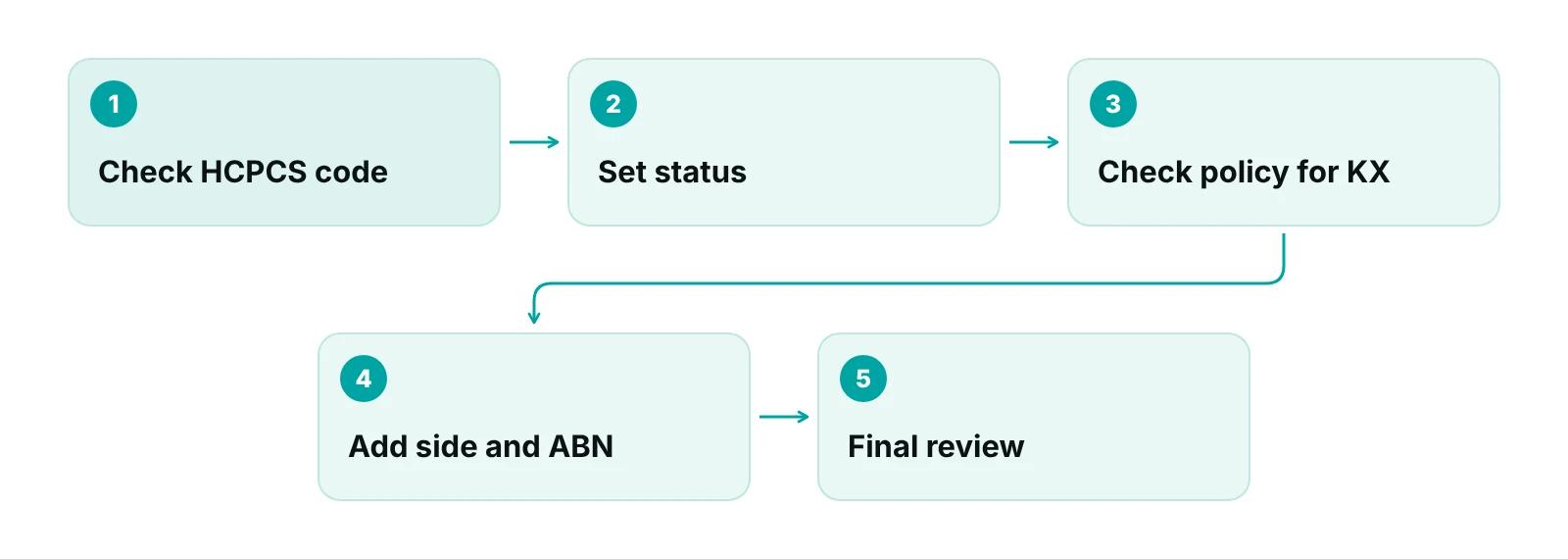
Run the same checks on every DME line, in this order. It takes a minute per line and it catches the errors that deny a claim as unprocessable.
- Confirm the HCPCS code and look up its allowed modifiers in the DME MAC modifier lookup tool.
- Set the status modifier: RR, NU or UE.
- If rental, set the payment month: KH, KI or KJ, and stop billing capped rental at month 13.
- Check the LCD and Policy Article. Add KX only if every requirement is met.
- Add side (LT or RT on separate lines), replacement (RA, RB), servicing (MS), ABN (GA) or coverage (GY, GZ) as the situation requires.
- Count modifiers. Four is the limit; use 99 and a narrative for more.
- Check that KX is not on a line with GA, GY or GZ.
Most of this is routine work that a system can enforce. A practice management system that tracks claims by stage lets you give each claim an owner and run data-completeness checks before submission, so a missing field is caught before the payer finds it. For billing help, see our medical billing and claims support.
Want a second pair of eyes on your DME claim lines?
Our free practice audit reviews a sample of your DME claim lines against the rules in this guide and shows where modifiers are missing or misplaced. Pricing is quoted after the audit.
What to stop repeating from older modifier lists
Many modifier lists online are copied from one another and have not been rechecked. Four items to remove from your own reference sheets:
- XK: not on the DME MAC list.
- KX as “documentation on file”: it means the medical policy requirements are met.
- KH on every purchase: not required on NU or UE purchase claims since October 1, 2018.
- RR as the only code for oxygen: oxygen has a 36-month rental period and its own modifiers.
We also removed denial-rate and revenue-loss figures from the earlier version of this post. They had no source, and two of them contradicted each other. Measure your own modifier denials from your remittances instead.
Handling modifiers in-house or with a partner
Whether you build this in-house or use a partner, the work is the same: a modifier crosswalk per HCPCS code, a policy check for KX, and a month counter for rentals. Our post on the pros and cons of outsourcing DME billing compares the options. If you want one team to own the cycle from charge to payment, see end-to-end revenue cycle management.
Not sure where your DME billing is leaking?
Tell us what you bill and which payers you bill it to. We will tell you what we would check first.
Our recommendations
- Build a modifier crosswalk by HCPCS code. List each code you bill, its allowed modifiers and the policy that governs it. Source it from the DME MAC lookup tool and the LCD, not from a blog list.
- Assign KX to a named reviewer. KX is a claim that policy requirements are met. Decide who confirms that, and what they check in the order and record, before the claim is released.
- Track rental months in a system. Count KH, KI and KJ months from a start date in your billing system, not in memory. Stop capped rental billing at month 13 and set a reminder for title transfer.
- Make GA, GY and GZ a two-person decision. These tell the payer your expectation about coverage. Require an ABN check and a second reviewer before a line goes out with any of them.
- Review the DME MAC modifier page each quarter. The Noridian page we used was updated April 3, 2026. Set a recurring review date and log any change to your crosswalk.
- Read your denials by modifier. Group remittance denials by line-level modifier, not just by code. You will see which rule your staff misses most.
A practice management system built around claims, not charts.
RCM Finder's portal tracks every claim by stage with an owner and runs data-completeness checks before submission. It is a claims system, not an EHR.
See how the RCM Finder portal works · Create a portal account
Disclosure: RCM Finder builds and sells this portal. It is a practice management system, not an EHR.
Bottom line
Get the status modifier right first, count rental months, treat KX as a policy statement and keep GA, GY and GZ apart from it. When claims still deny, our denial management service can work the appeals while you fix the cause upstream. You can also talk to us or start with a free practice audit.
Frequently asked questions
What is the difference between RR, NU and UE?
RR means the item is rented, NU means a new item is purchased and UE means a used item is purchased. They are pricing modifiers, so they go first on the claim line, ahead of KX and informational modifiers. Pick one per line. Use KR instead of RR when you bill a rental for only part of a month, and check the item’s policy for any extra modifier it requires.
Is KX a documentation modifier?
No. Noridian defines KX as requirements in the medical policy having been met. Before adding it, check the item’s LCD and Policy Article against the order and medical record. Do not use the “XK” modifier that appears on some older lists, because it is not on the DME MAC list. When criteria are not met, KX is the wrong modifier.
How many months do KH, KI and KJ cover?
KH is the initial claim or first rental month, KI is months two and three, and KJ is months four onward. The KJ descriptor runs to month 15 for PEN pumps, but capped rental payment ends after 13 continuous months under 42 CFR 414.229.
Do I still need KH on purchase claims?
Not for NU or UE purchases of capped rental items or PEN pumps. CMS Transmittal 4052 removed that requirement effective October 1, 2018. KH still marks the first rental month on rental claims, with KI for months two and three and KJ after that.
When do I use LT and RT?
Use them to show the left or right side. For bilateral items on the same date of service, Noridian says to bill two claim lines, one with RT and one with LT, with one unit on each. Do not put both sides on one line with two units.
Can GA and KX go on the same line?
No. Noridian says GA, GZ or GY and KX must never be used on the same claim line together, and the claim will deny as unprocessable. Use GA with a valid ABN when you expect a denial. Use KX only when the policy requirements are met.
Get your free practice audit
Tell us about your practice. We will contact you using the details you give.
- A review of your recent claims, denials and A/R aging
- Where your front desk and prior authorizations slow payment
- A prioritized fix list you keep, whether or not you hire us
Pricing is quoted after the audit, based on your volume and the services you choose. Prefer to talk? Call +1 (302) 556-2288.
Sources
- JD DME Modifiers — Noridian Healthcare Solutions (DME MAC) (2026)
- 42 CFR 414.229 Other items of DME; capped rental items — eCFR / HHS (current)
- 42 CFR 414.210 General payment rules — eCFR / HHS (current)
- Transmittal 4052, CR 10422: KH modifier removal for purchased capped rental items — CMS (2018)
- DME Upgrades, ABNs and Claims Modifiers — Noridian Healthcare Solutions (DME MAC) (2017)
- Supplier Exit from Oxygen Equipment Business — CGS Administrators (DME MAC) (2019)
Disclaimer: This post is general educational information about DME billing. It is not legal, coding or compliance advice. Modifier rules vary by DME MAC, payer, item and policy, and change over time. Confirm requirements in the current LCD, Policy Article and payer policy before billing.
