
Online appointment scheduling lets patients book, change and cancel visits without a phone call. Its best-supported revenue benefit comes from automated reminders: a Cochrane review found text reminders improved attendance. Many other claimed savings lack a traceable source, so measure your own no-show rate before and after.
This post is for practice owners and managers deciding whether to add online booking. We rewrote an older version that quoted several statistics we could not verify. Here we keep only what we could confirm, say where evidence is missing, and show how to test the change in your own schedule. Our front desk and revenue cycle post covers how the front desk affects the rest of the cycle.
Key takeaways
- Reminders have the strongest evidence: a 2013 Cochrane review found text reminders improved attendance versus none.
- Online booking alone does not reduce no-shows; reminders and checks tied to it do.
- Booking fields feed the claim, so capture insurance and visit data cleanly at the start.
- We found no verifiable national figure for the cost of a no-show, so use your own paid amounts.
- Portal calendar booking at RCM Finder is early access only.
What does online appointment scheduling change for a practice?
It changes who does the booking work and when it happens. Patients choose a slot through a web page, an app or a patient portal, and the booking lands on your schedule. Staff stop typing most of the appointments by hand. The schedule can then trigger reminders, intake and insurance checks.
That is the real link to revenue. A booked visit is only income if the patient arrives, the coverage is active and the claim carries the right data. Online booking helps with the first part only when reminders and checks are wired to it.
Three things it does not do on its own
- It does not guarantee fewer no-shows. A self-booked visit can be forgotten just as easily as one booked by phone.
- It does not verify insurance. A patient can type any plan name into a booking form. Someone still has to run the eligibility check, as covered in our patient insurance verification guide.
- It does not fix an overbuilt or underbuilt template. If visit lengths and provider rules are wrong, patients will book the wrong slots faster.
Specialties differ here. A practice with long new-patient visits and short follow-ups needs different booking rules from a walk-in friendly primary care office. Our specialty billing pages show how scheduling and billing patterns vary by specialty.
What does the evidence say about reminders and no-shows?
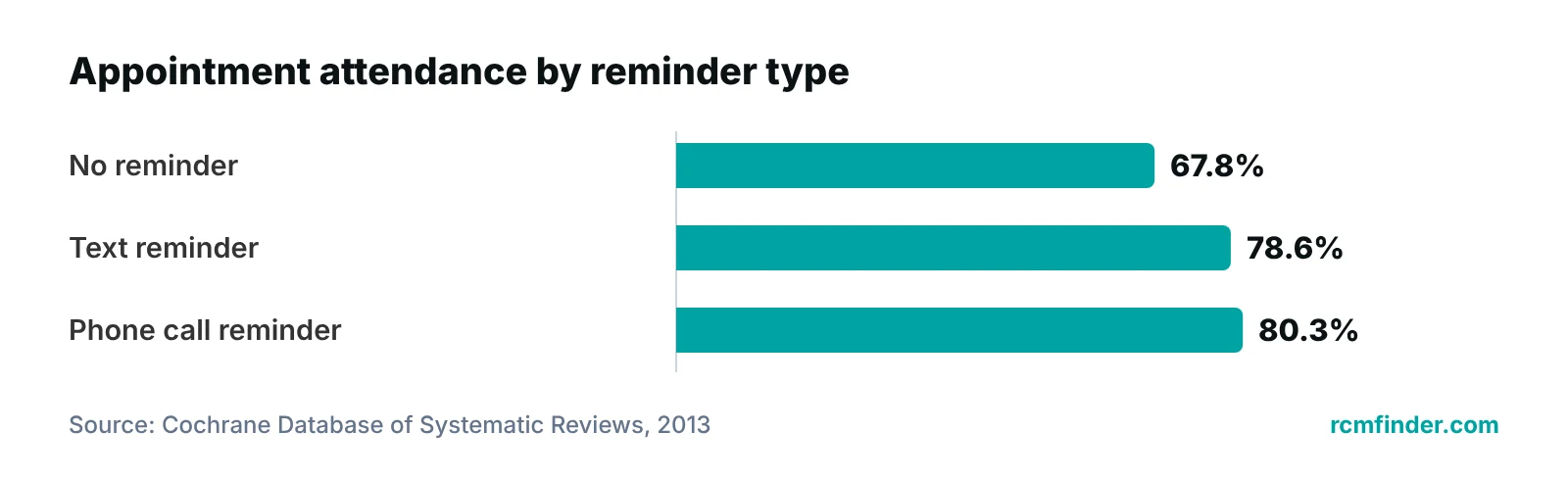
Reminders have the best evidence of any scheduling feature. A Cochrane systematic review of mobile phone text reminders (published 2013) pooled 8 randomized trials with 6,615 participants. Text reminders improved attendance compared with no reminder, and worked about as well as phone call reminders.
| Comparison | Studies (participants) | Result | Certainty |
|---|---|---|---|
| Text reminder vs no reminder | 7 (5,841) | Risk ratio 1.14 (95% CI 1.03 to 1.26): attendance improved | Moderate |
| Text reminder vs phone call reminder | 3 (2,509) | Risk ratio 0.99 (95% CI 0.95 to 1.02): about the same | Moderate |
| Text plus postal reminder vs postal reminder alone | 1 (291) | Risk ratio 1.10 (95% CI 1.02 to 1.19): attendance improved | Low |
| Cost per attendance, text vs phone call | 2 studies | Text cost 55% and 65% less per attendance | Reported by the review |
Source: Gurol-Urganci et al., Cochrane Database of Systematic Reviews (2013)
Read the numbers with care. The review rated the trials as low to moderate quality and said the evidence was not yet strong enough to settle policy questions. It reported no health outcomes and little on harms or on how patients felt about the messages. It is also a 2013 review of text messages, so it says nothing direct about app notifications or patient portal alerts.
What it does support: if you add reminders, texts are a reasonable, low-cost option, and they do not need to beat phone calls to be worth it. Their value is that software can send them without staff time. For the rest of this post, we use no figure for “percent fewer no-shows” because we could not confirm one from a primary source we could open. Measure your own, as shown below.
Which benefits are real, and which depend on your setup?
Most claimed benefits are real in principle but depend on configuration. The table separates what the evidence supports from what you must test yourself.
| Benefit | What has to be true | Evidence status |
|---|---|---|
| Fewer no-shows | Automatic reminders are sent for every booked visit | Reminders: supported by trials (Cochrane 2013). Online booking itself: not shown in the sources we reviewed |
| Less phone time at the front desk | Enough patients choose the online route, and staff are redeployed | No primary source reviewed. Measure call volume before and after |
| Fewer data-entry errors | Patients enter their own details and staff review them | No primary source reviewed. Spot-check a sample of bookings |
| Faster fill of cancelled slots | Cancellations free the slot at once and a waitlist exists | No primary source reviewed. Track fill rate of released slots |
| Cleaner claims | Insurance, referral and visit-type fields feed the claim | Process logic, not a measured result. Track front-end rejections |
Source: Cochrane Database of Systematic Reviews (2013) for the reminder row; other rows are RCM Finder’s assessment
Notice what is missing. Many web pages quote large dollar savings per practice or fixed percentage gains in revenue and denials from scheduling software. We could not trace those to a primary source, so we left them out. If a vendor quotes one, ask for the study, the practice type and the year.
Patient demand is also less clear than vendor surveys suggest. A 2025 ASTP/ONC data brief using 2024 national survey data found 77% of individuals were offered online access to their medical record, and 65% were offered it and used it. That brief is about record access. It does not report how many people book visits online, so it shows portal reach, not booking demand.
How does scheduling data reach the claim?
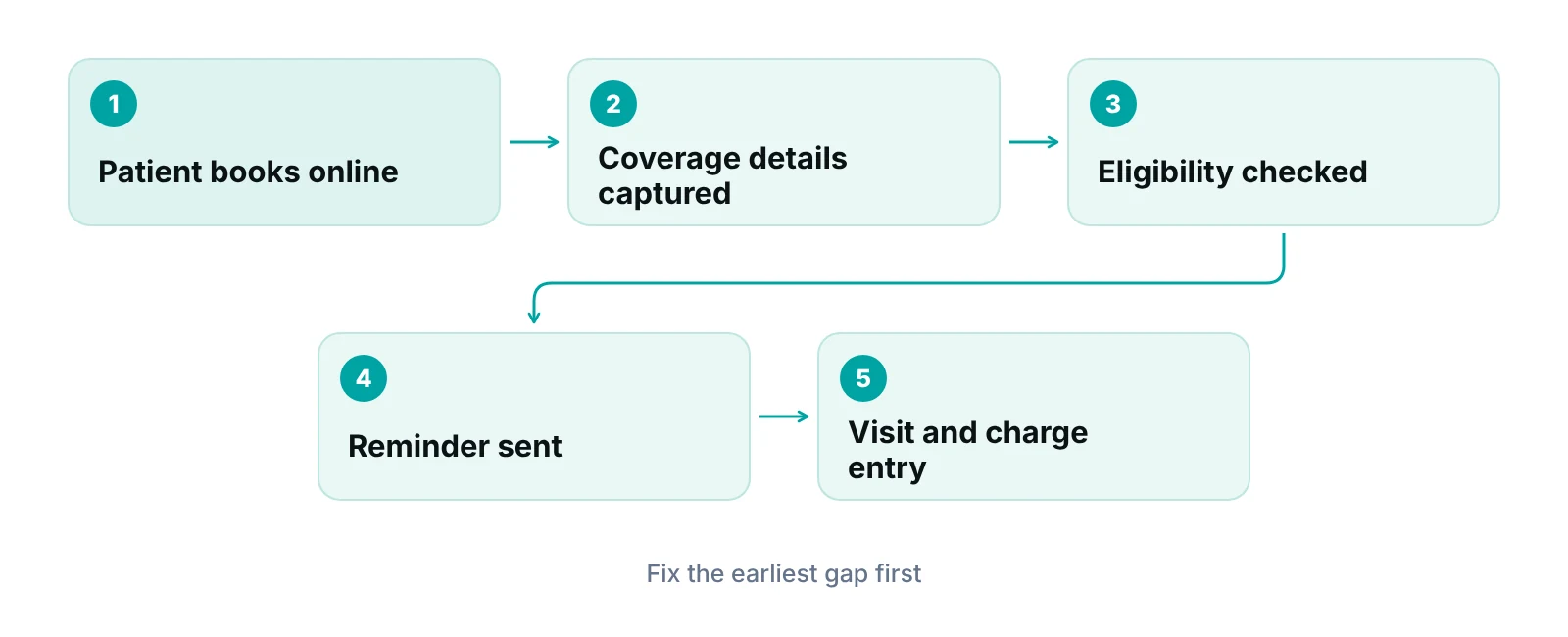
Every field captured at booking is either used later on the claim or has to be re-collected. Clean capture at the start is cheaper than a correction after a rejection. This is why scheduling belongs in a revenue cycle discussion.
| Captured at booking | Used later for | If it is wrong |
|---|---|---|
| Patient name, date of birth, contact details | Registration, statements, reminders | Mismatch with the payer record; reminders reach no one |
| Insurance plan and member ID | Eligibility check, claim submission | Claim rejected or denied for coverage reasons |
| Referral or authorization needed (yes/no) | Authorization workflow before the visit | Visit happens without approval |
| Visit type and length | Template, provider fit, charge expectations | Wrong slot; charge capture questions later |
| Rendering provider and location | Claim provider and place-of-service fields | Claim data errors |
| Cancel or no-show reason | Reporting and recall | No way to tell patterns from one-offs |
Source: RCM Finder workflow assessment (no external statistics)
Our post on how EHR and RCM systems connect explains why these fields should flow from one system to the next. If your scheduling tool sits apart from your billing system, someone retypes the data, and that is where errors enter. Our team works inside your existing EHR (for example PrognoCIS, eClinicalWorks or athenahealth) so the fields stay in the system you already use.
What are the risks and limits to plan for?
The main risks are privacy, access and operations, and all three are manageable. Decide on them before you switch online booking on.
Privacy and reminder content
HIPAA allows providers to contact patients about their care by phone, mail or other means. The HHS Office for Civil Rights FAQ on appointment reminders (content last reviewed December 28, 2022) says to limit what a voicemail discloses, for example a name, a number and what is needed to confirm an appointment. It also says that if a patient asks to be contacted another way or at another place, the provider must accommodate the request if it is reasonable. Keep reminder text short and let the patient opt for a different channel. Our patient privacy in revenue cycle management post covers the wider rules.
Text messaging may also fall under separate consumer-contact laws. We did not review those rules for this post, so ask your compliance advisor or counsel what consent you need before you send automated texts.
Access and operations
- Keep a phone path. Some patients cannot or will not book online. A booking page should add a route, not remove one.
- Limit what can be self-booked. New-patient visits, complex procedures and visits that need authorization often should go to staff.
- Plan for cancellations. Easy booking also means easy cancelling. Decide how a released slot is refilled.
- Assign an owner. Someone must check the online queue, fix mistakes and update the templates.
How do you measure whether it is working?
Measure your own no-show rate before and after, using the same definitions. No outside average can tell you whether your change worked.
- No-show rate = no-shows divided by scheduled visits in the period. Count late cancellations separately, since they can often be refilled and a no-show cannot.
- Cancellation lead time: how many days’ notice you get. More notice means more chance to refill the slot.
- Slot fill rate: released slots that were refilled divided by released slots.
- Estimated cost of a no-show = your average revenue for that visit type, adjusted for how often you refill the slot. Use your own paid amounts by visit type, not a national figure.
- Front-end rejections tied to registration data: track whether the count falls after the booking form changes.
Pull at least two full months before the change, and compare like months. Our guide to revenue cycle KPIs shows where these measures fit with denial and A/R measures.
See where scheduling leaks revenue
Send us your schedule template and a month of no-show data. We will review it in a free practice audit, then show where reminders, insurance checks and registration data can be tightened.
How do you choose between an online booking tool, a staffed option and a mix?
Pick the lowest-risk setup that covers your patients and your staff time. Most practices end up with a mix: online booking for simple visits and staff for the rest.
When you compare options, ask these questions of any vendor, including us:
- Does a booking write straight to the schedule in your EHR or practice management system, or does someone retype it?
- Which fields are captured at booking, and do they match what your claim needs?
- Who sends reminders, over which channels, and can a patient opt out or pick another channel?
- Will the vendor sign a Business Associate Agreement before it touches patient data?
- Can you export your booking and no-show data if you leave?
- What happens when a patient cancels, and is the slot offered to a waitlist?
There are three common ways to run it. You can use the booking module in your EHR or practice management system. You can use a standalone booking tool. Or you can have trained staff run scheduling and reminders for you. Our medical appointment scheduling services are the staffed route: our team works in your system on your practice’s time zone. Our Virtual Medical Assistants can also handle reminder calls, insurance checks and intake.
About our own portal
The RCM Finder portal tracks claims by stage and flags data gaps before submission. Appointment booking with a calendar view in the portal is early access only and is not generally available. If you need online booking today, use your EHR’s tool or a staffed service while you evaluate it.
Our recommendations
- Count before you buy. We would pull two months of scheduled visits, no-shows and late cancellations first. If your no-show rate is low, a booking page may not be your best first fix.
- Start with reminders. Reminders have the strongest evidence in this topic. Turn them on for every visit type, keep them short, and let patients choose a channel.
- Capture insurance at booking. We would add plan and member ID fields to the booking form, then run an eligibility check before the visit. Treat the form entry as unverified until checked.
- Keep the phone line open. Online booking should add a route. Plan how patients who prefer the phone, or who need a staff-led visit, get through quickly.
- Restrict what can be self-booked. Start with returning-patient visits that need no authorization. Add visit types after you see the error rate.
- Review monthly for three months. Compare no-show rate, fill rate and registration-related rejections against your baseline. Change one setting at a time so you can tell what worked.
RCM Finder's portal includes appointment scheduling in early access.
It has a calendar and day view. Live online booking is not available yet, so confirm that it fits before you plan around it.
See how the RCM Finder portal works · Create a portal account
Disclosure: RCM Finder builds and sells this portal. It is a practice management system, not an EHR.
Bottom line
Online appointment scheduling pays off when it is joined to reminders, insurance checks and clean registration data, and when you measure the result against your own baseline. If you want a second pair of eyes on your schedule and no-show data, our medical appointment scheduling services team can review it in a free practice audit, and you can size the revenue at stake with the revenue calculator or talk to us.
Frequently asked questions
What are the main benefits of online appointment scheduling?
The best-supported benefit is reminders: a 2013 Cochrane review found text reminders improved attendance compared with none. Other benefits, such as less phone time and cleaner registration data, are plausible but depend on setup. Measure your own baseline and results rather than relying on vendor figures.
Does online scheduling reduce no-shows by itself?
Not by itself. A patient who books online can still forget the visit. The reduction in the research comes from reminders, which online systems make easy to automate. Pair booking with reminders and track your no-show rate before and after.
How much revenue does a missed appointment cost?
It depends on your visit type, payer mix and whether you can refill the slot. We did not find a primary source for a reliable national figure, so we do not quote one. Use your own average paid amount by visit type and your slot fill rate to estimate it.
Are text message reminders allowed under HIPAA?
HIPAA permits providers to contact patients about their care and says to limit what is disclosed. Keep texts short, honor a patient’s request for another contact method where reasonable, and ask your compliance advisor about consent rules for automated texts. This is general information, not legal advice.
Can online scheduling connect to billing software?
Often, yes, but it depends on the systems. Check whether a booking writes directly to the schedule in your EHR or practice management system, and whether insurance, provider and visit-type fields carry through to the claim. If not, staff retype data and errors follow.
Does the RCM Finder portal offer online appointment booking?
Not yet generally. Appointment booking with a calendar view in our portal is early access only. Our staffed scheduling service works inside your existing EHR today, and we can review your current setup in a free practice audit.
Get your free practice audit
Tell us about your practice. We will contact you using the details you give.
- A review of your recent claims, denials and A/R aging
- Where your front desk and prior authorizations slow payment
- A prioritized fix list you keep, whether or not you hire us
Pricing is quoted after the audit, based on your volume and the services you choose. Prefer to talk? Call +1 (302) 556-2288.
Sources
- Mobile phone messaging reminders for attendance at healthcare appointments — Cochrane Database of Systematic Reviews (2013)
- May providers leave messages for patients at their homes to remind them of appointments — HHS Office for Civil Rights (HIPAA FAQ) (2022)
- 2024 HINTS Patient Access data brief — ASTP/ONC (healthit.gov) (2025)
Disclaimer: This article is educational and is not legal, compliance, coding or financial advice. Payer rules, state law and contracts vary; confirm requirements with your advisors. Study results may not apply to your practice.