
<strong>Charge entry in medical billing is the step where each billable service from a visit becomes a charge line in your practice management system.</strong> The line records the date, provider, place of service, procedure codes, modifiers, diagnoses, units and fee. Accurate, same-day entry feeds a clean claim. Missed or mis-keyed lines become denials or lost revenue.
Charge entry looks like data entry, but it decides whether a visit turns into a correct claim. A missed line is revenue that never gets billed. A wrong line is rework later.
The earlier version of this post leaned on unsourced denial statistics and a case study we could not support. We rebuilt it from the Medicare Claims Processing Manual, eCFR and CMS material, and kept the process steps that hold up.
Key takeaways
- Charge entry turns a documented, coded visit into charge lines that form the claim.
- Each line needs date, place of service, codes, modifiers, diagnosis pointer, units, fee and rendering NPI.
- Medicare allows one calendar year from the date of service to file; other payers set their own limits.
- Missed charges are the hardest error to see, because the claim still looks clean.
- Track charge lag and open encounters daily, and send queries instead of guessing.
What is charge entry in medical billing?
Charge entry is the point where care becomes a billable record. A charge line holds who did what, when, where, under which codes and diagnoses, for how many units and at what fee. Charge lines roll up into the claim that goes to the payer.
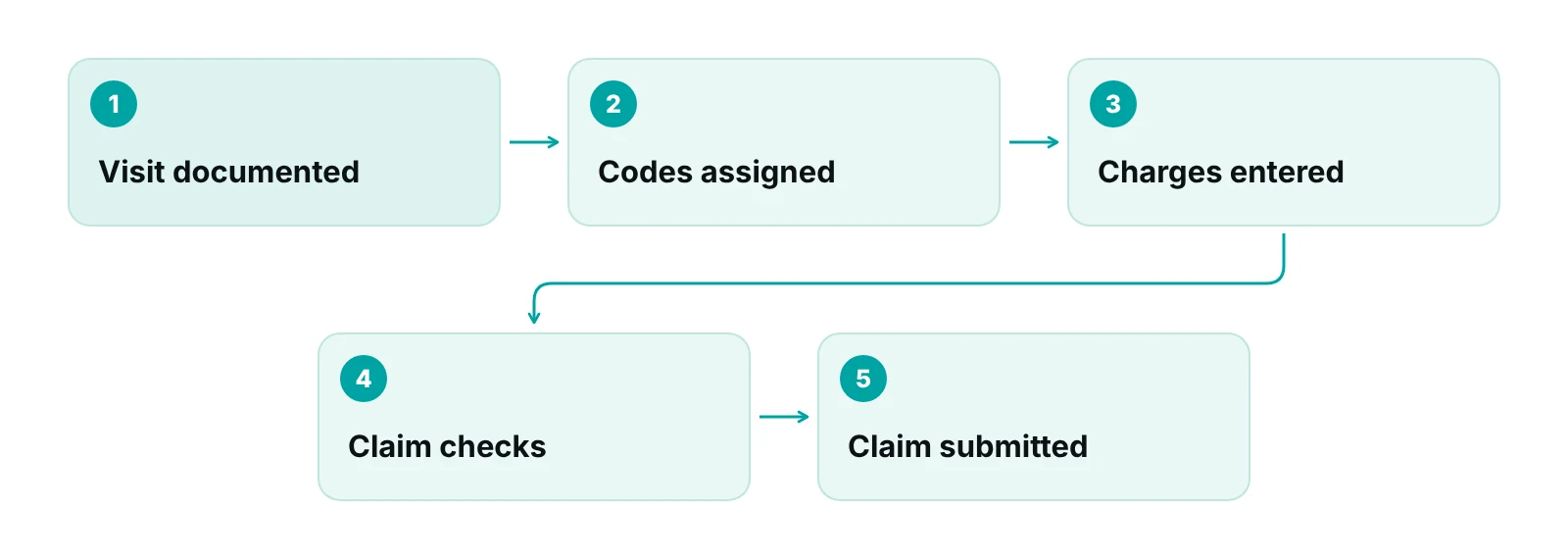
It sits between documentation and claim submission. The provider documents the visit. A coder, or the provider, assigns the codes. Charge entry puts those codes and details into the system. Claim checks and submission follow. If a charge is wrong or never entered, every later step starts from bad data.
How charge entry differs from nearby steps
- Charge capture: finding every billable service from the visit, including in-room procedures, supplies and add-on services. Charge entry records what capture finds.
- Medical coding: assigning CPT, HCPCS and ICD-10-CM codes from the note. Our guide to CPT, ICD-10 and HCPCS codes explains the three code sets.
- Charge posting: many billing teams use this term for the same step as charge entry. Our charge posting guide covers that wording, so this page stays on entry.
- Superbill or encounter form: the sheet or screen where the provider marks the services performed. See understanding superbills for what belongs on one.
- Payment posting: recording what a payer or patient paid. It comes after the claim, not before.
What data does a charge line need?
A charge line needs enough data to fill the claim without guessing. For a professional claim on the CMS-1500 form, the Medicare Claims Processing Manual, Chapter 26 lists what each item requires. Medicare rules are a baseline. Other payers publish their own billing guides, so keep a short payer rules sheet next to this list.
| Data element | Claim form item | What the Medicare manual says | Check at entry |
|---|---|---|---|
| Date of service | 24A | Required for each service. A date range needs a valid “to” date. | Use the date care was given, not the date the note was signed. |
| Place of service | 24B | Required. A missing or invalid code is returned as unprocessable. | Match where the service was actually delivered. |
| Procedure code and modifiers | 24D | CPT or HCPCS code with no narrative. The form holds up to four modifiers. Unlisted codes need a description. | Code and modifiers match the note. Add the description for unlisted codes. |
| Diagnosis codes | 21 | Up to 12 ICD-10-CM codes (A to L) on the 02/12 form, to the highest level of specificity, no periods, ICD indicator 0. | Codes are complete and each one supports a service on the claim. |
| Diagnosis pointer | 24E | Required. Medicare asks for one reference per line, pointing to the primary diagnosis. | Each line points to the diagnosis that supports that service. |
| Charge | 24F | Fee for each listed service. Item 28 must equal the total of all line charges. | Fee comes from the fee schedule, not from typing. |
| Units | 24G | Number of days or units. If one service was performed, enter 1. | Units follow the code rules and the note. |
| Rendering provider NPI | 24J | Required. A missing rendering NPI makes the claim unprocessable. | Pick the provider who delivered the service. |
Source: CMS, Medicare Claims Processing Manual, Chapter 26, Section 10.4 (chapter revision issued 2024). Rules for other payers vary.
Patient and coverage details come from registration, not from the charge line. That is why front-desk data quality matters. A charge entered against the wrong policy still fails, however clean the codes are.
Codes, specificity and modifiers
Federal rules name CPT and HCPCS for physician and other health services, and ICD-10-CM for diagnoses, as the standard code sets for electronic transactions (45 CFR 162.1002). The FY 2026 ICD-10-CM Official Guidelines say to code to the highest level of specificity documented in the record. Charge entry staff rarely choose these codes, but they must key them exactly as assigned.
Modifiers deserve extra care. CMS says modifier 59 should be used only when no more specific modifier fits, that the X modifiers (XE, XP, XS, XU) are preferred “whenever possible,” and that documentation must support the choice. It also says they are not appropriate just because two codes have different descriptors or diagnoses (CMS MLN1783722, April 2026). Our modifier 25 vs 59 guide goes deeper.
A modifier is not a workaround
Never add a modifier at entry only to get past a claim edit. If the note is unclear, send a query to the provider or coder and wait for the answer.
When should charges be entered?
Enter charges as soon as the visit is documented and coded, ideally the same or next business day. This is our working standard, not a federal rule. The limit that actually binds you is the payer’s timely filing deadline, and every day a charge sits unentered uses up part of it.
For Medicare, a claim for services on or after January 1, 2010 must be filed no later than the close of the period ending one calendar year after the date of service, with narrow exceptions listed in 42 CFR 424.44. Commercial and Medicaid limits are set by each payer’s contract or rules, so look up the limit for every payer you bill and load it into your system.
Track charge lag
Charge lag is the number of days between the date of service and the date charges are entered. It is a management measure rather than a CMS-defined one, so write your own definition and use it the same way every month. Four habits keep it low:
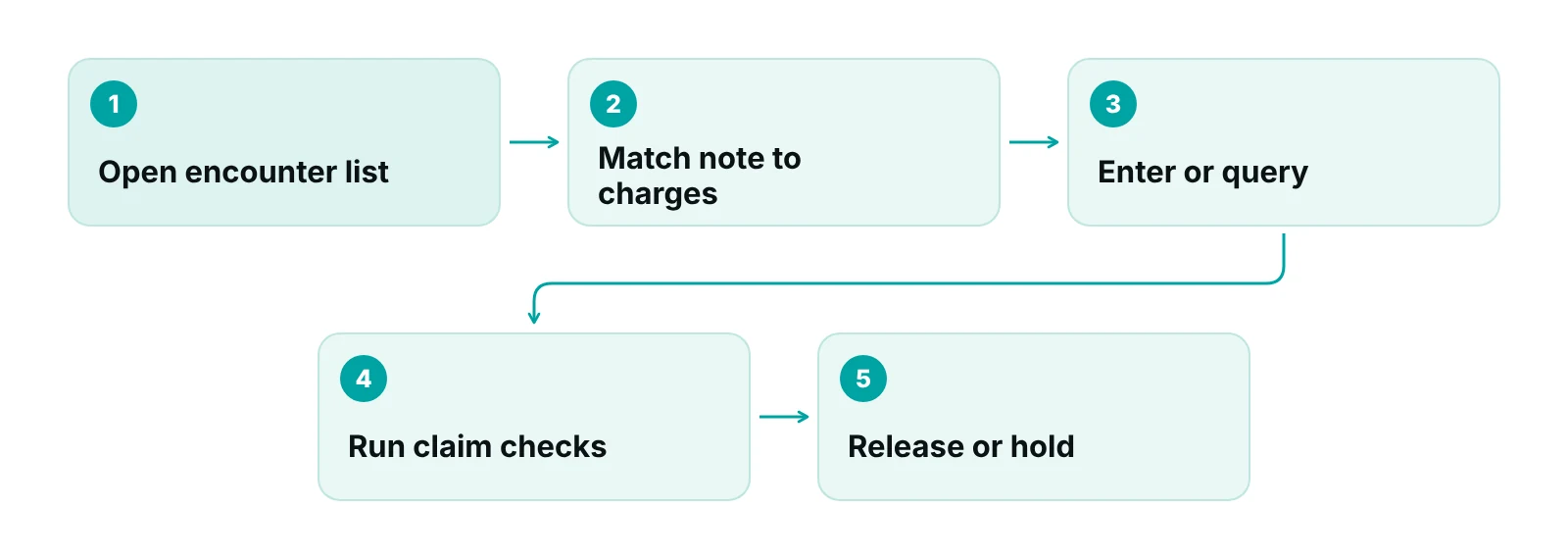
- Run an open encounters report every day and clear it, or give each leftover a reason.
- Keep a separate queue for unsigned or incomplete notes so they are chased, not forgotten.
- Report lag by provider and location each week, oldest first.
- Hold the charge, and record why, when a coding query is waiting on a provider.
Who does charge entry?
It depends on practice size. In a small practice the provider picks the services in the EHR and a biller enters or reviews them. Larger groups use a dedicated charge entry specialist, a separate coder and a billing lead. Some practices hand part or all of it to an outside billing team. What matters is that each hand-off has a named owner and a check.
| Role | What they do | Check before hand-off |
|---|---|---|
| Provider | Documents the visit and marks or selects the services performed. | Note is complete and signed before it reaches billing. |
| Coder | Assigns CPT, HCPCS, ICD-10-CM codes and modifiers from the note. | Unclear documentation goes back to the provider as a query. |
| Charge entry specialist or biller | Keys the charge lines: date, place of service, rendering provider, codes, units, fee. | Every coded service has a charge line, and no line lacks a code. |
| Billing lead | Reviews exceptions, runs open-encounter and error reports, trains staff. | Errors are tracked by cause and by provider. |
| Front desk | Collects demographics and coverage at registration. | Insurance data is complete before charges are released. |
“A charge entry desk should never be a place where guesses get typed in. When the note does not match the code, the right move is a query, not a quiet fix.”
— Awais Afzal, Healthcare Operations & Data Analyst
Common charge entry errors and how to prevent them
Most charge entry errors are small, repeatable and visible in a report if someone looks. The table lists the ones we check first, with the fix that belongs at the entry desk. Errors that slip through become denials and rework later.
| Error | What it looks like | Prevent it at entry |
|---|---|---|
| Missed charge | The note records a procedure, injection or supply but no charge line exists. | Compare each note with its charge lines. Clear the open-encounters report daily. |
| Wrong or outdated code | The code does not match the note, or the code table is out of date. | Update code tables when code sets change. Query the coder on any mismatch. |
| Missing or wrong modifier | The claim is rejected or an edit fires. | Add only what the note supports. Keep a modifier rules sheet. |
| Diagnosis not linked | A line points to a diagnosis that does not support the service. | Check item 24E pointers line by line. |
| Wrong units | Units ignore the code rules, or a single service shows more than one. | Check code rules and the note. Medicare expects 1 for one service. |
| Wrong provider or place of service | Rendering NPI or place of service does not match the visit. | Select the provider from the schedule. Check place of service against the visit type. |
| Duplicate charge | The same service is keyed twice, for example by hand and by an EHR feed. | Turn on a duplicate check for date, code and provider. |
Why missed charges are the hardest to see
Picture an office visit where the note also records a procedure done in the room and a supply used. The entry person keys only the visit. The claim pays for the visit. The procedure and supply never reach a payer, and no denial appears anywhere, because nothing was billed. The claim looks clean, which is exactly why this error hides. Only a note-to-charge comparison finds it.
Specialties that bill several procedures per visit, such as pain management, put more lines, modifiers and units on each encounter. Every extra line is another place to miss or mis-key. Our own billing pipeline was built and tested on real claim data from an affiliated pain management and neurology practice, which is why we pay attention to line-level detail.
How software helps charge entry, and where it stops
Software can enforce required fields, fill fees from a schedule, flag duplicates and stop a claim that is missing data. It cannot decide whether the note supports a code. That judgment stays with people.
- EHR to billing feeds can pass charges across and cut re-keying. Reconcile them anyway, because a feed that drops a line fails silently.
- Claim scrubbers check a finished claim against rules. Our claim scrubbing guide explains what they catch and what they miss.
- A claims-based system shows where each claim stands. We built a practice management system that tracks claims by stage with an owner on each claim, data-completeness checks before submission and rules that hold a claim for review. It is a claims system, not an EHR.
When to bring in outside help
Consider outside help when open encounters pile up faster than staff can clear them, when the same errors keep returning, or when staff turnover keeps resetting training. You can outsource entry alone or the whole claim cycle. Our medical billing services cover charge entry, coding support and claim submission, and the end-to-end revenue cycle management service adds denials and A/R follow-up.
Whoever you choose, ask for the written scope, who checks the work, what reports you will see each week and how queries reach your providers. Pricing is quoted after a free audit.
Want a second pair of eyes on your charge entry?
Our free practice audit reviews your open-encounter backlog, a sample of notes against charge lines and your error patterns, using the checks in this guide.
Our recommendations
- Write a one-page charge entry standard. List the fields every line needs, who enters it, the target time after the visit and who handles queries. Put it where staff will see it.
- Clear open encounters every day. Run the report at a fixed time. Every leftover gets a reason and an owner, so nothing sits without one.
- Compare notes with charge lines on a sample. Each week pull a few encounters per provider and compare the note with the charges. This is the only reliable way to find missed charges.
- Count errors by cause. A total error count tells you little. Tag each error by type, provider and source so training goes where the pattern is.
- Load payer deadlines and modifier rules. Keep one sheet with each payer’s filing limit and any modifier rule. Update it when a payer bulletin changes.
- Query, do not guess. Give staff an easy way to send a coding query to a provider, and make clear that waiting for an answer is the correct behavior.
A practice management system built around claims, not charts.
RCM Finder's portal tracks every claim by stage with an owner, runs data-completeness checks before submission and applies workflow rules to hold or advance claims. It is a claims system, not an EHR.
See how the RCM Finder portal works · Create a portal account
Disclosure: RCM Finder builds and sells this portal. It is a practice management system, not an EHR.
Bottom line
Charge entry is the first place a visit becomes money, and the cheapest place to catch a mistake. Give every line a complete data set, enter it promptly and compare notes with charges on a sample. If you want help running that routine, see our end-to-end revenue cycle management service or talk to us, or start with a free practice audit.
Frequently asked questions
What is charge entry in medical billing?
Charge entry is the step where billable services from a visit are recorded as charge lines in the practice management system. Each line carries the date, provider, place of service, codes, modifiers, diagnoses, units and fee. Those lines form the claim, so errors here carry into every later step.
What is the difference between charge entry and medical coding?
Coding turns the provider’s documentation into CPT, HCPCS and ICD-10-CM codes. Charge entry takes those assigned codes and keys them, with the dates, provider, units and fees, into the billing system. In small practices one person may do both, but the two checks are different.
How soon after the visit should charges be entered?
As soon as the note is signed and coded, ideally the same or next business day. That is our working standard, not a rule. The hard limit is each payer’s filing deadline. Medicare generally allows one calendar year from the date of service, and other payers set their own limits.
What information is required to enter a charge?
At minimum: date of service, place of service, procedure code with any modifiers, diagnosis codes and a pointer to the supporting one, units, the fee and the rendering provider’s NPI. Patient and insurance data come from registration. Each payer may add its own requirements.
Who is responsible for charge entry in a practice?
It varies. In small practices a biller or front-desk team member enters charges from the provider’s selections. Larger groups use charge entry specialists and separate coders. Outside billing companies can take over some or all of it. Whatever the setup, give each hand-off a named owner.
What happens if a charge is entered wrongly or missed?
A wrong charge can cause a rejection, a denial, an underpayment or an audit question. A missed charge is quieter: the claim pays for what was billed, and the rest is lost unless a note-to-charge review finds it. Correct errors quickly, and watch your payer’s filing limit.
Get your free practice audit
Tell us about your practice. We will contact you using the details you give.
- A review of your recent claims, denials and A/R aging
- Where your front desk and prior authorizations slow payment
- A prioritized fix list you keep, whether or not you hire us
Pricing is quoted after the audit, based on your volume and the services you choose. Prefer to talk? Call +1 (302) 556-2288.
Sources
- Medicare Claims Processing Manual, Chapter 26: Completing and Processing Form CMS-1500 Data Set — CMS (via HHS guidance portal) (2024)
- 42 CFR 424.44 Time limits for filing claims — eCFR (current)
- 45 CFR 162.1002 Medical data code sets — Cornell LII (eCFR text) (current)
- ICD-10-CM Official Guidelines for Coding and Reporting FY 2026 — CDC/NCHS (2025)
- MLN1783722: Proper Use of Modifiers 59, XE, XP, XS and XU — CMS (2026)
Disclaimer: This post is general educational information about revenue cycle operations. It is not legal, coding or compliance advice. Claim form rules, filing limits and modifier policies vary by payer and change over time. Confirm requirements with each payer and qualified advisors before acting.
