
The CMS-1500 claim form is the standard paper form for professional claims. The NUCC maintains it, and its items run from 1 to 33 across four zones: patient and insured, condition and diagnosis, service lines, and billing provider. Medicare requires electronic claims unless an exception applies, so paper is the exception.
This guide walks the form from top to bottom, using the NUCC manual and Medicare’s own claims manual. It also covers the question that comes before the boxes: should your practice be sending paper at all? Payer rules differ, so treat the payer’s own instructions as the final word on any box. For the institutional counterpart, see the UB-04 claim form guide.
Key takeaways
- The CMS-1500 is a paper layout for professional claims; the electronic equivalent is the 837P.
- Medicare denies paper claims that lack an ASCA exception, and the denial carries no appeal rights.
- Most box errors come from four places: IDs, diagnosis codes and pointers, service-line detail, and provider NPIs.
- The NUCC manual is a general guide; payer and clearinghouse instructions override it.
- A check before submission costs less than reworking a rejected or denied claim.
What the CMS-1500 claim form is, and what it is not
The CMS-1500 is the basic paper claim form for physicians, other providers and suppliers (professional claims). Its official name is the 1500 Claim Form, and the National Uniform Claim Committee (NUCC) maintains it. Medicare’s claims manual adds that new versions need approval from the Office of Management and Budget. The current form is the 02/12 version, which replaced the older 08/05 version (Medicare Claims Processing Manual, Chapter 26; NUCC).
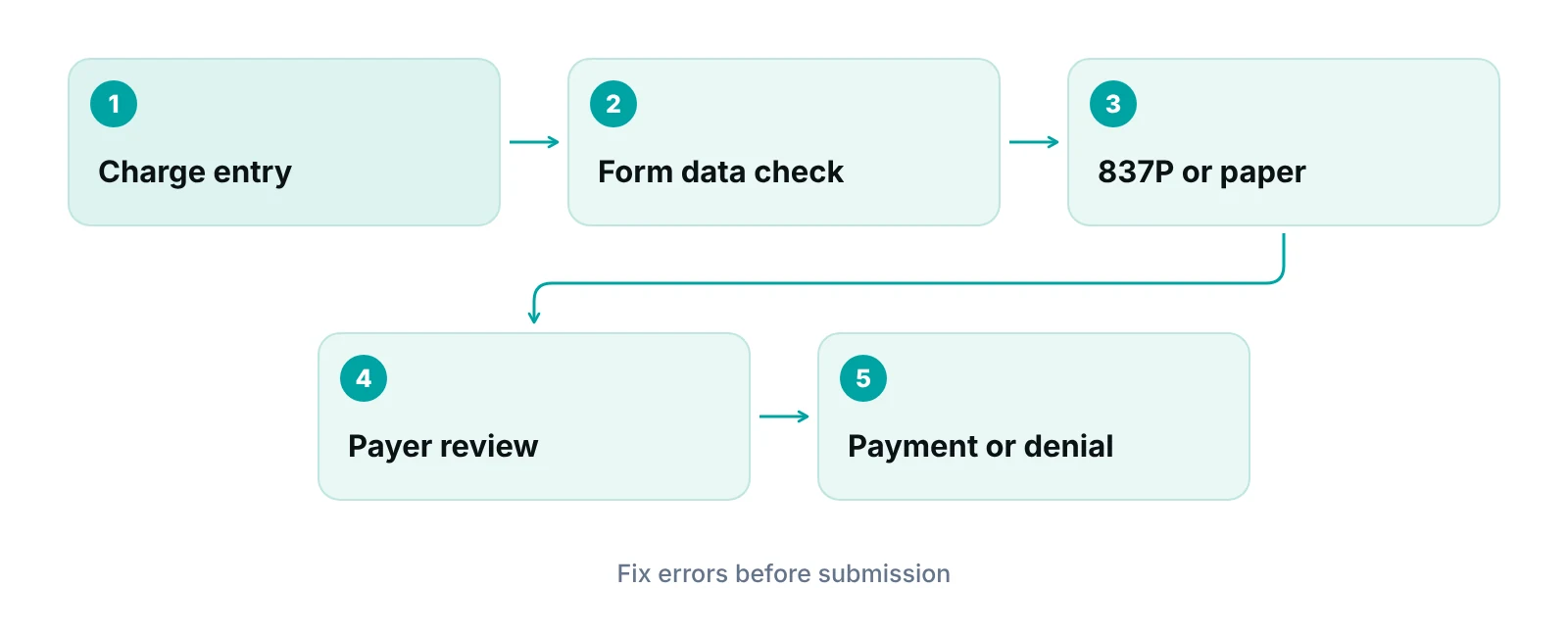
Two points trip up newer billers, and both change how you plan your workflow. First, the form is a layout, not a transmission: electronic professional claims go out as the 837P, and the NUCC manual’s instructions line up with that transaction. Second, the CMS-1500 is for professional services. Facilities bill claims on a different, institutional form, covered in our UB-04 claim form guide. For a side-by-side of all the claim families, see medical claim forms explained.
Where the rules come from
The NUCC manual is written as a general guide, not a payer-specific one. Payer, clearinghouse and vendor instructions govern specific requirements (NUCC manual, v8.0). The NUCC page lists version 13.0 (July 2025) as the current manual for the 02/12 form.
Do you still need the paper form?
For Medicare, usually not. The Administrative Simplification Compliance Act (ASCA) requires Medicare suppliers to submit claims electronically, with a short list of exceptions (Noridian Medicare). Other payers set their own rules, so check each payer’s provider manual.
Exceptions that allow paper include providers with fewer than 10 full-time equivalent employees, dental claims, and roster claims for mass immunizations. A paper claim sent without an exception or approved waiver is denied with remark code M117 and also carries MA44, which gives no appeal rights. Medicare’s manual also says photocopies of the CMS-1500 are not acceptable.
| Question | Paper CMS-1500 | Electronic 837P |
|---|---|---|
| Who uses it | Professional providers and suppliers who qualify for a paper exception | Professional providers and suppliers; required for Medicare unless an exception applies |
| What happens without an exception (Medicare) | Denied with M117 and MA44; no appeal rights | Not applicable |
| Fields that differ | Items 8, 9b, 9c and 30 exist on the form but are reserved or eliminated in the 5010A1 electronic version | Patient telephone, other insured’s birth date and sex, and balance due do not exist in 5010A1; the NUCC advises against reporting the patient phone |
| Provider taxonomy qualifier | ZZ | PXC |
| Filing deadline (Medicare) | One calendar year after the date of service, with limited exceptions | Same deadline |
Source: Noridian Medicare, ASCA page; NUCC 1500 Claim Form Reference Instruction Manual v8.0 (2020); 42 CFR 424.44.
The filing deadline matters because a rejected paper claim eats into it. Under 42 CFR 424.44, a Medicare claim is due no later than the close of the period ending one calendar year after the date of service, subject to limited exceptions. Commercial payers set their own limits by contract, so keep a payer-by-payer list.
How the form is laid out
The form has a carrier block at the top and 33 numbered items below it. Think of it in four zones. Knowing the zone tells you who supplies the data and who usually owns the error. That matters when you are deciding where to put a check: the front desk, the coder or the biller.
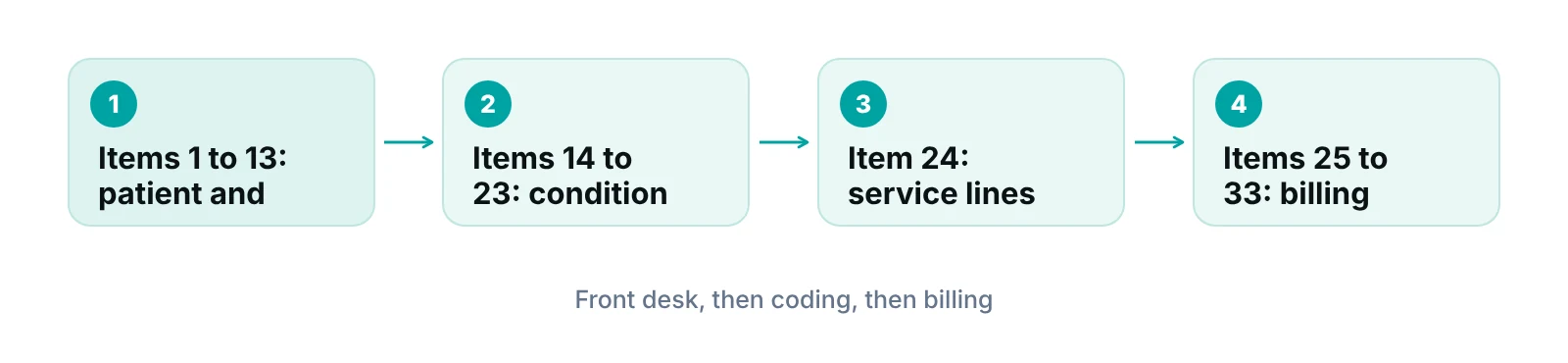
- Items 1 to 13 hold patient, insured and coverage data. These usually come from registration and the insurance card.
- Items 14 to 23 hold dates, referring provider, diagnoses and prior authorization. These come from the clinical record and the referral or authorization.
- Item 24 holds up to six service lines: dates, place of service, procedure codes, diagnosis pointers, charges, units and rendering provider.
- Items 25 to 33 hold tax ID, charges total, signatures, service location and the billing provider.
The most expensive errors usually start in zone one, because a wrong ID or payer is only found at the payer. That is why registration and eligibility work belongs inside any claim-quality plan, a point our clean claims guide covers in more depth.
Box-by-box: the fields that matter most
The table lists the boxes that most often need a second look. Entries marked Medicare come from Medicare’s manual; the rest come from the NUCC manual. Dollar amounts are entered without commas or dollar signs, and policy and ID numbers without hyphens or spaces.
| Item | What goes in it | What to check |
|---|---|---|
| 1a Insured’s ID | The ID as shown on the card for the payer receiving the claim | Use the ID for that payer, not a patient account number |
| 3 Birth date and sex | Birth date as 8 digits (MM DD CCYY) | Medicare requires the 8-digit format here |
| 11 Policy or group number | Alphanumeric policy or group number from the card; Medicare asks for NONE when no other insurance is primary | Item 11 is required; enter NONE rather than leaving it blank |
| 17 and 17b Referring provider | Qualifier DN (referring), DK (ordering) or DQ (supervising), then name; NPI in 17b | Missing qualifier or NPI |
| 21 Diagnoses | ICD indicator 0 for ICD-10-CM, then up to 12 codes (A to L), no decimal points | Do not mix ICD-9 and ICD-10 on one form |
| 24B Place of service | Two-digit place of service code for each line | A code that does not match where the service happened |
| 24D Procedures | CPT or HCPCS code with up to four modifiers | Unlisted codes need a narrative in item 19 or an attachment |
| 24E Diagnosis pointer | Letters A to L that point to item 21, not the codes themselves | Typing the diagnosis code instead of the letter |
| 24J Rendering provider | Rendering provider NPI in the unshaded area | Putting the billing NPI here |
| 28 Total charge | Sum of the charges in 24F | Total does not equal the lines |
| 31 Signature and date | Provider signature and date, or Signature on File | Blank or undated |
| 33 and 33a Billing provider | Name, address, phone and NPI of the entity requesting payment | Billing address and NPI that do not match enrollment |
Source: NUCC 1500 Claim Form Reference Instruction Manual v8.0 (2020); CMS Medicare Claims Processing Manual, Chapter 26.
Items 1 to 13: patient and insured
Medicare’s manual requires the beneficiary identifier in item 1a and the patient name as shown on the Medicare card in item 2. Item 4 takes the insured’s name, with SAME when the insured is the patient (Medicare leaves it blank when Medicare is primary). Items 12 and 13 take a signature or Signature on File. Medicare also asks that the 6-digit or 8-digit date format be used consistently in the date fields it lists.
Items 14 to 23: dates, referral, diagnoses and authorization
Item 21 is where coding meets the form. Enter the ICD indicator (0 for ICD-10-CM), then list up to 12 diagnoses in priority order at the highest specificity, with no periods and no narrative text. Item 24E then points back to these by letter. Item 23 holds the prior authorization number, among other identifiers; Medicare allows one condition per form there. If a payer requires authorization, the number should be on file before the claim is built.
Item 24: the six service lines
Each line needs a date of service (24A), place of service (24B), procedure code with up to four modifiers (24D), a diagnosis pointer (24E), a charge (24F), units (24G) and the rendering NPI (24J). The NUCC manual says the form is not meant to allow billing 12 lines. The shaded area at the top of each line is for supplemental data such as NDC information, and it needs a completed service line to go with it.
A worked example of pointers. Suppose a visit supports two diagnoses. Item 21 lists them as A and B. Line 1 is the office visit and points to A and B; line 2 is a procedure and points to B only. The pointer is the letter, so the payer can tie each procedure to the reason it was done. If line 2 pointed to a diagnosis that does not support it, the claim can fail medical-necessity edits even though every box is filled.
“A claim is only as clean as the registration and coding data that feed it.”
Items 25 to 33: tax ID, signatures, facility and billing provider
Item 32 is where the service was performed, and its NPI (32a) is reported only if it differs from the billing provider. Item 33 is the billing provider, the entity requesting payment, and it is always required with the NPI in 33a. Medicare notes that a claim without the tax ID in item 25 may be delayed. For help with this layer, our medical billing services cover charge entry through claim submission.
Where form errors come from
Form errors are rarely random. They cluster in a few predictable places, and each one has an owner. Published denial-rate figures vary by source and year, so rather than quote a number, use your own rejection and denial reports to find which boxes hurt you.
- Registration data: mismatched names, IDs or birth dates in items 1a to 3.
- Coding data: codes with decimal points, wrong pointers, or an unlisted procedure with no narrative in item 19.
- Service-line data: an invalid place of service, a missing ‘to’ date on a multi-day service, or units that do not match the charge.
- Provider data: billing and rendering NPIs swapped, or a billing address that does not match enrollment.
Medicare’s manual says some of these are returned as unprocessable rather than denied, for example an unlisted code with no narrative or a multi-day service without a valid ‘to’ date. Returned claims still use up filing time. Billing patterns also differ by specialty, so review your most common service lines against the specialty pages we cover. A pre-submission check (see claim scrubbing) catches many of these, and clearinghouse rejection codes explain what comes back when something slips through.
A short check before release
- Match the patient name, birth date and ID to the card and eligibility response for the payer receiving the claim.
- Confirm the ICD indicator, then confirm every diagnosis code is entered without a decimal point.
- Confirm each 24E pointer is a letter that exists in item 21.
- Confirm place of service, units and modifiers for every line.
- Confirm the rendering NPI in 24J and the billing NPI in 33a, and that the item 32 location is correct.
- Confirm the total in item 28 equals the sum of the line charges.
- Confirm any prior authorization number, referral qualifier and signature field.
- Confirm the payer’s filing limit and the date the claim is released.
Run this list in whichever tool you use. The point is a consistent check, not a perfect form: many practices find that a written list catches repeat mistakes that memory misses.
Find out which boxes are costing you rework
Request a free practice audit and we will review how your claims are built, checked and tracked.
Three ways to run claim creation
Once you know the form, the real decision is who builds and checks claims. A small team with a handful of payers has different needs from a group with several billers and specialties. The three common setups differ in control, cost of mistakes and how much monitoring they need.
| Option | Best for | Watch-outs | Ask before choosing |
|---|---|---|---|
| In-house with checks in your software | Practices with stable billing staff and few payers | Depends on staff knowing each payer’s rules; turnover creates gaps | Does the system flag missing or inconsistent fields before submission? |
| In-house plus a clearinghouse | Practices that want an outside edit layer without changing staff | Edits may be generic; rejections still need an owner | Who works rejections, and how fast? |
| Outsourced billing | Practices that want claim creation, follow-up and denials handled together | Less day-to-day visibility unless reporting is set up | Will you get claim-level status and a signed Business Associate Agreement? |
Whichever setup you choose, the pattern is the same: capture data once, check it before the claim leaves, and give every open claim a stage and an owner. A practice management system that tracks claims by stage is one way to do this, and a clearinghouse can add an outside edit layer on top.
See what claim errors are worth to your practice
Use the revenue calculator to estimate the cash tied up in unworked claims.
Our recommendations
- Confirm the form version and payer rules. Use the 02/12 form and keep each payer’s current instructions beside the NUCC manual.
- Send electronically when you can. Check each payer’s rule, and confirm an ASCA exception before sending any Medicare claim on paper.
- Check the high-risk boxes before release. Items 1a, 21, 24B, 24D, 24E, 24J and 33a account for most of the review time.
- Keep pointers as letters. Item 24E takes letters A to L, never the diagnosis codes.
- Track the filing deadline. For Medicare, the clock is one calendar year from the date of service, so work rejections quickly.
- Review rejections by box. Group rejection and denial reasons by the box that caused them and fix the process, not just the claim.
A practice management system that tracks claims by stage can catch missing fields before a claim is sent.
RCM Finder's portal tracks claims by stage with an owner and checks data completeness before submission. It is a claim-centred practice management system, not an EHR.
See how the RCM Finder portal works · Create a portal account
Disclosure: RCM Finder builds and sells this portal. It is a practice management system, not an EHR.
Bottom line
The CMS-1500 claim form rewards careful data capture more than clever filling in: get the IDs, diagnosis pointers and NPIs right, and most of the form takes care of itself. If denials from form errors keep returning, denial management services can help trace them to the source, and our team can review your setup in a free practice audit.
Frequently asked questions
What is the CMS-1500 claim form used for?
It is the standard paper form for professional claims from physicians, other providers and suppliers. It carries patient, insured, diagnosis, service-line and billing provider data to a payer. The NUCC maintains the layout, and the electronic equivalent is the 837P transaction. Facilities use a different institutional form.
How long do I have to file a claim on the CMS-1500?
For Medicare, a claim is due by the end of the period ending one calendar year after the date of service, with limited exceptions under 42 CFR 424.44. Commercial payers set their own limits by contract, so keep a payer-by-payer list, file early and work rejections quickly because a returned claim still uses up filing time.
Can I still send paper claims to Medicare?
Only if an ASCA exception applies, such as having fewer than 10 full-time equivalent employees, dental claims or roster billing. Paper claims without an exception or waiver are denied with M117 and MA44, which carries no appeal rights.
What is the difference between the CMS-1500 and the UB-04?
The CMS-1500 is for professional claims; the UB-04 (CMS-1450) is for institutional claims from hospitals and similar facilities. Their electronic equivalents are the 837P and the 837I. Our UB-04 claim form guide covers the institutional side in detail.
What does the ICD indicator in item 21 mean?
It is a single digit identifying the diagnosis code set. Enter 0 for ICD-10-CM. List up to 12 diagnoses without decimal points, then use the letters A to L in item 24E to point each service line to its diagnosis.
Where does the billing provider NPI go?
The billing provider is the entity requesting payment and goes in item 33, with its NPI in 33a. The rendering provider’s NPI goes in the unshaded area of item 24J, and the service facility NPI in 32a only if it differs from the billing provider. Mixing these up is a common cause of rework.
Get your free practice audit
Tell us about your practice. We will contact you using the details you give.
- A review of your recent claims, denials and A/R aging
- Where your front desk and prior authorizations slow payment
- A prioritized fix list you keep, whether or not you hire us
Pricing is quoted after the audit, based on your volume and the services you choose. Prefer to talk? Call +1 (302) 556-2288.
Sources
- 1500 Claim Form Reference Instruction Manual — National Uniform Claim Committee (2025)
- 1500 Claim Form Reference Instruction Manual v8.0 — National Uniform Claim Committee (2020)
- Medicare Claims Processing Manual, Chapter 26 — Centers for Medicare & Medicaid Services
- Administrative Simplification Compliance Act (ASCA) — Noridian Healthcare Solutions (Medicare Administrative Contractor)
- 42 CFR 424.44 Time limits for filing claims — eCFR
Disclaimer: This article is for general education. It is not legal, coding or compliance advice. Payer rules vary and change, so confirm requirements with each payer and its current instructions before you bill.