
The UB-04 claim form (CMS-1450) is the standard bill that institutional providers such as hospitals, skilled nursing facilities and home health agencies use to bill payers. It has 81 numbered form locators. Medicare expects most institutional claims to be sent electronically as the 837I, not on paper.
Most questions about the UB-04 claim form come down to three things: who has to use it, what goes in each box, and whether the paper form even matters when claims go out electronically. This guide answers all three, using the National Uniform Billing Committee (NUBC) field list and CMS instructions. If you bill professional services instead, start with our CMS-1500 claim form guide.
Key takeaways
- The UB-04 (CMS-1450) is the institutional claim form; its data elements are mirrored in the electronic 837I.
- Medicare requires initial claims to be sent electronically unless an exception or waiver applies.
- Form locator numbers are easy to mix up: patient discharge status is FL 17 and point of origin is FL 15.
- The type of bill code in FL 4 sets how the payer reads the whole claim, so get it right first.
- Required fields vary by payer and bill type. Always check the payer’s own instructions.
What is the UB-04 claim form used for?
The UB-04 claim form, also called the CMS-1450, is the uniform bill institutional providers use to charge for facility services. The CMS booklet on the CMS-1450 and 837I (December 2025) describes it as the institutional standard used across multiple payers. Because one form serves many payers, a given payer may not need every data element.
The NUBC maintains the official UB-04 data specifications. Its 2024 manual lists form locators (FLs) 1 through 81, which cover the billing provider, patient, dates, payer, diagnoses, procedures, revenue code lines and attending provider (NUBC, 2024). Some numbers are reserved for NUBC use and not filled in.
The form defines the data set. The claim itself is typically built in billing software and sent as an 837I file. Knowing the form still matters because every rejection message, payer manual and audit refers back to a form locator.
UB-04 or CMS-1450?
UB-04 and CMS-1450 are two names for the same institutional claim form. CMS manuals write it as UB-04 (CMS-1450). Payers may use either name, so search their manuals for both.
For a wider comparison of claim forms, see our medical claim forms guide.
Who bills on the UB-04 claim form?
Institutional providers bill on the UB-04. CMS lists hospitals, critical access hospitals, skilled nursing facilities, home health agencies, hospice organizations, federally qualified health centers, rural health clinics, end-stage renal disease facilities and opioid treatment programs as the audience for its CMS-1450 and 837I guidance (CMS, December 2025).
A physician practice that bills only its own professional services does not use this form. Our post on institutional versus professional billing claims explains the split, and the hospital versus professional billing guide shows how each side gets paid.
Billing patterns differ by specialty and by whether a program bills as an institution. Browse the specialty billing pages to find the closest match.
The older version of this post said self-pay patients can be billed on a UB-04 and that the form is used for workers’ compensation. We removed both statements because we could not tie them to a primary source. Payer rules decide which form a payer accepts, so ask each payer, including workers’ compensation carriers.
UB-04 paper form or electronic 837I?
For Medicare, electronic is the default. Under the Administrative Simplification Compliance Act (ASCA), initial Medicare claims must be submitted electronically unless the provider qualifies for an exception or waiver (CMS, December 2025). The 837I is the electronic equivalent of the CMS-1450, in ANSI ASC X12N version 5010A2, and CMS keeps the paper data elements consistent with it.
| Item | Paper CMS-1450 (UB-04) | Electronic 837I |
|---|---|---|
| When Medicare allows it | Only if an ASCA exception applies, such as fewer than 25 full-time equivalent employees billing a MAC, roster billing for mass immunizations, a demonstration project, or certain Medicare Secondary Payer claims | Default for initial claims |
| Format | Printed form with numbered form locators | ANSI ASC X12N 837I, version 5010A2 |
| Data elements | Defined by the NUBC | Kept consistent with the paper form |
| Testing | Not applicable | CMS points to the ASETT tool for HIPAA, syntax and business-rule checks |
| Practical note | Do not print your own form; its colors are needed for automated scanning | Follow your MAC’s companion guide and ask your clearinghouse to explain edits |
Source: CMS, Medicare Billing: Form CMS-1450 and the 837I (MLN006926), December 2025.
Some waivers need Medicare pre-approval before paper claims go out. Commercial payers set their own rules, so a payer that accepts paper today may not tomorrow. Confirm in the payer manual before you design a workflow around paper.
“A paper form is a data checklist. The claim that gets paid is the electronic file built from it.”
Timely filing matters here too. CMS advises Medicare institutional providers to file within one calendar year of the date of service or the From/Through date. Commercial payers set their own limits in the contract, so read yours. Our clean claim submission process shows where submission delays usually start.
The key UB-04 form locators, field by field
Start with the form locators that cause the most rejections: provider and patient identity, the type of bill, dates, and the code lines. The table lists the common ones with checks. Names come from the NUBC list. Required or situational status comes from the Medicare instructions or a Blue plan guide, as noted, and varies by payer and bill type.
| FL | Field name (NUBC) | What to check |
|---|---|---|
| 1 | Billing provider name, address and telephone | Medicare’s minimum entry is the provider name, city, state and ZIP. Match the name to the NPI in FL 56. |
| 2 | Billing provider’s designated pay-to address | Medicare ignores it if sent. One Blue plan asks for it only when it differs from FL 1. Do not fill it by habit. |
| 3a / 3b | Patient control number / medical record number | The control number is required; the record number is situational. Use a number you can trace in your own system. |
| 4 | Type of bill | Four characters with a leading zero. See the type of bill section below. |
| 5 | Federal tax number | Medicare lists the format as NN-NNNNNNN. |
| 6 | Statement covers period (from-through) | One Blue plan guide uses six-digit MMDDYY. Check what your payer wants. |
| 8 / 9 | Patient name or identifier / patient address | Spell the name exactly as on the insurance card. |
| 10 / 11 | Patient birth date / patient sex | The same guide shows birth date as eight digits (MMDDYYYY), unlike other dates. Check each payer. |
| 12 | Admission or start-of-care date | Required for inpatient and home health under Medicare. Not the same as the service date. |
| 14 / 15 | Priority (type) of admission or visit / point of origin | FL 14 is inpatient only under Medicare. FL 15 is the point of origin, not patient status. |
| 17 | Patient discharge status | Code 01 means discharged to home or self-care (routine). Medicare requires it for Part A inpatient, SNF, hospice, home health and outpatient hospital services. |
| 42 | Revenue codes | Four numeric digits on each service line. Take them from the chargemaster, not memory. |
| 45 / 47 | Service date / total charges | Check dates against the statement period in FL 6. On the last page, line 23 carries the totals. |
| 56 | NPI, billing provider | Must belong to the entity named in FL 1. |
| 67 | Principal diagnosis and present-on-admission indicator | Use current ICD-10-CM, coded to the greatest number of digits available. |
Sources: NUBC, UB-04 Data Specifications Manual table of contents (2024); CMS, Medicare Claims Processing Manual chapter 25 transmittal R1915CP; Blue Cross and Blue Shield of New Mexico, UB-04 user guide; CMS MLN006926 (December 2025).
Three mix-ups worth knowing
- FL 15 versus FL 17. Point of origin (FL 15) says where the patient came from. Patient discharge status (FL 17) says where the patient went. The old version of this guide had them reversed. Check both against the NUBC manual.
- FL 11 versus FL 12. FL 11 is patient sex. The admission or start-of-care date is FL 12.
- FL 13 and FL 16. Medicare does not require admission hour or discharge hour. The Blue plan guide above requires them on inpatient claims. Payers differ, so follow the payer.
The NUBC, not CMS, owns the code sets behind many of these boxes, including type of bill, condition, occurrence and revenue codes. MACs add their own edits on top. When a code you used last year is suddenly rejected, check the current NUBC and MAC code lists first.
How to read the type of bill code in FL 4
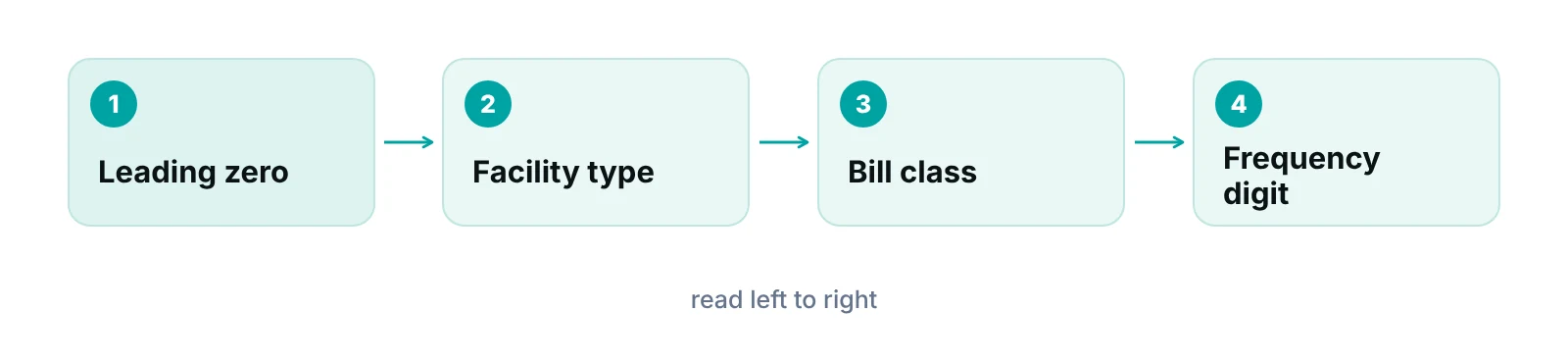
The type of bill (TOB) is a four-character code that tells the payer the facility type, the bill classification and the claim frequency. Medicare ignores the leading zero, so the three digits that matter are the last three (CMS, Medicare Claims Processing Manual, chapter 25).
| Position | Meaning | Examples from CMS |
|---|---|---|
| First | Leading zero | CMS ignores it |
| Second | Type of facility | 1 = hospital; 3 = home health; 7 = clinic or hospital-based renal dialysis |
| Third | Bill classification | 1 = inpatient Part A; 3 = outpatient |
| Fourth | Frequency | 1 = admit through discharge; 7 = replacement of prior claim; 8 = void or cancel |
Source: CMS, Medicare Claims Processing Manual chapter 25 transmittal R1915CP. The list shows examples, not every code.
CMS gives 011X as hospital inpatient Part A and 013X as hospital outpatient, where the X stands for the frequency digit. Use the right frequency digit whenever you replace or void a claim.
How to avoid UB-04 errors before the claim goes out
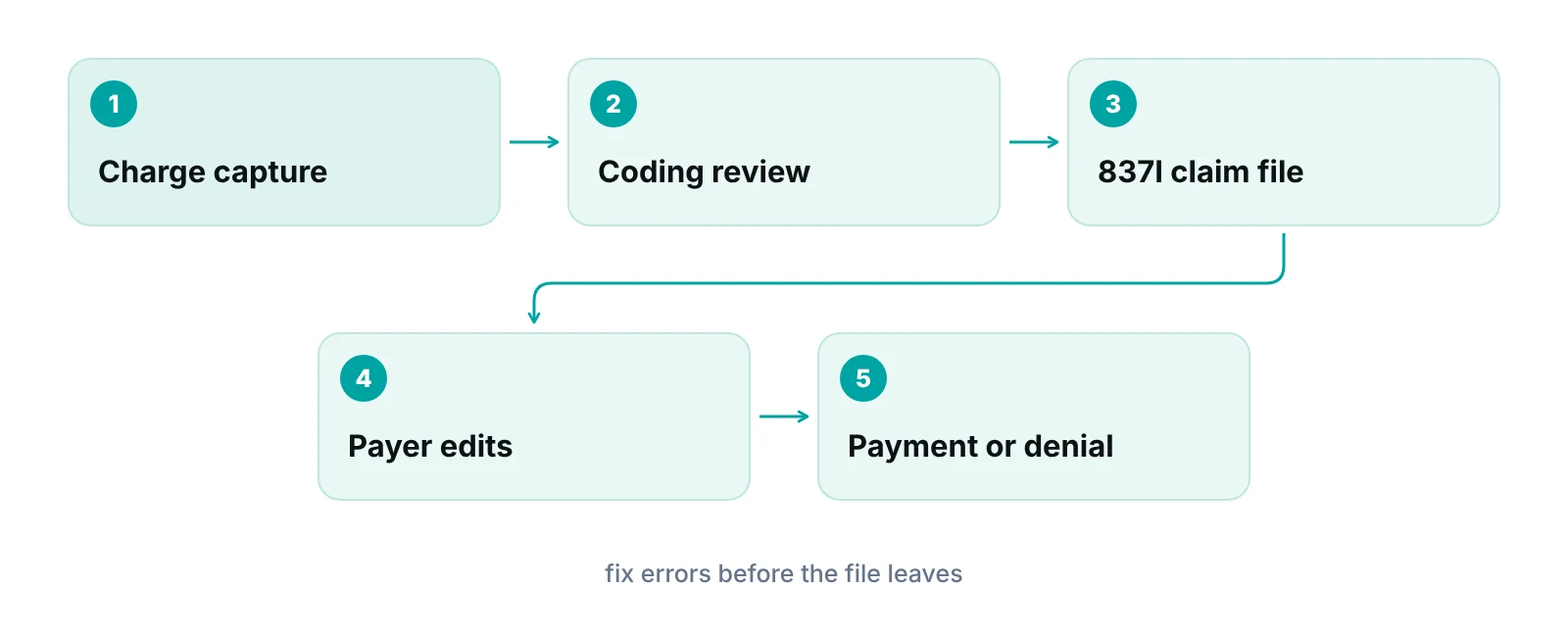
Most errors are data problems that a short pre-submission review catches. CMS gives a few practical tips for institutional claims, and the rest follows from the form layout.
- Use current codes. CMS advises current ICD-10-CM codes with the greatest number of digits available, HCPCS or CPT codes with proper modifiers, and the correct NUBC codes.
- Send the claim to the right place. Fee-for-service claims go to the correct MAC. Medicare Advantage patients go to the plan. Medicare Secondary Payer cases need the correct primary payer billed first.
- Follow the companion guide. CMS tells billers to follow the X12N implementation guide and the MAC’s companion guide, and to test electronic claims with ASETT.
- Capture every NUBC data element you have. CMS notes that extra elements can matter later for audits and coordination of benefits.
- Match identity fields. The billing provider name, tax number and NPI should agree with each other and with the payer’s enrollment record.
A claim scrubber automates many of these checks. Our claim scrubbing guide explains what scrubbers catch, and the clean claims guide covers how to measure clean claim rates. When a claim is rejected for missing or invalid information, CO-16 denial code guide is the place to start.
Handle UB-04 billing in-house or outsource it?
Institutional billing is data-heavy: revenue codes, type of bill, condition and occurrence codes, and payer-specific edits all have to line up. A team that sees few institutional claims will learn these slowly. A team with steady volume and a good scrubber can often keep it in-house.
- Keep in-house if you have trained institutional billers, a current scrubber and someone who tracks payer and MAC updates.
- Get outside help if you bill institutional and professional claims together, change payers often, or have a backlog of rejections nobody owns.
- Split the work if you want your staff to keep charge entry and have specialists handle edits, rejections and denials.
If you want a second set of eyes on where claims stall, RCM Finder offers medical billing services that work inside the EHR you already use, and the free practice audit is the starting point. Pricing is quoted after the audit.
See where your institutional claims stall
Get a free practice audit of your claim submission, rejections and denials. No obligation.
Our recommendations
- Keep one reference sheet per payer. For each payer, record which form locators they require, which date formats they accept and whether paper is allowed. Share it with every biller.
- Verify form locator numbers against the NUBC manual. Do not rely on blog posts or old training notes for FL numbers. Use the current NUBC manual or your MAC’s crosswalk.
- Build the type of bill into your checklist. Check facility type, classification and frequency before every submission, especially for replacements and voids.
- Test electronic claims before go-live. Use ASETT and your clearinghouse’s edits for new payers or new bill types, and read rejections within a day.
- Track rejections separately from denials. A rejection never reached adjudication and is usually a data fix. A denial needs an appeal or a correction. Report them as separate lines.
Bottom line
The UB-04 claim form is a data map. Learn the form locators that matter for your bill types, build the type of bill into your checklist and send claims electronically where the payer expects it. If rejections keep returning, denial management services can help you find the pattern, and our free practice audit is the quickest way to start.
Frequently asked questions
What is the UB-04 claim form used for?
It is the standard institutional claim form, also called the CMS-1450. Hospitals, skilled nursing facilities, home health agencies, hospice organizations and similar facilities use its data set to bill payers, usually as an electronic 837I file. The form is a uniform bill that can be used across multiple payers, so a given payer may not need every field.
Is the UB-04 the same as the CMS-1450?
Yes. CMS manuals write the form as UB-04 (CMS-1450), and payers use either name for the same institutional claim. When you search a payer manual or a rejection message, look for both names so you do not miss the instructions for your bill type.
Can I still submit a UB-04 on paper to Medicare?
Only if you qualify for an exception or waiver under ASCA. CMS lists examples such as fewer than 25 full-time equivalent employees billing a MAC and roster billing for mass immunizations. Some waivers need Medicare pre-approval first, so confirm with your MAC before sending paper. Commercial payers set their own paper rules.
How many fields are on the UB-04?
The NUBC lists 81 numbered form locators, from FL 1 to FL 81. Some are reserved for NUBC use, some hold multiple lines such as revenue codes, and many are situational, depending on the bill type and payer. Always check the payer’s own instructions before assuming a field is required.
What is the difference between the UB-04 and the CMS-1500?
The UB-04 is the institutional claim for facility services. Professional services are billed on a different claim form, covered in our CMS-1500 guide. Our institutional versus professional billing post explains how the two claim types differ and why some organizations send both.
What does the type of bill code in FL 4 mean?
It is a four-character code. After the leading zero, the digits show facility type, bill classification and claim frequency. For example, CMS lists 011X as hospital inpatient Part A and 013X as hospital outpatient. A replacement claim uses frequency 7 and a void uses 8, so check the last digit before you resubmit.
Get your free practice audit
Tell us about your practice. We will contact you using the details you give.
- A review of your recent claims, denials and A/R aging
- Where your front desk and prior authorizations slow payment
- A prioritized fix list you keep, whether or not you hire us
Pricing is quoted after the audit, based on your volume and the services you choose. Prefer to talk? Call +1 (302) 556-2288.
Sources
- Medicare Billing: Form CMS-1450 and the 837I (MLN006926) — CMS (2025)
- UB-04 Data Specifications Manual table of contents — NUBC (2024)
- UB-04 user guide — Blue Cross and Blue Shield of New Mexico (n.d.)
- Medicare Claims Processing Manual, Chapter 25 (transmittal R1915CP) — CMS (n.d.)
Disclaimer: This post is general educational information about institutional claim forms. It is not legal, coding or compliance advice. Form locator requirements, date formats and paper-claim rules vary by payer, bill type and MAC and change over time. Confirm requirements with each payer and the current NUBC manual before submitting claims.
