
A dermatology EHR should be judged on the work a skin practice repeats daily: tracking lesions on a body map, storing consented photos, closing the loop on biopsy and Mohs results, separating cosmetic self-pay from insurance, and handing clean charges to billing. Check certification, data export and security before you sign.
Most EHR demos show a smooth visit. A skin practice lives in the harder cases: many lesions on one patient, a biopsy result that never came back, a cosmetic package booked beside a medical visit, a contract that is easy to sign and hard to leave. This guide is for owners and administrators weighing a switch.
It names no products and ranks none. It sits under our dermatology practice management guide, and stays on the EHR decision. For records systems versus practice systems, read the EMR vs EHR guide.
Key takeaways
- Decide what is failing today before any demo, then test each workflow with your own cases.
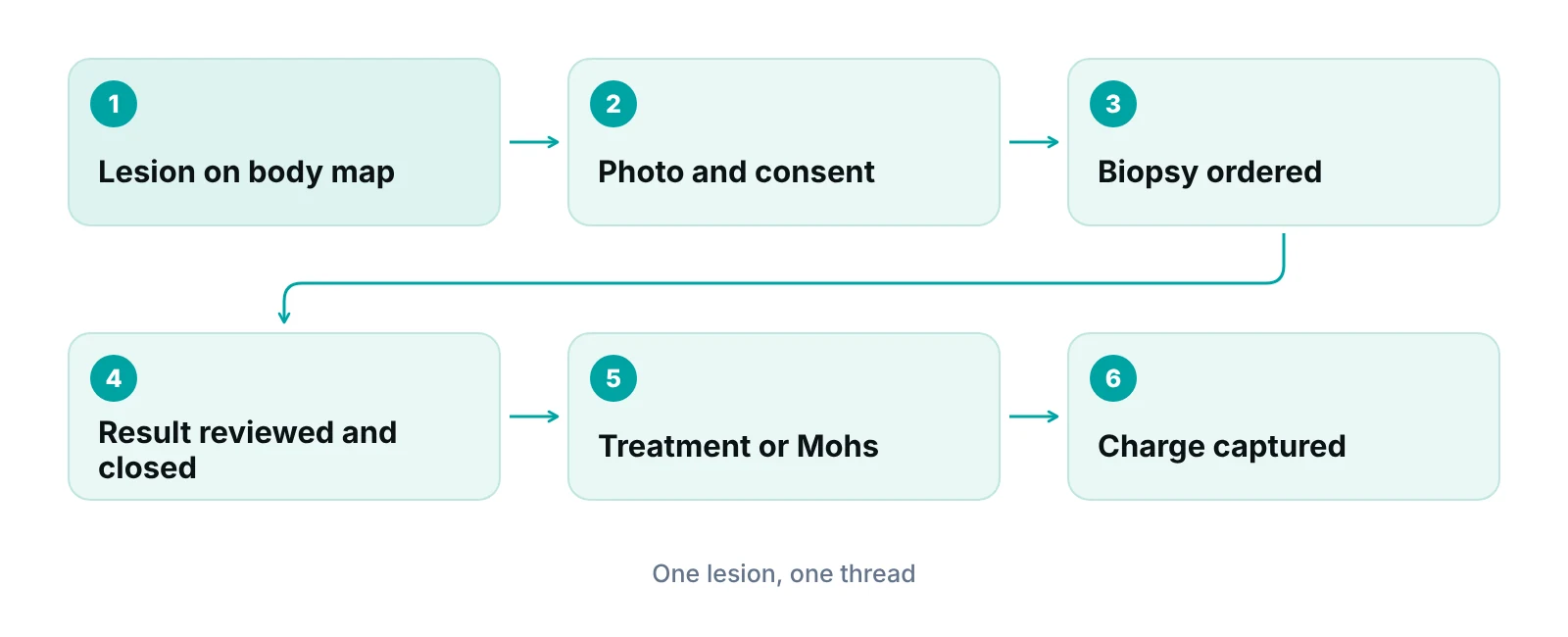
- Test the lesion loop end to end: body map, photo, biopsy order, result, follow-up and charge.
- Certification shows a product met federal criteria; it does not show it fits dermatology.
- Cosmetic self-pay, photo consent and the billing handoff are where skin practices differ most from other specialties.
- Get data export, exit terms and the business associate agreement in writing before you sign.
What should you decide before you look at demos?
Start with the problem, not the product. Write down what the current system does badly, in terms a medical assistant would recognize, and rank the list. Specific failures, such as lost results or slow note entry, justify a switch. A newer screen does not.
Then write down your visit mix: medical, surgical (including Mohs) and cosmetic, as visits per week. A medical-only office, a mixed office and a practice with in-house Mohs need different things from the same software.
If you use an outside billing team, bring them into the evaluation; they see what arrives with errors. The dermatology billing services guide explains that split and the dermatology revenue cycle guide maps where revenue leaks, so this post does not repeat them.
Which dermatology workflows should a demo test?
Test the system on six dermatology workflows with your own cases, not the vendor’s sample patient. Table 1 lists what to ask.
| Workflow | What to ask the vendor to show | Why it matters in a skin practice |
|---|---|---|
| Body map and lesion tracking | Mark a lesion, record its size and site, return at the next visit and see its history on the same map | A lesion followed over time needs the same identity at each visit |
| Photos and consent | Take a photo in the record, attach the consent, restrict who can view it, and show where the file is stored | Images are patient data and consent differs by purpose |
| Pathology and Mohs | Order a biopsy, receive the result, match it to the lesion and show an open-results list | An unreturned result is a patient safety and revenue problem |
| Cosmetic versus medical | Book a cosmetic service beside a medical visit, take self-pay and keep the cosmetic charge off the claim | Mixed visits are routine and the money flows differently |
| E-prescribing | Send a routine prescription, a refill and, if you prescribe them, a controlled-substance prescription | Pharmacy workflow and identity controls differ by drug |
| Patient-facing tools | Complete intake forms, view results and message the office from a phone | Patients expect forms and results online |
Source: RCM Finder evaluation checklist; vendors should demonstrate each item live.
Body map and lesion tracking
A body map is useful only if a lesion keeps one identity across visits. Ask whether each marked lesion carries its own site, size, photo, biopsy order, result and treatment. Count the clicks a medical assistant needs to add a second lesion; extra clicks multiply across a day.
Then ask how the map data leaves the system. If lesion history exists only as a picture on a screen, it will not move to a new system, so ask whether sites and findings are stored as exportable fields.
How should photos and consent be handled?
Clinical photos should live inside the record with consent attached, not in a staff member’s phone gallery. In its Safe Harbor method of de-identification, HHS lists full-face photographs and comparable images among the 18 identifiers to remove. Manage every skin photo like any other part of the chart.
- Capture: can staff photograph inside the EHR app, with the image filed to the right patient and lesion?
- Consent by purpose: can you record separate consent for the record, teaching and marketing, and see it beside the image?
- Access: can you limit who sees photos, and does the audit log show who opened them?
- Devices: what happens to an image on a lost phone or tablet?
- Storage and export: do images export with their dates and lesion links?
Marketing use is a separate decision. Under the Privacy Rule, HHS says a patient’s written authorization is generally required before protected health information is used for marketing. Before-and-after images in advertising are a marketing question, not a charting one. The ad rules sit in the dermatology marketing guide, and your attorney should approve the consent form.
How do pathology and Mohs results flow back?
The pathology loop is the workflow most worth testing, because a missed result harms both the patient and the claim. Ask the vendor to show what happens when no result arrives.
- Ordering: which pathology labs does the system connect to, and can it connect to the lab you already use?
- Matching: does the result attach to the right lesion and specimen, or only to the patient?
- Open-loop report: is there a list of biopsies with no result after a set number of days, and who is alerted?
- Result action: from the result, can the clinician record the next step, notify the patient and book treatment?
- Mohs documentation: does the system support staged maps, per-stage notes and the linked repair in one note?
- Charge link: does lesion-level detail reach the charge screen?
Where the billing rules live
Biopsy, modifier and Mohs coding rules are covered in the dermatology billing services guide. For the EHR, the question is whether lesion-level detail survives from note to charge.
How does the system separate cosmetic and medical work?
Medical care goes to a payer; cosmetic care is usually paid by the patient. One visit may carry both, and no cosmetic charge should reach an insurance claim. Coverage is explained in the dermatology insurance coverage guide.
- Separate fee schedules: medical, procedure and cosmetic services each need their own, with self-pay marked clearly.
- Mixed visits: have the vendor book a skin check and a cosmetic treatment in one visit and produce one claim and one patient statement.
- Packages, products and deposits: if you sell them, test how they are tracked, applied and refunded.
- Estimates: can the front desk quote a self-pay price from the scheduling screen?
Patient-facing tools and the website
Patient portals, intake forms and online booking are part of the EHR decision because they handle patient data. Ask whether forms flow into the chart without retyping and whether the vendor signs a business associate agreement for the tools it hosts. Public booking pages are covered in the dermatology website design guide, and virtual visits in the dermatology telehealth guide. Ask which pieces the EHR supplies and which you must add.
What does certification tell you, and what does it not?
ASTP/ONC certification tells you a product was tested against federal criteria, not that it suits dermatology. The ONC Health IT Certification Program is a voluntary program; ONC does not test or certify products itself. It authorizes testing labs and certification bodies, and developers seek certification from one of those bodies. The public Certified Health IT Product List (CHPL) shows each certified module and its status, and is updated at least weekly.
Ask for the CHPL listing and read it. The criteria cover functionality, security and interoperability, not body maps or Mohs. Treat certification as a floor, then judge specialty fit in the demo.
| Question to ask | What the source says | What to check |
|---|---|---|
| Is the product on the CHPL? | The CHPL is the authoritative public list of certified modules and shows status and compliance activity | Ask for the CHPL product number and look up the listing yourself |
| Which edition of the standards? | HTI-1 sets USCDI version 3 as the certification baseline from January 1, 2026 | Ask whether the product is certified to it and when your version updates |
| Can data be pulled by app or API? | Developers certified to the API criteria must publish documentation, terms and fees | Ask for the API documentation and any fees in writing |
| Will the vendor block data movement? | Certified developers and providers are both subject to information-blocking rules | Ask how the vendor handles requests to move records at contract end |
| Does billing use standard transactions? | CMS lists X12 version 5010 for claims (837), eligibility (270/271), claim status (276/277) and remittance (835) | Ask which run natively and which go through a clearinghouse |
| Can it send controlled substances? | DEA requires a certified or audited application, identity proofing and two-factor authentication | Ask for the audit or certification report and confirm state rules |
Sources: ASTP/ONC certification overview; ASTP HTI-1 final rule page; ASTP information blocking FAQs; CMS adopted standards (HIPAA); DEA EPCS FAQ.
Information blocking matters at exit. ASTP says the law covers health care providers, developers of certified health IT and health information exchanges. Developers can face termination of certification, a ban or civil monetary penalties, and HHS has finalized disincentives for providers found to have committed it. Ask how the vendor handles a request to move your records.
What should the handoff to billing look like?
Ask how a finished visit becomes a claim and who is responsible when it fails. CMS lists ASC X12 version 5010 as the adopted format for health claims, eligibility inquiries, claim status and payment advice, so any system should handle those formats (CMS).
- Charge flow: do procedures, diagnoses, modifiers and lesion detail pass from the note to the charge without retyping?
- Clearinghouse: is it included, or contracted separately? Who holds the contract, and can you see rejections and reports yourself?
- Eligibility: are checks run from the schedule and stored with the visit? See the insurance verification guide.
- Remittance: do electronic remittances post automatically, and who reviews exceptions?
- Cosmetic exclusion: can self-pay lines be marked so they never enter a claim?
Connecting clinical and billing systems is covered in the EHR and RCM integration guide. Our team works inside your existing EHR (for example PrognoCIS, eClinicalWorks or athenahealth) for billing and follow-up work, so a switch changes what our team sees. That describes how we work; it is not an endorsement of any system, and no partnership is implied.
Check the handoff before you change systems
A free practice audit of recent dermatology claims shows where charges arrive incomplete, so you know what a new EHR must fix.
What about data export, migration and security?
Settle the exit before the first day on the new system, because your leverage is greatest before you sign. Table 3 lists the questions.
| Area | Ask | Why it matters |
|---|---|---|
| Export scope | Can you export notes, discrete data, lesion records, images, results, documents and audit history? | A PDF-only export cannot be searched or imported |
| Export format and fee | In what format, how fast, and for what fee? | Costs and delays should be known in advance |
| Records after leaving | How long is read-only access kept after termination? | Records may be needed for audits, disputes and patient requests |
| Business associate agreement | Is there a BAA, with return or destruction of data at termination? | HHS lists EHR vendors and cloud providers as business associates |
| Access control and logging | Role-based access, unique logins, two-factor authentication and a readable audit trail? | You must be able to show who saw or changed a chart |
| Hosting and backup | Where is data stored, how often is it backed up and how is recovery tested? | Cloud locations carry risks that belong in your risk analysis |
Sources: HHS business associate guidance; HHS cloud computing guidance; HHS business associate contract provisions; HHS Security Rule guidance.
HHS names EHR vendors, e-prescribing gateways and cloud service providers among the services that can be business associates, and requires a written agreement before a covered entity discloses protected health information to them. On exit, HHS says the contract should require the business associate to return or destroy protected health information at termination where feasible (contract provisions). In its cloud guidance, HHS adds that a service level agreement should not block your access to your own data.
A vendor’s answers do not replace your own work. The Security Rule expects a risk analysis, and HHS lists guidance on risk analysis, remote use and cybersecurity, along with the HHS Security Risk Assessment Tool. Do it for the new system before go-live, and read the HIPAA compliance checklist with your privacy officer.
Patients can request records during a switch. HHS says a covered entity may charge only a reasonable, cost-based fee for copies and that costs such as system maintenance and data storage cannot be charged.
What to migrate, and what to leave behind
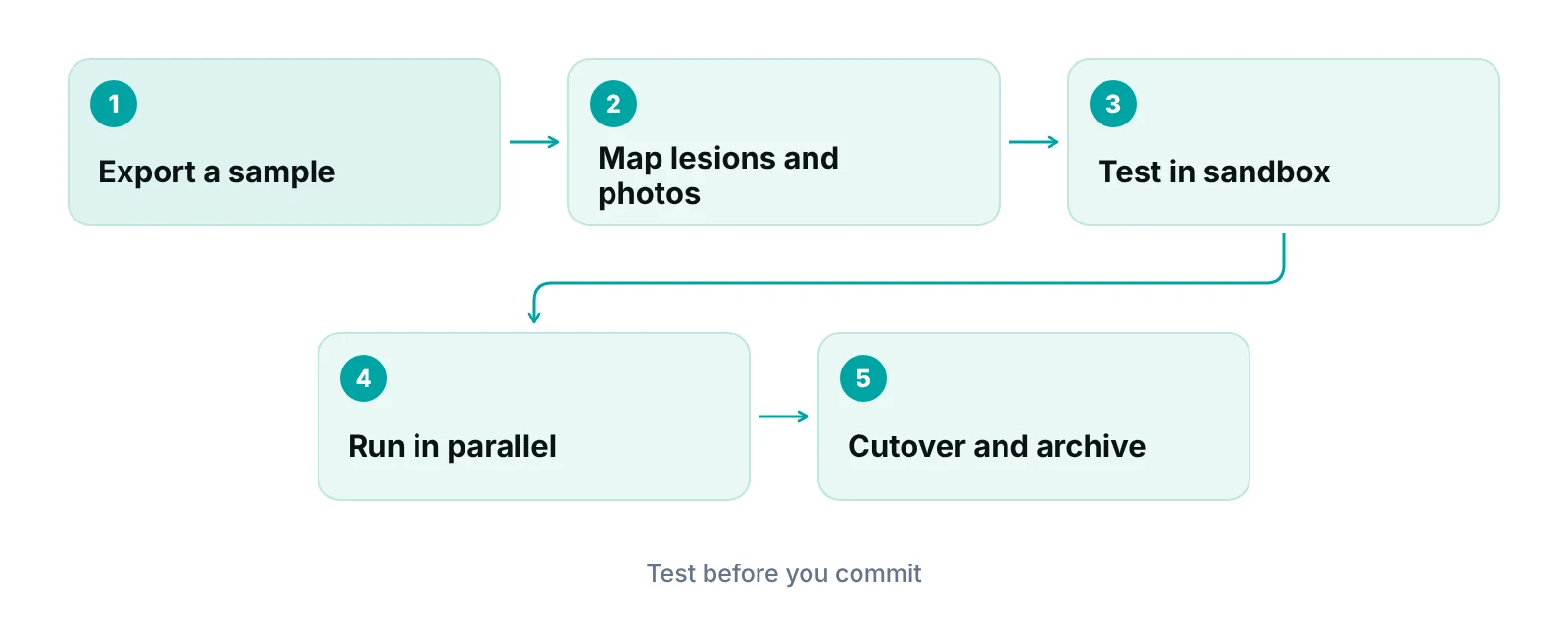
Agree the scope in writing with both vendors and test it on a sample first.
- Active patients, insurance, problem lists, medications and allergies.
- Lesion history and photographs with dates and consent records.
- Pathology results and open orders without a result.
- Open balances and unpaid claims, with a clear rule on which system works them.
What demo script tests all of this?
Give the vendor this script ahead of time, bring the staff who will use the system, and score each item pass, partial or fail.
- Register a patient with two insurance plans, verify eligibility and book a skin check.
- Mark three lesions on a body map, photograph one with consent and show the history at a second visit.
- Order a biopsy, receive a result, attach it to the right lesion and show the open-results list.
- Document a Mohs case with stages and a linked repair, then show the charge screen.
- Book a cosmetic treatment beside a medical visit, take payment and prove the cosmetic line is not on the claim.
- Export one patient’s complete record, including images, and show what a new user could open.
Our recommendations
- Write the failure list first. We would list what the current system does badly, ranked by cost in time or lost results, and bring it to every demo.
- Make the vendor use your cases. Send the demo script ahead and score pass, partial or fail, with medical assistants in the room.
- Check certification yourself. Look up the CHPL listing and ask which standards version the product supports. We treat certification as a floor, not a fit test.
- Protect the lesion loop. We would not buy a system that cannot show biopsies with no result.
- Get exit terms before the price. Ask for export scope, format, fee and read-only access after termination in writing.
- Plan the money side of the move. Decide which system works old claims, and who owns the clearinghouse, before cutover.
Bottom line
A dermatology EHR earns its place on the lesion loop, consented photos, clean separation of cosmetic and medical money, and an exit you can afford. Use the dermatology practice management guide to see where the EHR fits in the wider operation. If you want a second look at how charges reach billing, the practice management system for medical practices page describes our software, and a free practice audit is the next step.
Frequently asked questions
What should a dermatology practice look for in an EHR?
Look for lesion-level body maps, photo storage with consent, electronic pathology orders and a list of open results, support for Mohs documentation, separate cosmetic self-pay, e-prescribing, a clean billing handoff, full data export and a business associate agreement. Test each with your own cases in the demo.
Does ONC or ASTP certification mean an EHR is right for dermatology?
No. The program tests products against federal criteria for functionality, security and interoperability. It does not test body maps, photo consent or Mohs workflows. Use the Certified Health IT Product List to confirm the listing, then judge specialty fit in a demo.
How do we avoid losing biopsy results when we change systems?
Before cutover, list every biopsy order without a result and move it with its lesion and patient. Run the old and new systems in parallel for a short period, and assign one person to reconcile pending results until the list is clear.
Can we keep our clinical photos when we switch EHRs?
Often yes, but only if the vendor exports images with their dates, lesion links and consent records. Ask for a sample export in writing and open it in a test system before you sign. A folder of unlabeled files is hard to use.
Does the EHR need to include a clearinghouse and billing?
Not necessarily. Some systems include both, and others hand charges to a separate practice management system or clearinghouse. Ask who holds each contract, whether you can see rejections yourself, and how self-pay cosmetic lines are kept off claims.
How long should we keep access to the old EHR after switching?
Ask for read-only access after termination and settle the length in the contract. Records may be needed for audits, patient requests and old claims. Confirm in writing how long the vendor keeps your data, and when it returns or destroys it.
Get your free practice audit
Tell us about your practice. We will contact you using the details you give.
- A review of your recent claims, denials and A/R aging
- Where your front desk and prior authorizations slow payment
- A prioritized fix list you keep, whether or not you hire us
Pricing is quoted after the audit, based on your volume and the services you choose. Prefer to talk? Call +1 (302) 556-2288.
Sources
- ONC Health IT Certification Program Overview — ASTP/ONC (HealthIT.gov) (2024)
- HTI-1 Final Rule — ASTP/ONC (HealthIT.gov) (2025)
- Information Blocking FAQs — ASTP/ONC (HealthIT.gov) (2025)
- Guidance on HIPAA and Cloud Computing — HHS Office for Civil Rights (2016)
- Business Associates — HHS Office for Civil Rights (2026)
- Business Associate Contracts — HHS Office for Civil Rights (2013)
- Security Rule Guidance Material — HHS Office for Civil Rights (2026)
- May a covered entity charge individuals a fee for copies of their PHI? — HHS Office for Civil Rights (2026)
- Methods for De-identification of PHI — HHS Office for Civil Rights (2026)
- Marketing — HHS Office for Civil Rights (2026)
- Adopted Standards and Operating Rules — CMS (2026)
- Electronic Prescriptions for Controlled Substances (EPCS) FAQ — DEA Diversion Control Division (2026)
Disclaimer: This article is educational and is not legal, coding, security or compliance advice. HIPAA, controlled-substance, medical board and state rules differ and change, and vendor contracts vary, so confirm requirements with your attorney, privacy officer and vendors before acting.
