
Payment posting in medical billing is recording each payer and patient payment, and every adjustment, against the correct claim line and account, then reconciling the total to the deposit. Done accurately, it shows exactly which claims were paid, denied, underpaid or overpaid, so the right balances reach follow-up.
This guide is for practice owners and managers who want posting done correctly, whether staff do it, software does it or an outside team does. It explains the steps, how to read an electronic remittance, the federal rules that start a clock when a problem appears, and the controls that keep the ledger honest. It replaces three earlier overlapping posts on the same topic.
Key takeaways
- Post each payment and adjustment to the service line, then reconcile every batch to the deposit.
- Read the group code, CARC and RARC together before choosing an adjustment category.
- Posting detects denials and underpayments. It does not prevent them.
- Medicare time limits (1 year to file, 120 days to appeal, 60 days to return an overpayment) start from what posting finds.
- Auto-posting needs correct expected amounts and a human review queue.
What is payment posting in medical billing?
Payment posting is the step where every dollar that arrives, from a payer or from a patient, is recorded against the right claim, service line and patient account, together with every adjustment the payer applied. It is the point where your billing system learns what actually happened to a claim you sent.
That makes posting a data-entry task with accounting consequences. A payment applied to the wrong patient, a contractual adjustment written off as a denial, or a short payment posted as paid in full all produce the same result: the ledger says one thing and the bank says another, and nobody is chasing the difference.
Where posting sits in the revenue cycle
Posting comes after the payer adjudicates the claim and before accounts receivable follow-up. Your accounts receivable guide covers how balances are aged and worked. Posting is what decides which balances belong in that work queue in the first place. If posting is wrong, the A/R report is wrong, and so is every denial rate and days-in-A/R figure calculated from it.
Posting is also different from charge entry. Charge posting records what the practice billed. Payment posting records what came back. Reconciling the two, line by line, is the job.
The payment posting process, step by step
A reliable posting routine has six steps, and the order matters. Most errors come from skipping step 2 or step 5.
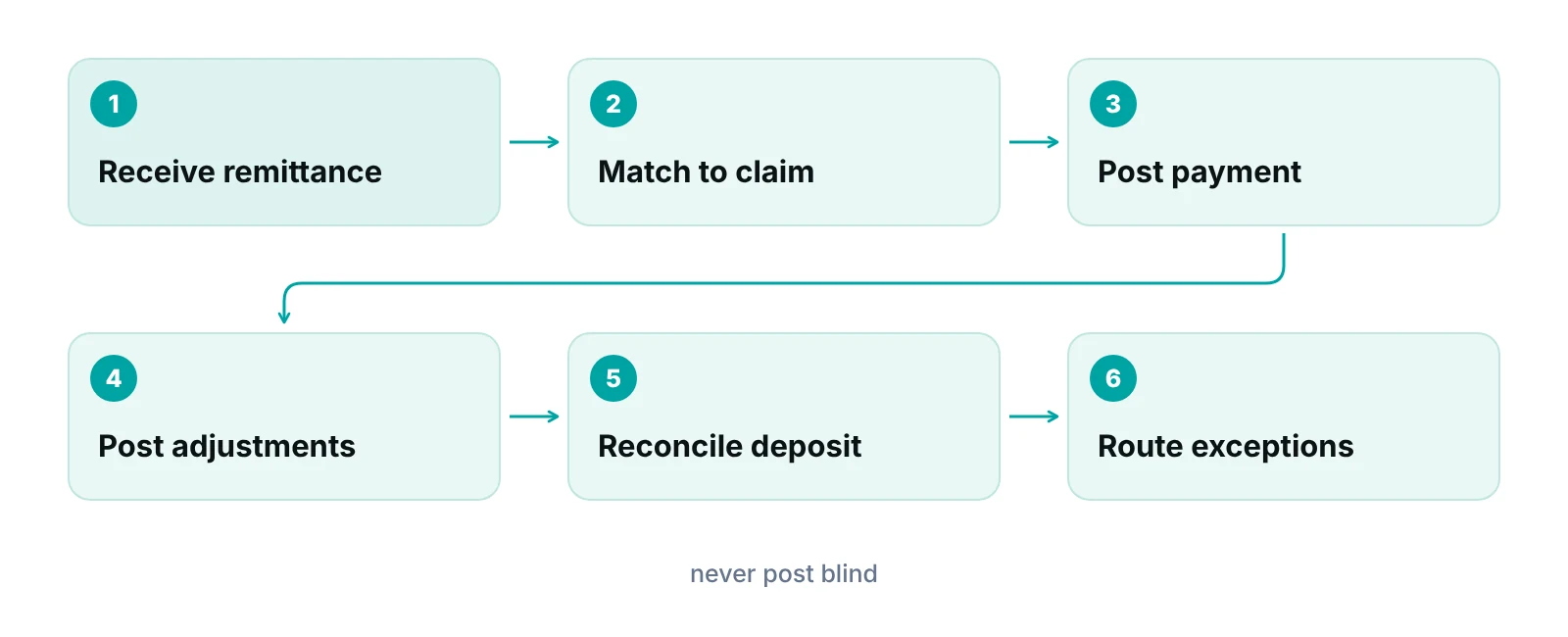
- Collect the remittance and the deposit. Gather the electronic remittance advice (ERA) or the paper explanation of benefits (EOB), and the matching bank deposit or card batch. Posting starts from the remittance, not from the bank statement.
- Match each line to a claim. Use the payer claim number, patient account number and date of service, not the patient name alone. Confirm the billed amount on the remittance equals the billed amount in your system.
- Post the payment. Apply the paid amount to the matched service line, not to the account as one lump.
- Post every adjustment with its reason. Contractual write-downs, patient responsibility amounts and other adjustments each go to their own category, using the payer’s codes. Do not post a denial as a contractual adjustment.
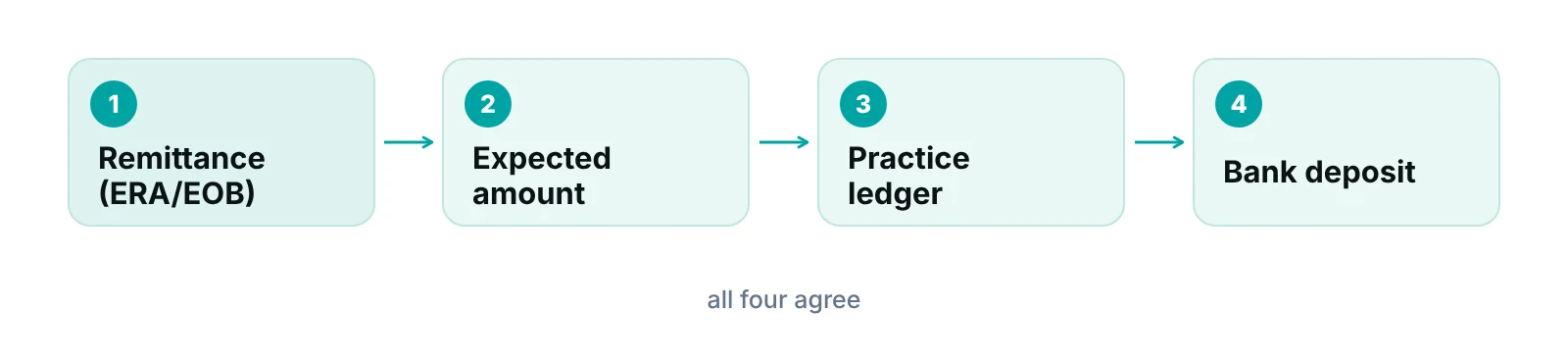
- Reconcile to the deposit. The total posted for a batch should equal the amount deposited. Any difference is resolved the same day, not carried.
- Route exceptions. Denials, underpayments, overpayments, unmatched payments and patient balances move to the right queue with an owner and a date.
Patient payments follow the same logic with different inputs: copays taken at check-in, card payments on statements and payment-plan installments. Post them to the date of service they were collected for, and keep them separate from payer money so that patient A/R stays accurate. Practices that offer installment arrangements should also review their patient payment plan practices so that installment posting rules are written down.
How to read an ERA: group codes, CARCs and RARCs
An ERA is the electronic remittance in the X12 835 format. For Medicare, CMS states that the X12 835 version 5010 format is the national HIPAA ERA standard. The federal rule that adopts it, 45 CFR 162.1602, names the standard as the ASC X12 Health Care Claim Payment/Advice (835), 005010X221.
Every adjustment on an ERA carries up to three code sets. The CMS page describes them: group codes assign financial responsibility for the unpaid portion, claim adjustment reason codes (CARCs) give the general reason, and remittance advice remark codes (RARCs) can add detail. Posting correctly means reading all three before deciding where a dollar goes.
| Code set | What it answers | Examples | Posting action |
|---|---|---|---|
| Group code CO (contractual obligation) | Who is not billable: the adjustment results from a contract or regulation | Fee schedule write-down | Post as contractual adjustment. Generally a provider write-off, not billed to the patient |
| Group code PR (patient responsibility) | Which amount may be billed to the patient or insured | Deductible, coinsurance, copay | Move the amount to patient A/R and send a statement |
| Group code OA (other adjustment) | Used when no other group code applies | Varies by payer | Post to its own category and review the reason before accepting it |
| CARC | Why the amount was adjusted | 1 Deductible Amount, 2 Coinsurance Amount, 3 Co-payment Amount, 45 Charge exceeds fee schedule/maximum allowable or contracted/legislated fee arrangement, 253 Sequestration – reduction in federal payment | Map each code to an adjustment category in your system |
| RARC | Added detail or an informational message | Maintained by CMS | Read it before deciding whether to appeal or correct |
Source: CMS, Medicare Claims Processing Manual Chapter 22 (group codes, CARC and RARC roles); X12 Claim Adjustment Reason Codes list (code descriptions); CMS Health Care Payment and Remittance Advice page.
Two details from the Medicare Claims Processing Manual, Chapter 22 matter for posters. First, remittances must balance at the service, claim and provider levels. If your posted total for a remittance does not equal the payment, something was missed. Second, the manual states the check amount equals the sum of claim-level payments, including claim and service-level adjustments, less provider-level adjustments. Provider-level adjustments are easy to overlook because they are not tied to one claim.
Code lists change. The manual says CARCs and RARCs are updated three times a year, so your system’s code mapping should be reviewed on the same cycle. For a plain-language walkthrough of the file itself, see our explanation of the ERA in medical billing.
Do not post on the check amount alone
A payment that matches the expected amount can still hide a wrong adjustment category. The manual notes that positive adjustments reduce payment and negative adjustments increase it, so a sign misread produces a plausible total and a wrong ledger.
Manual, auto-posting or outsourced: how to choose
Most practices land on a mix. Auto-posting handles clean, predictable ERA lines, and people handle everything else. The question to ask is which lines a rule can safely post and which need a person to read the reason code.
| Approach | Works best when | Main risk | Ask before choosing |
|---|---|---|---|
| Manual posting by staff | Low claim volume or mostly paper remittances | Keying errors and slow turnaround | Is anyone reconciling each batch to the deposit? |
| Auto-posting from ERAs, with a review queue | Most payers send 835 files and contracts are loaded accurately | Wrong rules post wrong money at speed | Which adjustment codes post automatically, and which always go to a person? |
| Outsourced posting | Staff cannot keep up or posting sits with one person | Weak handoff of exceptions to your team | Who owns denials and underpayments found during posting, and how fast do they reach you? |
Auto-posting is only as good as the contract and fee schedule data behind it. If the expected allowed amount in your system is wrong, an underpayment looks like a normal payment and posts without a flag. Specialty matters here: procedure-heavy specialties with multiple lines per visit generate more partial payments and bundling adjustments, which is why a poster should understand specialty-specific billing patterns and not just the ledger.
A practice management system that tracks claims by stage can reduce hand-offs. If your claims move through submitted, adjudicated, posted and follow-up stages with an owner on each, then a posted denial lands in a queue instead of a spreadsheet. You can read about a practice management system that tracks claims by stage and how it flags underpayments against expected amounts.
What payment posting reveals: denials, underpayments and overpayments
Posting does not prevent denials. A denial exists before the remittance arrives. What posting does is detect it, categorize it and hand it to someone who can act. Done well, it is the earliest reliable signal of what is going wrong upstream.
Denials
When a line is denied, post the denial with its CARC and RARC and move it to a denial work queue the same day. The American Academy of Family Physicians puts the industry average denial rate at 5% to 10%, with under 5% more desirable. Those figures come from posted data, so a practice that posts denials as contractual write-offs cannot measure its own rate. For the follow-up process, see our guide to medical billing denial management.
Underpayments
An underpayment is a payment lower than the amount your contract says the payer owes. It only shows up if you compare each line to an expected amount. Without that comparison, the shortfall is posted as a normal contractual adjustment and disappears. The AAFP page warns that applying inappropriate adjustments is a common error and advises separating noncontractual adjustments, such as those for late filing or missing prior authorizations, from contractual ones so problems are visible in your metrics.
Overpayments
Payers sometimes pay too much, pay twice or pay the wrong practice. Under Medicare’s rule at 42 CFR 401.305, an overpayment must be reported and returned by the later of 60 days after it was identified or the date any corresponding cost report is due, and the rule applies to overpayments identified within 6 years of the date received. A credit balance that sits unposted is a compliance risk as well as a bookkeeping one. We recommend a written step for who reviews credits and how they are returned.
See where your posting process leaks
A free practice audit reviews how payments, adjustments and exceptions flow through your billing today and where money is going unnoticed.
Deadlines that start from what you find while posting
When posting reveals a problem, the clock is already running. The filing limits below apply to Medicare fee-for-service; commercial payers set their own limits in contracts, so check each one.
| Situation found at posting | Rule | Time limit | Where it comes from |
|---|---|---|---|
| A claim was never filed or needs filing | Medicare claim filing limit | No later than the close of the period ending 1 calendar year after the date of service, with listed exceptions | 42 CFR 424.44 |
| A claim was denied or paid wrong and you disagree | First-level appeal (redetermination) | 120 days from receipt of the initial determination. The notice is presumed received 5 calendar days after its date | CMS redetermination page |
| The MAC reviews your appeal | Contractor decision | Generally within 60 days of receiving the request | CMS redetermination page |
| You were paid more than you were owed | Report and return overpayment | 60 days after identification, with a 6-year lookback | 42 CFR 401.305 |
Source: eCFR 42 CFR 424.44 and 401.305; CMS, First Level of Appeal: Redetermination by a Medicare Contractor.
The practical point is speed. A denial posted on the day the ERA arrives leaves nearly the whole appeal window available. A denial discovered months later in an A/R review may not. For non-Medicare payers, build a payer-by-payer sheet of filing and appeal limits from each contract and keep it where posters can see it.
How to tell if payment posting is working
Posting quality shows up in a handful of measures. Pick a few, track them monthly and look for movement rather than perfection.
- Unreconciled deposits: how many batches have a difference between posted total and deposit, and for how many days.
- Unapplied or unmatched payments: money received that is not attached to a claim. The count and age should trend down.
- Days in A/R: the AAFP says days in A/R should stay below 50 at minimum, with 30 to 40 preferable. It also recommends tracking A/R over 120 days, because a good overall figure can hide aging balances.
- Adjusted collection rate: the AAFP gives 95% as a minimum, calculated over 12 months.
- Denial rate and underpayment count: both depend on posting that categorizes adjustments correctly.
Turnaround time is worth watching too, but we do not state a universal posting deadline here, because no authoritative benchmark was found for it. Set your own standard, for example same business day for ERAs, and measure against it. For more on these measures, see our guide to revenue cycle KPIs and the A/R reporting metrics post, essential accounts receivable metrics.
“If a payment cannot be matched to a claim, it is not posted yet. It is a question waiting for an owner.”
Common payment posting mistakes and how to stop them
Most posting errors are repeatable, which means they can be designed out. These are the ones worth auditing first.
- Posting to the account instead of the line. A lump-sum posting hides which service was paid and which was denied.
- Treating every adjustment as contractual. This inflates write-offs and hides denials and underpayments.
- Ignoring provider-level adjustments. They appear on the remittance but belong to no single claim, so they are easy to skip.
- Letting unmatched money sit. Suspense accounts grow quietly and distort A/R and cash reports.
- Posting a corrected claim as new. The CMS manual explains that an adjusted claim’s remittance shows the earlier payment as previously paid. If the poster ignores that, the payment is counted twice.
- Stale code mapping. New or changed CARCs and RARCs fall into a default category nobody reviews.
A cleaner front end also reduces posting noise. Claims that go out complete and correct generate fewer denials to post, which is the subject of our clean claims guide.
Our recommendations
- Post to the service line, every time. Lump-sum posting to the account loses the information that matters most. Require line-level posting for payer payments.
- Reconcile each batch to the deposit the same day. Make a nonzero difference an exception with an owner, not a note in a margin.
- Keep an adjustment map and review it three times a year. CARCs and RARCs are updated on a regular cycle. Map each code to an adjustment category and re-check it on the same cycle.
- Compare every payment to an expected amount. Load contract rates and flag lines that pay less than expected. Without a comparison, an underpayment looks like a contractual write-down.
- Never write off a denial as a contractual adjustment. Keep denials, noncontractual write-offs and contractual adjustments in separate categories so your denial rate means something.
- Write down your credit-balance and overpayment steps. Name who reviews credits, how refunds are approved and who tracks the 60-day clock for Medicare overpayments.
- Set a posting turnaround standard and measure it. Choose a target that fits your volume, track it weekly and report exceptions, not averages.
A practice management system built around claims, not charts.
RCM Finder's portal tracks every claim by stage with an owner, flags underpayments against expected amounts and applies workflow rules to hold or advance claims. It is a claims system, not an EHR.
See how the RCM Finder portal works · Create a portal account
Disclosure: RCM Finder builds and sells this portal. It is a practice management system, not an EHR.
Bottom line
Payment posting is the point where a billing system finds out what really happened to a claim. Get the matching, the adjustment categories and the same-day reconciliation right, and denials, underpayments and credits surface while there is still time to act. If posting is backing up, our medical billing services and accounts receivable management services cover posting, follow-up and the exceptions it uncovers, and the free practice audit shows where your own process stands.
Frequently asked questions
What is the difference between payment posting and charge posting?
Charge posting records the services you billed. Payment posting records the money and adjustments that came back from payers and patients. Reconciling the two, line by line, tells you what is paid, what was adjusted and what is still open.
What is an ERA and why does it matter for posting?
An ERA is the electronic remittance advice in the X12 835 format. CMS states that version 5010 is the national HIPAA ERA standard for Medicare. It carries payments and adjustment codes in a structure software can read, which is what makes auto-posting possible.
What do CO, PR and OA mean on a remittance?
They are group codes. CO means a contractual obligation, generally a provider write-off that is not billed to the patient. PR means patient responsibility, such as a deductible or copay. OA means other adjustment, used when no other group code applies.
How soon should payments be posted?
No authoritative universal deadline exists. A practice can set its own standard, for example same business day for ERAs, and review it against its volume. What matters is that the standard is written, measured and tied to appeal and filing limits, which can be as short as 120 days for a Medicare redetermination.
What should we do if a payer overpays?
Do not leave a credit sitting. For Medicare, 42 CFR 401.305 requires reporting and returning an identified overpayment by the later of 60 days after identification or the cost report due date, if applicable. Other payers set their own refund terms, so check each contract.
Should a small practice outsource payment posting?
It depends on volume, staffing and how well exceptions are handled. Outsourcing helps when posting is slow or depends on one person. It only works if denials and underpayments found during posting reach your team quickly, so ask who owns them before you sign anything.
Get your free practice audit
Tell us about your practice. We will contact you using the details you give.
- A review of your recent claims, denials and A/R aging
- Where your front desk and prior authorizations slow payment
- A prioritized fix list you keep, whether or not you hire us
Pricing is quoted after the audit, based on your volume and the services you choose. Prefer to talk? Call +1 (302) 556-2288.
Sources
- Health Care Payment and Remittance Advice — CMS (n/d)
- 45 CFR 162.1602 Standards for health care payment and remittance advice — eCFR (current)
- Medicare Claims Processing Manual, Chapter 22 (Remittance Advice) — CMS (n/d)
- Claim Adjustment Reason Codes — X12 (2026)
- 42 CFR 401.305 Requirements for reporting and returning of overpayments — eCFR (current)
- 42 CFR 424.44 Time limits for filing claims — eCFR (current)
- First Level of Appeal: Redetermination by a Medicare Contractor — CMS (n/d)
- Managing practice finances — AAFP (n/d)
Disclaimer: This post is general educational information about revenue cycle operations. It is not legal, coding, accounting or compliance advice. Payer rules, contracts and deadlines vary, and the Medicare rules cited are for fee-for-service only. Confirm requirements with each payer and qualified advisors before acting.
