
Urgent care practice management software is the layer that carries a walk-in patient's registration, eligibility, charges and claim status from the front desk to the bill, alongside the chart. Judge it on what data it captures at check-in, how it passes that data on, which standard transactions it supports and what it records for audit.
Most software demonstrations for urgent care show the same screens: a queue, a chart and a bill. What separates one system from another is less visible, and it is whether the information typed at the front desk in the first two minutes arrives at the claim intact. Every walk-in is a new registration, often with a new insurance card, so any weakness in that hand-off repeats dozens of times a day.
This guide is vendor-neutral and uses no product names. It separates the EHR from the practice management layer, follows one patient’s data from check-in to charting to claim, sets out security questions grounded in HHS guidance and describes what RCM Finder’s portal does today and what is not live yet. For the EHR side, see the EHR and urgent care billing guide.
Key takeaways
- An EHR records the visit; the practice management layer carries registration, charges, claims and payments around it.
- ONC certification is voluntary and applies to health IT modules; it says nothing about how well a system bills.
- Place of service, rendering provider and diagnosis data must be present at claim time, and Medicare returns claims that lack required items.
- Ask for unique logins, role-based access, audit logs, encrypted connections and a business associate agreement.
- Appointment booking, a credentialing module and portal-based eligibility automation in RCM Finder’s portal are early access or coming next, not live.
What does practice management software do that an EHR does not?
The EHR holds the clinical record, and practice management software holds the business record around it. Registration, insurance, charges, claims, payments and statements usually live in the practice management layer, while orders, notes and prescriptions live in the chart. Some products bundle both, which is why it helps to ask for each layer’s evidence separately. The ONC Health IT Certification Program, for example, is a voluntary third-party program for health IT; the Certified Health IT Product List shows which modules were tested and certified, and certified technology is mainly required through CMS reporting programs (HealthIT.gov).
Certification is therefore a statement about specific modules, not about billing quality. The EHR and urgent care billing guide covers what the chart side should provide, and the general post on practice management software covers the category.
| Layer | Typical job | Evidence to ask for |
|---|---|---|
| EHR | Chart, orders, notes, prescriptions | Listing on the Certified Health IT Product List for the version in use, and the certified criteria it covers |
| Practice management | Registration, eligibility, charges, claims, payments, statements | Support for the standard transactions in Table 3 and a sample claim with all required fields |
| Billing service or team | Scrubbing, submission, posting, denials, A/R | Written agreement, access list, audit log and a reporting sample |
| Patient-facing tools | Online forms, check-in, text messages | Privacy review of each tool and a consent process for messages |
Source: editorial framework; ONC Health IT Certification Program overview (2024) for the certification description.
Which data must travel from check-in to the claim?
Place of service, the rendering provider, the diagnoses and any ordering provider have to be on the claim, and Medicare treats missing or invalid required items as unprocessable. A Medicare contractor’s CMS-1500 guide lists place of service (item 24B) as required on every claim, up to 12 diagnosis codes (item 21), the rendering provider’s NPI (item 24J), and a qualifier plus NPI for a referring, ordering or supervising provider when one applies, and says claims with missing or invalid items are returned (First Coast Service Options). CMS defines place of service 20 as the code for a location, distinct from a hospital emergency room, an office or a clinic, treating unscheduled walk-in patients (CMS).
Walk-in volume raises the stakes on every one of these fields. A scheduled practice can correct a bad registration at the next visit; an urgent care may not see the patient again, so the claim has to be right the first time and the correction path is a letter or a phone call.
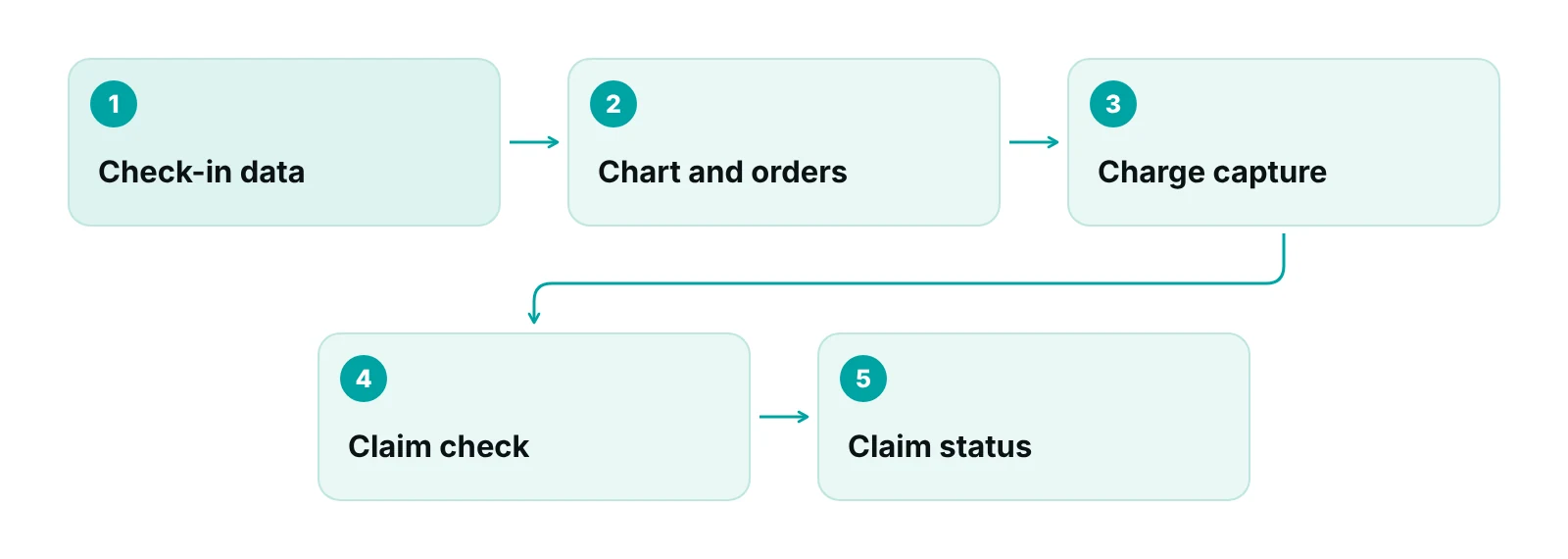
| Data | Captured at | Claim field (CMS-1500) | If missing |
|---|---|---|---|
| Payer and member identifier | Registration | Insured and payer details | Eligibility fails or the claim goes to the wrong plan |
| Place of service 20 | Site setup | Item 24B, required | Claim returned as unprocessable |
| Rendering provider | Charting | Item 24J, NPI | Claim returned or rejected |
| Diagnoses, up to 12 | Charting | Item 21 | Claim returned or denied for support |
| Ordering or referring provider | Orders | Item 17 with qualifier DN, DK or DQ, where it applies | Returned as unprocessable if qualifier is missing or invalid |
| Visit level and procedures | Charge capture | Procedure lines | Visit under- or over-billed |
Source: First Coast Service Options, CMS-1500 (02/12) data element requirements; CMS Place of Service Code Set.
Visit level adds a charting dependency. Since January 1, 2021, office and outpatient E/M levels (99202 to 99215) are chosen by medical decision making or total time, with history and exam as medically appropriate, according to a trade article in the Journal of Urgent Care Medicine (JUCM). Software that prompts for the time or the decision-making elements at the end of the note helps the coder. Claims for payers that pay a global per-visit rate, such as S9083 in the Urgent Care Association’s 2023 white paper (Urgent Care Association), need the software to build the charge differently by payer.
Which standard transactions should the software support?
CMS lists the HIPAA standard transactions: ASC X12 270/271 for eligibility and benefit verification, 837 for claims, 276/277 for claim status, 278 for prior authorization and referrals and 835 for remittance, all on version 5010, with federally mandated operating rules for eligibility, claim status and remittance (CMS). A system should be able to run each step electronically, and the clinic should ask to see it done.
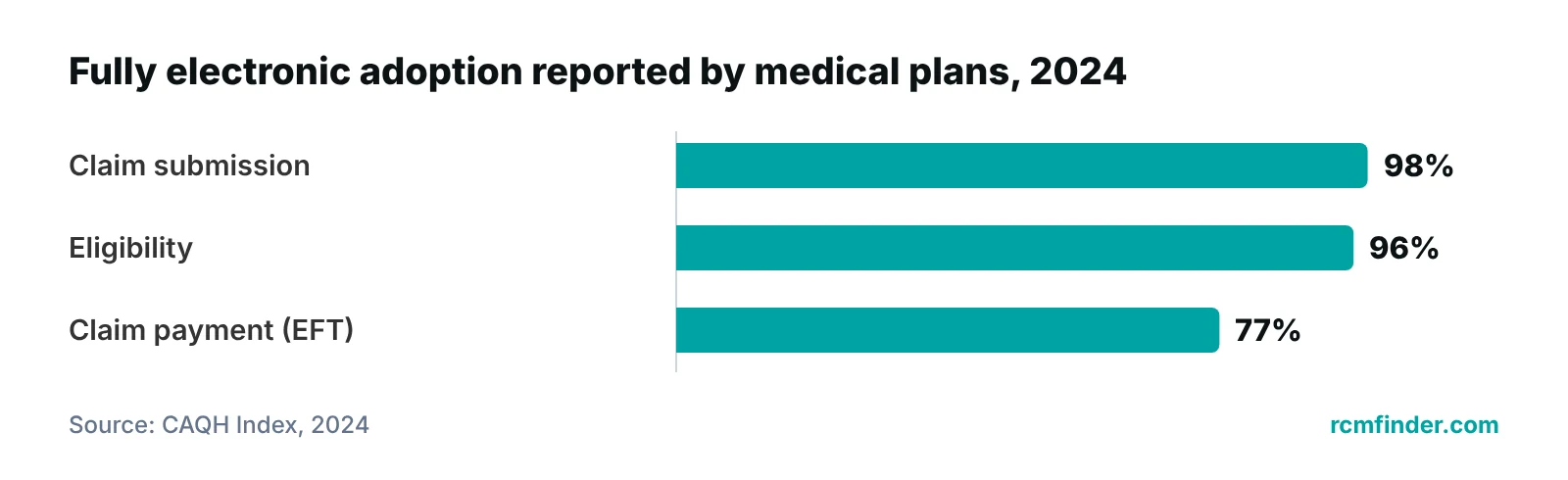
The case for electronic transactions is cost. In the 2024 CAQH Index, covering 2023, a manual eligibility check cost $12.95 against $2.04 fully electronic, and a manual claim status inquiry cost $18.18 against $3.68, while plans reported 96% fully electronic adoption for eligibility, 98% for claim submission and 77% for claim payment by electronic funds transfer (CAQH). Those are industry averages, but they show why a system that still needs a phone call for eligibility is working against the grain.
Self-pay patients need a path too. HHS’s good faith estimate FAQs, dated December 1, 2021, say urgent, emergent and trauma care is generally not included because it is not typically scheduled in advance and do not address walk-ins specifically (HHS FAQs), so the software should at least prompt for a self-pay price list and record what was collected at the desk.
What security and privacy questions apply?
The HIPAA Security Rule’s technical safeguards give a vendor-neutral question list. HHS’s guidance names access control (with unique user identification and an emergency access procedure as required items), audit controls, integrity, person or entity authentication and transmission security, and says the Rule does not require specific technologies, so a clinic decides what is reasonable and appropriate and documents it (HHS).
| Question | Why it matters | Evidence to request |
|---|---|---|
| Does every user have a unique login with role-based access? | Access control; unique user identification is a required item | A role matrix and a demonstration of a restricted user |
| Is there an audit log of who viewed or changed a record or claim? | Audit controls require a way to record and examine activity | A sample log export |
| Are connections encrypted in transit? | Transmission security is an addressable item that must be considered and documented | Written description of the encryption in use |
| Will the vendor sign a business associate agreement before touching patient data? | HHS sample provisions cover permitted uses, safeguards, breach reporting and subcontractors | The draft agreement |
| Which tracking tools run on patient-facing pages? | HHS says scheduling or symptom-checker tools may have access to PHI in some cases | A list of tools and a privacy review |
| Which standard transactions are supported? | Electronic eligibility, claims, status and remittance | A live demonstration of each |
Source: HHS/CMS Security Standards: Technical Safeguards; HHS sample business associate provisions (2013); HHS OCR online tracking bulletin (page reviewed June 26, 2024); CMS adopted standards.
Two further points apply to patient-facing tools. HHS’s tracking bulletin notes that a federal court vacated part of its guidance in 2024 and that HHS was evaluating next steps, but the page still says scheduling and symptom-checker tools may have access to PHI in certain circumstances (HHS OCR). On texting, a law-firm summary of the FCC’s 2015 order says autodialed texts to wireless numbers generally need prior consent and that the narrow healthcare exemption excludes marketing and billing messages (Kutak Rock). Both points should be confirmed with counsel before a check-in text feature goes live. The HIPAA compliance checklist for medical practices is a starting point for the review.
What does the RCM Finder portal do today, and what is not live yet?
RCM Finder builds its own portal, used by medical practices and by medical billing companies that serve several practices. Today it provides claim tracking by pipeline stage, specialty-aware billing logic that groups 35 specialties into shared billing-pattern types and applies them claim by claim, data-completeness checks before submission, underpayment detection against expected amounts, workflow rules that flag a claim, advance or hold a stage or assign an owner, role-based staff permissions, an audit log, a client portal and reporting dashboards. Connections use HTTPS, and RCM Finder puts a Business Associate Agreement in place before accessing patient data. The portal does not replace the EHR; the team works inside the clinic’s existing EHR.
The completeness check is the portal-side counterpart to Table 2. Before a claim is submitted, required items such as place of service, rendering provider and diagnoses are tested, and a claim that fails can be flagged for review and held at its stage instead of going out. The aim is to move rejections from after submission to before it, where they cost minutes instead of days. It supplements the EHR and the clinic’s own coding review; it does not replace either.
Early access and coming next
Appointment booking with a calendar view, a provider credentialing module and automated real-time eligibility verification inside the portal are not live. They are in early access or planned, and should not be assumed in any purchase decision today.
The portal sits within the wider practice management system offering. Remote front-desk staff from the Virtual Medical Assistant service can run eligibility checks and intake in the meantime, working on the clinic’s own time zone.
What should the reports show, and how should a switch be tested?
The software should report the handful of measures that show where the cycle slows, and it should do so from its own timestamps: charge lag, first-pass acceptance, point-of-service collection, days in A/R and denial rate by reason. These are the same measures laid out as checkpoints in the revenue cycle timeline, and a system that cannot produce them by week makes every later decision slower.
Any switch or new module deserves a test before the first live shift. A workable sequence has five steps.
- Map the current data path from check-in to claim and mark every place data is retyped.
- Set up roles and permissions first, and confirm a restricted user cannot see what the role should not.
- Run a batch of real or mock walk-in visits through to a test claim, and check each field in Table 2.
- Run old and new processes side by side for a short period on a low-volume day, comparing charges and claims.
- Record a baseline for the five measures before go-live so the effect can be judged.
How should an urgent care decide between software, remote staff and a billing team?
Start with the gap, not the product. If registration data is wrong, the fix is process and front-desk capacity. If claims leave incomplete, the fix is a completeness check. If payments are posted late or denials sit, the fix is a billing queue with an owner. The timeline in the guide to urgent care revenue cycle management shows where each gap appears, and the urgent care marketing guide shows how front-end promises feed registration.
Not sure which gap is costing the most?
Request a free practice audit and RCM Finder will review how check-in data reaches the claim in your current setup. The audit is free.
Our recommendations
- Write down the data path before the demo. List what is captured at registration, in the chart and at charge entry, and ask the vendor to follow one walk-in through each step.
- Ask for a sample claim with every required field. Check place of service, rendering provider, diagnoses and any ordering provider against Table 2.
- See each standard transaction performed. Ask for live eligibility, claim submission, status and remittance posting, not a feature list.
- Request security evidence, not assurances. Ask for the role matrix, an audit log sample and the draft business associate agreement.
- Review every patient-facing tool for privacy. Have the privacy officer approve tracking tools, online forms and text messaging before launch.
- Separate certification from billing fit. Check the Certified Health IT Product List for the EHR module and judge billing fit on the claim sample.
Bottom line
The right urgent care practice management software is the one that carries a walk-in’s data from the first screen to the posted payment without retyping, supports the standard transactions and can show its security controls on request. RCM Finder’s practice management system page describes what the portal does today and what is still to come, and the guides to urgent care SEO and urgent care digital marketing cover the demand side that feeds the front desk.
Frequently asked questions
What is urgent care practice management software?
It is the software layer that handles registration, insurance and eligibility, charges, claims, payments and statements around the clinical chart. Some products bundle it with the EHR. For urgent care the test is how well it carries data from a fast walk-in check-in to a complete claim.
Is ONC certification a guide to billing quality?
No. The ONC program is voluntary and tests and certifies specific health IT modules, which are listed on the Certified Health IT Product List. It says little about billing performance. Check the listing for the EHR component and judge billing by a sample claim.
Which claim fields does software most often miss?
Place of service, rendering provider NPI, diagnoses and the qualifier for an ordering or referring provider are required items on Medicare claims, and claims lacking required or valid items are returned as unprocessable. Ask to see a sample claim with every one populated.
What security evidence should a vendor provide?
Unique user logins, role-based access, an audit log, encrypted connections and a business associate agreement signed before any patient data is shared. Ask for a role matrix, a sample log export and the draft agreement rather than accepting a statement that the product is compliant.
What should an urgent care test before going live with new software?
Run a batch of walk-in visits through to a test claim and check every required field, confirm a restricted user cannot see protected areas, and compare old and new processes side by side on a quiet day. Record baseline charge lag and first-pass acceptance first, so the change can be measured.
Does the RCM Finder portal include appointment booking?
Not yet. Appointment booking with a calendar view, a provider credentialing module and automated real-time eligibility verification inside the portal are early access or coming next. Today the portal covers claim tracking, completeness checks, underpayment detection, workflow rules, permissions, audit logging and dashboards.
Get your free practice audit
Tell us about your practice. We will contact you using the details you give.
- A review of your recent claims, denials and A/R aging
- Where your front desk and prior authorizations slow payment
- A prioritized fix list you keep, whether or not you hire us
Pricing is quoted after the audit, based on your volume and the services you choose. Prefer to talk? Call +1 (302) 556-2288.
Sources
- ONC Health IT Certification Program Overview (2024) — HealthIT.gov / ONC (2024)
- Security Standards: Technical Safeguards — HHS / CMS HIPAA Security Series (2007)
- Adopted Standards and Operating Rules — CMS (2026)
- CMS Place of Service Code Set — CMS / HHS (2024)
- CMS-1500 (02/12) data element requirements — First Coast Service Options (Medicare) (2026)
- 2023 Urgent Care Industry White Paper — Urgent Care Association (2023)
- 2024 CAQH Index — CAQH (2024)
- Sample Business Associate Agreement Provisions — HHS Office for Civil Rights (2013)
- Use of Online Tracking Technologies by HIPAA Covered Entities and Business Associates — HHS Office for Civil Rights (2024)
- Already Looking Forward to 2021 and Smoother Sailing with E/M Coding — Journal of Urgent Care Medicine (Monte Sandler) (2020)
- Good Faith Estimates for Uninsured or Self-Pay Individuals FAQs, Part 1 — HHS / CMS (2021)
- FCC clarifies TCPA robocall rules for health care (law-firm summary of the 2015 FCC order) — Kutak Rock LLP (2015)
Disclaimer: This article is educational and is not legal, compliance, coding or software-purchasing advice. HIPAA, payer and Medicare contractor rules differ and change. Confirm current requirements with qualified counsel, your payers and your Medicare contractor, and evaluate any software on its own evidence.
