
Urgent care SEO is mostly local SEO. For a near-me search, Google ranks profiles by relevance, distance and prominence, so the work that counts is a verified Google Business Profile with accurate hours, one location page per site, and a review process that follows both Google's policy and HIPAA.
Someone with a sprained ankle at 7 p.m. does not read ten websites. They type a short phrase, look at the map, check whether the place is open and call or drive. Local search decides which urgent care that person sees, and most of what Google uses to decide is published.
This guide takes Google’s own pages as the rulebook: the Business Profile guidelines, the local ranking explainer, the contributed content policy and the LocalBusiness markup guide. It adds the HHS case on answering reviews and the one urgent care risk that most guides skip, which is opening hours. Advertising claims are covered in the urgent care marketing guide, and paid search in the urgent care digital marketing guide.
Key takeaways
- Google says local results rest on relevance, distance and prominence, and that there is no way to pay for a better local ranking.
- The profile name must match the real-world name; hours, services and taglines do not belong in it.
- Opening hours are the urgent care-specific risk: patients arrive on the strength of them.
- Each location needs its own profile and its own page, with LocalBusiness markup that matches.
- Review requests must be neutral and replies must not reveal that the reviewer was a patient.
How does Google rank an urgent care for a near-me search?
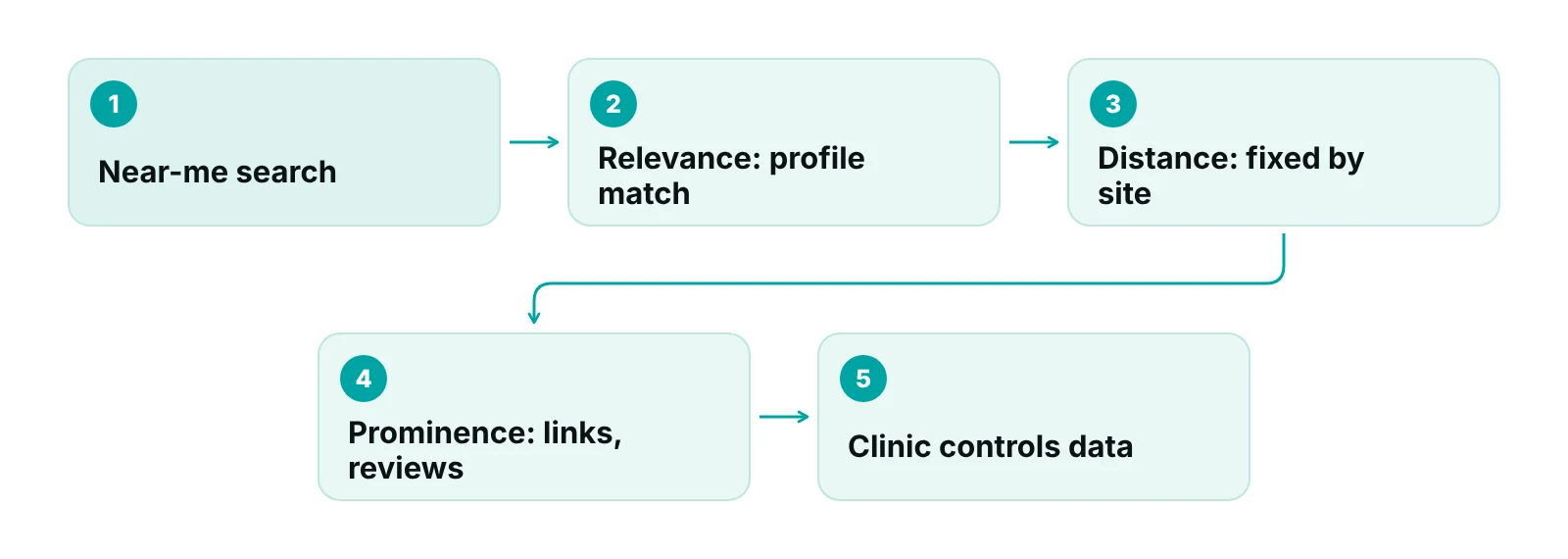
Google says local results are based on three factors: relevance, distance and prominence. Relevance is how well a profile matches the search, distance is how far each business is from the searcher, and prominence is how well known a business is, based on signals such as links and reviews. Google adds that there is no way to request or pay for a better local ranking (Google Business Profile Help).
Only one of the three is fixed. A clinic cannot move the building, so the work is relevance and prominence: complete, accurate information and a record of genuine reviews. Google also says verified, complete profiles are more likely to appear, and that replying to reviews shows customers their feedback is valued.
Distance deserves a practical note. It is measured from the searcher, not from the clinic’s marketing area, so a pin placed in the wrong spot or a profile with a mailing address instead of the clinic address works against the clinic in exactly the searches that matter most. Check the pin on the map, the entrance a patient should use and any suite number before anything else.
| Factor | How Google describes it | What the clinic controls |
|---|---|---|
| Relevance | How well a profile matches what someone searches for | Category, services, hours and a complete profile |
| Distance | How far each business is from the searcher | Nothing, except the choice of site and one profile per location |
| Prominence | How well known a business is, using links, reviews and ratings | A steady stream of genuine reviews and replies; honest links from the website |
| Verification | Shows Google the owner is authorized to represent the business | Verify every location and keep the account owner current |
Source: Google Business Profile Help, How to improve your local ranking on Google.
What do Google's Business Profile guidelines require?
The name, address, hours, categories and website must describe the real-world business. Google’s guidelines say the name should reflect the business’s real-world name, as on signage, the website and stationery, and that taglines, hours, phone numbers, URLs and service or location details are not allowed in it (Google guidelines). Categories should be as few as possible and should complete the statement ‘this business is a’, not ‘has a’. Address must be a real-world location customers can visit, and there should be one profile per location.
| Field | Google's rule | Urgent care risk |
|---|---|---|
| Name | Must match the real-world name; no taglines, hours, services or location details | Adding open now, 24 hours or wait times to the name |
| Address | Real-world location customers can visit; virtual offices and remote mailboxes are not eligible | Listing a marketing office instead of the clinic |
| Hours | Regular customer-facing hours | Hours that differ from signage, website or the front door |
| Categories | As few as possible; core business only | Adding categories for services the clinic does not mainly offer |
| Website and phone | A site that represents the individual location; no redirects to other pages | Sending every location to one generic page or call center |
| Locations | One profile per location, no duplicates | Duplicate profiles from old addresses or staff-created listings |
| Practitioners | Individual practitioners get one profile; support staff should not create their own | Staff creating profiles that split reviews |
Source: Google Business Profile Help, Guidelines for representing your business on Google.
One name rule deserves a second look for urgent care. Illinois, for one, bars non-hospital facilities from holding themselves out as emergency care centers while permitting urgent care branding (210 ILCS 70/2), and the federal Medicare rule for hospitals looks at whether a department is held out to the public as treating emergencies (42 CFR 489.24(b)). A profile name or category that implies an emergency room can therefore create a legal problem as well as a Google one. The urgent care marketing guide covers that wording in full.
Why are hours the urgent care-specific risk?
Patients choose an urgent care because it is open, so a wrong closing time costs a visit and a review. The Urgent Care Association’s 2023 white paper reports that 67% of centers are open every day, 11% every day except Sunday and 18% close on weekends (Urgent Care Association). Because patterns differ this much, a patient cannot assume a clinic is open and relies on the listing.
Google’s guidelines ask for regular customer-facing hours, so the listing should show the real schedule and not an aspiration. The practical controls are modest.
- Name one person responsible for hours, with a backup.
- Change hours the same day when a shift is cut, a provider is out or a holiday schedule applies.
- Use the profile’s special hours for holidays, and use the same dates in the website markup.
- Check the profile, the website, the door sign and the phone greeting together once a month, because a mismatch in any one of them is what patients notice.
Clinics with several sites need one more rule. Google’s guidelines say chain locations in the same country should use the same name unless the real-world name consistently varies, and that each location has its own profile. Each profile therefore carries its own hours, and a change at one site should never be copied to the others by habit.
Hours are also a front-desk fact
Whoever answers the phone reads the same hours to every caller. If the greeting, the listing and the door disagree, the call volume lands on the front desk. Remote staff can hold the call script, but the schedule itself has to be owned by the clinic.
What should a location page and its markup contain?
Each location needs its own page whose name, address, phone and hours match the profile exactly. Google’s LocalBusiness guide lists name and address as required, and geo coordinates, telephone, URL and opening hours specification as recommended, with start and end dates for seasonal closures. It tells publishers to mark up each location as its own entity and to use the most specific business subtype available (Google structured data guide).
| Property | Status in Google's guide | Note for an urgent care |
|---|---|---|
| name and address | Required | Match the profile exactly |
| telephone, url, geo | Recommended | Use the location’s own number and page, not a central line |
| openingHoursSpecification | Recommended; validFrom and validThrough for seasonal closures | Keep in step with the profile’s regular and special hours |
| One entity per location | Stated practice for multiple locations | Do not combine sites into one block |
| review and aggregateRating | Described as for sites that collect reviews of other local businesses | Do not mark up the clinic’s own reviews on its own page without checking current guidance |
Source: Google Search Central, Local business structured data guide.
Google also advises verifying the business in Business Profile and the website in Search Console, then testing markup with the Rich Results Test and allowing about a week for changes to show (Google Search Central). On privacy, the HHS tracking bulletin says a visit to a general information page, such as hours, generally does not involve PHI, while appointment or symptom-checker tools that need no login may have access to PHI in some cases (HHS OCR). Page analytics on a simple location page and a scheduling tool are therefore different questions and should be reviewed separately.
What should the website say besides the hours?
The site should answer the questions a walk-in patient asks before leaving the house, in plain words and on the page that the listing points to. Content that supports local search is mostly practical, and nearly all of it is already known to the front desk.
- The services actually provided on site, such as the types of injuries and illnesses treated, and whether imaging or lab testing is available, described as the clinic does them and nothing more.
- The walk-in process: whether online check-in is offered, what to bring and what to expect at registration.
- Insurance: a plan list with the date it was last checked, and how self-pay visits work.
- A clear line that anyone with a life-threatening problem should call 911 or go to an emergency room.
- The clinic’s address, parking and entrance, repeated on every page footer exactly as on the profile.
Each claim on those pages is subject to the same evidence test described in the urgent care marketing guide: if the page says the clinic treats something, treats it on site or accepts a plan, someone should be able to show that it does. Clinical information should be written or reviewed by a clinician, and forms that collect symptoms or contact details should be reviewed for privacy before launch, in line with the tracking technologies bulletin discussed above. Clinics without a documented privacy review can start from the HIPAA compliance checklist for medical practices and then ask their privacy officer to sign off on each form and tool.
How should reviews be requested and answered?
Request them neutrally and answer them without patient information. Google’s policy bars incentives, selective solicitation of positive reviews and staff review quotas (Google policy), and the FTC’s review rule, effective October 21, 2024, adds federal rules on fake, purchased and undisclosed insider reviews (Federal Register). The FTC’s Endorsement Guides page adds that asking only satisfied customers for reviews can mislead (FTC).
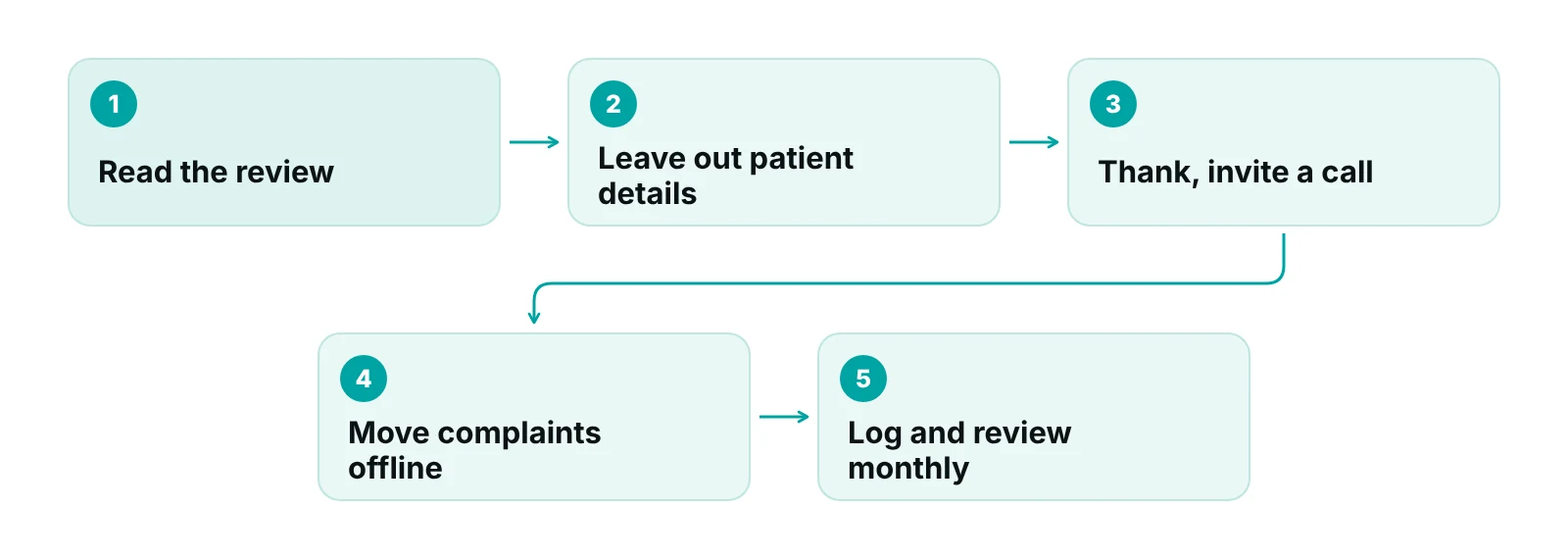
Replies carry the HIPAA risk. In December 2022 HHS OCR announced a $23,000 settlement with a California dental practice that answered patient reviews with names, treatment details and insurance information, and said providers cannot disclose patient information when responding to negative reviews (HHS OCR). The reply path below keeps replies general.
For the wider reputation program, see the guide to online reputation management for doctors, and for the fundamentals of medical search beyond urgent care, the healthcare SEO guide.
“A review reply is a public document. Write it as if the reviewer's employer and the privacy regulator will both read it.”
— Awais Afzal, Healthcare Operations & Data Analyst
Where does remote support help local search?
Local search sends calls, and the front desk decides whether they become visits. RCM Finder’s Virtual Medical Assistant services provide remote front-desk staff who answer insurance and hours questions from the clinic’s own script, run eligibility checks and take intake details, working inside the clinic’s existing EHR and on the clinic’s own time zone. The healthcare digital marketing service page describes how local search work is planned around the front desk. A short call script that mirrors the listing is the simplest quality check.
Is the listing sending patients the right way?
Request a free practice audit and RCM Finder will review how the Business Profile, the website and the phone script line up. The audit is free.
Our recommendations
- Verify and own every location. Confirm each profile is verified, has a named owner and a backup owner, and that no duplicate profiles exist.
- Match name, address and hours across profile, website and sign. Use the real-world name only, and check all three monthly.
- Make one person responsible for hours. Update special hours the same day a schedule changes and mirror them in the page markup.
- Build one page per location. Add the location’s own phone number, address, hours and LocalBusiness markup, and test it in the Rich Results Test.
- Use one neutral review request. Send the same invitation to every patient, offer nothing in return and disclose any staff relationship.
- Standardize review replies. Use a short template that reveals no patient information and ask a trained person to approve exceptions.
Bottom line
Urgent care SEO rewards the clinic that makes its real-world facts easy to find and keeps them true: the same name, address and hours everywhere, a page for each location and replies that protect patient privacy. Behind the listing sit the systems that handle the calls and visits it produces, covered in the guides to urgent care practice management software and urgent care revenue cycle management.
Frequently asked questions
Can an urgent care pay to rank higher in the Google map results?
No. Google’s local ranking page says there is no way to request or pay for a better local ranking. Relevance, distance and prominence decide, so complete and accurate profile information, verification and genuine reviews are the practical levers. Paid ads are a separate channel, covered in the digital marketing guide for urgent care.
How many categories should an urgent care choose on Google?
As few as possible. Google tells businesses to describe the overall core business and to pick categories that complete the statement ‘this business is a’. Adding categories for minor or occasional services can dilute relevance and may conflict with the guidelines.
Can every provider have a separate Business Profile?
Google treats doctors as individual practitioners and says a practitioner should not have multiple profiles for different specialties, and that support staff should not create their own. The location still gets one profile. Check eligibility before creating practitioner profiles.
Is it safe to reply to Google reviews?
Yes, with a general reply. HHS OCR announced a $23,000 settlement in 2022 with a dental practice whose replies revealed patient details. Thank the reviewer, avoid confirming they were a patient and invite them to call the clinic.
Should the clinic's own reviews be added to its location page markup?
Be careful. Google’s LocalBusiness guide describes review and aggregate rating properties as for sites collecting reviews of other local businesses. Check current Google documentation before marking up the clinic’s own ratings, and test the page in the Rich Results Test.
How often should hours be checked?
Monthly, and before every holiday or schedule change. Compare the profile, website, door sign and phone greeting. A wrong closing time sends patients to a locked door, and the listing is what patients rely on when they decide where to go.
Get your free practice audit
Tell us about your practice. We will contact you using the details you give.
- A review of your recent claims, denials and A/R aging
- Where your front desk and prior authorizations slow payment
- A prioritized fix list you keep, whether or not you hire us
Pricing is quoted after the audit, based on your volume and the services you choose. Prefer to talk? Call +1 (302) 556-2288.
Sources
- Guidelines for representing your business on Google — Google Business Profile Help (2026)
- How to improve your local ranking on Google — Google Business Profile Help (2026)
- Prohibited and restricted content — Google Maps contributed content policy (2026)
- Local business (LocalBusiness) structured data — Google Search Central (2026)
- Establish your business details with Google — Google Search Central (2026)
- 2023 Urgent Care Industry White Paper — Urgent Care Association (2023)
- Trade Regulation Rule on the Use of Consumer Reviews and Testimonials (final rule) — Federal Register (2024)
- The FTC's Endorsement Guides: What People Are Asking — Federal Trade Commission (2026)
- HHS Civil Rights Office enters settlement with dental practice — HHS (2022)
- Use of Online Tracking Technologies by HIPAA Covered Entities and Business Associates — HHS Office for Civil Rights (2024)
- 210 ILCS 70/2 — Illinois General Assembly (2026)
- 42 CFR 489.24 Special responsibilities of Medicare hospitals in emergency cases — eCFR (2026)
Disclaimer: This article is educational and is not legal, compliance or SEO guarantee advice. Google changes its policies and ranking systems, and HIPAA and state rules vary. Confirm current requirements in Google's documentation and with qualified counsel before acting.
