
Electronic remittance advice (ERA) is the electronic file a payer sends to explain how it paid, adjusted or denied your claims, in the ASC X12 835 format. It is matched to the bank deposit (EFT) by a trace number, then posted to each claim.
This guide covers what an ERA contains, how it differs from an EOB and an EFT, how to enroll, and a posting order that sends exceptions to a person. It is written for practice owners and billing leads. Every rule below is tied to a source, and payer rules vary, so confirm them with each payer.
Key takeaways
- An ERA is the 835 file that explains a payment. The EFT is the money. They are matched on a trace number.
- Read group code first (who owns it), then the reason code (why), then the remark code (detail).
- Provider-level adjustments sit after the claims and explain why a deposit can be short.
- An ERA reports denials, it does not prevent them. Prevention happens before submission.
- Enroll each payer and tax ID. Rules and timing differ by payer.
What is an electronic remittance advice (ERA)?
An ERA is the electronic file a payer sends to explain how it handled a batch of claims: what it paid, what it adjusted, what it denied and why. It replaces the paper explanation of payment (often called an EOB or paper remittance). The practice’s billing software reads it and posts the payments.
The format is the ASC X12 835. Under federal rules, the adopted standard for the health care claim payment and advice transaction is “Health Care Claim Payment/Advice (835), April 2006, ASC X12N/005010X221,” in effect on and after January 1, 2014 (45 CFR 162.1602). Medicare contractors use the 5010A1 version of the 835 (CMS).
Two terms get mixed up, so it is worth separating them now.
- ERA is the information: which claims, which amounts, which adjustment reasons.
- EFT (electronic funds transfer) is the money, deposited to your bank account.
- A paper EOB or paper remittance carries the same kind of information on paper or as a PDF. It is not an 835 and cannot be posted automatically.
An ERA does not change how a payer decides a claim. It reports the decision. A denial arrives on the ERA, and the work of fixing it still sits with your team, which is why ERAs matter most for payment posting and denial follow-up rather than for preventing denials.
What is inside an ERA?
An 835 holds identifying data for the payment, one block per claim and, last, any adjustments that are not tied to a claim. The end of the file is not a “trailer” for overpayment recovery or IRS levies, as some explainers say. Provider-level adjustments sit in a summary section after all the claim payments (835 companion guide; CMS).
| Part of the file | What it holds | Why it matters when posting |
|---|---|---|
| Header and payment information | Payment and trace data (BPR and TRN segments), plus payer and payee names and identifiers | Ties the ERA to one deposit. The trace number is the key for matching. |
| Claim payment and adjustments (loop 2100) | Claim payment (CLP), claim-level adjustments (CAS), patient and provider names, claim dates and amounts | Shows what was paid on each claim and what was adjusted, by group code and reason code. |
| Service lines (loop 2110) | Service payment (SVC), service dates, line-level adjustments, remark codes (LQ) | Needed for line-level posting and for spotting a single procedure that was cut or denied. |
| Provider-level adjustments (PLB) | Items not tied to one claim, such as interest, takeback notices and takebacks | Explains why the deposit differs from the sum of the claim payments. |
Source: Amerigroup/Elevance 835 companion guide; CMS Medicare transmittal R2843CP (undated).
For Medicare, the check amount equals the sum of the claim-level payments less provider-level adjustments, so a PLB line is usually the explanation when a deposit looks short. Other payers’ rules can differ, so confirm the balancing rule in each payer’s companion guide.
How an ERA and an EFT fit together
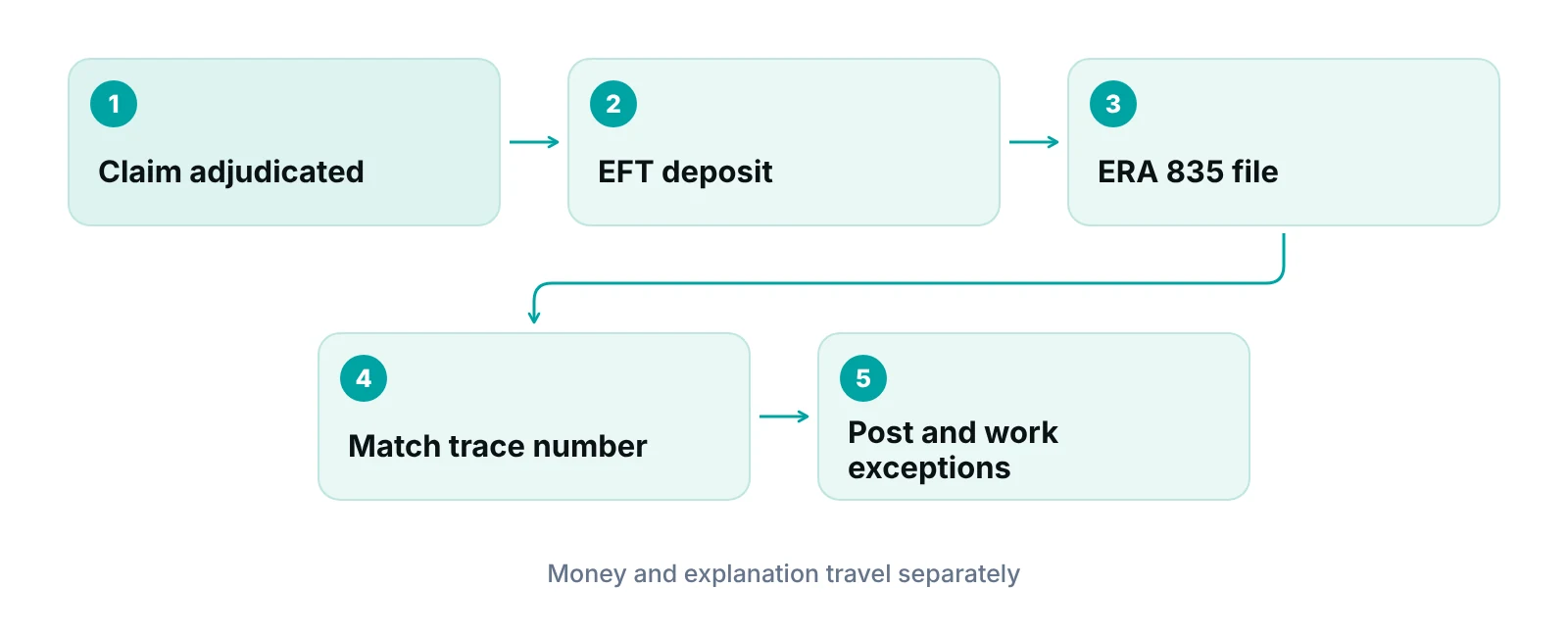
The ERA and the EFT travel separately and have to be matched by a reassociation trace number. The federal EFT standard (NACHA CCD+) carries the TRN segment, and the 835 carries the same number, so a biller can pair a bank deposit with its ERA (45 CFR 162.1602). Cigna, for one, describes a single tracking number that links the bank’s EFT report, the TRN02 field of the ERA and its online remittance report (Cigna).
Timing is not identical either. Medicare contractors may release an ERA before the payment date but never after it. Cigna says EFT funds are accessible the day they are deposited and that ERA starts on the next payment cycle after enrollment is final. In practice, enrolling in both gives you a deposit and the explanation for it.
How to read the adjustment codes
Every adjustment on an ERA carries a group code, a reason code and sometimes a remark code. Read them in that order: the group code tells you who owns the amount, the reason code tells you why, and the remark code adds detail.
| Code | What it tells you | What it usually means for the practice |
|---|---|---|
| Group code CO (contractual obligations) | A contractual agreement or regulatory requirement caused the adjustment | Generally a provider write-off. Not billed to the patient. |
| Group code PR (patient responsibility) | The amount may be billed to the patient or insured, typically deductibles and copays | Move to patient billing or to secondary insurance. |
| Group code OA (other adjustments) | Used when no other group code applies | Read the reason code carefully before deciding who owns it. |
| CARC (claim adjustment reason code) | Why the amount was adjusted | Drives the next step: write off, bill the patient, appeal or correct and resubmit. |
| RARC (remittance advice remark code) | Supplemental explanation, or an informational alert | Often holds the specific fix. Some CARCs, such as 16, require at least one RARC. |
Source: CMS Medicare transmittal R2843CP (undated), section 60.1; CMS job aid JA6229 (undated).
Those three group codes are the ones listed as valid on Medicare remittances. Other payers may use additional group codes, so check the payer’s companion guide instead of assuming. For one common adjustment in depth, see our guide to CO-45 adjustments.
Where the code lists come from
HIPAA requires payers to use reason and remark codes approved by X12-recognized maintainers instead of proprietary codes. A national committee maintains CARCs, CMS maintains RARCs, and both lists are updated about three times a year. The official lists are hosted by Washington Publishing Company, which governs if another site differs (CMS; CMS). Each adjustment amount carries only one reason code, so a claim with several problems appears as several adjustments.
Do not trust a code cheat sheet over the payer
Cheat sheets go stale when code lists update. Use the current published list and the payer’s own denial guidance before writing off or appealing a balance.
How a practice starts receiving ERAs
A payer will not send an ERA until you enroll for it, and each payer has its own process. You usually enroll through the payer’s portal or through your clearinghouse. Enroll each tax ID separately where the payer requires it.
| Payer | How it is set up | Good to know |
|---|---|---|
| Cigna | Tell your EDI vendor you want Cigna ERA. The vendor submits enrollment, and Cigna finalizes registration within 10 business days of receipt. | Enroll each TIN separately. ERAs begin on the next payment cycle. |
| Pennsylvania Medicaid (DHS) | Enroll online in the PROMISe provider portal or mail a paper application (about four weeks). Clearinghouse details go on the form. | Enrolled providers are not eligible for mailed paper remittance. Contact the state if an ERA is missing after four business days. |
| Medicare (contractors) | Contractors send remittance data to providers, billing services or clearinghouses. | Paper standard remittance exists for providers who cannot or choose not to receive ERA, but it is suppressed once an ERA has been received for more than 31 days (institutional) or 45 days (professional). |
Sources: Cigna provider site; Pennsylvania DHS ERA page; CMS Medicare transmittal R2843CP (undated). Rules are payer-specific and change.
If you use a clearinghouse, ask it to confirm in writing which payers it can receive ERAs for. Our overview of EDI in medical billing explains how claims and remittances move through that layer.
Not sure which payers are sending you ERAs?
Send us a recent set of remittances and we will show which payers arrive electronically and which still arrive on paper. No obligation.
How to post an ERA without losing money
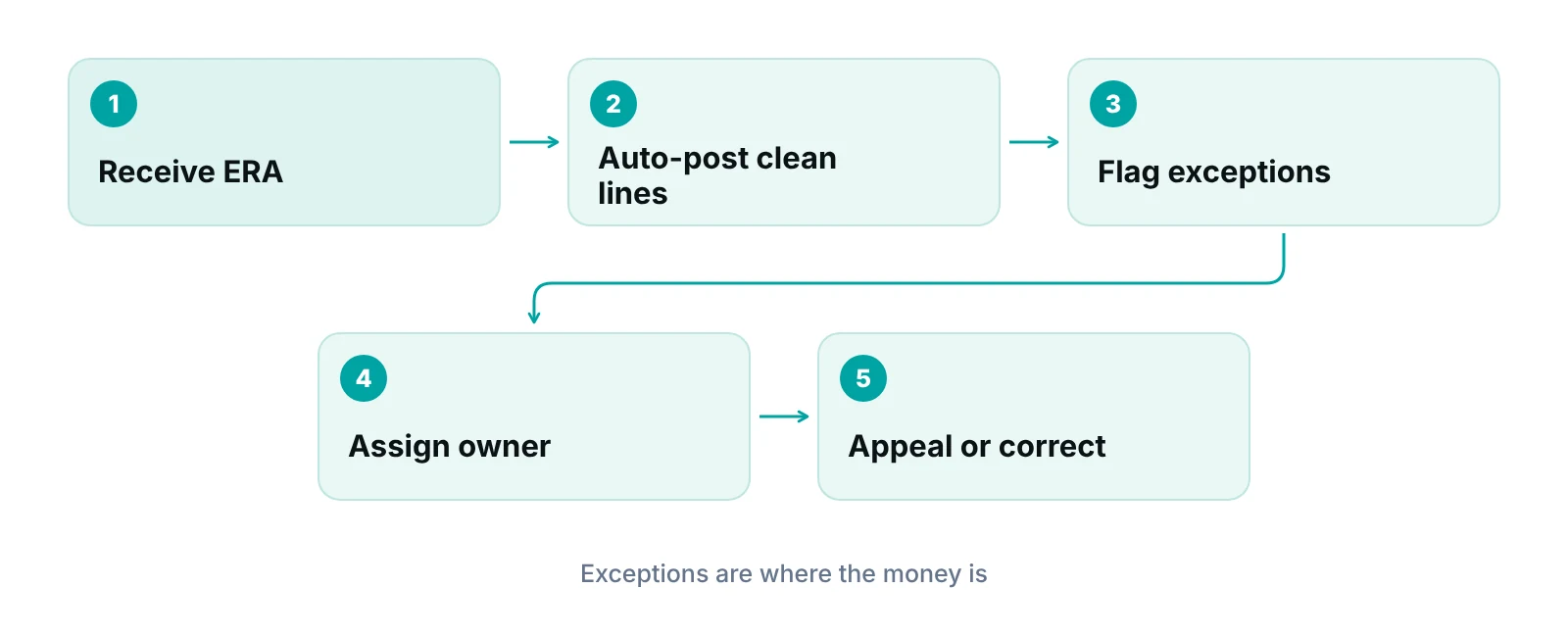
Posting means applying each payment and adjustment to the right claim, then routing every exception to a person. Auto-posting handles the clean lines. The value comes from deciding what happens to the rest. Our guides to payment posting steps and payment posting in the revenue cycle go deeper on the posting side.
- Match the deposit to the ERA. Use the trace number. Resolve any difference before posting.
- Check the balance. Claim payments less provider-level adjustments should equal the payment. A gap points to a PLB line or a missing file.
- Auto-post clean lines. Payments with expected contractual adjustments can post with no touch.
- Hold exceptions. Denials, zero-pays, unfamiliar codes and payments below what your contract says should go to a work queue with an owner.
- Move patient balances. PR amounts go to secondary coverage or to the patient statement.
- Record takebacks. Provider-level adjustments for recoupments need matching entries on the original claims. See our guide to recoupment in medical billing.
- Log patterns. Track the same reason code by payer. A repeated reason is a front-end problem, not a posting problem.
“A remittance only helps if every line that does not post cleanly lands in a queue with a name next to it.”
Common situations and the next step
- Deposit does not equal the sum of claim payments. Check the provider-level adjustments (interest, takebacks) and record each one.
- An EFT deposit with no ERA. Check enrollment with that payer and the trace number, then ask the payer or clearinghouse.
- Payment lower than your contracted rate. Compare it with the expected amount and dispute it where warranted.
- Denial with an unfamiliar code. Look up the current CARC and RARC, then route it to denial follow-up.
What your software should do with an ERA
Whatever you use, ask it to match remittances to deposits, auto-post only what is clearly clean and flag the rest. A claim-centred system such as a practice management system that tracks claims by stage helps because the ERA is one event in a claim’s life. Underpayment flags against expected amounts and an owner on each exception make the difference between posting and follow-up.
If your team does not have time to work the exceptions, a billing partner can take that over. Our medical billing services include payment posting and the follow-up that comes after it, and the work looks different by specialty (see our specialty billing pages).
Common ERA mistakes in a practice
- Posting to the deposit only. Skipping the claim detail hides denials and PR amounts.
- Treating CO as always safe. A contractual adjustment is a write-off only if the amount matches your contract.
- No owner for provider-level adjustments. Takebacks become surprise A/R changes.
- Enrolling one tax ID and forgetting the others. Payers such as Cigna enroll each TIN separately.
- Letting paper and electronic mix. Two streams for one payer means double posting or gaps.
- Counting on ERA to cut denials. It reports them. Prevention happens before the claim goes out, through eligibility, authorization and claim scrubbing.
Estimate what slow follow-up costs
Use our revenue calculator to put a number on denied or underpaid claims in your own practice.
Our recommendations
- Enroll every payer and every tax ID. List each payer and TIN you bill. Confirm in writing which are set up for ERA and EFT and which still send paper.
- Match before you post. Pair every deposit with its ERA by trace number. Do not post to a bank total.
- Auto-post only the clean lines. Set a short rule list for what posts without review. Everything else goes to a queue with an owner and a due date.
- Read the provider-level adjustments. Interest, takebacks and recoupments sit outside the claim lines. Record them the day the ERA arrives.
- Track reason codes by payer. Count the same reason code by payer each month. Fix repeats at the source: registration, authorization or coding.
- Use the current code lists. Update the lookup table your team relies on when the code lists change, and retire old cheat sheets.
Track each remittance exception to a named owner.
RCM Finder's portal tracks claims by stage with an owner and flags underpayments against expected amounts, so exceptions from an ERA do not get lost between posting and follow-up.
See how the RCM Finder portal works · Create a portal account
Disclosure: RCM Finder builds and sells this portal. It is a practice management system, not an EHR.
Bottom line
An ERA is the record that tells you what each payer decided. Its value depends on matching it to the deposit, posting the clean lines and giving every exception an owner. If denials and short payments are piling up after posting, our denial management services can take the follow-up, and our free practice audit shows where your remittances are leaking.
Frequently asked questions
What is an ERA in medical billing?
An ERA, or electronic remittance advice, is an electronic file in the ASC X12 835 format that a payer sends to explain how it processed claims: payments, adjustments and denials, with reason codes. It is the electronic counterpart of the paper explanation of payment.
What is the difference between an ERA and an EOB?
They carry similar information for different readers. An EOB is typically a paper or PDF explanation, and a patient may receive one too. An ERA is the 835 data file sent to the provider so software can post payments automatically.
What is the difference between an ERA and an EFT?
The ERA explains the payment, and the EFT is the payment itself, deposited to your bank. They are sent separately and linked by a reassociation trace number. A deposit with no matching ERA, or an ERA with no deposit, needs follow-up with the payer or clearinghouse.
How do I start receiving ERAs?
Enroll with each payer, usually through its portal or your clearinghouse, and enroll each tax ID if the payer requires it. Cigna, for example, finalizes ERA registration within 10 business days of receipt and starts on the next payment cycle. Rules differ by payer.
Does an ERA reduce claim denials?
No. The ERA arrives after the payer has decided the claim, so it reports denials but does not prevent them. It helps you find and work them faster. Prevention comes from accurate registration, eligibility checks, authorization and claim scrubbing before submission.
Does an ERA help with secondary claims?
It can. The primary payer’s adjustments and patient-responsibility amounts are what you usually need to bill a secondary payer. Medicare requires current reason and remark codes in both remittance advice and coordination of benefits transactions. Confirm each secondary payer’s submission rules.
Get your free practice audit
Tell us about your practice. We will contact you using the details you give.
- A review of your recent claims, denials and A/R aging
- Where your front desk and prior authorizations slow payment
- A prioritized fix list you keep, whether or not you hire us
Pricing is quoted after the audit, based on your volume and the services you choose. Prefer to talk? Call +1 (302) 556-2288.
Sources
- 45 CFR 162.1602 Standards for health care electronic funds transfers and remittance advice — eCFR (via Cornell LII) (2014 (effective))
- Medicare Claims Processing Manual transmittal R2843CP (remittance advice) — CMS (undated)
- CR 6229 job aid: CARC and RARC updates — CMS (undated)
- Claim payments: EFT and ERA — Cigna (current)
- Electronic Remittance Advice — Pennsylvania DHS (current)
- 835 Health Care Claim Payment/Advice companion guide — Amerigroup (Elevance) (undated)
Disclaimer: This article is educational and is not legal, coding or compliance advice. Payer rules, enrollment steps and code lists change, so confirm current requirements with each payer and the official code sources.
