
Chiropractic practice management software should capture the fields Medicare and payers expect, track visits against plans of care and authorizations, and meet HIPAA Security Rule duties. Compare features against those requirements, test them with real cases, and confirm business associate terms and data export before signing.
A demo looks good when every patient is a clean example. A real chiropractic day is different: dozens of short visits, a plan of care that must be refreshed, a Medicare patient who needs an advance notice, and a payer that approved ten visits and no more. This guide is for owners and managers choosing or replacing software who want a checklist that comes from the rules, not from a feature brochure.
It names no products. It covers what the record and claim must contain, how to track visits, which security questions to ask, and how a billing workflow layer differs from the clinical system. The wider overview is in the practice management software guide.
Key takeaways
- Start from the record. Medicare contractor documents name the fields a chiropractic chart must hold, from initial treatment date to subluxation level and plan of care.
- Visit tracking matters. One published payer rule approves ten visits at a time and requires documentation to reauthorize.
- Software cannot make care medically necessary. An OIG audit estimated 82% of sampled Medicare chiropractic payments in 2013 were unallowable.
- Security duties stay with the practice. Ask about unique logins, audit controls, encryption, breach reporting and a Business Associate Agreement.
- Plan the exit before signing: how to export records and what happens to protected data at termination.
What makes chiropractic workflow different for software?
Chiropractic care produces many short visits against a plan, and each visit has to fit that plan on paper and on the claim. A system built for a few long appointments a day will struggle. The test is whether the software can follow one patient from first exam through the plan of care, the visit count, the authorization and the claim without re-keying.
Payer rules show why visit tracking matters. One published reauthorization notice from a large health plan says prior authorization is required for all spinal manipulation, ten visits are approved to start, and further care can be reauthorized up to ten visits at a time with documentation showing improvement and continued need (Kaiser Permanente notice, most recent date listed 12/23/2024). It also says to verify the member’s benefit plan first, since visit limits may apply. Other payers differ, so the software should hold limits per plan and warn before the last approved visit.
Cash and package patients add a second requirement. A clinic that sells prepaid visit packages or memberships needs a ledger that shows the prepaid balance, the visits used and the refund terms, kept apart from insured visits so each patient is billed the way the clinic advertised. The chiropractic marketing guide explains why package terms and fee statements need a rule check before launch.
The practical consequence is that scheduling, charting and billing cannot live in separate silos. The EMR and EHR guide explains how the terms differ, and the practice management system page shows how RCM Finder frames the billing-side workflow.
Which record fields should the software capture?
It should capture the elements Medicare contractors and payers say a chiropractic record must show, and make them hard to skip. The table below lists the fields drawn from a Medicare contractor fact sheet, a CMS billing guideline, a CMS educational tool and an Optum Medicare policy. Contractor texts date from different years, so the list is a starting point and the current contractor policy governs.
| Record element | Source text says | Feature to test |
|---|---|---|
| Initial treatment date | Entered in Item 14 of the CMS-1500 (CHIRO-001); date of acute exacerbation if applicable (CGS) | Date set once and carried to every claim |
| Subluxation and condition | Subluxation as primary diagnosis with level; neuromusculoskeletal condition secondary (CHIRO-001) | Diagnosis order and spinal level fields |
| PART exam findings | Two of four findings, one being asymmetry or range-of-motion abnormality (CGS; Optum) | Structured exam fields, not free text only |
| Plan of care | Frequency, duration, specific goals and objective measures (CGS) | Plan fields with a review reminder |
| Subsequent visit note | Interval history, focused spinal exam, treatment that day, fit with plan (CGS) | Visit template that pulls the plan forward |
| X-ray currency | Current if taken no more than 12 months before or 3 months after starting treatment (CGS) | Date alert on imaging |
| Signatures | Signed notes; attestation process instead of late signatures (CGS, CHIRO-001) | Signature capture and attestation log |
| AT modifier | For active or corrective treatment only, never maintenance (MLN1232664; CHIRO-001) | Prompt tied to care type that blocks AT on maintenance visits |
Sources: CGS Medicare chiropractic fact sheet L37254 (revised 2017); CMS CHIRO-001 (2015); CMS MLN1232664 (2022); Optum Medicare chiropractic policy (effective 02/11/2026).
Two cautions follow. First, the CMS educational tool says the AT modifier does not prove medical necessity, and contractors can deny claims after review. Second, the CHIRO-001 guideline says reimbursement is limited to one treatment per day unless documentation supports more, so the software should warn on a second same-day charge. For the coding and coverage rules behind these fields, see the Medicare billing guide for chiropractors and the CPT codes and modifiers guide.
Software supports documentation; it does not replace it
An OIG audit of 2013 Medicare payments estimated that $358.8 million, about 82% of $438.1 million paid for chiropractic services, was unallowable, and recommended better education on the AT modifier (OIG A-09-14-02033, October 2016). Prompts help, but the clinician’s note still has to show medical necessity.
Which claim and billing features should be on the checklist?
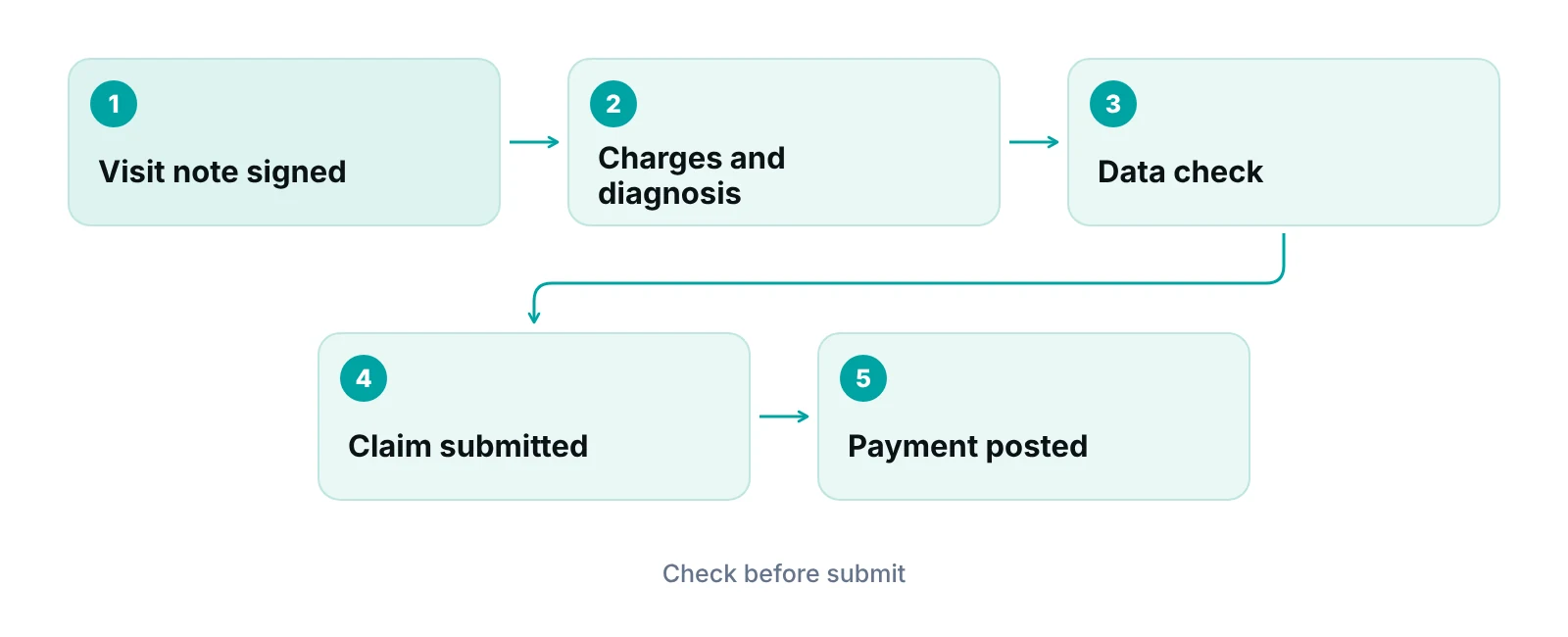
The claim features should reduce rework before submission and show where each claim stands afterward. For a chiropractic office that means flags for Medicare notices, a data check before claims go out, deadline alerts and clear status tracking.
- ABN handling. The CMS Claims Processing Manual, chapter 30, section 50 says the ABN applies to Original Medicare, is issued before care expected to be denied, and is not to be given to every beneficiary. The software should store the notice per service and set the GA or GZ modifier logic that the billing guideline describes.
- Claim data check. A check for missing diagnosis order, treatment date or modifier before submission saves denials. The idea is simple: catch the error before the payer does.
- Filing deadline alerts. A CMS transmittal (No. 12909, October 24, 2024) states Medicare denies a claim as untimely when received more than 12 months after the service (CMS). Alerts for aging unbilled visits matter.
- Payer rule library. Visit limits, authorizations and plan quirks held per payer, not in staff memory.
- Status tracking and reports. Claims tracked by stage, with an aging view the manager reads weekly.
If the office wants a second set of eyes on claim flow, the chiropractic billing services guide explains when to keep billing in-house and when to outsource.
What security features and contract terms should be confirmed?
Security duties stay with the practice even when a vendor hosts the data. The HHS risk analysis guidance says a covered entity must assess risks to all of its electronic protected health information, and the AMA warns that physicians should not rely on certified EHR technology alone to satisfy the Security Rule. Use the table to turn the technical safeguards in 45 CFR 164.312 into vendor questions.
| Safeguard (45 CFR 164.312) | Status in the rule | Question for the vendor |
|---|---|---|
| Unique user identification | Required | Does every staff member have a separate login? |
| Emergency access procedure | Required | How is patient data reached if the system or a user fails? |
| Automatic logoff | Addressable | Can idle sessions end automatically? |
| Encryption and decryption | Addressable | Is stored data encrypted? What does the vendor document if not? |
| Audit controls | Standard | Can the practice see who viewed or changed a record? |
| Integrity | Standard; mechanism addressable | How is tampering with a record detected? |
| Person or entity authentication | Standard | How is each user’s identity verified? |
| Transmission security | Standard; encryption addressable | Are connections to the system and portal encrypted? |
Source: eCFR, 45 CFR 164.312 (current). Only the implementation specifications carry a required or addressable label.
Then check the contract. HHS says a business associate contract must set permitted uses, require safeguards including Security Rule compliance for electronic information, require reporting of improper disclosures and breaches, bind subcontractors, and allow termination for a material violation (HHS). The HHS sample provisions add that protected health information should be returned or destroyed when the contract ends, if feasible. Ask how records are exported before signing, because required documents must be kept for at least six years according to the AMA guidance.
Patient-facing pages deserve a separate check. The HHS OCR tracking bulletin treats information collected when someone schedules an appointment as protected health information, so online booking and intake forms should be reviewed for third-party tags. A court vacated part of that bulletin on June 20, 2024. The HIPAA compliance checklist gives the wider program.
What should patient-facing features do?
Intake forms, reminders and online booking save front-desk time, and each one handles patient information. For intake, look for forms that send to the chart without re-typing and that capture consent and insurance details once. For reminders, look for message templates that hold the minimum a patient needs, because a reminder that spells out a diagnosis exposes it on a lock screen. For booking, look for control over which pages load third-party scripts.
- Intake and consent forms completed before the visit and filed to the chart
- Reminders with appointment details only, sent by a method the patient agreed to
- Booking pages whose third-party scripts the office can list and approve
- A patient portal where each user sees only their own record
The chiropractic SEO post and the digital marketing post explain how booking pages connect to local search and ads.
Should one system do everything?
Not always. Many offices run a clinical and front-desk system and add a billing workflow layer, or outsource billing, depending on size and appetite for in-house work. The table separates the jobs so the decision is about tasks, not brand names. It is a decision framework drawn from this article’s requirements, not a sourced industry statistic.
| Job | Clinical and front-desk system | Billing workflow layer or billing partner |
|---|---|---|
| Charting, plan of care, signatures | Core job; must be strong here | Not the place for clinical notes |
| Scheduling and reminders | Core job | Not required |
| Payer visit limits and authorizations | Needs a place to store and warn | Can track status and follow-up |
| Claim data checks before submission | Varies by product | Can run checks on each claim |
| Claims tracked by stage and aging | Basic view in many products | Dedicated pipeline view |
| Underpayment detection against expected amounts | Often manual | Can compare payments to expected amounts |
| Role-based access and audit log across billing staff | Required by the Security Rule | Same duty applies to any added tool |
Framework prepared by RCM Finder from the sources above; not a statement about any product.
RCM Finder’s own portal is a billing-side workflow layer used by medical practices and by billing companies serving several practices. Today it provides claim tracking by stage, specialty-aware billing logic applied per claim, claim data-completeness checks before submission, underpayment detection against expected amounts, workflow automation rules, role-based staff permissions, an audit log, a client portal and reporting dashboards over encrypted HTTPS connections. Appointment booking with a calendar view, a provider credentialing module and automated real-time eligibility verification inside the portal are early access or coming next, not live today. Clinical charting stays in the practice’s own record system.
Software does not answer the phone. A Virtual Medical Assistant can handle scheduling, eligibility checks and intake in the practice’s time zone, which keeps front-desk work moving whichever system the office chooses.
How should the practice run the selection?
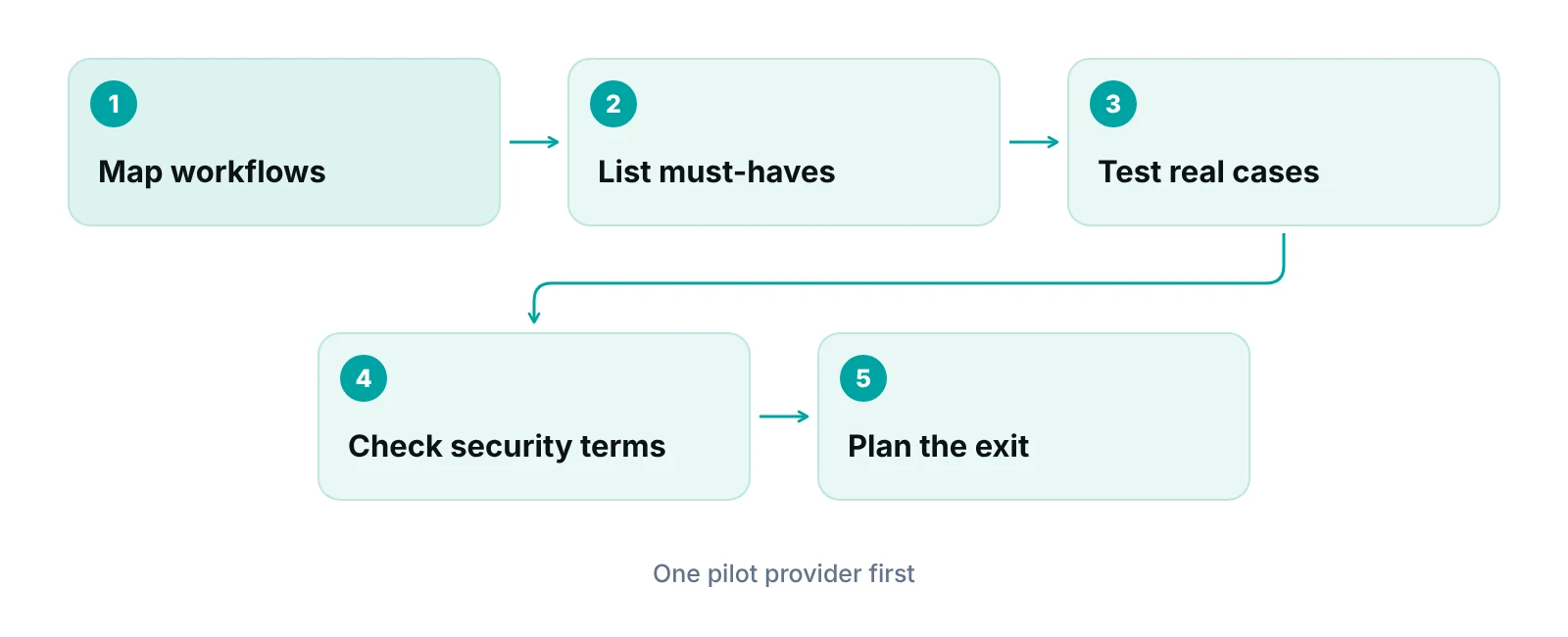
Use the same short script with every vendor, with real scenarios from the last month. Ask each vendor to show the steps, not describe them.
- Write down ten real cases: a Medicare active-care patient, a maintenance patient needing an ABN, a plan with a visit cap, a cash patient on a package, a same-day second charge.
- Run each case through the demo and note the clicks and the warnings.
- Ask for the security answers in writing, matched to the table above.
- Read the Business Associate Agreement and the data-return terms.
- Ask how a finished contract ends: export format, timing and deletion.
- Pilot with one provider before moving the whole clinic.
Map your workflow before you buy
A free practice audit reviews how visits, authorizations and claims move through your office and where software or staffing gaps sit. Pricing is quoted after the audit.
Our recommendations
- Write the cases before the demo. List ten real chiropractic scenarios and make every vendor run them.
- Make documentation fields required. Require treatment date, subluxation level, plan of care and signature before a note can close.
- Block AT on maintenance visits. Tie the modifier to the care type so it cannot be added by default.
- Store payer limits in the system. Hold visit caps and authorization dates per plan and warn before the last approved visit.
- Get security answers in writing. Match each answer to the technical safeguards table and file it with the risk analysis.
- Review the Business Associate Agreement. Confirm breach reporting, subcontractor terms and PHI return at termination.
- Plan the exit on day one. Confirm export formats and a retention plan that covers at least six years of required documents.
Bottom line
The best chiropractic practice management software is the one that fits the visit workflow, captures the fields payers expect, tracks limits and meets Security Rule duties. Test it with real cases and read the contract before signing. For a billing-side workflow layer, see the practice management system page or request a free practice audit.
Frequently asked questions
What features does chiropractic practice management software need?
It needs structured fields for treatment date, subluxation level, exam findings and plan of care, visit tracking against payer limits, ABN and modifier logic, claim data checks, role-based access and audit trails. Test each against real cases and the Medicare contractor’s current policy.
Does the software decide when the AT modifier is used?
No. CMS says the AT modifier marks active or corrective treatment and does not prove medical necessity. The clinician decides the care type, and the software should only prompt and prevent AT on maintenance visits. Contractors can still deny claims after review.
Is a certified EHR enough for HIPAA compliance?
No. The AMA guidance says physicians should not rely on certified EHR technology alone to satisfy the Security Rule. The practice still needs its own risk analysis, policies, access controls and Business Associate Agreements with vendors that handle protected data.
What should a Business Associate Agreement cover?
HHS says it should set permitted uses, require safeguards including Security Rule compliance, require reporting of breaches and improper disclosures, bind subcontractors, and allow termination for a material violation. Sample provisions also cover returning or destroying data at the end, if feasible.
Can online booking forms create privacy risk?
Yes. OCR’s tracking bulletin treats appointment information as protected health information, so third-party tags on booking and intake pages need review and may need a Business Associate Agreement. A court vacated part of the bulletin in 2024, so counsel should confirm the current position.
Should billing sit in the same system as charting?
It can, but it does not have to. Some offices keep charting and scheduling in one system and add a billing workflow layer, or outsource billing. Decide by task: who checks claims, tracks aging and follows up. The key is clean data between the two.
Get your free practice audit
Tell us about your practice. We will contact you using the details you give.
- A review of your recent claims, denials and A/R aging
- Where your front desk and prior authorizations slow payment
- A prioritized fix list you keep, whether or not you hire us
Pricing is quoted after the audit, based on your volume and the services you choose. Prefer to talk? Call +1 (302) 556-2288.
Sources
- Chiropractic Services Fact Sheet (L37254) — CGS Medicare (2017)
- CHIRO-001 Chiropractic Services billing guideline — CMS Medicare Coverage Database (2015)
- MLN1232664 Chiropractic Services educational tool — CMS (2022)
- Medicare Chiropractic Services Utilization Management Policy 496 — Optum (2026)
- Reauthorization for spinal manipulation visits — Kaiser Permanente (2024)
- Medicare Claims Processing Manual, Chapter 30, Section 50 (ABN) — CMS (current)
- Transmittal 12909, Claims Processing Manual Chapter 1 — CMS (2024)
- Hundreds of Millions in Medicare Payments for Chiropractic Services Did Not Comply With Medicare Requirements (A-09-14-02033) — HHS OIG (2016)
- 45 CFR 164.312 Technical safeguards — eCFR (current)
- Guidance on Risk Analysis — HHS Office for Civil Rights (current)
- HIPAA security rule and risk analysis — American Medical Association (current)
- Business associate contracts — HHS Office for Civil Rights (current)
- Sample business associate agreement provisions — HHS (current)
- Use of Online Tracking Technologies by HIPAA Covered Entities — HHS Office for Civil Rights (2024)
Disclaimer: This article is educational and is not legal, coding, tax or compliance advice, and it does not tell any clinician how to treat a patient. State board rules, payer policies and Medicare contractor policies differ and change, so confirm the current rule with your state board, your payers, your Medicare contractor and qualified counsel before you act. CPT is a registered trademark of the American Medical Association.
