
Dental website design converts when a first-time visitor can see who you treat, which plans you accept and how to book within seconds on a phone. The site needs fast pages, plain service pages, a simple booking path, accessible forms, privacy-safe tracking and copy that follows your state dental board advertising rules.
Most advice on this topic comes from design agencies and shows layouts. This guide treats the site as the front door of patient intake: each page has one job, each form has a data rule, and each claim has a board rule behind it. It sits under our dental practice management guide, which covers the rest of the operation.
Ranking tactics are covered in our dental SEO guide. This post starts after the click: what the visitor sees, what the site collects and what the practice must be able to defend.
Key takeaways
- Give every page one job and one next step: call, book or send a form.
- Test speed and accessibility against published pass marks: Core Web Vitals “good” thresholds and WCAG 2.1 Level AA.
- Treat booking and intake forms as places where patient data is collected, and get a business associate agreement from any vendor that stores it.
- Keep marketing tags off pages that collect health details, and never put names or reasons for a visit in URLs.
- Check your state dental board rules before publishing claims, specialty terms, fees, testimonials or photos.
What does a dental website actually have to do?
It has to move a person from a search or a referral to a booked first visit with as few steps as possible. Everything else on the site supports one of three outcomes: a call, an online booking, or a form that reaches the front desk.
Picture a new resident who wants to know if you take their plan, or a patient with a broken tooth who wants a phone number now. Each should reach the right page in one tap.
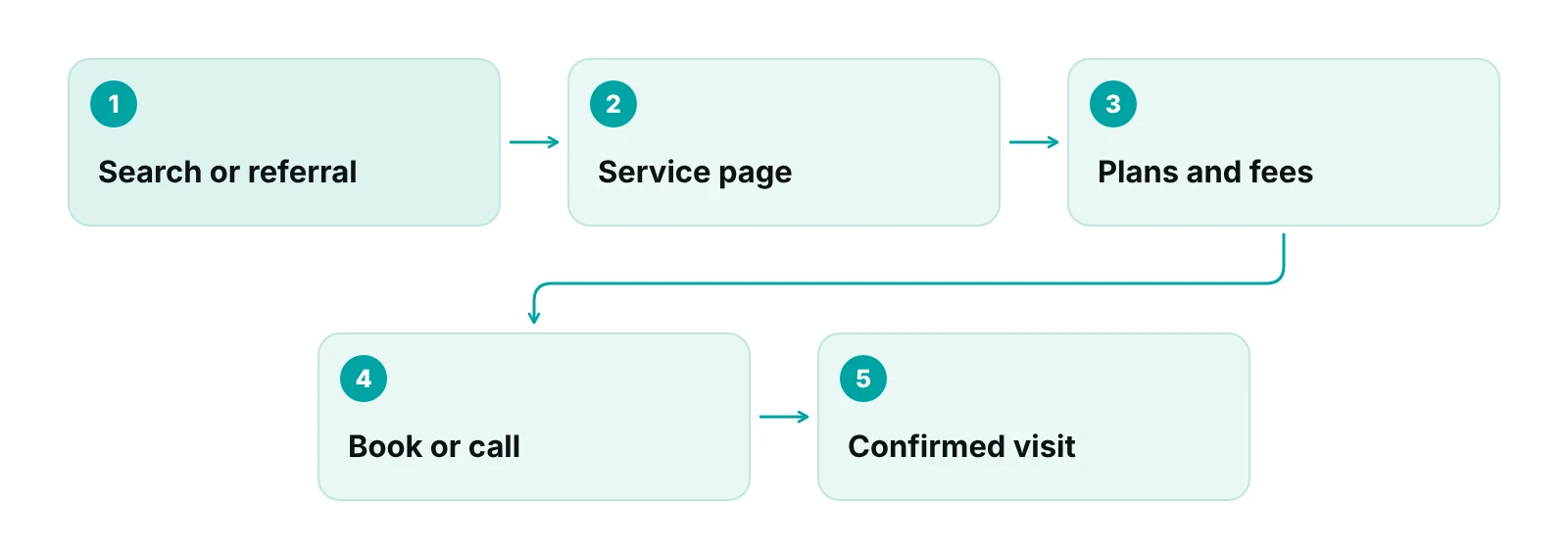
The design test is not “does it look modern?” but “how many seconds until a visitor sees the location, plans accepted and a booking button?”
Where the site sits in the wider plan is covered in our dental marketing plan and dental digital marketing guide. For general layout ideas across specialties, see our roundup of medical website designs.
Which pages and elements move visitors to book?
A small set of pages does most of the work. Give each a single purpose and a single call to action.
| Page | Job | Must contain | Common gap |
|---|---|---|---|
| Home | Orient and route | Location, phone (tap to call), booking button, plans accepted, hours | Rotating banner with no phone number |
| Service pages (one each) | Answer “do you do this?” | Plain description, who it suits, what the visit involves, next step | One long “services” page that covers everything |
| Insurance and payment | Remove cost doubt | Plans accepted, how benefits checks work, payment options, contact for questions | Plan logos without the sentence “call us to confirm” |
| Team | Build trust | Name, license role, training, a clear specialty statement if any | Specialty wording the board would not allow |
| New patients | Prepare the visit | What to bring, forms, arrival time, emergency contact | Forms emailed as unsecured attachments |
| Contact and location | Get the visit booked | Address, map, parking, phone, booking link, after-hours instructions | Contact form is the only option |
Source: RCM Finder framework for dental practice websites; no external statistics.
Two details are easy to miss. First, write plans accepted as a sentence a front desk can stand behind, for example “We are in network with the plans listed; call us to confirm your benefits.” Second, put the phone number in text, not in an image, so it can be tapped.
The same pages feed your paid campaigns. Our guide to dental Google Ads explains why a landing page should match the ad that sent the click.
How should online booking and intake forms work?
Offer two paths, a tap-to-call number and a short booking or request form, and make sure every request lands in a place staff check on a schedule. A form nobody reads for two days costs more than no form.
Decide before launch who owns each inbound request and how fast it is answered.
- Collect the minimum on the first form: name, phone, email, preferred time and whether the person is new. Leave out symptoms and insurance ID numbers on the public form.
- Move the detailed intake (history, insurance details) behind a secure link after the visit is requested.
- Send an automatic confirmation that says what happens next and gives the office phone number.
- Route requests to a named inbox or scheduling queue, not a general mailbox that several people check.
- Record the source of each new patient at the time of booking so reports match the schedule.
Booking tools need to match the practice management system, or staff will retype every request. Our dental practice management software guide lists the questions to ask about scheduling and patient portals before you buy.
Whose job is the follow-up?
Many missed new patients come from slow replies, not weak design. Our dental virtual assistant article describes how remote front-desk staff can answer web requests and confirm appointments. See also our guide to automated patient scheduling.
What speed and accessibility pass marks should the site meet?
Use published thresholds rather than a designer’s opinion. Google’s web.dev team defines Core Web Vitals “good” scores as a Largest Contentful Paint of 2.5 seconds or less, an Interaction to Next Paint of 200 milliseconds or less and a Cumulative Layout Shift of 0.1 or less, measured at the 75th percentile of visits (web.dev). Ask your developer for these numbers for the home page and the booking page, on mobile.
| Check | Pass mark | How to test |
|---|---|---|
| Main content loads (LCP) | 2.5 seconds or less | Field data in Search Console or PageSpeed Insights, mobile |
| Response to taps (INP) | 200 milliseconds or less | Tap the booking button and menu on a mid-range phone |
| Layout stability (CLS) | 0.1 or less | Watch for buttons that jump as the page loads |
| Text contrast | At least 4.5:1 for normal text (WCAG 2.1 AA 1.4.3) | Contrast checker on brand colors and button text |
| Text resize | Usable at 200 percent without losing content (1.4.4) | Zoom the browser and check forms and menus |
| Headings and labels | Describe topic or purpose (2.4.6) | Read headings out of context; label every form field |
| Keyboard use | All functions work without a mouse (2.1.1) | Tab through the booking form |
Source: web.dev, “How the Core Web Vitals metrics thresholds were defined”; W3C, Web Content Accessibility Guidelines (WCAG) 2.1.
Heavy photos, auto-playing video and chat widgets are common speed problems. Compress images, fix image sizes so the layout does not jump, and load third-party scripts only where needed.
Accessibility starts with the same pages: descriptive alt text on images, captions on videos, form fields with visible labels, and buttons that can be reached by keyboard. These are standard parts of WCAG, which organizes its requirements under four principles: perceivable, operable, understandable and robust (W3C).
What does accessibility law require of a dental website today?
The clearest legal rules cover government sites, and the detailed technical standard in them is WCAG 2.1 Level AA. Private practices fall under a different part of the ADA, where the Department of Justice has issued guidance rather than a technical standard.
The Justice Department’s 2024 rule for state and local governments requires web content and mobile apps to meet WCAG 2.1 Level AA, with compliance dates that an April 2026 interim final rule moved to April 26, 2027 for governments serving 50,000 or more people and April 26, 2028 for smaller ones (ADA.gov; ADA.gov fact sheet). The DOJ’s 2022 guidance for businesses open to the public points to WCAG as a resource and does not name a required standard (U.S. Access Board).
Health care has a second track. HHS’s Section 504 rule applies WCAG 2.1 Level AA to recipients of HHS federal financial assistance, and a May 2026 interim final rule moved the dates to May 11, 2027 for recipients with 15 or more employees and May 10, 2028 for those with fewer (Federal Register). Whether a given dental practice counts as a recipient depends on its funding; ask your attorney.
Do not rely on an overlay alone
A script that adds a toolbar does not replace accessible design. Ask your developer to fix the page structure and test with a keyboard and a screen reader.
The practical target is WCAG 2.1 Level AA on the pages that matter most: home, service pages, forms and booking. Write it into the build contract and ask for a test report.
How do you keep forms and trackers within HIPAA?
Treat any page where a visitor can book, describe a problem or enter insurance details as a place where protected health information may be collected. HHS says tracking on unauthenticated pages usually does not involve PHI, but pages that let users book appointments can collect it, such as an email address or the reason for care (HHS).
The picture has a legal wrinkle. On June 20, 2024 a federal court in American Hospital Association v. Becerra vacated the part of HHS’s bulletin about IP addresses on public pages about conditions or providers, and HHS says it is evaluating next steps. The rest of the bulletin, including the caution on scheduling pages and the business associate point below, still stands on HHS’s page.
- Vendors: a form, booking or chat vendor that stores or sends PHI for you is a business associate. HHS’s cloud guidance says a provider storing ePHI needs a business associate agreement even if it cannot view the data (HHS).
- Agreements and banners: HHS says a signed agreement alone does not permit a disclosure, a privacy policy is not an authorization, and a cookie banner does not count as a HIPAA authorization.
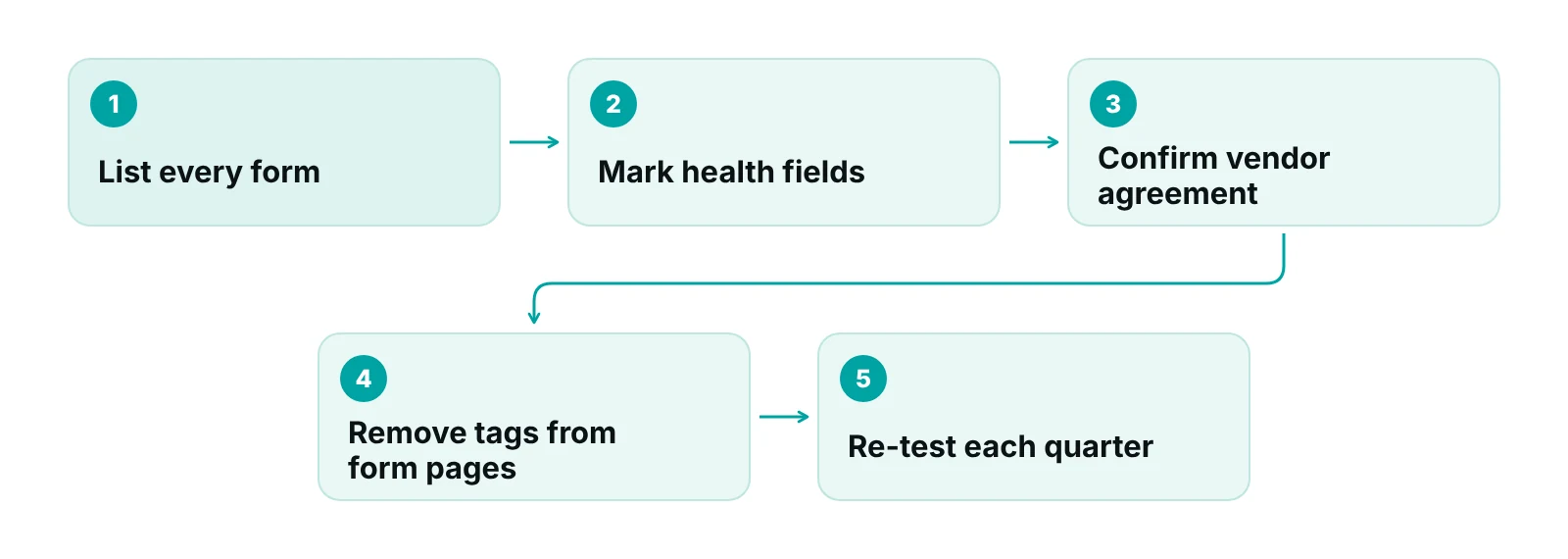
- Tags: keep ad and analytics tags off booking, form and portal pages unless the vendor will sign an agreement and your counsel approves.
- URLs and titles: never include names, symptoms or plan numbers in page addresses, page titles or thank-you page text.
The tracking setup, including what to measure and where it comes from, is in our dental digital marketing guide, and the wider safeguards are in the HIPAA compliance checklist for medical practices.
Which state dental board advertising rules apply to site copy?
Your state board sets the rules for what a dental website may claim, and states differ. The common threads are no false or misleading statements, tight control of specialty terms, conditions on fee advertising and consent for patient information. Read your own board’s rules before the copy is final.
| Topic | Pennsylvania board rules (2021) | Iowa board rules (chapter 26) | ADA Code of Ethics (section 5) |
|---|---|---|---|
| Truthfulness | No false, misleading or deceptive ads; no unjustified expectations of results | Ads must be accurate; no unjustified expectations; substantiate claims at the time of the ad | No ad false or misleading in a material respect; websites and SEO must comply |
| Specialty terms | Not allowed unless the board recognizes the specialty and training is completed; non-specialty areas must not imply specialty | Only for diplomates or board-eligible dentists in approved specialties; name the certifying board | “Specialist in” only for recognized specialties; general dentists must say so |
| Superiority and comparisons | Comparisons must be substantiated | Superiority claims must be substantiated | Superiority claims need reasonable substantiation |
| Fees and offers | Honor advertised fee for at least 60 days; label minimum fees | Define the service; offer presumed to include what is ordinarily required | Not addressed in section 5.F |
| Patient information and testimonials | Check the full rule text | No identifiable patient information without consent; no unverifiable testimonials on quality | Testimonials not directly addressed |
Sources: Pennsylvania State Board of Dentistry advertising regulations (2021 PDA copy); Iowa Administrative Code chapter 650-26 (2025); ADA Principles of Ethics and Code of Professional Conduct, section 5.
Specialty wording needs extra care. The American Academy of Pediatric Dentistry notes that a Texas rule limiting specialist claims to ADA-recognized specialties was struck down in American Academy of Implant Dentistry v. Parker, so boards differ on what a dentist may say (AAPD). A site that calls a general dentist an “implant specialist” can create a board problem in one state and not in the next.
Reviews and testimonials carry a second layer. The FTC’s Consumer Reviews and Testimonials Rule, effective October 21, 2024, bars fake or false reviews and testimonials, review-buying tied to a particular sentiment and unclear insider reviews, and the FTC says a business posting testimonials on its own site is disseminating them (FTC). HHS settled with a California dental practice for $23,000 in 2022 after it disclosed patient information while responding to online reviews (HHS OCR). Our guide to dental reputation management covers reviews in depth.
A simple copy review
Before launch, list every claim on the site (best, painless, same-day, specialist, free, guaranteed), write the proof next to each one, and delete any claim you cannot support or your board does not allow. Keep the list for the board if it asks.
How do you brief a builder and test the result?
Write a one-page brief that names the pages, the booking path, the pass marks above and the data rules, then test against it before you pay the final invoice. A builder can only meet requirements you have written down.
- Scope: page list, forms, booking tool, who edits the site after launch and how fast changes are made.
- Performance: Core Web Vitals “good” thresholds on mobile for the home and booking pages.
- Accessibility: WCAG 2.1 Level AA target, plus a written test result and a fix window.
- Privacy: list of every third-party script and form vendor, with agreement status.
- Ownership: the practice owns the domain, the content and the hosting account, with admin access in your name.
- Exit: how you get content and data out if you change builders.
See what happens after the form is submitted
A free practice audit looks at your front-desk and billing workflow, so you can see whether the patients your website books turn into paid visits.
Our recommendations
- Time the path on a phone. Open the site on a mid-range phone and time how long it takes to find your plans accepted, your address and a booking button. If it takes more than a few seconds, the home page needs work before any ad spend.
- Collect less on the public form. We recommend a short first form with name, phone and preferred time, and detailed intake behind a secure link. It reduces risk and usually helps completion too.
- Put pass marks in the contract. Write the Core Web Vitals thresholds and WCAG 2.1 Level AA into the scope, and ask for a test report at hand-over.
- Keep a vendor register. List every form, chat, booking and tracking vendor with its agreement status and the pages it runs on. Review it each quarter.
- Prove each claim. For every superlative or specialty term on the site, write down the proof and check your state board’s rules. Remove what you cannot defend.
Bottom line
A dental website converts when it is quick to use, easy to book from and careful with patient data and claims. Set the page jobs, write the speed and accessibility pass marks into the brief, keep tags off form pages and check every claim against your dental board. For the wider operation, return to our dental practice management guide, and if you want help bringing patients to the site, see our healthcare digital marketing services.
Frequently asked questions
What should a dental website include?
A dental website should include a home page with location, phone and a booking button, one page per main service, an insurance and payment page, a team page, a new-patient page with forms and a contact page. Each page needs one clear next step, and the phone number should be tap-to-call text.
Does a private dental practice have to follow WCAG?
The Justice Department’s WCAG 2.1 Level AA rule covers state and local governments. For businesses open to the public, DOJ guidance points to WCAG as a resource without naming a required standard. Many practices still target Level AA because it is the benchmark in current rules. Ask your attorney about your situation.
Can a dental website use Google Analytics or ad pixels?
On public pages with no health details, HHS says tracking often does not involve PHI. Booking and form pages are different, because they can collect identifying health information. Keep tags off those pages unless the vendor signs a business associate agreement and your counsel approves.
Is an online booking form covered by HIPAA?
It can be. If the form or its vendor stores or transmits information that identifies a patient and relates to care, such as the reason for a visit, the vendor is generally a business associate and needs an agreement. Collect the minimum on the public form and ask the vendor for its agreement before launch.
How fast should a dental website load?
Aim for the Core Web Vitals “good” thresholds: Largest Contentful Paint of 2.5 seconds or less, Interaction to Next Paint of 200 milliseconds or less and Cumulative Layout Shift of 0.1 or less, at the 75th percentile of visits. Test the home and booking pages on mobile.
Can a dental website show reviews and before-and-after photos?
Often yes, but with limits. The FTC bars fake reviews and treats testimonials on your own site as your responsibility, and patient photos and details need consent. State boards may add rules on testimonials and results claims. Check your board and get written permission before posting.
Get your free practice audit
Tell us about your practice. We will contact you using the details you give.
- A review of your recent claims, denials and A/R aging
- Where your front desk and prior authorizations slow payment
- A prioritized fix list you keep, whether or not you hire us
Pricing is quoted after the audit, based on your volume and the services you choose. Prefer to talk? Call +1 (302) 556-2288.
Sources
- Accessibility of Web Information and Services of State and Local Governments: First Steps — ADA.gov (U.S. Department of Justice) (2026)
- Fact sheet: Final rule on web and mobile app accessibility, Title II — ADA.gov (U.S. Department of Justice) (2026)
- Department of Justice issues web accessibility guidance under the ADA — U.S. Access Board (2022)
- Extension of Compliance Dates for Nondiscrimination on the Basis of Disability; Accessibility of Web Information and Services — Federal Register (HHS) (2026)
- Web Content Accessibility Guidelines (WCAG) 2.1 — W3C (2018)
- How the Core Web Vitals metrics thresholds were defined — web.dev (Google) (2024)
- Use of Online Tracking Technologies by HIPAA Covered Entities and Business Associates — HHS Office for Civil Rights (2024)
- Guidance on HIPAA and Cloud Computing — HHS Office for Civil Rights (2022)
- Advertising Regulations (State Board of Dentistry) — Pennsylvania Dental Association / PA State Board of Dentistry (2021)
- Iowa Administrative Code, Chapter 650-26: Advertising — Iowa Dental Board (2025)
- Principles of Ethics and Code of Professional Conduct: Section 5, Veracity — American Dental Association (2025)
- Statement on Specialty Advertising — American Academy of Pediatric Dentistry (2018)
- The Consumer Reviews and Testimonials Rule: Questions and Answers — Federal Trade Commission (2024)
- HHS Civil Rights Office Enters Settlement with Dental Practice Over Disclosures of Patients' PHI (New Vision Dental) — HHS Office for Civil Rights (2022)
Disclaimer: This article is educational and is not legal, coding, tax or compliance advice. Accessibility, privacy and dental advertising rules differ by state and change over time, so confirm current requirements with your state dental board and your attorney before acting. CDT is a registered trademark of the American Dental Association.
