
Dental PPC is paid search advertising, mainly Google Ads and Local Services Ads, where a practice pays when someone clicks or contacts it. It works when campaigns follow what the patient wants, each ad leads to a matching page, calls and forms are counted, and no patient health information is sent to ad platforms.
This guide sits under our dental practice management guide and goes deeper on one channel. It shows how to structure dental Google Ads, where Local Services Ads fit, how to track calls, and where HIPAA and Google’s own policies limit measurement. It avoids cost-per-click averages, because the sources behind most of them are the agencies selling the work.
For the full channel mix, see dental digital marketing. This post covers only paid search.
Key takeaways
- Split dental Google Ads by patient intent: urgent, general, higher-value treatment, plan and brand terms.
- Dentist is a listed Local Services Ads category, but availability depends on locality and slow responses can hurt ranking.
- Count phone calls by length; Google’s call recording is off by default for healthcare, and recordings can hold PHI.
- Google offers no BAA for Analytics, and its health policies bar customer-data audiences, so keep PHI and patient lists out of ad tools.
- Set the budget from first-year collections per new patient and open chair slots, not from published cost-per-click figures.
What is dental PPC, and which campaign types does a practice use?
Dental PPC is paid search: the practice bids to appear when someone searches for a dentist, and pays for a click or a contact. Most practices choose among four formats, and each one gives the practice a different level of control.
| Campaign type | How it works | What to watch |
|---|---|---|
| Search campaigns | Ads appear on searches that match the keywords you choose. You control keywords, negative keywords, location and ad copy. | Match types and search terms need regular review. |
| Local Services Ads | Dentist is a listed category, and availability depends on country and locality. Google says you pay for leads tied to your business and services, and screening comes first. | Slow or missed responses can hurt ad ranking. |
| Performance Max | Google’s automated format. Optional search themes (up to 50 per asset group) give context and are not meant to limit traffic. | No way to control individual queries directly. |
| Call ads and call assets | Google assigns a forwarding number so calls can be measured. A call costs the same as a website click. | Call recording is off by default for healthcare. |
Source: Google Ads Help, Local Services Help, Search Engine Land (2023), Google Ads call reporting and call recording pages.
Google’s Local Services help pages list dentist among eligible categories and add that pre-badge ads and booking leads are not available for health care verticals. The page does not say which categories count, so confirm in your own account whether dentists are included (Google Local Services Help). Search Engine Land reported in January 2023 that Google had added dentists to Local Services Ads and that dentists must complete verification before advertising (Search Engine Land).
Our suggestion for a single-location practice: start with search campaigns and, where the account is eligible, Local Services Ads. Add Performance Max only after calls and forms are counted correctly, because automated formats learn from whatever you tell them to count.
How should keywords and campaigns be organized?
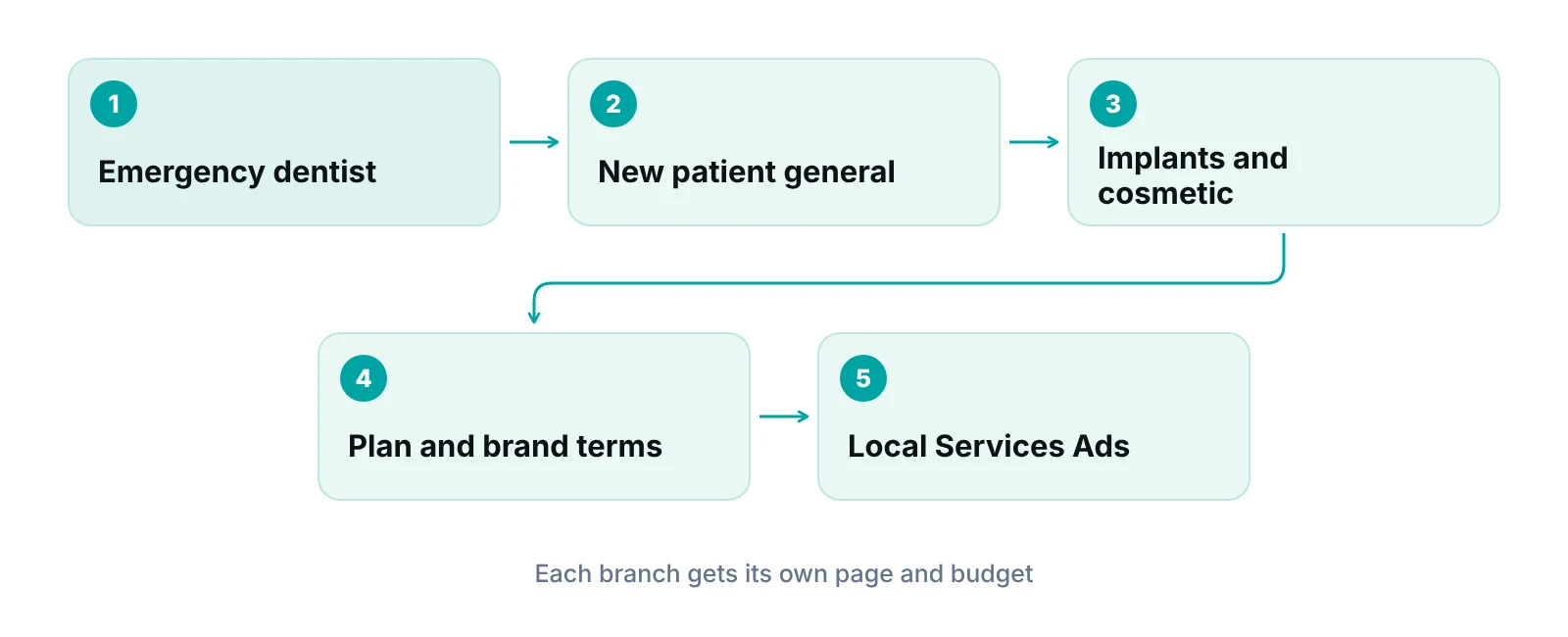
Group keywords by what the patient wants and how soon they want it. Each group has a different value, a different schedule fit and a different landing page, so each deserves its own budget line.
| Intent group | Example search themes | Landing page | Conversion to count |
|---|---|---|---|
| Urgent | emergency dentist, toothache dentist, same-day dental appointment | Hours, phone number, same-day booking path | Phone call of set length |
| New patient, general | dentist near me, family dentist, new patient dentist | Services, location, how to book | Call or booking-form submission |
| Higher-value treatment | dental implants, clear aligners, veneers | One page per treatment, consultation request | Consultation call or form |
| Insurance and plan | dentist that takes a named plan | Plans accepted, how benefits are checked | Call or form |
| Brand and doctor name | practice name, dentist’s name | Home page or booking page | Call or booking click |
Source: RCM Finder framework. Search themes are examples, not volume or cost data.
Match types set how closely a search must resemble a keyword. In Google’s description, broad match is the default and can show for related searches, phrase match falls in the middle, and exact match gives the most control but reaches the fewest searches. Google also says it is critical to use Smart Bidding with broad match (Google Ads Help). Smart Bidding needs conversion tracking to be enabled, so broad match on a new dental account with weak tracking is the riskier choice (Google Ads Help, Smart Bidding). We start treatment and urgent terms on phrase and exact match, then widen only when conversions are counted reliably.
Negative keywords keep the ads off irrelevant searches such as job seekers or students. Google notes that negatives do not match close variants, so singular, plural and synonym forms must be added by hand (Google Ads Help, negative keywords). Read the search terms report weekly at first.
For location, Google’s default option reaches people who are in or show interest in the area; the Presence option limits ads to people likely to be in the targeted location, and Google warns that most campaigns see fewer impressions after leaving the default (Google Ads Help, location options). A practice that serves one commuting area can test Presence and compare booked patients, not just clicks.
What should a dental PPC landing page do?
A landing page should repeat the promise in the ad, show how to book in one step and ask for as little information as possible. Send each intent group to its own page rather than the home page. The wider site work is covered in our guide to dental website design.
- Match the headline to the search: an implant ad lands on an implant page, not a general services list.
- Show the phone number as tap-to-call, the address, hours and the plans the office accepts, but only claim plans that are true today.
- Offer a short request form with name, phone and preferred time. Keep health history and reasons for visit off the form.
- Keep proof honest. The ADA says dental ads must not be false or misleading in any material respect, superiority claims need substantiation, and some states bar them outright.
Check state rules before the ad goes live
The ADA’s advertising guidance says most states regulate specialty claims, that offers described as free cannot be funded by inflating another price, and that some states, including Florida, Indiana and California, require specific fee and discount disclosures (ADA). Ask your state dental board or counsel to review treatment, price and specialty wording.
How should calls from dental ads be tracked?
Track calls with a Google forwarding number or a call-tracking tool, count only calls that last long enough to be real inquiries, and leave call recording off unless a business associate agreement and legal review are in place. Many dental PPC conversions are phone calls, so this setup matters more than the click count.
Google’s call reporting records call duration, start time, whether the call connected and, for calls over 15 seconds, the caller’s number. You can count calls of a set length as conversions, and Google does not set a minimum, so the practice chooses one from its own call history (Google Ads Help, call reporting). Google lists several ways to measure calls: from call assets, from website visits, by upload from another system and from a linked Business Profile (Google Ads Help, measure calls).
Recording is a separate setting. Google says it is enabled by default for AI lead qualification but stays off, or is skipped, when a business is identified as healthcare unless the advertiser accepts the Call Ads Supplemental Terms, and callers hear an automated recording notice. Turning it off means conversions fall back to call duration (Google Ads Help, call recording). A recording of a patient call can contain protected health information, and under HHS guidance a vendor that creates, receives, maintains or transmits PHI for the practice is a business associate that needs a written agreement (HHS). Our advice is to keep recording off and rely on duration unless counsel has approved the alternative.
- Turn on call reporting and place the forwarding number only where Google allows it.
- Set the minimum call length from last quarter’s call log, not from a guess.
- Train the front desk to answer with the practice name and to ask how the caller found the office.
- Log each call as booked, not booked or wrong number, so the call count turns into a booked-patient count.
- Send plan questions to a standard script. The dental insurance verification guide shows how to check benefits before the visit, and the dental virtual assistant guide covers remote phone coverage.
Local Services Ads add a second rule. Google says slow or missed responses can hurt ranking, so a practice that cannot answer during open hours should test whether paid leads are worth taking at those times, or pause the ads when the office is closed or full.
Are your ad calls turning into booked patients?
A free practice audit looks at calls, benefit checks and claims together, so ad spend is not lost after the patient is booked.
How do you measure dental PPC without sending PHI to ad platforms?
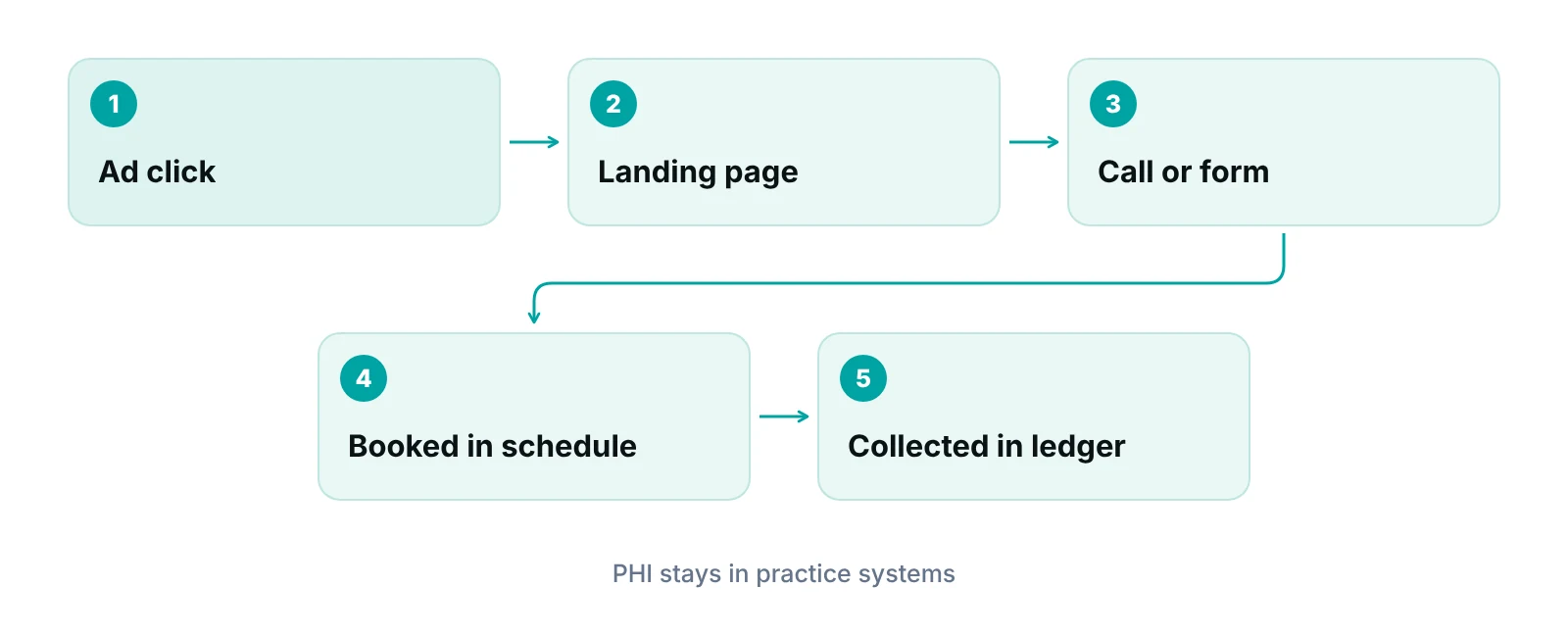
Measure the lead in the ad platform and the patient in the practice’s own systems. Ad tools should see clicks, calls and form submissions as counts. They should never receive names, health reasons, appointment details or patient lists.
The rules are partly unsettled. On June 20, 2024, a federal court vacated the part of HHS’s online tracking bulletin about linking an IP address to a visit to an unauthenticated public page on health conditions or providers. HHS’s page says it is evaluating next steps. What remains: tracking on login-required pages such as patient portals can involve PHI, HIPAA applies where tracking collects information entered to schedule an appointment, and a tracking vendor that handles PHI is a business associate. A privacy notice or cookie banner does not replace authorization (HHS online tracking bulletin). We checked the page in October 2026; its metadata shows an update in March 2026.
Google’s rules point the same way. Google Analytics Help says Google offers no business associate agreement for Analytics, that HIPAA-regulated entities must not expose PHI to it, and that tags should not sit on authenticated pages or on unauthenticated pages tied to providing care (Google Analytics Help). Google’s customer data policy bars conversions tied to sensitive categories, which include medical services, from enhanced conversions and store sales uploads (Google Ads customer data policies). Its health personalization policy bars advertiser-curated audiences, such as Customer Match and lookalike segments, and personalized ads for users under 18 (Google Ads Help, health in personalized advertising). That category covers invasive procedures, so an implant or oral surgery campaign may fall inside it.
| What to measure | How to capture it | Privacy rule |
|---|---|---|
| Clicks and cost | Ad platform report | Counts only; no patient data involved |
| Calls from ads | Forwarding number, duration threshold | Recording off unless a BAA and counsel approve it |
| Form submissions | Thank-you page view or form event | No names, emails or reasons for visit in URLs, page titles or event labels |
| Booked new patients | Practice schedule, matched to source by staff | Patient-level data stays in practice systems |
| Treatment accepted and collections | Billing ledger | Share totals by source with vendors, not patient lists |
| Patient-list audiences and offline uploads | Not recommended | Google bars these for health conversions; HHS requires authorization for most marketing uses of PHI |
Source: HHS (2024 ruling, bulletin page); Google Analytics Help; Google Ads policy pages; RCM Finder framework.
HHS also says marketing uses of PHI generally need written authorization and that a covered entity may not sell patient lists to third parties without it (HHS marketing guidance). The page does not address ad audiences directly, so our conservative reading is to avoid uploading patient lists. The wider safeguards are in the HIPAA compliance checklist for medical practices.
How do you set a dental PPC budget without benchmark guesses?
Work backward from what a new patient is worth and how many the schedule can absorb. We do not quote cost-per-click or cost-per-lead averages here: published figures usually come from agencies, vary by city and treatment, and say nothing about your office.
- Find the value of a new patient: first-year collections from patients who joined in the last year, from the billing ledger.
- Decide the share of that value the practice will pay to win one. This sets a ceiling for cost per booked patient.
- Count capacity: new-patient slots open per week. Do not buy calls the front desk cannot answer.
- Check data volume. Google recommends evaluating Smart Bidding over a month or longer with at least 30 conversions (Google Ads Help, Smart Bidding). A small account may not reach that, so judge it over a longer window or keep bidding simpler.
- Split the budget by group. Fund urgent and brand terms first, because they are the closest to a booking, then higher-value treatments, then the rest.
Budget decisions belong inside the full marketing plan. The dental marketing plan covers the 90-day sequence, and dental digital marketing channels, budget and tracking covers how PPC sits beside search, reviews and email. Reviews and organic search affect the same patient, so see the dental reputation management guide and the dental SEO guide.
Read the number that pays the bills
Cost per click is a vendor metric. Cost per booked new patient, and collections per ad dollar after treatment, are the practice’s metrics. Ask for both in every report.
What should you review every month?
A monthly dental PPC review should answer one question: did the spend produce booked and paid patients inside the ceiling? Use this checklist.
- Spend and conversions by intent group, compared with the cost-per-booked-patient ceiling.
- Search terms report: add negatives, and move good new terms into the right group.
- Calls: answered versus missed, call lengths, and the booked-or-not log from the front desk.
- Booked, seen and collected new patients by source, taken from the schedule and ledger.
- Local Services Ads: response speed to leads and whether the verification and profile are current.
- Ad status: disapprovals, policy notices and whether health personalization limits changed what can run.
- Tag audit: confirm no tags sit on portal, scheduling or intake pages and that no PHI appears in URLs or titles.
- Landing pages: loading speed on mobile, working phone number and booking path, and plans listed still correct.
Register ad accounts, the Google profile and the domain in the practice’s name, whether work is in-house or with an agency.
Our recommendations
- Set the cost-per-booked-patient ceiling first. Work out first-year collections per new patient and the share you will spend to win one before opening an ad account.
- Split the account by patient intent. Separate urgent, general, higher-value treatment, plan and brand searches, each with its own page, budget and conversion.
- Count calls by length, not clicks. Turn on call reporting, set the minimum call length from your own call log, and keep recording off unless counsel approves it.
- Keep PHI out of every ad tool. No patient lists, no names or reasons for visit in URLs, and no tags on portal, scheduling or intake pages.
- Reconcile with the schedule and ledger monthly. Match calls and forms to booked and collected patients so the report shows revenue, not traffic.
Bottom line
Dental PPC pays when the account is built around patient intent, calls are counted by length, and PHI stays out of ad platforms. Start from the cost you will pay for a booked patient, then test one change a month. For the wider operating picture, read the dental practice management guide. If you want help with the paid search side, RCM Finder’s healthcare digital marketing work covers Google Ads, local SEO and reputation, and pricing is quoted after a free practice audit.
Frequently asked questions
What is dental PPC?
Dental PPC is paid advertising on search engines, mainly Google Ads and Local Services Ads, where a dental practice pays when someone clicks or contacts the office. The practice chooses keywords, location and ad copy, and measures calls and forms as conversions. Results depend on the landing page and how quickly the front desk answers.
Are Local Services Ads available for dentists?
Google’s Local Services help lists dentist as an eligible category, and availability depends on country and locality. Dentists must complete Google’s verification before advertising. The help page also says pre-badge ads and booking leads are not available for health care verticals but does not define them, so check your own account.
Can a dental practice use Google Analytics and remarketing?
Google Analytics Help says Google offers no business associate agreement for Analytics and that HIPAA-regulated entities must not expose PHI to it. Google’s health personalization policy also bars advertiser-curated audiences in the health category. Keep tags off authenticated and scheduling pages, and have counsel review any remarketing plan.
Should I record calls from dental ads?
Google’s call recording is skipped or off by default for businesses identified as healthcare unless the advertiser accepts extra terms. A recording can contain protected health information, so a vendor handling it would need a business associate agreement. Most practices can rely on call length as the conversion signal and leave recording off.
How much should a dental practice spend on Google Ads?
There is no sourced average that fits every office. Start from first-year collections per new patient, choose the share you will pay to win one, and cap spend at the number of new-patient slots the schedule can fill. Review cost per booked patient monthly and adjust.
How long before dental PPC shows results?
Google recommends judging Smart Bidding over a month or longer, with at least 30 conversions. A small practice may need a longer window. Read the search terms report weekly at first, and judge success on booked and collected patients, not on clicks.
Get your free practice audit
Tell us about your practice. We will contact you using the details you give.
- A review of your recent claims, denials and A/R aging
- Where your front desk and prior authorizations slow payment
- A prioritized fix list you keep, whether or not you hire us
Pricing is quoted after the audit, based on your volume and the services you choose. Prefer to talk? Call +1 (302) 556-2288.
Sources
- About call reporting — Google Ads Help (2026)
- Manage your call recording settings and eligibility — Google Ads Help (2026)
- Measure calls from ads — Google Ads Help (2026)
- Healthcare and medicines — Google Ads policy (2026)
- Health in personalized advertising — Google Ads policy (2026)
- Customer data policies — Google Ads policy (2026)
- Getting started with Local Services Ads — Google Local Services Help (2026)
- About Local Services — Google Local Services Help (2026)
- Google Local Service Ads are now available for dentists — Search Engine Land (2023)
- About keyword matching options — Google Ads Help (2026)
- About negative keywords — Google Ads Help (2026)
- About advanced location options — Google Ads Help (2026)
- About search themes in Performance Max campaigns — Google Ads Help (2026)
- About Smart Bidding — Google Ads Help (2026)
- Google Analytics and HIPAA — Google Analytics Help (2026)
- Use of Online Tracking Technologies by HIPAA Covered Entities — HHS Office for Civil Rights (2024)
- Business Associates — HHS (2026)
- Marketing — HHS (2026)
- Marketing and Advertising — American Dental Association (2026)
Disclaimer: This article is educational information for practice owners and managers. It is not legal, compliance, advertising-regulation or coding advice. Google policies, HHS guidance and state dental board rules change and vary by state; confirm current requirements with qualified counsel and your state board before running or changing ads.
