
A dental virtual assistant is a remote administrative worker who takes over insurance checks, overflow phone calls, schedule follow-up and claim status calls, while your in-office team keeps greeting patients and presenting treatment. HIPAA still applies: get a written business associate agreement, role-based access and documented training before any remote worker sees patient data.
When one person is checking in a patient, answering a third ring and verifying a 10 AM crown benefit, something gets skipped. This guide is for dental owners and office managers weighing remote help. It covers the work, the cost comparison and what to put in writing first. It is about non-clinical help only.
Key takeaways
- Move repeatable screen work (benefit checks, call overflow, recall, claim status). Keep greeting, checkout and treatment presentation in the office.
- A dental benefit check must capture the annual maximum used, deductible, waiting periods and frequency limits, not just “active.”
- At the 2025 median receptionist wage of $18.27 an hour, an illustrative all-in hire cost is about $26 an hour before desk and training.
- HIPAA does not ban remote assistants, but it requires a written business associate agreement, training and access controls.
- Start with one task, write the rules down and review after 30 days.
What does a dental virtual assistant do?
A dental virtual assistant does repeatable administrative work from a remote desk: checking insurance benefits, answering overflow calls, working the schedule, following up on claims and keeping patient records current. It does not replace the person who greets patients and it does not do clinical work.
Here the term means a front-desk or insurance coordinator who works remotely, not a clinical role. Our virtual medical assistants fill this kind of role: scheduling, eligibility checks, prior authorizations where a plan requires them, and patient intake.
The U.S. Bureau of Labor Statistics describes receptionists in medical and dental offices as people who greet patients and collect their information, and says some also handle billing and insurance payments. It adds that the work can be stressful when phones are constant.
The California Dental Association’s July 2023 article on virtual assistants says general assistants may handle scheduling, calls and routine administration, and virtual medical assistants may handle insurance billing, patient information and follow-up. Its headline also says “proceed with caution.” The HIPAA section below covers what that means.
| Task | Best placed | What it needs to work |
|---|---|---|
| Greeting and checking in patients | In the office | A person on site |
| Presenting treatment plans and answering clinical questions | Dentist and in-office team | A remote assistant can prepare paperwork, not make the case |
| Insurance benefit checks before the visit | Remote assistant | Portal access or a phone script, and a standard chart note |
| Overflow calls and voicemail return | Remote assistant | Call routing, scripts and escalation rules |
| Filling openings, recall and unscheduled-treatment follow-up | Remote assistant | A daily list and rules on who may be offered which opening |
| Claim status checks and follow-up calls | Remote assistant or a billing service | A report of open claims and a point to escalate |
| Anything in the operatory (clinical work, imaging, clinical notes) | Clinical team only | Not a remote administrative role |
Source: RCM Finder task split, informed by BLS Occupational Outlook Handbook (2025) and California Dental Association (2023).
Our dental specialty page shows how our team supports dental offices, including second plans and predetermination requests for costly work.
How does a dental virtual assistant handle insurance verification?
They check each patient’s benefits before the visit, using the payer’s portal or a phone call, and write the result in the chart in a fixed format. The value is in what gets recorded. A note that says “active” is not a benefit check.
Dental plans work differently from medical ones. The American Dental Association explains that many plans cap the total dollars paid each year (the annual maximum), that plans pay a share of a “customary” fee the insurer sets and rarely publishes, and that some plans exclude conditions present before enrollment, such as missing teeth. A good record captures:
- Active coverage on the date of service, the plan name and the subscriber
- Annual maximum and how much of it is already used
- Deductible, and whether it has been met
- Waiting periods by service category
- Frequency limits, such as how often exams, X-rays or fillings are covered
- Coverage percentage by category (preventive, basic, major)
- Exclusions tied to the planned procedure
- A second plan, if any, and which is primary
One 2026 plan document, Delta Dental’s Matrix Direct PPO Basic, lists a 6-month waiting period for basic services (waived with proof of prior coverage), exams and cleanings at 2 per calendar year, a filling limit written as “1 in 25 months,” a $50 individual deductible and a $1,000 individual annual maximum. Your patients’ plans will differ, so the checklist has to ask.
Maximums vary. The ADA’s December 2025 report, citing the National Association of Dental Plans, puts in-network annual maximums at $1,000 to $1,500 for 32.8% of plans, $1,500 to $2,500 for 48.2%, and above that (or none) for 17.2%.
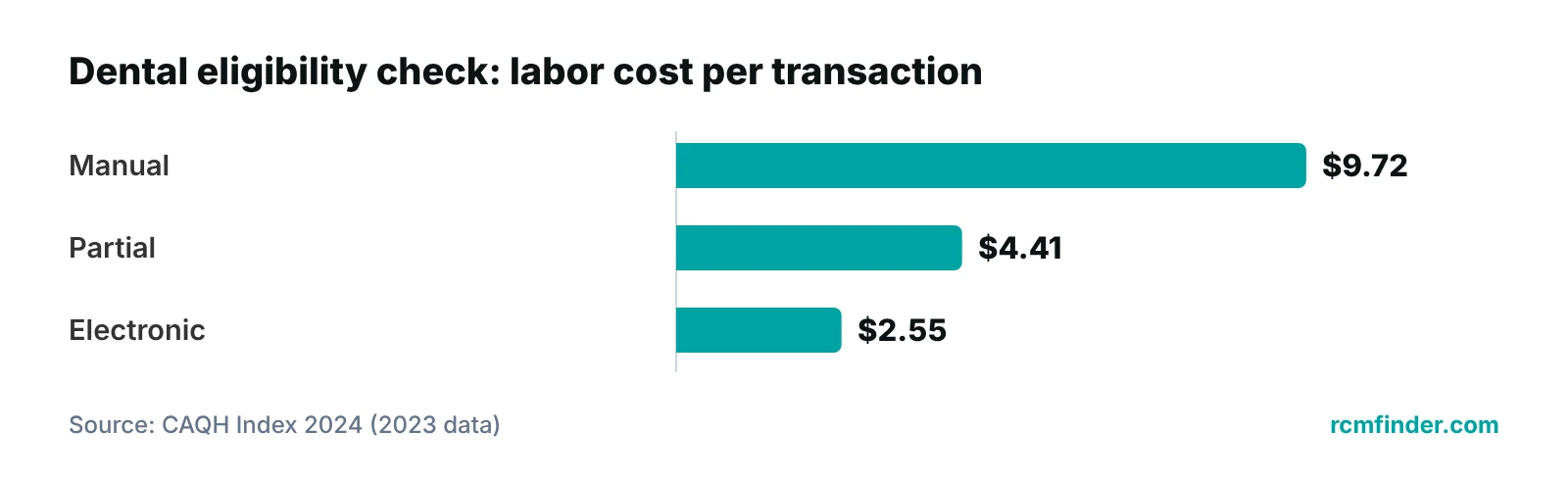
The 2024 CAQH Index (2023 data) reports that a manual dental eligibility check cost the industry $9.72 in labor, against $2.55 electronic. The provider’s share was $6.52 manual and $2.53 electronic, and about 70% of roughly 1.2 billion dental verifications were fully electronic. These are labor-only, industry-wide figures. They show method matters: ask which portals and electronic tools an assistant will use, and keep calls for what a portal does not show.
For the billing side, see our dental billing and coding guide. For the broader process, see our guides to patient insurance verification and automating eligibility verification.
Can a remote assistant manage phones and the schedule?
Yes, if the office sets the rules. Phones and scheduling work remotely when the assistant can see the schedule, knows which appointment types go where and has a clear path to hand a call back to a person in the office.
Start with overflow, not the whole phone line. The assistant answers when the desk is busy, books or moves routine visits and takes a message for everything else. Clinical questions, upset patients and billing disputes go to a named person at the office.
Give them a daily list: unscheduled treatment, patients overdue for hygiene, cancellations to refill. Our appointment scheduling services cover the booking side if you want it handled as a service. Either way, write down:
- Which appointment types can be booked without approval
- Appointment lengths, and provider and operatory rules
- What the assistant may say about cost and coverage (read from the verification note, never guess)
- How to confirm, reschedule and handle patients who cannot be reached
- When to hand the call to the office
Ask about call handling before you start
Ask how calls will be answered, how recording is handled and who can listen. Ask your attorney whether a state call-recording notice applies to you.
Our guide to how front desk staff affect the revenue cycle shows how registration and eligibility errors become denials.
What does a dental virtual assistant cost compared with a hire?
Compare the full cost of an in-office hire with a written quote for the remote role, and do the arithmetic yourself. Our pricing is quoted after a free audit of your volume and tasks. What we can show here is how to price the hire side from public data.
The BLS Occupational Outlook Handbook lists a 2025 median wage of $18.27 an hour ($38,010 a year) for receptionists and information clerks. The BLS Employer Costs for Employee Compensation release for June 2026 shows that across private industry, wages and salaries were 70.0% of employer compensation costs and benefits were 30.0%. Dividing a wage by 0.70 gives a rough all-in figure.
| Line | Figure | How it is derived |
|---|---|---|
| Median receptionist wage, 2025 | $18.27 an hour; $38,010 a year | BLS Occupational Outlook Handbook |
| Wages as a share of private-industry compensation, June 2026 | 70.0% | BLS Employer Costs for Employee Compensation |
| Benefits share, June 2026 | 30.0% (legally required 7.2%; health insurance 7.4%) | Same BLS release |
| Illustrative all-in hourly cost | About $26.10 an hour | $18.27 ÷ 0.70 |
| Illustrative all-in annual cost | About $54,300 | $38,010 ÷ 0.70 |
| Not included | Recruiting, training, workspace, equipment, supervision, turnover | Add your own numbers |
| Remote role | Quoted after a free audit | Compare it to the lines above on the same hours |
Source: U.S. Bureau of Labor Statistics, Occupational Outlook Handbook (2025) and Employer Costs for Employee Compensation (June 2026). The 70/30 split is a private-industry average, not a dental-office figure.
Two cautions. The 70/30 split is an all-industry average per hour worked, so your own benefits cost may differ. And a remote role is billed for the hours or tasks you buy, while a hire is paid for a full week. The size of any saving depends on your hours, so be wary of a flat annual saving that does not show the work.
To estimate the revenue side of the question, our revenue calculator is a quick place to start.
Is a dental virtual assistant HIPAA compliant?
It depends on how the arrangement is set up. HIPAA does not ban virtual assistants, including ones outside the U.S., but the practice stays responsible for patient information. A compliant arrangement needs a written business associate agreement, documented training and access limited to the job.
The California Dental Association (2023) states that training applies wherever the assistant works and that a written business associate agreement (BAA) is required with any business that receives protected health information. It advises legal review of agency contracts and caution with contracts that disavow HIPAA duties or put all training on the dentist.
HHS explains that a covered entity may disclose protected health information to a business associate only after getting satisfactory assurances in a written contract (45 CFR 164.502(e)). The agreement must describe permitted uses, bar other uses and require reporting of security incidents and breaches (45 CFR 164.504(e) and 164.314). A subcontractor needs its own agreement, and if you learn of a pattern of material breach you must take reasonable steps to cure it or end the arrangement.
The Security Rule, which HHS summarizes, adds practical controls: workforce training (45 CFR 164.308(a)(5)), access that matches the person’s role (164.308(a)(4)), audit controls (164.312(b)) and protection for data sent over a network (164.312(e)). HHS also links to a proposed Security Rule update. Today’s rules apply until any update is final.
- Sign a BAA before the assistant sees patient data, and have counsel read it.
- Ask who trains the assistant, and see the training record.
- Give each person a named login. Never share credentials.
- Limit access to the systems the job needs.
- Use encrypted connections. Ask how the remote computer is secured and whether patient data is stored on it.
- Log activity and decide who reviews the logs.
- Write down what happens after an impermissible disclosure at the assistant’s location.
- Agree on sanctions for violations. The CDA notes OCR may ask for this policy.
A claim of "HIPAA compliant" is not proof
Ask for the BAA, the training record and a description of the access controls. For our own work, we put a Business Associate Agreement in place before accessing patient data, and our portal uses role-based access, audit logging and encrypted (HTTPS) connections.
See where your front desk loses time
Our free practice audit reviews your phone, verification and scheduling workload and shows which tasks could move. Pricing is quoted after the audit.
For a broader view of your own obligations, see our HIPAA compliance checklist for medical practices and our guide to HIPAA guidelines for the front desk.
In-house hire, freelancer, agency or hybrid: which fits a dental office?
A hybrid often fits: keep in-person roles in the office and move screen-based work to a managed remote team. The right answer depends on volume, written processes and how much supervision you can give.
| Option | Strengths | Watch-outs | Ask before choosing |
|---|---|---|---|
| Another in-office hire | On site for patients; direct control | Highest fixed cost; recruiting and training time | Is the work in-person, or mostly screen work? |
| Freelance virtual assistant | Flexible hours; low commitment | You manage training, backup and HIPAA paperwork; responsibility may fall solely on the dentist (CDA) | Will they sign a BAA? Who covers absences? |
| Managed remote team or agency | Trained staff, backup, reporting; BAA and training can be shared | Contract terms vary; some disavow HIPAA duties (CDA, 2023) | Who trains and supervises? Can you see the BAA first? |
| Hybrid (office desk plus remote team) | Patients see a person; remote team absorbs verification, overflow and follow-up | Needs hand-off rules and one owner on your side | Which tasks move first? How will you measure? |
Source: RCM Finder comparison; California Dental Association (2023) for contract and responsibility cautions.
How do you onboard a remote assistant without it failing?
Treat them like a new employee: written rules, a trial task and a 30-day review. Most failures come from handing over a login and no instructions.
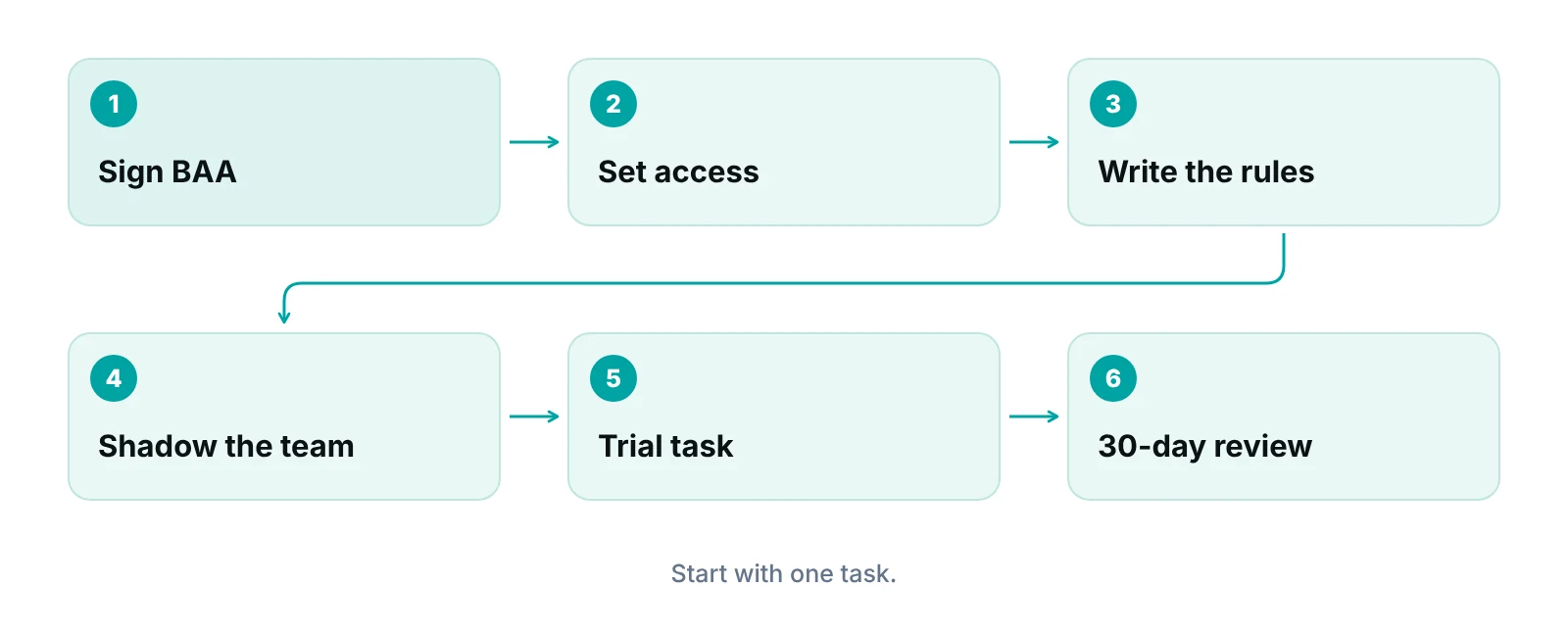
- Sign the BAA and confirm training before any login is created.
- Set role-based access to the systems and screens the first task needs.
- Write the rules. A one-page checklist per task: what to do, what to record and when to ask.
- Shadow the team. Let them hear how your office talks to patients and join the morning huddle by video.
- Run a trial task, such as next-day benefit checks, and review every one for the first week.
- Review at 30 days against measures you chose in advance, then decide whether to add phones or scheduling.
Ask which dental practice software they have worked in and how they will connect to yours (cloud, remote desktop or VPN). Ask for a test on your own system, because it depends on how your software is hosted.
Who is a dental virtual assistant for, and who should wait?
It suits offices where screen work is crowding out patient time. It does not suit offices with no written processes.
- Good fit: a busy front desk that misses calls, skips benefit checks, or lets unscheduled treatment sit.
- Good fit: a practice that can name one owner to give instructions and review the work.
- Wait: if no one can say how a benefit check or recall call should be done today.
- Wait: if you want clinical tasks done remotely. That is outside this role.
- Wait: if the plan is to share one login.
See how a remote front desk works
Our virtual medical assistants handle scheduling, eligibility checks, prior authorizations and intake on your practice's time zone.
Our recommendations
- Start with one task. We usually suggest next-day benefit checks. They are easy to review and show quickly whether the process works.
- Write the benefit-note format first. Decide what every note must hold, using the checklist above.
- Put compliance in writing before access. Get the BAA signed, the training record on file and named logins created before anyone sees a chart.
- Keep patient-facing moments in the office. Check-in, checkout and treatment conversations stay with your in-person team.
- Measure before you expand. Pick two or three measures, such as call-back time and next-day appointments with a completed benefit note. Set a baseline and review monthly.
- Compare with your own numbers. Use the BLS arithmetic above with your real wage and desk costs, and compare it to a written quote for the same hours.
Bottom line
A dental virtual assistant works best as part of a team, not a replacement for it. Move repeatable screen work, keep patients in front of a person, and put the BAA, training and access rules in writing first. Questions about your own setup? Contact us. If scheduling is your biggest gap, our appointment scheduling services are a good place to look, and our virtual medical assistants can take on eligibility checks, phone overflow and intake.
Frequently asked questions
Is a dental virtual assistant HIPAA compliant?
Only if the arrangement is set up that way. HIPAA does not prohibit virtual assistants, but you need a written business associate agreement, documented training and role-based access before they see patient data. Ask to see the BAA and the training record rather than accept a claim.
What tasks can a dental virtual assistant do?
Typical tasks are benefit checks, overflow calls, scheduling and recall, intake follow-up and claim status calls. Greeting patients, checkout and treatment presentation stay in the office, and clinical work is outside the role. Start with one task and add more after a review.
How much does a dental virtual assistant cost?
It depends on hours, tasks and the provider, so get a written quote. We quote after a free audit. To compare, price an in-house hire with public data: at the 2025 BLS median wage of $18.27 an hour, an all-in cost is roughly $26 an hour before desk and training costs.
Can a virtual assistant work in Dentrix, Eaglesoft or Open Dental?
Possibly, but it depends on how your software is hosted and how the assistant connects. Ask which dental software they have used and ask for a test in your own system before you commit. Do not assume it works because the software name is on a list.
Do I need a business associate agreement with a virtual assistant?
Yes, if they will create, receive, maintain or transmit patient information for you. HHS says a covered entity may disclose protected health information to a business associate only after getting satisfactory assurances in a written contract. The California Dental Association also advises having counsel review any agency contract.
Should I hire a virtual assistant or another front-desk employee?
If the work is mostly in-person, hire in the office. If it is mostly screen work such as verification, calls and follow-up, a remote assistant may fit. Many offices do both: a person at the desk and a remote team behind them. Compare the all-in cost for the same hours.
Get your free practice audit
Tell us about your practice. We will contact you using the details you give.
- A review of your recent claims, denials and A/R aging
- Where your front desk and prior authorizations slow payment
- A prioritized fix list you keep, whether or not you hire us
Pricing is quoted after the audit, based on your volume and the services you choose. Prefer to talk? Call +1 (302) 556-2288.
Sources
- Thinking of bringing on a virtual assistant in the dental practice? That's an option, but proceed with caution — California Dental Association (2023)
- Business Associates — HHS Office for Civil Rights (2026)
- The Security Rule — HHS Office for Civil Rights (2026)
- Occupational Outlook Handbook: Receptionists — U.S. Bureau of Labor Statistics (2025)
- Employer Costs for Employee Compensation, June 2026 — U.S. Bureau of Labor Statistics (2026)
- 2024 CAQH Index Report — CAQH (2024)
- Typical Dental Plan Benefits and Limitations — American Dental Association (2026)
- Dear ADA: annual maximums — ADA News (2025)
- Matrix Direct PPO Basic plan document, plan year 2026 — Delta Dental (2026)
Disclaimer: This article is general educational information for dental practice owners and managers. It is not legal, HIPAA compliance, coding or billing advice. Payer rules, plan terms and state requirements vary and change. Have qualified counsel review any business associate agreement or vendor contract before you sign.
