

Dermatology website design works when it gives medical and cosmetic visitors separate paths, shows patient photos only with valid authorization, and keeps booking forms free of health details. Add named, verifiable provider credentials, accessible and fast pages, and basic local business markup so patients can trust the practice and book without friction.
Most advice on this topic comes from agencies and software vendors, and it concentrates on how a skin practice’s site should look. This guide concentrates on what the site must do and what rules sit behind it: photo consent, advertising statutes, privacy in forms, accessibility and speed. It is one of the supporting guides in the dermatology practice management guide.
Search work, such as keywords and the Google Business Profile, is covered in the dermatology SEO guide. The claims rulebook for each service line is in the post on marketing medical and cosmetic dermatology. This post is the build brief that sits between them.
Key takeaways
- Give medical and cosmetic visitors separate entry points, because they ask different questions and face different payment rules.
- A patient photo on a website is a marketing use of health information; HIPAA requires a written authorization with specific elements before it goes live.
- A booking form should collect only what scheduling needs, and tags should stay off pages and forms where health details are entered.
- The DOJ web rule covers state and local governments; Section 504 applies to recipients of HHS funding. Private practices should still use WCAG 2.2 AA as the working standard and confirm their duties with counsel.
- Provider bios that name the board, the license and the training are the strongest trust signal on a skin practice site.
Why does a skin practice need two front doors?
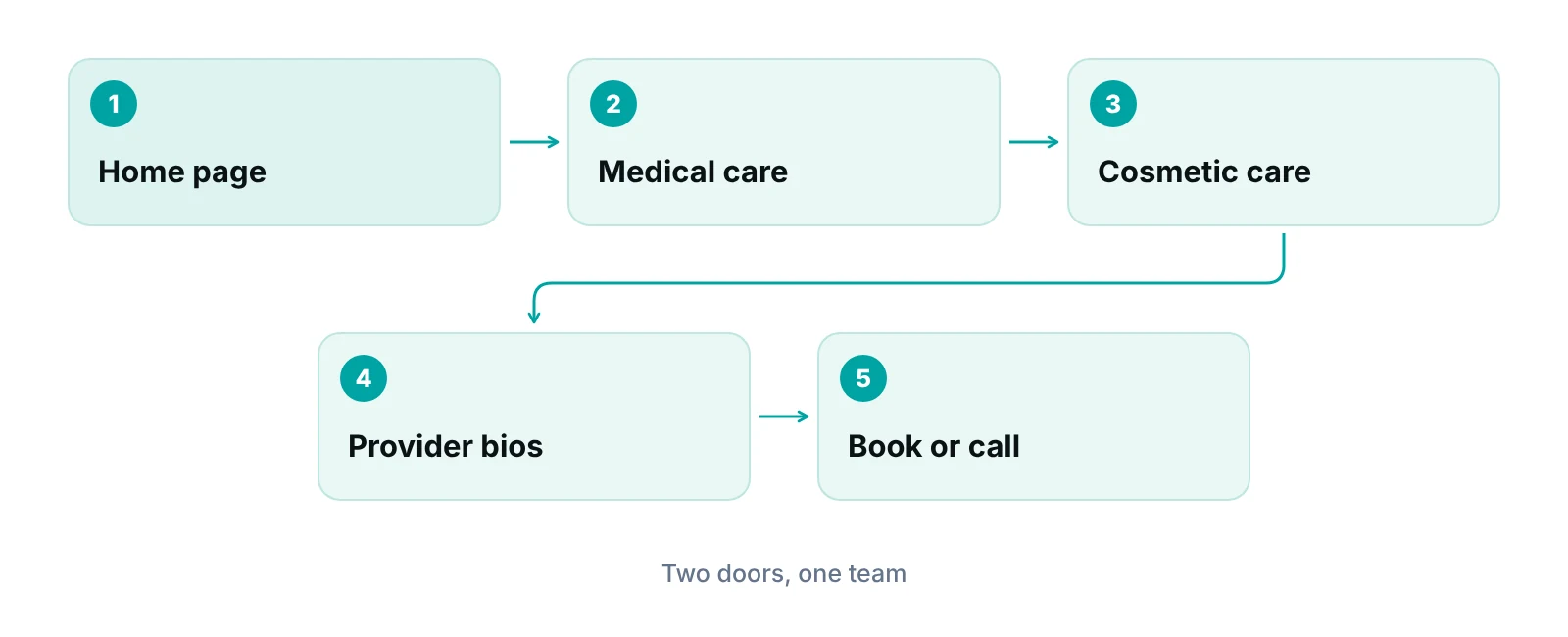
Because a patient with a changing mole and a patient asking about injectables want different answers and pay in different ways. Give each path its own entry point on the home page, its own page templates and its own next step, and keep one brand and one set of provider bios across them.
Brand and Google profile questions are in the medical and cosmetic marketing post. The design question is what each template must contain.
| Page element | Medical and surgical path | Cosmetic path |
|---|---|---|
| Visitor’s question | Can I be seen soon, and does my plan cover it? | What will the treatment involve, and what will it cost? |
| First screen | Conditions treated, plans accepted, a call button | Treatments offered, who performs them, consultation button |
| Payment statement | Plans accepted and what to bring to the visit | Usually self-pay; say so plainly and state what a consultation costs, if anything |
| Primary action | Request a visit or call | Request a consultation |
| Photos | Educational images that show no identifiable patient | Authorized results gallery with required labels |
| Urgent-symptom notice | Site is not for emergencies; who to call | Link to aftercare contacts instead |
| Related pages | Skin check, biopsy, surgery, referrals | Treatment finder, pricing, provider bios |
Source: RCM Finder editorial framework; coverage differences are explained in the linked insurance coverage guide.
Patients often cannot tell which concerns insurance treats as medical. A plain-language page linked from both paths saves calls; the dermatology services and insurance coverage guide explains the difference.
How should before-and-after photos be handled on the website?
As marketing uses of health information that need a signed authorization before they are published. A photo taken at a visit belongs to the chart; moving it to the website is a different purpose.
Under 45 CFR 164.508, marketing uses of protected health information generally require an authorization. A valid one names the information, who may disclose it, who may receive it, each purpose, an expiration date or event, and carries the patient’s signature and date. It must also state the right to revoke in writing, whether treatment can be conditioned on signing, and that the recipient may redisclose the information (eCFR). The identifier list in 45 CFR 164.514(b) names full-face photographic images and comparable images, so a face in a results gallery is identifiable by definition (eCFR).
Enforcement is not theoretical. In a 2016 resolution, HHS OCR settled for $25,000 with a physical therapy practice that posted patient testimonials, with full names and full-face photos, on its website without valid authorizations (HHS OCR).
| Gallery element | What the source says | Control to build in |
|---|---|---|
| Written authorization | 45 CFR 164.508 lists required elements, including purpose, expiry and signature | A separate web-use authorization form, not a clause inside the treatment consent; copy given to the patient |
| Identifiable images | Full-face photographic images are a listed identifier under 164.514(b) | Treat any face or distinctive feature as identifiable; crop or choose images with the authorization in mind |
| Required labels | California requires results images to name the procedure, be comparable in pose and lighting, and state that results may not be the same for all patients | A caption template that cannot be skipped in the gallery editor; confirm your own state’s wording |
| Accuracy | Images must not be altered from the actual subject (California example) | No retouching rule written into the photo protocol; unedited originals kept |
| Result claims | The FTC expects a reasonable basis for objective claims before they run, including implied ones | Do not caption a best case as typical |
| Expiry and revocation | The authorization must state an expiry and the right to revoke in writing | A gallery log with expiry dates and a named person who removes lapsed or revoked images |
| File handling | Not a stated rule; a practice control | Strip location and device data from uploads and use neutral file names, not patient names |
Sources: eCFR 45 CFR 164.508 and 164.514; HHS OCR (2016); California Business and Professions Code 651; FTC Policy Statement on Advertising Substantiation.
The FTC’s substantiation policy applies everywhere: an advertiser must have a reasonable basis for objective claims before disseminating them, and implied claims count (FTC).
Reviews and testimonials on your own pages
The FTC’s rule on reviews and testimonials bars undisclosed insider reviews, incentives tied to review sentiment, and claiming that displayed reviews represent all or most reviews when negative ones were removed because of their rating (FTC). Named or photographed testimonials also need a HIPAA authorization.
How should online booking and intake forms work?
Ask for as little as possible on the public page, and move detailed intake behind a secure login. Medical history, photos and insurance cards belong in a system the practice has a business associate agreement with, not in a web form that feeds an email inbox or an advertising tag.
HHS says tracking technologies on unauthenticated pages, such as appointment scheduling pages, can involve protected health information if they capture an email address or a reason for seeking care. A tracking vendor that receives PHI for a covered function is generally a business associate and needs a BAA. A cookie banner or privacy-policy line is not a valid authorization. In June 2024 a federal court in Texas vacated part of the HHS bulletin, the part about unauthenticated pages tied to specific health conditions, and HHS said it was evaluating next steps (HHS OCR). That leaves booking and symptom forms as the clearest risk. The general checklist is in the HIPAA compliance checklist for medical practices.
Build the booking path in five steps
- Public request form. Name, phone, preferred time and visit type (skin check, rash or acne, cosmetic consultation). No free-text symptom box.
- Choose the vendor on the BAA first. HHS lists billing, practice management and EHR vendors and cloud providers among business associates; any scheduling or form tool that will hold patient details needs the agreement before launch (HHS).
- Secure transmission. The Security Rule requires technical measures against unauthorized access to ePHI in transit; encryption is an addressable specification (eCFR). Use HTTPS on every page and form.
- Confirmation without detail. Reply with visit type and time, not the condition.
- Intake after booking. Send history, consent and insurance forms through the patient portal or the EHR so they land in the chart. Vendor questions are in the dermatology EHR evaluation checklist.
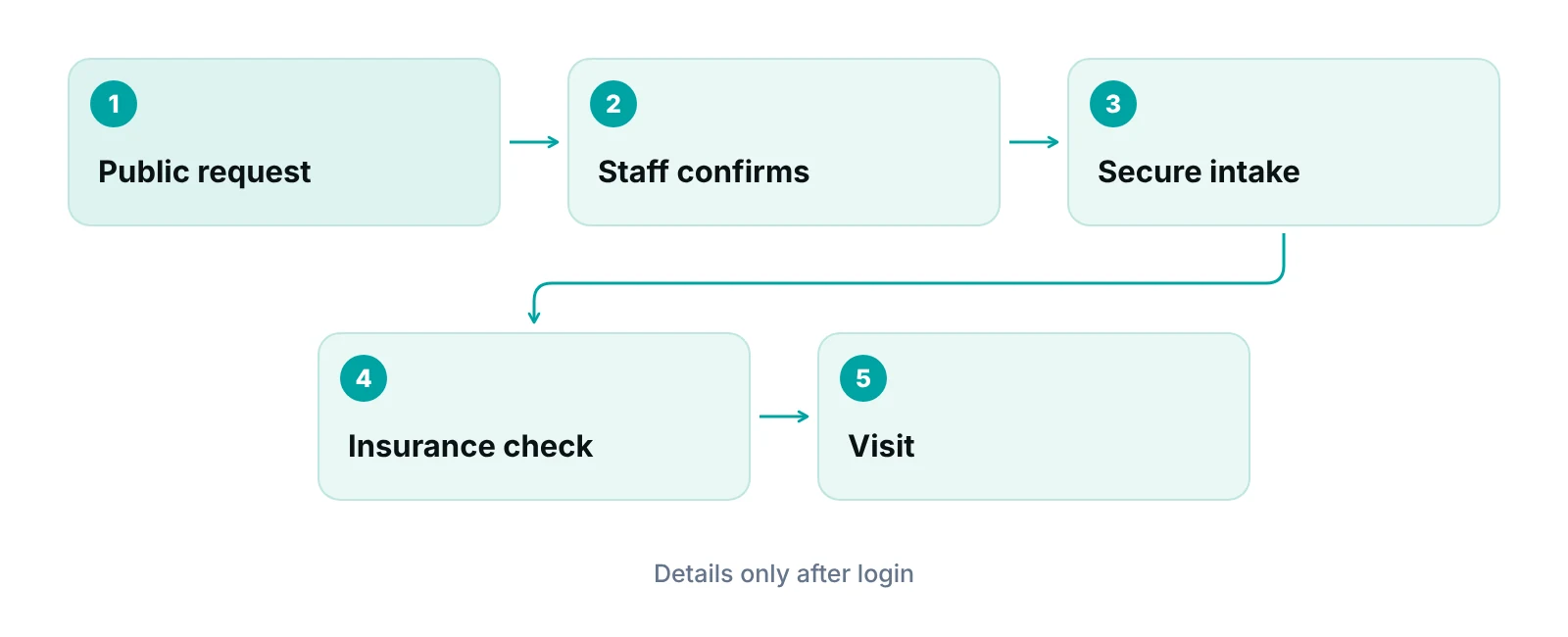
Insurance comes after booking. The page should state accepted plans and what to bring, and the front desk should verify coverage before the visit; see patient insurance verification. Virtual visits need their own page and consent flow, which the dermatology telehealth guide covers.
A form no one answers loses the patient anyway. If the practice cannot reply the same business day, a virtual medical assistant can take first contact and schedule inside the practice’s own system. The ad-to-visit audit is in the post on dermatology digital marketing.
Does your booking form pass a privacy check?
Send us the form, the tag list and the confirmation message. A free practice audit reviews the path from click to kept visit.
What do provider bios and credentials need to show?
Bios should let a patient or a reviewer verify who treats them. Trust is the main signal Google says it looks for on health topics: Google’s guidance says trust is the most important part of E-E-A-T, that health topics get extra weight for it, and that accurate authorship information is encouraged (Google Search Central). The same guidance calls fabricated profiles, such as AI-generated headshots, made-up names or false credentials, a form of deception.
Give every clinician who sees patients a bio page that includes:
- Full name, degree and role, matching the state license record exactly.
- Board certification, with the certifying board named. California, for example, allows physicians to say “board certified” only for certification by a recognized board and requires the full board name to appear with comparable prominence (Cal. BPC 651).
- Training, fellowship and hospital affiliations that can be confirmed.
- Clinical focus, and which clinician performs which treatment.
- A real, current photograph.
- For clinical articles, the author and a reviewer, plus a last-reviewed date.
Retire a bio the same week a clinician leaves, and redirect it. A stale bio is a credentials claim the practice can no longer support.
What do accessibility and speed require?
Accessibility rules differ by who you are, and speed has published targets. For private practices, no single web rule settles accessibility, so the practical approach is to build to WCAG 2.2 Level AA and confirm legal duties with counsel.
The DOJ web rule under ADA Title II applies to state and local governments and sets WCAG 2.1 Level AA; the fact sheet does not address private businesses and notes extended dates of April 26, 2027 for larger governments and April 26, 2028 for smaller ones, after an April 2026 interim rule (ADA.gov). HHS has a separate Section 504 rule for recipients of HHS federal financial assistance, which also uses WCAG 2.1 AA. An interim final rule filed May 7, 2026 moved the deadlines to May 11, 2027 for recipients with 15 or more employees and May 10, 2028 for smaller ones (Federal Register). Whether a practice is a recipient depends on its payers and arrangements, so ask your attorney.
| Check | Target | Where it comes from |
|---|---|---|
| Image alternatives | Every informative image has a text alternative serving the same purpose | WCAG 2.2, criterion 1.1.1 (Level A) |
| Text contrast | At least 4.5:1, or 3:1 for large text | WCAG 2.2, criterion 1.4.3 (Level AA) |
| Touch targets | At least 24 by 24 CSS pixels, with listed exceptions | WCAG 2.2, criterion 2.5.8 (Level AA) |
| Keyboard focus | Focused element is not entirely hidden by other content | WCAG 2.2, criterion 2.4.11 (Level AA) |
| Largest Contentful Paint | 2.5 seconds or less | Google web.dev Core Web Vitals |
| Interaction to Next Paint | 200 milliseconds or less | Google web.dev Core Web Vitals |
| Cumulative Layout Shift | 0.1 or less | Google web.dev Core Web Vitals |
Sources: W3C WCAG 2.2 Recommendation (5 October 2023) and Understanding 2.5.8; Google web.dev (Core Web Vitals, measured at the 75th percentile, mobile and desktop).
Two dermatology points follow. Gallery images need alternative text that describes the image without health details about a named patient. Large galleries are also the usual cause of slow pages, so compress images and test the gallery on a phone. Core Web Vitals are judged at the 75th percentile of page loads, mobile and desktop separately (web.dev).
What structured data and tracking basics belong on the site?
Add basic local business markup that matches what is visible on the page, and nothing more. Google’s local business guide requires name and address, recommends fields such as telephone, URL, opening hours and geo coordinates, and advises using the most specific subtype available (Google Search Central). Schema.org defines Dermatology as a medical specialty value, and its hierarchy places it under medical business types (schema.org), so ask your developer which medical subtype fits your site.
- One markup block per location page, matching the visible name, address, phone and hours.
- No star-rating markup for your own practice without checking Google’s current guidance; Google recommends review fields only for sites that capture reviews of other local businesses.
- Retest after each template change.
Tracking is the other basic. Keep analytics and ad tags off the booking form, portal login and any page where a visitor describes a symptom. The search side of this, including the Google profile and page hierarchy, is in the dermatology SEO guide. For general layout patterns, see medical website designs.
What should be checked before a redesign goes live?
Ask the web team for these items and keep the answers on file.
- Authorization and expiry date logged for every gallery image and testimonial.
- A list of every script and tag, the pages each runs on, and the BAA status of each vendor that receives patient data.
- The booking form field list, signed off by the privacy lead.
- A WCAG 2.2 AA test report, including keyboard-only use, and Core Web Vitals results for mobile and desktop.
- A credential file for each clinician, and a redirect map from old URLs.
Our recommendations
- Design two entry points, not one menu. Give medical and cosmetic visitors separate front doors from the first screen, with shared provider bios.
- Write the photo authorization before the gallery. Draft the web-use authorization and caption template first. Fixing it after launch means pulling images.
- Keep the public form short. Name, phone, preferred time and visit type are enough. Move history and photos behind a login with a vendor that has signed a BAA.
- Keep a tag inventory. List every script on every page and remove any on the booking form or portal login unless a BAA and a permitted use are in place.
- Verify every credential claim. Check each bio against the state license record and the certifying board before it goes live, and again when the site changes.
- Test on a phone with a keyboard and a screen reader. Accessibility and speed fail on real devices first. Test every release.
Bottom line
A strong dermatology site routes two kinds of patient well, treats every photo and form as a privacy decision, and lets a visitor check who the clinicians are. Start with the dermatology practice management guide for the wider operating picture, then use the build brief above with your web team. If you want help connecting the website to search, ads and the front desk, see our healthcare digital marketing services.
Frequently asked questions
Do we need a signed authorization to post before-and-after photos?
Generally yes. Using patient photos for marketing is a use of protected health information that the Privacy Rule says needs a written authorization with specific elements, including purpose, expiry, signature and the right to revoke. Full-face images are a listed identifier. Your state may add labeling rules, so ask your attorney.
Can we put an online booking form on the public site?
Yes, if it collects only what scheduling needs, such as name, phone, preferred time and visit type, and the vendor holding the data has signed a business associate agreement. Avoid free-text symptom boxes and keep advertising tags off the form. HHS says scheduling pages can involve protected health information.
Does the ADA web rule apply to a private dermatology practice?
The DOJ web rule on the ADA’s Title II applies to state and local governments, and its fact sheet does not address private businesses. HHS’s Section 504 rule covers recipients of HHS financial assistance. Many practices build to WCAG 2.2 AA anyway and ask counsel which duties apply to them.
How fast does the site need to be?
Google’s Core Web Vitals targets are Largest Contentful Paint of 2.5 seconds or less, Interaction to Next Paint of 200 milliseconds or less, and Cumulative Layout Shift of 0.1 or less, judged at the 75th percentile of page loads. Large photo galleries are the usual cause of misses.
What should a dermatologist's bio page include?
The clinician’s name and degree as on the license, board certification with the board named, training and affiliations that can be verified, clinical focus, and a real photograph. Clinical articles should show the author, the reviewer and a last-reviewed date. Check each claim against the license and board record.
Should medical and cosmetic services share one website?
Usually yes, under one practice brand, with separate entry points and page templates. Medical pages state plans accepted and when to call urgently; cosmetic pages state self-pay terms and what a consultation involves. Shared provider bios let patients move between lines without losing trust.
Get your free practice audit
Tell us about your practice. We will contact you using the details you give.
- A review of your recent claims, denials and A/R aging
- Where your front desk and prior authorizations slow payment
- A prioritized fix list you keep, whether or not you hire us
Pricing is quoted after the audit, based on your volume and the services you choose. Prefer to talk? Call +1 (302) 556-2288.
Sources
- Use of Online Tracking Technologies by HIPAA Covered Entities and Business Associates — HHS Office for Civil Rights (2024)
- 45 CFR 164.508 Uses and disclosures for which an authorization is required — eCFR (2026)
- 45 CFR 164.514 Other requirements relating to uses and disclosures of PHI — eCFR (2026)
- Complete P.T. resolution agreement — HHS Office for Civil Rights (2016)
- California Business and Professions Code section 651 — California Public Law (2026)
- Policy Statement Regarding Advertising Substantiation — Federal Trade Commission (1984)
- FTC announces final rule banning fake reviews and testimonials — Federal Trade Commission (2024)
- Guidance on Business Associates — HHS Office for Civil Rights (2026)
- 45 CFR 164.312 Technical safeguards — eCFR (2026)
- Fact Sheet: New Rule on the Accessibility of Web Content and Mobile Apps (ADA Title II) — U.S. Department of Justice, ADA.gov (2026)
- HHS interim final rule extending Section 504 web and mobile app accessibility dates — Federal Register (public inspection) (2026)
- Web Content Accessibility Guidelines (WCAG) 2.2 — W3C (2023)
- Understanding Success Criterion 2.5.8: Target Size (Minimum) — W3C (2023)
- Web Vitals — Google web.dev (2026)
- Creating helpful, reliable, people-first content — Google Search Central (2026)
- Local business structured data — Google Search Central (2026)
- Dermatology — schema.org (2026)
Disclaimer: This article is educational and is not legal, compliance, coding or medical advice. Privacy, advertising and accessibility rules vary by state and by practice, and they change. Confirm your own obligations with a qualified attorney before publishing patient photos, changing forms or relying on any rule described here.
