
Practice management software runs the business side of a clinic: scheduling, registration, charges, claims, payments and reports. Choose it by testing your own workflows in a demo, getting a Business Associate Agreement signed, planning the data move and training staff before go-live.
Most clinics shop for practice management software when something is already hurting: claims keep bouncing, the schedule lives in three places, or the current vendor is retiring a product. That is a hard time to compare tools. Decide what to test, what to ask in writing and how to move your data.
Key takeaways
- Practice management software handles scheduling, billing and reporting; an EHR holds the clinical record. Decide which one you are replacing.
- Demo with your own scenarios, not the vendor’s script, and score each role that will use the system.
- No software is HIPAA compliant on its own: HHS says OCR does not certify products, and a cloud vendor that handles patient data needs a Business Associate Agreement.
- Settle who migrates your data, who pays for it and what is moved before you sign.
- Budget staff time for training and a test run; the switch fails at the front desk, not in the software.
What practice management software does
Practice management software (often called a PMS, or a practice management system) handles the administrative and financial work around a patient visit. It books the visit, captures who the patient is and who pays, turns the visit into a charge and a claim, posts what comes back and reports on the result.
- Scheduling and reminders: the calendar, appointment types, providers and rooms.
- Registration: demographics, insurance details and consent or intake forms.
- Charges and claims: charge entry, claim creation, submission and status.
- Payments: posting insurer and patient payments, patient statements and balances.
- Reports: who owes what, what is stuck, and how each payer and provider is performing.
An electronic health record (EHR) is a different job: it holds the clinical record. Some products bundle both, and some practices run a separate PMS next to an EHR. HealthIT.gov lists “practice management and interfaces” as its own selection factor: decide whether you are replacing the PMS and how it will be converted or connected (HealthIT.gov). See also the difference between EMR and EHR systems.
For background first, read what a practice management system is and why it matters to revenue cycle management.
Features to test before you buy
Test each feature against a job your staff does every week. A feature list on a vendor page tells you what exists, not whether it fits your payer mix, specialty or staffing.
| Area | Ask the vendor to show | What to look for |
|---|---|---|
| Scheduling | Book, move and cancel a visit for a patient with two insurances | Appointment types per provider, reminders, how a cancelled slot is filled |
| Registration | Enter a new patient and a changed insurance card | Required fields, how insurance is stored and updated, intake forms |
| Charges and claims | Create a charge, build a claim and fix a rejected one | Which edits run before submission, who maintains them, how rejections are shown |
| Clearinghouse | Submit, then check status of, a claim | Which clearinghouse is used, who pays per-claim fees, how status updates return |
| Payments | Post an insurer payment and a patient payment | Handling of electronic remittances, adjustments, underpayments and patient balances |
| Reports | Pull a payer-level and provider-level report | Can you export the data, and can you build the views you use today |
| Security | Show user roles and the audit log | Role-based access, who can see what, a record of who changed what |
Two of these rows decide most billing outcomes. First, the claim edits: ask exactly what is checked before a claim goes out and who keeps those rules current. Do not accept “it checks against CMS rules” as an answer. See our guides to claim scrubbing and clean claims. Second, the clearinghouse link: see how clearinghouses handle medical claims before you ask about fees and status updates.
Use your scenarios, not the vendor's script
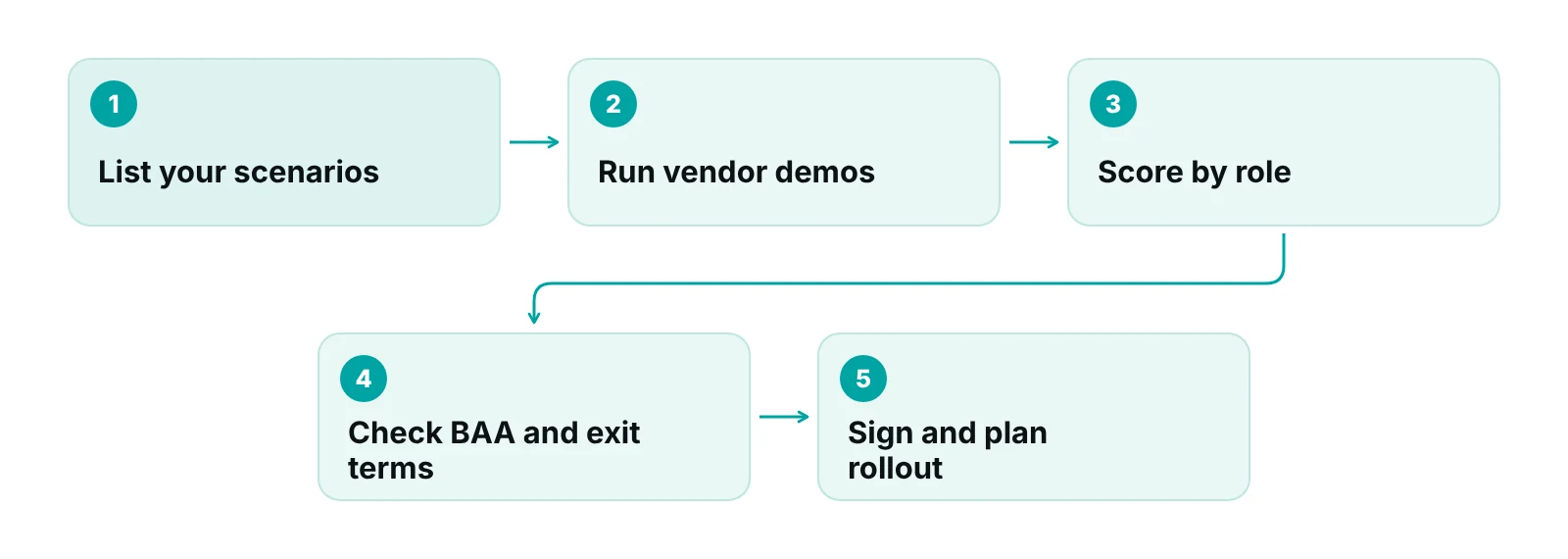
HealthIT.gov’s demonstration toolkit is built on “established scenarios” that show how a system handles real practice work, with the people who will use it watching (HealthIT.gov). Ask each vendor to run the same ten of your own situations, and have the biller, front desk and manager each score them.
How to compare vendors fairly
Compare vendors on the same factors in the same order. HealthIT.gov’s guidance on selecting an EHR vendor gives a workable list, and most of it applies to practice management software too. The questions below turn those factors into things you can ask in writing.
| Factor (HealthIT.gov) | Question to ask the vendor | Why it matters |
|---|---|---|
| Fit with practice goals | Can you run our ten scenarios in the demo? | A tool that fits a generic clinic may not fit your specialty or payer mix |
| Total pricing | What are the costs for software, implementation, training, interfaces and support? | The subscription is only one line of the total |
| Implementation support | Who trains us, when, and how long is support included? | Poor training shows up at the front desk, not in the demo |
| Data migration | Who moves our data, who pays and what is moved? | Moving only selected data can simplify the switch |
| Integration and security | How does it connect to our EHR and other tools, and how is access controlled? | Double entry between systems brings back the errors you are trying to remove |
| Site visit and references | Can we see it running in a practice like ours? | Peers will describe workflow changes the demo skips |
| Contract review | Can our counsel review the terms, including exit and data return? | Exit terms matter most when something goes wrong |
Source: HealthIT.gov, “What factors should I consider when selecting a vendor?” (paraphrased; the questions are our suggestions).
Also check where the system sits next to your EHR. If you keep your current EHR, you need the PMS to work with it rather than ask staff to key the same data twice. See EHR and revenue cycle integration for what to check.
HIPAA, BAAs and cloud-based software
Cloud-based practice management software is not HIPAA compliant just because it is cloud-based, or because the vendor says so. HHS states that the Office for Civil Rights does not endorse, certify or recommend specific technology or products (HHS cloud computing guidance). Compliance depends on contract, configuration and policy.
What HHS does say is practical:
- A practice that uses a cloud service provider to store or process electronic patient information must have a HIPAA-compliant Business Associate Agreement (BAA) with that provider.
- A cloud vendor that stores only encrypted data and does not hold the key is still a business associate.
- You should understand the vendor’s environment well enough to run your own risk analysis and negotiate the BAA.
- The HIPAA rules do not expressly require a cloud vendor to share security documentation or allow customer audits. You can ask for these in the BAA or a service agreement.
- Storing data outside the United States is allowed with a BAA, but the risk analysis should account for location.
| BAA topic | What to look for | Question to ask |
|---|---|---|
| Permitted uses | What the vendor may do with patient data, and nothing beyond it | Is any data used for purposes beyond running our account? |
| Safeguards | A duty to protect the data and meet the Security Rule for electronic data | Which safeguards do you document, and can we request them? |
| Reporting | Reporting of unauthorised uses, breaches and security incidents | How fast do you notify us, and who is our contact? |
| Subcontractors | The same restrictions pass to any subcontractor that handles the data | Which subcontractors touch our data, and where? |
| Return or destruction | Return or destroy data at the end of the contract where feasible | How do we get our data out, and in what format? |
| Termination | A right to end the contract for a material violation | What happens to our data and access if we terminate? |
Source: HHS, Sample Business Associate Agreement Provisions (2013). HHS notes these are samples, not required language.
Ask any vendor to sign a BAA before they touch patient data, and raise it early. Our HIPAA compliance checklist for medical practices covers wider practice-side duties. Have counsel review the BAA.
Self-pay patients and good faith estimates
If you treat uninsured or self-pay patients, federal rules give them a right to a written good faith estimate of expected charges. CMS’s provider guidance (revised January 2025) says the rules cover people without coverage and those who do not intend to use their insurance (CMS).
- You must give an estimate when an item or service is scheduled three or more business days in advance, or when the individual asks for one.
- The estimate must be in writing, on paper or electronically, in the format the individual asks for.
- If a patient uses the federal dispute process for billed charges at least $400 above the estimate, the provider must take part. While it is pending, the provider cannot send the bill to collections, threaten to, or charge late fees.
What this means for software: ask whether the system can produce an estimate from your fee schedule, record when it was given and flag self-pay appointments scheduled three or more business days out. Your practice is still responsible for what the estimate says. Check the current CMS No Surprises Act guidance before you build a workflow around the rule.
Specialty fit: behavioral health and other special cases
The right system depends on your specialty. A solo therapist, an orthopedic group and a multi-site urgent care need different scheduling, documentation and billing logic, so ask each vendor to run a visit from your specialty, not a generic one.
Behavioral and mental health practices should ask for a worked example of how a therapy visit is documented and billed: session length, group sessions, telehealth visits and the modifiers payers expect. For the billing side, see our behavioral and mental health billing and RCM operations page.
“A demo that never touches a rejected claim has not shown you the part of the software you will use most.”
Data migration: moving without losing records
Agree in writing who migrates your data, who pays for it and which data moves. HealthIT.gov says to define those three points and notes that moving only selected data can simplify the switch (HealthIT.gov). Everything below is our recommended sequence.
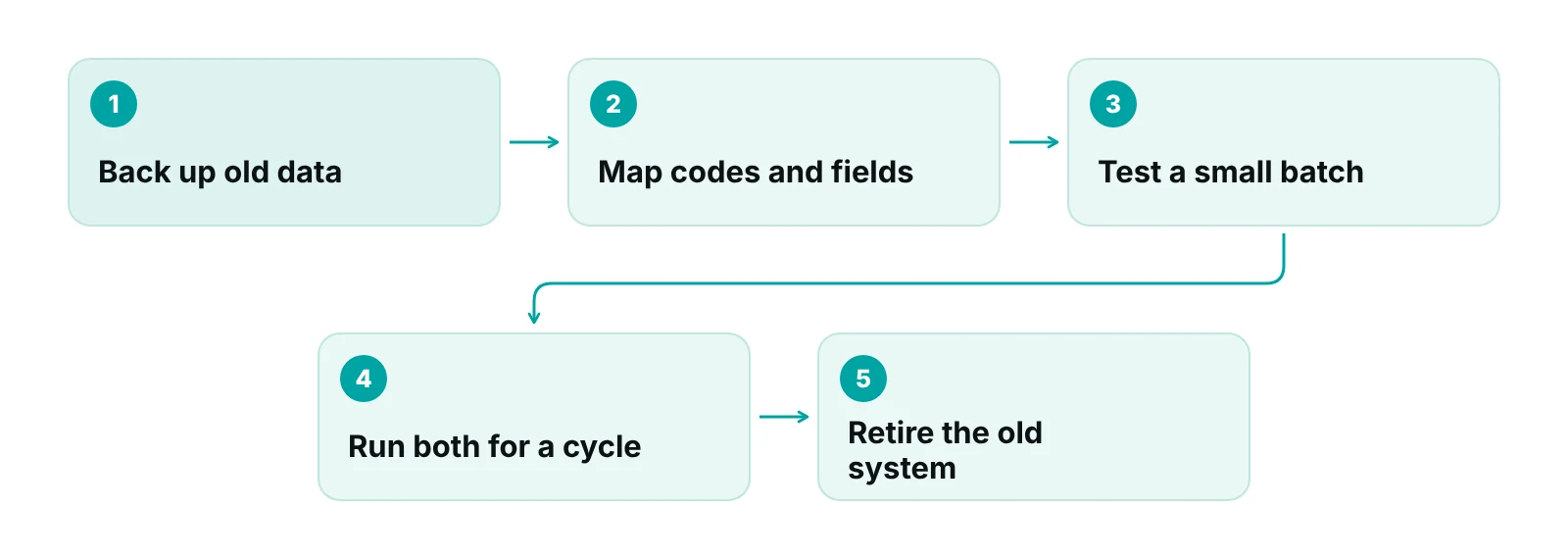
- Take an offline backup of the old system before anything changes, and confirm you can open it.
- Decide what moves. Demographics, upcoming appointments and open balances are usually essential. Decide how much history you need.
- Map your fields and codes. Check fee schedules, payer names, provider IDs and any custom codes against the new system.
- Test with a small batch. Check patient details, insurance, open balances and one submitted claim for each major payer.
- Handle open claims on purpose. Decide whether in-flight claims finish in the old system or move, and who watches each.
- Keep the old system readable until the new one has completed a full payment cycle and balances reconcile.
Ask the vendor how they handle a failed test migration.
Training staff and the first 30 days
Plan paid, protected time for training. A system staff do not trust gets worked around, and workarounds create the errors you were trying to remove. Our post on the front desk’s impact on the revenue cycle explains why registration mistakes cost money later.
- Train by role: front desk, billing, providers and managers each learn their own screens.
- Set a few reports to watch weekly in the first month, such as unsubmitted charges, rejected claims and unpaid claims by age. See our guide to revenue cycle KPIs for definitions.
- Review what is not working at the end of weeks two and four.
Want a second opinion before you sign?
Our free practice audit reviews how claims, scheduling and follow-up work in your practice today, so you know what the new system must handle. Pricing for any service is quoted after the audit.
When a claims-first system fits
If your EHR works but claims get lost between visit and payment, look for a practice management system that tracks claims by stage. RCM Finder’s portal is one: it is a claims system, not an EHR, and it works with the EHR you already use.
- Claim tracking by stage, with an owner on each claim.
- Specialty-aware billing logic applied claim by claim.
- Data-completeness checks before a claim is submitted.
- Flags for underpayments against expected amounts.
- Workflow rules that flag a claim for review, hold it or advance it to the next stage, and assign an owner.
- Role-based permissions and an audit log.
- Client portals for practices and billing companies, plus reporting dashboards.
Appointment scheduling in the portal is in early access, so do not choose it on the strength of scheduling alone. If you want help with the billing work as well, see our medical billing services or our end-to-end revenue cycle management.
Our recommendations
- Write your scenarios before you book demos. List ten real situations: a new patient with two insurances, a rescheduled visit, a rejected claim, a patient who pays by plan. Ask every vendor to walk through the same ten.
- Name the owner of each decision. Give one person the schedule, one the billing flow and one the vendor contract.
- Ask for the BAA and the data-exit terms early. Request the Business Associate Agreement and the contract’s data return terms before pricing talks. If they are slow to appear, that tells you something.
- Price the whole project, not the subscription. Add implementation, training, interfaces, data migration and support to the monthly fee. HealthIT.gov lists these as separate cost lines for a reason.
- Run a pilot week with a small batch of real records. Move a sample of patients and open claims into the new system first. Check demographics, insurance, balances and one submitted claim per payer before the full cutover.
- Keep the old system read-only until the first clean payment cycle. Do not shut the legacy system down until claims submitted from the new one have been paid or worked, and the old balances reconcile.
A practice management system built around claims, not charts.
RCM Finder's portal tracks each claim by stage with an owner, checks data completeness before submission, flags underpayments against expected amounts and applies workflow rules. It is a claims system, not an EHR, so it works alongside the EHR you already use.
See how the RCM Finder portal works · Create a portal account
Disclosure: RCM Finder builds and sells this portal. It is a practice management system, not an EHR.
Bottom line
Choose practice management software by testing your own scenarios, putting the BAA and data-exit terms in writing, and planning the migration and training before go-live. If you want help with the claims side, start with our medical billing services or talk to us. Start with the free practice audit.
Frequently asked questions
What is the difference between an EHR and practice management software?
An EHR holds the clinical record: notes, diagnoses, orders and histories. Practice management software handles the business workflow: scheduling, registration, charges, claims, payments and reports. Many products bundle both, and some practices run them separately. Decide which one you are replacing before you compare vendors.
How much does practice management software cost?
It varies by vendor, practice size and what is included, so a single number would mislead. Ask for the total: subscription, implementation, training, interfaces, data migration and support. HealthIT.gov lists these as separate cost lines when comparing systems. Get quotes in writing and compare like for like.
Is cloud-based practice management software HIPAA compliant?
Not by default. HHS states that OCR does not endorse, certify or recommend specific products. A practice that uses a cloud vendor to store or process patient data needs a HIPAA-compliant Business Associate Agreement with that vendor, and it should run its own risk analysis. Compliance depends on contract, configuration and your own policies.
Do I need good faith estimates in my software?
If you see uninsured or self-pay patients, federal rules require you to give a written good faith estimate when care is scheduled three or more business days ahead, or when the patient asks. Software that produces estimates can help, but the practice remains responsible for accuracy. Check the current CMS guidance.
How long does it take to switch practice management software?
It depends on the vendor, how much history you move, your interfaces and how much time staff can spare for training. Ask each vendor for a written timeline with named milestones, and confirm who does the data migration. Avoid any quote that skips a test migration.
Can practice management software replace my billing team?
No. Software can organise claims, run edits and report on payments, but someone still has to work denials, follow up on unpaid claims and decide what to appeal. Many practices pair a system with in-house or outsourced billing support. Decide who owns each step before you buy.
Get your free practice audit
Tell us about your practice. We will contact you using the details you give.
- A review of your recent claims, denials and A/R aging
- Where your front desk and prior authorizations slow payment
- A prioritized fix list you keep, whether or not you hire us
Pricing is quoted after the audit, based on your volume and the services you choose. Prefer to talk? Call +1 (302) 556-2288.
Sources
- Cloud Computing (HIPAA guidance) — U.S. Department of Health and Human Services (HHS) (2016 (reviewed 2022; page updated 2026))
- Sample Business Associate Agreement Provisions — HHS (2013)
- No Surprises Act: key responsibilities for providers (good faith estimates for uninsured or self-pay individuals) — Centers for Medicare & Medicaid Services (CMS) (2025)
- What factors should I consider when selecting a vendor? — HealthIT.gov (ONC) (n.d.)
- EHR Demonstration Scenario, Evaluation and Vendor Questions — HealthIT.gov (ONC) (n.d.)
Disclaimer: This post is general educational information for practice owners and managers. It is not legal, HIPAA, coding, accounting or compliance advice. Software features, vendor terms and federal and state rules change and vary by payer and state. Confirm requirements with your own counsel, compliance officer and each vendor before you sign anything.
