
Cardiology practice management software should be tested on the path from device to claim: imaging and ECG interfaces, orders and results, in-office procedure scheduling, authorization tracking and global, technical and professional billing. Then check reporting, ASTP/ONC certification, data export and security. Test each with your own devices and cases in the demo.
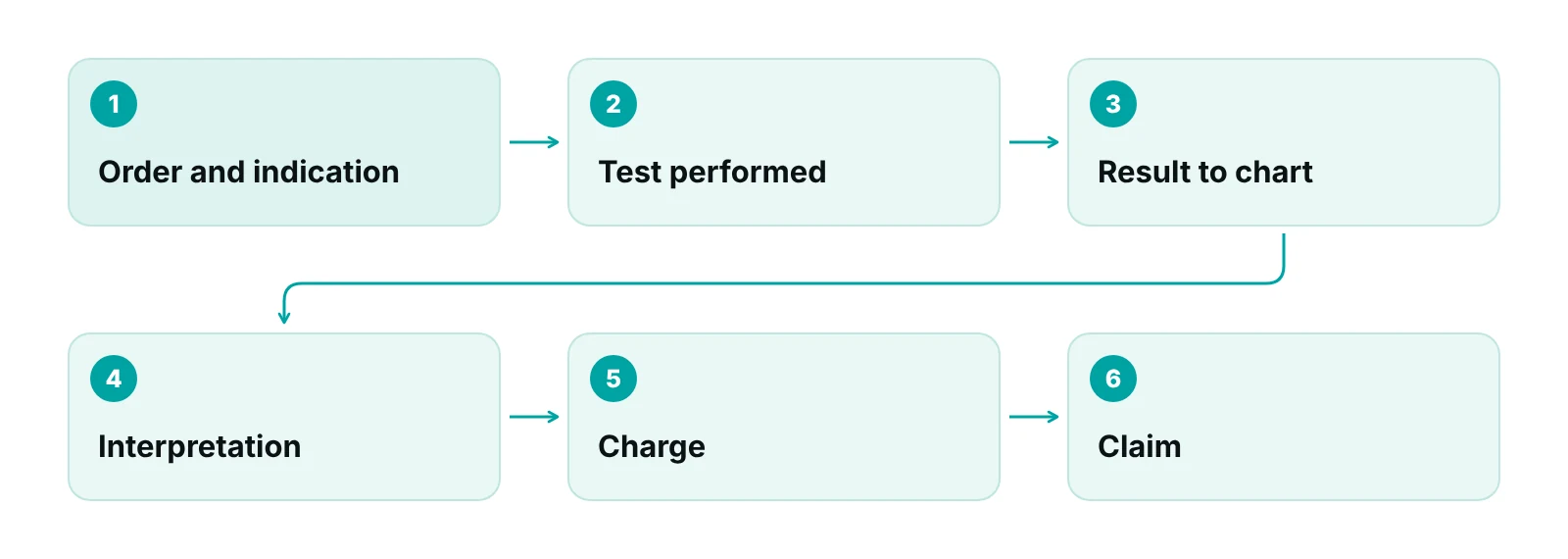
A cardiology demo usually shows a clean visit. It rarely shows a Holter result arriving in the wrong chart, a stress test that is billed as global when another group reads it, or what happens to your data when you leave. This guide is for owners and administrators who are shortlisting systems and want a way to compare them that does not depend on a feature list.
It names no products and stays on the cardiology-specific items. Related guides cover cardiology billing services and the cardiology revenue cycle.
Key takeaways
- Follow one test from device to order, result, interpretation, charge and claim in every demo.
- Get written interface details for each device you own; DICOM does not test conformance.
- Global, technical and professional billing depends on the code, setting, reader and payer.
- Check the CHPL listing for ASTP/ONC certification and test single-patient and full data export before signing.
- A cloud vendor holding patient data is a business associate; the BAA should cover access, logging and return of data.
What makes cardiology practice management software different?
Cardiology practice management software has to manage heavy in-office diagnostic testing, not just visits. Each test creates an order, a result, an interpretation and a charge that must reach the claim intact.
A general feature list is a poor guide for that reason. The checklist below follows the path from device to claim, then covers certification, export and security. Decide first which tool owns which job: the practice management system handles the schedule, authorizations, charges and claims, and the EHR holds the clinical record. The EMR vs EHR guide and the general practice management software guide cover that split. This post names no products.
| Area | What to test in a demo | Basis |
|---|---|---|
| Device interfaces | Which echo, ECG, stress and Holter devices connect, and in what format | DICOM |
| Orders and results | Diagnosis and indication on the order; gap list for missing results | MAC policies |
| Procedure scheduling | Room, device and staff booked together | Practice workflow |
| Authorizations | Status and approved dates linked to order and claim | CMS-0057-F; HTI-4 |
| Billing handoff | Global, technical and professional lines from one test | CMS PC/TC indicators |
| Reporting | Orders without results; results without charges | Practice-defined |
| Certification and export | CHPL listing; single-patient and full export | ASTP/ONC; (b)(10) |
| Security | Roles, audit trail, encryption, BAA, data return | 45 CFR 164.312; HHS |
Source: DICOM; CMS (2026); ASTP/ONC (2024); eCFR 45 CFR 164.312 (2026); HHS.
How should you test imaging and device interfaces (DICOM, ECG, Holter)?
Ask the vendor to show a real result from each device you own arriving in the right patient chart, then ask for the written interface details. A claim that a system is “integrated” tells you little until you know the device model, the direction of the data and the format.
DICOM is the international standard for medical images and related data. Its coverage includes cardiology equipment as well as radiology and ultrasound. The standard does not test an implementation: the DICOM overview says it does not specify a procedure to assess conformance. So ask each vendor for its conformance information and compare it with your echo machines.
ECG, stress and Holter devices vary. Some send structured data, some a PDF, and some only a file that a person attaches. Each manual step is a place where a result goes to the wrong chart or goes unbilled.
- List every device by make, model and age, and ask which are supported today, not on a roadmap.
- Ask whether data flows one way (results in) or two ways (orders and demographics out).
- Ask what arrives: images, waveforms, a summary, a PDF or only a link.
- Run one live test per device type and follow the patient to the claim.
Remote monitoring has its own rules; the cardiology telehealth guide covers it.
What should order and results management do?
Order and results management should tie each test to an ordering provider, a diagnosis and an indication, and should show anything ordered that has no result. Without that, the practice learns about a missing result when a patient calls or a payer asks for a record.
Medicare reviews some cardiology tests for medical necessity. A CMS Recovery Audit topic on transthoracic echocardiography covers codes 93303, 93306 and 93307 and points to separate local coverage policies from CGS, NGS and Palmetto GBA, so other MACs may differ. Software cannot decide medical necessity, but it can make the order capture the diagnosis and indication your MAC asks for.
- Order fields: ordering provider, diagnosis, indication, test and urgency.
- A worklist of open orders by age.
- Result routing to the reading physician, then the ordering provider, with a signed and dated interpretation.
- A link from order to charge, so a performed test cannot sit unbilled.
- Specific diagnosis search; the chest pain ICD-10 guide shows how symptom codes are chosen.
How should in-office procedure scheduling work?
Procedure scheduling should book the room, device and technician together and carry the authorization status onto the appointment.
In the demo, check three things. Can a stress test reserve a room and a staff member? Does a Holter create two appointments, hook-up and return? Does the front desk see authorization status before a same-day echo?
Place of service also needs a decision at scheduling. The American College of Cardiology notes that CMS treats office (11) and off-campus (19) and on-campus (22) outpatient hospital departments as separate settings. The system must keep those settings apart on the charge.
Appointment booking inside the RCM Finder portal is in early access, so this guide does not rely on it.
What should authorization tracking include?
Authorization tracking should hold the request, the status, the approval number, the approved dates and units, and the link to the order and claim. If those live in a spreadsheet beside the system, the claim will not know what was approved.
The AMA’s June 2024 release on its physician survey reported an average of 43 prior authorizations per physician per week and 12 hours a week of combined physician and staff time. Those figures cover all specialties, not cardiology alone.
Two federal developments affect what software should do. The CMS interoperability and prior authorization final rule puts requirements on certain payers, not on practices. Separately, ASTP/ONC’s HTI-4 final rule added certification criteria for provider-side prior authorization APIs. Ask each vendor whether it plans to certify to them and when.
| Item | What it says | Who it applies to |
|---|---|---|
| CMS-0057-F decisions | 72 hours expedited, 7 calendar days standard, with a specific denial reason (drugs excluded) | Impacted payers, from January 1, 2026 |
| CMS-0057-F Prior Authorization API | Approval, denial or more-information responses | Impacted payers, generally from January 1, 2027 |
| HTI-4 (July 31, 2025) | Three provider prior authorization API certification criteria | Health IT developers |
| Security Rule proposal | Proposed MFA and encryption; not final, per HHS | Covered entities, if finalized |
Source: CMS fact sheet on CMS-0057-F (2024); ASTP/ONC HTI-4 overview (2025); ASTP/ONC certification overview (2024); HHS OCR Security Rule NPRM fact sheet (2024).
Until payer APIs reach practices, test whether staff can enter, find and reuse an authorization in one place. The prior authorization guide covers the workflow, and RCM Finder’s virtual medical assistants can run requests inside your system.
How should the billing handoff handle global, TC and 26 splits?
The software should turn one performed test into the right claim line: a global charge when the practice owns the equipment and the interpretation, or technical-only or professional-only lines when it does not. Many cardiology denials start here.
CMS assigns each code a professional component/technical component indicator. Per the CMS status indicator page, a global-only code has separate professional-only and technical-only codes, and modifiers 26 and TC cannot be added to it. CMS’s ECG examples are 93010 (interpretation and report only) and 93005 (tracing only).
| Test | Codes and what each covers | Basis |
|---|---|---|
| ECG | 93005 tracing only (technical); 93010 interpretation and report only (professional) | CMS PC/TC indicators |
| Exercise stress test | 93015 complete service; 93016 supervision only; 93017 tracing only; 93018 interpretation and report only | AAPC article on MPFS indicators |
| Holter, up to 48 hours | 93224 complete service; 93225 recording; 93226 scanning analysis; 93227 review and interpretation | WPS LCD CV-016 (2011); verify |
Source: CMS status indicators (2026); AAPC (stress test coding); WPS LCD CV-016 via CMS (2011). Illustrative; confirm with the current fee schedule and your MAC.
Rules vary by who performs and who reads. Under the Medicare Claims Processing Manual chapter 13, the technical component in a physician office is paid under the fee schedule (section 20.2.2), and the professional component needs a written report (section 20.1). If a practice bills for a read done by a physician outside the practice, the anti-markup rules in section 20.3 apply. Because some tests split by separate codes instead of modifiers, the software must not add 26 or TC automatically.
Ask the vendor to build three claims: an in-office test read by your cardiologist, a technical-only test read elsewhere, and a read-only hospital study. The cardiology billing services guide goes deeper on the component-billing rules and denials.
Which reports does a cardiology practice need?
A cardiology practice needs reports that show leaks between steps, not only total charges. The most useful ones ask what happened after the test was ordered.
- Orders with no result, by test type and age.
- Performed tests with no charge.
- Authorizations expiring or used up, by payer and test.
- Denials by test type, modifier, payer and reason.
- Technical and professional collections shown separately.
Ask whether staff can build these reports without the vendor. The revenue cycle KPI guide defines the measures, and the cardiology revenue cycle management guide shows how they fit the full cycle.
What do ASTP/ONC certification and data export mean for a buyer?
Certification tells you a specific product module passed testing against named criteria. It does not tell you the product fits cardiology. Check the criteria it holds, then test the workflows yourself.
The ASTP/ONC Health IT Certification Program is voluntary and third-party: accredited labs test and certification bodies certify. The Certified Health IT Product List (CHPL) is the public record, updated at least weekly. CMS Promoting Interoperability programs require certified technology, so ask the vendor for the CHPL product number and criteria, not a logo.
Data export is where certification can help. The (b)(10) criterion requires a certified product to let a user export a single patient’s electronic health information without developer help and to export the full patient population, with a public link to the export format. That is a floor. Also ask for the schedule, ledger, charges, authorizations and claim history, and export a sample before signing.
- Do the criteria held match the programs you report to?
- Can an administrator run both exports without a service ticket?
- Is the format documented, and does it include ledger and authorization data?
- What does an export cost, and is it logged?
How should you compare security and hosting?
Compare security on access control, activity logging, encryption, hosting terms and exit. A cloud vendor that holds your patient data is a business associate, and the agreement should say what happens to the data at the end.
The HIPAA Security Rule’s technical safeguards at 45 CFR 164.312 cover access control (unique user identification and an emergency access procedure are required; automatic logoff and encryption are addressable), audit controls, integrity, person or entity authentication and transmission security. Test each in the demo with a front-desk login.
HHS’s cloud computing guidance says a cloud provider that handles electronic protected health information for you is a business associate and requires a business associate agreement (BAA), even when it stores only encrypted data. The BAA must require the return or destruction of PHI at the end of the contract where feasible. Request security documentation and audit rights in the contract.
HHS proposed multi-factor authentication and encryption in December 2024; its fact sheet calls it a proposal, not a final rule. Ask vendors for MFA now. For practice-side steps, see the HIPAA compliance checklist for medical practices.
What should a cardiology software demo script include?
Use your own cases so the vendor cannot choose an easy path. Score each task pass or fail.
- Order a stress test with a diagnosis and indication, and show the authorization status on the appointment.
- Book an echo and a Holter hook-up with the room, device and technician, and the return visit.
- Receive a result from a device you own and show it in the right chart.
- Sign the interpretation and show how the global, technical-only and professional-only lines are created.
- Show an order with no result and a test with no charge in a report.
- Export one patient and a sample of the ledger, and show the audit trail for both.
- Remove a user and show the audit trail.
Where does a billing portal fit next to cardiology software?
A billing portal works beside the clinical and device systems, not in place of them. RCM Finder’s portal is a billing-side system, not a cardiology record or device interface.
The RCM Finder practice management system tracks every claim by stage, checks claim data for completeness before submission, flags underpayments against expected amounts, and applies workflow rules that hold or advance a claim or assign an owner. It uses role-based permissions, an audit log, a client portal and encrypted (HTTPS) connections. The team works inside your existing EHR, for example PrognoCIS, eClinicalWorks or athenahealth, and we put a Business Associate Agreement in place before accessing patient data. Appointment booking with a calendar view is in early access, and in-portal real-time eligibility checks are coming next.
Check where your tests stall between order and payment
A free practice audit reviews a sample of claims and shows which gaps are software problems and which are process problems.
Our recommendations
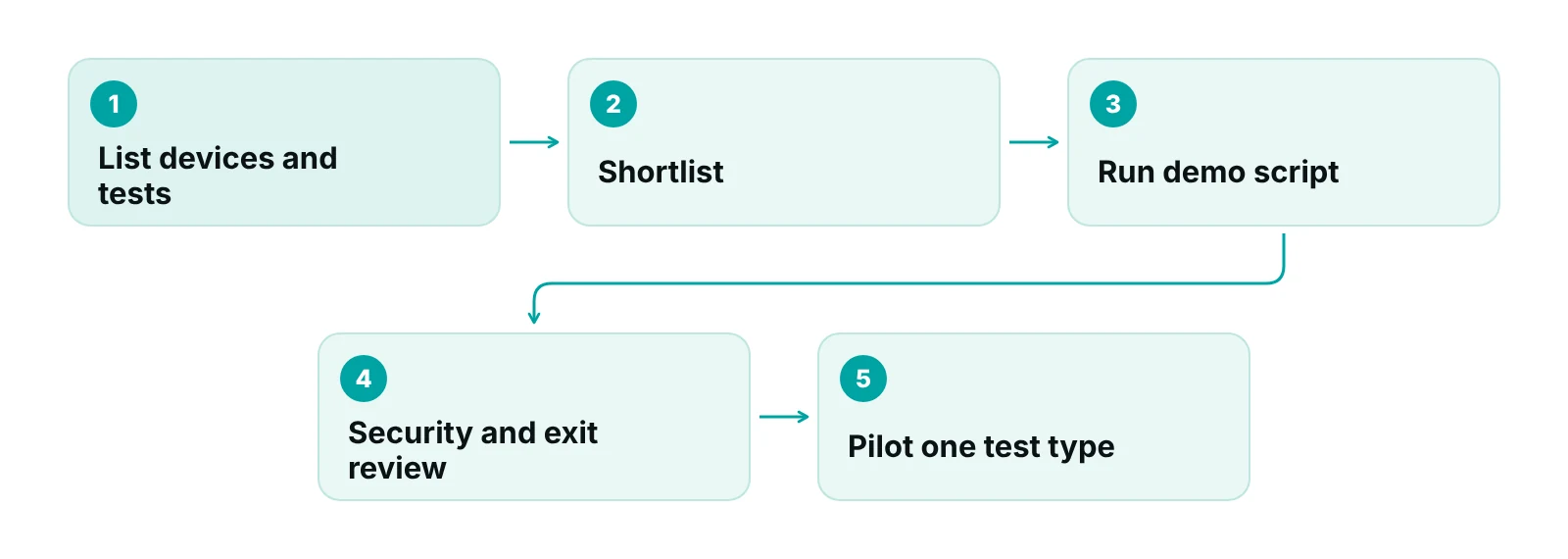
- List devices and tests first. Write down every echo, ECG, stress and monitor device with model and age. Ask each vendor to confirm support in writing.
- Follow one test from order to payment. Use your own case and stop at the claim. A system that cannot show the charge created from a result has not passed.
- Own the global, TC and 26 rules. Give the vendor your payer and MAC rules and test them with three sample claims.
- Keep authorizations in the system. Staff should enter every approval, date range and unit count where the claim reads from.
- Ask for the CHPL listing. Request the product number and criteria held, then match them to programs you report to.
- Test the exit before you sign. Export a patient and a ledger sample, read the BAA language on data return, and put export timing in the contract.
Bottom line
The right cardiology practice management software is the one that carries a test from device to paid claim with the right components, keeps authorizations beside the order, and lets the practice take its data out. Use the checklist and demo script above, then decide who works the denials. RCM Finder’s practice management system page lists what its billing portal does today and what is still early access.
Frequently asked questions
What is cardiology practice management software?
It is the system that runs the business side of a cardiology office: the schedule, authorizations, charges, claims and reports. Many products also include the clinical record and connect to echo, ECG, stress and monitor devices. Some practices use one system for everything, and others combine separate tools.
Is cardiology practice management software the same as a cardiology EHR?
No. The EHR holds the clinical record and the practice management system handles scheduling and billing. Many cardiology products bundle both, which can reduce re-entry. Decide which tool will own orders, results, charges and authorizations, because that is where data gets lost between systems.
Does the software need to support DICOM?
If the practice runs an echo lab or other imaging, ask for DICOM conformance information from the vendor and match it to your machines. DICOM covers images and related data, including from cardiology equipment, but the standard does not test an implementation, so the vendor must show it works with your devices.
Does the software need ASTP/ONC certification?
Not always. Certification is voluntary, but CMS Promoting Interoperability programs require certified technology. If you report to those programs, ask for the product’s CHPL listing and confirm the certified criteria cover what you need. Certification does not show that a product suits cardiology workflows.
Should the system add modifier 26 and TC automatically?
Not without rules. CMS indicators decide which codes allow those modifiers, and some tests use separate codes instead. The right choice depends on who owns the equipment, who reads the study, the place of service and the payer. Test several claim scenarios before go-live.
Can RCM Finder replace our cardiology software?
No. RCM Finder’s portal tracks claims, checks data completeness and flags underpayments on the billing side, and its team works inside your existing EHR. It does not replace charting or device interfaces. Appointment booking is in early access, and real-time eligibility in the portal is coming next.
Get your free practice audit
Tell us about your practice. We will contact you using the details you give.
- A review of your recent claims, denials and A/R aging
- Where your front desk and prior authorizations slow payment
- A prioritized fix list you keep, whether or not you hire us
Pricing is quoted after the audit, based on your volume and the services you choose. Prefer to talk? Call +1 (302) 556-2288.
Sources
- About DICOM: Overview — DICOM Standard (NEMA) (2026)
- DICOM PS3.1 Introduction and Overview — NEMA / DICOM (2026)
- ONC Health IT Certification Program Overview — ASTP/ONC (healthit.gov) (2024)
- Electronic Health Information export (170.315(b)(10)) — ASTP/ONC (healthit.gov) (2026)
- CMS Interoperability and Prior Authorization Final Rule (CMS-0057-F) fact sheet — Centers for Medicare & Medicaid Services (2024)
- HTI-4 Final Rule overview — ASTP/ONC (healthit.gov) (2025)
- AMA survey indicates prior authorization wreaks havoc on patient care — American Medical Association (2024)
- Status Indicators (PC/TC indicators) — Centers for Medicare & Medicaid Services (2026)
- Medicare Claims Processing Manual, Chapter 13 — Centers for Medicare & Medicaid Services (2026)
- Clean Up Your Cardiovascular Stress Test Coding with MPFS Insights — AAPC (2026)
- LCD CV-016 Electrocardiographic Monitoring (Holter or Real-Time Monitoring) — WPS Medicare via CMS Medicare Coverage Database (2011)
- Approved RAC Topic 0111: Transthoracic Echocardiography — Centers for Medicare & Medicaid Services (2026)
- Place of Service Codes — American College of Cardiology (2026)
- 45 CFR 164.312 Technical safeguards — eCFR (2026)
- HIPAA and cloud computing guidance — U.S. Department of Health and Human Services (2016)
- HIPAA Security Rule NPRM fact sheet — HHS Office for Civil Rights (2024)
- Adopted Standards and Operating Rules — Centers for Medicare & Medicaid Services (2026)
Disclaimer: This article is educational and is not legal, coding, tax or compliance advice. Medicare policies differ by MAC, and payer rules, state law and software features change, so confirm current requirements with your MAC, each payer, your attorney and your vendor before acting. CPT is a registered trademark of the American Medical Association; official code descriptors are not reproduced here.