
POS 11 vs POS 22 comes down to where the patient was seen: POS 11 is a physician's office, and POS 22 is an outpatient department on a hospital's main campus. For Medicare professional claims, POS 11 is paid at the non-facility rate and POS 22 at the facility rate, so the code changes the payment.
Many practices bill from more than one setting. A physician may see patients in the office on Monday and in a hospital outpatient clinic on Tuesday. The service can be the same and the code on the claim still has to differ. This guide explains the two codes, the often-forgotten POS 19, and how to check them before a claim goes out. It replaces older advice that quoted percentage gaps between the two codes. Those figures could not be traced to a source, so they are not repeated here. If you only need the office code, see our POS 11 guide.
Key takeaways
- POS 11 means office. POS 22 means on-campus hospital outpatient. POS 19 means off-campus hospital outpatient.
- For Medicare professional claims, POS 11 is a non-facility setting; POS 19 and POS 22 are facility settings.
- The code you report follows where the service happened, not which rate is higher.
- The hospital’s own facility costs are billed separately from the physician’s professional claim.
- Check POS at scheduling, at charge entry and again before submission.
What a place of service code tells the payer
A place of service (POS) code is a two-digit code on a professional claim that names the setting where the service was provided. It tells the payer who carried the facility side of the visit, and for Medicare it decides which payment rate applies. CMS publishes the code set and notes that each payer, including Medicare, Medicaid and private insurers, sets its own reimbursement policy for the codes.
That last point matters. Questions about how a code is paid should go to your Medicare Administrative Contractor (MAC) or to the payer’s own provider manual, not to a general rule of thumb.
POS 11 vs POS 22 at a glance
POS 11 is the office. POS 22 is a portion of a hospital’s main campus that provides outpatient diagnostic, therapeutic and rehabilitation services. POS 19 is the same kind of department, but off campus. The table puts all three side by side.
| Item | POS 11 | POS 22 | POS 19 |
|---|---|---|---|
| CMS name | Office | On Campus-Outpatient Hospital | Off Campus-Outpatient Hospital |
| Where it applies | A location where the professional routinely provides exams, diagnosis and treatment on an ambulatory basis | A portion of a hospital’s main campus | A portion of an off-campus hospital provider-based department |
| Medicare payment rate for the professional claim | Non-facility | Facility | Facility |
| Does a hospital also bill for the visit? | No hospital facility claim | Yes, the hospital bills its own facility costs | Yes, the hospital bills its own facility costs |
| Added or revised | No change noted by CMS | Description revised January 1, 2016 | Added January 1, 2016 |
Source: CMS Place of Service Code Set (page updated 2026); CMS Transmittal 10356 (2020); CMS Transmittal R3315CP (2015); CMS fact sheet on the CY 2017 OPPS rule.
Where the old guidance went wrong
Older versions of this post said POS 22 covers any hospital outpatient department and left out POS 19. CMS treats on-campus and off-campus departments as two separate codes. Using POS 22 for an off-campus department is a code mismatch, even though Medicare edits treat 19 and 22 alike.
What POS 11 means for your claims
Report POS 11 when the service happens in a physician’s or other practitioner’s office. It is the code for routine exams, evaluation and management visits and in-office procedures. Under Medicare’s fee schedule it is a non-facility setting, along with POS 12 (home), as CMS Transmittal 10356 lists.
Medicare builds separate practice expense values for facility and non-facility settings, as the CMS relative value file documentation explains. That split is why the payer needs to know where the service happened.
Telehealth adds a twist. When a clinician delivers a visit to a patient at home, POS 10 applies, and Medicare pays the non-facility rate. When the patient is somewhere other than home, POS 02 applies, and the rate is the facility rate. CMS Transmittal 12671 (June 2024) states this and adds that modifiers 93 and 95 do not change the rate. Only the POS code does. Our telehealth POS 10 guide covers that code in full.
What POS 22 means, and where POS 19 fits
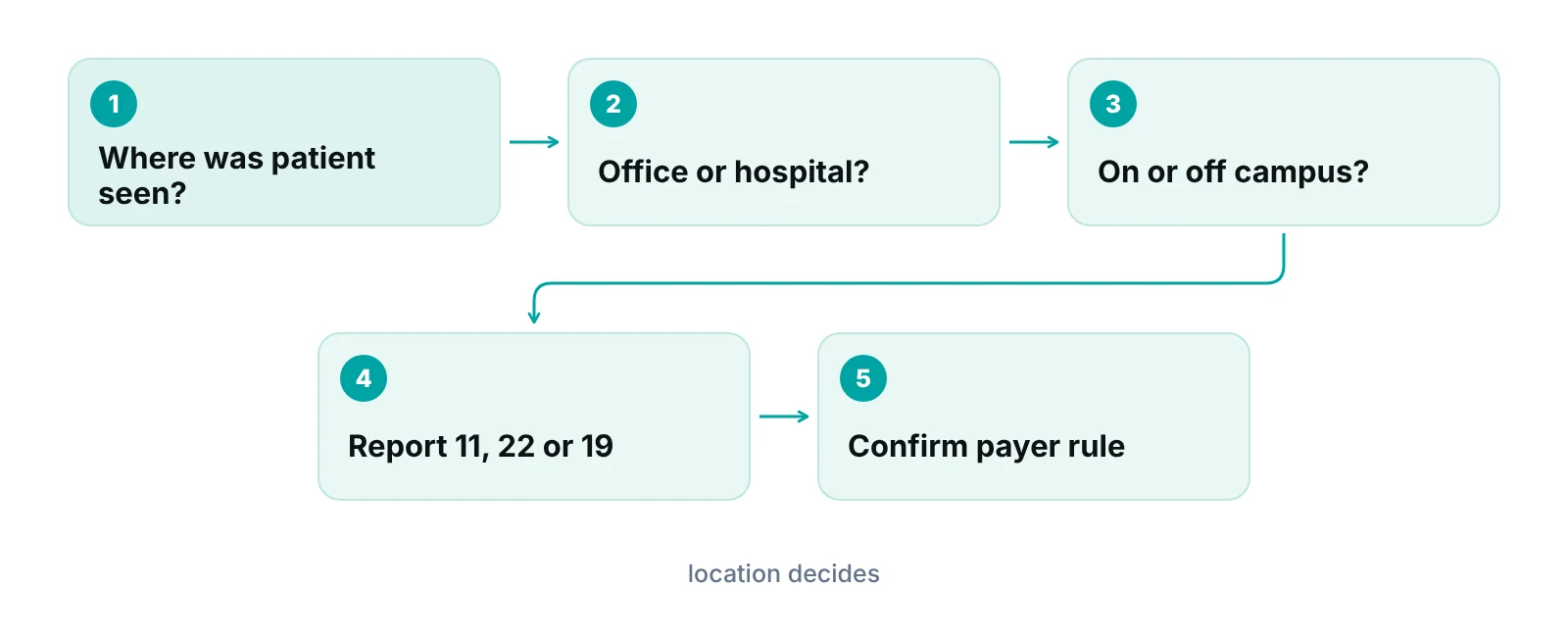
Use POS 22 when a hospital outpatient service takes place in a department on the hospital’s main campus. Use POS 19 when it takes place in an off-campus provider-based department. Before 2016 there was one outpatient hospital code. CMS added POS 19 and revised POS 22 effective January 1, 2016, and told contractors to treat POS 19 and POS 22 in the same way when editing claims.
A hospital-owned clinic can look and feel like an office to staff and patients. The code still follows how the location is registered, not how it looks. If your practice is employed by a hospital or works in a hospital-owned clinic, ask the hospital’s compliance or billing office which code applies to each location and keep that answer on file.
A note on off-campus departments
Hospital billing for some off-campus departments changed in 2017. A CMS fact sheet on the CY 2017 outpatient rule explained that certain off-campus services were no longer paid under the hospital outpatient payment system and were paid under the physician fee schedule at site-specific rates. It also said the physician continues to bill the professional claim and is paid at the facility rate. The hospital side of this is for the hospital to manage. For the practice, the lesson is the same: do not guess the setting, ask.
How the place of service changes payment
For Medicare, the POS code on the claim selects either the facility or the non-facility rate for the same procedure code. Transmittal 10356 says the rate is “determined by the Place of service (POS) code that is used to identify the setting.” For a hospital outpatient, it says the facility rate is paid regardless of where the face-to-face encounter occurred.
Do not read this as “office pays more, so use the office code.” The code has to describe what happened. Reporting POS 11 for a hospital department visit sends the wrong setting to the payer, and the claim may need to be corrected. The right question is always where the patient was, never which rate is better.
Exceptions worth knowing
- Diagnostic tests, professional component. CMS states the facility and non-facility rates are the same, whatever POS is on the claim.
- Outpatient therapy. CMS states non-facility rates apply to outpatient rehabilitative therapy procedures.
- Procedures with no value in one setting. Some codes have no non-facility value because they are rarely or never done outside a facility, per the relative value file documentation.
To see the real gap for a code, look it up in the Medicare physician fee schedule lookup tool for your locality. It shows facility and non-facility amounts side by side. Do not rely on a blanket percentage, because the difference varies by code and locality.
“A place of service code records where care happened. Choose it from the facts of the visit, then let the payer apply the rate.”
For specialties that perform the same procedure in an office, a surgery center or a hospital department, such as pain management, this check matters on almost every schedule day.
Other POS codes you will meet
POS 11 and POS 22 are not the only codes that move the rate. This quick reference shows how Medicare groups several common ones.
| POS | Setting | Rate type |
|---|---|---|
| 02 | Telehealth, patient not at home | Facility |
| 10 | Telehealth, patient at home | Non-facility |
| 11 | Office | Non-facility |
| 12 | Home | Non-facility |
| 19 | Off-campus outpatient hospital | Facility |
| 21 | Inpatient hospital | Facility |
| 22 | On-campus outpatient hospital | Facility |
| 24 | Ambulatory surgical center | Facility |
Source: CMS Transmittal 10356 (2020); CMS Transmittal 12671 (2024); CMS Place of Service Code Set.
For ambulatory surgery centers versus hospital departments, see our ASC vs HOPD billing guide. For the form-level view of who bills what, read institutional vs professional claims and the CMS-1500 claim form guide.
Common POS mistakes and how to fix them
Most POS problems start before the biller sees the claim. A scheduler books the wrong location, the template defaults to the office, or a provider rotates between sites and the charge keeps the last setting.
| Mistake | Why it causes trouble | Control that catches it |
|---|---|---|
| Office code used for a hospital department visit | Wrong rate sent to the payer; the claim may need correction | Location field on the schedule drives the POS default |
| POS 22 used for an off-campus department | Code does not match the registered site | Keep a list of each site with its approved POS |
| POS 11 left as a template default | Provider who rotates sites bills the wrong setting | Require POS confirmation at charge entry for multi-site providers |
| Telehealth billed with the wrong POS | Rate differs between POS 02 and POS 10 | Capture patient location at every telehealth visit |
| Hospital-owned clinic billed as an office | Registration and billing disagree | Get the hospital’s written POS guidance per location |
A denial for a POS mismatch usually looks like a front-end data problem, not a coding problem. Our guide to medical billing denial management explains how to trace denials back to their source, and the clean claims guide covers the front-end checks that prevent them.
How to keep POS accurate across sites
Accuracy comes from capturing the location once, early, and reusing it. Re-keying it at billing is where errors enter.
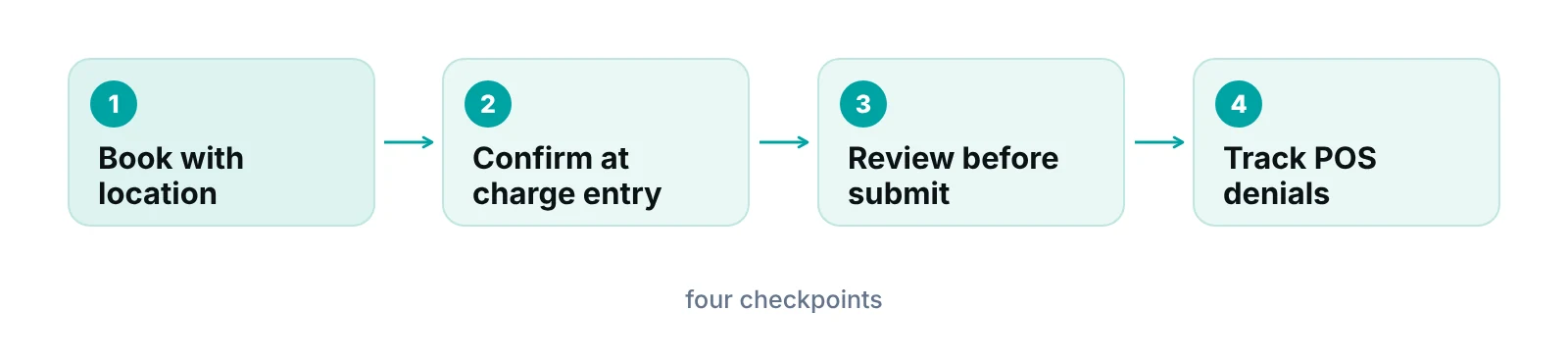
A practice management system can help here. Look for a practice management system that runs data-completeness checks before submission and tracks claims by stage with an owner, so a claim with a missing or mismatched setting is held and reviewed instead of sent. It also helps to have your billing partner or in-house team own a written site list. If you want outside help, medical billing services can take charge entry and claim review off the front desk.
Not sure which sites are coded correctly?
Request a free practice audit and we will review how your claims carry place of service across your locations. Pricing is quoted after the audit.
If you want to estimate how much revenue leaks out of your billing process, try the revenue calculator.
Our recommendations
- Keep a written list of every site and its POS. For each location, record the registered setting and the approved POS code. Get the hospital’s answer in writing for hospital-owned clinics.
- Drive POS from the schedule. Let the appointment location set the default POS, so the biller is confirming a code, not choosing one from memory.
- Require confirmation for multi-site providers. A provider who splits time between an office and a hospital department should confirm the setting on every charge.
- Capture patient location for telehealth. POS 02 and POS 10 pay differently, so record where the patient was at each visit.
- Audit a small sample every month. Pull a sample of claims by site, compare the POS to the schedule, and fix the source of any mismatch.
- Re-check payer policy at least twice a year. Payers set their own reimbursement rules for POS codes, so review the Medicare and commercial manuals for changes.
A practice management system can hold a claim when its data is incomplete.
RCM Finder's portal tracks claims by stage with an owner and runs data-completeness checks before submission, so a claim missing its location details can be flagged for review.
See how the RCM Finder portal works · Create a portal account
Disclosure: RCM Finder builds and sells this portal. It is a practice management system, not an EHR.
Bottom line
POS 11 is the office, POS 22 is the on-campus hospital outpatient department, and POS 19 is the off-campus one. Report the setting that matches where the patient was seen, and let the payer apply the rate. If POS-related denials keep coming back, our denial management services can trace them to their source.
Frequently asked questions
What is the difference between POS 11 and POS 22?
POS 11 is a physician’s or practitioner’s office. POS 22 is an outpatient department on a hospital’s main campus. For Medicare professional claims, POS 11 is a non-facility setting and POS 22 is a facility setting, so each triggers a different rate.
What is POS 19?
POS 19 is an outpatient department that is part of an off-campus hospital provider-based department. CMS added it on January 1, 2016, and told Medicare contractors to treat it like POS 22 when editing claims. Both are facility-rate settings for the professional claim, but they are separate codes, so use the one that matches the location.
Does POS 11 always pay more than POS 22?
Not as a rule. The Medicare fee schedule lists separate facility and non-facility amounts for each procedure code, and the gap varies by code and locality. Look up your own codes in the fee schedule lookup tool rather than assume a fixed percentage. Also remember that a hospital bills separately for its own facility costs, so the practice’s claim is only one part of the total.
Can I use POS 11 for a hospital-owned clinic?
Only if the location is truly an office under the hospital’s registration. Many hospital-owned clinics are hospital outpatient departments. Ask the hospital’s billing or compliance office in writing, and keep that answer on file for audits and training new staff.
Which POS do I use for telehealth?
Use POS 10 when the patient is at home and POS 02 when the patient is elsewhere. In Medicare, POS 10 is paid at the non-facility rate and POS 02 at the facility rate. Check each payer’s own telehealth policy, because commercial payers may handle these codes differently from Medicare.
Who decides how a POS code is paid?
Each payer does. CMS publishes the code set, but Medicare, Medicaid and private insurers set their own reimbursement policies. Your MAC or the payer’s provider manual is the place to confirm.
Get your free practice audit
Tell us about your practice. We will contact you using the details you give.
- A review of your recent claims, denials and A/R aging
- Where your front desk and prior authorizations slow payment
- A prioritized fix list you keep, whether or not you hire us
Pricing is quoted after the audit, based on your volume and the services you choose. Prefer to talk? Call +1 (302) 556-2288.
Sources
- Place of Service Code Set — CMS (2026)
- Transmittal 10356, Claims Processing Manual Ch. 12 s.20.4.2 — CMS (2020)
- Transmittal 12671 (CR 13582) — CMS (2024)
- Transmittal R3315CP — CMS (2015)
- Physician Fee Schedule RVU file documentation — CMS (2010)
- CMS finalizes hospital outpatient prospective payment changes for 2017 — CMS (2016)
Disclaimer: This page is general educational information about billing operations. It is not legal, coding, billing-compliance or financial advice. Payer rules vary by payer, plan and state and change often. Confirm requirements with the payer, your MAC and qualified advisors before acting.