
End-to-end RCM for medical practices

End-to-End Revenue Cycle Management Services for Medical Practices

One accountable team from the first scheduling call to the final payment, working inside your existing EHR. You see every claim's stage and every KPI in one place.
  • Works inside your current EHR
  • US practice time zone, every shift
  • Weekly KPI reporting, or on your schedule
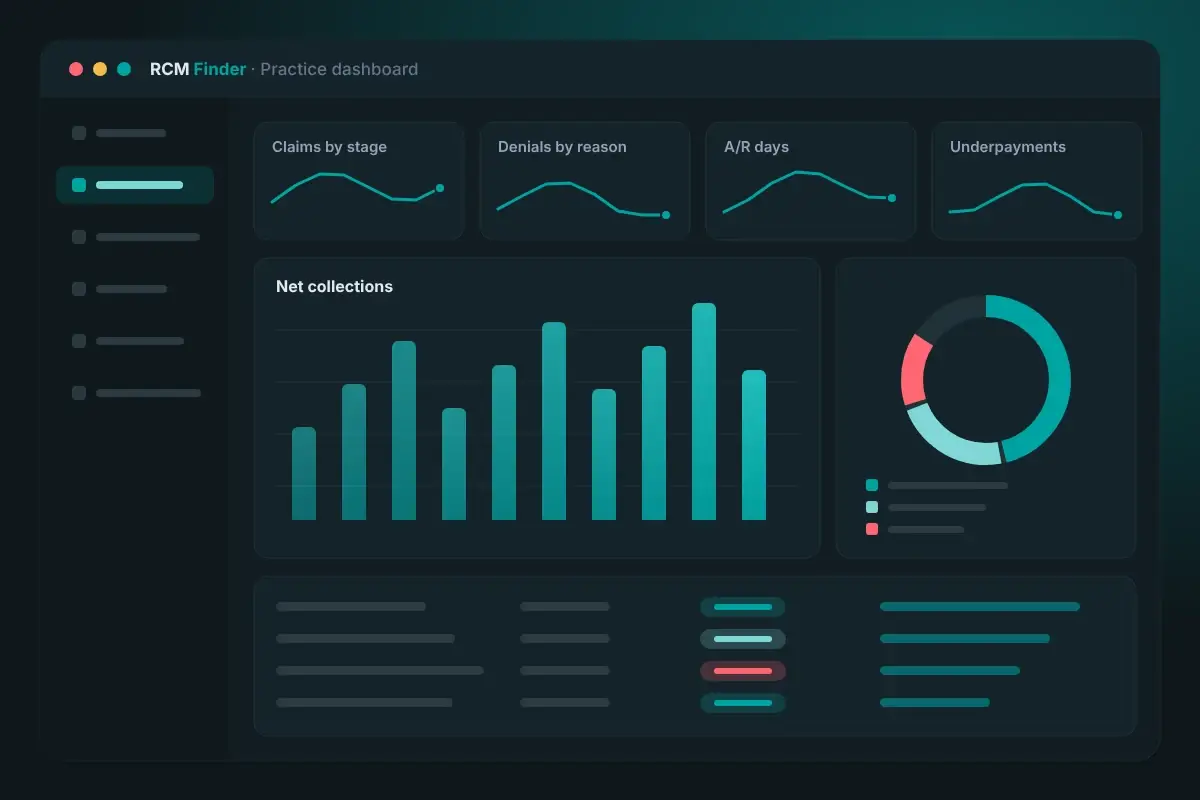
End-to-end revenue cycle management dashboard showing claims by stage, denial reasons, days in A/R and underpayments

Quick answer

End-to-end revenue cycle management services handle every financial step of a visit: scheduling, eligibility, prior authorization, coding support, claim scrubbing and submission, payment posting, denials, A/R follow-up and reporting. One accountable team owns the whole chain, so errors are fixed where they start instead of passed between vendors.

Disclaimer: This page is general educational information about revenue cycle operations. It is not legal, coding, billing-compliance or financial advice. Payer rules, filing limits and contract terms vary by payer, plan and state and change often. Confirm requirements with the payer, your contracts and qualified advisors before acting.

Why do handoffs in the revenue cycle leak revenue?

Revenue leaks where one person or vendor passes work to another and nobody owns the result. The front desk enters a member ID, a biller sends the claim, a different team works the denial. A small error at the first step shows up weeks later as a rejected claim, and by then nobody remembers where it began.

The scale of denials is well documented. In Premier's survey published in February 2025, hospitals and health systems reported an average initial denial rate of about 15% on their 2023 claims, and about 70% of denials were eventually overturned and paid. That money was owed. It took extra rounds of work to collect.

KFF's analysis of 2024 HealthCare.gov marketplace data, published in March 2026, found that insurers denied 19% of in-network claims, with rates from 3% to 36% by insurer, and that fewer than 1% of denied claims were appealed. Among in-network denial reasons, 25% were administrative and 9% were a missing prior authorization or referral. Both are front-end problems.

We found no source that puts a single dollar figure on revenue lost to handoffs alone, so we do not invent one. What the data does show is that many denials are preventable at registration, eligibility and authorization, and that most denied claims are never appealed. End-to-end RCM puts one accountable team across those steps.

Where the handoffs usually break

  • Front desk to eligibility: insurance details are typed once and never checked against the card or the payer.
  • Eligibility to authorization: coverage is confirmed, but the approval is not matched to the code or date billed.
  • Provider to coder: the note supports a service the claim does not show, or the claim shows one the note does not support.
  • Biller to payer: a claim leaves with missing data and comes back rejected.
  • Payment to follow-up: a short payment is posted as paid, and nobody compares it with the expected amount.
  • Denial to prevention: the denial is appealed, but the cause is never fixed at the desk.

Find out which handoff costs you most

Our free practice audit reviews a sample of your claims, denials and A/R aging and shows which stage loses the most revenue. Pricing is quoted after the audit.

Get a Free Practice Audit

What do end-to-end revenue cycle management services include?

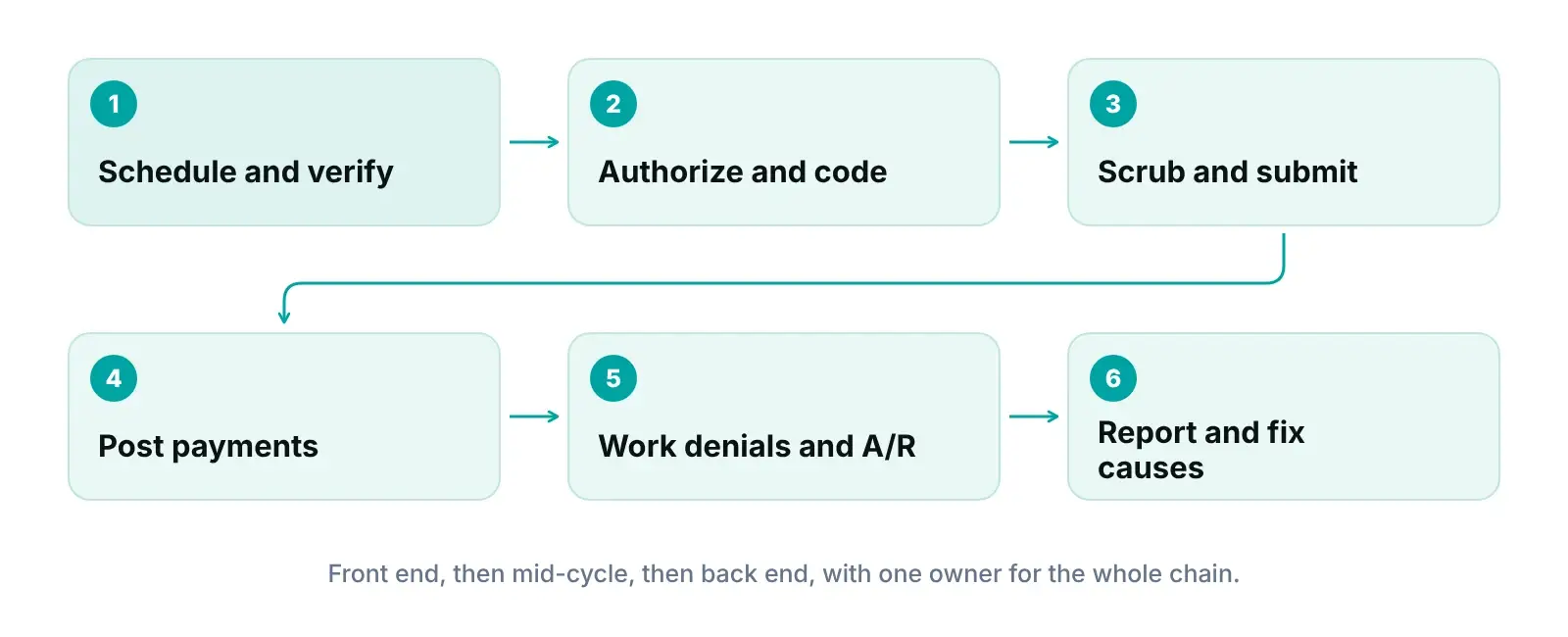
End-to-end revenue cycle management services cover every financial step of a patient visit, from the first scheduling call to a zero balance. In a full-service medical billing and RCM arrangement, one team owns the front end, the mid-cycle and the back end, and reports on all of it.
Front end: before the patient is seen

  • Scheduling and registration: demographics and insurance captured once and checked against the card.
  • Eligibility and benefits: coverage, copay, deductible and referral rules confirmed before the visit. See our insurance verification guide.
  • Prior authorization: requests tracked and matched to the codes billed. See our prior authorization guide.

Mid-cycle: turning the visit into a clean claim

  • Charge capture: every billable service in the note reaches the claim.
  • Coding support: codes and modifiers checked against the note and payer policy, with a provider query when they do not match.
  • Claim scrubbing: data-completeness checks before the claim leaves. Our claim scrubbing guide lists common edits.
  • Submission: claims sent inside each payer's filing limit. Medicare's limit is generally 1 calendar year after the date of service under 42 CFR 424.44, with limited exceptions; other payers set their own.

Back end: getting paid in full

  • Payment posting: remittances posted line by line and matched to deposits.
  • Denials: sorted by reason and root cause, then corrected or appealed. More in our denial management guide.
  • A/R follow-up: open claims worked by deadline and value. See our accounts receivable guide.
  • Reporting: KPI dashboards built on published definitions, reviewed with you every week.
End-to-end revenue cycle management diagram from scheduling and eligibility to coding, claims, posting, denials and reporting
One chain from first call to final payment. A fix upstream prevents rework downstream.

This page describes the service. For the full service overview, see our main revenue cycle management services page; for the software side, see our practice management system.

How our end-to-end RCM service works

We start with a free audit, then take over the cycle in stages inside your existing EHR. You keep your system, your payer contracts and your data.

  1. 1

    Free practice audit

    We review a sample of recent claims, denials, remittances and A/R aging, plus how registration and eligibility work today. You get a written summary of where revenue slips and what to fix first. Pricing is quoted after the audit.

  2. 2

    Business Associate Agreement and access

    We put a Business Associate Agreement in place before accessing patient data. Each team member then gets a personal login and a role limited to what the job needs.

  3. 3

    Map payers, scope and specialty rules

    We document your payer mix, your fee schedules and which stages you want us to run. The portal applies specialty-aware billing logic per claim, with 35 specialties grouped into shared billing-pattern archetypes.

  4. 4

    Work inside your EHR

    Our team works inside your existing EHR (for example PrognoCIS, eClinicalWorks or athenahealth), on your practice's time zone, onshore or offshore.

  5. 5

    Run the cycle and route exceptions

    Claims move through a tracked pipeline. Automation rules flag a claim for review, hold or advance a stage, or assign an owner, so every exception has a name next to it.

  6. 6

    Report weekly and fix root causes

    You get weekly KPI reporting and a review of denial reasons, underpayments and aging. Each recurring problem gets an owner and an upstream fix.

We build our billing pipeline around how claims actually move through a practice: registration, charge entry, submission, payment and follow-up.
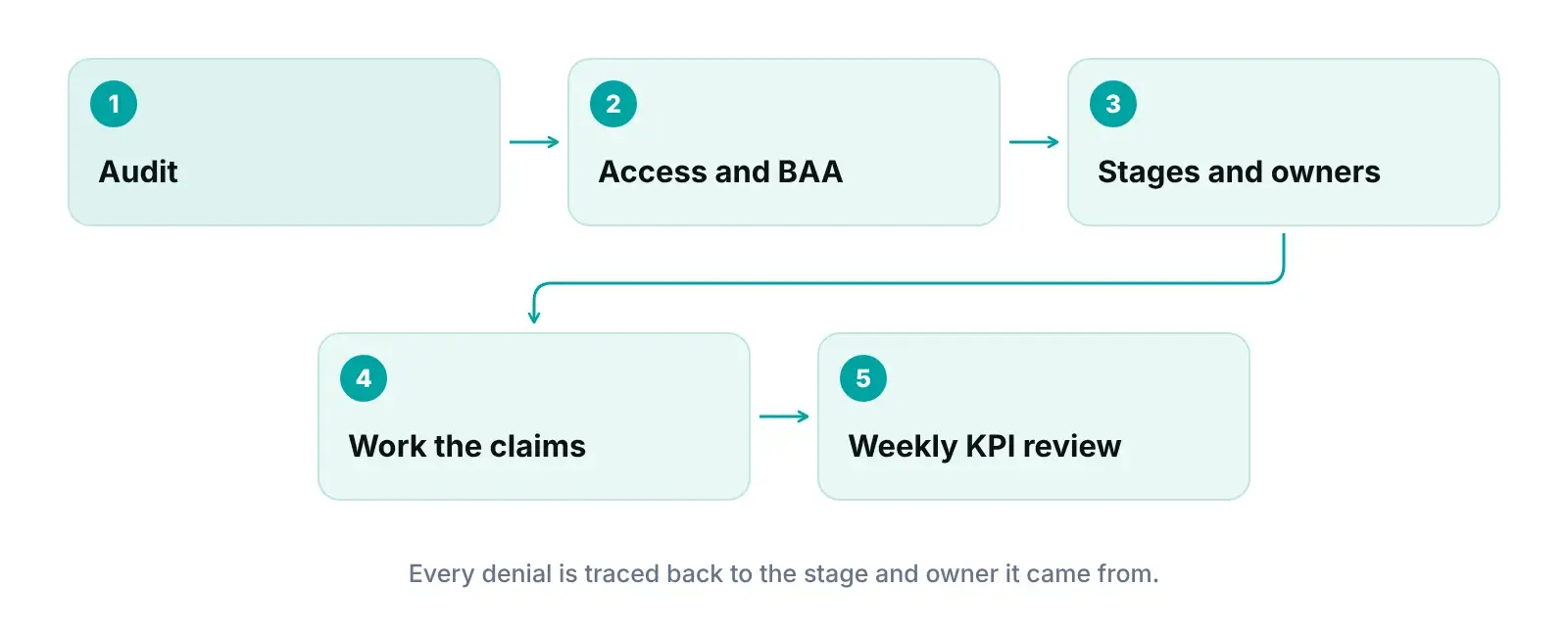
Diagram showing one accountable owner per revenue cycle stage and weekly review of denial causes
One owner per stage, one weekly review, one place to see every claim.

Which RCM KPIs prove the whole cycle is working?

Track days in A/R, net collection rate, denial rate, clean claim rate and A/R aging. Use published definitions so each number means the same thing every month.

HFMA's MAP Keys (2023 edition) state that one set of keys applies to hospitals and systems, ambulatory providers and physician organizations. MGMA's DataDive definitions (2025) are built for medical groups. We say which standard each number follows.

Core RCM KPIs: what each one tells you and how it is calculated
KPIWhat it tells youFormula (as published)Source
Days in A/RHow many days of charges sit unpaidTotal A/R ÷ (adjusted FFS charges × 1/365)MGMA data definitions
Net days in A/RThe same idea on a net revenue basisNet A/R ÷ average daily net patient service revenueHFMA MAP Keys, FM-1
Net collection rateShare of adjusted charges collectedNet FFS revenue × 100 ÷ adjusted FFS chargesMGMA data definitions
Denial rateHow often claims come back deniedClaims denied ÷ claims remitted (actionable denials)HFMA MAP Keys, AR-5
Clean claim rateClaims passing edits with no manual touchClaims passing edits with no manual intervention ÷ claims accepted for billingHFMA MAP Keys, CL-1
Aged A/RHow much A/R is old and at riskBilled A/R in each aging bucket (0–30 to over 120 days) ÷ total billed A/RHFMA MAP Keys, AR-1

Sources: HFMA MAP Keys, 2023 edition; MGMA DataDive definitions glossary, 2025. FFS = fee-for-service. Neither source sets a universal target value.

For a longer walkthrough, read our guide to revenue cycle KPIs.

Size the gap before the audit

Enter your monthly claim volume and collections in our revenue calculator for a starting number to bring to the audit.

Open the Revenue Calculator

How end-to-end RCM differs by specialty

The stages are the same in every specialty, but where claims break is not. Procedure-heavy specialties lose revenue at authorization and modifiers; visit-based specialties lose it at eligibility and documentation. Our portal applies specialty-aware logic per claim, so a multi-specialty group is not forced into one rule set.

What changes in end-to-end RCM by specialty group
Specialty groupFront endMid-cycleBack end
Pain management and neurologyPrior authorization for procedures and repeat injections; coverage rules checked before schedulingProcedure codes, modifiers and units matched to the note; diagnosis linked to the serviceDenials by reason and payer; short payments checked against expected amounts
CardiologyAuthorization for imaging and procedures, where the plan requires itProfessional, technical or global billing depends on who owns the equipment and who readsRepeat-study and documentation denials traced to the ordering step
Orthopedics and general surgerySurgical authorization and the assistant or facility rules for each caseGlobal-period and modifier rules checked on follow-up visitsClaims split across surgeon, assistant and facility need clear owners
Radiology and pathologyOrder and authorization verified before the studyProfessional and technical components kept separate; ordering provider details completeRejections for missing order or referring-provider data worked at the source
Behavioral healthBenefit and visit-limit checks by plan before each series of sessionsSession length and service type matched to the code billedAuthorization expiry dates tracked so renewals do not lapse
Dermatology and ophthalmologyMedical vs cosmetic or routine coverage confirmed up frontMedical necessity documented for each procedure; diagnosis links checkedDenials split by medical vs non-covered reason
Family practice and internal medicineEligibility on every visit; high patient volumeVisit level and preventive services coded to the noteVolume of small balances worked by value and age
Pediatrics and urgent careGuarantor and coverage checks at registration; walk-ins need same-day checksVaccine, visit and procedure charges all reach the claimPatient balances and plan changes followed up quickly

Operational patterns by specialty, not statistics. Payer rules vary by plan; confirm each against the payer's own policy. Details on each specialty page.

Each name above links to that specialty's page, with the codes, payer rules and sources behind it. For the full list of 35 specialties, see our specialty RCM hub.

Outsourced, in-house or hybrid RCM: which model fits your practice?

Choose the model that can cover every stage, every day. In-house gives the most control, outsourced RCM for medical practices adds depth and coverage, and a hybrid splits tasks between your office and a partner.

In-house vs outsourced vs hybrid revenue cycle management
FactorIn-house teamOutsourced RCMHybrid model
Day-to-day controlHighestShared, set by scope and reportingSplit by task
Coverage when staff are outGaps unless cross-trainedVendor covers absencesPartner covers its stages
Depth in coding and appealsLimited to who you can hireUsually broader, across many payersPartner fills the gaps
VisibilityYour own reportsVendor reporting; ask for claim-level accessNeeds one shared dashboard
Cost structureSalaries, benefits, software, trainingContract fee (ours is quoted after a free audit)A mix of both
Usually suitsLarger groups with stable billing staffPractices short on staff or facing rising denialsPractices keeping the front desk local

Decision guide based on common operating models; no sourced statistics.

A common hybrid: keep your front desk, add virtual medical assistants for eligibility and prior authorizations, and hand everything after the visit to an RCM team. Ask: can your team work every denial before its appeal deadline, and who covers billing when your biller is out? More in our article on how front desk staff affect the revenue cycle.

Not sure which model fits?

Talk it through with our RCM team. If keeping billing in-house makes more sense for your practice, we will say so.

Talk to Our Team

How end-to-end RCM connects to marketing, virtual staff and your portal

Revenue cycle results depend on what happens before and around billing. We run RCM as one of four connected services.

Pillar 1 · Healthcare Marketing

Healthcare Marketing: the right patients and payers

Marketing decides which patients and plans reach your schedule. We aim local SEO, Google Ads and reputation work at the services you want to grow.

  • Campaigns built around the services you want
  • Lead source captured at booking
  • Insurance details collected up front
Explore Healthcare Marketing
Pillar 2 · Virtual Medical Assistants

Virtual Medical Assistants: a clean front end

Many avoidable denials start at registration. Our virtual medical assistants handle scheduling, eligibility checks, prior authorizations and intake.

  • Insurance verified before the visit
  • Prior authorizations tracked
  • Your time zone, every shift
Explore Virtual Medical Assistants
Pillar 3 · End-to-End RCM

End-to-End RCM: every claim worked to zero

Coding support, scrubbing, denial management and A/R follow-up, run by one accountable team.

  • Completeness checks before submission
  • Denials traced to root cause
  • Underpayments flagged
Explore End-to-End RCM
Pillar 4 · Practice Management System

Practice Management System: visibility

Our portal shows where every claim stands and who owns the next step, for practices and billing companies.

  • Claim pipeline by stage
  • Role-based permissions and audit log
  • Scheduling in early access
Explore Practice Management System

What to ask any full-service RCM provider before you sign

Any RCM vendor that handles your patient data is generally a HIPAA business associate and needs a Business Associate Agreement. Beyond that, ask how the vendor limits access, logs activity, tracks filing deadlines and returns your data.

HHS guidance lists billing and practice management among business associate functions. It says a covered entity may disclose patient data to a business associate only with satisfactory assurances in a written agreement, and that business associates are directly liable for certain HIPAA provisions. HHS's minimum necessary guidance asks covered entities to identify which workforce roles need which patient information, and the Security Rule's 45 CFR 164.312 sets access-control and audit-control safeguards.

Questions to ask any RCM provider

  • Will you sign our Business Associate Agreement before accessing patient data?
  • Who works our account, and in which time zone?
  • Which stages do you run, and which do you leave to us? Ask for it in writing.
  • Do your coders hold an AAPC or AHIMA credential, and who reviews their work?
  • How is access limited by role, and can we see the audit log?
  • Can we see claim-level status, not only a monthly summary?
  • If we leave, how do we get our data back?

Our own setup: role-based access, audit logging, encrypted HTTPS connections, and a Business Associate Agreement in place before we access patient data. For your side, use our HIPAA compliance checklist.

Who this is for, and who it is not for

We would rather tell you now than after you sign. Here is where we fit and where we do not.

A good fit if you are

  • Independent and multi-provider practices that want one team accountable from registration to payment
  • Practices with rising denials, aging A/R or unexplained short payments
  • Groups that want to keep their current EHR
  • Practices comparing in-house, outsourced and hybrid billing
  • Owners who want KPI reporting on published HFMA and MGMA definitions

Probably not a fit if you are

  • Practices that want a promised percentage or result before anyone has seen their claims
  • Practices replacing their EHR as part of this project
  • Buyers choosing only on the lowest per-claim price

Expert recommendations from our operations team

What we would do first if we were running your practice's revenue cycle tomorrow.

  1. 01

    Fix the front end before you chase denials

    We check registration, eligibility and authorization first. In KFF's 2024 marketplace data, administrative reasons and missing authorization or referral made up about a third of in-network denial reasons.

  2. 02

    Give every stage one named owner

    A handoff without an owner is where claims stall. We write each stage, its owner and its exit condition down before we add automation.

  3. 03

    Work A/R by deadline, not only by age

    We sort open claims by the nearest filing or appeal deadline and by value, so recoverable money is worked before it expires.

  4. 04

    Load your contracted rates

    Underpayments cannot be found without an expected amount. Share your fee schedules, and we use them as the baseline for underpayment checks.

  5. 05

    Use published KPI definitions

    We follow HFMA and MGMA formulas and say which one each number uses, so trends stay honest month to month.

  6. 06

    Send every denial back to its cause

    We tag each denial with the stage where it started and review the top reasons weekly, so the fix lands where the error began.

Frequently asked questions

What is end-to-end revenue cycle management?

End-to-end revenue cycle management means one team handles every financial step of a patient visit: scheduling, eligibility and prior authorization, charge capture and coding support, claim scrubbing and submission, payment posting, denials, A/R follow-up and reporting. The point is a single owner for the whole chain, so errors are fixed where they start instead of passed between vendors.

How is full-service medical billing and RCM different from billing only?

Billing-only services usually start when the claim is ready and end when it is sent or paid. A full-service arrangement also covers the front end, such as eligibility and prior authorization, and the back end, such as denial root causes and reporting. Ask any vendor for a written list of the stages it runs and the stages left to your staff.

Should a small practice outsource RCM or keep it in-house?

It depends on whether your team can cover every stage on every day, including absences, and work each denial before its deadline. Many small practices keep the front desk and outsource everything after the visit. We say so if in-house suits you better. Our free audit shows where your current process loses time.

Do we have to change our EHR to outsource RCM to RCM Finder?

No. Our team works inside your existing EHR, for example PrognoCIS, eClinicalWorks or athenahealth, using the access you grant. Our portal sits alongside it for claim-stage tracking, underpayment checks and reporting. We do not claim official partnerships with EHR vendors.

How much do outsourced RCM services cost?

Pricing depends on claim volume, specialty, payer mix and how many stages you hand over. Billing companies price in different ways, so compare what each quote covers. We quote after a free practice audit so the price reflects your actual workload. Ask any vendor what is included, such as old A/R, patient statements and reporting.

Which KPIs show that RCM is working?

Start with days in A/R, net collection rate, denial rate, clean claim rate and the share of A/R in the oldest aging buckets. Use a published definition, such as MGMA's or HFMA's, so numbers stay comparable month to month. Watch trends and the reasons behind them rather than a single month. We report these weekly.

Free to request

Get your free practice audit

Tell us about your practice. We will contact you using the details you give.

  • A review of your recent claims, denials and A/R aging
  • Where your front desk and prior authorizations slow payment
  • A prioritized fix list you keep, whether or not you hire us

Pricing is quoted after the audit, based on your volume and the services you choose. Prefer to talk? Call +1 (302) 556-2288.

Tell us about your practice

RCMFinder Master Intake Form
AA

About the author: Awais Afzal

Healthcare Operations & Data Analyst, RCM Finder

Awais has spent more than 16 years in healthcare digital marketing and clinical operations management. He builds data-driven revenue cycle blueprints for high-ticket medical practices and leads product development of the RCM Finder portal. More about our team.

How we write: every figure, code and rule on this page was checked against the primary source listed below and independently fact-checked before publishing. We re-review this page every six months. Last reviewed October 12, 2026; next review April 12, 2027.

Sources

  1. Claims adjudication costs providers $25.7 billion; $18 billion is potentially unnecessary — Premier Inc. (2025)
  2. Claims Denials and Appeals in ACA Marketplace Plans in 2024 — KFF (2026)
  3. MAP Keys, 2023 edition — HFMA (2023)
  4. DataDive Definitions Glossary — MGMA (2025)
  5. 42 CFR 424.44 — Time limits for filing claims — eCFR (National Archives) (2026)
  6. Business Associates guidance — HHS Office for Civil Rights (2026)
  7. Minimum Necessary Requirement — HHS Office for Civil Rights (2026)
  8. 45 CFR 164.312 — Technical safeguards — eCFR (National Archives) (2026)
  9. Revenue Cycle Management Services (live page) — RCM Finder (2026)