
Urgent care website design works when a patient on a phone can confirm you are open, see an honest wait estimate and start check-in within seconds. That needs hours that match your Google listing, a defined wait-time claim, a minimal check-in form with a vendor agreement, fast pages, tap-to-call and accessible forms.
Most urgent care web advice comes from agencies and shows layouts. This guide treats the site as a capacity tool: it tells a patient whether you are open, roughly how long the visit will take and how to start check-in. It is one part of the urgent care practice management guide, which covers the rest of the clinic.
Ranking tactics sit in our urgent care SEO guide. The advertising rules for wait-time claims sit in our urgent care marketing guide. This post covers what the page itself shows, collects and promises.
Key takeaways
- Hours are the first thing a patient checks. Put the real schedule on the site, the Google listing, the door and the phone greeting, and change all four the same day.
- A wait-time number is an advertising claim. Define it in writing, label it as an estimate, show when it was updated and keep an off switch.
- Treat the check-in form as a place where health information may be collected: collect the minimum, sign a business associate agreement with the vendor and keep ad tags off it.
- Test speed against the Core Web Vitals “good” marks and accessibility against WCAG 2.1 Level AA, because a check-in form that fails on a phone loses the patient.
- Say plainly which services and plans you take, and what to do in an emergency.
What does an urgent care website have to do in the first few seconds?
It has to answer three questions before the visitor scrolls: are you open now, where are you, and how do I get seen. Urgent care is a walk-in decision, often made in a car or a waiting room, so the page is judged on a phone and in seconds.
Picture a parent with a feverish child at 6:40 p.m. searching for the nearest clinic. She needs the closing time, a tap-to-call number and a check-in button on the first screen. A photo banner with the phone number in the footer fails her.
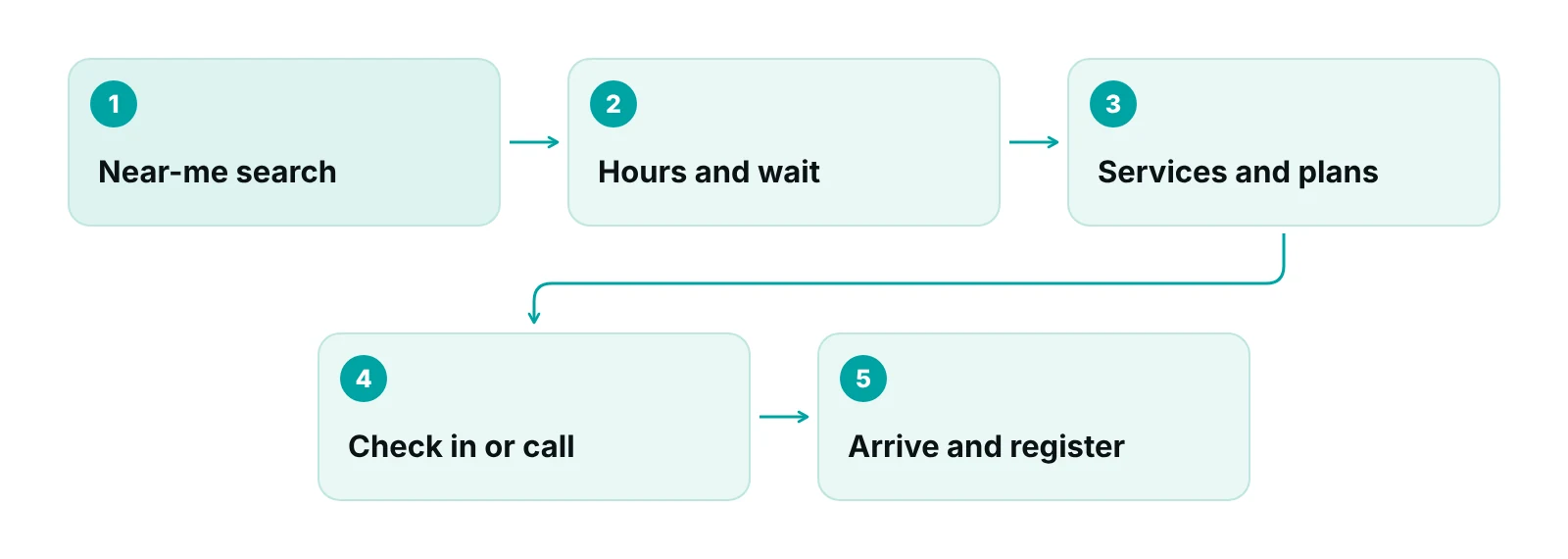
The design test is simple: on a phone, how many seconds until a stranger sees today’s hours, the address and a way to start check-in? Layout ideas for other specialties are in our roundup of medical website designs.
How do you keep hours and location accurate?
Name one owner for the schedule and change every place it appears on the same day. A wrong closing time costs a visit and a review, and the mismatch patients notice is between the listing, the site and the door.
Google’s Business Profile guidelines ask for regular customer-facing hours, with special hours for particular days such as holidays, and for a phone number and website that belong to the individual location, not a central line or a redirect (Google Business Profile guidelines). The same rule applies on your own site: each location needs its own page with its own address, phone and hours.
- Show today’s hours and a closing time in plain text at the top of the page, not inside an image.
- Put holiday and weather changes in one banner and in the profile’s special hours, then remove them when the day passes.
- Give each location its own page, map link, parking note and phone number.
- If a shift is cut or a provider is out, change the posted hours before the clinic changes its real ones.
- Once a month, compare the site, the profile, the door sign and the phone greeting side by side.
Profile ranking, reviews and the full location-page checklist are in the urgent care SEO guide. Here the point is narrower: hours are content that expires, so they need an owner.
Should the website show a wait time?
It can, if the number is defined, current and honest about its limits. A posted wait is an objective advertising claim, and the FTC’s substantiation policy statement says an advertiser needs a reasonable basis for such a claim before it runs (FTC). The advertising side is covered in our urgent care marketing guide; this section is about the display.
A 2019 commentary in the Journal of Urgent Care Medicine, written about emergency department displays, notes that wait time has no standard definition and may stop at triage, so patients can read a short number as a short visit. The author suggests clear disclaimers that the figure does not apply to emergencies (JUCM). It is opinion, not a study, but the measurement problem applies to any clinic.
| Display option | What it needs | Main risk | Safer wording |
|---|---|---|---|
| Live number from the check-in system | A written definition, a refresh time and a way to switch it off | Number frozen at a quiet-hour value | “Estimated wait to see a provider: about X minutes. Updated at 2:15 p.m.” |
| Range by time of day | Timestamped data from your own system for each daypart | Range copied from a quiet week | “Weekday evenings are usually busier than mornings.” |
| Fixed promise (“seen in 15 minutes”) | Data showing the promise holds at peak, plus a rule for retiring it | A guarantee you cannot meet on a busy night | Avoid; describe the process instead |
| Busy / not busy indicator | A rule for each level, set by staffing | Patients read “not busy” as “no wait” | “Lighter than usual right now. Waits can change.” |
| No display, check-in button only | Nothing beyond the button | Lower interest from time-sensitive visitors | “Save your spot online and we text you when we are ready.” |
Source: RCM Finder framework, applying the FTC advertising substantiation policy statement and the JUCM commentary (2019).
Whatever you choose, put the definition beside the number (for example, check-in to first contact with a provider), the time of the last update and one line telling anyone with an emergency to call 911 instead of waiting. Someone on the team should own switching the display off when the system is down.
How should online check-in and intake forms work?
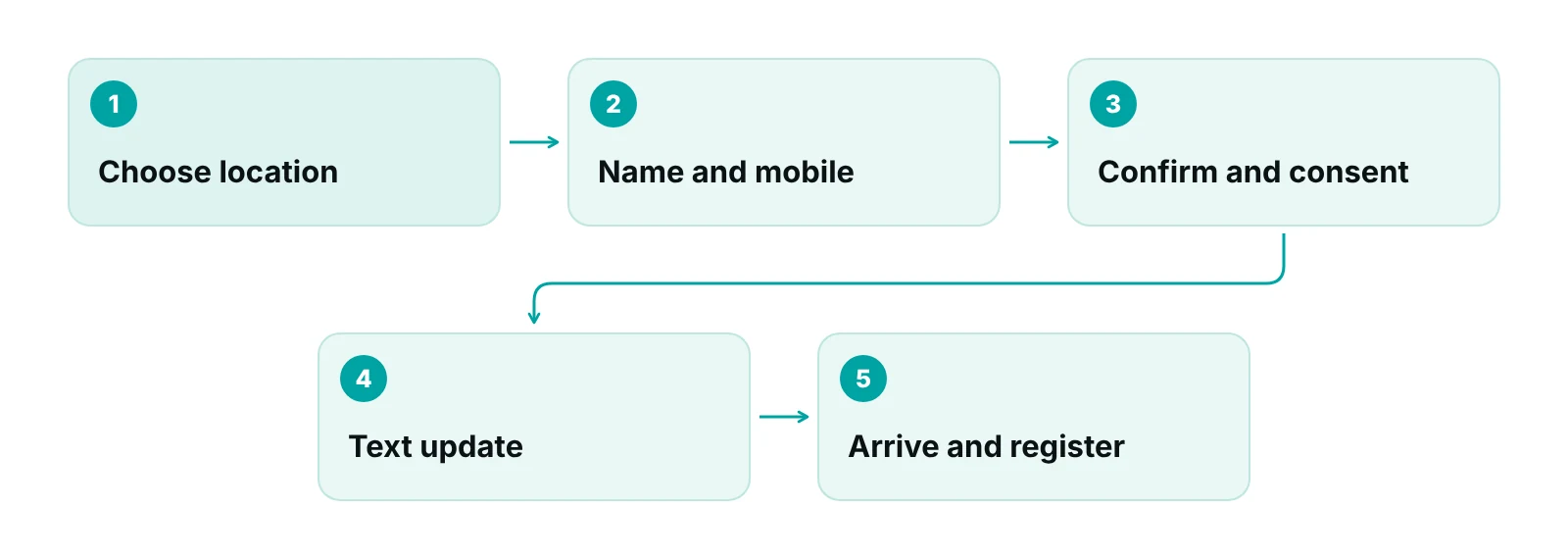
Keep check-in to the smallest form that lets the front desk hold a place, and collect the rest at the visit or in a secured step. Every extra field adds drop-off on a phone and adds health data you must protect.
HHS says tracking technologies on public pages that cannot reach health, care or payment information, such as visiting hours, generally fall outside the HIPAA Rules. It also says appointment scheduling and symptom-checker pages can capture an email address or the reason for care a visitor selects or types, and that information is individually identifiable health information. A federal court vacated part of the bulletin on June 20, 2024 (the IP-address-plus-public-page view), and HHS said it was evaluating next steps (HHS OCR). Reason-for-visit boxes are therefore the field to treat with most care.
| Step | Ask for | Data rule | Common mistake |
|---|---|---|---|
| Reserve a spot | First name, mobile number, preferred location | Minimum data; business associate agreement with the check-in vendor; no ad tags on the page | Marketing pixel left on the booking page |
| Reason for visit | A short pick-list, not free text, if you ask at all | Highest sensitivity; keep out of URLs and analytics | Symptoms typed into a field that feeds an ad platform |
| Text updates | Consent to receive texts | Capture consent first; operational content only | Pre-checked consent box |
| Insurance details | Plan name; card photo at the visit or in a secured step | Encrypted transfer; role-based access | Card images sent as email attachments |
| Full registration | Demographics, history, consents | Complete in the clinic or the EHR’s secured intake | Long form on the first screen |
Source: RCM Finder framework, applying the HHS OCR online tracking technologies guidance (last reviewed June 26, 2024, including the June 20, 2024 court ruling).
A form vendor that stores patient information for you is a business associate. HHS says that holds for a cloud provider even when it holds only encrypted data and has no key, and the covered entity must have a business associate agreement in place (HHS cloud computing guidance). Ask for that agreement before the form goes live, and record who approved the tool in your HIPAA compliance checklist.
The check-in tool also has to hand the visit to the chart. How that data lands in the record is an EHR question, covered in our urgent care EHR evaluation checklist. If you offer virtual visits, give them their own button and path; the rules are in our urgent care telehealth guide. For texting consent and tracking, see the urgent care digital marketing guide.
What should the services and insurance pages say?
They should say what you treat, what you do not, and which plans you accept as of a stated date. Patients often decide on those three facts, and vague pages push the question to the front desk phone.
- One short page per major service, such as X-ray, lab testing, stitches, school and sports physicals, occupational medicine and vaccines, each with who it suits, what the visit involves and how to start check-in.
- An “is this an emergency?” note near the top of the site, in plain words, that tells patients with chest pain, trouble breathing or severe bleeding to call 911.
- An insurance page with plans accepted, the date the list was last checked, a line saying benefits are confirmed at the visit, and how self-pay works.
- Self-pay and employer services listed separately so they are easy to find.
- A note on what you cannot treat, so patients do not drive over for nothing.
Do not call the clinic an emergency room or use the word emergency in names or headings without checking your state rules. Some states restrict the term; the marketing guide linked above explains the issue, and your state health department or counsel can confirm local rules. Keep the insurance list under one owner, the same person who owns payer contracts, so it does not drift from reality.
How fast should the site load, and how should click-to-call work?
Aim for the Core Web Vitals “good” marks on mobile. Google’s web.dev lists them at the 75th percentile of page views: Largest Contentful Paint at 2.5 seconds or less, Interaction to Next Paint at 200 milliseconds or less and Cumulative Layout Shift at 0.1 or less (web.dev). A heavy slider or an unoptimized photo on the home page is the usual cause of a failure.
- Make the phone number a tap-to-call link on every page, and put it in the header on mobile.
- Send each location’s button to that location’s own number, not a call center that cannot see the schedule.
- Place the check-in button above the fold on mobile, with a plain label such as “Check in online”.
- Compress photos, drop autoplay video and limit third-party scripts. Each one slows the page and may collect data.
- Test on a mid-range phone on a mobile connection, not only on the office computer.
A button that jumps as the page loads gets mis-tapped, so layout shift matters most on check-in.
What does accessibility law require of an urgent care website today?
A private urgent care clinic is covered by the ADA’s general rules for businesses open to the public, but there is no detailed federal web regulation for it. The detailed rules DOJ published in 2024 apply to state and local governments, and their dates have moved. Build to WCAG 2.1 Level AA anyway, since it is the standard every rule points to.
| Rule | Who it covers | Date or status | What it means for a clinic |
|---|---|---|---|
| ADA Title III (DOJ guidance, March 18, 2022) | Businesses open to the public, including their websites | No detailed web regulation; DOJ points to WCAG and Section 508 as references | Build to a recognized standard and document testing |
| ADA Title II web rule (DOJ, published April 2024) | State and local government entities | April 26, 2027 for populations of 50,000 or more; April 26, 2028 for smaller; standard is WCAG 2.1 AA | Applies if a government hospital district or county runs the clinic |
| Section 504 web rule (HHS, interim final rule May 11, 2026) | Recipients of HHS federal financial assistance | May 11, 2027 for 15 or more employees; May 10, 2028 for fewer than 15; standard is WCAG 2.1 AA | Ask counsel whether your clinic is a recipient |
| WCAG 2.1 Level AA (W3C) | Voluntary technical standard | Includes text contrast of 4.5:1 and keyboard operation | The test sheet for your builder |
Source: DOJ ADA.gov web guidance (2022) and web rule first steps; Federal Register, HHS interim final rule (May 11, 2026); W3C WCAG 2.1. Dates were current when fetched in October 2026.
Dates for these rules have already moved once, so confirm them before you rely on them (ADA.gov, Federal Register). DOJ’s 2022 guidance names the barriers to fix first: images without text alternatives, low color contrast, form fields without labels and error messages, and pages that cannot be used with a keyboard. It adds that automated checkers help but do not guarantee accessibility (DOJ).
WCAG 2.1 asks for a contrast ratio of at least 4.5:1 for normal text, a 3:1 ratio for the borders and focus marks that identify form controls, and keyboard operation of all form functions (W3C). For check-in, that means labeled fields, clear error messages, a form that works without a mouse and hours that are text, not an image.
What schema markup does a clinic page need?
Keep it to the basics: one block per location with name, address, phone, URL and hours. Google’s LocalBusiness guide lists name and address as required and telephone, URL, geo coordinates and opening hours as recommended, with start and end dates for seasonal closures, and asks for the most specific business subtype that fits (Google Search Central).
For late hours, Google’s guide says to use a single entry for hours that run past midnight. Ask the developer to update the markup whenever the visible hours change, so the page and the code never disagree. Do not mark up a live wait time as a fixed fact. The full walk-through is in the urgent care SEO guide.
How do you brief a builder and test the site?
Give the builder a written brief and a pre-launch test, because most failures here are not visual. They are stale hours, a tag on the wrong page or a form that fails on a phone.
- Brief: pages and jobs, hours owner, wait-time definition, check-in fields, vendors that will touch patient data, accessibility target (WCAG 2.1 AA) and speed target.
- Test hours on the site, listing and phone greeting for every location, including a holiday.
- Test check-in on a phone, with a screen reader and with a keyboard only.
- List every script and tag on each page, and remove marketing tags from the check-in steps.
- Ask who updates the site at 7 p.m. on a holiday, and who switches the wait display off.
Want a second pair of eyes on your intake path?
We review the path from search to registration, including front-desk handoffs and the eligibility step, and tell you where patients and revenue slip.
Our team works with clinics on local search, ads and reputation. Our portal’s appointment booking is in early access and is not something we promise on a website today. We work inside the EHR or scheduling tool you already use, for example PrognoCIS, eClinicalWorks or athenahealth.
Our recommendations
- Name an owner for hours. We ask every clinic to name one person, and a backup, who changes hours on the site, the profile and the phone greeting the same day.
- Write the wait-time definition first. Before any number goes live, we would write what it measures, where the data comes from and who turns it off. If the clinic cannot answer, we would not show the number.
- Shrink the check-in form. We would keep the first screen to a name, a mobile number and a location, and move everything else to the visit or a secured step.
- Sign the agreement before launch. We would get a business associate agreement from any vendor that stores patient details, and keep marketing tags off every check-in page.
- Run the phone test. We would load the home page on an average phone and watch for the check-in button, the phone number and today’s hours in the first screen.
- Test accessibility by hand. We would run the form with a keyboard and a screen reader and fix contrast, labels and error messages before relying on any automated score.
- Review the site every quarter. We would recheck services, plans accepted and the emergency notice four times a year.
Bottom line
An urgent care website is a capacity tool: accurate hours, a wait estimate you can defend, a short check-in form with the right data safeguards, fast pages and accessible controls. Put those in place first and refresh them on a schedule. The rest of the operation is mapped in our urgent care practice management guide, and our healthcare digital marketing services cover local search, ads and reputation for clinics.
Frequently asked questions
What should an urgent care website show on the home page?
Today’s hours, the address, a tap-to-call number, a check-in button, a short list of services and the plans you accept. Add a plain notice telling anyone with an emergency to call 911. Put all of it where a phone visitor sees it without scrolling.
Is it safe to show a live wait time?
It can be, if you define what the number measures, label it an estimate, show when it was updated and switch it off when the data is stale. A posted wait is an advertising claim, so keep the data behind it. Avoid fixed promises you cannot meet at peak.
Is an online check-in form covered by HIPAA?
It can be. HHS says appointment scheduling pages can collect an email address or the reason for care, which is identifiable health information. Collect the minimum, get a business associate agreement from the form vendor and keep ad tags off the page. Ask counsel about your setup.
Does the ADA require my urgent care website to meet WCAG?
For private businesses there is no detailed federal web regulation, but DOJ’s 2022 guidance says the ADA applies to business websites and points to WCAG as a reference. Government-run clinics face the Title II rule, and HHS-assisted providers may face a Section 504 rule. Build to WCAG 2.1 AA and confirm dates with counsel.
How fast should an urgent care website load?
Use Google’s Core Web Vitals “good” marks as the target: Largest Contentful Paint of 2.5 seconds or less, Interaction to Next Paint of 200 milliseconds or less and Cumulative Layout Shift of 0.1 or less, measured at the 75th percentile. Test on a mid-range phone.
Does RCM Finder offer online appointment booking for urgent care?
Not as a launch feature. Appointment booking in our portal is in early access. We help with the front-desk and billing side and work inside the EHR you already use. Ask us in a free practice audit what fits your clinic.
Get your free practice audit
Tell us about your practice. We will contact you using the details you give.
- A review of your recent claims, denials and A/R aging
- Where your front desk and prior authorizations slow payment
- A prioritized fix list you keep, whether or not you hire us
Pricing is quoted after the audit, based on your volume and the services you choose. Prefer to talk? Call +1 (302) 556-2288.
Sources
- Guidance on Web Accessibility and the ADA — U.S. Department of Justice, ADA.gov (2022)
- Web Content Accessibility Guidelines: First Steps — U.S. Department of Justice, ADA.gov (2026)
- Extension of Compliance Dates for Nondiscrimination on the Basis of Disability: Accessibility of Web Information and Services — Federal Register (HHS) (2026)
- Web Content Accessibility Guidelines (WCAG) 2.1 — W3C (2018)
- Use of Online Tracking Technologies by HIPAA Covered Entities and Business Associates — HHS Office for Civil Rights (2024)
- Guidance on HIPAA and Cloud Computing — HHS (2022)
- Defining the Core Web Vitals metrics thresholds — web.dev (Google) (2026)
- Local Business structured data — Google Search Central (2026)
- Guidelines for representing your business on Google — Google Business Profile Help (2026)
- FTC Policy Statement Regarding Advertising Substantiation — Federal Trade Commission (1983)
- Advertised ED Wait Times Negatively Skew Patient Perceptions Regarding Nonemergent Encounters — Journal of Urgent Care Medicine (2019)
- 2023 Urgent Care Industry White Paper — Urgent Care Association (2023)
Disclaimer: This article is educational and operational information for medical practice owners and managers. It is not legal, compliance, coding or accessibility advice. Web accessibility dates, HIPAA guidance and state advertising rules change, and payer and state requirements vary. Confirm details with qualified counsel before acting.
