
An urgent care EHR should be judged on walk-in speed and on what happens after the visit: fast registration, a triage queue, order sets, x-ray and lab interfaces, e-prescribing, accurate charge capture and a clean billing handoff. Certification and data export show what a vendor must provide, but only a timed demo shows fit.
Urgent care runs on short, unscheduled visits. A patient arrives, registers in minutes, is triaged, may have an x-ray or a swab, leaves with a prescription and a note, and the claim follows. An EHR that handles a booked office visit well can still stall in that flow. This checklist is vendor-neutral, names no products and follows the walk-in from the front door. The wider operating picture is in the urgent care practice management guide.
Two neighboring posts cover other ground. The urgent care practice management software guide traces data from check-in to the claim and covers vendor security questions, and EHR for urgent care billing explains what an EHR does for claims. This post covers the clinical-flow side: whether staff can keep up with the queue and whether the chart captures what the bill needs.
Key takeaways
- Test the walk-in flow live with a stopwatch: registration, triage, queue, orders, results and charges.
- Interfaces matter most for in-house x-ray and lab; ask who builds and maintains each one.
- Occupational and workers’ compensation visits need their own payer path at the first screen.
- ONC certification is voluntary; check the listing, the e-prescribing standard and the data export.
- Get interface fees, support hours and exit terms in writing before signing.
How is an urgent care EHR evaluation different from a clinic evaluation?
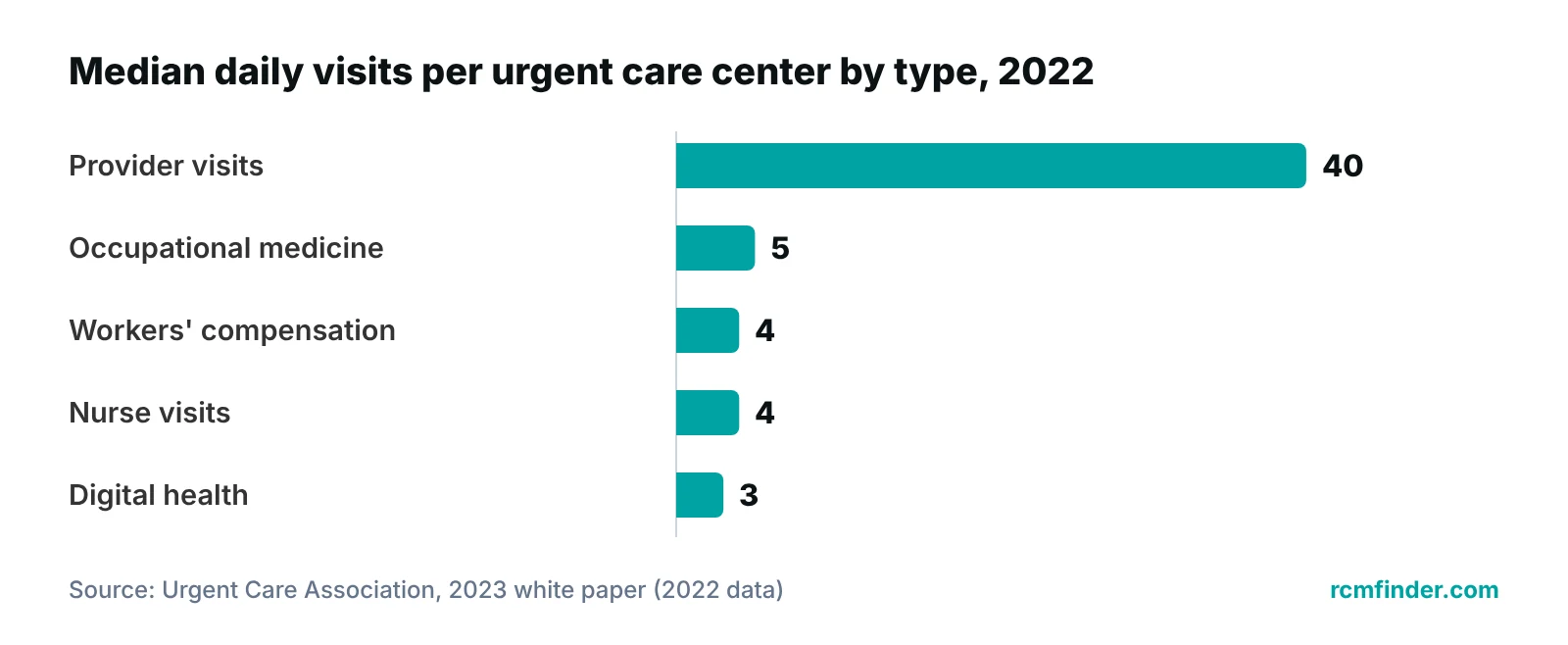
The difference is the missing schedule. A walk-in model needs the system to manage arrival, queue and throughput instead of booked slots, and to record in-house diagnostics that many primary care offices do not perform. The Urgent Care Association’s 2023 industry white paper reports a median of 56 patients a day per center in 2022, made up of provider visits, occupational medicine, workers’ compensation, nurse visits and digital health visits. Each type follows a different path through the chart and the bill, so the EHR has to run several flows, not one.
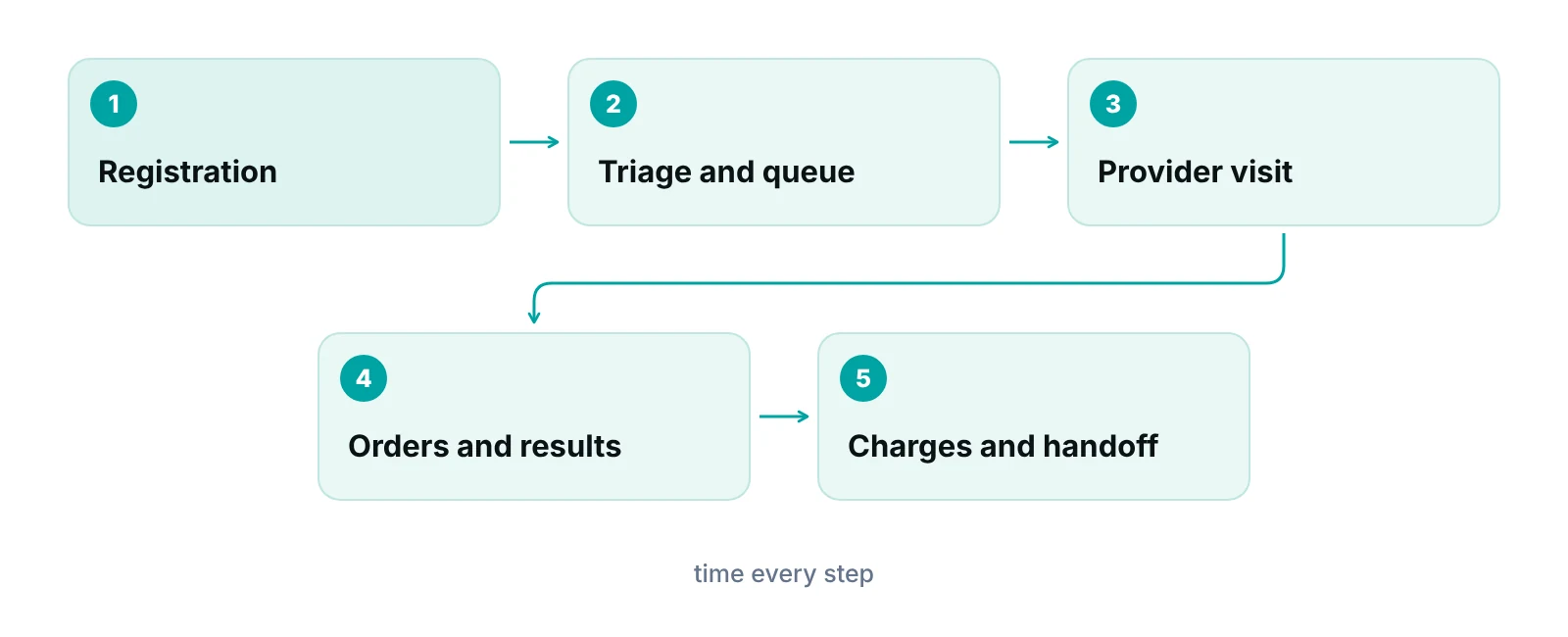
Telehealth adds a further visit type; the white paper reports that 94% of centers offered telemedicine in 2022. That is covered in the urgent care telehealth guide. Table 1 turns the in-person flow into a demo script. Run each row live with the vendor’s own staff and a stopwatch, not as a slide.
| Stage | What to test live | Pass signal |
|---|---|---|
| Registration | Register a returning patient, then a new patient with an insurance card and photo ID | Returning patient found fast; nothing typed twice; card and ID images attach to the record |
| Triage, queue and wait display | Enter complaint, vitals and acuity; watch the queue and the public display update | Staff see who waits, how long and for which room; the public view shows no clinical detail |
| Order sets | Open the set for a sprain, a sore throat and a laceration | Orders, supplies and charges attach in one step and a clinician can edit them |
| X-ray and lab | Send an order and receive the result | Result files to the right chart and keeps the ordering provider |
| Occupational medicine | Open an employer-paid visit | Employer, injury and claim details captured at the first screen |
| E-prescribing | Send a routine prescription and a controlled-substance prescription | Pharmacy chosen from history; a controlled-substance workflow exists |
| Charge capture and billing handoff | Close a visit with a procedure and an x-ray, then release it to billing | Visit level, procedure and imaging lines created without retyping; errors listed before release |
| Export | Ask a staff user to run a single-patient export | The practice runs it, not the vendor, and the file format is documented |
Source: editorial checklist; the sourced rules behind each row are in Tables 2 and 3.
What should registration, triage and the queue do?
They should move a patient from the door to a provider with the fewest keystrokes and no lost information. Registration speed is the first test, because every walk-in is a registration event and small delays add up across a busy shift.
- Search and duplicates: find a returning patient from a partial name and date of birth, and warn before creating a duplicate record.
- Card and ID capture: scan or photograph the insurance card and ID so fields fill without retyping, and check eligibility from the same screen. HIPAA’s standard eligibility transaction is the ASC X12 270/271, version 5010, per CMS.
- Payer path at the first screen: health plan, self-pay and employer-paid visits should split here, not at billing.
- Consents and forms: signatures taken on a tablet should file straight to the chart.
- Triage and acuity: complaint, vitals and an acuity flag should set the queue order, and staff should be able to override the order with a logged reason.
- Role-based screens: front-desk users should see demographics and insurance without the clinical note. Unique user identification is a required item under the HIPAA technical safeguards, per HHS.
Run a timed drill
Ask the vendor to register three patients in a row at your front desk’s pace: a returning patient, a new patient with insurance and a self-pay patient. Record seconds from search to finished registration. Keep those numbers as your baseline for the first month after go-live. No outside benchmark is quoted here because none was verified.
How should the wait-time display and online check-in be judged?
Judge them on what they show the public and what they collect. A display can run from the live queue without exposing clinical detail, but an online check-in form that gathers health information raises HIPAA questions.
HHS says in its sign-in sheet FAQ that providers may use sign-in sheets and call out patient names, with reasonable safeguards and the minimum necessary standard, and that a sign-in sheet may not display medical information not needed for signing in, such as the reason for the visit. By analogy, a lobby screen is safer showing a token number or first name and a status, never a complaint. That application is our recommendation, not an HHS statement.
Online check-in is different, because it collects data before the patient arrives. HHS’s tracking technologies bulletin says unauthenticated pages that take appointment details or the reason for a visit can involve protected health information. A federal court vacated part of that bulletin on June 20, 2024, and HHS said it was evaluating next steps, so check the current HHS page. The urgent care digital marketing guide covers what an online check-in step collects, and the urgent care website design guide covers the page itself.
- Is the wait estimate calculated from the queue, or typed in by staff?
- What happens to a patient’s place in line when the estimate is wrong or the patient is late?
- Which third-party scripts load on the check-in page, and are they covered by a business associate agreement where PHI is involved?
- Can staff turn the public display off, or cap the estimate, when the clinic is overloaded?
Advertising a wait time carries its own claims issues, which the urgent care marketing guide addresses.
What do order sets and in-house x-ray and lab interfaces need to do?
Order sets should cut clicks without hiding clinical decisions, and device interfaces should file each result to the right chart with the ordering provider attached. The Urgent Care Association’s white paper reports that 84.6% of centers employed x-ray technicians in 2022, that lab testing is usually CLIA-waived or CLIA-moderate, and that x-ray and lab capability are requirements of its Certified Urgent Care program. In-house diagnostics are core work, so interface quality matters more here than in most offices.
Order sets
Build them with your own clinicians before the demo, then ask the vendor to load them. Check who maintains them, how edits are versioned and whether an order set attaches the supply and the charge as well as the order.
Imaging and lab interfaces
- Imaging: does the order reach the x-ray unit or image viewer, and where does the final read return, including a callback if an outside radiologist disagrees with the first read?
- Point-of-care lab: are waived results entered by hand or by device, and does the chart show which site and which test list applied?
- Send-out lab: does the reference-lab interface carry orders and results both ways, and who is notified of an abnormal result after the patient has left?
- Ownership: who builds, tests and repairs each interface, and what is charged?
On the lab side, CMS says a Certificate of Waiver is issued to a laboratory that performs only waived tests, is generally valid for two years and is generally needed for each testing location. A site that adds moderate or high complexity testing must reapply on Form CMS-116 before it begins. The EHR will not hold your certificate, but it should let you see which tests each site performs.
How should occupational medicine, E/M levels and procedures be captured?
The EHR must record who pays and what was done at the time of the visit, because occupational visits, procedures and imaging each bill differently. A chart that records the work but not the payer path leaves the billing team guessing. Table 2 maps common services to what the chart must hold.
| Service | The chart must capture | Billing point to confirm |
|---|---|---|
| Standard office or outpatient visit | Medical decision making elements, or total time on the date, documented | Level chosen by decision making or time under the 2021 rules; history and exam need only be medically appropriate |
| Procedure, such as a laceration repair | Procedure details and supplies in their own documentation | Separate charge; time spent on a separately reported service is not counted toward visit time |
| X-ray taken and read in house | Order, ordering provider, images and the interpretation | Global code with no modifier when the same provider performs both parts |
| X-ray taken in house, read by an outside radiologist | Order, image sent, read returned and filed | Clinic reports the technical component (TC) and the reader reports the professional component (26); check the PC/TC indicator on the fee schedule |
| Waived point-of-care test | Test, result and the site that ran it | Waived tests fall under a Certificate of Waiver; adding moderate complexity testing needs the correct certificate first |
| Occupational or workers’ compensation visit | Employer, injury date, claim details and any required state forms | Handled through the state workers’ compensation system for private employers; confirm payer, forms and fee schedule with the state board |
Source: JUCM and MGMA on 2021 E/M changes; Priority Health provider manual on modifiers 26 and TC (one payer’s policy); CMS CLIA Certificate of Waiver guidance; U.S. Department of Labor (workers’ compensation).
Occupational medicine
The Urgent Care Association reports a median of five occupational medicine visits and four workers’ compensation visits a day per center in 2022, and that very few centers had a separate entrance, waiting room or lab for occupational patients. Those visits share the front desk with walk-ins, so the first screen must separate them. The U.S. Department of Labor directs workers at private companies to their state workers’ compensation board, so the EHR should be configurable to your state’s forms and payer rules.
Visit level and procedures
Since January 1, 2021, office and outpatient visit levels (99202 to 99215) are chosen by medical decision making or total time on the date, as JUCM and MGMA explain. Time must be documented if it is the basis. The same JUCM article noted that workers’ compensation may be an exception, so ask the vendor how its templates handle payers that do not follow the 2021 changes. Place of service 20 and visit-level detail are in the urgent care billing and coding guide.
What do e-prescribing, certification and data export have to cover?
Certification shows what a vendor was tested on, it is voluntary, and it does not prove fit. Check the product’s listing, the e-prescribing standard it supports and whether you can take your own data out. The ONC program overview calls the program voluntary and says the Certified Health IT Product List is updated at least weekly.
| Topic | Ask the vendor | What the source says |
|---|---|---|
| Certification listing | Which version is certified, and where is it on the Certified Health IT Product List? | The ONC program is voluntary; the list is updated at least weekly; CMS Promoting Interoperability programs require certified health IT |
| Single-patient export | Can our staff run it without you, and can we limit who may? | Criterion (b)(10) requires a user-run, timely export of one patient’s electronic health information, with access limited to identified users or an administrator |
| Population export | How do we request a full export, and what support is involved? | The criterion requires an export of all information the product can store, in a computable format with a public link to the format; it may need developer action |
| E-prescribing standard | Which NCPDP SCRIPT version do you support, and when do you move to 2023011? | Developers may use 2017071 or 2023011 through December 31, 2027; only 2023011 from January 1, 2028 |
| Controlled substances | Does it support electronic prescribing of controlled substances with identity checks? | Medicare Part D requires controlled substances to be e-prescribed; 70% or higher is compliant after exceptions |
| Standard transactions | Does it support eligibility, claims, status and remittance transactions? | HIPAA adopts ASC X12 version 5010: 270/271, 837, 276/277, 835 and 278 |
Source: HealthIT.gov / ONC (2024, 2023, 2025); CMS EPCS program page (2026); CMS adopted standards.
Export deserves extra attention, because it is your exit route. The (b)(10) criterion puts requirements on developers only; ONC’s practical guide tells practices to confirm the function is live, decide which staff may run exports and review the format documentation. A vendor that cannot show a single-patient export on request is a warning.
On prescribing, CMS’s EPCS program page says Part D controlled substance prescriptions must be electronic under section 2003 of the SUPPORT Act, with a 70% compliance rate after exceptions, an automatic exception for prescribers with 100 or fewer qualifying prescriptions and a waiver window for measurement year 2025 from September 16 to November 18, 2026. ONC’s HTI-4 rule adds new developer criteria, including real-time prescription benefit and electronic prior authorization. These are developer certification criteria, so ask for the vendor’s dated roadmap rather than assuming they are live.
What about billing handoff, security, support and cost?
Test the handoff by releasing a finished visit to billing and reading the claim. Then ask for security evidence, support terms and total cost in writing, because these decide whether the system is livable in year two.
Place of service, diagnoses and the rendering provider are required or conditionally required items on a Medicare claim, and an ordering provider needs a valid qualifier, per this CMS-1500 data element guide. The practice management software guide lays out that field map, and the urgent care revenue cycle guide follows the claim after release.
Under the HIPAA technical safeguards summarized by HHS, only unique user identification and an emergency access procedure are required, while automatic logoff and encryption are addressable and must be considered and documented. For a shared-workstation center, ask to see automatic logoff, the emergency access procedure and an audit log sample. The vendor should also sign a business associate agreement before touching patient data.
- Interfaces: which are included, and what is charged to build or change one?
- Exit: is there a fee to export data on leaving, in what format and how fast?
- Support: does coverage match your open hours, including evenings and weekends, with response times in writing?
- Downtime: what can staff see when the system is down?
- Migration: how many years of charts convert, what stays as images, is there a parallel run and how many training hours per role?
- Pricing: per provider, per location or per module, and what raises the bill later?
Some centers close gaps with help instead of a new system. RCM Finder’s team works inside your existing EHR on billing follow-up and remote front-desk tasks, and a free practice audit can show where the walk-in flow loses information.
Not sure where the walk-in flow loses information?
Request a free practice audit and RCM Finder will review how registration, charting and charges reach the claim in your current setup. The audit is free.
Our recommendations
- Time the demo, do not watch it. Give the vendor your three registration cases and a stopwatch, and record seconds for each.
- Write your order sets first. Draft the sprain, sore throat and laceration sets with your clinicians so the vendor builds yours, not theirs.
- Ask to see each interface working. Watch an x-ray order and a lab result reach a chart, with the ordering provider kept.
- Check the listing and the export. Find the version on the Certified Health IT Product List and have a staff user run a single-patient export.
- Release test visits to billing. Close a standard visit, a procedure visit, an x-ray visit and an employer-paid visit, then read each claim.
- Get the cost and the exit in writing. Interface fees, per-user pricing, export terms and support hours should all be on paper before signing.
Bottom line
The right urgent care EHR is the one your front desk and clinicians can run at peak volume, that captures what the claim needs without retyping and that lets you take your data with you. For the full operating picture, read the urgent care practice management guide; for how RCM Finder supports the system around your EHR, see the practice management system page.
Frequently asked questions
What should an urgent care EHR do that a primary care EHR may not?
It should manage unscheduled arrival: fast registration, a triage queue, a wait display and routing of different payer paths at the first screen. It should also interface with in-house x-ray and lab, support order sets for common complaints and capture the charges for procedures and imaging at the visit.
Does ONC certification mean an EHR fits urgent care?
No. The ONC program is voluntary and certifies modules against technical criteria, listed on the Certified Health IT Product List. It does not test walk-in speed, queue handling or billing fit. Use the listing to verify the version and the criteria covered, then test fit with a timed demo.
Does an urgent care need a CLIA certificate for in-house tests?
A laboratory that performs only waived tests needs a Certificate of Waiver, which CMS says is generally valid for two years and generally needed for each testing location. Moderate or high complexity testing needs a different certificate. Confirm requirements with your state agency before adding tests.
How should an EHR handle occupational medicine visits?
It should separate employer-paid visits at the first screen and capture the employer, injury date and claim details. Private-sector workers’ compensation runs through state boards, so forms and payer rules vary by state. Ask the vendor how its templates handle payers that follow different rules from standard office visits.
Can a clinic show names on a public wait-time screen?
HHS says sign-in sheets and calling names are allowed with reasonable safeguards and no unnecessary medical information. A screen is not the same thing, so a token number or first name with a status is the safer design. Have your privacy officer approve the format before launch.
What should we ask about leaving an EHR later?
Ask whether the product is certified to the electronic health information export criterion, whether your staff can run a single-patient export without the vendor, how a full export is requested, what it costs and where the file format is documented. Put the terms in the contract.
Get your free practice audit
Tell us about your practice. We will contact you using the details you give.
- A review of your recent claims, denials and A/R aging
- Where your front desk and prior authorizations slow payment
- A prioritized fix list you keep, whether or not you hire us
Pricing is quoted after the audit, based on your volume and the services you choose. Prefer to talk? Call +1 (302) 556-2288.
Sources
- ONC Health IT Certification Program Overview (2024) — HealthIT.gov / ONC (2024)
- 2023 Urgent Care Industry White Paper — Urgent Care Association (2023)
- Electronic Health Information export, 170.315(b)(10) — HealthIT.gov / ONC (n.d.)
- Getting Ready for EHI Export: A Quick Guide — HealthIT.gov / ONC (2023)
- CMS Electronic Prescribing for Controlled Substances (EPCS) Program — CMS (2026)
- HTI-4 Final Rule: Electronic Prescribing, Real-Time Prescription Benefit and Electronic Prior Authorization — HealthIT.gov / ASTP (2025)
- May health care providers use sign-in sheets? — HHS / OCR (2006 (reviewed 2022))
- Use of Online Tracking Technologies by HIPAA Covered Entities and Business Associates — HHS / OCR (2024)
- How to Obtain a Certificate of Waiver — CMS (n.d.)
- Already Looking Forward to 2021 and Smoother Sailing with E/M Coding — JUCM (n.d.)
- Preparing your practice for 2021 E/M changes — MGMA (n.d.)
- Modifiers 26 and TC, professional or technical component only — Priority Health (provider manual) (n.d.)
- Workers' Compensation — U.S. Department of Labor (n.d.)
- Adopted Standards and Operating Rules — CMS (n.d.)
- Security Standards: Technical Safeguards — HHS (2007)
- CMS-1500 (02/12) data element requirements — First Coast Service Options (Medicare contractor) (n.d.)
Disclaimer: This article is educational and is not legal, compliance, coding or software-purchasing advice. HIPAA, CLIA, workers' compensation, payer and Medicare contractor rules differ and change. Confirm current requirements with qualified counsel, your state agencies and your payers, and evaluate any EHR on its own evidence.
